First of all I've been out of the loop for years now. Lately I've been putting together songs in my ipad using StageTraxx which solo performers use a lot.
For convenience if I find a song on Karoke-Version that I can use, I grab one of those and call it the day. Otherwise I started using BIAB again to put together songs.
My issue is when I load the songs into my ipad the BIAB songs are about 3 to 4 db lower in volume. So switching between songs is going to be too much volume adjusting for a live situation.
My first thought for the quickest remedy would be to lower the volume in the Karoke Version songs and render but they are already compressed to high heaven and mp3's when I get them so the fidelity is going to take a hit if I do that.
Is there a way to master the BIAB songs when I render. By the way I'm still on 10.5 and it looks like the only way to render is mixdown to CD setting..which I save it as .wav
I have Audacity set up, Reaper but that just comes with your basic VST (I think) whatever you get for $60 and I have Studio One that came with interface box. It has some mastering eff but I was hoping I could do everything in BIAB.
After exporting to MP3, I use Wavelab to normalize all volumes to -4 dB (Any DAW will do this). Then I play the normalized files through the PA, making notes on which songs have to come up a dB or two, or down. I revisit those songs and get a more-or-less balanced set of volumes.
Nothing worse than having a song jump out at you 6 dB too loud!
Ok, I guess I need to use something in Studio One to master or should I say compress/turn up the BIAB files. I tried normalize but still too much between the 2.
I'm not sure what features are in your version of BiaB. If you've got the VST/DX Synths dialog, you can drop a VST compressor effect into the combo slot, or use the one that comes with BiaB.
Reaper actually comes with a nice set of VSTs which are pretty easy to use. They have a stand-alone set that can run in other DAWs, include BiaB - you can find them here. Obviously, there's the reacomp compressor plug-in. But the reajs plug-in has a number of nice tools as well. Push the Load button on the VST and look under LOSER to find some master limiters. SStillwell has some nice compressors - for example, eventhorizon and fairlychildish.
Since you've got Reaper already installed, keep in mind that the 60 days review period is non-expiring, so you won't lose any work if that period runs out - you'll just get a nag screen, but no lost functionality. I'd just load the .wav files from BiaB into Reaper and put compressors on the FX of the main buss.
Obviously there are other DAWs available - I just happen to be familiar with these, and you'd mentioned that you've got Reaper installed.
It is fairly transparent even when hitting something with 7 or 8 on the knob. You can download a demo to test it. $49 - they put it on sale at times. It could not be any simpler. Drop it on a mix file and turn the knob.
Ok, I guess I need to use something in Studio One to master or should I say compress/turn up the BIAB files. I tried normalize but still too much between the 2.
Thanks
I use WavePad... not to be confused with WaveLab.... to do final edits and such on my exported waves. It's simply a wave editor and mp3 converter. My last step is to NORMALIZE the track to whatever level I want. Normalization is NOT compression.
With normalization, you are simply increasing the volume of everything in a track in a linear fashion using the highest musical peak as the reference point. So if you have a track with good average peaks through out, and set -4dB as the point, the entire track with those peaks comes up in volume. You are amplifying the peaks as well as the noise floor gets raised which is why a fair number of people speak poorly of normalizing. If you have a song with one large spike that's pretty loud, normalization will hardly be noticeable on that track.
You want to be careful with compression. Compression does more to the music than to simply raise the level, which is what a lot of folks use it for. It reduces the peaks while at the same time bringing up the lower program material.
I don't mess around with the karaoke tracks, but it doesn't surprise me one bit that they are super compressed. Trying to match your material to them would, I imagine, be difficult, for more than a few reasons.
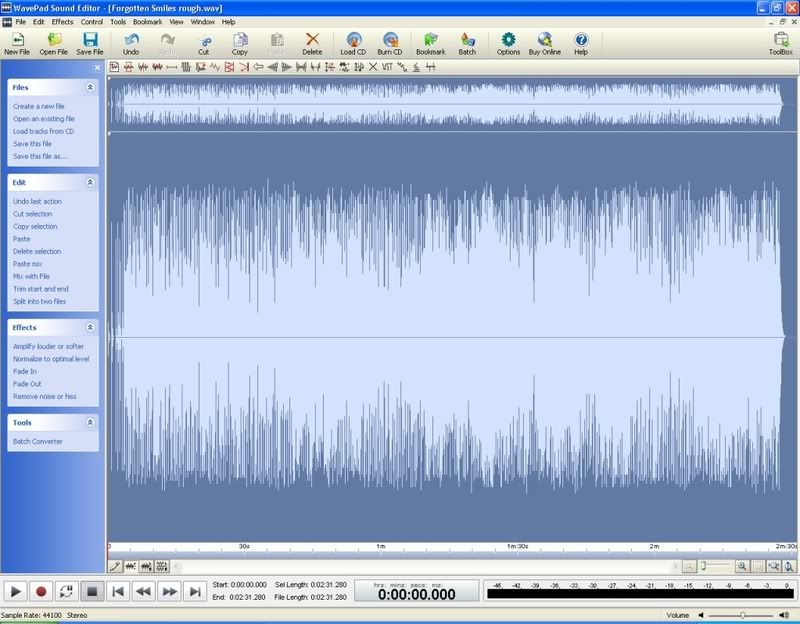
MY THOUGHTS: If I was trying to do what you are attempting.... I would first, lightly compress (perhaps a bit more than "lightly" but error on the side of caution) the original WAVE file with a good DAW compressor to get it looking something like this:
Notice the head room in WavePad? That's the remaining distance between the peaks and the top and bottom of the window. Also notice that the peaks are pretty much all around the same point. This file can now easily be normalized to give a nice volume bump without further compression. Normalizing it will give a noticeable volume increase.
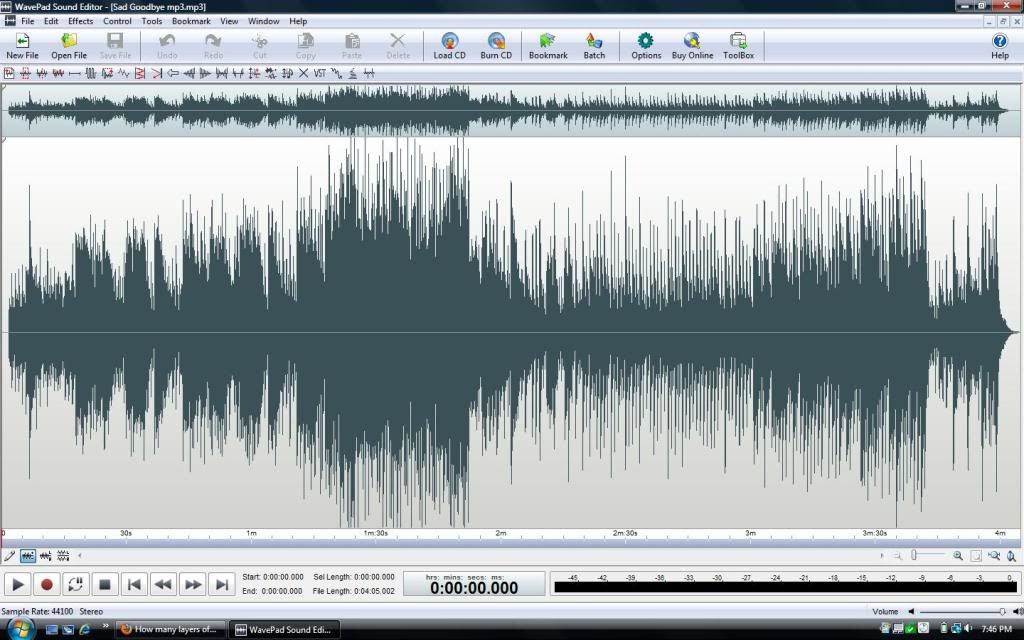
This file is not so easy to bump smoothly in volume due to it's "spikey" appearance. Those spikes will prevent it from seeing much of an increase in volume from a normalizing process. I would need to compress it first if I wanted to get the levels up. Notice that the peaks in this wave ARE touching the top and bottom of the screen. It has already been normalized to 100% in this case. Any further increase in volume would need to be through compression which would start to alter the sonic quality of the music in subtle ways. This song is on my web site and this is the version you will hear. 100% normalized level, no further compression. http://soundclick.com/share.cfm?id=11386873
The important part of this entire equation is the file you start with should be full and well recorded with strong levels. Start with a weak wave and you will have issues.
Trying to match your original music to that of some that was recorded in some sort of "professional setting" and compressed by that studio, is going to be an interesting project. Not impossible, but it will teach you some things along the way.
Hope this info is useful and educational to you.
Last edited by Guitarhacker; 02/10/1603:12 AM.
You can find my music at: www.herbhartley.com Add nothing that adds nothing to the music. You can make excuses or you can make progress but not both.
The magic you are looking for is in the work you are avoiding.
"My first thought for the quickest remedy would be to lower the volume in the Karoke Version songs and render but they are already compressed to high heaven and mp3's when I get them so the fidelity is going to take a hit if I do that."
Not really. Just lower the Karaoke tracks volumes to match the BIAB songs.
As Guitarhacker pointed out, normalization is limited by the maximum volume of the recording. Normalization works by going raising the volume of the whole sound - but only so that none of the sound exceeds the maximum.
That means that if any of the recording is already near the maximum (typically one of those "spikes", or "transients" - often a drum beat), there's not much room to raise the volume.
A compressor works by raising the raising the volume where it's low ("low level compression"), and lowering the volume where it's high ("peak limiting"). You lose variety in volume, but generally gain in overall loudness. You'll need to know how to fiddle with settings to get the best results, or find VST with presets or simplified settings (like floyd jane pointed out).
The "transparency" of the compressor is determined by how fast it turns changes the volume, and how quickly it returns to the normal settings. Typically, you don't want to hear the knob being turned (so to speak), although sometimes that effect (called "pumping") is desirable.
A master limiter is just a more specialized compressor. It's named as such because it's typically placed on the master buss to limit the signal so it doesn't exceed the maximum volume ("peak limiter"). But you might find it an easy way to increase the volume.
There are a number of free VSTs that specialize in making a mix louder, such as this. They're typically just compressors with the settings simplified so they're easier to use.
There are a number of free VSTs that specialize in making a mix louder,.... They're typically just compressors with the settings simplified so they're easier to use.
One of my favorites is the VST BOOST 11 that comes with Cakewalk. It's not free. But it is included in the majority of the Cakewalk DAWs. When I have a track that isn't cutting through the mix, I can throw B-11 on it and waaa laaa.... I can hear it.
Of course the better option and one that I generally work on later on in the mix process is to turn the other tracks down a bit so I don't need to use B-11 because it does squash the sound of that track.... with a guitar, that's not a problem, but with a vocal, you don't want it squashed.
You can find my music at: www.herbhartley.com Add nothing that adds nothing to the music. You can make excuses or you can make progress but not both.
The magic you are looking for is in the work you are avoiding.
The OP is talking about a "live situation", i.e. - through a PA. What sort of PA? A Bose system, SOS's, or a full-blown pro system? Any given mix will sound decidedly different on each of these systems. I have three PA systems. They all sound very different.
There is no plug-in that will substitute for your ears in this situation. The best method I have found is to adjust the gain of each mix to a baseline (-4 dB in my case), play the tracks over the PA at performance levels, and adjust volumes accordingly. It's time consuming, but it works much better than the one button approach.
I'll check the Reaper vst out, Thanks! I bought reaper awhile back, I really like the feature where it slows down the track but keeps the pitch, works great. I need to take the time and learn how to set it up though, makes sense in looking at your link to the vst's
I hear you. It would be nice to have individual channels for each instrument since room acoustics change also affects levels but I guess that defeats the ipad mp3 concept of having everything compact in one place with lyrics that scroll as the song plays.
Not sure about version 10.5, but recent versions have the sliders in the image below. Not sure how they actually work , but suspect they use PGPeakLimit plugin in the output path. In older versions they may be available but located in a different place, maybe as menu item as opposed to sliders in the mixer shown.
You could also simply open the resulting file in Realband (from a BiaB song saved as either a Wav or a native .sgu format) ... and then use the PGPeakLimit plugin on the whole thing as a VST .. but that would open a whole 'nother world of PGMusic goodness.
I do not work here, but the benefits are still awesome Make your sound your own!
Also, you mentioned Audacity...it comes with pretty good compression and normalization tools that you can set up as a macro process and apply repeatedly to a batch of files.
I noticed you use Wavepad. I also use that for a lot of ESL language recordings. Do you feel the effects that come with it match up to eg the effects in Realtracks? Do you use any of the other NCH products. I use quite a few others like Switch for file conversion and debut for video recording and soundtap for audio recording. I'm a big fan of most of their products. I also bought Mixpad, but I've not used it for multitrack recording. Are you familiar with it and how do you rate it? Could I consider it a serious DAW product. Sorry I'm pretty new to multi-track recording and DAWs.
Thanks
Neil
Windows 10 Home 20H2 Build 19042.487 BIAB 2021 (Build 818) Intel(R) Core(TM), i3-4160, CPU @3.60 GHz RAM 16 GB, 64 Bit X64-based processor Zoom UAC-2 (USB 3 interface-built in midi) VoiceLive 3 Extreme, Sputnik Valve Condenser Mic
I noticed you use Wavepad. I also use that for a lot of ESL language recordings. Do you feel the effects that come with it match up to eg the effects in Realtracks? Do you use any of the other NCH products. I use quite a few others like Switch for file conversion and debut for video recording and soundtap for audio recording. I'm a big fan of most of their products. I also bought Mixpad, but I've not used it for multitrack recording. Are you familiar with it and how do you rate it? Could I consider it a serious DAW product. Sorry I'm pretty new to multi-track recording and DAWs.
Thanks
Neil
I use specific tools for specific jobs. So as far as WavePad is concerned..... here's what I use it to do:
1. To view the overall wave. I can see if the song is compressed and to what level.
2. To trim the starting count in and the dead air at the end.
3. To normalize the file if it's low.
4. To convert to MP3.
I do not use WavePad to add effects or compression to the file. Since I don't use FX in WavePad nor do I use the FX in Real Band or on realtracks, I really can't answer that question about how they compare. All my FX go in at the DAW level in Sonar.
I think I do have a few of their other products on some of my computers, but I don't use them so again, I can't comment on them.
Like so much of the software I use to do what I do, I use it all in very specific ways and limited ways and in many cases don't even touch the vast majority of it's capabilities. BB is a prime example. I use it to compose and write. I rarely ever use the ACW or so many of it's other features. I enter the chords, select a style and proceed to write the song. It's essentially my scratch pad replacing the old pan and paper I used to use.
This is also true of the NCH software. I don't use a function just because it's there. I use it only if I need it.
Hope that helps and answered your questions.
You can find my music at: www.herbhartley.com Add nothing that adds nothing to the music. You can make excuses or you can make progress but not both.
The magic you are looking for is in the work you are avoiding.
Thanks. It's easy to get sidetracked with all the toys. I understand exactly where you're coming from. Right now, I'm having to be very focused as I have a solo live show on Saturday and it's my first time using BIAB rather than just rendered files. Also, it's quite different going back to live after several months of internet shows.
Windows 10 Home 20H2 Build 19042.487 BIAB 2021 (Build 818) Intel(R) Core(TM), i3-4160, CPU @3.60 GHz RAM 16 GB, 64 Bit X64-based processor Zoom UAC-2 (USB 3 interface-built in midi) VoiceLive 3 Extreme, Sputnik Valve Condenser Mic
I use Audacity as a final step even after a Pro Tools mix. I snip the head and tail and adjust the level using the amplify effect, don't forget to check the box to allow clipping, you won't hear distortion.
zplane recently interviewed Peter Gannon, the founder and creator of Band-in-a-Box, about the software's early days, what sets it apart from AI, how zplane's audio algorithms are used in Band-in-a-Box, and more!
Special thanks to the team at zplane for their continued support.
Last Chance! The Band-in-a-Box® 2026 for Mac® Special Ends Today (May 31, 2026) at 11:59pm PDT!
Time really is running out! Save up to 50% on Band-in-a-Box® 2026 for Mac® upgrades and receive a FREE Bonus PAK—only when you order by 11:59 PM PDT today!
We've added many major new features and new content in a redesigned Band-in-a-Box® 2026 for Mac®!
Version 2026 introduces a modernized GUI redesign across the program, with updated toolbars, refreshed windows, smoother workflows, and a new Dark Mode option. There’s also a new side toolbar for quicker access to commonly used windows, and the new Multi-View feature lets you arrange multiple windows as layered panels without overlap, making it easier to customize your workspace.
Another exciting new addition is the amazing new AI-Notes feature, which can transcribe polyphonic audio into MIDI. View the results in notation or play them back as MIDI, and choose whether to transcribe an entire track or transcribe specific parts like drums, bass, guitars/piano, or vocals. There's over 100 new features in Band-in-a-Box® 2026 for Mac®.
There's an amazing collection of new content too, including 202 RealTracks, new RealStyles, MIDI SuperTracks, Instrumental Studies, “Songs with Vocals” Artist Performance Sets, Playable RealTracks Set 5, two RealDrums Stems sets, and much more!
Upgrade your Band-in-a-Box for Mac® to save up to 50% on most Band-in-a-Box® 2026 upgrade packages!
Plus, when you order your Band-in-a-Box® 2026 Mac upgrade during our special, you'll receive a Free Bonus PAK of exciting new add-ons.
If you need any help deciding which package is the best option for you, just let us know. We are here to help!
Band-in-a-Box® 2026 Mac Special Offers Extended Until May 31st!
Good news- we've extended our Band-in-a-Box® 2026 for Mac® special offers until May 31, 2026!
Band-in-a-Box® 2026 is packed with major new features, enhancements, and an incredible lineup of new content! The program now sports a sleek, modern GUI redesign across the entire interface, including updated toolbars, refreshed windows, smoother workflows, a new dark mode option, and more. The brand-new side toolbar provides quicker access to key windows, while the new Multi-View feature lets you arrange multiple windows as layered panels without overlap, creating a flexible, clutter-free workspace. We have an amazing new “AI-Notes” feature. This transcribes polyphonic audio into MIDI so you can view it in notation or play it back as MIDI. You can transcribe an entire track (all pitched instruments and drums) or focus on individual parts like drums, bass, guitars/piano, or vocals. There's an amazing collection of new content too, including 202 RealTracks, new RealStyles, MIDI SuperTracks, Instrumental Studies, “Songs with Vocals” Artist Performance Sets, Playable RealTracks Set 5, two RealDrums Stems sets, and much more!
There are over 100 new features in Band-in-a-Box® 2026 for Mac®.
When you order purchase Band-in-a-Box® 2026 before 11:59 PM PDT on May 31st, you'll also receive a Free Bonus PAK packed with exciting new add-ons.
Check out the Band-in-a-Box® for Mac packages page to find the best package for you.
Today's the Last Day of the Band-in-a-Box 2026® for Mac Special!
Order before 11:59pm PDT today (May 15, 2026) to save up to 50% off your Band-in-a-Box® 2026 for Mac® upgrade and receive a FREE Bonus PAK loaded with great new Add-ons to use with this new version!
Band-in-a-Box® 2026 for Mac - Special Offers End at 11:59pm PDT on Friday, May 15th, 2026!
Order before 11:59pm PDT on Friday, May 15th and SAVE up to 50% on most Band-in-a-Box® version 2026 for Mac Upgrade packages... and that's not all! With your version 2026 for Mac purchase, we'll include a Bonus PAK full of great new Add-ons FREE! Upgrade to the 2026 49-PAK to receive even more NEW Add-ons including 20 additional RealTracks... that's 222 NEW RealTracks available with version Band-in-a-Box® 2026 for Mac!
Upgrade to Band-in-a-Box® 2026 for Mac® today for as little as $49! Check out the Band-in-a-Box® packages page for all available purchase options.
Learn more about the Free Bonus PAK and 49-PAK here.
If you have any questions about which package is the best option for you, just let us know. We're here to help!
202 New RealTracks Released with Band-in-a-Box 2026!
With Band-in-a-Box® 2026, we've released 202 incredible new RealTracks (in sets 468-488) in a variety of genres—featuring your most requested styles!
Jazz, Funk & World (Sets 468-475):
Our new jazz, funk & blues RealTracks include a groovin’ collection of RealTracks and RealDrums! These include more requested “soul jazz” RealTracks featuring artists Neil Swainson (bass), Charles Treadway (organ), Brent Mason (guitar), and Wes Little (drums). There are new “smooth jazz” styles (4), which include a RealTracks first: muted trumpet, as well as slick new smooth jazz brushes options for drums. Blues lovers will be thrilled—there are more “classic acoustic blues” styles, including guitar (5), bass (4), and drums (10) with blues master Colin Linden, featuring understated and tasty background acoustic soloing, plus brushes drums and acoustic bass. There are also new electric blues RealTracks, including electric blues with PG favorite Johnny Hiland (3) and soulful electric slide guitar from Colin Linden (4). If you love funk & gospel, there are great new options this year, including gospel organ (3) from Charles Treadway, as well as new funk, tango, and rock ’n’ roll drums (3) and bass (1). And for big, bold arrangements, we have uptempo soul horns (4) featuring a three-part hip horn section with options for a full mix or stems of each individual horn — plus an accompanying rhythm section (4) of drums, bass, guitar, and electric piano!
Rock & Pop (Sets 476–482):
Our new rock & pop RealTracks bring a powerful mix of requested favorites, fresh genres, and modern chart-inspired styles! We have more of our popular “Producer Layered Acoustic Guitars (15)” featuring Band-in-a-Box favorite Brent Mason. We’ve continued our much-requested disco styles (10), and added new Celtic guitar (5) with a more basic, accessible approach than our previous Drop-D or DADGAD offerings. There are also highly requested yacht rock styles (17), inspired by the smooth, polished soft-rock sound of the late ’70s and early ’80s — laid-back grooves, silky electric pianos, warm textures, elegant harmonic movement, and pristine production aesthetics. Fans of heavier styles will love our new glam metal (13), capturing the flashy, high-energy sound of ’80s arena-ready guitar rock. We also have a set of rootsy modern-folk rock (18), with a warm, organic sound combining contemporary folk textures and driving acoustic strumming. And we’ve added lots of new modern pop styles (16) — the kinds of sounds you’re hearing on the radio today, featuring exciting new drums, synths, and cutting-edge RealTracks arrangements.
Country, & Americana (Sets 483–488):
Our new country & Americana RealTracks deliver a rich collection of acoustic, electric, and roots-inspired styles! We have new country pop (9) with legendary guitarist Brent Mason. There is also a potpourri (14) of bouzouki, guitars, banjo, and more, perfect for adding texture and character to contemporary acoustic arrangements. We’ve added funky country guitar (5) with PG favorite Brent Mason, along with classic pedal steel styles (5) featuring steel great Doug Jernigan. There are more country songwriter styles (8) that provide intimate, rootsy foundations for storytelling and modern Americana writing. Finally, we have “background soloing” acoustic guitar (12) with Brent Mason — simpler, but still very tasty acoustic lines designed to sit beautifully behind vocals or act as a subtle standalone solo part.
And, if you are looking for more, the 2026 49-PAK (for $49) includes an impressive collection of 20 bonus RealTracks, featuring exciting and inspiring additions to add to your RealTracks library. You'll get new country-rhythm guitar styles from PG Music favorites Johnny Hiland and Brent Mason, along with modern-pop grooves that capture today’s radio-ready sound! There are also new indie-folk styles with guitar, bass, 6-string bass used as a high-chording instrument, acoustic guitar, and banjo. Plus, dedicated "cymbal fills" RealDrums provide an added layer that work very well with low-key folky styles with other percussion.
The 2026 49-PAK is loaded with other great new add-ons as well. Learn more about the 2026 49-PAK!
One of our representatives will be happy to help you over the phone. Our hours of operation are from
6:00AM to 6:00PM PST (GMT -8) Monday thru Friday, and 8:00AM to 4:00PM PST Saturday. We are closed Sunday. You can also send us your questions via email.
One of our representatives will be happy to help you on our Live Chat or by email. Our hours of operation are from
6:00AM to 6:00PM PST (GMT -8) Monday thru Friday; 8:00AM to 4:00PM PST (GMT -8) Saturday; Closed Sunday.












 Dansk
Dansk Deutsch - Windows
 Español
 Français - Windows
 Italiano - Windows
 Nederlands
 Polski
 Português
 Svenskt
 русский
 Japanese
 Simplified Chinese
 Traditional Chinese
 Korean