Previous Thread
Index
Next Thread
Print Thread
Go To
Page 1 of 2 1 2
Beginners Forum
Joined: Oct 2017
Posts: 35
SteveMc Offline OP
Enthusiast
OP Offline
Enthusiast
Joined: Oct 2017
Posts: 35
Hello Everyone,

I'm not a heavy user of BinB. I use it mostly as a practice tool for jazz piano, and yes I know I should dig a little deeper. When I open a song file particularly when there are chords with 9ths or altered chords, I will see a message at the bottom right hand corner referring to the chord selection that disappears (IMHO) rather quickly. Is there a log of these messages that I can look at and study in my own (slow) time.

Thanks in advance

Beginners Forum
Joined: Jun 2012
Posts: 21,157
Veteran
Offline
Veteran
Joined: Jun 2012
Posts: 21,157
The short answer is Yes.
Help > Utilities > Display Log/Text file of Yellow/Green messages

Note that the latest entry is at the TOP of the file. Check the included timestamp to be sure.


BIAB & RB2026 Win.(Audiophile), Windows 10 Pro & Windows 11, Cakewalk Bandlab, Izotope Prod.Bundle, Roland RD-1000, Synthogy Ivory, Session Keys Grand S & Electric R, Kontakt, Focusrite 18i20, KetronSD2, NS40M, Pioneer Active Monitors.
Beginners Forum
Joined: Oct 2017
Posts: 35
SteveMc Offline OP
Enthusiast
OP Offline
Enthusiast
Joined: Oct 2017
Posts: 35
Thanks I'll check it out

Beginners Forum
Joined: Oct 2017
Posts: 35
SteveMc Offline OP
Enthusiast
OP Offline
Enthusiast
Joined: Oct 2017
Posts: 35
59% of the chords are complex (9ths, 13ths). To improve arrangement, consider setting Natural Arrangement to allow re-interpreation of these. (Turn this feature on globally in Arrangement Opt, or Song Settings.) This message shows once per session. [2020.728.0, 2020-09-07 4:37:53 PM]

I would have liked the option to dismiss this message after I had digested the information.

Thanks again

Beginners Forum
Joined: Jun 2012
Posts: 21,157
Veteran
Offline
Veteran
Joined: Jun 2012
Posts: 21,157
Yes, it's a lot to attempt to read in a very short time. I seem to recall in an earlier version that you could right-click the message and it stayed displayed for a longer period. I don't think that feature works now (well, not for me anyway).


BIAB & RB2026 Win.(Audiophile), Windows 10 Pro & Windows 11, Cakewalk Bandlab, Izotope Prod.Bundle, Roland RD-1000, Synthogy Ivory, Session Keys Grand S & Electric R, Kontakt, Focusrite 18i20, KetronSD2, NS40M, Pioneer Active Monitors.
Beginners Forum
Joined: Jul 2000
Posts: 27,745
Veteran
Offline
Veteran
Joined: Jul 2000
Posts: 27,745
You can turn thIs feature, Natural Arrangement, off in individual songs, or globally.

Also, don’t put a lot of stock in the accuracy of the percentage given. Use your ears to decide if you want the chords to sound exactly as written (turn it off), or somewhat simplified to perhaps give better or more common voicing (turn it on).


BIAB 2026 Win Audiophile. Software: Fender Studio One 8, Swam horns, Acoustica-7, Notion 6, Song Master Pro, Win 11 Home. Hardware: Intel i9, 32 Gb; Fender Quantom HD8 & Faderport 8, Royer 121, Adam Sub8 & Neumann 120 monitors.
Beginners Forum
Joined: Jun 2012
Posts: 21,157
Veteran
Offline
Veteran
Joined: Jun 2012
Posts: 21,157
I never have Natural Arrangements enabled.
Try this.
- Start BiaB.
- One single 'C' chord in the first cell, nothing else.
- 32 bars.
- Press Generate.
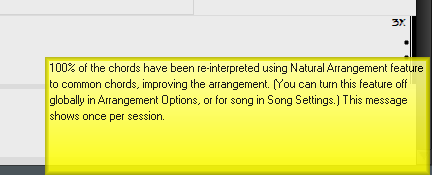
You will get this message (which makes no obvious sense to me)

Attached Files (Click to download or enlarge) (Only available when you are logged in)
2020-09-08_14-37-42.jpg (21.33 KB, 112 downloads)

BIAB & RB2026 Win.(Audiophile), Windows 10 Pro & Windows 11, Cakewalk Bandlab, Izotope Prod.Bundle, Roland RD-1000, Synthogy Ivory, Session Keys Grand S & Electric R, Kontakt, Focusrite 18i20, KetronSD2, NS40M, Pioneer Active Monitors.
Beginners Forum
Joined: Dec 2003
Posts: 25,143
Veteran
Online Content
Veteran
Joined: Dec 2003
Posts: 25,143
Originally Posted By: VideoTrack
I never have Natural Arrangements enabled.
Try this.
- Start BiaB.
- One single 'C' chord in the first cell, nothing else.
- 32 bars.
- Press Generate.
You will get this message (which makes no obvious sense to me)


Interesting. I never have Natural Arrangements enabled either but when I run the above test I do not get that message.


Life is short so make sure you spend as much time as possible on the Internet arguing with strangers.

64 bit Win 10 Pro, the latest BiaB/RB, Roland Octa-Capture audio interface, a ton of software/hardware
Beginners Forum
Joined: Oct 2017
Posts: 35
SteveMc Offline OP
Enthusiast
OP Offline
Enthusiast
Joined: Oct 2017
Posts: 35
Thanks for explaining. I will leave this turned off.

Beginners Forum
Joined: Oct 2017
Posts: 35
SteveMc Offline OP
Enthusiast
OP Offline
Enthusiast
Joined: Oct 2017
Posts: 35
Yes. I have some one chord songs for scale practice and I am receiving this message. I will leave it turned off.

Beginners Forum
Joined: Aug 2011
Posts: 11,111
Veteran
Offline
Veteran
Joined: Aug 2011
Posts: 11,111
SteveMc,

PG Music labels the messages "Flash Tips". The main Preferences dialog window has a check box setting to enable or disable flash tips. When flash tips are enabled, the main Preference dialog window also has a setting in milliseconds for how long a flash tip is displayed.

For Windows Band-in-a-Box press Control and the letter E, Ctrl + E, to open Preferences.

Attached Files (Click to download or enlarge) (Only available when you are logged in)
Clipboard01.jpg (82.43 KB, 98 downloads)
Main 2020 PC Preference Dialog Window with flash tips enabled for 2.4 seconds.

Jim Fogle - 2026 BiaB (Build 1249) RB (Build 10) - Ultra+ PAK
DAWs: Cakewalk Sonar - Standalone: Zoom MRS-8
Desktop: i7 Win 11, 12GB ram 256GB SSD, 4 TB HDD
Music at: https://fogle622.wix.com/fogle622-audio-home
Beginners Forum
Joined: Oct 2017
Posts: 35
SteveMc Offline OP
Enthusiast
OP Offline
Enthusiast
Joined: Oct 2017
Posts: 35
Thanks Jim. I will definitely click the box. So much to learn so little time.

I just wanted to add that as a Canadian Senior Citizen I have a hard time going from inches to centimetres, and as a normal human being, I have a hard time thinking in milliseconds. (Boxes for Delay and Show )

Last edited by SteveMc; 09/08/20 09:52 AM.
Beginners Forum
Joined: Jun 2012
Posts: 21,157
Veteran
Offline
Veteran
Joined: Jun 2012
Posts: 21,157
I'm fairly certain that the 'Show Hints for' time value only affects this type of hint (see below), and not the Yellow/Green boxes that don't specifically belong to any control. The yellow box messages always have a much shorter display time - at least definitely on my system anyway.

Attached Files (Click to download or enlarge) (Only available when you are logged in)
2020-09-09_6-08-30.jpg (30.56 KB, 89 downloads)

BIAB & RB2026 Win.(Audiophile), Windows 10 Pro & Windows 11, Cakewalk Bandlab, Izotope Prod.Bundle, Roland RD-1000, Synthogy Ivory, Session Keys Grand S & Electric R, Kontakt, Focusrite 18i20, KetronSD2, NS40M, Pioneer Active Monitors.
Beginners Forum
Joined: Aug 2011
Posts: 11,111
Veteran
Offline
Veteran
Joined: Aug 2011
Posts: 11,111
Originally Posted By: SteveMc
I have a hard time thinking in milliseconds. (Boxes for Delay and Show )
That's why there are internet search engines! smile


Jim Fogle - 2026 BiaB (Build 1249) RB (Build 10) - Ultra+ PAK
DAWs: Cakewalk Sonar - Standalone: Zoom MRS-8
Desktop: i7 Win 11, 12GB ram 256GB SSD, 4 TB HDD
Music at: https://fogle622.wix.com/fogle622-audio-home
Beginners Forum
Joined: Oct 2017
Posts: 35
SteveMc Offline OP
Enthusiast
OP Offline
Enthusiast
Joined: Oct 2017
Posts: 35
If we were digging into the audio, and altering the the attack or decay of a waveform then I would be fine with milliseconds. But for the duration of a text message I think your garden variety 'second' would work just fine.

Anyways, thanks to all of you, I have found what I was looking for.

Beginners Forum
Joined: Jun 2017
Posts: 3,008
PG Music Staff
Offline
PG Music Staff
Joined: Jun 2017
Posts: 3,008
Originally Posted By: VideoTrack
I never have Natural Arrangements enabled.
Try this.
- Start BiaB.
- One single 'C' chord in the first cell, nothing else.
- 32 bars.
- Press Generate.
You will get this message (which makes no obvious sense to me)

Hey Videotrack!

Would you mind PMing me here on the forum your version of Band-in-a-Box, OS, and current build? I'm not getting this message either following your outlined steps but I'd like to test this further!


Cheers,
Ember
Beginners Forum
Joined: Jul 2000
Posts: 27,745
Veteran
Offline
Veteran
Joined: Jul 2000
Posts: 27,745
Ember, I don't think you need that info from Trevor, other than we use the Windows versions of BIAB. I've received this result on BIAB ever since the feature was introduced. We don't want to denigrate the Natural Arrangement feature, because it does have its uses and can sound great. There are several threads dealing with this in the developer area. In particular, you could look for one of mine asking about how it's supposed to work. We are just trying to help.


BIAB 2026 Win Audiophile. Software: Fender Studio One 8, Swam horns, Acoustica-7, Notion 6, Song Master Pro, Win 11 Home. Hardware: Intel i9, 32 Gb; Fender Quantom HD8 & Faderport 8, Royer 121, Adam Sub8 & Neumann 120 monitors.
Beginners Forum
Joined: Jun 2012
Posts: 21,157
Veteran
Offline
Veteran
Joined: Jun 2012
Posts: 21,157
Hi Ember, thanks for your message, it's appreciated.

I created a short video that shows my build version, settings, and an example of the message I get. It's included as a link in the PM that I've sent to you.

As Matt mentioned, the feature no doubt has its useful place, but users would really like to know how it is supposed to work. Please review the PM, and also please let me know of any way I can assist further.

Trevor


BIAB & RB2026 Win.(Audiophile), Windows 10 Pro & Windows 11, Cakewalk Bandlab, Izotope Prod.Bundle, Roland RD-1000, Synthogy Ivory, Session Keys Grand S & Electric R, Kontakt, Focusrite 18i20, KetronSD2, NS40M, Pioneer Active Monitors.
Beginners Forum
Joined: May 2002
Posts: 7,997
PG Music Staff
Offline
PG Music Staff
Joined: May 2002
Posts: 7,997
To clarify:

The purpose of the feature is to interpret the chord sheet using chords that are more common in the style that you have selected. The message is this:


I can duplicate the issue that VideoTrack has where the "complex chords" flash message happens if "Never" is selected in the Arrangement options. I don't think it's actually doing any reinterpretation but we will look into that further. You can avoid seeing the message by selecting "Never" in the "show message" drop down.


Andrew
PG Music Inc.
Beginners Forum
Joined: Jul 2000
Posts: 27,745
Veteran
Offline
Veteran
Joined: Jul 2000
Posts: 27,745
Thanks for looking at this, Andrew.


BIAB 2026 Win Audiophile. Software: Fender Studio One 8, Swam horns, Acoustica-7, Notion 6, Song Master Pro, Win 11 Home. Hardware: Intel i9, 32 Gb; Fender Quantom HD8 & Faderport 8, Royer 121, Adam Sub8 & Neumann 120 monitors.
Previous Thread
Next Thread
Go To
Page 1 of 2 1 2

Moderated by  Andrew - PG Music, PeterGannon 

Link Copied to Clipboard
ChatPG

Ask sales and support questions about Band-in-a-Box using natural language.

ChatPG's knowledge base includes the full Band-in-a-Box User Manual and sales information from the website.

PG Music News
Special Extended Until September 15, 2026! Save over 40 Styles PAKs for Band-in-a-Box 2026 for Windows!

We've extended our XPro Styles PAKs and Xtra Styles PAKs sale until September 15th, 2026!

It's the perfect time to expand your Band-in-a-Box® style library with XPro and Xtra Styles PAKs. These additional styles for Band-in-a-Box® 2026 offer a wide range of genres designed to work seamlessly with your project. Each style is professionally arranged and mixed, helping enhance your songs while saving you time.

XPro Styles PAKs 1-11 for Windows or for Mac are on special for only $29 each (reg. $49 ea), or get all 11 PAKs for only $149 (reg. $299)!

XPro Styles PAKs are styles that work with ANY version (Pro, MegaPAK, UltraPAK, UltraPAK+, or Audiophile Edition) of Band-in-a-Box® 2026 (or higher). XPro Styles PAKS 1-11 includes 1,100 styles!

Xtra Styles PAKs 1-22 for Windows or for Mac are on special for only $29 each (reg. $49 ea), or get all 22 PAKs for $199 (reg $399)! .

Xtra Styles PAKs are styles that work with the UltraPAK, UltraPAK+, or Audiophile Edition of Band-in-a-Box® 2026 (or higher). Xtra Styles PAKs 1-22 includes 3,900 styles (and 35 MIDI styles)!

Note: XPro and Xtra Styles PAKs include additional styles for Band-in-a-Box® that work seamlessly with your project. Xtra Styles PAKs and XPro Styles PAKs are NOT included in any Band-in-a-Box® package!

Supercharge your Band-in-a-Box today with XPro Styles PAKs and Xtra Styles PAK Sets!

Special Extended Until September 15, 2026! Save over 40% on XPro & Xtra Styles PAKs for Band-in-a-Box 2026 for Mac!

We've extended our XPro Styles PAKs and Xtra Styles PAKs sale until September 15th, 2026!

It's the perfect time to expand your Band-in-a-Box® style library with XPro and Xtra Styles PAKs. These additional styles for Band-in-a-Box® 2026 offer a wide range of genres designed to work seamlessly with your project. Each style is professionally arranged and mixed, helping enhance your songs while saving you time.

XPro Styles PAKs 1-11 for Mac or for Windows are on special for only $29 each (reg. $49 ea), or get all 11 PAKs for only $149 (reg. $299)!

XPro Styles PAKs are styles that work with ANY version (Pro, MegaPAK, UltraPAK, UltraPAK+, or Audiophile Edition) of Band-in-a-Box® 2026 (or higher). XPro Styles PAKS 1-11 includes 1,100 styles!

Xtra Styles PAKs 1-22 for Mac or for Windows are on special for only $29 each (reg. $49 ea), or get all 22 PAKs for $199 (reg $399)! .

Xtra Styles PAKs are styles that work with the UltraPAK, UltraPAK+, or Audiophile Edition of Band-in-a-Box® 2026 (or higher). Xtra Styles PAKs 1-22 includes 3,900 styles (and 35 MIDI styles)!

Note: XPro and Xtra Styles PAKs include additional styles for Band-in-a-Box® that work seamlessly with your project. Xtra Styles PAKs and XPro Styles PAKs are NOT included in any Band-in-a-Box® package!

Supercharge your Band-in-a-Box today with XPro Styles PAKs and Xtra Styles PAK Sets!

Introducing XPro Styles PAK 11 – Now Available for Windows Band-in-a-Box 2026 and Higher!

XPro Styles PAK 11 for Windows & Mac Band-in-a-Box® version 2026 (and higher) is here with 100 brand new RealStyles, plus 31 RealTracks/RealDrums!

Guess who’s back again? That’s right! It’s our XPro Styles PAK’s triumphant return with the 11th edition in this series! 100 new styles are coming your way spread across the rock & pop, jazz, and country genres. And this edition's wildcard genre explores the immense and far-reaching catalogue of electronic music! The included 31 RealTracks and RealDrums can be used with any Band-in-a-Box® 2026 (and higher) package.

Special offers available until August 31st, 2026!

All the XPro Styles PAKs 1-11 are on sale for only $29 ea (Reg. $49 ea), or get them all in the XPro Styles PAK Bundle for only $149 (reg. $299)! Order now!

Learn more and listen to demos of XPro Styles PAKs.

Video: XPro Styles PAK 11 Overview & Styles Demos: Watch now!

XPro Styles PAKs require Band-in-a-Box® 2026 or higher and are compatible with ANY package, including the Pro, MegaPAK, UltraPAK, UltraPAK+, and Audiophile Edition.

Introducing Xtra Styles PAK 22 – Now Available for Windows Band-in-a-Box 2026 and Higher!

Xtra Styles PAK 22 for Windows & Mac Band-in-a-Box version 2026 (and higher) is here with 200 brand new RealStyles!

It’s time to celebrate! Xtra Styles PAK 22 for Band-in-a-Box® is here, and we've got 200 brand-new styles coming your way!

No Xtra Styles PAK is complete without the classic rock & pop, jazz, and country volumes you know and love, and we’ve got plenty to share, with 150 styles spread across too many genres to list! Of course, it also wouldn’t be complete with our special wildcard volume to add a little spice and pizzazz to the mix. This year, because we loved it so much the first time, we’ve decided to make the second iteration of our SynthMaster volume, full of new sounds, interesting genres, and 50 engaging styles, all making use of the diverse SynthMaster plugin! Here you can find genres such as airy yacht rock, sultry electrotango, and even some synth soca funk. Don’t wait, pickup up Xtra Styles PAK 22 today!

In this PAK you can find: dulcet folk ballads, funky gospel country, Brazilian jazz fusion, upbeat 1980s pop, classic Americana, a plethora of breezy bossa novas, indie singer-songwriter, scintillating synthwave, exuberant electronica, and many, many more!

Special offers available until August 31st, 2026!

All the Xtra Styles PAKs 1-22 are on special for only $29 each (reg $49), or get all 22 PAKs for $199 (reg $399)! Order now!

Learn more and listen to demos of the Xtra Styles PAK 22.

Video: Xtra Styles PAK 22 Overview & Styles Demos: Watch now!

Note: The Xtra Styles require the UltraPAK, UltraPAK+, or Audiophile Edition of Band-in-a-Box®. (Xtra Styles PAK 22 requires the 2026 or higher UltraPAK, UltraPAK+, or Audiophile Edition. They will not work with the Pro or MegaPAK version because they need the RealTracks from the UltraPAK, UltraPAK+, or Audiophile Edition.

Introducing XPro Styles PAK 11 – Now Available for Mac Band-in-a-Box 2026 and Higher!

XPro Styles PAK 11 for Mac & Windows Band-in-a-Box® version 2026 (and higher) is here with 100 brand new RealStyles, plus 31 RealTracks/RealDrums!

Guess who’s back again? That’s right! It’s our XPro Styles PAK’s triumphant return with the 11th edition in this series! 100 new styles are coming your way spread across the rock & pop, jazz, and country genres. And this edition's wildcard genre explores the immense and far-reaching catalogue of electronic music! The included 31 RealTracks and RealDrums can be used with any Band-in-a-Box® 2026 (and higher) package.

Special offers available until August 31st, 2026!

All the XPro Styles PAKs 1-11 are on sale for only $29 ea (Reg. $49 ea), or get them all in the XPro Styles PAK Bundle for only $149 (reg. $299)! Order now!

Learn more and listen to demos of XPro Styles PAKs.

Video: XPro Styles PAK 11 Overview & Styles Demos: Watch now!

XPro Styles PAKs require Band-in-a-Box® 2026 or higher and are compatible with ANY package, including the Pro, MegaPAK, UltraPAK, UltraPAK+, and Audiophile Edition.

Introducing Xtra Styles PAK 22 – Now Available for Mac Band-in-a-Box 2026 and Higher!

Xtra Styles PAK 22 for Mac & Windows Band-in-a-Box version 2026 (and higher) is here with 200 brand new RealStyles!

It’s time to celebrate! Xtra Styles PAK 22 for Band-in-a-Box® is here, and we've got 200 brand-new styles coming your way!

No Xtra Styles PAK is complete without the classic rock & pop, jazz, and country volumes you know and love, and we’ve got plenty to share, with 150 styles spread across too many genres to list! Of course, it also wouldn’t be complete with our special wildcard volume to add a little spice and pizzazz to the mix. This year, because we loved it so much the first time, we’ve decided to make the second iteration of our SynthMaster volume, full of new sounds, interesting genres, and 50 engaging styles, all making use of the diverse SynthMaster plugin! Here you can find genres such as airy yacht rock, sultry electrotango, and even some synth soca funk. Don’t wait, pickup up Xtra Styles PAK 22 today!

In this PAK you can find: dulcet folk ballads, funky gospel country, Brazilian jazz fusion, upbeat 1980s pop, classic Americana, a plethora of breezy bossa novas, indie singer-songwriter, scintillating synthwave, exuberant electronica, and many, many more!

Special offers available until August 31st, 2026!

All the Xtra Styles PAKs 1-22 are on special for only $29 each (reg $49), or get all 22 PAKs for $199 (reg $399)! Order now!

Learn more and listen to demos of the Xtra Styles PAK 22.

Video: Xtra Styles PAK 22 Overview & Styles Demos: Watch now!

Note: The Xtra Styles require the UltraPAK, UltraPAK+, or Audiophile Edition of Band-in-a-Box®. (Xtra Styles PAK 22 requires the 2026 or higher UltraPAK, UltraPAK+, or Audiophile Edition. They will not work with the Pro or MegaPAK version because they need the RealTracks from the UltraPAK, UltraPAK+, or Audiophile Edition.

Peter Gannon Talks Band-in-a-Box with zplane

zplane recently interviewed Peter Gannon, the founder and creator of Band-in-a-Box, about the software's early days, what sets it apart from AI, how zplane's audio algorithms are used in Band-in-a-Box, and more!

Special thanks to the team at zplane for their continued support.

Check out the full interview here: https://products.zplane.de/blog/peter-gannon-interview-pg-music

Forum Statistics
Forums57
Topics86,742
Posts809,052
Members40,210
Most Online64,515
Apr 8th, 2026
Newest Members
Papachuco, AngelCamilo, KPivonka, Amelia Ella, AlainC
40,210 Registered Users
Top Posters(30 Days)
MarioD 88
rsdean 79
WaoBand 58
Noel96 43
vicarn 40
Today's Birthdays
Kenn
Powered by UBB.threads™ PHP Forum Software 7.7.5