
Band-in-a-Box 2022 New Feature - All Tracks Equal
Now all 24 tracks (8 main tracks and 16 Utility tracks) have the same capabilities. You can generate RealTracks, RealDrums, MIDI SuperTracks, Loops, etc. on any track. Styles can be made using up to 24 tracks. You can edit audio on any track, not just the Audio and Utility tracks.
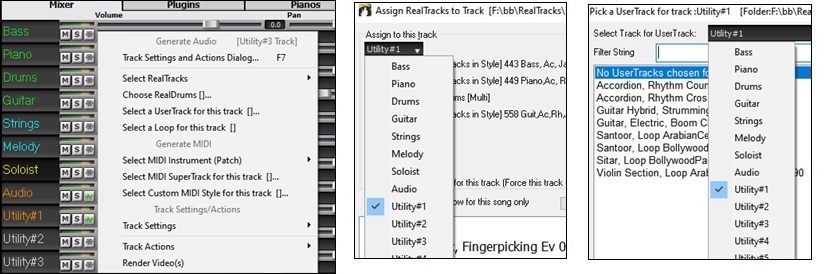
For example, when you click on a Utility track label in the Mixer, you will see a menu with settings and actions, which has always shown for the main tracks, so you can use it to generate RealTracks, RealDrums, MIDI SuperTracks, Loops, etc. on the Utility track. Also, in various track generation dialogs (RealTracks Picker, Loops Picker, MIDI SuperTracks Picker, etc.) the track selector now includes all 24 tracks to allow you to select any track within the dialog..
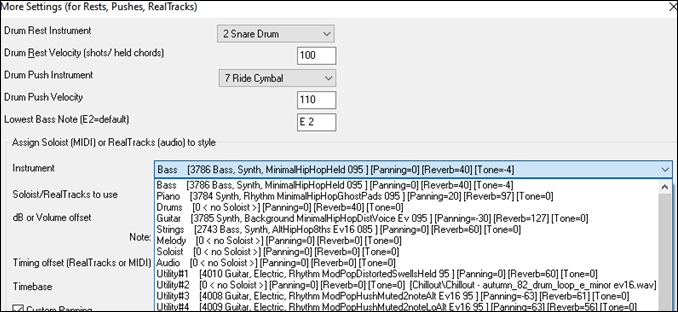
To make a style with up to 24 tracks, launch the StyleMaker, press the [Misc] button on its toolbar, and press the [More] button in the Misc. Style Settings dialog.

In the More Settings dialog, select a Soloist or RealTracks for each of the tracks you need in the “Assign Soloist (MIDI) or RealTracks (audio) to style” area.
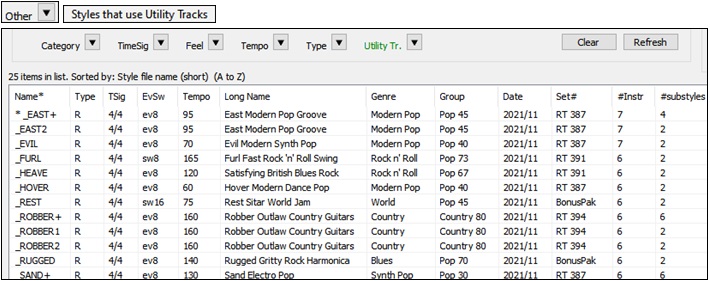
Some new styles were made using Utility tracks. You can find them in the StylePicker by pressing the [Other] filter button and selecting Styles that use Utility Tracks from the menu.
You can edit audio on any track.

Previously, when you generated RealTracks on Utility tracks, Band-in-a-Box created very large audio .WAV files. So, if you made a lot of songs with Utility tracks, it took up too much of your hard drive space, and this often made it complicated to organize your files. Now, the Utility tracks work the same way as the main tracks have always worked, so Band-in-a-Box won’t create audio files and instead point to the source material. This is called wave instructions, in which Band-in-a-Box saves a list of different parts of the source material. Those instructions are tiny and they are saved in the small Band-in-a-Box song file (.MGU/.SGU).

Unconditional 30-Day Money Back Guarantee on all PG Music products purchased from PG Music Inc.
PG Music Inc.
29 Cadillac Ave Victoria BC Canada V8Z 1T3
Sales: 800-268-6272, 250-475-2874,+ 800-4746-8742*
* Outside USA & Canada where International Freephone service is available.
Access Codes
Tech Support: Live Chat, support@pgmusic.com
All of our XPro Styles PAKs and Xtra Styles PAKs are on sale until May 15th, 2026!
It's the perfect time to expand your Band-in-a-Box® style library with XPro and Xtra Styles PAKs. These additional styles for Band-in-a-Box® offer a wide range of genres designed to fit seamlessly into your projects. Each style is professionally arranged and mixed, helping enhance your songs while saving you time.
April 22, 2026 Band-in-a-Box 2026 for Mac Videos With the release of Band-in-a-Box® 2026 for Mac, we’re rolling out a collection of brand-new videos on our YouTube channel. We’ll keep this forum post...
Q: How do I get the latest version of Band-in-a-Box?
A: We have packages for first-time or existing customers. Use the convenient chart to find the right package for you.
Q: Can I really have the entire UltraPAK shipped pre-installed on a USB 3 hard drive?
A: Yes, in addition to e-delivery/download, you can choose during checkout to get a physical backup copy hard drive for only $25 US (free shipping). You can use Band-in-a-Box directly from the hard disk, or copy it to your computer.
 Online now
Need Help?
Customer Sales & Support
|
Phones (Pacific Time) 1-800-268-6272 1-250-475-2874 |
||
| Live Chat | ||
| OPEN | Online Ordering 24/7 |
|
| OPEN | Forums, email, web support |