|
Log in to post
|
Print Thread |
|
|
|
|
|
Recording, Mixing, Performance and Production
|
Joined: Feb 2016
Posts: 39
Enthusiast
|
OP

Enthusiast
Joined: Feb 2016
Posts: 39 |
This must have been asked/covered before, but I don't find it.
I'm a songwriter, and solo folky-country-ish performer (I ain't all that, but I have a good time and have a small, twisted following). I'm new to BIAB, and I've started making arrangements for some existing songs, deconstructing and reconstructing. I've rarely played with an accompanist, if so usually just a harmonica or bass, let alone a whole band, and this is giving me a great opportunity to see what the songs might be if enhanced/supported by a band.
I don't need anything album quality, but I'd like the songs to be relatively mastered. I have one ready to go now. I could get a studio here to do it, but I thought I'd see if anyone here wanted to give it a shot. Trying to mix it is driving me insane. Many, many days. I'm probably too invested in the song and my voice, etc., to be able to see/hear it reasonably.
Original song, lyric heavy, story, 7 piece band and my vocal.
If anyone is interested, shout.
Either way, thanks for your time. This whole experience has completely changed me and my understanding of music.
Andy
|
|
|
|
|
|
|
|
|
|
|
|
|
Recording, Mixing, Performance and Production
|
Joined: Apr 2009
Posts: 10,995
Veteran
|
|
Veteran
Joined: Apr 2009
Posts: 10,995 |
Andy... Welcome.
Since it is an original song done in BB/RB feel free to post it in the user showcase. Having some additional ears may either validate what you're thinking or suggest some additional corrections to the mix.
Mastering... is normally a process done to a group of songs to have them sound similar. However, aside from all that definition, I know exactly what you're talking about.
You want the song to stand out and shine in all the right places.
I call is either "small "m" mastering" or "song polishing" .
You can try LANDR.com which is an online mastering service, or you can take the time to actually learn how to do it yourself. If you write one song a year or there abouts, use the free online stuff, but if you have a lot of songs, learn how to roll your own.
Most DAW's will give you all the tools you need to polish your songs. However, many folks find that a "mastering suite" such as Ozone is the ticket. It contains presets that make the starting point easier to find. And yeah... the straight up preset settings sound good.
Ozone has a free trial, but be warned.... have the money to buy it because you will be so impressed that you will absolutely have to buy it.
I use Ozone with some customized presets and love it.
Last edited by Guitarhacker; 03/14/16 01:31 AM.
You can find my music at: www.herbhartley.comAdd nothing that adds nothing to the music. You can make excuses or you can make progress but not both. The magic you are looking for is in the work you are avoiding.
|
|
|
|
|
|
|
|
|
|
|
|
|
Recording, Mixing, Performance and Production
|
Joined: Feb 2016
Posts: 39
Enthusiast
|
|
OP
Enthusiast
Joined: Feb 2016
Posts: 39 |
Thanks, GH, for the website addy. Greatly appreciated.
Yes, it's more polishing than a true master. My upbeat (R&R honkeytonk band) songs work out fine naturally.
But, what I'm finding is for a lyric heavy song, telling a story where every word needs to be heard clearly the first time, and I'm accustomed to performing solo in a listening room environment, BIAB is uneven, so that's the issue. I have several DAWs, but they cannot control it unless I constantly slide, so the instruments ebbs/flows, and I end up making so many adjustments to instrument tracks that it has a ripple effect, e.g. increase keys at bar 31 to 104, return them at bar 42, increase fiddle, fade it later, etc., and those adjustments affect the instruments later. Find a spot where where an instrument blasts by it's own nature and smothers a few lyrics, so reduce that spot, increase it in a bar or two. By the time I get to the end area, say bar 140 it's become a jumble.
So, I'll give the program you suggest a spin (greatly appreciate the suggestion), and if I'm not happy I'll get a studio engineer to even it out.
|
|
|
|
|
|
|
|
|
|
|
|
|
Recording, Mixing, Performance and Production
|
Joined: Dec 2012
Posts: 110
Apprentice
|
|
Apprentice
Joined: Dec 2012
Posts: 110 |
Sounds like a trip thru a DAW should take care of your issue. Use envelopes in the DAW and lower instrument volumns during lyric passes. Do it right one time and use that file as your master.
Rich
Windows 10, 64 bit | BIAB 2019 PlusPak | Studio One 2 Artist
|
|
|
|
|
|
|
|
|
|
|
|
|
Recording, Mixing, Performance and Production
|
Joined: Jun 2012
Posts: 21,130
Veteran
|
|
Veteran
Joined: Jun 2012
Posts: 21,130 |
Cocotex There are some powerful tools out there that just might get you back where you need to be. One that comes to mind is iZotope Ozone 7 Mastering Suite. Like Herb mentioned, have your c/card ready. There's a couple of videos on this page that explain the product.
BIAB & RB2026 Win.(Audiophile), Windows 10 Pro & Windows 11, Cakewalk Bandlab, Izotope Prod.Bundle, Roland RD-1000, Synthogy Ivory, Session Keys Grand S & Electric R, Kontakt, Focusrite 18i20, KetronSD2, NS40M, Pioneer Active Monitors.
|
|
|
|
|
|
|
|
|
|
|
|
|
Recording, Mixing, Performance and Production
|
Joined: Apr 2009
Posts: 10,995
Veteran
|
|
Veteran
Joined: Apr 2009
Posts: 10,995 |
Thanks, GH,
But, what I'm finding is for a lyric heavy song, telling a story where every word needs to be heard clearly the first time, and I'm accustomed to performing solo in a listening room environment, BIAB is uneven, so that's the issue. I have several DAWs, but they cannot control it unless I constantly slide, so the instruments ebbs/flows, and I end up making so many adjustments to instrument tracks that it has a ripple effect, e.g. increase keys at bar 31 to 104, return them at bar 42, increase fiddle, fade it later, etc., and those adjustments affect the instruments later. Find a spot where where an instrument blasts by it's own nature and smothers a few lyrics, so reduce that spot, increase it in a bar or two. By the time I get to the end area, say bar 140 it's become a jumble.
So, I'll give the program you suggest a spin (greatly appreciate the suggestion), and if I'm not happy I'll get a studio engineer to even it out. OK... THAT is not a mastering or polishing issue. You need to learn to mix properly. First of all, the BB tracks and the RB tracks are fairly consistent in their levels from start to finish. Most of the time I don't have to do any sort of volume envelope to adjust for inconsistencies in levels in any of the BB/RB tracks. There might be some minor variations.... but DO NOT try to micro manage the levels. That could be part of your problem. Notice in this song that my volume envelopes are pretty boring.... not much in the way of riding the volume levels. 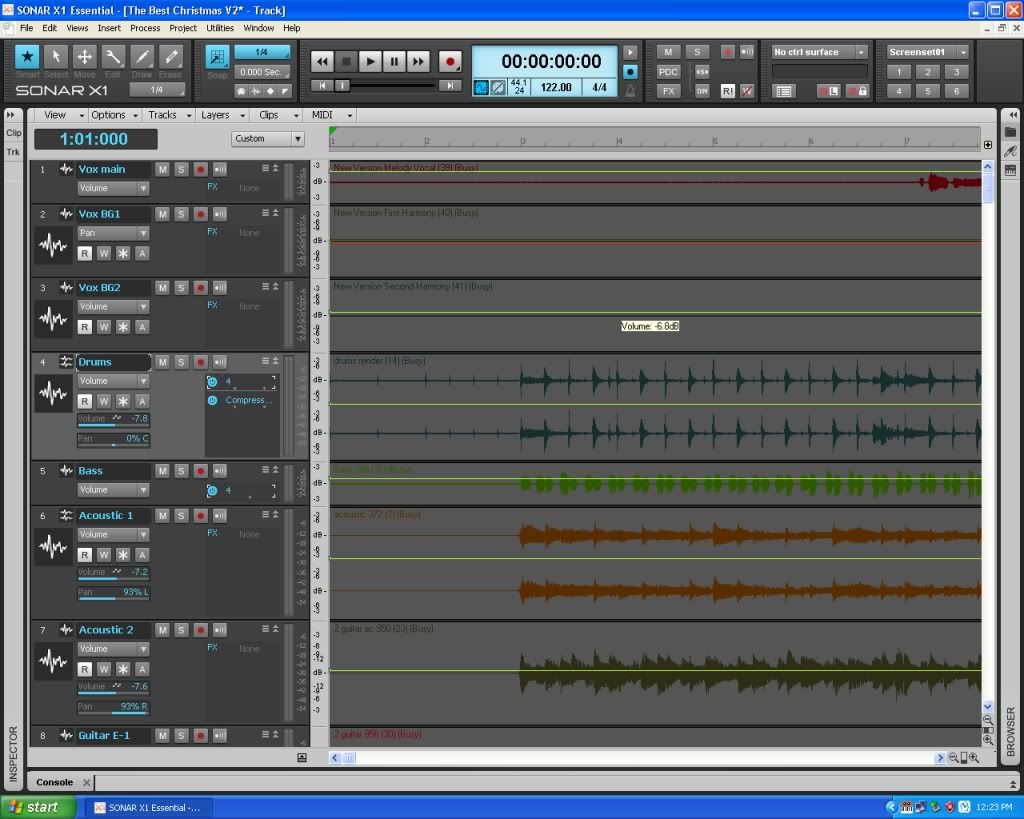 This is the beginning of The Best Christmas... on my website. Work on only ONE TRACK at a time. You will become overwhelmed quickly if you're trying to do everything at one time. There have been times where I have reached that point. When I realize that I'm past that point, I start over. Delete all the plugs and the envelopes, mute all the tracks and start again with the rhythm tracks and one vocal, adding tracks as needed. Quite often I find I simply was trying to cram too many tracks into a song. You say "lyric heavy" but what I want to know is how many tracks besides vocals do you have in a given song? Start with the basics... the rhythm section....drums & Bass and perhaps one rhythm guitar. Those 3 things will be the foundation of the song and will play at a consistent level from start to finish under normal conditions. Normally, in my music, when a singer is singing, those 3 things are generally the only instruments playing. One other instrument will play fills in the space in between the vocal phrases. I use envelopes in the DAW to accomplish this. Generally, those 3 rhythm instruments will NOT vary in level even though they have envelopes in them. Envelopes are there for other reasons, including the end fade to black. everything goes out together. Dust on the Floor is a good example of what I'm talking about. http://soundclick.com/share.cfm?id=13017714Envelopes in "Dust" 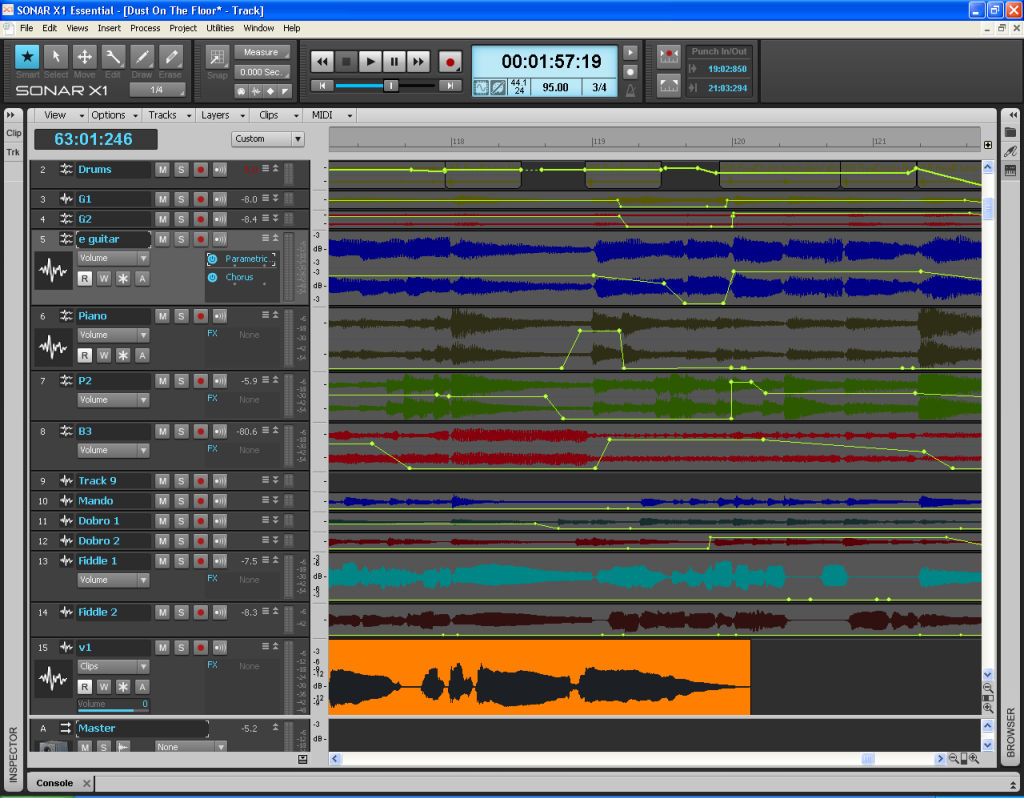 Keep it simple to start with. One mistake folks make is that since we have the ability to have dozens of tracks, we do. And that's fine once you get a solid foundation. 90% of my songs are between 6 to 16 tracks total. Some as few as 5. Mix the 3 rhythm tracks to a good basic mix, then drop your vocal lead vocal track into the project. Get that to where you can clearly hear and understand the lyrics. Now... without touching those 4 track's levels, add the fill instruments using envelopes to bring them in and out, and adjust their levels to the existing rhythm levels. You're not going for volume and loudness, you're going for a good sounding, well balanced mix at this point. Hope this helps.
You can find my music at: www.herbhartley.comAdd nothing that adds nothing to the music. You can make excuses or you can make progress but not both. The magic you are looking for is in the work you are avoiding.
|
|
|
|
|
|
|
|
|
|
|
|
|
Recording, Mixing, Performance and Production
|
Joined: Dec 2011
Posts: 16,271
Veteran
|
|
Veteran
Joined: Dec 2011
Posts: 16,271 |
Like Herb said and illustrated, mixing comes a long ways before even thinking about mastering. It took me a year to learn my way around my DAW (and mixing many songs) before I even thought about mastering. Mastering ices the cake but it needs to be a fine cake to start with.
Have fun...it's an interesting journey.
J&B
Our albums and singles are on Spotify, Apple Music, Amazon Music, YouTube Music, Pandora and more. If interested search on Janice Merritt. Thanks! A few of our videos are here on our website: https://www.janiceandbud.com/our-music.html
|
|
|
|
|
|
|
|
|
|
|
|
|
Recording, Mixing, Performance and Production
|
Joined: Dec 2006
Posts: 1,590
Expert
|
|
Expert
Joined: Dec 2006
Posts: 1,590 |
I see the envelopes, but what do they actually do? Sorry if it's a stupid question! Is it just for demo purposes on the screen to show how they have been used or are they actually doing something?
Windows 10 Home 20H2 Build 19042.487
BIAB 2021 (Build 818)
Intel(R) Core(TM), i3-4160, CPU @3.60 GHz RAM 16 GB, 64 Bit X64-based processor
Zoom UAC-2 (USB 3 interface-built in midi)
VoiceLive 3 Extreme, Sputnik Valve Condenser Mic
|
|
|
|
|
|
|
|
|
|
|
|
|
Recording, Mixing, Performance and Production
|
Joined: Apr 2009
Posts: 10,995
Veteran
|
|
Veteran
Joined: Apr 2009
Posts: 10,995 |
I see the envelopes, but what do they actually do? Sorry if it's a stupid question! Is it just for demo purposes on the screen to show how they have been used or are they actually doing something? If you go to the song indicated on my site: Dust on the Floor, and listen to that song... this screenshot is approximately at the section right before the solo starts. Listen to how things are coming in and going out throughout the entire song. Volume envelopes in Sonar are controlling that process. And yes, if you watch Sonar in the Console view, you see the faders moving in relation to the envelopes that control them. Unlike other types of automation envelopes, you don't have to link these to the things they control. That's already done in the software. It makes things fast and easy when working with volume and panning envelopes. The envelopes are automation envelopes. As the song is playing and the time line is moving forward, the control connected to the automation envelope, in this case of the YELLOW envelopes, the volume of that track follows the automation. So yeah, they control the volume in the tracks. It's what I use to bring things in and out without having to do everything manually and in real time. In Sonar, I also use panning envelopes. For example.... if I have one guitar playing fills and solo, it's generally centered. But lets say, at the 80% point in a solo, I have another guitar come in to play harmony notes to the lead. Obviously, I don't want it centered, so I may set it at 60% left panning, nor do I want the guitars to be lopsided in the mix. So I use an automation panning envelope to move the original lead guitar to 60% right panning for that harmony part, and then back to center when the twin guitars are finished. If you listen to any of my songs, you will hear something like a mandolin or dobro come in to do a short lick fill and then it disappears from the mix until the next fill and so on. Envelopes that automate the volume faders do that. Using them surgically, you can easily have them in 2 or more tracks and pick and choose small sections of notes from one track, another section in another track and so on to complete a small fill. I use that technique a lot. Envelopes are worth learning about and using.
You can find my music at: www.herbhartley.comAdd nothing that adds nothing to the music. You can make excuses or you can make progress but not both. The magic you are looking for is in the work you are avoiding.
|
|
|
|
|
|
|
|
|
|
|
|
|
Recording, Mixing, Performance and Production
|
Joined: Dec 2006
Posts: 1,590
Expert
|
|
Expert
Joined: Dec 2006
Posts: 1,590 |
What a great idea.  Thanks. I'll have to investigate this when I move to using a DAW. I'm assuming this is not available in BIAB but is in some format in Realband. 
Windows 10 Home 20H2 Build 19042.487
BIAB 2021 (Build 818)
Intel(R) Core(TM), i3-4160, CPU @3.60 GHz RAM 16 GB, 64 Bit X64-based processor
Zoom UAC-2 (USB 3 interface-built in midi)
VoiceLive 3 Extreme, Sputnik Valve Condenser Mic
|
|
|
|
|
|
|
|
|
|
|
|
|
Recording, Mixing, Performance and Production
|
Joined: Apr 2009
Posts: 10,995
Veteran
|
|
Veteran
Joined: Apr 2009
Posts: 10,995 |
What a great idea. Thanks. I'll have to investigate this when I move to using a DAW. I'm assuming this is not available in BIAB but is in some format in Realband. yep... I believe it is available in RB.
You can find my music at: www.herbhartley.comAdd nothing that adds nothing to the music. You can make excuses or you can make progress but not both. The magic you are looking for is in the work you are avoiding.
|
|
|
|
|
|
|
|
|
|
|
|
|
Recording, Mixing, Performance and Production
|
Joined: Jun 2012
Posts: 21,130
Veteran
|
|
Veteran
Joined: Jun 2012
Posts: 21,130 |
What a great idea. Thanks. I'll have to investigate this when I move to using a DAW. I'm assuming this is not available in BIAB but is in some format in Realband. Yes, RealBand supports envelopes in the Tracks window
BIAB & RB2026 Win.(Audiophile), Windows 10 Pro & Windows 11, Cakewalk Bandlab, Izotope Prod.Bundle, Roland RD-1000, Synthogy Ivory, Session Keys Grand S & Electric R, Kontakt, Focusrite 18i20, KetronSD2, NS40M, Pioneer Active Monitors.
|
|
|
|
|
|
|
|
|
|
|
|
|
Recording, Mixing, Performance and Production
|
Joined: May 2000
Posts: 22,661
Veteran
|
|
Veteran
Joined: May 2000
Posts: 22,661 |
FWIW RB also offers this feature in the Piano Roll mode for various different Control Change messages.
If you insert Volume Changes in piano roll, they magically appear in the Tracks Window.. as Envelope Nodes.
There are lots of little gems inside RB. Discovering them is half the fun.
For instance I didn't know you could freeze tracks in RB until recently, since the need has never arose due to my workflow.
Since RB natively only generates what you tell it to, I've never needed to Freeze a track to prevent it from generating.
Once I thought about it, it is probably handy IF you leave the BB tracks as BB tracks. The first thing I always do when opening a BB song in RB is change all the BB tracks to regular tracks, then Save As a .seq file ... so my workflow has never needed this feature.
If I wanted to generate all the BB tracks repeatedly I'd do so in BiaB where it is faster, but once in RB I really like having more control over generating (and everything else), hence my workflow of changing the BB tracks to regular tracks right away.
I do not work here, but the benefits are still awesome
Make your sound your own!
|
|
|
|
|
|
|
|
|
|
|
|
|
Recording, Mixing, Performance and Production
|
Joined: Feb 2016
Posts: 39
Enthusiast
|
|
OP
Enthusiast
Joined: Feb 2016
Posts: 39 |
Herb...that song is awesome....
I'm just getting around to reading all the suggestions. Greatly appreciated. I think I'm 95% ready to finish this one up.
2016 BIAB UltraPlusPak HD
Windows 8.1
8 GB, 64-bit, 2 TB
Focusrite Scarlett 2i2 USB 2.0 Audio Interface
M-Audio AV40 Monitors (powered)
Zoom R16 Recorder - Interface - Controller
|
|
|
|
|
|
|
|
|
|
|
|
|
Recording, Mixing, Performance and Production
|
Joined: Feb 2016
Posts: 39
Enthusiast
|
|
OP
Enthusiast
Joined: Feb 2016
Posts: 39 |
RHarv, thank you for your help. It's a journey, I'm sure. I'm probably less technically inclined that all you guys. The broad brushstroke suggestions are like gold. Mostly because I can understand them, sometimes. 
Last edited by CocoTex; 03/24/16 04:27 PM.
2016 BIAB UltraPlusPak HD
Windows 8.1
8 GB, 64-bit, 2 TB
Focusrite Scarlett 2i2 USB 2.0 Audio Interface
M-Audio AV40 Monitors (powered)
Zoom R16 Recorder - Interface - Controller
|
|
|
|
|
|
|
|
|
|
|
|
|
Recording, Mixing, Performance and Production
|
Joined: Feb 2015
Posts: 671
Journeyman
|
|
Journeyman
Joined: Feb 2015
Posts: 671 |
This must have been asked/covered before, but I don't find it.
I'm a songwriter, and solo folky-country-ish performer (I ain't all that, but I have a good time and have a small, twisted following). I'm new to BIAB, and I've started making arrangements for some existing songs, deconstructing and reconstructing. I've rarely played with an accompanist, if so usually just a harmonica or bass, let alone a whole band, and this is giving me a great opportunity to see what the songs might be if enhanced/supported by a band.
I don't need anything album quality, but I'd like the songs to be relatively mastered. I have one ready to go now. I could get a studio here to do it, but I thought I'd see if anyone here wanted to give it a shot. Trying to mix it is driving me insane. Many, many days. I'm probably too invested in the song and my voice, etc., to be able to see/hear it reasonably.
Original song, lyric heavy, story, 7 piece band and my vocal.
If anyone is interested, shout.
Either way, thanks for your time. This whole experience has completely changed me and my understanding of music.
Andy
CocoTex Don't pull out all your hair. In BIAB with a full drum set, Kick, Snare, Toms, Open Hi Hat, Crash and ride, and possibly a Closed Hi Hat, all recorded in stereo with at least 4 variations and 7 instruments mixed with your vocal that's a lot of sound. I would choke on mixing it down without a CONTROL SURFACE (something to control multiple channels and sub mixes at the same time), and automate the mix within your DAW. But, I don't do it that way, I do the following. I strip out 4 of those 7 instruments and get the song rock soliid. Just use the Drums, Bass, Keys or guitar tracks. Set the levels of those instruments. Render those 3 tracks down to a stereo file (mute the other 4 instrument tracks before you render this mix) Listen and sing along to see if you have solved your level problems with those 3 tracks. If you have not solve the problems with those 3 tracks remix and render a new version to sing over. Repeat this procedure until you have a three piece stereo mix that you like to sing with. Now record your vocals with these three tracks leave the other channels muted. Now, you can add (unmute)one instrument track at a time. You have simplified your solution to leveling problems because you can ride one channel while listening to the mix, all the way through the song. I usually find that after one or two passes I can set a volume and leave it there. Remember you can also PAN an instrument to the left or right to move it away from the lead vocal. + -15 to 20 is usually sufficient. In some cases as little as + -5 will do the trick. I always produce a 4 track version of my original songs, Drums, Bass, Rhythm Guitar, or Rhythm Keys, and the lead Vocals. I do not wait until I finish the complete arrangement. After listening to this 4 track arrangement my production could take a whole different direction. (Especially if I record background Vocals. But, that is a different topic all together.) I am a singer/songwriter too and those 3 piece backing band versions of my songs rendered .wav files allows me to play my guitar and sing with that track, and have other musicians join in. Hope that helped. Good Luck mixing.
"When you help somebody else you are really helping yourself"
|
|
|
|
|
|
|
|
|
|
|
|
|
Recording, Mixing, Performance and Production
|
Joined: Dec 2009
Posts: 214
Apprentice
|
|
Apprentice
Joined: Dec 2009
Posts: 214 |
Wow, it has been interesting reading the different methods. I go about the mix completely different. Once I get all the tracks just like I like them, including the vocal, I do a Merge Audio and VSTi/DXi Tracks to Stereo Wave file of all tracks. This then gives me a single Wave file track, which becomes my Master. I mix the master, always leaving the Seq file raw, as is. I mix using the PG Music plugins which are marvelous. You just have to play around with them to see what you like and what matches your voice, style of music, etc.
I am generally pleased with the overall finished production sound, but after reading these posts I'm thinking I'm doing something wrong. What am I missing?
|
|
|
|
|
|
|
|
|
|
|
|
|
Recording, Mixing, Performance and Production
|
Joined: Sep 2010
Posts: 8,317
Veteran
|
|
Veteran
Joined: Sep 2010
Posts: 8,317 |
I am generally pleased with the overall finished production sound, but after reading these posts I'm thinking I'm doing something wrong. What am I missing? It doesn't sound like you're doing anything wrong. There's one rule of music: if it sounds good, it is good. All these tools and procedures are a means to an end. If you're happy with your results, there's no need to change anything you're doing.
-- David Cuny My virtual singer development blogVocal control, you say. Never heard of it. Is that some kind of ProTools thing?BiaB 2025 | Windows 11 | Reaper | Way too many VSTis.
|
|
|
|
|
|
|
|
|
|
|
|
|
Recording, Mixing, Performance and Production
|
Joined: Jun 2012
Posts: 21,130
Veteran
|
|
Veteran
Joined: Jun 2012
Posts: 21,130 |
Carolyne, I agree with David
I don't ever see that you are doing anything wrong. The technique you are using is apparently working very well. Your material is always first class. You just use a different approach. And that's obviously perfectly OK.
BIAB & RB2026 Win.(Audiophile), Windows 10 Pro & Windows 11, Cakewalk Bandlab, Izotope Prod.Bundle, Roland RD-1000, Synthogy Ivory, Session Keys Grand S & Electric R, Kontakt, Focusrite 18i20, KetronSD2, NS40M, Pioneer Active Monitors.
|
|
|
|
|
|
|
|
|
|
|
|
|
Recording, Mixing, Performance and Production
|
Joined: Apr 2009
Posts: 10,995
Veteran
|
|
Veteran
Joined: Apr 2009
Posts: 10,995 |
There's one rule of music: if it sounds good, it is good.
Yup... it doesn't matter how you get there. There are many paths you can go by.... If someone listens and says.... "Wow, that's good"... you have done your job.
You can find my music at: www.herbhartley.comAdd nothing that adds nothing to the music. You can make excuses or you can make progress but not both. The magic you are looking for is in the work you are avoiding.
|
|
|
|
|
|
|
|
|
|
|
|
Ask sales and support questions about Band-in-a-Box using natural language.
ChatPG's knowledge base includes the full Band-in-a-Box User Manual and sales information from the website.
|
|
|
|
|
|
|
|
|
|
|
Last Chance! The Band-in-a-Box® 2026 for Mac® Special Ends Today (May 31, 2026) at 11:59pm PDT!
Time really is running out! Save up to 50% on Band-in-a-Box® 2026 for Mac® upgrades and receive a FREE Bonus PAK—only when you order by 11:59 PM PDT today!
We've added many major new features and new content in a redesigned Band-in-a-Box® 2026 for Mac®!
Version 2026 introduces a modernized GUI redesign across the program, with updated toolbars, refreshed windows, smoother workflows, and a new Dark Mode option. There’s also a new side toolbar for quicker access to commonly used windows, and the new Multi-View feature lets you arrange multiple windows as layered panels without overlap, making it easier to customize your workspace.
Another exciting new addition is the amazing new AI-Notes feature, which can transcribe polyphonic audio into MIDI. View the results in notation or play them back as MIDI, and choose whether to transcribe an entire track or transcribe specific parts like drums, bass, guitars/piano, or vocals. There's over 100 new features in Band-in-a-Box® 2026 for Mac®.
There's an amazing collection of new content too, including 202 RealTracks, new RealStyles, MIDI SuperTracks, Instrumental Studies, “Songs with Vocals” Artist Performance Sets, Playable RealTracks Set 5, two RealDrums Stems sets, and much more!
Upgrade your Band-in-a-Box for Mac® to save up to 50% on most Band-in-a-Box® 2026 upgrade packages!
Plus, when you order your Band-in-a-Box® 2026 Mac upgrade during our special, you'll receive a Free Bonus PAK of exciting new add-ons.
If you need any help deciding which package is the best option for you, just let us know. We are here to help!
Band-in-a-Box® 2026 Mac Special Offers Extended Until May 31st!
Good news- we've extended our Band-in-a-Box® 2026 for Mac® special offers until May 31, 2026!
Band-in-a-Box® 2026 is packed with major new features, enhancements, and an incredible lineup of new content! The program now sports a sleek, modern GUI redesign across the entire interface, including updated toolbars, refreshed windows, smoother workflows, a new dark mode option, and more. The brand-new side toolbar provides quicker access to key windows, while the new Multi-View feature lets you arrange multiple windows as layered panels without overlap, creating a flexible, clutter-free workspace. We have an amazing new “AI-Notes” feature. This transcribes polyphonic audio into MIDI so you can view it in notation or play it back as MIDI. You can transcribe an entire track (all pitched instruments and drums) or focus on individual parts like drums, bass, guitars/piano, or vocals. There's an amazing collection of new content too, including 202 RealTracks, new RealStyles, MIDI SuperTracks, Instrumental Studies, “Songs with Vocals” Artist Performance Sets, Playable RealTracks Set 5, two RealDrums Stems sets, and much more!
There are over 100 new features in Band-in-a-Box® 2026 for Mac®.
When you order purchase Band-in-a-Box® 2026 before 11:59 PM PDT on May 31st, you'll also receive a Free Bonus PAK packed with exciting new add-ons.
Check out the Band-in-a-Box® for Mac packages page to find the best package for you.
Holiday Weekend Hours
It's Victoria Day Long Weekend in Canada. Our Customer Service hours are:
Saturday, May 16: Closed
Sunday, May 17: Closed
Monday, May 18: 8:00am - 4:00pm
Regular hours resume Tuesday, May 19th!
Today's the Last Day of the Band-in-a-Box 2026® for Mac Special!
Order before 11:59pm PDT today (May 15, 2026) to save up to 50% off your Band-in-a-Box® 2026 for Mac® upgrade and receive a FREE Bonus PAK loaded with great new Add-ons to use with this new version!
Don't wait - order today!
Check out all the new features in the redesigned Band-in-a-Box® 2026 for Mac®!
Band-in-a-Box® 2026 for Mac - Special Offers End at 11:59pm PDT on Friday, May 15th, 2026!
Order before 11:59pm PDT on Friday, May 15th and SAVE up to 50% on most Band-in-a-Box® version 2026 for Mac Upgrade packages... and that's not all! With your version 2026 for Mac purchase, we'll include a Bonus PAK full of great new Add-ons FREE! Upgrade to the 2026 49-PAK to receive even more NEW Add-ons including 20 additional RealTracks... that's 222 NEW RealTracks available with version Band-in-a-Box® 2026 for Mac!
Upgrade to Band-in-a-Box® 2026 for Mac® today for as little as $49! Check out the Band-in-a-Box® packages page for all available purchase options.
Learn more about the Free Bonus PAK and 49-PAK here.
If you have any questions about which package is the best option for you, just let us know. We're here to help!
202 New RealTracks Released with Band-in-a-Box 2026!
With Band-in-a-Box® 2026, we've released 202 incredible new RealTracks (in sets 468-488) in a variety of genres—featuring your most requested styles!
Jazz, Funk & World (Sets 468-475):
Our new jazz, funk & blues RealTracks include a groovin’ collection of RealTracks and RealDrums! These include more requested “soul jazz” RealTracks featuring artists Neil Swainson (bass), Charles Treadway (organ), Brent Mason (guitar), and Wes Little (drums). There are new “smooth jazz” styles (4), which include a RealTracks first: muted trumpet, as well as slick new smooth jazz brushes options for drums. Blues lovers will be thrilled—there are more “classic acoustic blues” styles, including guitar (5), bass (4), and drums (10) with blues master Colin Linden, featuring understated and tasty background acoustic soloing, plus brushes drums and acoustic bass. There are also new electric blues RealTracks, including electric blues with PG favorite Johnny Hiland (3) and soulful electric slide guitar from Colin Linden (4). If you love funk & gospel, there are great new options this year, including gospel organ (3) from Charles Treadway, as well as new funk, tango, and rock ’n’ roll drums (3) and bass (1). And for big, bold arrangements, we have uptempo soul horns (4) featuring a three-part hip horn section with options for a full mix or stems of each individual horn — plus an accompanying rhythm section (4) of drums, bass, guitar, and electric piano!
Rock & Pop (Sets 476–482):
Our new rock & pop RealTracks bring a powerful mix of requested favorites, fresh genres, and modern chart-inspired styles! We have more of our popular “Producer Layered Acoustic Guitars (15)” featuring Band-in-a-Box favorite Brent Mason. We’ve continued our much-requested disco styles (10), and added new Celtic guitar (5) with a more basic, accessible approach than our previous Drop-D or DADGAD offerings. There are also highly requested yacht rock styles (17), inspired by the smooth, polished soft-rock sound of the late ’70s and early ’80s — laid-back grooves, silky electric pianos, warm textures, elegant harmonic movement, and pristine production aesthetics. Fans of heavier styles will love our new glam metal (13), capturing the flashy, high-energy sound of ’80s arena-ready guitar rock. We also have a set of rootsy modern-folk rock (18), with a warm, organic sound combining contemporary folk textures and driving acoustic strumming. And we’ve added lots of new modern pop styles (16) — the kinds of sounds you’re hearing on the radio today, featuring exciting new drums, synths, and cutting-edge RealTracks arrangements.
Country, & Americana (Sets 483–488):
Our new country & Americana RealTracks deliver a rich collection of acoustic, electric, and roots-inspired styles! We have new country pop (9) with legendary guitarist Brent Mason. There is also a potpourri (14) of bouzouki, guitars, banjo, and more, perfect for adding texture and character to contemporary acoustic arrangements. We’ve added funky country guitar (5) with PG favorite Brent Mason, along with classic pedal steel styles (5) featuring steel great Doug Jernigan. There are more country songwriter styles (8) that provide intimate, rootsy foundations for storytelling and modern Americana writing. Finally, we have “background soloing” acoustic guitar (12) with Brent Mason — simpler, but still very tasty acoustic lines designed to sit beautifully behind vocals or act as a subtle standalone solo part.
Check out all the 202 new RealTracks (in sets 468-488)!
And, if you are looking for more, the 2026 49-PAK (for $49) includes an impressive collection of 20 bonus RealTracks, featuring exciting and inspiring additions to add to your RealTracks library. You'll get new country-rhythm guitar styles from PG Music favorites Johnny Hiland and Brent Mason, along with modern-pop grooves that capture today’s radio-ready sound! There are also new indie-folk styles with guitar, bass, 6-string bass used as a high-chording instrument, acoustic guitar, and banjo. Plus, dedicated "cymbal fills" RealDrums provide an added layer that work very well with low-key folky styles with other percussion.
The 2026 49-PAK is loaded with other great new add-ons as well. Learn more about the 2026 49-PAK!
2026 Free Bonus PAK & 49-PAK for Band-in-a-Box® 2026 for Mac®!
With your version 2026 for Mac Pro, MegaPAK, UltraPAK, UltraPAK+, Audiophile Edition or PlusPAK purchase, we'll include a Bonus PAK full of great new Add-ons for FREE! Or upgrade to the 2026 49-PAK for only $49 to receive even more NEW Add-ons including 20 additional RealTracks!
These PAKs are loaded with additional add-ons to supercharge your Band-in-a-Box®!
This Free Bonus PAK includes:
- The 2026 RealCombos Booster PAK:
-For Pro customers, this includes 27 new RealTracks and 23 new RealStyles.
-For MegaPAK customers, this includes 25 new RealTracks and 23 new RealStyles.
-For UltraPAK customers, this includes 12 new RealStyles.
- MIDI Styles Set 92: Look Ma! More MIDI 15: Latin Jazz
- MIDI SuperTracks Set 46: Piano & Organ
- Instrumental Studies Set 24: Groovin' Blues Soloing
- Artist Performance Set 19: Songs with Vocals 9
- Playable RealTracks Set 5
- RealDrums Stems Set 9: Cool Brushes
- SynthMaster Sounds Set 1 (with audio demos)
- iOS Android Band-in-a-Box® App
Looking for more great add-ons, then upgrade to the 2026 49-PAK for just $49 and you'll get:
- 20 Bonus Unreleased RealTracks and RealDrums with 20 RealStyle.
- FLAC Files (lossless audio files) for the 20 Bonus Unreleased RealTracks and RealDrums
- MIDI Styles Set 93: Look Ma! More MIDI 16: SynthMaster
- MIDI SuperTracks Set 47: More SynthMaster
- Instrumental Studies 25 - Soul Jazz Guitar Soloing
- Artist Performance Set 20: Songs with Vocals 10
- RealDrums Stems Set 10: Groovin' Sticks
- SynthMaster Sounds & Styles Set 2 (sounds & styles with audio demos)
Learn more about the Bonus PAK and 49-PAK for Band-in-a-Box® 2026 for Mac®!
|
|
|
|
|
|
|
|
|
|
|
|
Forums57
Topics86,522
Posts806,086
Members40,142
| |
Most Online64,515
Apr 8th, 2026
|
|
|
|
|
|
|
|
|
|
|
|
There are no members with birthdays on this day. |
|
|
|
|
|
|
|
|









 Dansk
Dansk Deutsch - Windows
 Español
 Français - Windows
 Italiano - Windows
 Nederlands
 Polski
 Português
 Svenskt
 русский
 Japanese
 Simplified Chinese
 Traditional Chinese
 Korean