|
Log in to post
|
Print Thread |
|
|
|
|
|
Band-in-a-Box for Windows
|
Joined: Aug 2013
Posts: 237
Apprentice
|
OP

Apprentice
Joined: Aug 2013
Posts: 237 |
Hi everyone
I have made a few attempts at learning at least some of the many details of BIAB. As you can appreciate, it's pretty daunting. My latest attempt has been watching the 20-video series by Groove 3. Things are getting clearer.
However, the more I learn about BIAB, the more I think about ignoring it and working solely in RealBand (which I’ve only played with a few times.) I’d like folks’ advice on this.
Here is some background:
Once BIAB 2015 arrives, I will be on my third version of BIAB starting from 2013. My experience with the software has been thus... I open something up, hunt for ideas, get blown away by some of the things I audition... but then when the works starts, of turning these ideas into properly arranged finished pieces or stems within BIAB with high degree of control, I start getting lost, or badly cramped, within the BIAB visual framework.
I am used to seeing parts as horizontal tracks, with changes visually marked somehow; whereas in BIAB, if I have several tracks with various changes going on e.g. tempo changes, style changes, patch changes etc. I find it becomes too much work to have to remember where and when these occur; I have to right click each bar to get all this information, bar by bar, instead of having a single view "song map".
This is one of the reasons I have so many works in progress in BIAB (maybe 20) but only 1-2 finished projects. (Another reason is that I tend to wander off exploring the trillions of options available, but that is my fault.)
So, because my job limits my free time a lot, I figure, if I am going to save time and brain juice by properly studying (i.e. including going through the manual, gasp) just one of the two, it should be RealBand. The DAW track layout is so much more intuitive.
I have read posts here in which people say they often do their "finishing " in Real Band, or semi-finishing, with finishing in another DAW.
I very much like the idea of working just in RealBand, as opposed to some in BIAB, some in RealBand. It simplifies things by dealing with just one program, which, from what I understand, does most of what BIAB does.
But -- and here is my main question: what are the main things which you can only do in BIAB? What would I miss by using only RB?
By the way, some more background about how I use BIAB, as this might affect your answers..
I rarely aim or want to create something start to finish using PG's tools. Rather, I will start with a bare-bones midi or audio track created elsewhere, get the chords, tempo etc info into BIAB, and audition accompaniments, often part by individual part. I'm not looking necessarily to have a full New Orleans RealStyle accompany my bare bones track, but I might be interested in, say, its bass or piano RealTrack.
I also don't care much about BIAB Melodist of Harmony functions.
I do want to be able to use Solos (RealTrack, MIDI etc) from available styles though.
Anyway, I'd be grateful for any thoughts.
Last edited by lingyai; 12/08/14 03:00 AM. Reason: Clarifying
|
|
|
|
|
|
|
|
|
|
|
|
|
Band-in-a-Box for Windows
|
Joined: Dec 2000
Posts: 12,852
Veteran
|
|
Veteran
Joined: Dec 2000
Posts: 12,852 |
Since you've got the basics down, I would suggest to keep using BIAB to get started with your songs. I find you can layout your chord progression and audition styles much more quickly in BIAB. Then once you have the basic framework of the song, move it over to RealBand. There you'll have greater control over every aspect of the song.
One thing BIAB does (and this is just for RealTracks, since MIDI generation is instantaneous) is to start playing back the song much quicker than RealBand, because it continues generating the song in the background while the song is playing. RealBand needs to completely generate the RealTracks before starting to play. That's why auditioning styles is quicker in BIAB.
Do the simple stuff in BIAB, then the heavy audio editing in RealBand.
My $0.02 worth.
John Laptop-HP Omen I7 Win11Pro 32GB 12TB SSD Desktop-ASUS-I7 Win10Pro 32GB 12TB SATA BB2026/UMC204HD&404HD/Casios/Cakewalk/Reaper/Studio One/Notion/Dorico/Noteworthy/NI/Halion/IK http://www.sus4chord.com (under rehosting/construction)
|
|
|
|
|
|
|
|
|
|
|
|
|
Band-in-a-Box for Windows
|
Joined: Jun 2002
Posts: 174
Apprentice
|
|
Apprentice
Joined: Jun 2002
Posts: 174 |
JFord
Thanks for the interesting comments re: BIAB and RB.
Cheers
|
|
|
|
|
|
|
|
|
|
|
|
|
Band-in-a-Box for Windows
|
Joined: Aug 2011
Posts: 11,096
Veteran
|
|
Veteran
Joined: Aug 2011
Posts: 11,096 |
My "New Year's resolution" January 2014 was to learn to use RealBand. That's still a work in progress. That said there's a few things I've noticed.
As others have stated it is quicker to build a basic song in BiaB then RealBand. BiaB does much of it's work as background tasks so you can plug in a few bars worth of chords and try them out. RealBand builds tracks from scratch each time before it starts playback. Your wasting a lot of time between track rebuilds.
If you're making a lot of project changes BiaB seems to be more resistant to file corruption than RealBand.
RealBand seems to be more resource hungry (cpu cycles and ram memory dependent) than BiaB. The more powerful your cpu and the more ram available for use, the faster RealBand operates.
When you are auditioning styles BiaB's eight track limitation means it's real good at replacing instruments as needed. RealBand doesn't replace RealTracks. New RealTracks are added but unwanted RealTracks must be manually removed.
My opinion is BiaB excels at choosing initial style, tempo and key signature, chord entry, part markers and bars required; in other words, basic song structure. RealBand is best for track specific tasks such as editing midi, selecting midi instruments, choosing RealTracks, changing the chordsheet to modify a RealTrack's althorithm choices, using effects and mixing.
|
|
|
|
|
|
|
|
|
|
|
|
|
Band-in-a-Box for Windows
|
Joined: Feb 2008
Posts: 194
Apprentice
|
|
Apprentice
Joined: Feb 2008
Posts: 194 |
I stopped using BIAB and only use RealBand. I like it much better now that I'm so used to working in it. It works for me....give it a try.
- Rick
|
|
|
|
|
|
|
|
|
|
|
|
|
Band-in-a-Box for Windows
|
Joined: Aug 2011
Posts: 1,827
Expert
|
|
Expert
Joined: Aug 2011
Posts: 1,827 |
Never use BB anymore, no use for it at all.
Unless you are using BIAB for what it was designed for Auto Accompaniment:
In RB you can SEE what you are doing.
You can SEE what instrument comes in/finishes at a glance.
You can SEE if the track is Stereo or Mono.
(that's why no one knew Stereo UserTracks were generating in Mono because they use BB)
You can mix MultiTrack Drums.
You can generate re-renerate a section on any bar,s on any of the 48 tracks.
MultiRiffs any track/section.
You can mute/fade-in-out sections of track with Volume Nodes.
How could you not need all that ?
That's why I recommend to people DON'T get settled in to BB, you will become an invalid. Take the brave step as others here have and Learn RB now before it's too late.
That's why we have moved from DOS, typing in things, to Windows where you can SEE.
|
|
|
|
|
|
|
|
|
|
|
|
|
Band-in-a-Box for Windows
|
Joined: Jun 2000
Posts: 2,499
Veteran
|
|
Veteran
Joined: Jun 2000
Posts: 2,499 |
Soildrock I have to disagree about your view of what BIAB is "only" good/designed for (auto accompanist) - but different strokes makes the world go round (mixing metaphors). No place else can I generate a SONG or flesh out whole idea, start to finish, faster including my over dubs. In my view, the bulk of what you mentioned RB does over BIAB is what I would do AFTER I have laid down a song or tune/idea. It's what I would view (no pun), mainly, as "post" work: MIXING/polishing/correcting phase, for me the creative juices just get drained in RB (and PT and Sonar and Reaper and..) when all I want to do is lay down a tune end-to-end, albeit unpolished. Again just me (old fart, stuck in old ways - like I still think kids ought to learn to use slide rule  , or at least pencil and paper, first before calculators. FORCES the skulls full of mush young un's to at least have an idea of the concept of "order of magnitude" for the RIGHT answer (yes, Virginia there is only ONE right answer) instead of whatever gibberish their random key punching yields on the LCD "thing-a-ma-bob" display  ) Lingyai, John mentioned why he thought you might consider effort spent in BIAB first while Solidrock gives very good reasons to start RB first (and maybe only) - each have compelling reasons for their point of view. Both are long time users and always give good advice. Good Luck no matter where you go or how you use BAIB/RB Larry EDIT: PS I'm clearly now posting just simply to increase my post count - someone has to take up the slack now that Mac doesn't post 
Last edited by Larry Kehl; 12/08/14 01:12 PM.
Win10Pro,i9,64GB,2TBSSD+20TBHDDs,1080TI,BIAB'24,Scarlett18i8,Montage7,Fusion 8HD,QS8,Integra7,XV5080,QSR,SC-8850,SPLAT,FL21&others,Komp.14,IK suite&others, just a guitar player-AXE FX III &FM9T, FishmanTP, MIDIGuitar2, GK2/3'sw/GI20
|
|
|
|
|
|
|
|
|
|
|
|
|
Band-in-a-Box for Windows
|
Joined: Aug 2011
Posts: 1,827
Expert
|
|
Expert
Joined: Aug 2011
Posts: 1,827 |
No, that's fine if it's easier to make it up in BB sure. Also double click on a chord in BB then RB and see how long it takes to play. 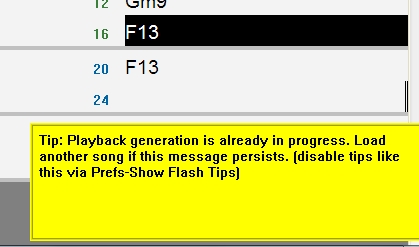
|
|
|
|
|
|
|
|
|
|
|
|
|
Band-in-a-Box for Windows
|
Joined: Aug 2013
Posts: 237
Apprentice
|
|
OP
Apprentice
Joined: Aug 2013
Posts: 237 |
I'd like to thank everyone for the different perspectives.
Soidrock, I must admit there's a ring of full-throated manifesto in your first post that I like.
As I mentioned, my main intended use is not to create things start to finish, but rather, to import something from outside the PG universe, like a midi track which already has a formed, set structure and known key, chords and tempo, and then audition single-part accompaniment candidates, and then pick one or more best candidates for mixing in.
So in Realband, at any given time I will be able to see all my candidates (some of which might be muted) and then arrange the winners visually, using clip length trimming, volume automation and what-not. Losers eventually get deleted.
For this kind of workflow, then, I think RealBand will be best for me.
By the way -- the last RealBand manual I saw was for the 2013 version, with a separate "What's new in 2014" pdf. Does anyone know if they ever got woven together, or even if by chance there is a 2015 version available?
Thanks again to everyone. Though please keep posting on this topic if you wish -- I learn a lot from listening to y'all.
|
|
|
|
|
|
|
|
|
|
|
|
|
Band-in-a-Box for Windows
|
Joined: May 2000
Posts: 22,671
Veteran
|
|
Veteran
Joined: May 2000
Posts: 22,671 |
Edit: when I posted below I saw your post (a minute before).
For you, in that situation and with those desired workflows, it does sound like RB would be a good choice for you.
original post:
Speed/Value depend on the workflow.
There is no doubt BiaB generates and lets you try many many ideas faster. So sometimes I use it for just that purpose. But as soon as I have the basics down, I'll move to RB so I can add/subtract what I want in more detail. For me it doesn't take long to hit the point with BiaB where it becomes more efficient (for me) to move to RB.
I think it's because I have the 'linear' mindset of a song, as you described in your original post.
I wouldn't 'avoid' BiaB, but rather learn what RB does and let your workflow decide how you proceed. If RB is more comfortable it'll be evident right away to you. It was for me, but I come from an old school 'track' oriented mindset. The more tracks I have to work with the better!
If I know what I want a song to do before I start, I go ahead and start in RB .. but if I'm tinkering for ideas or styles I start in BiaB.
From your (admitted) tendency to tinker, you may need to learn when to change to suit your workflow/needs. But there's no reason to abandon one for the other.
Last edited by rharv; 12/08/14 02:32 PM.
I do not work here, but the benefits are still awesome
Make your sound your own!
|
|
|
|
|
|
|
|
|
|
|
|
|
Band-in-a-Box for Windows
|
Joined: Aug 2011
Posts: 1,827
Expert
|
|
Expert
Joined: Aug 2011
Posts: 1,827 |
By the way -- the last RealBand manual I saw was for the 2013 version, with a separate "What's new in 2014" pdf. Does anyone know if they ever got woven together, or even if by chance there is a 2015 version available?
Have a look at this RealBand_User's_Guide.pdf have not been through it, might just have the 2015 New Features pasted in the top ?
|
|
|
|
|
|
|
|
|
|
|
|
|
Band-in-a-Box for Windows
|
Joined: Aug 2013
Posts: 237
Apprentice
|
|
OP
Apprentice
Joined: Aug 2013
Posts: 237 |
|
|
|
|
|
|
|
|
|
|
|
|
|
Band-in-a-Box for Windows
|
Joined: Jan 2002
Posts: 1,486
Expert
|
|
Expert
Joined: Jan 2002
Posts: 1,486 |
Daunting as it may be BB should be used for the bulk of use of laying down and live play and use RB for the audio adjustments etc.
Jazzman
BIAB - RealBand - 2022
Windows 10 64
Zoo computer with 7i processor- SSD 1TB -2TB HDD
Roland keyboards
|
|
|
|
|
|
|
|
|
|
|
|
|
Band-in-a-Box for Windows
|
Joined: Apr 2009
Posts: 11,029
Veteran
|
|
Veteran
Joined: Apr 2009
Posts: 11,029 |
I've posted this before...
This is how I work.
I write and compose in BB since the software lends itself to the composing process really well. Once I have the song constructed like I want, with everything where it needs to be, I close BB after saving the file.
I open the BB file with Real Band. I use RB to create new tracks and the other tracks that don't generate naturally in the BB style with it's 5 track limit.
Once I have these tracks rendered in RB, I export them to a folder and load them into Sonar X1.
I prefer to work on the mixing and editing in Sonar where I can see things in the track view format, and where I know how to easily cut and paste, as well as drop in FX and envelopes. I set up bussing there as well. I do my final polishing in Sonar using the tools in my DAW.
I export that "finished" mix to the song's folder and open it in a third party wave/MP3 editor/converter. I do final levels and trim the start and endings to loose silence and count in clicks.
So, to me, each program has a specific job that it does well. I use them for their strong points.
You can find my music at: www.herbhartley.comAdd nothing that adds nothing to the music. You can make excuses or you can make progress but not both. The magic you are looking for is in the work you are avoiding.
|
|
|
|
|
|
|
|
|
|
|
|
|
Band-in-a-Box for Windows
|
Joined: Dec 2011
Posts: 3,371
Veteran
|
|
Veteran
Joined: Dec 2011
Posts: 3,371 |
Like Solidrock, I work exclusively in RB and never boot BiaB at all.
Maybe it's because I came to BiaB after years of being a Powertracks user, so I already understood the basics of RB. As I see it, RB will do everything that BiaB does, but with the addition of all the editing and mixing power of Powertracks. Just having access to the amazing mixer window is enough to ensure I don't move out of RB, but being able to start a project and carry it right through to mastering in the same program is wonderful.
At the end of the day, it's a personal thing - you use what feels right.
ROG.
|
|
|
|
|
|
|
|
|
|
|
|
|
Band-in-a-Box for Windows
|
Joined: Feb 2008
Posts: 194
Apprentice
|
|
Apprentice
Joined: Feb 2008
Posts: 194 |
Like ROG, I learned Power Tracks, and then when RealBand came out, I switched. I did use BIAB when I first started, but once I switched to Power Tracks, I had no reason to go back. So I guess that's why I like RealBand so much.
- Rick
|
|
|
|
|
|
|
|
|
|
|
|
|
Band-in-a-Box for Windows
|
Joined: Jun 2005
Posts: 7,697
Veteran
|
|
Veteran
Joined: Jun 2005
Posts: 7,697 |
As I mentioned, my main intended use is not to create things start to finish, but rather, to import something from outside the PG universe, like a midi track which already has a formed, set structure and known key, chords and tempo, and then audition single-part accompaniment candidates, and then pick one or more best candidates for mixing in. This is EXACTLY why I've told people for years to learn RB. Taking an already produced midi track and adding stuff to it or edit the midi file itself is way easier in RB. One thing said earlier that I disagree with is I NEVER open a Biab file in RB unless it's all midi, it takes forever to generate. No, what you do is render the Biab tracks to audio first then D&D them into RB. Much quicker. If you discover a need to recreate a Biab part you can do that easily in RB. Also say your original tracks are a set number of bars like 65. You decide you need another 12 bar bridge or whatever. Go to the Bars Window in RB and simply copy/paste the extra bars wherever you want them no need to regenerate anything. You're simply manipulating an audio track like you can in any other DAW. Once you have a Biab audio track inside RB you can do anything you want with it. Bob
Biab/RB latest build, Win 11 Pro, Ryzen 5 5600 G, 512 Gig SSD, 16 Gigs Ram, Steinberg UR22 MkII, Roland Sonic Cell, Kurzweil PC3, Hammond SK1, Korg PA3XPro, Garritan JABB, Hypercanvas, Sampletank 3, more.
|
|
|
|
|
|
|
|
|
|
|
|
Ask sales and support questions about Band-in-a-Box using natural language.
ChatPG's knowledge base includes the full Band-in-a-Box User Manual and sales information from the website.
|
|
|
|
|
|
|
|
|
|
|
Peter Gannon Talks Band-in-a-Box with zplane
zplane recently interviewed Peter Gannon, the founder and creator of Band-in-a-Box, about the software's early days, what sets it apart from AI, how zplane's audio algorithms are used in Band-in-a-Box, and more!
Special thanks to the team at zplane for their continued support.
Check out the full interview here: https://products.zplane.de/blog/peter-gannon-interview-pg-music
Last Chance! The Band-in-a-Box® 2026 for Mac® Special Ends Today (May 31, 2026) at 11:59pm PDT!
Time really is running out! Save up to 50% on Band-in-a-Box® 2026 for Mac® upgrades and receive a FREE Bonus PAK—only when you order by 11:59 PM PDT today!
We've added many major new features and new content in a redesigned Band-in-a-Box® 2026 for Mac®!
Version 2026 introduces a modernized GUI redesign across the program, with updated toolbars, refreshed windows, smoother workflows, and a new Dark Mode option. There’s also a new side toolbar for quicker access to commonly used windows, and the new Multi-View feature lets you arrange multiple windows as layered panels without overlap, making it easier to customize your workspace.
Another exciting new addition is the amazing new AI-Notes feature, which can transcribe polyphonic audio into MIDI. View the results in notation or play them back as MIDI, and choose whether to transcribe an entire track or transcribe specific parts like drums, bass, guitars/piano, or vocals. There's over 100 new features in Band-in-a-Box® 2026 for Mac®.
There's an amazing collection of new content too, including 202 RealTracks, new RealStyles, MIDI SuperTracks, Instrumental Studies, “Songs with Vocals” Artist Performance Sets, Playable RealTracks Set 5, two RealDrums Stems sets, and much more!
Upgrade your Band-in-a-Box for Mac® to save up to 50% on most Band-in-a-Box® 2026 upgrade packages!
Plus, when you order your Band-in-a-Box® 2026 Mac upgrade during our special, you'll receive a Free Bonus PAK of exciting new add-ons.
If you need any help deciding which package is the best option for you, just let us know. We are here to help!
Band-in-a-Box® 2026 Mac Special Offers Extended Until May 31st!
Good news- we've extended our Band-in-a-Box® 2026 for Mac® special offers until May 31, 2026!
Band-in-a-Box® 2026 is packed with major new features, enhancements, and an incredible lineup of new content! The program now sports a sleek, modern GUI redesign across the entire interface, including updated toolbars, refreshed windows, smoother workflows, a new dark mode option, and more. The brand-new side toolbar provides quicker access to key windows, while the new Multi-View feature lets you arrange multiple windows as layered panels without overlap, creating a flexible, clutter-free workspace. We have an amazing new “AI-Notes” feature. This transcribes polyphonic audio into MIDI so you can view it in notation or play it back as MIDI. You can transcribe an entire track (all pitched instruments and drums) or focus on individual parts like drums, bass, guitars/piano, or vocals. There's an amazing collection of new content too, including 202 RealTracks, new RealStyles, MIDI SuperTracks, Instrumental Studies, “Songs with Vocals” Artist Performance Sets, Playable RealTracks Set 5, two RealDrums Stems sets, and much more!
There are over 100 new features in Band-in-a-Box® 2026 for Mac®.
When you order purchase Band-in-a-Box® 2026 before 11:59 PM PDT on May 31st, you'll also receive a Free Bonus PAK packed with exciting new add-ons.
Check out the Band-in-a-Box® for Mac packages page to find the best package for you.
Holiday Weekend Hours
It's Victoria Day Long Weekend in Canada. Our Customer Service hours are:
Saturday, May 16: Closed
Sunday, May 17: Closed
Monday, May 18: 8:00am - 4:00pm
Regular hours resume Tuesday, May 19th!
Today's the Last Day of the Band-in-a-Box 2026® for Mac Special!
Order before 11:59pm PDT today (May 15, 2026) to save up to 50% off your Band-in-a-Box® 2026 for Mac® upgrade and receive a FREE Bonus PAK loaded with great new Add-ons to use with this new version!
Don't wait - order today!
Check out all the new features in the redesigned Band-in-a-Box® 2026 for Mac®!
Band-in-a-Box® 2026 for Mac - Special Offers End at 11:59pm PDT on Friday, May 15th, 2026!
Order before 11:59pm PDT on Friday, May 15th and SAVE up to 50% on most Band-in-a-Box® version 2026 for Mac Upgrade packages... and that's not all! With your version 2026 for Mac purchase, we'll include a Bonus PAK full of great new Add-ons FREE! Upgrade to the 2026 49-PAK to receive even more NEW Add-ons including 20 additional RealTracks... that's 222 NEW RealTracks available with version Band-in-a-Box® 2026 for Mac!
Upgrade to Band-in-a-Box® 2026 for Mac® today for as little as $49! Check out the Band-in-a-Box® packages page for all available purchase options.
Learn more about the Free Bonus PAK and 49-PAK here.
If you have any questions about which package is the best option for you, just let us know. We're here to help!
202 New RealTracks Released with Band-in-a-Box 2026!
With Band-in-a-Box® 2026, we've released 202 incredible new RealTracks (in sets 468-488) in a variety of genres—featuring your most requested styles!
Jazz, Funk & World (Sets 468-475):
Our new jazz, funk & blues RealTracks include a groovin’ collection of RealTracks and RealDrums! These include more requested “soul jazz” RealTracks featuring artists Neil Swainson (bass), Charles Treadway (organ), Brent Mason (guitar), and Wes Little (drums). There are new “smooth jazz” styles (4), which include a RealTracks first: muted trumpet, as well as slick new smooth jazz brushes options for drums. Blues lovers will be thrilled—there are more “classic acoustic blues” styles, including guitar (5), bass (4), and drums (10) with blues master Colin Linden, featuring understated and tasty background acoustic soloing, plus brushes drums and acoustic bass. There are also new electric blues RealTracks, including electric blues with PG favorite Johnny Hiland (3) and soulful electric slide guitar from Colin Linden (4). If you love funk & gospel, there are great new options this year, including gospel organ (3) from Charles Treadway, as well as new funk, tango, and rock ’n’ roll drums (3) and bass (1). And for big, bold arrangements, we have uptempo soul horns (4) featuring a three-part hip horn section with options for a full mix or stems of each individual horn — plus an accompanying rhythm section (4) of drums, bass, guitar, and electric piano!
Rock & Pop (Sets 476–482):
Our new rock & pop RealTracks bring a powerful mix of requested favorites, fresh genres, and modern chart-inspired styles! We have more of our popular “Producer Layered Acoustic Guitars (15)” featuring Band-in-a-Box favorite Brent Mason. We’ve continued our much-requested disco styles (10), and added new Celtic guitar (5) with a more basic, accessible approach than our previous Drop-D or DADGAD offerings. There are also highly requested yacht rock styles (17), inspired by the smooth, polished soft-rock sound of the late ’70s and early ’80s — laid-back grooves, silky electric pianos, warm textures, elegant harmonic movement, and pristine production aesthetics. Fans of heavier styles will love our new glam metal (13), capturing the flashy, high-energy sound of ’80s arena-ready guitar rock. We also have a set of rootsy modern-folk rock (18), with a warm, organic sound combining contemporary folk textures and driving acoustic strumming. And we’ve added lots of new modern pop styles (16) — the kinds of sounds you’re hearing on the radio today, featuring exciting new drums, synths, and cutting-edge RealTracks arrangements.
Country, & Americana (Sets 483–488):
Our new country & Americana RealTracks deliver a rich collection of acoustic, electric, and roots-inspired styles! We have new country pop (9) with legendary guitarist Brent Mason. There is also a potpourri (14) of bouzouki, guitars, banjo, and more, perfect for adding texture and character to contemporary acoustic arrangements. We’ve added funky country guitar (5) with PG favorite Brent Mason, along with classic pedal steel styles (5) featuring steel great Doug Jernigan. There are more country songwriter styles (8) that provide intimate, rootsy foundations for storytelling and modern Americana writing. Finally, we have “background soloing” acoustic guitar (12) with Brent Mason — simpler, but still very tasty acoustic lines designed to sit beautifully behind vocals or act as a subtle standalone solo part.
Check out all the 202 new RealTracks (in sets 468-488)!
And, if you are looking for more, the 2026 49-PAK (for $49) includes an impressive collection of 20 bonus RealTracks, featuring exciting and inspiring additions to add to your RealTracks library. You'll get new country-rhythm guitar styles from PG Music favorites Johnny Hiland and Brent Mason, along with modern-pop grooves that capture today’s radio-ready sound! There are also new indie-folk styles with guitar, bass, 6-string bass used as a high-chording instrument, acoustic guitar, and banjo. Plus, dedicated "cymbal fills" RealDrums provide an added layer that work very well with low-key folky styles with other percussion.
The 2026 49-PAK is loaded with other great new add-ons as well. Learn more about the 2026 49-PAK!
|
|
|
|
|
|
|
|
|
|
|
|
Forums57
Topics86,620
Posts807,581
Members40,173
| |
Most Online64,515
Apr 8th, 2026
|
|
|
|
|
|
|
|
|










 Dansk
Dansk Deutsch - Windows
 Español
 Français - Windows
 Italiano - Windows
 Nederlands
 Polski
 Português
 Svenskt
 русский
 Japanese
 Simplified Chinese
 Traditional Chinese
 Korean