|
Log in to post
|
Print Thread |
|
|
|
|
|
Recording, Mixing, Performance and Production
|
Joined: Oct 2013
Posts: 8
Newbie
|
OP

Newbie
Joined: Oct 2013
Posts: 8 |
Hi Guys,
Can anyone suggest any quality mastering software/plugins?
I'm looking for something which is fairly easy to use and a good fit for ReadBand/BIAB.
Many thanks
Mike
|
|
|
|
|
|
|
|
|
|
|
|
|
Recording, Mixing, Performance and Production
|
Joined: Jul 2000
Posts: 27,566
Veteran
|
|
Veteran
Joined: Jul 2000
Posts: 27,566 |
Have you tried the plugins that come with PG Music products? Limiters, compressors and equalizers can get you a long way. You should first experiment with what you already have, and get the hang of using plugins and concepts of mastering.
I use Ozone by Izotope. I haven't tried it in BIAB/RB (I learned SONAR first) but it should work. Even if you don't buy it, they have a terrific free guide that is a must read for someone starting out in mastering.
Another top quality program you will encounter is the plugin suite by Waves. This is the industry standard but the last time I checked, it required iLock copy protection, which I will not use.
I am making a distinction here between mastering and mixing. If that isn't clear to you, then we need to drop back a step and clarify what mastering is.
BIAB 2026 Win Audiophile. Software: Fender Studio One 8, Swam horns, Acoustica-7, Notion 6, Song Master Pro, Win 11 Home. Hardware: Intel i9, 32 Gb; Fender Quantom HD8 & Faderport 8, Royer 121, Adam Sub8 & Neumann 120 monitors.
|
|
|
|
|
|
|
|
|
|
|
|
|
Recording, Mixing, Performance and Production
|
Joined: Oct 2008
Posts: 20,581
Veteran
|
|
Veteran
Joined: Oct 2008
Posts: 20,581 |
Another Ozone user here... it's great software. I use it with BIAB/RB files in Reaper.
MY SONGS...Audiophile BIAB 2026
|
|
|
|
|
|
|
|
|
|
|
|
|
Recording, Mixing, Performance and Production
|
Joined: Apr 2007
Posts: 118
Apprentice
|
|
Apprentice
Joined: Apr 2007
Posts: 118 |
Hi Mike,
I also use Ozone in Real Band. The beginner will find it easy to use by using one of the many presets. After getting familiar with the presets, you can tweek away at the many parameters for custom settings. The results are amazing! You can download the program for a free trial. I don't remember what the trial restrictions are, but I do remember having the ability to fully test on my arrangements. Go to their site and check it out; try out the free demo download!
Don
|
|
|
|
|
|
|
|
|
|
|
|
|
Recording, Mixing, Performance and Production
|
Joined: Jun 2012
Posts: 3,904
Veteran
|
|
Veteran
Joined: Jun 2012
Posts: 3,904 |
Yep! Another vote for Ozone! With all due respect to Matt, imho life is too short to be farting around with the built-in PG plugs! If you can afford Ozone you will be instantly amazed with what you can accomplish using the many presets!! If I never really understand mixing and mastering but I can get great tracks using these tools I will die a happy man! 
|
|
|
|
|
|
|
|
|
|
|
|
|
Recording, Mixing, Performance and Production
|
Joined: Apr 2009
Posts: 10,858
Veteran
|
|
Veteran
Joined: Apr 2009
Posts: 10,858 |
My "go-to" polisher (I don't call it "big "M" mastering) is Ozone and I use it in Sonar.
Regarding the built in or default plugs that come with BB/RB as well as any other DAW on the market.... You can produce radio ready product with the default plugs, but, for many folks including myself, the aftermarket plugs help get the job done faster.
Last edited by Guitarhacker; 12/23/15 04:10 AM.
You can find my music at: www.herbhartley.comAdd nothing that adds nothing to the music. You can make excuses or you can make progress but not both. The magic you are looking for is in the work you are avoiding.
|
|
|
|
|
|
|
|
|
|
|
|
|
Recording, Mixing, Performance and Production
|
Joined: Oct 2013
Posts: 8
Newbie
|
|
OP
Newbie
Joined: Oct 2013
Posts: 8 |
Thanks very much Guys for taking time and trouble to reply at Xmas, all very much appreciated and read with interest.
Ozone keeps coming up so I will check it out. The goal is to find a product which will allow me to produce music which will be professional enough to be played on radio and which will sound the same across most formats. I used to mix myself and pay for the mastering but it is about time I learned!
Have a great Xmas!
Cheers
Mike
|
|
|
|
|
|
|
|
|
|
|
|
|
Recording, Mixing, Performance and Production
|
Joined: Jul 2000
Posts: 27,566
Veteran
|
|
Veteran
Joined: Jul 2000
Posts: 27,566 |
Ozone costs a few hundred but is completely worth it. Ease of use is a great feature. My recommendation on this or almost any plugin: turn it up till you hear it clearly, then back off by half. Otherwise, it's very easy to overdo things.
Mastering also involves the relative balance of one song versus the others in the same collection. This used to be more important when people bought albums, cassettes or even CDs where there was a planned order of songs. Now, with individual MP3s etc. most songs are just jacked up to maximum volume, however horrible that is to the artistry of the music. And the radio station is going to further add their own compression to squeeze the life out of whatever you give them. Anyway, if you are making a collection of songs, then I recommend CD Architect by SONY.
BIAB 2026 Win Audiophile. Software: Fender Studio One 8, Swam horns, Acoustica-7, Notion 6, Song Master Pro, Win 11 Home. Hardware: Intel i9, 32 Gb; Fender Quantom HD8 & Faderport 8, Royer 121, Adam Sub8 & Neumann 120 monitors.
|
|
|
|
|
|
|
|
|
|
|
|
|
Recording, Mixing, Performance and Production
|
Joined: Oct 2013
Posts: 8
Newbie
|
|
OP
Newbie
Joined: Oct 2013
Posts: 8 |
Thanks again Matt.
I've checked out Ozone today and will be almost certainly get it. Just have to decide whether any of their bundled products are worth having as well. I'm back into this for the long haul with the goal of getting a few more songs on the radio!
Have a great Xmas.
Regards
Mike
|
|
|
|
|
|
|
|
|
|
|
|
|
Recording, Mixing, Performance and Production
|
Joined: Jul 2000
Posts: 27,566
Veteran
|
|
Veteran
Joined: Jul 2000
Posts: 27,566 |
They have a very effective noise reduction program.
They also have Alloy, which you could think of as Ozone Lite. Ozone is meant to go on the final bus, or a stereo audio file. Alloy uses much less of your computer resources and is intended to be applied to individual tracks in a mix, before you mix down to a stereo file. You can have many instances of Alloy running concurrently, but I don't recommend that with Ozone.
That isn't a knock on Ozone, though - I highly recommend it.
BIAB 2026 Win Audiophile. Software: Fender Studio One 8, Swam horns, Acoustica-7, Notion 6, Song Master Pro, Win 11 Home. Hardware: Intel i9, 32 Gb; Fender Quantom HD8 & Faderport 8, Royer 121, Adam Sub8 & Neumann 120 monitors.
|
|
|
|
|
|
|
|
|
|
|
|
|
Recording, Mixing, Performance and Production
|
Joined: Jun 2003
Posts: 1,116
Expert
|
|
Expert
Joined: Jun 2003
Posts: 1,116 |
Another top quality program you will encounter is the plugin suite by Waves. This is the industry standard but the last time I checked, it required iLock copy protection, which I will not use.
Waves moved on from iLok a couple of cycles ago. Their copy protection is similar to Celemony and PGMusic now.
Keith
2026 Audiophile Windows 11 RYZEN THREADRIPPER 3960X 4.5GHZ 128 GB RAM 2 Nvidia RTX 3090s, Vegas,Acid,SoundForge,Izotope Production,Melodyne Studio,SONAR,3 Raven Mtis
|
|
|
|
|
|
|
|
|
|
|
|
|
Recording, Mixing, Performance and Production
|
Joined: Nov 2007
Posts: 6,062
Veteran
|
|
Veteran
Joined: Nov 2007
Posts: 6,062 |
Yes, the waves copy protection is not bad now, and they have some fabulous plugins!
I use the waves plugins on individual tracks and I use Ozone for the final master.
|
|
|
|
|
|
|
|
|
|
|
|
|
Recording, Mixing, Performance and Production
|
Joined: Apr 2009
Posts: 10,858
Veteran
|
|
Veteran
Joined: Apr 2009
Posts: 10,858 |
I use Ozone on tracks as well as busses and of course in the master output buss.
I haven't checked, but at one time, and perhaps still, Ozone was offered as a fully functional demo that worked for 10 days before shutting down into demo mode.
Anyone who makes the mistake of downloading the demo to use had better have the money saved up to buy it. It's THAT good. You WILL have to purchase it after you get a taste of what it can do.
You can find my music at: www.herbhartley.comAdd nothing that adds nothing to the music. You can make excuses or you can make progress but not both. The magic you are looking for is in the work you are avoiding.
|
|
|
|
|
|
|
|
|
|
|
|
|
Recording, Mixing, Performance and Production
|
Joined: Apr 2010
Posts: 5,139
Veteran
|
|
Veteran
Joined: Apr 2010
Posts: 5,139 |
Hi Guys,
Can anyone suggest any quality mastering software/plugins?
I'm looking for something which is fairly easy to use and a good fit for ReadBand/BIAB.
Many thanks
Mike
The most salient point IMO was made by Matt: “Have you tried the plugins that come with PG Music products? Limiters, compressors and equalizers can get you a long way. You should first experiment with what you already have, and get the hang of using plugins and concepts of mastering.” Ozone is great, but it has a tendency to suck all of the dynamics out of a mix if overused. (And a lot of people overuse it, myself included  ). Real Tracks are already compressed at the time they were recorded (SOP), and adding more limiting and compression can reduce your headroom considerably. Try some judicious EQ, limiting and compression on the Master Buss, and you might find you have a brighter, cleaner mix. Regards, Bob
|
|
|
|
|
|
|
|
|
|
|
|
|
Recording, Mixing, Performance and Production
|
Joined: Jun 2003
Posts: 1,116
Expert
|
|
Expert
Joined: Jun 2003
Posts: 1,116 |
I haven't checked, but at one time, and perhaps still, Ozone was offered as a fully functional demo that worked for 10 days before shutting down into demo mode.
That is still the case.
Keith
2026 Audiophile Windows 11 RYZEN THREADRIPPER 3960X 4.5GHZ 128 GB RAM 2 Nvidia RTX 3090s, Vegas,Acid,SoundForge,Izotope Production,Melodyne Studio,SONAR,3 Raven Mtis
|
|
|
|
|
|
|
|
|
|
|
|
|
Recording, Mixing, Performance and Production
|
Joined: Dec 2011
Posts: 16,133
Veteran
|
|
Veteran
Joined: Dec 2011
Posts: 16,133 |
Ozone also includes a standalone app that you can run your stereo mix through independent of the DAW. Also Ozone 6 (my product) has a suite of "light" presets and they will not "suck the life out of your" as somebody mentioned. The other presets can indeed do that unless you modify them per your song.
It may have been mentioned but I suggest you resist the temptation to use Ozone for mastering at any point during your production until you are satisfied with your mix.
A great companion to Ozone is Izotope's Nectar which is for vocal processing but has an incredible reverb that can be used alone for non-vocal tracks.
Bud
Our albums and singles are on Spotify, Apple Music, Amazon Music, YouTube Music, Pandora and more. If interested search on Janice Merritt. Thanks! Our Videos
|
|
|
|
|
|
|
|
|
|
|
|
|
Recording, Mixing, Performance and Production
|
Joined: Jul 2000
Posts: 27,566
Veteran
|
|
Veteran
Joined: Jul 2000
Posts: 27,566 |
Also Ozone 6 (my product) has a suite of "light" presets and they will not "suck the life out of your" as somebody mentioned.
Bud All very good advice. About just this quote, if you were referring to my post, I said the radio stations will do that no matter what you do. It's their mission to make all volumes sound the same over radio. But if it was Bob's post, or others, the advice is well taken to use Ozone or any other plugin in moderation.
BIAB 2026 Win Audiophile. Software: Fender Studio One 8, Swam horns, Acoustica-7, Notion 6, Song Master Pro, Win 11 Home. Hardware: Intel i9, 32 Gb; Fender Quantom HD8 & Faderport 8, Royer 121, Adam Sub8 & Neumann 120 monitors.
|
|
|
|
|
|
|
|
|
|
|
|
|
Recording, Mixing, Performance and Production
|
Joined: Dec 2011
Posts: 16,133
Veteran
|
|
Veteran
Joined: Dec 2011
Posts: 16,133 |
Thanks. Somebody else mentioned that. Think he said suck all the dynamics out. And it certainly can if you get carried away with the compression modules. Typing on phone so I'm not particularly expressive!
Our albums and singles are on Spotify, Apple Music, Amazon Music, YouTube Music, Pandora and more. If interested search on Janice Merritt. Thanks! Our Videos
|
|
|
|
|
|
|
|
|
|
|
|
|
Recording, Mixing, Performance and Production
|
Joined: Jul 2000
Posts: 27,566
Veteran
|
|
Veteran
Joined: Jul 2000
Posts: 27,566 |
We're good! I just re-read the thread and clarified my post. Many of us are saying something similar. This thread should be very helpful to anyone starting out along this route. I remember twenty years ago asking the same question: how come my mixes don't sound like the ones on my CDs?
BIAB 2026 Win Audiophile. Software: Fender Studio One 8, Swam horns, Acoustica-7, Notion 6, Song Master Pro, Win 11 Home. Hardware: Intel i9, 32 Gb; Fender Quantom HD8 & Faderport 8, Royer 121, Adam Sub8 & Neumann 120 monitors.
|
|
|
|
|
|
|
|
|
|
|
|
|
Recording, Mixing, Performance and Production
|
Joined: Oct 2013
Posts: 8
Newbie
|
|
OP
Newbie
Joined: Oct 2013
Posts: 8 |
All of your experience and comments are very welcome. Thank you and have a great Xmas!
Best wishes
Mike
|
|
|
|
|
|
|
|
|
|
|
|
|
Recording, Mixing, Performance and Production
|
Joined: Apr 2009
Posts: 10,858
Veteran
|
|
Veteran
Joined: Apr 2009
Posts: 10,858 |
Regarding Ozone supposedly sucking the life out of your mix.... First, that is not limited to Ozone. Anyone can do that with the default plugins that come with any DAW including BB & RB. Second point and probably the most important one. If you learn what you're doing and use only what you need, you can use any preset in Ozone and still have a dynamic mix. Some tweeking of any preset is always a good idea. AND.... there is a PDF that helps newbies learn about using compressors and limiters and all the other tools in Ozone....and the best thing is, it applies across any plug in used in the mastering process. It is ultimately YOUR choice and by the decisions you make whether your mix looks like this which is compressed to the max: 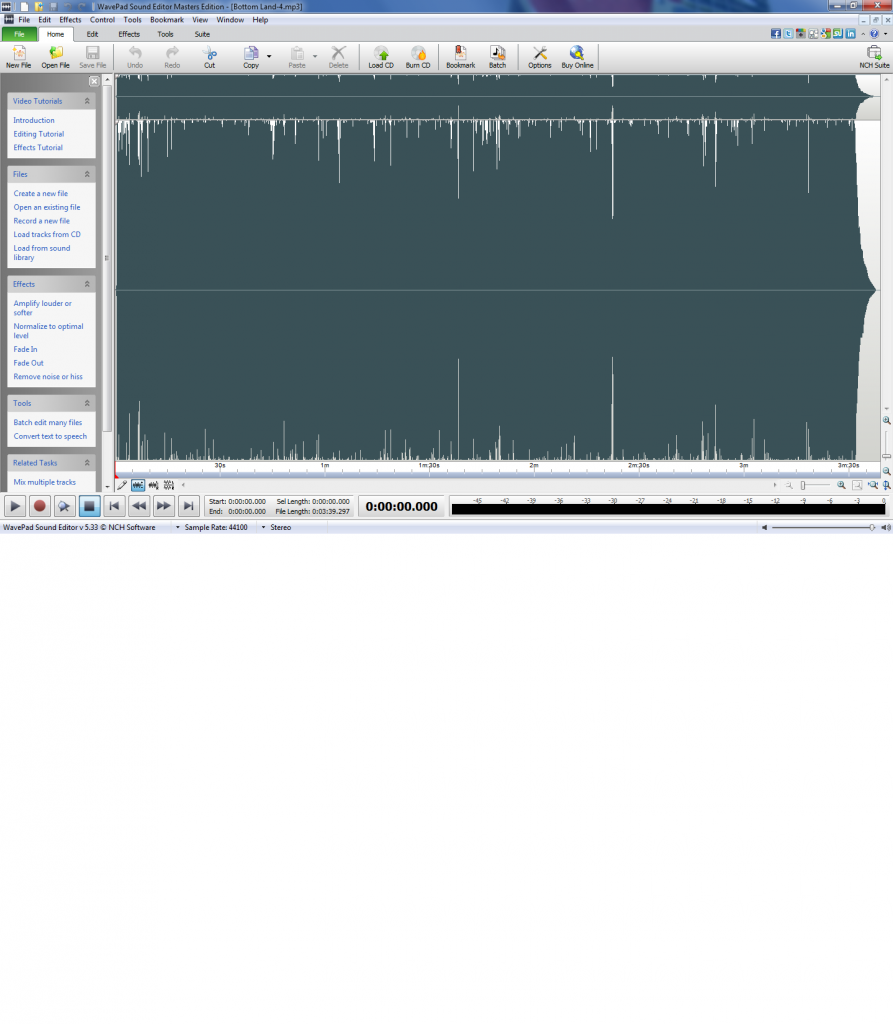 or if it looks like this one which is also quite loud but still retains the dynamics it needs to impart a pleasant listening experience: 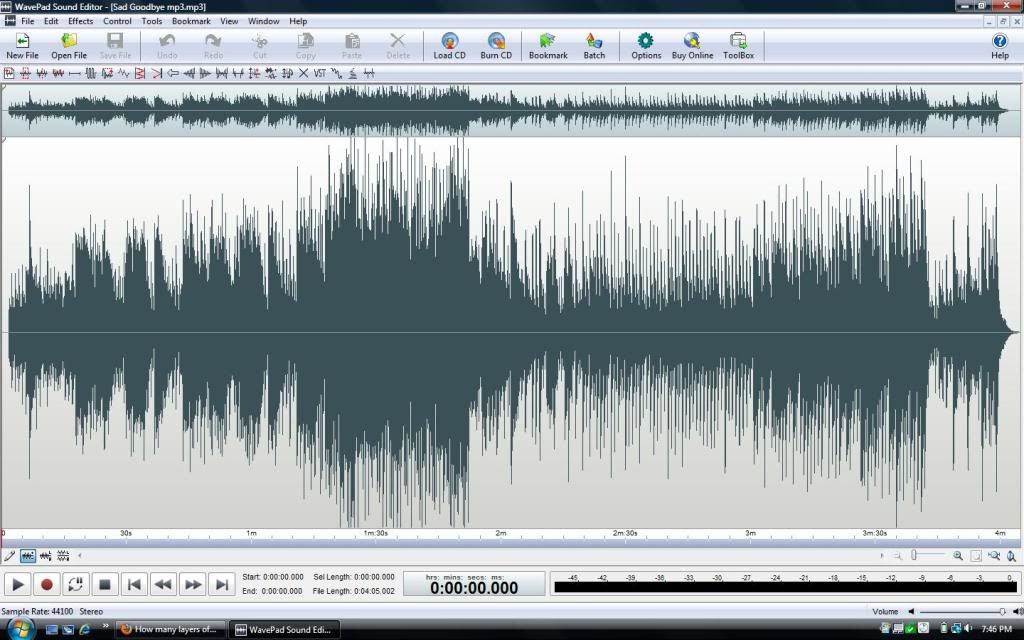 A good wave editor lets you see the final wave. This is one time I do recommend using visual information in the mixing process. And yes, a simple compressor adjustment can make the difference between the top photo and the bottom one. And unless you have good ears, it may be difficult for a newbie mixer to hear that difference but your eyes will spot it. My 2 cents
You can find my music at: www.herbhartley.comAdd nothing that adds nothing to the music. You can make excuses or you can make progress but not both. The magic you are looking for is in the work you are avoiding.
|
|
|
|
|
|
|
|
|
|
|
|
|
Recording, Mixing, Performance and Production
|
Joined: May 2015
Posts: 40
Enthusiast
|
|
Enthusiast
Joined: May 2015
Posts: 40 |
I have been recording my band for many years. For anything serious, we have it professionally mastered here in Chicago or New York for $100-$150 per song. Those guys are using gear that would never make sense to own, and (more importantly) have the experience to get things sounding as close to "radio-ready" as possible. Back to the original poster's question... Which mastering suite/plug-in is best suited for BIAB/Realband? If you're happy with the overall sound of your mix, you can just run it through a peak limiter to get things a little louder. Look at kvraudio.com for free peak limiters. This one is highly regarded: http://vladgsound.wordpress.com/plugins/limiter6/. I use the Izotope Mastering Essentials. It's included with Mixcraft Pro Audio 7, which costs less than half of Izotope Ozone. Essentials doesn't include nearly as many features as Ozone, but has a lot to offer in terms of shaping the sound and amplifying your mix. That, and Mixcraft is a great DAW if you need features that extend beyond Realband's capability (I use both). Lastly, here's some great general advise: "The short version: Stop recording so hot. Instead of trying to get your tracks to peak at -2dBFS, have them peak between -20 and -12dBFS and your recordings will almost undoubtedly sound better. Mixing will be easier. EQ will be more effective. Compression will be smoother, more manageable and predictable. You're in the age of 24-bit digital recording - Relax and enjoy the headroom. Even if your only concern is the volume of the finished product (which would be a shame, but it happens), recordings made with a good amount of headroom are almost undoubtedly better suited to handle the "abuse" of excessive dynamics control. QUIETER recordings have more potential to be LOUD later. It's because they're usually better sounding recordings in the first place." John Scrip - MASSIVE Mastering ----- I hope this helps! Best, Mark
|
|
|
|
|
|
|
|
|
|
|
|
Ask sales and support questions about Band-in-a-Box using natural language.
ChatPG's knowledge base includes the full Band-in-a-Box User Manual and sales information from the website.
|
|
|
|
|
|
|
|
|
|
|
XPro & Xtra Styles PAK Sets On Sale Now - Until May 15, 2026!
All of our XPro Styles PAKs and Xtra Styles PAKs are on sale until May 15th, 2026!
It's the perfect time to expand your Band-in-a-Box® style library with XPro and Xtra Styles PAKs. These additional styles for Band-in-a-Box® offer a wide range of genres designed to fit seamlessly into your projects. Each style is professionally arranged and mixed, helping enhance your songs while saving you time.
What are XPro Styles and Xtra Styles PAKs?
XPro Styles PAKs are styles that work with any version (Pro, MegaPAK, UltraPAK, UltraPAK+, or Audiophile Edition) of Band-in-a-Box® 2025 (or higher). XPro Styles PAKS 1-10 includes 1,000 styles!
Xtra Styles PAKs are styles that work with the UltraPAK, UltraPAK+, or Audiophile Edition of Band-in-a-Box® 2025 (or higher). Xtra Styles PAKs 1-21 includes 3,700 styles (and 35 MIDI styles)!
The XPro & Xtra Styles PAKs are not included in any Band-in-a-Box® package.
The XPro Styles PAKs 1-10 are available for only $29 ea (reg. $49 ea), or get them all in the XPro Styles PAK Bundle for only $149 (reg. $299)! Listen to demos and order now! For Mac or for Windows.
The Xtra Styles PAKs 1-21 are available for only $29 ea (reg. $49 ea), or get them all in the Xtra Styles PAK Bundle for only $199 (reg. $349)! Listen to demos and order now! For Mac or for Windows.
Note: XPro Styles PAKs require Band-in-a-Box® 2025 or higher and are compatible with ANY package, including the Pro, MegaPAK, UltraPAK, UltraPAK+, and Audiophile Edition.
The Xtra Styles require the UltraPAK, UltraPAK+, or Audiophile Edition of Band-in-a-Box®. (Xtra Styles PAK 19 requires the 2025 or higher UltraPAK, UltraPAK+, or Audiophile Edition. They will not work with the Pro or MegaPAK version as they require the RealTracks included in the UltraPAK, UltraPAK+, or Audiophile Edition.
Supercharge your Band-in-a-Box today with XPro Styles PAKs and Xtra Styles PAK Sets!
Band-in-a-Box 2026 for Mac Videos
With the release of Band-in-a-Box® 2026 for Mac, we’re rolling out a collection of brand-new videos on our YouTube channel. We’ll keep this forum post updated so you can easily find all the latest videos in one convenient spot.
Whether you're exploring new features, checking out the latest RealTracks or Style PAKs, this is your go-to guide for Band-in-a-Box® 2026.
Check out this forum post for "One Stop Shopping" of our Band-in-a-Box® 2026 Mac Videos!
Band-in-a-Box 2026 for Mac is Here!
Band-in-a-Box® 2026 for Mac is here and it is packed with major new features! There’s a new modern look, a GUI redesign to all areas of the program including toolbars, windows, workflow and more. There’s a Multi-view layout for organizing multiple windows. A standout addition is the powerful AI-Notes feature, which uses AI neural-net technology to transcribe polyphonic audio into MIDI—entire mixes or individual instruments—making it easy to study, view, and play parts from any song. And that’s just the beginning—there are over 100 new features in this exciting release.
Along with version 2026, we've released an incredible lineup of new content! There's 202 new RealTracks, brand-new RealStyles, MIDI SuperTracks, Instrumental Studies, “Songs with Vocals” Artist Performance Sets, Playable RealTracks Set 5, two new RealDrums Stems sets, XPro Styles PAK 10, Xtra Styles PAK 21, and much more!
Special Offers
Upgrade to Band-in-a-Box® 2026 for Mac and save up to 50% on most upgrade packages during our special offer—available until May 15, 2026. Visit our Band-in-a-Box® packages page to explore all available upgrade options.
2026 Free Bonus PAK & 49-PAK Add-ons
Our Free Bonus PAK and 49-PAK are loaded with amazing add-ons! The Free Bonus PAK is included with most Band-in-a-Box® 2026 for Mac packages, but you can unlock even more—including 20 unreleased RealTracks—by upgrading to the 2026 49-PAK for just $49.
Holiday Weekend Hours
As we hop into the Easter weekend, here are our holiday hours:
April 3 (Good Friday): 8:00 AM – 4:00 PM PDT
April 4 (Saturday): Closed
April 5 (Easter Sunday): Closed
April 6 (Easter Monday): Open regular hours
Wishing you an egg-cellent weekend!
— Team PG
Update to Build 10 of RealBand® 2026 for Windows®!
If you're already using RealBand 2026 for Windows, download build 10 to get all the latest additions and enhancements.
Band-in-a-Box® 2025 for Mac® users: Build 904 now available!
If you're already using Band-in-a-Box® 2025 for Mac®, make sure to grab the latest update! Build 904 is now available for download and includes the newest additions and enhancements from our team.
Band-in-a-Box® 2026 for Windows® users: Build 1237 is now available!
Already a Band-in-a-Box 2026 for Windows user? Stay up to date and download the build 1237 to get all the latest additions and enhancements.
|
|
|
|
|
|
|
|
|
|
|
|
Forums57
Topics86,192
Posts801,807
Members40,064
| |
Most Online64,515
Apr 8th, 2026
|
|
|
|
|
|
|
|
|










 Dansk
Dansk Deutsch - Windows
 Español
 Français - Windows
 Italiano - Windows
 Nederlands
 Polski
 Português
 Svenskt
 русский
 Japanese
 Simplified Chinese
 Traditional Chinese
 Korean