I am working on a blues/soul project. I am starting the tracks with BB/RB, doing as much as I can, then taking them to a friend's studio. There are a few reasons. His software is a little better and he knows it better. I can do vocals there much easier. His production ideas are good. Finally, he understands mastering.
A couple of the songs have stops and pushes. RD's don't always handle those well. Yes, I know how to enter them, but some RD's just won't comply. In addition, I need some more fills. So it seems my choices are to use a real drummer for those songs or buy a drum package to play the midi parts. The price of two sessions with a drummer (if I get a bargain) and a software package will be about the same. And recording with a drummer is no easy thing.
So here's my question. Do you have any plugins you recommend. EZ Drummer looks as if it has some good features. There are also some free software packages; anyone have a favorite one of those? Just for clarification, I don't need a hundred variations of each drum. I need a couple of bass drums, a few good snares, some toms, a decent crash and ride, open and close HH.
If the cost is the same.... Personally I would go with software because you can use it from that point on. And you don't have to deal with drummers and their personalities. Also miking a kit isn't a fun thing.
I'm not really up to date on the newest and best drum software so I'm offering some generalities.
With drum software there are two ways... well 3 ways to work. 1 is obviously, using midi and playing it or mousing it in yourself. Downside is you gotta be able to play and understand drums to a certain degree to get realistic, believable tracks.
2 is using loops. You simply select your loops from a bunch of intro's, fills, etc and pop them into the song. I've heard some pretty nicely down and very impressive drum tracks done this way. A bit of time to learn the software and you're golden.
3 is using an AI drummer like Jamstix. It can and will compose a workable part on it's own, given the parameters you select. There's a level of competency required to get this working well.
You can find my music at: www.herbhartley.com Add nothing that adds nothing to the music. You can make excuses or you can make progress but not both.
The magic you are looking for is in the work you are avoiding.
Drums are the major hangup for lots of home studio folks. They are critical and are mixed hot, in your face. Two good software programs have already been mentioned, EZD and Jamstix. There are others, Studio Drummer for example. There are a ton of vids on YT for all of them. You won't pick it up in a few hours, devote most of a weekend to viewing the how-to vids. Then of course it's what DAW software will you use to host either one?
Real Band can do that and you already have it. But some drum software is exclusive to one software package like Studio Drummer is part of Kontakt meaning you pay about $150 as an add on library but you have to already own a full version of Kontakt which costs from $500-$1,000. DAW software like Cubase, Pro Tools, Studio One etc have drum software built in too but of course you're now buying a full DAW for $400-800, learning it then learning how their drum software works.
Someone mentioned loops. People have been using loops for pretty decent drum tracks for 20 years. There are tons of loop libraries out there and some are free. Biab and RB both work well with loops. You can also take your Real Drum track and do audio editing on it. If you need a fill on bar 15 you can drop a loop in there and EQ it to match the sound of the RD. You can find midi drum tracks and find some good midi fills. The midi can trigger a drum synth for playback only and there are some free drum synths around including a decent sounding drum kit. Of course all of this has a learning curve that you just have to dig in and figure out.
I feel your pain, you know what you want in your head but to really get it you have to make a serious investment. The beauty and frustration of Biab/RB is all the RT/RD's that gets you "almost there" but not quite. Getting over the hump for that last bit can double your cost. Or more.
If you're really serious about this and can afford it then buy a well known and tested software package now and go for it. Trying to do it on the cheap can work to get started but you'll wind up buying the good stuff anyway so you may as well do it now. IF you're really serious.
One final thought. Audio production is a serious industry and people get 4 year college degrees in it. You're not going to get proficient in a month, 6 months or even a year. It takes time but like the old saying goes. a journey of a thousand miles begins with but a single step.
Drums are the major hangup for lots of home studio folks.
DAW software like Cubase, Pro Tools, Studio One etc have drum software built in too but of course you're now buying a full DAW for $400-800, learning it then learning how their drum software works.
Then of course... Sonar is now free.
You can find my music at: www.herbhartley.com Add nothing that adds nothing to the music. You can make excuses or you can make progress but not both.
The magic you are looking for is in the work you are avoiding.
The free Sonar Herb mentioned has a GREAT built in drummer called Session Drummer that you can as Herb says "mouse your way through"--that is play the virtual kit with a mouse-- to create realistic fills and even secondary tracks (or main tracks if you use no Real Drums.)
I use it all the time and it is super easy. You load a style and kit--like Old Zep Wet Kit--choose what type of fills or patterns you want, then just click on those while the song is playing, recording to a track.
Mixed in with Real Track you will never notice the paste if you EQ them the same.
I think it took all of a half an hour to learn. It really is not that hard at all.
David Snyder Songwriter/Renaissance Man Studio + Fingers
I clicked on the Bandlab Assistant, found the down arrow, found Install Addons. A box came up showing the addons. Problem is nothing happens when I click Install.
Maybe they don't give you everything on the free version.
I just installed addons and it worked ok. I almost gave up too as it took awhile until something happened, then a very faint grey flashing download information appeared which could easily be overlooked. Try again.
Thanks, Rockstar. I am going to download the free Jamstix and play with it a bit. But, I have a feeling that I am going to go the same route you did in the end.
Thanks, Rockstar. I am going to download the free Jamstix and play with it a bit. But, I have a feeling that I am going to go the same route you did in the end.
2b
For me, Jamstix was a stepping stone on the road to better drums.
I started by mousing the notes into a midi sequencer. Worked but it was too mechanical and stiff. Not realistic.
Jamstix was AI so it created it's own track automatically by following the audio. However, editing and really tweeking it was a learning curve of it's own. And I only got a few rungs up the ladder compared to some of the folks using it. But it was a more realistic drummer, and it was automatic.
Real Tracks made it even easier and they sounded more realistic since they are in fact a real drummer under it all. Down side to the RT's is they are all essentially in one track so if you want to bring put the snare or the kick for example, you are limited to doing it via EQ and selective compression. It would be nice to have the drum RT's available in multi-track mode. I have used midi and Jamstix at times to fill in the creative gaps left by RT's.
You can find my music at: www.herbhartley.com Add nothing that adds nothing to the music. You can make excuses or you can make progress but not both.
The magic you are looking for is in the work you are avoiding.
Groove Monkey free package has some decent loops. I use them some times in Reaper. The folder names and file names give good clues to what they are including, and estimated tempo they might be used for. I also created a folder that holds all of the Power Tracks midi drum files, the one used for "Load Scrap". These work well for starters but lack fills and rolls. Here's a short cut you might use. Think of a blues song that is similar to the one you are creating. Download a free midi file from the internet. Drag it into your DAW. Mute or delete unwanted tracks. Make edits in the Piano Roll/Midi Editor. Sometimes I use a midi controller keyboard to manually record my midi fills and other parts onto a new track. Then I mute the adjacent sections on the original track until I feel confident to cut them out and paste in my fills and other parts. Many of the midi files I find for free sound rather cheezy when played back through Windows Media player (computer synth) but when played back using my hardware synth or even SI Drums that came with CakeWalk they come alive better depending on how the file was made. Keep in mind that SI drums is not a full GM/GM2 or GS synth. So it does not have things like shakers and cowbells and many others voices. If those instruments are in the original file you will see them but not hear them. If I feel they are important I copy just those onto another track and choose a separate synth, TTS-1 or hardware for example, just for those instruments. Or, load a similar blues song .wav file into Band In A Box's Audio Chord Wizard. Let it interpret the chords which lays out the song in BIAB chord sheet. Mute all instruments except for drums. Choose a BIAB blues style, midi or Real Drum with an accompanying midi style. Place style change markers where you want drum rolls. Export to you DAW... Well, there's some ideas anyhow.
I used to use drum loops from Beta Monkey and was pretty happy with them. I got some from Drums on Demand, but thought the song sets were a bit too limited and processed for my taste. YMMV - it's been a while since I've looked at what they offered.
Eventually I got enough money and moved on to Toontrack's EZDrummer and stuck with the canned tracks that came with it.
Then came EZDrummer 2 with the ability to edit tracks simply by dialing the complexity of particular instruments in and out, which is really cool.
I'm sure you know that they've got Southern Soul and Blues kits, along with MIDI tracks. If you don't need to sound exactly like classic hardware, they also sell the MIDI grooves from the Blues and a different Soul Grooves MIDI. (Based on this comment, you'd probably need to get additional grooves even if you got their Southern Soul EZX).
You might also have a look at RealiDrums to see if it fits your workflow. Like EZDrummer, you can dial in the complexity of canned grooves to customize it. Unlike EZDrummer, it comes with a boatload of different drumkits, so you can really customize the kit.
I haven't been able to play with it, and I'm curious if anyone on the forum has. I know that Jim Fogel was looking at them, but don't know if he ever took the plunge.
Couple things about RB/realdrums, and they have been mentioned before.
1. In RB you can generate many takes of the drummer experimenting with different variations (image below) .. sometimes what you are looking for is in a different variation, and if you don't experiment you'll never find it (same with recording a real drummer, except you get to explain what you want with a real drummer), though what you get will vary, much as it does with RealDrums variations. I have been known to generate many realdrum tracks and paste them together and sometimes those variations over a given A/B section make a big difference.
2. At the end of many of the actual RealDrum wma files (or wav files if using the audio version) you'll find actual recordings of many of the drum hits on their own, these can be edited to be 'samples' which makes using a sample player to create your own fill (or add to one) an inviting option for editing since they sound like the same drums, *if* you like the rest of the RealDrums you have generated.
If you are genuinely not happy with the generated RealDrums, well that's a whole 'nother problem and how to proceed depends on a lot; your abilities with MIDI, your abilities with cut/paste (or slice/dice) of audio .. your ability to manipulate another drum generator .. lots of variables.
I do not work here, but the benefits are still awesome Make your sound your own!
As mentioned by sinbad in his post above, there is no visual indicator (like a progress bar) to indicate a download is in progress. The Studio Instruments file is a pretty good size so it does take some time to download and install. I believe it was ten to 15 minutes. The good news is download and install is performed with just a click of the install button.
There have been a few instances noted in the Cakewalk forum of the program or Add-ons not fully downloading and installing. The "fix" is to uninstall and delete the existing copy of the Bandlab Assistant from your computer, download and install a fresh copy and try again.
Regarding the RD's, I posted something on the Wish List today. I would like more fills for each style. I have generated and re-re-re-generated and I get pretty much the same fills.
My big problem is pushes. Most of the RD's I have found sound great until they get to a push. Then they sound like the drummer was distracted by some hottie. Some of the pianos are just as bad, but I can use midi for them and sound OK. But the midi drums just aren't as good.
Regarding the RD's, I posted something on the Wish List today. I would like more fills for each style. I have generated and re-re-re-generated and I get pretty much the same fills.
My big problem is pushes. Most of the RD's I have found sound great until they get to a push. Then they sound like the drummer was distracted by some hottie. Some of the pianos are just as bad, but I can use midi for them and sound OK. But the midi drums just aren't as good.
Anyway, thanks for all the ideas.
2b
Maybe I missed it in the thread, but, what synth are you using for your midi drums?
I would gladly use something else, but for some reason I can not get any other VST's to load into RB. Kent from PG helped me get a bass synth loaded. Since that day, no luck at all. I can't even get Sample Tank 2, included with BB/RB, to work consistently.
Maybe I am doing something wrong, but I can't find out what it is.
Sorry, but, I don't use Coyote and rarely use RealBand. Reaper, $60, handles plug ins well. I run SampleTank 3 in it all the time. I also have all the drum kits from ST2 inside of ST3 and they are decent. In case you didn't know; you can get SI Drums, Piano, Strings and Bass for free with a free download of Cakewalk by BandLab along with TTS-1 full GM soft synth. I prefer TTS-1 over Coyote. I use SI Drums often with good results. But it does not have all of the standard GM drum voices. Just a basic but decent drum kit with many alternate drum kits. I think ST2/ST3 are full General Midi drum kits but as far as I know there is no way to edit it's individual instruments other than changing velocities in your midi editor. The reason I bring this up is I think you would like the drum sounds much better than Coyote.
Thanks, Tobias. I have been trying to learn a little about Reaper. I have a project that I am trying to keep moving and I hate to stop to learn a new system now. After this project, I will probably make the change. There are just too many little things about RB.
I downloaded Cakewalk but I did not have Studio Instruments. I tried to get that but it wouldn't work. So I am going to reinstall and try again. I tried ST3 but had no luck with it either. I am going to try that again.
My guess is that I am doing something wrong but I can't figure out what.
As I said earlier, I decided I was going to try again today. Glad I did.
First thing I did was try to use SampleTank 2 (included with BB/RB). There is only one drum kit under HiQ. The drums sounded better than Coyote.
Then I tried uninstalling Jamstix and downloading it again. The free version says the plugin will be installed under Program Files\Steinberg\Plugins. Don't believe it. After two tries, they aren't there. There is a data file with an RZD extension called Sounds. I copied that to Plugins, even though I didn't think it would work. No luck. I copied the Manager file. No luck.
Then I downloaded Power Drums that Jim Fogle suggested. Eureka! It downloads quickly. It tells you exactly what to copy to the Plugins file. The drums sound wonderful. It comes with a mixer that allows you to control the volume of individual drums and cymbals. Compression can be switched on or off of each instrument. Master volume can be changed. It comes with a drum composer that has loops. You can build a drum track and then move it to the DAW. For us geezers who grew up with TR707's, that concept is very familiar. And the whole thing is free. They ask for a donation and I am going to make one, but they don't limit the program and there is no expiration date.
I am going to try editing my drum track and seeing how Power Drums reacts, but I can't think of any reason it wouldn't work. Even if it doesn't, I can always edit with Coyote and then switch.
I don't know how much it would cost PG, but they may want to consider putting Power Drums in one of their bundles. They could charge something for it and it would save us all a lot of trouble.
Finally, I can't thank you folks on the Forum enough, especially Jim for turning me on to this. If you were here, I'd have to hug you.
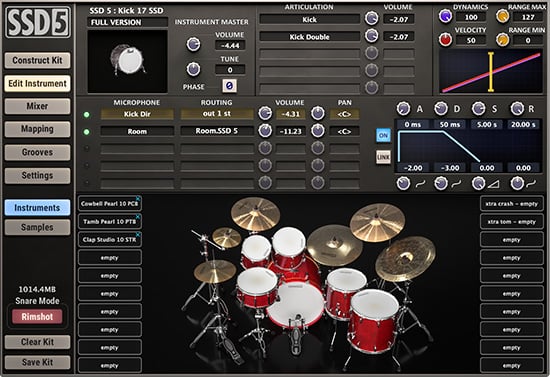
Experience a taste of SSD5 with full functionality and one incredible Deluxe 2 Kit for FREE. Not an expiring demo! There is no iLok Activation Code for SSD5 Free.
FYI - I just purchased the SSD4 update to SSD5 and the drums sound great. I haven't had the chance to get into it deep yet but there are a lot of options to either completely change a drum or drums and/or to modify their sound. Lots to learn here.
OK, a random thought; Why does toilet paper need a commercial? Who's not buying it?
64 bit Win 10 Pro, the latest BiaB/RB, Roland Octa-Capture audio interface, a ton of software/hardware
XPro & Xtra Styles PAK Sets On Sale Now - Until May 15, 2026!
All of our XPro Styles PAKs and Xtra Styles PAKs are on sale until May 15th, 2026!
It's the perfect time to expand your Band-in-a-Box® style library with XPro and Xtra Styles PAKs. These additional styles for Band-in-a-Box® offer a wide range of genres designed to fit seamlessly into your projects. Each style is professionally arranged and mixed, helping enhance your songs while saving you time.
What are XPro Styles and Xtra Styles PAKs?
XPro Styles PAKs are styles that work with any version (Pro, MegaPAK, UltraPAK, UltraPAK+, or Audiophile Edition) of Band-in-a-Box® 2025 (or higher). XPro Styles PAKS 1-10 includes 1,000 styles!
Xtra Styles PAKs are styles that work with the UltraPAK, UltraPAK+, or Audiophile Edition of Band-in-a-Box® 2025 (or higher). Xtra Styles PAKs 1-21 includes 3,700 styles (and 35 MIDI styles)!
The XPro & Xtra Styles PAKs are not included in any Band-in-a-Box® package.
The XPro Styles PAKs 1-10 are available for only $29 ea (reg. $49 ea), or get them all in the XPro Styles PAK Bundle for only $149 (reg. $299)! Listen to demos and order now! For Mac or for Windows.
The Xtra Styles PAKs 1-21 are available for only $29 ea (reg. $49 ea), or get them all in the Xtra Styles PAK Bundle for only $199 (reg. $349)! Listen to demos and order now! For Mac or for Windows.
Note: XPro Styles PAKs require Band-in-a-Box® 2025 or higher and are compatible with ANY package, including the Pro, MegaPAK, UltraPAK, UltraPAK+, and Audiophile Edition.
The Xtra Styles require the UltraPAK, UltraPAK+, or Audiophile Edition of Band-in-a-Box®. (Xtra Styles PAK 19 requires the 2025 or higher UltraPAK, UltraPAK+, or Audiophile Edition. They will not work with the Pro or MegaPAK version as they require the RealTracks included in the UltraPAK, UltraPAK+, or Audiophile Edition.
Supercharge your Band-in-a-Box today with XPro Styles PAKs and Xtra Styles PAK Sets!
With the release of Band-in-a-Box® 2026 for Mac, we’re rolling out a collection of brand-new videos on our YouTube channel. We’ll keep this forum post updated so you can easily find all the latest videos in one convenient spot.
Whether you're exploring new features, checking out the latest RealTracks or Style PAKs, this is your go-to guide for Band-in-a-Box® 2026.
Band-in-a-Box® 2026 for Mac is here and it is packed with major new features! There’s a new modern look, a GUI redesign to all areas of the program including toolbars, windows, workflow and more. There’s a Multi-view layout for organizing multiple windows. A standout addition is the powerful AI-Notes feature, which uses AI neural-net technology to transcribe polyphonic audio into MIDI—entire mixes or individual instruments—making it easy to study, view, and play parts from any song. And that’s just the beginning—there are over 100 new features in this exciting release.
Along with version 2026, we've released an incredible lineup of new content! There's 202 new RealTracks, brand-new RealStyles, MIDI SuperTracks, Instrumental Studies, “Songs with Vocals” Artist Performance Sets, Playable RealTracks Set 5, two new RealDrums Stems sets, XPro Styles PAK 10, Xtra Styles PAK 21, and much more!
Special Offers
Upgrade to Band-in-a-Box® 2026 for Mac and save up to 50% on most upgrade packages during our special offer—available until May 15, 2026. Visit our Band-in-a-Box® packages page to explore all available upgrade options.
2026 Free Bonus PAK & 49-PAK Add-ons
Our Free Bonus PAK and 49-PAK are loaded with amazing add-ons! The Free Bonus PAK is included with most Band-in-a-Box® 2026 for Mac packages, but you can unlock even more—including 20 unreleased RealTracks—by upgrading to the 2026 49-PAK for just $49.
Band-in-a-Box® 2025 for Mac® users: Build 904 now available!
If you're already using Band-in-a-Box® 2025 for Mac®, make sure to grab the latest update! Build 904 is now available for download and includes the newest additions and enhancements from our team.
One of our representatives will be happy to help you over the phone. Our hours of operation are from
6:00AM to 6:00PM PST (GMT -8) Monday thru Friday, and 8:00AM to 4:00PM PST Saturday. We are closed Sunday. You can also send us your questions via email.
One of our representatives will be happy to help you on our Live Chat or by email. Our hours of operation are from
6:00AM to 6:00PM PST (GMT -8) Monday thru Friday; 8:00AM to 4:00PM PST (GMT -8) Saturday; Closed Sunday.















 Dansk
Dansk Deutsch - Windows
 Español
 Français - Windows
 Italiano - Windows
 Nederlands
 Polski
 Português
 Svenskt
 русский
 Japanese
 Simplified Chinese
 Traditional Chinese
 Korean