I'm about to pull the trigger on the PreSonus HP4 4-Channel Compact Headphone Amplifier and I have a question about how I should hook it up to my Focusrite 8i6 interface.
I've seen some people suggest that I just plug one end of the wire to the headphone input on the front of the Focusrite and plug the other end into the PreSonus. But if that's the way to do it, what are the input/outputs on the back of the PreSonus for? I'm thinking - and I might be wrong (it wouldn't be the first time) - that the connections should be done with these. And if so, how exactly should I be running the wires for this type of connection?
All input (no pun intended) would be greatly appreciated!!!
As the Presonus has separate left and right inputs and thru outputs, I would suggest that it's expected to be connected to line outputs from the Focusrite and if you want to send those same line outputs onward to the, e.g., PA, then you plug the PA into the Presonus Thru ports.
As the Focusrite has four outputs, you could also give separate feeds to the Presonus and the PA.
The Focusrite headphone outputs have, of course, their own independent volume controls. That would allow a total of six headphones. There seems to be no way to control the mix for individual players.
Jazz relative beginner, starting at a much older age than was helpful. AVL:MXE Linux; Windows 11 BIAB2026 Audiophile, a bunch of other software. Kawai MP6, Ui24R, Focusrite Saffire Pro40 and Scarletts .
Hi Gordon... thanks for the comeback. I'm pretty sure that now, after giving it a lot of thought and research that I won't have any trouble getting it hooked up. I'll be getting it tomorrow and will let you know how I make out.
The line outs from the back of the Focusrite should go to the headphone amp. That has two benefits; The headphone amp gets the expected signal (with separate volume controls on the headphone amp) The headphone outputs on the Focusrite are still available
So you've gained headphone outputs (on the Focusrite) and retained signal quality to the headphone amp. We've been running that way for years with an 8 Out headphone amp. Using a headphone out to feed a headphone amp would degrade the signal IMO
I do not work here, but the benefits are still awesome Make your sound your own!
To use the line outs at the rear of the unit you'll need to configure the management software to allow this and to send the main stereo mix to it. You'd need to suss out if you need to use 1/3 or or 1/2 etc. The software will let you know. You'll have to set the software to have two lines running to your monitor amp and two to the headphone amp.
On the headphone amp you insert a standard mono jack for each of your stereo channels. Those can run directly from the back of the Focusrite or you could use a Y cable and run from one of the headphone sockets at the from of the FR. There are two so it's not really going to be a problem. The 8i6 is a bit of a con, (I had an older version & love it BUT...), as the non digital inputs on the back will, in many instances, need an external preamp. Two front combo inputs with preamps on the front, stereo SPDF = 2 digital inputs at the back and the additional analogue inputs at the back, (needing pres)= 8. I found that out the hard way and bought two stereo/2 channel preamps to allow me to record a drum kit.
When I'm recording a couple of people I use a Behringer MINIAMP AMP800 Headphone Amplifier that's straight out of the headphone socket of my SSL2. Everyone gets the same mix but that's generally OK.Though it has multiple inputs so that an interface can, if needed & set up for it, send multiple mixes to the h/amp and they be heard by the appropriate people at different levels etc. by selecting the input front the front panel.
I'm not sure I'd be interested in the "monitor/through" arrangement...that's sending the signal to your monitors along an uncertain path in terms of signal impact etc.
Last edited by rayc; 01/06/2309:04 PM.
Cheers rayc "What's so funny about peace, love & understanding?" - N.Lowe
We never actually discussed why you need this. I'm assuming three or four people (i.e. more than two) will use headphones and want their own volume (though not their own mix; that's much more involved but possible). If you only have two people using headphones, then I would have recommended long headphone extension cords.
As the headphone amp only has 1/4" input jacks, that lets out any consideration of digital.
BIAB 2026 Win Audiophile. Software: Fender Studio One 8, Swam horns, Acoustica-7, Notion 6, Song Master Pro, Win 11 Home. Hardware: Intel i9, 32 Gb; Fender Quantom HD8 & Faderport 8, Royer 121, Adam Sub8 & Neumann 120 monitors.
Well, the PreSonus arrived today and I"m over the moon in love with it. It's very much more than I could ever expect.
I had been using crappy, cheap headphones for years. So, using the Amazon gift card that Santa brought me I treated myself to a set of Beyerdynamic DT 770 PRO - 250 OHM LE Professional Studio Headphones (Limited Black Edition) When they arrived I discovered that I had to crank the headphone volume knob on the Focusrite literally up to the max and they still weren't even close to being loud enough.
So, doing some more research - that I should have done before I ordered them - I found that in fact an amplifier was suggested for maximum performance. As I said, the phones didn't cost me anything out of pocket so I really don't mind putting out for the amp.
Hooking it up was a breeze. Turns out, it came with an illustration card showing me exactly where to plug in four wires. Basically it is idiot proof. There are no drivers to install and no Focusrite software adjustments needed. It's truly plug-n-play right out of the box.
Actually, I've always found that the earphone outputs on the Focusrite were never what I would call powerful. I would have to turn the volume knob up to around 3/4 in order to get the volume I wanted.
Compared to what I had been using, these things sound like heaven. They're a MAJOR step up for me.
I bought the Focusrite 8i6 because at the time I was using old sound modules and needed the extra input/outputs to hook them up. But there came a point where it became frustrating. It seemed like I was constantly looking for the proper connections. And so I decided to go modern and began collecting an using only VST's which to me was a fantastic decision. I even have a lot more space on my desk. Bottom line is that I'm really having fun and loving my music again.
I bought the PreSonus because there are times when I have 2 old band mates come over to do some recording, just for fun. One is a bass player and the other is a lead guitarist. We use BIAB for drums and any other instruments we may want to throw into the mix. One of the guys has a couple sets of decent quality headphones that he'll be bringing with him when he's over. Fact is, I don't need the extra outputs all of the time as I'm alone most of the time. But it's nice knowing they're there when I do need them.
Music used to be my occupation until I retired some years ago. It is now my hobby. Every hobby will cost a few bucks when first starting out. My "studio" is nowhere close to being a professional recording studio and never will be. But the money I have invested into something that gives me hours upon hours of total enjoyment is money very well spent in my opinion.
Thanks again for the comebacks... very much appreciated!!!
I also own the Presonus HP4 Headphone amp. It has plenty of volume. The way mine is setup is I took the main outputs from my Presonus Audiobox and went to the inputs of the HP4. Then I sent the outputs of the HP4 to my M-Audio BX5a powered monitors. I am also using a dbx 286s mic pre-amp before the AudioBox. This setup works for me.
BIAB 2026 Ultrapack- Fender Studio Pro 8, Windows 11, Mac Mini M4 with Logic Pro 11, Melodyne Studio, Luna Pro
Yes, some headphone amps can serve as a pass-through as Brian describes, to make them monitor controllers. Press a button and it cuts off the feed to the powered monitors. My GraceDesign m900 does this.
BIAB 2026 Win Audiophile. Software: Fender Studio One 8, Swam horns, Acoustica-7, Notion 6, Song Master Pro, Win 11 Home. Hardware: Intel i9, 32 Gb; Fender Quantom HD8 & Faderport 8, Royer 121, Adam Sub8 & Neumann 120 monitors.
That Behringer headphone amp is long discontinued. I'm surprised that any still work. That entire series was way too noisy for my taste as were my other Behringer PowerPlay 'phone amps. Good riddance.
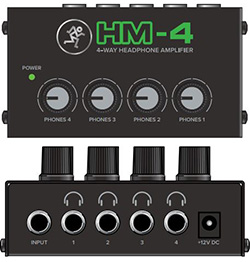
My favorite compact unit is this $40 baby from Mackie. Takes a headphone out, gives you 4 with individual volume. Loud, clean and almost no self noise. Wall wart included, shielded stereo TRS cable is not,
The PreSonus has a dedicated power monitor volume knob which is independent from the four headphone out volume knobs. I keep the volume knob on the speakers between 1/4 and 1/2 and the PreSonis knob about the same. There's no "hissing" sound whatsoever. There's more than enough power if ever I want the monitor's volume louder.
The other thing I saw when I was researching the PreSonus was that it has no power on/off switch and this is true. I really wasn't concerned with this because it is on my desk and it would be very easy to just pull the power cord out. But I was greatly surprised and happy to find that there is an on/off switch on the power cord.
That Behringer headphone amp is long discontinued. I'm surprised that any still work. That entire series was way too noisy for my taste as were my other Behringer PowerPlay 'phone amps. Good riddance.
Not sure who mentioned Behringer that you are replying to. One thing I noticed with the Powerplay headphone amps was the closer you got to the Power button, the noisier the outputs got. The first 2-3 outs from the far side were fine, but the last couple near the power can get pretty noisy, and gradually so in between. (they had 8 outs) My experience anyway.
I do not work here, but the benefits are still awesome Make your sound your own!
That Behringer headphone amp is long discontinued. I'm surprised that any still work. That entire series was way too noisy for my taste as were my other Behringer PowerPlay 'phone amps. Good riddance.
Not sure who mentioned Behringer that you are replying to.
Sometimes, you have to scroll up. The old MiniAmp series pictured suffered from plastic deterioration over time. Sound great at first then every one I knew fell apart — from the internal heat is my guess.
Quote:
One thing I noticed with the Powerplay headphone amps was the closer you got to the Power button, the noisier the outputs got. The first 2-3 outs from the far side were fine, but the last couple near the power can get pretty noisy, and gradually so in between. (they had 8 outs) My experience anyway.
Oh yea, those units were terrible—versatile, yes but I got to the point where there was no place I could put mine — sounded like they picked up every stray electric field in the Silicon Valley. When they were new, there was nothing on the market anywhere near the price, however.
That was then, however. Now we have plenty of excellent choices including the Presonus if you need the control and the Mackie if you prefer the simplicity.
BIAB 2026 Audiophile Mac 24Core/60CoreGPU M2 MacStudioUltra/8TB/192GB Sequoia/Tahoe, M1 & M5 MBAir, 2012 MBP Digital Performer11, Logic, Finale27/Dorico/Encore/SmartScore/Notion/Overture
The old MiniAmp series pictured suffered from plastic deterioration over time. Sound great at first then every one I knew fell apart — from the internal heat is my guess.
Mine is in A1 physical condition, works a treat, isn't noisier than others I tried, and does what I need. For several years it lived in a rack of gear but is now on the front left of my mix desk. No interference other than the RFI & EMI that my entire house suffers. Perhaps I'm lucky. I don't replace stuff until it's no longer fit for purpose.
Last edited by rayc; 02/16/2302:35 AM.
Cheers rayc "What's so funny about peace, love & understanding?" - N.Lowe
The old MiniAmp series pictured suffered from plastic deterioration over time. Sound great at first then every one I knew fell apart — from the internal heat is my guess.
Mine is in A1 physical condition, works a treat, isn't noisier than others I tried, and does what I need. For several years it lived in a rack of gear but is now on the front left of my mix desk. No interference other than the RFI & EMI that my entire house suffers. Perhaps I'm lucky. I don't replace stuff until it's no longer fit for purpose.
"Mine is in A1 physical condition, works a treat, isn't noisier than others I tried, and does what I need." Same for me with the exception I have two units.
Good for both of you. The ones I bought for myself and my daughter fell apart, literally. Some of the plastic pieces crumbled. There was a matching monitor controller that suffered the same fate.
Outside RFI and EMF are a big issue in my studio. If there’s a stray field in the Silicon Valley, my gear picks it up. About 10 years ago, I bought a pair of star-quad interconnect cables and the improvement was dramatic. I have since rewired my studio with them.
I do not subscribe to the mystic jumbo-jumbo surrounding cable. If you can’t hear the difference, in this case, noise reduction, you don’t need star-quad. I get mine custom made by SESCOM through Markertek at about 1/3 the price of so-called “premium” cables through most channels such as Sweetwater. If it’s not one of their standard listings, SSCOM will make anything I want.
Good for both of you. The ones I bought for myself and my daughter fell apart, literally. Some of the plastic pieces crumbled. There was a matching monitor controller that suffered the same fate.
Outside RFI and EMF are a big issue in my studio. If there’s a stray field in the Silicon Valley, my gear picks it up. About 10 years ago, I bought a pair of star-quad interconnect cables and the improvement was dramatic. I have since rewired my studio with them.
I do not subscribe to the mystic jumbo-jumbo surrounding cable. If you can’t hear the difference, in this case, noise reduction, you don’t need star-quad. I get mine custom made by SESCOM through Markertek at about 1/3 the price of so-called “premium” cables through most channels such as Sweetwater. If it’s not one of their standard listings, SSCOM will make anything I want.
I use a power conditioner,iron chokes on all cables as well as better insulated cables and a D.I. box for bass that allows me to send balanced signal to the interface. The differences are audible but still not enough to leave me happy. I need to use ReaFir on all channels I've tracked with guitar/bass etc. It used to be a hassle but I've set up templates so that the work flow is only minimally altered. Basically if I walk out into the front yard with a fluro tube it will light up.
Cheers rayc "What's so funny about peace, love & understanding?" - N.Lowe
Yea, I already had iron chokes and an expensive power conditioner before I tried star quad. The power conditioner is still in place but the chokes are gone.
My first pair was on my studio monitors and the difference was dramatic. Easy to compare by trying one first.
I also tried making a star quad power cable for my subwoofer — lots of those around here for sensitive equipment — but that had no effect.
BIAB 2026 Audiophile Mac 24Core/60CoreGPU M2 MacStudioUltra/8TB/192GB Sequoia/Tahoe, M1 & M5 MBAir, 2012 MBP Digital Performer11, Logic, Finale27/Dorico/Encore/SmartScore/Notion/Overture
Introducing XPro Styles PAK 11 – Now Available for Windows Band-in-a-Box 2026 and Higher!
XPro Styles PAK 11 for Windows & Mac Band-in-a-Box® version 2026 (and higher) is here with 100 brand new RealStyles, plus 31 RealTracks/RealDrums!
Guess who’s back again? That’s right! It’s our XPro Styles PAK’s triumphant return with the 11th edition in this series! 100 new styles are coming your way spread across the rock & pop, jazz, and country genres. And this edition's wildcard genre explores the immense and far-reaching catalogue of electronic music! The included 31 RealTracks and RealDrums can be used with any Band-in-a-Box® 2026 (and higher) package.
Special offers available until August 31st, 2026!
All the XPro Styles PAKs 1-11 are on sale for only $29 ea (Reg. $49 ea), or get them all in the XPro Styles PAK Bundle for only $149 (reg. $299)! Order now!
XPro Styles PAKs require Band-in-a-Box® 2026 or higher and are compatible with ANY package, including the Pro, MegaPAK, UltraPAK, UltraPAK+, and Audiophile Edition.
Introducing Xtra Styles PAK 22 – Now Available for Windows Band-in-a-Box 2026 and Higher!
Xtra Styles PAK 22 for Windows & Mac Band-in-a-Box version 2026 (and higher) is here with 200 brand new RealStyles!
It’s time to celebrate! Xtra Styles PAK 22 for Band-in-a-Box® is here, and we've got 200 brand-new styles coming your way!
No Xtra Styles PAK is complete without the classic rock & pop, jazz, and country volumes you know and love, and we’ve got plenty to share, with 150 styles spread across too many genres to list! Of course, it also wouldn’t be complete with our special wildcard volume to add a little spice and pizzazz to the mix. This year, because we loved it so much the first time, we’ve decided to make the second iteration of our SynthMaster volume, full of new sounds, interesting genres, and 50 engaging styles, all making use of the diverse SynthMaster plugin! Here you can find genres such as airy yacht rock, sultry electrotango, and even some synth soca funk. Don’t wait, pickup up Xtra Styles PAK 22 today!
In this PAK you can find: dulcet folk ballads, funky gospel country, Brazilian jazz fusion, upbeat 1980s pop, classic Americana, a plethora of breezy bossa novas, indie singer-songwriter, scintillating synthwave, exuberant electronica, and many, many more!
Special offers available until August 31st, 2026!
All the Xtra Styles PAKs 1-22 are on special for only $29 each (reg $49), or get all 22 PAKs for $199 (reg $399)! Order now!
Note: The Xtra Styles require the UltraPAK, UltraPAK+, or Audiophile Edition of Band-in-a-Box®. (Xtra Styles PAK 22 requires the 2026 or higher UltraPAK, UltraPAK+, or Audiophile Edition. They will not work with the Pro or MegaPAK version because they need the RealTracks from the UltraPAK, UltraPAK+, or Audiophile Edition.
Introducing XPro Styles PAK 11 – Now Available for Mac Band-in-a-Box 2026 and Higher!
XPro Styles PAK 11 for Mac & Windows Band-in-a-Box® version 2026 (and higher) is here with 100 brand new RealStyles, plus 31 RealTracks/RealDrums!
Guess who’s back again? That’s right! It’s our XPro Styles PAK’s triumphant return with the 11th edition in this series! 100 new styles are coming your way spread across the rock & pop, jazz, and country genres. And this edition's wildcard genre explores the immense and far-reaching catalogue of electronic music! The included 31 RealTracks and RealDrums can be used with any Band-in-a-Box® 2026 (and higher) package.
Special offers available until August 31st, 2026!
All the XPro Styles PAKs 1-11 are on sale for only $29 ea (Reg. $49 ea), or get them all in the XPro Styles PAK Bundle for only $149 (reg. $299)! Order now!
XPro Styles PAKs require Band-in-a-Box® 2026 or higher and are compatible with ANY package, including the Pro, MegaPAK, UltraPAK, UltraPAK+, and Audiophile Edition.
Introducing Xtra Styles PAK 22 – Now Available for Mac Band-in-a-Box 2026 and Higher!
Xtra Styles PAK 22 for Mac & Windows Band-in-a-Box version 2026 (and higher) is here with 200 brand new RealStyles!
It’s time to celebrate! Xtra Styles PAK 22 for Band-in-a-Box® is here, and we've got 200 brand-new styles coming your way!
No Xtra Styles PAK is complete without the classic rock & pop, jazz, and country volumes you know and love, and we’ve got plenty to share, with 150 styles spread across too many genres to list! Of course, it also wouldn’t be complete with our special wildcard volume to add a little spice and pizzazz to the mix. This year, because we loved it so much the first time, we’ve decided to make the second iteration of our SynthMaster volume, full of new sounds, interesting genres, and 50 engaging styles, all making use of the diverse SynthMaster plugin! Here you can find genres such as airy yacht rock, sultry electrotango, and even some synth soca funk. Don’t wait, pickup up Xtra Styles PAK 22 today!
In this PAK you can find: dulcet folk ballads, funky gospel country, Brazilian jazz fusion, upbeat 1980s pop, classic Americana, a plethora of breezy bossa novas, indie singer-songwriter, scintillating synthwave, exuberant electronica, and many, many more!
Special offers available until August 31st, 2026!
All the Xtra Styles PAKs 1-22 are on special for only $29 each (reg $49), or get all 22 PAKs for $199 (reg $399)! Order now!
Note: The Xtra Styles require the UltraPAK, UltraPAK+, or Audiophile Edition of Band-in-a-Box®. (Xtra Styles PAK 22 requires the 2026 or higher UltraPAK, UltraPAK+, or Audiophile Edition. They will not work with the Pro or MegaPAK version because they need the RealTracks from the UltraPAK, UltraPAK+, or Audiophile Edition.
zplane recently interviewed Peter Gannon, the founder and creator of Band-in-a-Box, about the software's early days, what sets it apart from AI, how zplane's audio algorithms are used in Band-in-a-Box, and more!
Special thanks to the team at zplane for their continued support.
Last Chance! The Band-in-a-Box® 2026 for Mac® Special Ends Today (May 31, 2026) at 11:59pm PDT!
Time really is running out! Save up to 50% on Band-in-a-Box® 2026 for Mac® upgrades and receive a FREE Bonus PAK—only when you order by 11:59 PM PDT today!
We've added many major new features and new content in a redesigned Band-in-a-Box® 2026 for Mac®!
Version 2026 introduces a modernized GUI redesign across the program, with updated toolbars, refreshed windows, smoother workflows, and a new Dark Mode option. There’s also a new side toolbar for quicker access to commonly used windows, and the new Multi-View feature lets you arrange multiple windows as layered panels without overlap, making it easier to customize your workspace.
Another exciting new addition is the amazing new AI-Notes feature, which can transcribe polyphonic audio into MIDI. View the results in notation or play them back as MIDI, and choose whether to transcribe an entire track or transcribe specific parts like drums, bass, guitars/piano, or vocals. There's over 100 new features in Band-in-a-Box® 2026 for Mac®.
There's an amazing collection of new content too, including 202 RealTracks, new RealStyles, MIDI SuperTracks, Instrumental Studies, “Songs with Vocals” Artist Performance Sets, Playable RealTracks Set 5, two RealDrums Stems sets, and much more!
Upgrade your Band-in-a-Box for Mac® to save up to 50% on most Band-in-a-Box® 2026 upgrade packages!
Plus, when you order your Band-in-a-Box® 2026 Mac upgrade during our special, you'll receive a Free Bonus PAK of exciting new add-ons.
If you need any help deciding which package is the best option for you, just let us know. We are here to help!
Band-in-a-Box® 2026 Mac Special Offers Extended Until May 31st!
Good news- we've extended our Band-in-a-Box® 2026 for Mac® special offers until May 31, 2026!
Band-in-a-Box® 2026 is packed with major new features, enhancements, and an incredible lineup of new content! The program now sports a sleek, modern GUI redesign across the entire interface, including updated toolbars, refreshed windows, smoother workflows, a new dark mode option, and more. The brand-new side toolbar provides quicker access to key windows, while the new Multi-View feature lets you arrange multiple windows as layered panels without overlap, creating a flexible, clutter-free workspace. We have an amazing new “AI-Notes” feature. This transcribes polyphonic audio into MIDI so you can view it in notation or play it back as MIDI. You can transcribe an entire track (all pitched instruments and drums) or focus on individual parts like drums, bass, guitars/piano, or vocals. There's an amazing collection of new content too, including 202 RealTracks, new RealStyles, MIDI SuperTracks, Instrumental Studies, “Songs with Vocals” Artist Performance Sets, Playable RealTracks Set 5, two RealDrums Stems sets, and much more!
There are over 100 new features in Band-in-a-Box® 2026 for Mac®.
When you order purchase Band-in-a-Box® 2026 before 11:59 PM PDT on May 31st, you'll also receive a Free Bonus PAK packed with exciting new add-ons.
Check out the Band-in-a-Box® for Mac packages page to find the best package for you.
One of our representatives will be happy to help you over the phone. Our hours of operation are from
6:00AM to 6:00PM PST (GMT -8) Monday thru Friday, and 8:00AM to 4:00PM PST Saturday. We are closed Sunday. You can also send us your questions via email.
One of our representatives will be happy to help you on our Live Chat or by email. Our hours of operation are from
6:00AM to 6:00PM PST (GMT -8) Monday thru Friday; 8:00AM to 4:00PM PST (GMT -8) Saturday; Closed Sunday.








 Bottom line is that I'm really having fun and loving my music again.

 Dansk
Dansk Deutsch - Windows
 Español
 Français - Windows
 Italiano - Windows
 Nederlands
 Polski
 Português
 Svenskt
 русский
 Japanese
 Simplified Chinese
 Traditional Chinese
 Korean