How do I get my midi keyboard to sync start record in Studio One 5?
Billy
“Amazing! I’ll be working with Jaco Pastorius, Charlie Parker, Art Tatum, and Buddy Rich, and you’re telling me it’s not that great of a gig? “Well…” Saint Peter, hesitated, “God’s got this girlfriend who thinks she can sing…”
Technics SXPR603. This keyboard is pretty old. There are a lot of midi functions but... I looked through the manual and did not find anything. There is a sync start button on the keyboard that starts the internal recorder.
Billy
Last edited by Planobilly; 06/09/2305:31 AM.
“Amazing! I’ll be working with Jaco Pastorius, Charlie Parker, Art Tatum, and Buddy Rich, and you’re telling me it’s not that great of a gig? “Well…” Saint Peter, hesitated, “God’s got this girlfriend who thinks she can sing…”
That model is 19years old. I do not believe any keyboard from that era could control a DAW. I believe the control your DAW feature is only a couple of years old.
I think my wife has started to show the first signs of dementia. She said she can't remember what she ever saw in me!
64 bit Win 10 Pro, the latest BiaB/RB, Roland Octa-Capture audio interface, a ton of software/hardware
I did it the other way I had an old W30 that could start/stop with RB, I am sure it would be more than 19 years old now (if it lived; it ran on floppies!) .. and it would follow a position pointer so the SEQ knew 'where' to start and sync up.
The solution for me was finding the particular time clock setting in RB/PT (DAW) that allowed sending this data.
So instead of Start/Stop from the keyboard I would Start/Stop from the computer. Give yourself a couple seconds to reposition, and you're good to go.
Last edited by rharv; 06/09/2311:05 AM.
I do not work here, but the benefits are still awesome Make your sound your own!
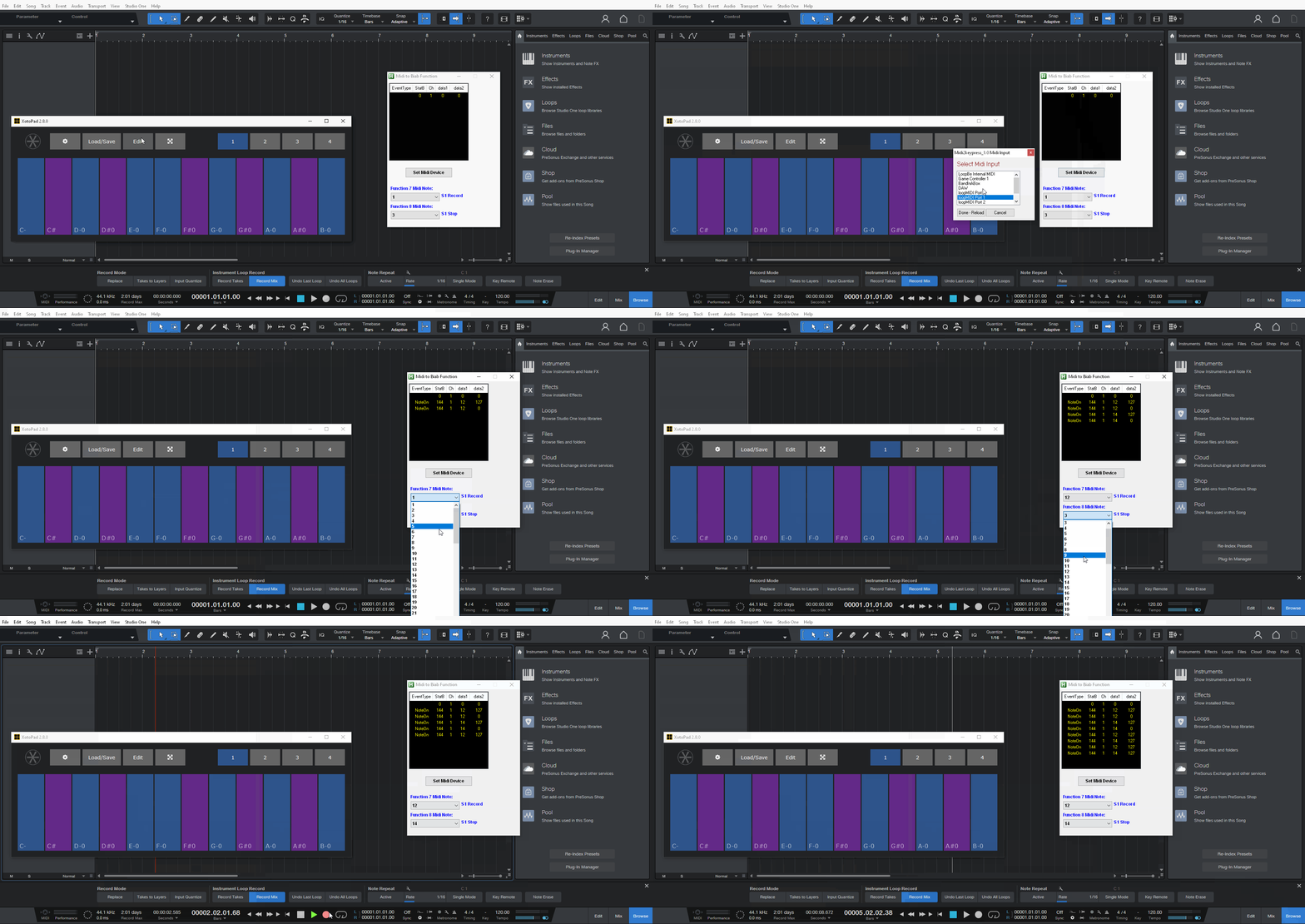
This will allow you to start record in Studio One with your very old keyboard https://www.pgmusic.com/forums/ubbthreads.php?ubb=showflat&Number=718863 you would just need to set it to studio one rather than Biab, this is easily done. You can set your keyboard to do any function in studio one by sending the hot key or accessing S1 menus.
Rather than:
winactivate,ahk_class TBandWindow
you will have
winactivate,ahk_class StudioOne (whatever name it users you get by running the windows spy.ahk and clicking on the S1 window will give the name to use)
Yes, the keyboard is 20 years old. I have rebuilt the main electronics board twice and built a new power supply. Fortunately, all the mechanical parts are in great shape.
I like the feel of the keys better than anything else I have tried. There are a few of these Technics keyboards for sale on Reverb. They are pricy for such an old keyboard.
But...a modern keyboard to replace it is 3k to 5k.
I have the keyboard set up in Studio One, both Midi and analog out from the keyboard. The midi signal is using an aftermarket USB device Roland UM-One. I also have midi cables if I need them. The new Focusrite interface has midi ports.
I will try to figure out the script.
Billy
“Amazing! I’ll be working with Jaco Pastorius, Charlie Parker, Art Tatum, and Buddy Rich, and you’re telling me it’s not that great of a gig? “Well…” Saint Peter, hesitated, “God’s got this girlfriend who thinks she can sing…”
When it first runs it will ask for the midi device, this may come up behind the main GUI window. It will send numpad * for record and spacebar for stop.
You can preset the midi notes with "Choose1" "Choose3"
All the other actions are for Biab, I can remove them if you just want the last 2 functions.
Band-in-a-Box 2026 for Windows Special Offers End Tomorrow (January 15th, 2026) at 11:59 PM PST!
Time really is running out! Save up to 50% on Band-in-a-Box® 2026 for Windows® upgrades and receive a FREE Bonus PAK—only when you order by 11:59 PM PST on Thursday, January 15, 2026!
We've added many major new features and new content in a redesigned Band-in-a-Box® 2026 for Windows®!
Version 2026 introduces a modernized GUI redesign across the program, with updated toolbars, refreshed windows, smoother workflows, and a new Dark Mode option. There’s also a new side toolbar for quicker access to commonly used windows, and the new Multi-View feature lets you arrange multiple windows as layered panels without overlap, making it easier to customize your workspace.
Another exciting new addition is the new AI-Notes feature, which can transcribe polyphonic audio into MIDI. You can view the results in notation or play them back as MIDI, and choose whether to process an entire track or focus on specific parts like drums, bass, guitars/piano, or vocals. There's over 100 new features in Band-in-a-Box® 2026 for Windows®.
There's an amazing collection of new content too, including 202 RealTracks, new RealStyles, MIDI SuperTracks, Instrumental Studies, “Songs with Vocals” Artist Performance Sets, Playable RealTracks Set 5, two RealDrums Stems sets, XPro Styles PAK 10, Xtra Styles PAK 21, and much more!
Upgrade your Band-in-a-Box for Windows to save up to 50% on most Band-in-a-Box® 2026 upgrade packages!
Plus, when you order your Band-in-a-Box® 2026 upgrade during our special, you'll receive a Free Bonus PAK of exciting new add-ons.
If you need any help deciding which package is the best option for you, just let us know. We are here to help!
Band-in-a-Box® 2026 for Windows® Special Offers Extended Until January 15, 2026!
Good news! You still have time to upgrade to the latest version of Band-in-a-Box® for Windows® and save. Our Band-in-a-Box® 2026 for Windows® special now runs through January 15, 2025!
We've packed Band-in-a-Box® 2026 with major new features, enhancements, and an incredible lineup of new content! The program now sports a sleek, modern GUI redesign across the entire interface, including updated toolbars, refreshed windows, smoother workflows, a new dark mode option, and more. The brand-new side toolbar provides quicker access to key windows, while the new Multi-View feature lets you arrange multiple windows as layered panels without overlap, creating a flexible, clutter-free workspace. We have an amazing new “AI-Notes” feature. This transcribes polyphonic audio into MIDI so you can view it in notation or play it back as MIDI. You can process an entire track (all pitched instruments and drums) or focus on individual parts like drums, bass, guitars/piano, or vocals. There's an amazing collection of new content too, including 202 RealTracks, new RealStyles, MIDI SuperTracks, Instrumental Studies, “Songs with Vocals” Artist Performance Sets, Playable RealTracks Set 5, two RealDrums Stems sets, XPro Styles PAK 10, Xtra Styles PAK 21, and much more!
There are over 100 new features in Band-in-a-Box® 2026 for Windows®.
When you order purchase Band-in-a-Box® 2026 before 11:59 PM PST on January 15th, you'll also receive a Free Bonus PAK packed with exciting new add-ons.
Upgrade to Band-in-a-Box® 2026 for Windows® today! Check out the Band-in-a-Box® packages page for all the purchase options available.
Band-in-a-Box 2026 Video: The Newly Designed Piano Roll Window
In this video, we explore the updated Piano Roll, complete with a modernized look and exciting new features. You’ll see new filtering options that make it easy to focus on specific note groups, smoother and more intuitive note entry and editing, and enhanced options for zooming, looping, and more.
Band-in-a-Box 2026 Video: AI Stems & Notes - split polyphonic audio into instruments and transcribe
This video demonstrates how to use the new AI-Notes feature together with the AI-Stems splitter, allowing you to select an audio file and have it separated into individual stems while transcribing each one to its own MIDI track. AI-Notes converts polyphonic audio—either full mixes or individual instruments—into MIDI that you can view in notation or play back instantly.
Bonus PAK and 49-PAK for Band-in-a-Box® 2026 for Windows®
With your version 2026 for Windows Pro, MegaPAK, UltraPAK, UltraPAK+, Audiophile Edition or PlusPAK purchase, we'll include a Bonus PAK full of great new Add-ons for FREE! Or upgrade to the 2026 49-PAK for only $49 to receive even more NEW Add-ons including 20 additional RealTracks!
These PAKs are loaded with additional add-ons to supercharge your Band-in-a-Box®!
This Free Bonus PAK includes:
The 2026 RealCombos Booster PAK:
-For Pro customers, this includes 27 new RealTracks and 23 new RealStyles.
-For MegaPAK customers, this includes 25 new RealTracks and 23 new RealStyles.
-For UltraPAK customers, this includes 12 new RealStyles.
MIDI Styles Set 92: Look Ma! More MIDI 15: Latin Jazz
MIDI SuperTracks Set 46: Piano & Organ
Instrumental Studies Set 24: Groovin' Blues Soloing
Artist Performance Set 19: Songs with Vocals 9
Playable RealTracks Set 5
RealDrums Stems Set 9: Cool Brushes
SynthMaster Sounds Set 1 (with audio demos)
Android Band-in-a-Box® App (included)
Looking for more great add-ons, then upgrade to the 2026 49-PAK for just $49 and you'll get:
20 Bonus Unreleased RealTracks and RealDrums with 20 RealStyle.
FLAC Files (lossless audio files) for the 20 Bonus Unreleased RealTracks and RealDrums
MIDI Styles Set 93: Look Ma! More MIDI 16: SynthMaster
MIDI SuperTracks Set 47: More SynthMaster
Instrumental Studies 25 - Soul Jazz Guitar Soloing
Artist Performance Set 20: Songs with Vocals 10
RealDrums Stems Set 10: Groovin' Sticks
SynthMaster Sounds & Styles Set 2 (sounds & styles with audio demos)
One of our representatives will be happy to help you over the phone. Our hours of operation are from
6:00AM to 6:00PM PST (GMT -8) Monday thru Friday, and 8:00AM to 4:00PM PST Saturday. We are closed Sunday. You can also send us your questions via email.
One of our representatives will be happy to help you on our Live Chat or by email. Our hours of operation are from
6:00AM to 6:00PM PST (GMT -8) Monday thru Friday; 8:00AM to 4:00PM PST (GMT -8) Saturday; Closed Sunday.






 Dansk
Dansk Deutsch - Windows
 Español
 Français - Windows
 Italiano - Windows
 Nederlands
 Polski
 Português
 Svenskt
 русский
 Japanese
 Simplified Chinese
 Traditional Chinese
 Korean