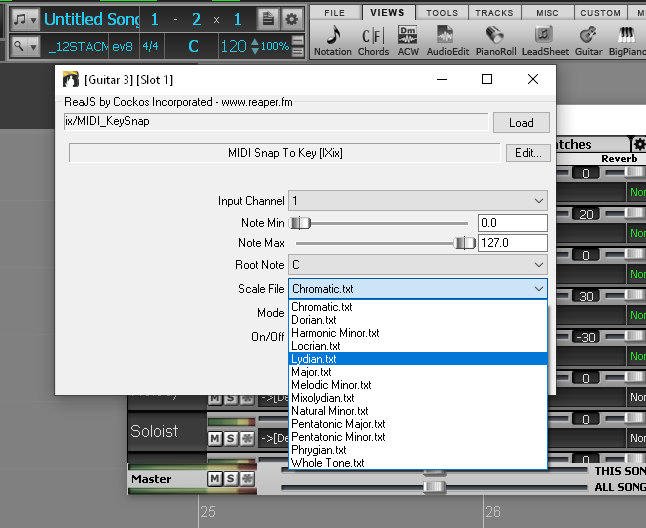
If you are looking to hit a button and get a great solo you are best to look at AI to do everything for you. I would rather work with human made tracks in Biab and put my human creativity into it also. Most of the generators in RC are mechanical for EDM styles. If you have saved phrases with controllers and keyswitches in RC in the library they are easily dragged n dropped any where and with fit the set chord/scale, this IS the main thing about it, it's Rapid, I can't do that in Biab, I have asked them many times, I did make a Plugin for Biab (Biab Snap MIDI To Chords & Biab MIDI Key Snap) but because you can't chain vsti in Biab it's just another hassle of a workaround. In Reaper I can do anything I conceive of with scripting like the Track Injector it gives so much more control in the creation process to step outside the limits of Biab.
To try and bring Biab RealBand out of the dark ages and help develop a Plugin version spending 14 years up against it all dealing with protectionism keeping it in the 90's you get worn out, disappointed and frustrated as it takes so much time and energy, so you get rid of accounts and emails to "ban" yourself so you can't log in, but then you have a rest from it all and back in the ring to take another swing. There has been so much implemented but it takes soooo long and still remains behind playing catch up. It's easy for users to knock things rather than coming up with ideas themselves. It's a curse to able to see issues from a hundred miles away hence you are up against it with those that don't. I shouldn't have to be the main one here posting all this info for quantum leap improvements, I tried hard in other forums to get knowledgeable users here to help drive it, I was even going to BUY Biab for them but could not get anyone
Quote:
That's the problem with young people popping in briefly and leaving imho. An old looking GUI being talked about by their parents (or grandparents) and referencing ancient music to do it. What 25 year old cares about that? As far as they're concerned it's an old program for old people.
>>"Band-in-a-Box is bad at generating professional guitar solos" >>Why don't you give yourself less than an hour, generate an easy 16 bar solo, and send me the mixed MP >> Go with key of C, 65 bpm, even feel, use a typical pop melodic chord progression:
F-G-Em-Am-Dm-G-C-C7 F-G-Em-Am-Dm-G-C-C ========================================= Music Villain,
OK. I took you up on your challenge to generate a professional sounding guitar solo for your chord progression. I didn't need one hour to do it, just two minutes, and did absolutely no editing. I don't want to hijack this thread, so have started a new one. Hopefully you can listen to the solo, and comment on it. And let me know if you stick by your comment that "Band-in-a-Box is bad at generating professional guitar solos". Because this 'first take, no editing' generated solo sounds good to me.
I can't do that in Biab, I have asked them many times, I did make a Plugin for Biab (Biab Snap MIDI To Chords & Biab MIDI Key Snap) but because you can't chain vsti in Biab it's just another hassle of a workaround.
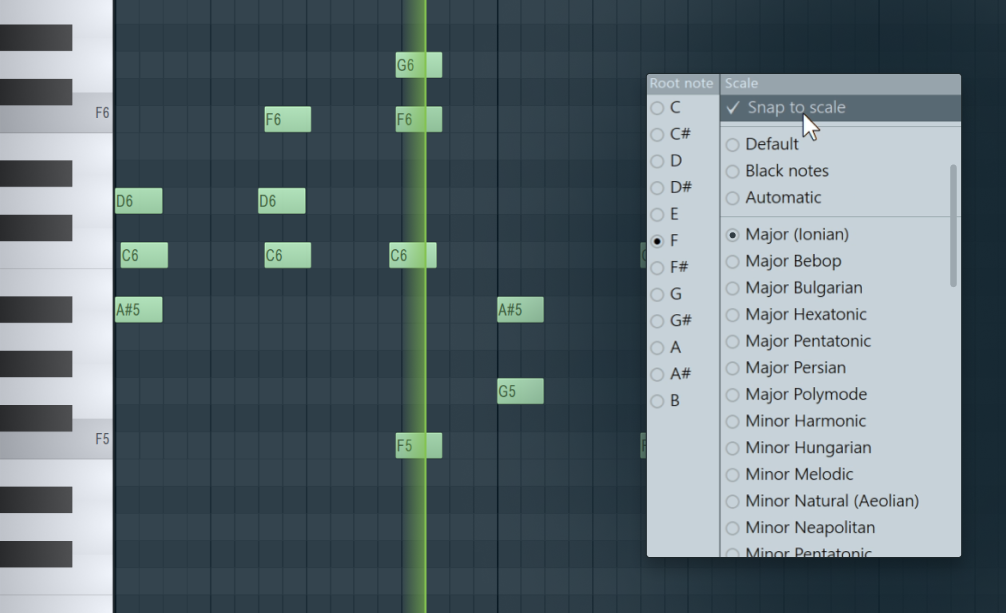
I just got this email, and I'm the crazy guy here that talks BS: noreply@mailing.image-line.com FL Studio 21.1: Get powerful new features in this free update
Snap to Scale Automatically snap Piano Roll notes to a selected scale when adding or moving them. Access it with the new ‘Note’ icon in the Toolbar.
Hopefully you can listen to the solo, and comment on it. And let me know if you stick by your comment that "Band-in-a-Box is bad at generating professional guitar solos".
Peter, you have no idea how much I hope I was wrong about this. BiaB is the most efficient music software I have ever used, and generating a guitar solo with a virtual guitar instrument is a painful learning curve.
My problem with BiaB generated solo is, it's good, but not perfect, so you need to partial regen. When you partial regen, for musicality purpose, you need to regen a full bar, or at least a full beat. The result is always very close, but not the best.
The solution would be, directly comping the source material in the RealTracks folder. But I can't open and read .bt1 file, and therefore I don't know which chord is referred to which bar in the original recording. Hope you know what I'm talking about here.
A Canadian music producer, singer songwriter, composer, and professional guitarist.
Peter, it would be kind of you, if you could tell us the BiaB users, how to open and read a .bt0 and .bt1 file. Why? Because these files are RealTrack chord mapping files. If we can read it, we will know which chord is recorded to which bar of the .wma source file in the RealTracks folder, then we can directly open, chop, and comp the wma source files according to chord, works much faster than partial regen twenty times for one bar.
I thought they were just beat files and all the info is in ST2 XT2. If you want all that info just use the track injector.
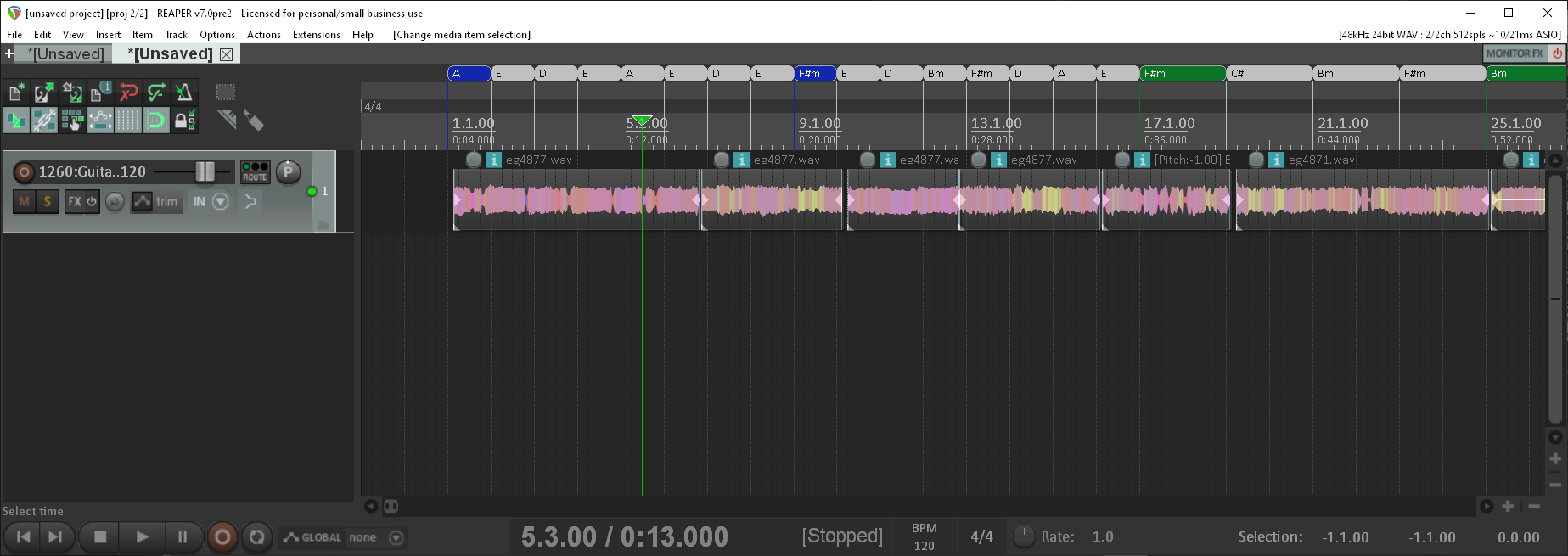
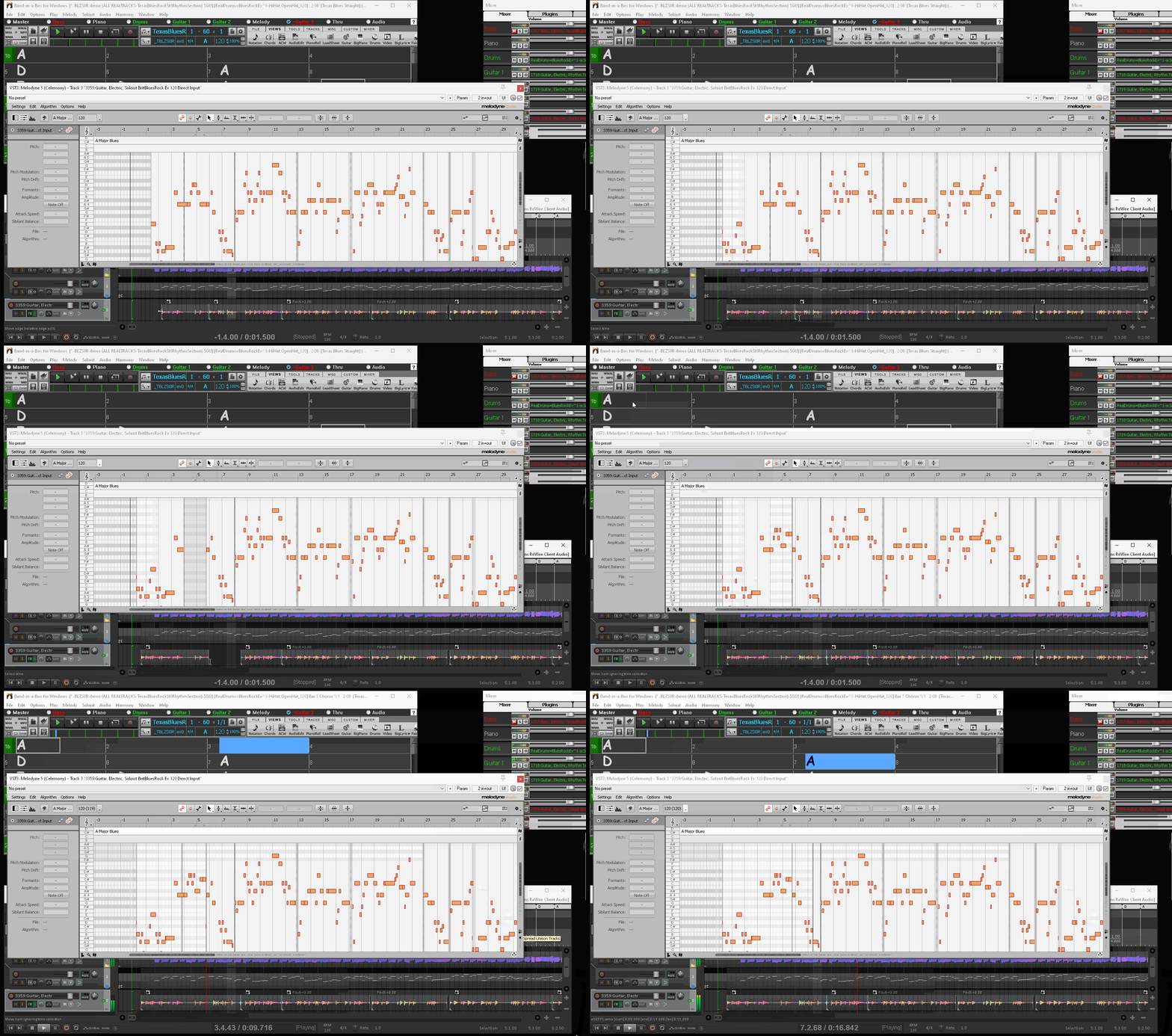
I might have an easier way to do it all soon rather that having to use the Track Injector. If you use wav files you can also write the info in as cue points that you can see if your DAW will display them like Reaper. All the sections below you can edit to tweak or get the solo you want and be able to change the track to DI <> FX:
These are the original solo sections from a Biab track. Any section I can extend or shorten the original playing. If you watch the video where you have the gaps you can manually merge so there's no stop, you can't do that with a consolidated wav or in Biab now how it is: Reaper-RT-Solo-Extend.mp4
I thought they were just beat files and all the info is in ST2 XT2. If you want all that info just use the track injector. I might have an easier way to do it all soon rather that having to use the Track Injector.
Musocity, I tried to open ST2 and XT2 files with a txt editor and failed miserably.
First, could you provide a step by step guide with detailed explanations on how to use Track Injector without complicated installation process, scripting, or using Reaper. No way I am a tech expert to explore this deep and all I want is to view the file, and know which bar is playing which chord. The only two DAWs I'm using are FL Studio and Cubase, nothing else.
Second, it would be great if you could come up with an easier solution, just to view the file.
Third, what if I want to know the chord mapping for rhythm type RealTracks, such as rhythm acoustic guitars, rhythm electric guitars, basses, etc. Do I still need to view ST2 and XT2 files in the Soloist folder?
This, is so important, to make BiaB solos great again.
A Canadian music producer, singer songwriter, composer, and professional guitarist.
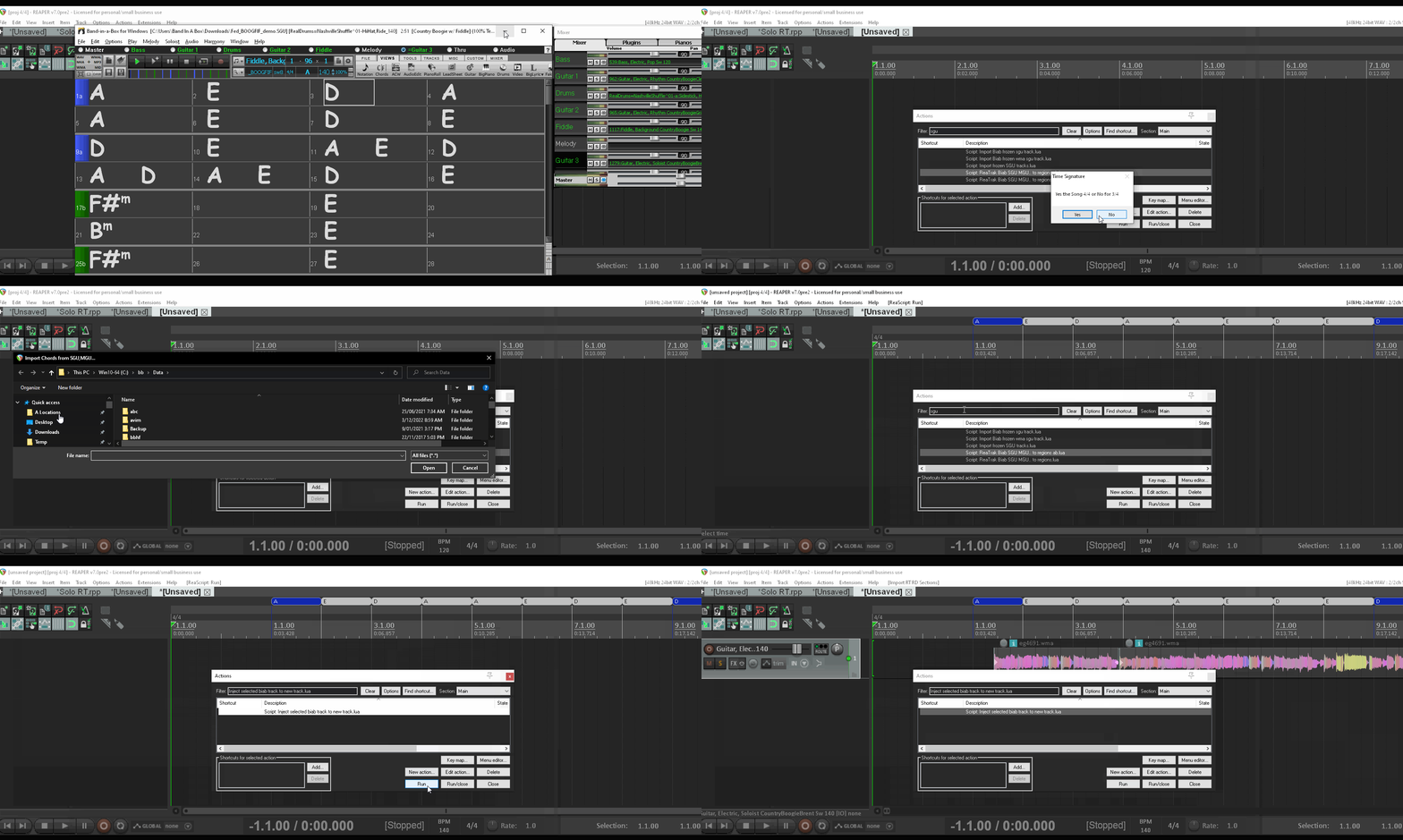
If you can use Reaper enough to just to edit the solo it will be so easy you only need to run a script to get the chord sheet and one to get the track:
Hopefully you can listen to the solo, and comment on it. And let me know if you stick by your comment that "Band-in-a-Box is bad at generating professional guitar solos".
Peter, you have no idea how much I hope I was wrong about this. BiaB is the most efficient music software I have ever used, and generating a guitar solo with a virtual guitar instrument is a painful learning curve.
My problem with BiaB generated solo is, it's good, but not perfect, so you need to partial regen. When you partial regen, for musicality purpose, you need to regen a full bar, or at least a full beat. The result is always very close, but not the best.
The solution would be, directly comping the source material in the RealTracks folder. But I can't open and read .bt1 file, and therefore I don't know which chord is referred to which bar in the original recording. Hope you know what I'm talking about here.
MusicVillain,
The Band-in-a-Box Audio Chord Wizard, or ACW for short, can assist you with matching audio with bars and with detecting what chords are located in each bar. Check out +++ THIS +++ 8:53 YouTube video.
One issue is obvious from my screenshot below, each RealTrack folder contains multiple audio files. The answer is to use the import function to load each audio file back to back so there is one, long audio stream
Jim Fogle you've got it! ACW is exactly what I have been doing right now, using its chord detection function to figure out which chord is being played on which bar of the wma source audio, so I can chop and comp these source audios in a DAW by myself.
There's only one problem: it's a post-recording action, not a pre-recording action. Meaning, if the wma file gets a bit complex, ACW will tell the wrong chord, screw everything.
Jim Fogle you know how to record a User Track, and RealTrack were recorded in the same way. A user/player is given a chord sheet, with different chords, and he play along and record, then BiaB uses the chord sheet to determine which part of his track is on which chord, so later it can be cutout and inserted into a new song based on the new song's chords.
I wonder, why PG Music doesn't give this reference chord sheet of each RealTrack to its users? The size is very small. With this reference chord mapping chart, it is 100% accurate because Brent Mason recorded the whole track based on it. If BiaB starts to generate sour notes or inconsistent octaves on any RealTracks, a user with this chord chart can simply drag the source wma to his DAW, quickly find the chord he needs, cut it out, and get it done.
I truly hope, there's a way of achieving this.
A Canadian music producer, singer songwriter, composer, and professional guitarist.
I have asked for that info for ages ! that's why I ended up making track injector you can get all this info using it. I have been through all that with ACW and Melodyne, to get it accurately use the Injector.
The Villain, supposedly, a guitar player oops Professional guitar player. I'd have thought he'd generate his own solos. I find most BIAB solos a little too pro sounding - too genre specific - and lacking the sort of noise/accident/dissonant weirdness I enjoy.
Cheers rayc "What's so funny about peace, love & understanding?" - N.Lowe
MusicVillian, could I ask a respectful question? If you are a professional guitarist why not play the guitar tracks?
Having ask that I understand part of the issue you are describing. Some times I generate a RT and it plus the chord it seems different from what I expect so the the chord adds a sound that takes the song to a different direction tone wise.
Best way to describe it is it seems to to go up in tone rather than down. Example a song you are familiar with goes from an A chord to an E chord the vocal goes down and the the chord up. You just don’t hear the notes you want in the chord. Don’t know if that makes sense or not but just my observation.
HP Win 11 12 gig ram, Mac mini Sonoma with 16 gig of ram, BiaB/RB 2026, Reaper 7, Harrison Mixbus 11 , Presonus Audiobox USB96
If BiaB starts to generate sour notes or inconsistent octaves on any RealTracks, a user with this chord chart can simply drag the source wma to his DAW, quickly find the chord he needs, cut it out, and get it done.
Can't you do that by ear? You'd have to work your way through the file anyway.
Cheers rayc "What's so funny about peace, love & understanding?" - N.Lowe
rayc, I agree, BiaB can do a great job generating chording tracks, but when it comes to solo tracks generating, there's always something off, either in notes or in timing, the solo just doesn't feel exciting.
Figuring out chords by ear would be impossible. Each RealTrack recording starts with major and minor chords, which are easy to identify, then it moves to 7th and dominant 7th, augment and diminish, then it goes to sus 4, add 9, flat 5, getting more and more complicated.
The best way, is still for PG to share with its users the RealTrack chord sequence sheet.
A Canadian music producer, singer songwriter, composer, and professional guitarist.
Rob Helms, you are right about RealTracks, many times it generates out-of-tune notes in the chord, aka sour notes. There's nothing you can do with sour notes except for having to regen.
Regarding to guitar solos, I can play very well but I'm still not Slash, so when it comes to emotional shred part with continuous 32rd notes, it's game over for me. That's why I need to rely on virtual guitar to generate Guns & Roses level solos to be put in my production.
A Canadian music producer, singer songwriter, composer, and professional guitarist.
<< I wonder, why PG Music doesn't give this reference chord sheet of each RealTrack to its users? The size is very small. With this reference chord mapping chart, it is 100% accurate because Brent Mason recorded the whole track based on it. If BiaB starts to generate sour notes or inconsistent octaves on any RealTracks, a user with this chord chart can simply drag the source wma to his DAW, quickly find the chord he needs, cut it out, and get it done.
I truly hope, there's a way of achieving this. >>
I can't speak for PGMusic and I'm not affiliated with them in any way, however, I've studied the BIAB production process, demos, and forum discussions to surmise the following.
The fact there are sour notes by top grade session players who obviously didn't play sour notes is a big clue to what's going on. What users presume are sour notes that somehow made it through the PGMusic developers, engineers and quality control that's certainly in place is a major clue that sour notes are 'out of place' rather than wrong. The Bt, ST2 and XT2 files exist for the BIAB algorithm and I presume are proprietary information that work in conjunction with WAV instructions. The decoded text files I've seen presented to capture chords and decode progressions have never contained any of the advanced processing that's in BIAB generated tracks. The fact that BIAB has a tool to correct sour notes is also a clue the issue is related to the algorithm selection process and not poorly played notes or chords.
It's my thought that users who generate tracks and export out to DAW's as quickly as possible are getting the rawest and most elementary track that BIAB can produce and users lose 100% of most advance features BIAB is capable of producing the moment they export or generate tracks from the main program, Plug-in or RealBand.
It's not possible to quickly find the best possible replacement for a sour note that's a better choice than BIAB can do it for several reasons.
First, as Jim Fogle displayed, there are normally multiple audio recordings for a RealTrack. However, BIAB can search and select audio from multiple RealTracks other than the one displayed in the Mixer. Users may or may not know of the RealTrack Medley Maker that provides 10 additional slots for any other RealTrack to be merged with the main RealTrack displayed in the BIAB Mixer. This feature is available for the seven original Legacy Tracks. Therefore, BIAB can generate up to 77 separate RealTracks in a single render and can manipulate how these 77 slots will play out in the BIAB Chord Chart in 8-10 different ways. By various bar counts (2,4,8,16,32), Part Markers, Choruses, whole song, and manually or play them all simultaneously. This is evidence BIAB can read from and select audio from a minimum of eleven different RealTracks at once.
These track sub-mixers have panning and volume controls for each additional RealTrack. There are special RealTracks to specifically interact with these sub-mixer RealTracks that along with WAV instructions direct the BIAB to make specific audio choices for intro's and outro's and process multiple actions across a single measure of the chord chart where one RT instrument is fading and another fades in, providing cross fading and correct audio for an ending for instrument and opening phrasing for the other instrument.
A user can designate all seven mixer tracks and sub-mixer tracks to specifically take advantage of the BIAB algorithm in order to comp a single instrument performance that's saved as an Artist Performance File. The Artist Performance File is imported and placed on a Legacy or Utility Track and the process can be repeated for another instrument. This process can be repeated over and over.
BIAB recognizes RT-1152 Silence the same as other RT's and BIAB will react differently and select different audio snippets than if a user chooses to use the (F5) mute feature and this method eliminates abrupt cut-off endings and intros. The difference is due to when using RT-1152 or any other RT, BIAB selects the audio based on the Chord Chart and Mixer programing which is a pre-render action whereas using (F5) mute is a post-render action.
Many users may never think of a time to need 77 RealTracks in a song and that's true. But, it's important to note these are RealTrack slots. This means as few as two RealTracks is all that's necessary to fill these slots in a pre-render arrangement format allowing a single song that consists of hundreds of variations and changes between the RealTracks. This makes it incredibly fast and easy to swap instruments while retaining the arrangement of the instruments and allows the BIAB algorithm to provide all its advanced features.
Note also that PGMusic staff finalizes all of the demos, demo with vocals, lessons and RealTrack/RealStyle videos as BIAB files. Not as RealBand Seq files, Pro-tools, Sonar, Studio One, Cakewalk or Reaper files. They use these software tools, but not from the inside out to finish them but from the outside in.
Then there's the additional features like MultiStyles that aren't recognized by the Plug-in, RealBand or any DAW.
While this is speculation on my part, so far, treating the speculation as true has given me the expected results 100% of the time.
Charlie Fogle, you are getting too technical here. I read your essay back and forth twice, still didn't have a clue on how to use the medley slot to fix the bad chords.
Say, I open up BiaB, enter my chords, choose a style, generate a standard 32 bar song, all bars are set to substyle A, the song includes a Brent Mason fingerpick acoustic guitar track.
Then I single this fingerpick track, mute everything else, listen, and find the track is a total mess.
In Bar 7, the chord has obvious sour notes and doesn't fit the song. In Bar 13, the chord sounds bad and it's transposed from a different key. In Bar 22, the chord is in the wrong octave, notes are an octave higher than Bar 21 & 23, doesn't fit in between. In Bar 26, the chord is in the wrong play style, it plays much more notes than Bar 25 & 27, musically sounds bad.
So, can you provide a step by step guide, on how you would fix Bar 7, 13, 22, 26?
The current method I'm using, is to freeze everything, sit there, track by track, bar by bar, repetitively partial regen, until a proper chord is generated, very time consuming.
Doing partial regen to fix a bad generated chord, is like playing Russian Roulete, you never know the next one you get is good or worse.
A Canadian music producer, singer songwriter, composer, and professional guitarist.
Last Chance! The Band-in-a-Box® 2026 for Mac® Special Ends Today (May 31, 2026) at 11:59pm PDT!
Time really is running out! Save up to 50% on Band-in-a-Box® 2026 for Mac® upgrades and receive a FREE Bonus PAK—only when you order by 11:59 PM PDT today!
We've added many major new features and new content in a redesigned Band-in-a-Box® 2026 for Mac®!
Version 2026 introduces a modernized GUI redesign across the program, with updated toolbars, refreshed windows, smoother workflows, and a new Dark Mode option. There’s also a new side toolbar for quicker access to commonly used windows, and the new Multi-View feature lets you arrange multiple windows as layered panels without overlap, making it easier to customize your workspace.
Another exciting new addition is the amazing new AI-Notes feature, which can transcribe polyphonic audio into MIDI. View the results in notation or play them back as MIDI, and choose whether to transcribe an entire track or transcribe specific parts like drums, bass, guitars/piano, or vocals. There's over 100 new features in Band-in-a-Box® 2026 for Mac®.
There's an amazing collection of new content too, including 202 RealTracks, new RealStyles, MIDI SuperTracks, Instrumental Studies, “Songs with Vocals” Artist Performance Sets, Playable RealTracks Set 5, two RealDrums Stems sets, and much more!
Upgrade your Band-in-a-Box for Mac® to save up to 50% on most Band-in-a-Box® 2026 upgrade packages!
Plus, when you order your Band-in-a-Box® 2026 Mac upgrade during our special, you'll receive a Free Bonus PAK of exciting new add-ons.
If you need any help deciding which package is the best option for you, just let us know. We are here to help!
Band-in-a-Box® 2026 Mac Special Offers Extended Until May 31st!
Good news- we've extended our Band-in-a-Box® 2026 for Mac® special offers until May 31, 2026!
Band-in-a-Box® 2026 is packed with major new features, enhancements, and an incredible lineup of new content! The program now sports a sleek, modern GUI redesign across the entire interface, including updated toolbars, refreshed windows, smoother workflows, a new dark mode option, and more. The brand-new side toolbar provides quicker access to key windows, while the new Multi-View feature lets you arrange multiple windows as layered panels without overlap, creating a flexible, clutter-free workspace. We have an amazing new “AI-Notes” feature. This transcribes polyphonic audio into MIDI so you can view it in notation or play it back as MIDI. You can transcribe an entire track (all pitched instruments and drums) or focus on individual parts like drums, bass, guitars/piano, or vocals. There's an amazing collection of new content too, including 202 RealTracks, new RealStyles, MIDI SuperTracks, Instrumental Studies, “Songs with Vocals” Artist Performance Sets, Playable RealTracks Set 5, two RealDrums Stems sets, and much more!
There are over 100 new features in Band-in-a-Box® 2026 for Mac®.
When you order purchase Band-in-a-Box® 2026 before 11:59 PM PDT on May 31st, you'll also receive a Free Bonus PAK packed with exciting new add-ons.
Check out the Band-in-a-Box® for Mac packages page to find the best package for you.
Today's the Last Day of the Band-in-a-Box 2026® for Mac Special!
Order before 11:59pm PDT today (May 15, 2026) to save up to 50% off your Band-in-a-Box® 2026 for Mac® upgrade and receive a FREE Bonus PAK loaded with great new Add-ons to use with this new version!
Band-in-a-Box® 2026 for Mac - Special Offers End at 11:59pm PDT on Friday, May 15th, 2026!
Order before 11:59pm PDT on Friday, May 15th and SAVE up to 50% on most Band-in-a-Box® version 2026 for Mac Upgrade packages... and that's not all! With your version 2026 for Mac purchase, we'll include a Bonus PAK full of great new Add-ons FREE! Upgrade to the 2026 49-PAK to receive even more NEW Add-ons including 20 additional RealTracks... that's 222 NEW RealTracks available with version Band-in-a-Box® 2026 for Mac!
Upgrade to Band-in-a-Box® 2026 for Mac® today for as little as $49! Check out the Band-in-a-Box® packages page for all available purchase options.
Learn more about the Free Bonus PAK and 49-PAK here.
If you have any questions about which package is the best option for you, just let us know. We're here to help!
202 New RealTracks Released with Band-in-a-Box 2026!
With Band-in-a-Box® 2026, we've released 202 incredible new RealTracks (in sets 468-488) in a variety of genres—featuring your most requested styles!
Jazz, Funk & World (Sets 468-475):
Our new jazz, funk & blues RealTracks include a groovin’ collection of RealTracks and RealDrums! These include more requested “soul jazz” RealTracks featuring artists Neil Swainson (bass), Charles Treadway (organ), Brent Mason (guitar), and Wes Little (drums). There are new “smooth jazz” styles (4), which include a RealTracks first: muted trumpet, as well as slick new smooth jazz brushes options for drums. Blues lovers will be thrilled—there are more “classic acoustic blues” styles, including guitar (5), bass (4), and drums (10) with blues master Colin Linden, featuring understated and tasty background acoustic soloing, plus brushes drums and acoustic bass. There are also new electric blues RealTracks, including electric blues with PG favorite Johnny Hiland (3) and soulful electric slide guitar from Colin Linden (4). If you love funk & gospel, there are great new options this year, including gospel organ (3) from Charles Treadway, as well as new funk, tango, and rock ’n’ roll drums (3) and bass (1). And for big, bold arrangements, we have uptempo soul horns (4) featuring a three-part hip horn section with options for a full mix or stems of each individual horn — plus an accompanying rhythm section (4) of drums, bass, guitar, and electric piano!
Rock & Pop (Sets 476–482):
Our new rock & pop RealTracks bring a powerful mix of requested favorites, fresh genres, and modern chart-inspired styles! We have more of our popular “Producer Layered Acoustic Guitars (15)” featuring Band-in-a-Box favorite Brent Mason. We’ve continued our much-requested disco styles (10), and added new Celtic guitar (5) with a more basic, accessible approach than our previous Drop-D or DADGAD offerings. There are also highly requested yacht rock styles (17), inspired by the smooth, polished soft-rock sound of the late ’70s and early ’80s — laid-back grooves, silky electric pianos, warm textures, elegant harmonic movement, and pristine production aesthetics. Fans of heavier styles will love our new glam metal (13), capturing the flashy, high-energy sound of ’80s arena-ready guitar rock. We also have a set of rootsy modern-folk rock (18), with a warm, organic sound combining contemporary folk textures and driving acoustic strumming. And we’ve added lots of new modern pop styles (16) — the kinds of sounds you’re hearing on the radio today, featuring exciting new drums, synths, and cutting-edge RealTracks arrangements.
Country, & Americana (Sets 483–488):
Our new country & Americana RealTracks deliver a rich collection of acoustic, electric, and roots-inspired styles! We have new country pop (9) with legendary guitarist Brent Mason. There is also a potpourri (14) of bouzouki, guitars, banjo, and more, perfect for adding texture and character to contemporary acoustic arrangements. We’ve added funky country guitar (5) with PG favorite Brent Mason, along with classic pedal steel styles (5) featuring steel great Doug Jernigan. There are more country songwriter styles (8) that provide intimate, rootsy foundations for storytelling and modern Americana writing. Finally, we have “background soloing” acoustic guitar (12) with Brent Mason — simpler, but still very tasty acoustic lines designed to sit beautifully behind vocals or act as a subtle standalone solo part.
And, if you are looking for more, the 2026 49-PAK (for $49) includes an impressive collection of 20 bonus RealTracks, featuring exciting and inspiring additions to add to your RealTracks library. You'll get new country-rhythm guitar styles from PG Music favorites Johnny Hiland and Brent Mason, along with modern-pop grooves that capture today’s radio-ready sound! There are also new indie-folk styles with guitar, bass, 6-string bass used as a high-chording instrument, acoustic guitar, and banjo. Plus, dedicated "cymbal fills" RealDrums provide an added layer that work very well with low-key folky styles with other percussion.
The 2026 49-PAK is loaded with other great new add-ons as well. Learn more about the 2026 49-PAK!
2026 Free Bonus PAK & 49-PAK for Band-in-a-Box® 2026 for Mac®!
With your version 2026 for Mac Pro, MegaPAK, UltraPAK, UltraPAK+, Audiophile Edition or PlusPAK purchase, we'll include a Bonus PAK full of great new Add-ons for FREE! Or upgrade to the 2026 49-PAK for only $49 to receive even more NEW Add-ons including 20 additional RealTracks!
These PAKs are loaded with additional add-ons to supercharge your Band-in-a-Box®!
This Free Bonus PAK includes:
The 2026 RealCombos Booster PAK:
-For Pro customers, this includes 27 new RealTracks and 23 new RealStyles.
-For MegaPAK customers, this includes 25 new RealTracks and 23 new RealStyles.
-For UltraPAK customers, this includes 12 new RealStyles.
MIDI Styles Set 92: Look Ma! More MIDI 15: Latin Jazz
MIDI SuperTracks Set 46: Piano & Organ
Instrumental Studies Set 24: Groovin' Blues Soloing
Artist Performance Set 19: Songs with Vocals 9
Playable RealTracks Set 5
RealDrums Stems Set 9: Cool Brushes
SynthMaster Sounds Set 1 (with audio demos)
iOS Android Band-in-a-Box® App
Looking for more great add-ons, then upgrade to the 2026 49-PAK for just $49 and you'll get:
20 Bonus Unreleased RealTracks and RealDrums with 20 RealStyle.
FLAC Files (lossless audio files) for the 20 Bonus Unreleased RealTracks and RealDrums
MIDI Styles Set 93: Look Ma! More MIDI 16: SynthMaster
MIDI SuperTracks Set 47: More SynthMaster
Instrumental Studies 25 - Soul Jazz Guitar Soloing
Artist Performance Set 20: Songs with Vocals 10
RealDrums Stems Set 10: Groovin' Sticks
SynthMaster Sounds & Styles Set 2 (sounds & styles with audio demos)
One of our representatives will be happy to help you over the phone. Our hours of operation are from
6:00AM to 6:00PM PST (GMT -8) Monday thru Friday, and 8:00AM to 4:00PM PST Saturday. We are closed Sunday. You can also send us your questions via email.
One of our representatives will be happy to help you on our Live Chat or by email. Our hours of operation are from
6:00AM to 6:00PM PST (GMT -8) Monday thru Friday; 8:00AM to 4:00PM PST (GMT -8) Saturday; Closed Sunday.









 Dansk
Dansk Deutsch - Windows
 Español
 Français - Windows
 Italiano - Windows
 Nederlands
 Polski
 Português
 Svenskt
 русский
 Japanese
 Simplified Chinese
 Traditional Chinese
 Korean