It would be nice, when Band in a Box could be used as live arranger, without typing in first all chords. Only this will allow to make spontaneous live music. Es wäre toll, wenn man Band in a Box auch als Live-Arranger benützen könnte, ohne dass man vorgängig alle Akkorde eingeben muss. Nur dies erlaubt ein spontanes Musizieren.
This has been asked of PGMusic many times; however, the answer has been that it's not in the works, mainly because of how BIAB works. It's a look ahead system that picks parts based on what's coming up in the chord progression.
I will agree that this would be nice to have (you would think they could turn of the look ahead features and just choose a pattern for the currently selected chord; however, you would still need a way to handle fills and A/B style variations. And then what happens when someone picks a style with RealTracks? Etc, etc. I suspect that it is probably conceptually easy to do, but once you start digging, it's easier said than actually done.
John
Laptop-HP Omen I7 Win11Pro 32GB 12TB SSD Desktop-ASUS-I7 Win10Pro 32GB 12TB SATA
80% well that's a no brainer then. There's another reason for direct play, if Biab just loads the RT data from the selected style then plays back the inputted chord direct from the RT's on the hard drive. Else as mention you could generate up up tracks in the key/chords you want to play in and Biab on chord change will go to those bars with smooth seek like Reaper. The smooth seek will also allow the Conductor to work.
Originally Posted By: chrisroode
Jun 14, 2021 at 10:39pm Hello, just discovered this software...perfect for my teaching job! Anyway....Is there a way to have JJazzLab recognize chords from a midi input?
I only need (literally) the same thing those casio keyboards do, where I can play a C maj chord, and the accompaniment instead switches to C maj. Then when I play an Fmaj chord (even in 2nd inversion) it will switch to that.
I'm planning to use this software for echo playing of rhythms and melodic passages to teach beginning band kids. I like to have the chords change with what I play, but there is no specific form to what I'm doing...so if say the kids mess up a measure that goes Bb, F7, then I want to be able to repeat that on the fly, and I can easily do that if I am at a keyboard and just hammering out the melody on the right hand and playing block chord changes on the left.
Summer break is coming, and if this is not something available, I am willing to fork and make it...
Originally Posted By: Jerome
Oct 1, 2021 at 4:26am @chrisroode I've implemented it in JJazzLab 3.0, to be released in november probably.
There is a slight delay (<1 sec) when you change the chord on the keyboard to get the backing track updated, so it's not pure real-time like vArranger, but it should not be a problem for your use case.
so when a chord is played on the user's keyboard it will play that chord directly from the location in the source file. If a new chord is not entered it will loop that same chord section again or another one with the same chord.
I just tried this in Reaper and it all just works playing the files direct from hard drive without a glitch, as I change the input chord it will play that section in the files on the USB drive. It can change on the next beat or at the end of a bar.
Rather than choosing chord sections from the source files to join together in RAM then play, it will choose a section for the currently inputted chord, go straight to it and play. This is what it is doing in the video, they are 24bit 48khz files on a USB drive. Biab could do that and be a live Arranger, I think Yamaha have audio drums but I don't know if they have audio instruments yet. Biab could be then used with a laptop and the user's keyboard.
That would be awesome. I have a Yamaha workstation that can be the sound engine for a BIAB chord sheet except for RealTracks. It can play audio from a flash drive in sync triggered by multipads pressed manually. I do it from the keyboard and never tried it connected to the PC and BIAB.
This is using 2 BBPlugins to get a verse ending and chorus ending in the other. It is playing the files back direct from the SavedTracks folders. So Biab should be able to play the RTs direct and live.
I don't have an arranger keyboard so I'm not sure exactly how they are set up, but I thought something like this below, if you think that will work ? If you hit a keyswitch that will be the next section played on a new chord or the same chord is played, the change will occur on next beat or bar. If no section keyswitch is hit it will continue with the current.
You can see right hand obviously plays a melody with a pre-selected instrument patch. A style is pre-selected on the keyboard for the accompaniment (similar to how we audition and select styles in BB). The keyboard has a row of buttons to start/stop the accompaniment, to switch between A/B/C/D variations, to increase/decrease tempo, and there may also be special Intro/Outro variations (with predefined chords based on a key) and drum fills that can be triggered and well as rests.
To recreate a similar set of features, it could either be built somewhere into BB or perhaps as a standalone app.
Before live playing, the following settings could be adjusted: * Tempo * Select style (existing BB popup window) * Mixer (solo/mute/select track/erase track - reuse from BB) * Choose instrument (MIDI patch or an external plugin such as Komplete or Arturia V-Collection or Spitfire) * Choose split point (which is the lowest note that will play a note instead of being recognized as a chord)
Prominent buttons in the interface which can be clicked and linked to computer keyboard shortcuts and also MIDI controller buttons (CC mapping)
Buttons and possible keyboard shortcuts: * Tempo Up (A) / Down (Z) / Default Recommended Tempo for style (Q or A+Z together) * Play/Pause (SPACE) * Drum Fill (X) * Variation A (1) / B (2) / C (3) / D (4), etc where applicable for multi-styles * Bass vol increment (D) / decrement (C) * Piano vol increment (F) / decrement (V) * Drums vol increment (G) / decrement (B) * Strings vol increment (H) / decrement (N) * Guitar vol increment (J) / decrement (M)
Don't read into the keyboard shortcut letters too much, it's more about their relative positions next to each other (i.e. A + Z, D + C are like Up/Down buttons).
Perhaps before playing live, users must click a Generate button after selecting a new style. This could generate various temporary WAV files for each real track with every possible chord and variation. Percussive tracks would of course be easier/different. When playing live and you press G+C+E keys on the left side of your MIDI (musical) keyboard, the program would intelligently find the pre-generated section for each real track for the current variation where a C/G and play that instantly (at the next 16th of a bar, now possible with BB 2022).
Inspiration for other features/settings could come from analyzing Yamaha/Roland keyboards further. If this were a separate feature I'd honestly pay a one-time extra $40 or $50 for it.
If PG-Music wishes, I could mock up a simple UI design for it.
The very helpful guys over at Reaper implemented the Windows Media Foundation codec to play the Biab compressed files on old or new hardware. Here's your Biab Live Arranger playing wma direct https://www.dropbox.com/s/g28fd8zss4me8h8/Biab-Live-Arranger-WMA.mp4?dl=0 so what Reaper is doing there Biab can do the same, it would be good to put it in an easy programmed crossplatform language so you don't spend half the year on Win and the other half on Mac. It just needs to be basic without all the Biab features. When the user loads a style it just loads all the track data for those RTs and plays the user's chord input back direct from the wma/wav source file sections that are referenced in the data. Or you can just wait till Yamaha do it
Yes, I think because of the way Biab works (generating all stuff at first), it will cause performance issues when Biab needs to react in milliseconds to ad hoc chord changes - no pre-generation of anything.
But I aggree, it would be wonderful. I enjoy playing random stuff on my Tyros in various styles on the keyboard.
Cheers Stefan
DAW: Studio One 6.2 Pro Interfaces: StudioLive AR12c, Scarlett 8i6 Windows 11 Professional AMD Ryzen 9 4900H, 16GB, 3,30 GHz
it will cause performance issues when Biab needs to react in milliseconds to ad hoc chord changes - no pre-generation of anything
Reaper does that, it will smooth seek on the next beat or bar to the next chord anywhere within the wma source files instantly. Most styles just have 4-5-6 tracks, the soloist is just playing in key/scale so it keeps playing the current riff without seeking chords, drums only change when part changes from A<>B. So the only chord seeking will be with the rhythm tracks. All the data for each track in the style is loaded so on every chord change it knows where to go and how much if at all to transpose/stretch. Biab was made how it is because of the old days, the old days have gone though there are still old users thinking the old way. Pretty well all DAWs work this way by playing from any start position within the source files direct with non destructive editing.
Here's Live Arranger playing Biab tracks direct from the wma source files. So as the midi chord is inputted each track will go to that chord in each source file. That tracks were injected into reaper with Biab Track Injector
What is the chance that PG will release this at the end of the year 2022 (for Win first at least, if it's not multi platform like the Plugin Standalone Lite version without all the million and 1 features of the main app, it just loads the Style RT/RD track data and plays that direct to the chosen chord inputted. ) ?
For me, part of the point of an arranger is to have physical control buttons available to select intros, sub-styles, fills, outros and so on, i.e., preferably not a touch-screen.
That can be done after a fashion using function keys on a PC keyboard, or on a MIDI controller pad-field, but the ergonomics are less than ideal.
I've occasionally considered putting backupband (Linux only) on something like a Raspberry Pi with a matrix MIDI controller or Novation Launchkey or similar.
I have vArranger, which is quite good, but it uses a USB key and they really don't mix with gigging unless the key is located inside the PC. I managed to break mine within about three weeks and it's now held together with insulating tape.
Jazz relative beginner, starting at a much older age than was helpful. AVL:MXE Linux; Windows 11 BIAB2026 Audiophile, a bunch of other software. Kawai MP6, Ui24R, Focusrite Saffire Pro40 and Scarletts .
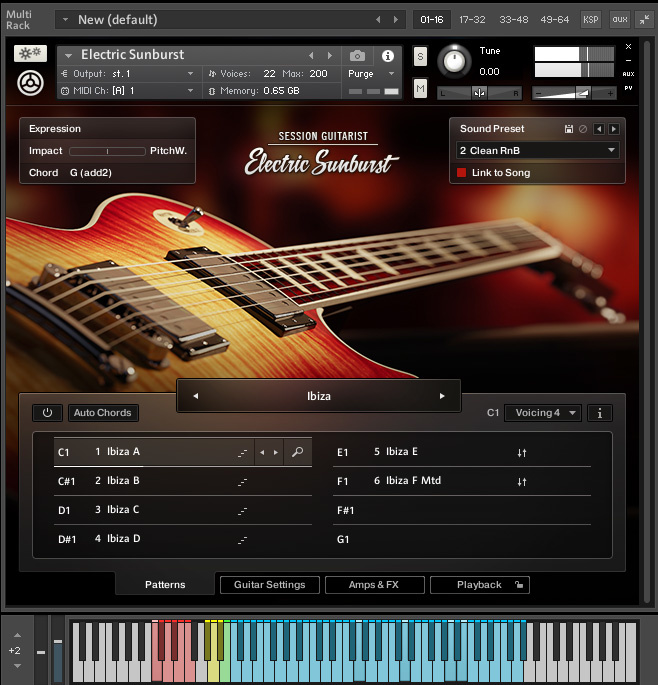
Kontakt is designed to be used like that. It just needs the option to set the keyswitches of any octave on your keyboard.
You can try it in Reaper (even in Linux) this was made just to test the theory out it uses some support scripts, I will see what PG do else I will put some more work into it to be a self contained script. It works great with the BB Plugin as you can have lots of Plugins for more material than 255 bars (if the Plugin is made self contained it will work with Linux). https://forum.cockos.com/showthread.php?t=226865 https://www.pgmusic.com/forums/ubbthreads.php?ubb=showflat&Number=561237
Ah, that's interesting and also Ah, that's interesting.
That looks like it may be a useful tool. I'll try it out.
Installation looks suspect on Linux, though.
There's an additional .lua script in the forum thread with instructions to install it in "Scripts\ReaTrak". When I tried to do that, initially I could not find that directory. After a short while I tried a find . -name "*.lua" which gave lots of hits, including numerous "Scrpits\ReaTrack\xxxxx", but when I look in Scripts I can't see them.
After a while I realised the problem ... those backslashes in the filenames are real, where on Linux I would expect forward slashes, so all those files are in the directory "REAPER", whilst I suspect they should be in the subdirectories up to the backslash.
Are you able to confirm that? If you are, I can probably fairly quickly script a mass move. That also suggests that the .zip file is not as one would normally expect.
Edit: Oh, I realise now this is not an ordinary zip file, it ends .ReaperConfigZip I must RTFM.
Last edited by Gordon Scott; 11/16/2206:06 AM.
Jazz relative beginner, starting at a much older age than was helpful. AVL:MXE Linux; Windows 11 BIAB2026 Audiophile, a bunch of other software. Kawai MP6, Ui24R, Focusrite Saffire Pro40 and Scarletts .
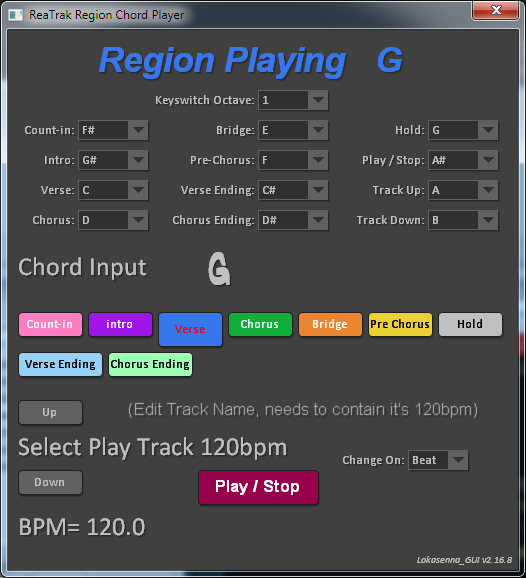
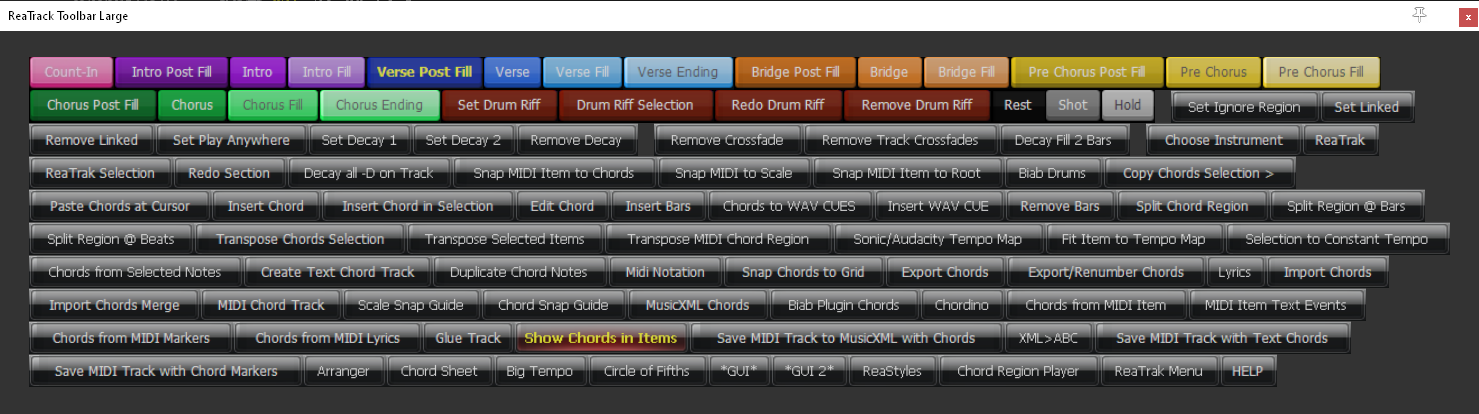
Yes, when you install .ReaperConfigZip it will install the scripts to Scripts/ReaTrak. The Script: ReaTrak midi chord input to region chord player.lua just calls on other scripts. It should give all the ReaTrak functions in a small, medium or large toolbar also:
I've been following the instructions in the thread to which you. I'm unsure quite what to do with the following item:
6. Reaper > View > Toolbar Docker add or change toolbar from REAPER\MenuSets\
Jazz relative beginner, starting at a much older age than was helpful. AVL:MXE Linux; Windows 11 BIAB2026 Audiophile, a bunch of other software. Kawai MP6, Ui24R, Focusrite Saffire Pro40 and Scarletts .
zplane recently interviewed Peter Gannon, the founder and creator of Band-in-a-Box, about the software's early days, what sets it apart from AI, how zplane's audio algorithms are used in Band-in-a-Box, and more!
Special thanks to the team at zplane for their continued support.
Last Chance! The Band-in-a-Box® 2026 for Mac® Special Ends Today (May 31, 2026) at 11:59pm PDT!
Time really is running out! Save up to 50% on Band-in-a-Box® 2026 for Mac® upgrades and receive a FREE Bonus PAK—only when you order by 11:59 PM PDT today!
We've added many major new features and new content in a redesigned Band-in-a-Box® 2026 for Mac®!
Version 2026 introduces a modernized GUI redesign across the program, with updated toolbars, refreshed windows, smoother workflows, and a new Dark Mode option. There’s also a new side toolbar for quicker access to commonly used windows, and the new Multi-View feature lets you arrange multiple windows as layered panels without overlap, making it easier to customize your workspace.
Another exciting new addition is the amazing new AI-Notes feature, which can transcribe polyphonic audio into MIDI. View the results in notation or play them back as MIDI, and choose whether to transcribe an entire track or transcribe specific parts like drums, bass, guitars/piano, or vocals. There's over 100 new features in Band-in-a-Box® 2026 for Mac®.
There's an amazing collection of new content too, including 202 RealTracks, new RealStyles, MIDI SuperTracks, Instrumental Studies, “Songs with Vocals” Artist Performance Sets, Playable RealTracks Set 5, two RealDrums Stems sets, and much more!
Upgrade your Band-in-a-Box for Mac® to save up to 50% on most Band-in-a-Box® 2026 upgrade packages!
Plus, when you order your Band-in-a-Box® 2026 Mac upgrade during our special, you'll receive a Free Bonus PAK of exciting new add-ons.
If you need any help deciding which package is the best option for you, just let us know. We are here to help!
Band-in-a-Box® 2026 Mac Special Offers Extended Until May 31st!
Good news- we've extended our Band-in-a-Box® 2026 for Mac® special offers until May 31, 2026!
Band-in-a-Box® 2026 is packed with major new features, enhancements, and an incredible lineup of new content! The program now sports a sleek, modern GUI redesign across the entire interface, including updated toolbars, refreshed windows, smoother workflows, a new dark mode option, and more. The brand-new side toolbar provides quicker access to key windows, while the new Multi-View feature lets you arrange multiple windows as layered panels without overlap, creating a flexible, clutter-free workspace. We have an amazing new “AI-Notes” feature. This transcribes polyphonic audio into MIDI so you can view it in notation or play it back as MIDI. You can transcribe an entire track (all pitched instruments and drums) or focus on individual parts like drums, bass, guitars/piano, or vocals. There's an amazing collection of new content too, including 202 RealTracks, new RealStyles, MIDI SuperTracks, Instrumental Studies, “Songs with Vocals” Artist Performance Sets, Playable RealTracks Set 5, two RealDrums Stems sets, and much more!
There are over 100 new features in Band-in-a-Box® 2026 for Mac®.
When you order purchase Band-in-a-Box® 2026 before 11:59 PM PDT on May 31st, you'll also receive a Free Bonus PAK packed with exciting new add-ons.
Check out the Band-in-a-Box® for Mac packages page to find the best package for you.
Today's the Last Day of the Band-in-a-Box 2026® for Mac Special!
Order before 11:59pm PDT today (May 15, 2026) to save up to 50% off your Band-in-a-Box® 2026 for Mac® upgrade and receive a FREE Bonus PAK loaded with great new Add-ons to use with this new version!
Band-in-a-Box® 2026 for Mac - Special Offers End at 11:59pm PDT on Friday, May 15th, 2026!
Order before 11:59pm PDT on Friday, May 15th and SAVE up to 50% on most Band-in-a-Box® version 2026 for Mac Upgrade packages... and that's not all! With your version 2026 for Mac purchase, we'll include a Bonus PAK full of great new Add-ons FREE! Upgrade to the 2026 49-PAK to receive even more NEW Add-ons including 20 additional RealTracks... that's 222 NEW RealTracks available with version Band-in-a-Box® 2026 for Mac!
Upgrade to Band-in-a-Box® 2026 for Mac® today for as little as $49! Check out the Band-in-a-Box® packages page for all available purchase options.
Learn more about the Free Bonus PAK and 49-PAK here.
If you have any questions about which package is the best option for you, just let us know. We're here to help!
202 New RealTracks Released with Band-in-a-Box 2026!
With Band-in-a-Box® 2026, we've released 202 incredible new RealTracks (in sets 468-488) in a variety of genres—featuring your most requested styles!
Jazz, Funk & World (Sets 468-475):
Our new jazz, funk & blues RealTracks include a groovin’ collection of RealTracks and RealDrums! These include more requested “soul jazz” RealTracks featuring artists Neil Swainson (bass), Charles Treadway (organ), Brent Mason (guitar), and Wes Little (drums). There are new “smooth jazz” styles (4), which include a RealTracks first: muted trumpet, as well as slick new smooth jazz brushes options for drums. Blues lovers will be thrilled—there are more “classic acoustic blues” styles, including guitar (5), bass (4), and drums (10) with blues master Colin Linden, featuring understated and tasty background acoustic soloing, plus brushes drums and acoustic bass. There are also new electric blues RealTracks, including electric blues with PG favorite Johnny Hiland (3) and soulful electric slide guitar from Colin Linden (4). If you love funk & gospel, there are great new options this year, including gospel organ (3) from Charles Treadway, as well as new funk, tango, and rock ’n’ roll drums (3) and bass (1). And for big, bold arrangements, we have uptempo soul horns (4) featuring a three-part hip horn section with options for a full mix or stems of each individual horn — plus an accompanying rhythm section (4) of drums, bass, guitar, and electric piano!
Rock & Pop (Sets 476–482):
Our new rock & pop RealTracks bring a powerful mix of requested favorites, fresh genres, and modern chart-inspired styles! We have more of our popular “Producer Layered Acoustic Guitars (15)” featuring Band-in-a-Box favorite Brent Mason. We’ve continued our much-requested disco styles (10), and added new Celtic guitar (5) with a more basic, accessible approach than our previous Drop-D or DADGAD offerings. There are also highly requested yacht rock styles (17), inspired by the smooth, polished soft-rock sound of the late ’70s and early ’80s — laid-back grooves, silky electric pianos, warm textures, elegant harmonic movement, and pristine production aesthetics. Fans of heavier styles will love our new glam metal (13), capturing the flashy, high-energy sound of ’80s arena-ready guitar rock. We also have a set of rootsy modern-folk rock (18), with a warm, organic sound combining contemporary folk textures and driving acoustic strumming. And we’ve added lots of new modern pop styles (16) — the kinds of sounds you’re hearing on the radio today, featuring exciting new drums, synths, and cutting-edge RealTracks arrangements.
Country, & Americana (Sets 483–488):
Our new country & Americana RealTracks deliver a rich collection of acoustic, electric, and roots-inspired styles! We have new country pop (9) with legendary guitarist Brent Mason. There is also a potpourri (14) of bouzouki, guitars, banjo, and more, perfect for adding texture and character to contemporary acoustic arrangements. We’ve added funky country guitar (5) with PG favorite Brent Mason, along with classic pedal steel styles (5) featuring steel great Doug Jernigan. There are more country songwriter styles (8) that provide intimate, rootsy foundations for storytelling and modern Americana writing. Finally, we have “background soloing” acoustic guitar (12) with Brent Mason — simpler, but still very tasty acoustic lines designed to sit beautifully behind vocals or act as a subtle standalone solo part.
And, if you are looking for more, the 2026 49-PAK (for $49) includes an impressive collection of 20 bonus RealTracks, featuring exciting and inspiring additions to add to your RealTracks library. You'll get new country-rhythm guitar styles from PG Music favorites Johnny Hiland and Brent Mason, along with modern-pop grooves that capture today’s radio-ready sound! There are also new indie-folk styles with guitar, bass, 6-string bass used as a high-chording instrument, acoustic guitar, and banjo. Plus, dedicated "cymbal fills" RealDrums provide an added layer that work very well with low-key folky styles with other percussion.
The 2026 49-PAK is loaded with other great new add-ons as well. Learn more about the 2026 49-PAK!
One of our representatives will be happy to help you over the phone. Our hours of operation are from
6:00AM to 6:00PM PST (GMT -8) Monday thru Friday, and 8:00AM to 4:00PM PST Saturday. We are closed Sunday. You can also send us your questions via email.
One of our representatives will be happy to help you on our Live Chat or by email. Our hours of operation are from
6:00AM to 6:00PM PST (GMT -8) Monday thru Friday; 8:00AM to 4:00PM PST (GMT -8) Saturday; Closed Sunday.








 Dansk
Dansk Deutsch - Windows
 Español
 Français - Windows
 Italiano - Windows
 Nederlands
 Polski
 Português
 Svenskt
 русский
 Japanese
 Simplified Chinese
 Traditional Chinese
 Korean