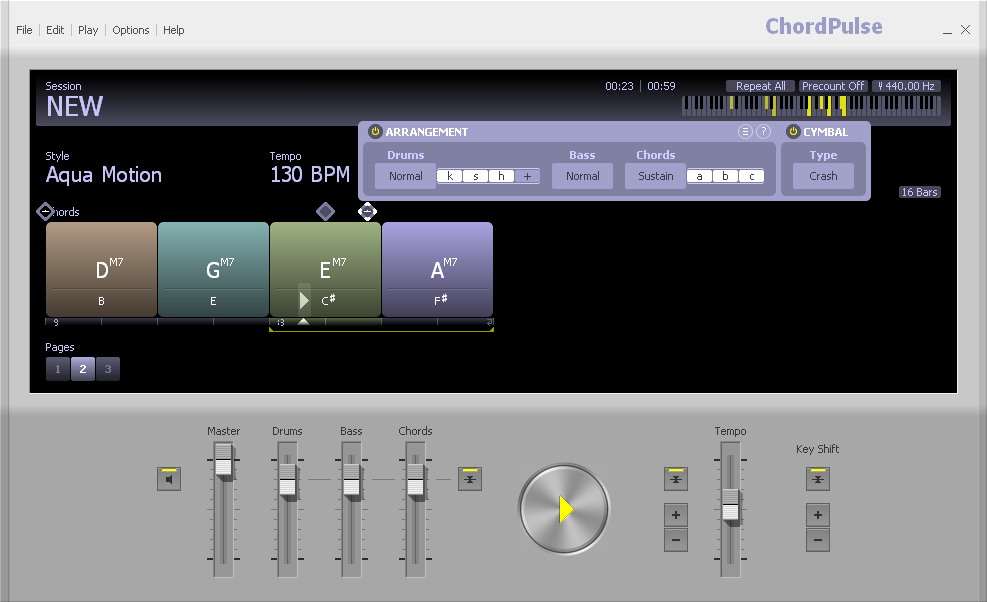
I have never in my decades of using and writing software seen a more confusing, disorganized, and cluttered user interface than Band in a Box, and never experienced a greater need for good tutorials. Please, fire the GUI department and start over. Start with mashing together Chordpulse and the Digitech Trio (but in software) -- each is stupidly easy to use. Complexity can be added in a better way than just cramming another button on the front page.
It sounds like you are in the mode that shows maximum commands and controls. If you have the Windows 2017 version, have you tried switching to the alternative full screen mode? This was designed to minimise the display of on-screen options and is obtained by clicking where I've highlighted on the below image (the shortcut is CTRL+T).
Also, if you're looking for tutorials, PG Music have a Youtube page at the below URL...
Thanks for the reply. I have tried to use BIAB in the simplified mode but it doesn't help in ~how to use this thing~. The videos on pgmusic.com are several years out of date and mostly worthless to a new user. Those on the youtube channel are mostly showcasing new features, testimonials, advanced features, or demonstrations of new realtracks, not how to use the product.
Everyone says BIAB does a million things and it's all great. I'm just going to have to take their word for it. My problem is not the icons or the color scheme or even the 75 buttons. It's that there is no intuitive way to navigate the software. Reorganizing the toolbar or adding a dozen more options to a pulldown menu is just nibbling at the edges. I shouldn't have to already be an expert to use this.
I spent a couple hundred dollars on this software but I can't really use it. Unfortunately it's more than 30 days since I bought it so I can't return it. I would pay the same amount for a product with a fraction of the features but a great user interface.
If GarageBand had a way to prescribe the chord progression and add loops that follow the chord progression I would switch to Mac. Because I see the potential of what BIAB can be but they're just shooting themselves in the foot by ignoring the usability of their product.
The videos on pgmusic.com are several years out of date and mostly worthless to a new user.
I appreciate that at first glance, this might seem to be the case. The reason that the older videos are still there is because the aspect of BIAB that they are detailing has not been changed. When program operations change, PG Music remove those videos that are no longer relevant.
There is certainly a learning curve associated with coming to grips with BIAB. That said, the basic approach to getting a song happening is straightforward.
Can I help in some way to get things happening for you? What would you like to achieve?
After being on these forums for a number of years, there are a couple of things that I've noticed that seem to cause huge hurdles for those starting out and are best avoided in the early stages of learning the software. These hurdles are...
HURDLE 1: Thinking of BIAB's chord grid in terms of a piece of sheet music.
Rather than the above, it's better to think of BIAB as a band performance that plays from beginning to end and enter the chords accordingly. Initially, don't try to create repeats and codas (etc.). Simply enter the chords as they would be played in a live setting, start to finish.
Once this starts to make sense, then, if you want, try using repeats, codas, etc. Personally, I prefer using BIAB without these because it gives me much more control over the arrangement. I always work with the linear format.
HURDLE 2: Trying to achieve advanced techniques without first developing an understanding of how BIAB is designed.
Initially, the best approach is...
a) Type in chords.
b) Save the file so that if something unexpected happens it's easy to get back the chord sheet.
c) Select a style to play your chord sheet.
d) Press Generate/Play.
Hope this helps.
Regards, Noel
P.S. If you want to hear how BIAB can sound, have a listen to some of my songs in my signature.
Also, the Users Showcase contains links to the work of many BIAB enthusiasts.
Noel has generously provided you with a significant amount of information (and plenty of his own time). BiaB has some extremely complex functions. It also allows you to create and play a song in only a few seconds.
The different groups of functions all have titles and are laid out in an organized, intuitive manner.
Most controls feature pop-up hints that guide you through the operations and functionality.
Like most new things, there is a learning curve. I have a saying that applies to most things: "Everything is easy when you know how". If you are able, please try to be a little more patient and take your time learning the basics. I'm sure it will pay off in the long run.
Welcome also to the forum. Supported by fellow users.
BIAB & RB2026 Win.(Audiophile), Windows 10 Pro & Windows 11, Cakewalk Bandlab, Izotope Prod.Bundle, Roland RD-1000, Synthogy Ivory, Session Keys Grand S & Electric R, Kontakt, Focusrite 18i20, KetronSD2, NS40M, Pioneer Active Monitors.
I'm pretty sure they'll get right on firing the president of the company on down, hiring new staff, and completely rewriting the software to suit your expectations. Maybe they'll be done in a week or so, and it will look just like Chordpulse mashed up with Digitech Trio, as I'm sure that's exactly what they originally intended to do when the released BIAB a few decades ago, but just never got there.
Or maybe, take the time to learn the software, ask questions on the forum, and learn how it works. There are thousands and thousands and thousands of folks making a lot of good music using BIAB.
But truly, welcome to the forum; we users are happy to help you out (including me, even though I know I started out kind of snarky), but you've got to let us know what you aren't able to do with the software. We may not know it all, but we can generally get you pointed in the right direction.
Noel and Trevor have already started. Let us know what you are having problems with and we can help you work through it.
John
Laptop-HP Omen I7 Win11Pro 32GB 12TB SSD Desktop-ASUS-I7 Win10Pro 32GB 12TB SATA
Let us know what you are having problems with and we can help you work through it.
Exactly. We read lots of criticism, but not a single statement about what the O/P had actually attempted to do but was unable to achieve. Was it to 'enter chords?', 'print notation?', 'select a style?'. Work with us, and we'll work with you .
BIAB & RB2026 Win.(Audiophile), Windows 10 Pro & Windows 11, Cakewalk Bandlab, Izotope Prod.Bundle, Roland RD-1000, Synthogy Ivory, Session Keys Grand S & Electric R, Kontakt, Focusrite 18i20, KetronSD2, NS40M, Pioneer Active Monitors.
I'm new to using BIAB only got it this year and I feel your frustrations. I too had mental breakdowns and anger management meetings due to this this complicated programme.
If it wasn't for the support of the guys on these forums I think I would have thrown the towel in a week aftyer I bought it! I am not the brightest of buttons in the box when it comes to this type of music making stuff nor computer litereate but I persevered. I gained more inspiration when heard the songs otheres were producing and knew that BIAB/RB does have the quality. SO I continued to blunder about and ask a few questions on these forums.
My first step to producing something was to do someting simple (right up my street)! Perhaps don't be in a rush to start on your favourite song you've written. Make a simple chord progression- Take it into RB convert it into WAV import it into your DAW and make a few edits, chops, splits add vocals and any vst's gitar breaks etc etc.
The next step will be learning about the drum stops, regenerate solos on any instrument. Be patient and things will happen. If I can make headway, believe me anyone can! I only use a few of the buttons out of the 75 you counted so don't despair.
The support you will find on here is second to none in my opinion, great advice and support and all this is free of charge! Stick with it All the best Paul
I have never in my decades of using and writing software seen a more confusing, disorganized, and cluttered user interface than Band in a Box, and never experienced a greater need for good tutorials. Please, fire the GUI department and start over. Start with mashing together Chordpulse and the Digitech Trio (but in software) -- each is stupidly easy to use. Complexity can be added in a better way than just cramming another button on the front page.
"a more confusing, disorganized, and cluttered user interface than Band in a Box" That sounds about right, I appreciate your input from someone who is new to Biab, this gives the developers information to improve Biab.
Digitech Trio that uses Biab. Chordpulse is good.
There is an easy solution, look for an icon called RealBand if you are not on a Mac. Unless you are writing songs from scratch and need to change things around quickly, RealBand will do things easier as you can see what you are doing as the tracks are laid out in front of you. Check out www.realband.org they have a lot of info and videos.
Hi all Strangely enough BIAB did seem a bit daunting to me when I first had it, But I must say that I like the way every thing is on top and handy, (like a sea mans chest) I still use the old GUI for this reason
I hate the way apps and other software is going with its big blobby metro icons and page after page of menus and drop downs where you have no idea where you are going or have come from. . Probably stems back to my DOS days and understanding of directory structures, and trees. Mind you wouldn’t want to see my desk top.
I also hate the way some software dumbs everything down to the lowest level automatically leaving you no choice but except defaults etc. So lets keep BIAB as it is please the program is well worth the effort and leaning curve ,and there is plenty of help on this forum and in the program its self. Just my take Mike
<<< I have tried to use BIAB in the simplified mode but it doesn't help in ~how to use this thing~. >>>
Here is BIAB in simplified mode: (Taken From Noel's post)
a) Type in chords.
b) Save the file so that if something unexpected happens it's easy to get back the chord sheet. (optional unless you are working on a serious project)
c) Select a style to play your chord sheet.
d) Press Generate/Play.
Here is BIAB in intermediate mode:
a) Type in chords.
b) Save the file so that if something unexpected happens it's easy to get back the chord sheet.
c) Select a style to play your chord sheet.
d) Press Generate/Play.
Here is BIAB in its most advanced mode:
a) Type in chords.
b) Save the file so that if something unexpected happens it's easy to get back the chord sheet.
c) Select a style to play your chord sheet.
d) Press Generate/Play.
These steps are also the same for:
BIAB in singer/songwriter mode: BIAB in Classical composition mode: BIAB in backing tracks mode: BIAB in practice guitar, piano, sax, trumpet, et al mode: BIAB in make my own Karaoke mode: BIAB in create a movie soundtrack mode: BIAB in print charts for the band mode: BIAB in create my own CD mode:
and any other purpose you want to use BIAB to create music for.
Everything you do that follows these steps are features that you pick and choose to achieve end results for your music output. Every version of BIAB back to the days of DOS have provided the instructions to << enter your chord progression, select a style, press play >>
Mike posted while I was composing. He is correct.
Last edited by Charlie Fogle; 04/11/1702:57 AM. Reason: To acknowledge Mike's post
Am I the only long-term user who can see the problem through the eyes of a beginner?
Nowhere does Texasprenegade say that he/she cannot work out how to do something with BIAB but all the resposes concentrate on being patient in learning how to use the software. This happens every time a newcomer critisizes the GUI. No-one is prepared to recognise the importance of how the GUI looks when you first see it. Yes, there are lots of offers to help but really everyone blaims the victim by telling them to try harder.
It's like someone critisizing the layout of a car's interior controls as being confusing only to be told "don't worry, you will get used to it, just persevere to learn them" Meanwhile sales of the new car are tanking and you can bet that the next model will have corrected the layout even if the functionality is no different. My 2014 Ford Escape has a terrible GPS GUI, so much so that I use my 10 year old Garmin mounted on the windshield. Ford paid attention to the comments and the 2016 version was a big improvement.
Sooner or later PG will start paying attention to beginner's comments instead of relying on the opinions of long-term users who have passed through the "right of passage" and are comfortable with the GUI. Yes, I know PG recently introduced an optional simplified GUI but it still needs a completely fresh approach. Personally, I have stayed with the previous version.
When I taught programming, part of the test of my students' projects was what we called the 'any idiot' test. We would find an idiot, defined as the next unknown person walking down the hall, and ask them to react to the program. Observe, revise, retest.
Right after BIAB version 2017 was released, many of the active beta testers on the site paid particularly close attention to the posts by newcomers (as well as newly-confused experienced users). We passed on extensive observations to PG Music. It is an ongoing process.
We had asked for a streamlining of the GUI, and we got it. The next step would seem to me to be a revision of the Menu system and a thorough review of the Help system. But what do I know?
BIAB 2026 Win Audiophile. Software: Fender Studio One 8, Swam horns, Acoustica-7, Notion 6, Song Master Pro, Win 11 Home. Hardware: Intel i9, 32 Gb; Fender Quantom HD8 & Faderport 8, Royer 121, Adam Sub8 & Neumann 120 monitors.
Matt, I did the same thing when writing macros for Lotus 123 and Excel as well as Standard Operating Procedures. The difference is that I call it the Gorilla Test.
texasprenegade, welcome. You are not the first one to point out the GUI. In fact there have been many requests to change it over the years. The latest 2017 GUI is much better than the older GUI , IMHO, but I can see where both can be very confusing for a new comer. Heck I'm an old user and sometimes I get lost trying to figure something out.
You are right about the GUI but so are those that were trying to help. The GUI will not change overnight so you have to do the changing. Put your GUI suggestions in the wish forum but keep on trying to learn the program. It does have a lot to offer and in fact I probably use less then 10% of what is available.
Life is short so make sure you spend as much time as possible on the Internet arguing with strangers.
64 bit Win 10 Pro, the latest BiaB/RB, Roland Octa-Capture audio interface, a ton of software/hardware
Someone else suggested this, but I'm going to suggest it too. Try Realband. It does 'most' of what BiaB does (and more than most users need) but in a different way. You may or may not like it better. If you have a recent version of BiaB then Realband was included for free. Nothing to lose.
If you are used to a regular DAW, Realband works much more like that. It's not just like Protools or Reaper or Audition, it's still different, so some learning curve applies. For quite a few people I know, all the click-paths just make more sense for what they want to do. This is why I use Realband more than most users; it works more like I 'expect' music software to work. So I get more done with less frustration or hunting.
As far as looks though, I really wish we could design our own skins. I am no good at graphics, but I work every day with people that do app designs/graphics/builds. It pains me to know how much better it could 'appear' (and probably flow).
I do not work here, but the benefits are still awesome Make your sound your own!
I fail to see how something with the complexities and significant features that BiaB offers is supposed to just 'look' simple.
As the song goes: 'Get a little dirt on your hands'. No pain, no gain.
You described yourself as a software writer. Please feel free to illustrate a mock-up of exactly how the interface should appear.
Please describe how the new 2017 interface is 'confusing', 'disorganized' and 'cluttered'.
Then I'll understand the problem you are experiencing a little more. Thanks.
BIAB & RB2026 Win.(Audiophile), Windows 10 Pro & Windows 11, Cakewalk Bandlab, Izotope Prod.Bundle, Roland RD-1000, Synthogy Ivory, Session Keys Grand S & Electric R, Kontakt, Focusrite 18i20, KetronSD2, NS40M, Pioneer Active Monitors.
I'm still looking forward to texasprenegade's response to the items he/she described.
BIAB & RB2026 Win.(Audiophile), Windows 10 Pro & Windows 11, Cakewalk Bandlab, Izotope Prod.Bundle, Roland RD-1000, Synthogy Ivory, Session Keys Grand S & Electric R, Kontakt, Focusrite 18i20, KetronSD2, NS40M, Pioneer Active Monitors.
(warning: it's long) OK, I take all your points and agree with most of you. But to explain, my background is in tech, I write software including user interfaces (though for the web), and have spent my entire career learning new and complicated software (think Autocad, finite element CFD models, etc.). I am not an inexperienced user of complicated software. And I am more than willing to give the benefit of the doubt when it comes to design. I know how hard it is to cram so much functionality into such little space. And I'm not expecting to grok the UI immediately, but I do know some of the components that make a good design.
For me, a good design is all about functionality. I couldn't care less about the color scheme, or skins, or big gaudy buttons. I would love to see a user interface study to see how beginners approach the software, as well as how the veterans use it. I'd be willing to bet most people use the same 10% of the capabilities. The rest should be tucked away--the experts will find the extra stuff, the rest won't even see it. I believe the user interface should get you close to what you want to do and well-organized examples and tutorials should do the rest. This user guide doesn't do any of that, except sort of explain the buttons, but without any context. And though forums are extremely helpful, they shouldn't be necessary except for some of the more esoteric functions.
In general, I believe that the more trial and error one needs to do, the worse the user interface. I've had to do a lot of trial and error and reading forum posts to get what little progress I've achieved.
Speaking of achievements, I am indeed making progress. I'll give BIAB credit: On the first day I was able to do something, even before Charlie Fogle suggested: a) Type in chords. b) Save the file so that if something unexpected happens it's easy to get back the chord sheet. c) Select a style to play your chord sheet. d) Press Generate/Play.
So again, I'll give credit. But after that, it's trial and error time. The stylepicker gives me the most grief. Even sorting columns doesn't seem to work, but does something random. And on one of the screens there's no "OK" button, so it's hard to undo something you've clicked. That's not intuitive. And what's that row of "Master Bass Guitar1 Drums ..." with radio buttons near the top? It changes, but it took me a while to figure out why. And how does it relate to the mixer thing on the right? And the mixer has something with [None][None][None][None] on it. You gotta admit, that doesn't really help anyone. Why not leave it blank? All that extra information is confusing and we newbies don't know what's important and what we can ignore. And, being a newbie, let's say I picked a style but want to do something different with drums. Should I click the big button that says "Drums"? I guess not, but the interface makes it confusing. Same with guitar. I know it's obvious to you all, but put yourself in the newbie shoes: if I want to do something related to guitar, shouldn't I click the guitar button?
Those are just a couple examples. I know I'm not alone in my experience--I've read dozens of posts saying the same thing, just not with the p*ss and vinegar that I did. My bad. I've calmed down now and have been jamming to my 12 bar blues backing track with RealTracks (I think) and am now trying to record my sick guitar solos over it (sick, if you like eighth notes).
And I don't think I showed any unappreciation for the efforts to help beginners. I do appreciate it and so do hundred of others. The first nice attempts pointed me to some videos that I found inadequate. I'm on the other side, too, as I am a sorta-veteran on another forum where I help newbies like me, so I understand when frustrated wankers like me start complaining about how everything is so haaaarrrrdddd.
I'm making progress and will continue to do so, little by little. I just think the UI gets in the way of using the software, rather than facilitating.
And @VideoTrack, I'm a guy but I appreciate you covering all bases
Last Chance! The Band-in-a-Box® 2026 for Mac® Special Ends Today (May 31, 2026) at 11:59pm PDT!
Time really is running out! Save up to 50% on Band-in-a-Box® 2026 for Mac® upgrades and receive a FREE Bonus PAK—only when you order by 11:59 PM PDT today!
We've added many major new features and new content in a redesigned Band-in-a-Box® 2026 for Mac®!
Version 2026 introduces a modernized GUI redesign across the program, with updated toolbars, refreshed windows, smoother workflows, and a new Dark Mode option. There’s also a new side toolbar for quicker access to commonly used windows, and the new Multi-View feature lets you arrange multiple windows as layered panels without overlap, making it easier to customize your workspace.
Another exciting new addition is the amazing new AI-Notes feature, which can transcribe polyphonic audio into MIDI. View the results in notation or play them back as MIDI, and choose whether to transcribe an entire track or transcribe specific parts like drums, bass, guitars/piano, or vocals. There's over 100 new features in Band-in-a-Box® 2026 for Mac®.
There's an amazing collection of new content too, including 202 RealTracks, new RealStyles, MIDI SuperTracks, Instrumental Studies, “Songs with Vocals” Artist Performance Sets, Playable RealTracks Set 5, two RealDrums Stems sets, and much more!
Upgrade your Band-in-a-Box for Mac® to save up to 50% on most Band-in-a-Box® 2026 upgrade packages!
Plus, when you order your Band-in-a-Box® 2026 Mac upgrade during our special, you'll receive a Free Bonus PAK of exciting new add-ons.
If you need any help deciding which package is the best option for you, just let us know. We are here to help!
Band-in-a-Box® 2026 Mac Special Offers Extended Until May 31st!
Good news- we've extended our Band-in-a-Box® 2026 for Mac® special offers until May 31, 2026!
Band-in-a-Box® 2026 is packed with major new features, enhancements, and an incredible lineup of new content! The program now sports a sleek, modern GUI redesign across the entire interface, including updated toolbars, refreshed windows, smoother workflows, a new dark mode option, and more. The brand-new side toolbar provides quicker access to key windows, while the new Multi-View feature lets you arrange multiple windows as layered panels without overlap, creating a flexible, clutter-free workspace. We have an amazing new “AI-Notes” feature. This transcribes polyphonic audio into MIDI so you can view it in notation or play it back as MIDI. You can transcribe an entire track (all pitched instruments and drums) or focus on individual parts like drums, bass, guitars/piano, or vocals. There's an amazing collection of new content too, including 202 RealTracks, new RealStyles, MIDI SuperTracks, Instrumental Studies, “Songs with Vocals” Artist Performance Sets, Playable RealTracks Set 5, two RealDrums Stems sets, and much more!
There are over 100 new features in Band-in-a-Box® 2026 for Mac®.
When you order purchase Band-in-a-Box® 2026 before 11:59 PM PDT on May 31st, you'll also receive a Free Bonus PAK packed with exciting new add-ons.
Check out the Band-in-a-Box® for Mac packages page to find the best package for you.
Today's the Last Day of the Band-in-a-Box 2026® for Mac Special!
Order before 11:59pm PDT today (May 15, 2026) to save up to 50% off your Band-in-a-Box® 2026 for Mac® upgrade and receive a FREE Bonus PAK loaded with great new Add-ons to use with this new version!
Band-in-a-Box® 2026 for Mac - Special Offers End at 11:59pm PDT on Friday, May 15th, 2026!
Order before 11:59pm PDT on Friday, May 15th and SAVE up to 50% on most Band-in-a-Box® version 2026 for Mac Upgrade packages... and that's not all! With your version 2026 for Mac purchase, we'll include a Bonus PAK full of great new Add-ons FREE! Upgrade to the 2026 49-PAK to receive even more NEW Add-ons including 20 additional RealTracks... that's 222 NEW RealTracks available with version Band-in-a-Box® 2026 for Mac!
Upgrade to Band-in-a-Box® 2026 for Mac® today for as little as $49! Check out the Band-in-a-Box® packages page for all available purchase options.
Learn more about the Free Bonus PAK and 49-PAK here.
If you have any questions about which package is the best option for you, just let us know. We're here to help!
202 New RealTracks Released with Band-in-a-Box 2026!
With Band-in-a-Box® 2026, we've released 202 incredible new RealTracks (in sets 468-488) in a variety of genres—featuring your most requested styles!
Jazz, Funk & World (Sets 468-475):
Our new jazz, funk & blues RealTracks include a groovin’ collection of RealTracks and RealDrums! These include more requested “soul jazz” RealTracks featuring artists Neil Swainson (bass), Charles Treadway (organ), Brent Mason (guitar), and Wes Little (drums). There are new “smooth jazz” styles (4), which include a RealTracks first: muted trumpet, as well as slick new smooth jazz brushes options for drums. Blues lovers will be thrilled—there are more “classic acoustic blues” styles, including guitar (5), bass (4), and drums (10) with blues master Colin Linden, featuring understated and tasty background acoustic soloing, plus brushes drums and acoustic bass. There are also new electric blues RealTracks, including electric blues with PG favorite Johnny Hiland (3) and soulful electric slide guitar from Colin Linden (4). If you love funk & gospel, there are great new options this year, including gospel organ (3) from Charles Treadway, as well as new funk, tango, and rock ’n’ roll drums (3) and bass (1). And for big, bold arrangements, we have uptempo soul horns (4) featuring a three-part hip horn section with options for a full mix or stems of each individual horn — plus an accompanying rhythm section (4) of drums, bass, guitar, and electric piano!
Rock & Pop (Sets 476–482):
Our new rock & pop RealTracks bring a powerful mix of requested favorites, fresh genres, and modern chart-inspired styles! We have more of our popular “Producer Layered Acoustic Guitars (15)” featuring Band-in-a-Box favorite Brent Mason. We’ve continued our much-requested disco styles (10), and added new Celtic guitar (5) with a more basic, accessible approach than our previous Drop-D or DADGAD offerings. There are also highly requested yacht rock styles (17), inspired by the smooth, polished soft-rock sound of the late ’70s and early ’80s — laid-back grooves, silky electric pianos, warm textures, elegant harmonic movement, and pristine production aesthetics. Fans of heavier styles will love our new glam metal (13), capturing the flashy, high-energy sound of ’80s arena-ready guitar rock. We also have a set of rootsy modern-folk rock (18), with a warm, organic sound combining contemporary folk textures and driving acoustic strumming. And we’ve added lots of new modern pop styles (16) — the kinds of sounds you’re hearing on the radio today, featuring exciting new drums, synths, and cutting-edge RealTracks arrangements.
Country, & Americana (Sets 483–488):
Our new country & Americana RealTracks deliver a rich collection of acoustic, electric, and roots-inspired styles! We have new country pop (9) with legendary guitarist Brent Mason. There is also a potpourri (14) of bouzouki, guitars, banjo, and more, perfect for adding texture and character to contemporary acoustic arrangements. We’ve added funky country guitar (5) with PG favorite Brent Mason, along with classic pedal steel styles (5) featuring steel great Doug Jernigan. There are more country songwriter styles (8) that provide intimate, rootsy foundations for storytelling and modern Americana writing. Finally, we have “background soloing” acoustic guitar (12) with Brent Mason — simpler, but still very tasty acoustic lines designed to sit beautifully behind vocals or act as a subtle standalone solo part.
And, if you are looking for more, the 2026 49-PAK (for $49) includes an impressive collection of 20 bonus RealTracks, featuring exciting and inspiring additions to add to your RealTracks library. You'll get new country-rhythm guitar styles from PG Music favorites Johnny Hiland and Brent Mason, along with modern-pop grooves that capture today’s radio-ready sound! There are also new indie-folk styles with guitar, bass, 6-string bass used as a high-chording instrument, acoustic guitar, and banjo. Plus, dedicated "cymbal fills" RealDrums provide an added layer that work very well with low-key folky styles with other percussion.
The 2026 49-PAK is loaded with other great new add-ons as well. Learn more about the 2026 49-PAK!
2026 Free Bonus PAK & 49-PAK for Band-in-a-Box® 2026 for Mac®!
With your version 2026 for Mac Pro, MegaPAK, UltraPAK, UltraPAK+, Audiophile Edition or PlusPAK purchase, we'll include a Bonus PAK full of great new Add-ons for FREE! Or upgrade to the 2026 49-PAK for only $49 to receive even more NEW Add-ons including 20 additional RealTracks!
These PAKs are loaded with additional add-ons to supercharge your Band-in-a-Box®!
This Free Bonus PAK includes:
The 2026 RealCombos Booster PAK:
-For Pro customers, this includes 27 new RealTracks and 23 new RealStyles.
-For MegaPAK customers, this includes 25 new RealTracks and 23 new RealStyles.
-For UltraPAK customers, this includes 12 new RealStyles.
MIDI Styles Set 92: Look Ma! More MIDI 15: Latin Jazz
MIDI SuperTracks Set 46: Piano & Organ
Instrumental Studies Set 24: Groovin' Blues Soloing
Artist Performance Set 19: Songs with Vocals 9
Playable RealTracks Set 5
RealDrums Stems Set 9: Cool Brushes
SynthMaster Sounds Set 1 (with audio demos)
iOS Android Band-in-a-Box® App
Looking for more great add-ons, then upgrade to the 2026 49-PAK for just $49 and you'll get:
20 Bonus Unreleased RealTracks and RealDrums with 20 RealStyle.
FLAC Files (lossless audio files) for the 20 Bonus Unreleased RealTracks and RealDrums
MIDI Styles Set 93: Look Ma! More MIDI 16: SynthMaster
MIDI SuperTracks Set 47: More SynthMaster
Instrumental Studies 25 - Soul Jazz Guitar Soloing
Artist Performance Set 20: Songs with Vocals 10
RealDrums Stems Set 10: Groovin' Sticks
SynthMaster Sounds & Styles Set 2 (sounds & styles with audio demos)
One of our representatives will be happy to help you over the phone. Our hours of operation are from
6:00AM to 6:00PM PST (GMT -8) Monday thru Friday, and 8:00AM to 4:00PM PST Saturday. We are closed Sunday. You can also send us your questions via email.
One of our representatives will be happy to help you on our Live Chat or by email. Our hours of operation are from
6:00AM to 6:00PM PST (GMT -8) Monday thru Friday; 8:00AM to 4:00PM PST (GMT -8) Saturday; Closed Sunday.







 .
.






 Dansk
Dansk Deutsch - Windows
 Español
 Français - Windows
 Italiano - Windows
 Nederlands
 Polski
 Português
 Svenskt
 русский
 Japanese
 Simplified Chinese
 Traditional Chinese
 Korean