Copied from this post
http://www.pgmusic.com/forums/ubbthreads.php?ubb=showflat&Number=376053#Post376053
Pipeline, this info is too good to lose. Perhaps make a post in Tips and Tricks?
This will give the same consecutive shot/hold/push and not random ones, you can use this method on any RealDrum without having to edit the drum audio file:
This will give you just a few of the possible options.
Put these folders in your X:\bb\Drums\SurfRockDoubleTwo^
https://www.dropbox.com/s/yb7ficwz8nj1wj9/SurfRockDoubleTwo%5E01-Extra.zip?dl=1 Create a backup 1st then paste this over all the C:\bb\Drums\SurfRockDoubleTwo^ text
in X:\bb\Data\PGALLDrumFolderNames.txt (2018)
X:\bb\PGALLDrumFolderNames.txt (2017)
C:\bb\Drums\SurfRockDoubleTwo^\SurfRockDoubleTwo^01-Ride,Splsh
C:\bb\Drums\SurfRockDoubleTwo^\SurfRockDoubleTwo^01-Ride-SK,Splsh-SK
C:\bb\Drums\SurfRockDoubleTwo^\SurfRockDoubleTwo^01-Ride-SS,Splsh-SS
C:\bb\Drums\SurfRockDoubleTwo^\SurfRockDoubleTwo^01-Ride-ST1,Splsh-ST1
C:\bb\Drums\SurfRockDoubleTwo^\SurfRockDoubleTwo^02-Ride,HiHat
C:\bb\Drums\SurfRockDoubleTwo^\SurfRockDoubleTwo^03-Splsh,HHat
In the RealDrum Picker > Rebuild > then choose Shot=Kick or Shot=Snare or Shot=Tom1
you can create many different ones with one type for a shot/hold and another for a push. The above demos just uses the same for push/shot/hold.
More can be added to 01 02 03
But to have combined hits the wav file will need to be edited.
Memos can be added to RDPGMemos.txt and info to DrumGrooveNames.txt


Just open up the text file inside the different shot folders then scroll to the bottom and you will see all shots are removed but the one being used.
The first one still has all the shots at the end of the text file so using that drum you will get random shots.
The one with 0 in front is used for shots n holds C.. C...
the one with 1 in front is used for the pushes ^C ^^C
So you can just make a copy of the first folder and rename it to the name of the shot and also rename the text file inside to the same name prefix.
Then just go down to the bottom of the text file and delete the shots you don't want, if the shot has a ; in front remove it to use it.
You can have the same shot for shots/holds and pushes or different just choose the 2 you want to use, one with 0 in front(shot/hold) and one with 1 in front(push).
The end of text file in the RealDrums folder will show where and what shots you have:
Shot{ Kick (applicable for Brushes & Sticks) },1,289,0,543,1,90
;Shot{ Kick (applicable for Brushes & Sticks) },0,289,0,543,1,90
Shot{ Snare with Sticks },1,290,64,543,1,90
;Shot{ Snare with Sticks },0,290,64,543,1,90
Shot{Flam},1,291,128,434,1,90
;Shot{Flam},0,291,128,434,1,90
;Shot{ HiHat },1,292,84,380,1,90
Shot{ HiHat },0,292,84,380,1,90
;Shot{ HiHat Open },1,292,465,543,1,90
Shot{ HiHat Open },0,292,465,543,1,90
Shot{ HiHat Open 2 },1,294,49,815,1,90
;Shot{ HiHat Open 2 },0,294,49,815,1,90
;Shot{ Tom 1 },1,295,385,1087,1,90
Shot{ Tom 1 },0,295,385,1087,1,90
;Shot{ Tom 2 },1,298,34,1087,1,90
Shot{ Tom 2 },0,298,34,1087,1,90
Shot{ Floor Tom },1,300,162,1087,1,90
;Shot{ Floor Tom },0,300,162,1087,1,90
Shot{ Crash },1,302,291,1904,1,90
;Shot{ Crash },0,302,291,1904,1,90
Shot{ Crash 2 },1,306,275,1904,1,90
Shot{ Crash 2 },0,306,275,1904,1,90
Shot{Ride },1,310,260,2176,1,90
Shot{Ride },0,310,260,2176,1,90
Shot{ Side Stick },1,315,37,543,1,90
;Shot{ Side Stick },0,315,37,543,1,90
Other Methods:
You could create your own RealDrum set to play just the shots/holds you need but you would need to use F5 to change drums then F5 again to return to normal drums.
Or you could edit the real drum text file (use ; in front to comment lines out) so it only has one shot to choose from, and even add that shot as a custom made one to the end of the wav/wma file, just backup the original text & wav file and experiment with it.
292 is the bar that the shot is on (with the track starting on -1 then 0 as the 2 bar countin) just drag the real drum track into RealBand set to the same tempo as the drums.
,1,292,84,380,1,90
more info:
http://www.pgmusic.com/tutorial_realdrums_stylemaking.htmHere are some examples of defined shots:
Shot,1,82,-2,455,1,100
Shot,0,83,5,360,1,90
Shot,1,171,240,200,1,80
The six elements that come after the text "shot" are explained here in further detail:
Type of shot The type of shot needs to be either 0 or 1. If 0 is entered, the shot will be used when chords are entered with two periods (shot) or three periods (hold). If 1 is entered, the shot will be used when chords are entered with two or three carets before them (8th & 16th note pushes).
Bar number in style wave file Like with patterns, you need to remember that RealDrums styles use -1 based numbering, so you need to subtract 2 from the bar number as you see it in your audio editor. More than one shot can be played in a single bar, and you would use the tick adjust amount to distinguish between the two.
Tick Adjust The shots do not necessarily have to occur at the bar lines, and the tick adjust can be used to tell Band-in-a-Box® exactly where the shot starts. Simply measure the number of ticks from the downbeat of the bar number entered to the start of the shot, and that is the number that should be entered here. If the shot starts before the bar number that was entered, a negative number should be entered here.
For example, if a shot is recorded at bar 82, but on closer examination it appears that
Shot,1,82,-2,455,1,100
In another example (see example 10 below), a shot is played at the third beat of bar 171. In this case you need to use the tick adjust to indicate that it a full two beats after bar 171. Since one beat is 120 ticks, two beats would be 240 ticks, and it would therefore be entered as such:
Shot,1,171,240,200,1,80
RealDrums Style Example 10
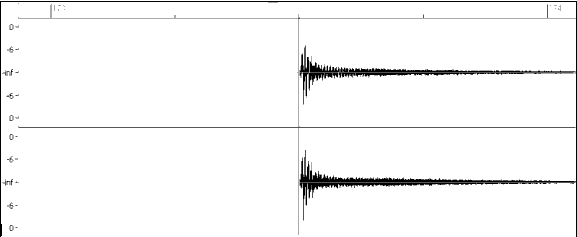
Example 10: Here the shot begins at bar 171 (173-2), at the third beat, or 240 ticks into the bar.
Duration Unlike patterns, which use numbers of bars for durations, the shots use ticks for durations. So, for example, if a shot lasts for three beats, you would enter 360 (3 beats * 120 ticks per beat).
Here is an example of a shot that lasts for three beats:
Shot,0,83,5,360,1,90
For the best effect, the sound of the shots should decay naturally, and the entire length of the shot including the decay should be entered in the text file. This is especially important when all other instruments are silent, and all you hear is the decaying sound of the drum hit.
Weight The weight for shots works exactly the same as the weight for patterns, except that there is no need for the use of 0 or 9 weights. This number should be between 1 and 8, with higher numbers representing a greater chance that the shot will be selected each time.
Volume The volume of the shots is represented by a number between 1 and 127. If 90 is entered, the volume will not be adjusted at all. If a number between 1 and 89 is entered, the volume will be lowered accordingly, and if a number between 91 and 127 is entered, the volume will be raised accordingly. It is generally easiest to test the volume amounts once the style has been completed.
Create a backup copy of SurfRockDoubleTwo^_165_Style.wav(wma)
and SurfRockDoubleTwo^01-Ride,Splsh_165_Style.txt
So set RB to 165bpm then drag SurfRockDoubleTwo^_165_Style.wav in onto the track name,
go to the end of the track and highlight the first hit you want, zoom in to get it accurate making sure you get all the sustain in the selection,
Ctrl+C check Events only,
Select "Snap to Beat"
Set cursor @ bar 251
Ctrl+V check Merge & Events
DeSelect "Snap to Beat"
Copy the next hit you want and repeat the above, if you don't want the hit on a beat don't use Snap
Delete SurfRockDoubleTwo^_165_Style.bt1
Save to wav with original name (drag the new wav back into RB to check it saved correctly)
Remove all the shots in the text file and just add this and save :
Shot{ My Custom Hits                 },1,251,0,2244,8,90
Shot{ My Custom Hits                 },0,251,0,2244,8,90
Here's another option
Custom RealDrum Solos\Hits Mac\Win you can also create an SFZ instrument from the same realdrums and use it in Sforzando VSTi on the midi track you can mute the realdrums on the bar/s with the shots/holds then add the midi notes you need in the piano roll on the bar/s that you need the custom shots/holds, then un-mute the realdrums after the shots/holds.
You can try it first with the PG Library in Sforzando > Drums > Rock Kit.
1. Use F5 to mute the drum track where the shots are.
2. Load Sforzando vst into a midi track.
3. In the Piano Roll view in the same midi track, hold the shift+ctrl and draw in a note, move the note up/down until you get the hit you want (make sure you have ASIO or MME Always On in the Driver Settings), draw in more notes if need be.
4. Use F5 to un-mute the drum track after the shots.
You never know the Rock Kit may be the same kit the surf drums were recorded on in the PG studio. You have some FX in the Sforzando GUI to adjust the sound to match the RealDrums or you can add some FX after Sforzando. You can copy and paste the midi shots if you need them again.

n RealBand you can regenerate each shot to get what you want or copy and paste.
With Biab 2018 you can use the audio editor to edit the drum track how you like but you would need a bit of enthusiasm.
You can save the drum track to a Performance track then move it to the audio editor, copy a good shot from one section to another, OR open the original realdrum track in another instance of Biab and copy the shots you need from the end of the track to the other Biab with your drum track.
and..
http://www.pgmusic.com/forums/ubbthreads.php?ubb=showflat&Number=459905#Post459905http://www.pgmusic.com/forums/ubbthreads.php?ubb=showflat&Number=460040#Post460040http://www.pgmusic.com/forums/ubbthreads.php?ubb=showflat&Number=447121 




 Dansk
Dansk Deutsch - Windows
 Español
 Français - Windows
 Italiano - Windows
 Nederlands
 Polski
 Português
 Svenskt
 русский
 Japanese
 Simplified Chinese
 Traditional Chinese
 Korean