|
Log in to post
|
Print Thread |
|
|
|
|
|
Recording, Mixing, Performance and Production
|
Joined: May 2008
Posts: 310
Journeyman
|
OP

Journeyman
Joined: May 2008
Posts: 310 |
I would like to use Reaper as it allows me to save as MP3.
I've tried Real Band but could never get the MP3 save to work.
I'm importing midi files to Reaper, but it seems Reaper only has 1 sound that I can use.
Please explain how I would get more sounds installed.
Last edited by Danna; 01/14/14 08:42 PM.
|
|
|
|
|
|
|
|
|
|
|
|
|
Recording, Mixing, Performance and Production
|
Joined: Oct 2008
Posts: 20,676
Veteran
|
|
Veteran
Joined: Oct 2008
Posts: 20,676 |
Hi Danna, Before anything, could you please check that you have Coyote WT installed as a soft synth. To do this ... If you have BIAB 2014 then click on "Prefs" (#1). Now select "Midi driver" (#2), select Microsoft GS Wavetable (#3), make sure both check-boxes have ticks in them (#3) and lastly click on the "VST/DXi Synth Settings" button (#5). These numbers refer to the image below.  If you don't have BIAB 2014, go to "Opt | Preferences" and then the same process described above (#1 - #5) still applies. After you've clicked on #5, the following will open.  Select "Default Synth" (#2), Make sure "Edit" is selected in the top slot (#5). Now click on the dropdown menu (#3) and select "Coyote WT" (#4). 'OK' (or exit if OK is not available) your way out of everything. When you've set this up (or double-checked that it's set up), please post a message to say so and I'll continue. Regards, Noel Select the button called "Default Synth" (#2).
MY SONGS...Audiophile BIAB 2026
|
|
|
|
|
|
|
|
|
|
|
|
|
Recording, Mixing, Performance and Production
|
Joined: May 2008
Posts: 310
Journeyman
|
|
OP
Journeyman
Joined: May 2008
Posts: 310 |
Thanks Noel ... here's what I have. 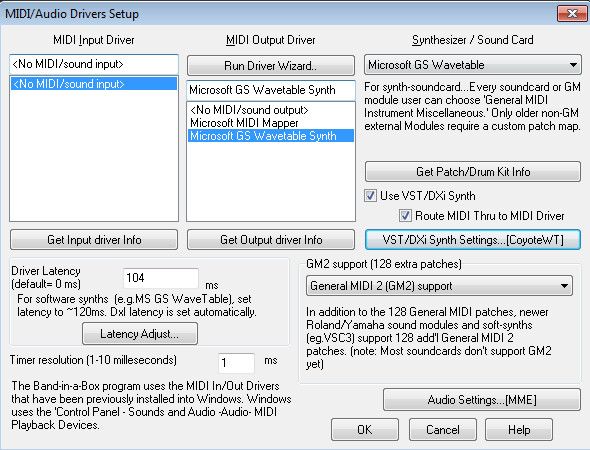 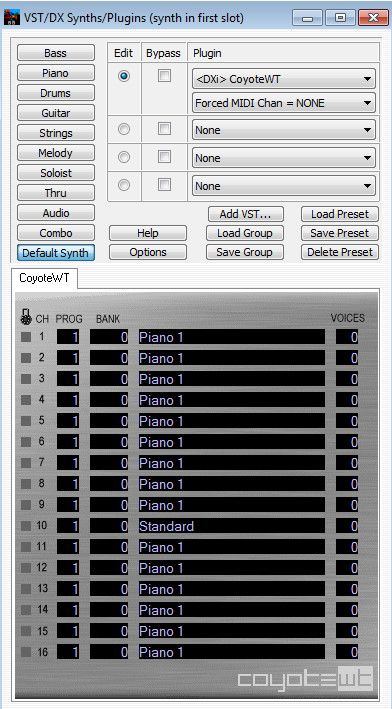
|
|
|
|
|
|
|
|
|
|
|
|
|
Recording, Mixing, Performance and Production
|
Joined: Oct 2008
Posts: 20,676
Veteran
|
|
Veteran
Joined: Oct 2008
Posts: 20,676 |
That looks excellent. As an aside, in case this is useful information for other who read the thread, you've installed CoyoteWT as at VSC/DXi. This will allow you to export wav / mp3 / wma files from BIAB. This would mean that if you load a midi file into BIAB at the moment, you could save in one of the above formats. Anway, continuing on ... 1. Open Reaper and start a new project. 2. Now open "Insert | Media file" and load up a midi.  3. When the midi is loaded, click on the FX button (shown below).  4. When the fx window opens, click on "All plugins" (#1). Now, down in the "Filter list" (#2) type in coyote. CoyoteWT should be listed up the top of the window somewhere (#3). Double click on Coyote WT, close the software synth that opens up and then exit the fx window (if the exit wasn't automatic).  5. The fx button will now be green (as below).  6. If you start the midi file playing now, it should play with whatever sounds were set when the midi was created. Hope this helps, Noel
MY SONGS...Audiophile BIAB 2026
|
|
|
|
|
|
|
|
|
|
|
|
|
Recording, Mixing, Performance and Production
|
Joined: May 2008
Posts: 310
Journeyman
|
|
OP
Journeyman
Joined: May 2008
Posts: 310 |
Thanks Noel. Loaded midi with Insert-Media file ... but no "fx" button 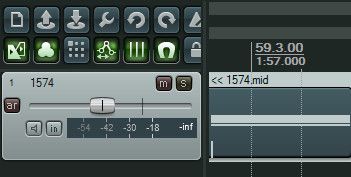 Also tried another midi file but still no "fx" button.
Last edited by Danna; 01/14/14 08:26 PM.
|
|
|
|
|
|
|
|
|
|
|
|
|
Recording, Mixing, Performance and Production
|
Joined: Oct 2008
Posts: 20,676
Veteran
|
|
Veteran
Joined: Oct 2008
Posts: 20,676 |
That's strange. What version of Reaper do you have? It's under "Help | About Reaper"
Noel
MY SONGS...Audiophile BIAB 2026
|
|
|
|
|
|
|
|
|
|
|
|
|
Recording, Mixing, Performance and Production
|
Joined: May 2008
Posts: 310
Journeyman
|
|
OP
Journeyman
Joined: May 2008
Posts: 310 |
|
|
|
|
|
|
|
|
|
|
|
|
|
Recording, Mixing, Performance and Production
|
Joined: Oct 2008
Posts: 20,676
Veteran
|
|
Veteran
Joined: Oct 2008
Posts: 20,676 |
Danna, The fx button was there in that version for me. Try going to "Options | Preferences" and then select "Appearance | Media" and check the boxes I have a red rectangle around. This should make the fx button visible on the track itself. (You may need to expand the track, by clicking on it and scrolling it out, to see it though.)  Regards, Noel
MY SONGS...Audiophile BIAB 2026
|
|
|
|
|
|
|
|
|
|
|
|
|
Recording, Mixing, Performance and Production
|
Joined: Oct 2008
Posts: 20,676
Veteran
|
|
Veteran
Joined: Oct 2008
Posts: 20,676 |
In addition to the above, another thing to try ... ... is to right-click where shown and then set the track layout to default. If it's already set on "default" change it to something else and then back to default.  Regards, Noel
MY SONGS...Audiophile BIAB 2026
|
|
|
|
|
|
|
|
|
|
|
|
|
Recording, Mixing, Performance and Production
|
Joined: May 2008
Posts: 310
Journeyman
|
|
OP
Journeyman
Joined: May 2008
Posts: 310 |
Thanks Noel ... I now have the FX button.
Click on FX button - choose All Plugins - filter for Coyote and nothing shows in right pane.
|
|
|
|
|
|
|
|
|
|
|
|
|
Recording, Mixing, Performance and Production
|
Joined: Oct 2008
Posts: 20,676
Veteran
|
|
Veteran
Joined: Oct 2008
Posts: 20,676 |
Hmm.... the plugin must be in a different location that what Reaper scans. I'll track it down and get back to you  Noel
MY SONGS...Audiophile BIAB 2026
|
|
|
|
|
|
|
|
|
|
|
|
|
Recording, Mixing, Performance and Production
|
Joined: May 2008
Posts: 310
Journeyman
|
|
OP
Journeyman
Joined: May 2008
Posts: 310 |
The Coyote folder is in "Programs Files (x86)" on my machine.
Thanks Noel
Went into Pref - VST and set path to C:\Program Files (x86)\Coyote\CoyoteWT but still does not recognize.
Last edited by Danna; 01/15/14 06:49 AM.
|
|
|
|
|
|
|
|
|
|
|
|
|
Recording, Mixing, Performance and Production
|
Joined: Oct 2008
Posts: 20,676
Veteran
|
|
Veteran
Joined: Oct 2008
Posts: 20,676 |
Danna, Did you "Re-scan" the plugins after adding the above path? Also, when you re-scanned, as the option "Get VST names/types when scanning" checked? Lastly, please have a look at the FX list and select DXi. If you could provide me with a capture of the list, it would be great.  It's late here now and time for me to throw in the proverbial towel. I'll get back to this tomorrow. Regards, Noel
Last edited by Noel96; 01/15/14 07:13 AM. Reason: added another question
MY SONGS...Audiophile BIAB 2026
|
|
|
|
|
|
|
|
|
|
|
|
|
Recording, Mixing, Performance and Production
|
Joined: May 2008
Posts: 310
Journeyman
|
|
OP
Journeyman
Joined: May 2008
Posts: 310 |
<Did you "Re-scan" the plugins after adding the above path?> Yes <the option "Get VST names/types when scanning" checked?> Yes Thanks Noel Here's my FX dialog 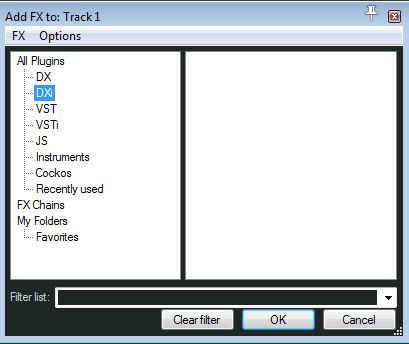 When I had "All Plugins" selected and try to filter for "Coyote" : Type the C and the right pane list shortens Type the O and the right pane list shortens Type the Y and the right pane list dissappears
|
|
|
|
|
|
|
|
|
|
|
|
|
Recording, Mixing, Performance and Production
|
Joined: Oct 2008
Posts: 20,676
Veteran
|
|
Veteran
Joined: Oct 2008
Posts: 20,676 |
Hi Danna,
That seems unusual.
Under "Options | Preferences" then "Plugins | VST" try running "Auto-detect" and if that brings no joy, try "Clear cache/rescan".
While you're at it, could click on the DX under "All plugins" and let me have a screen shot. I'd like to see if the PG Music plugins are being picked up.
Regards,
Noel
MY SONGS...Audiophile BIAB 2026
|
|
|
|
|
|
|
|
|
|
|
|
|
Recording, Mixing, Performance and Production
|
Joined: May 2008
Posts: 310
Journeyman
|
|
OP
Journeyman
Joined: May 2008
Posts: 310 |
Hey Noel
Auto-detect seems to have no effect.
Clear cache/rescan did something, and I'm sure I saw coyote.dll flash upon the screen for a split second.
But still nothing showing in the FX panel.
Clicking on DX under "All plugins" leaves a empty right pane, same as pic from above with DXi selected.
... thanks for your efforts.
|
|
|
|
|
|
|
|
|
|
|
|
|
Recording, Mixing, Performance and Production
|
Joined: May 2008
Posts: 310
Journeyman
|
|
OP
Journeyman
Joined: May 2008
Posts: 310 |
I was wondering if it is a 32bit or 64bit issue, and found this from PG. 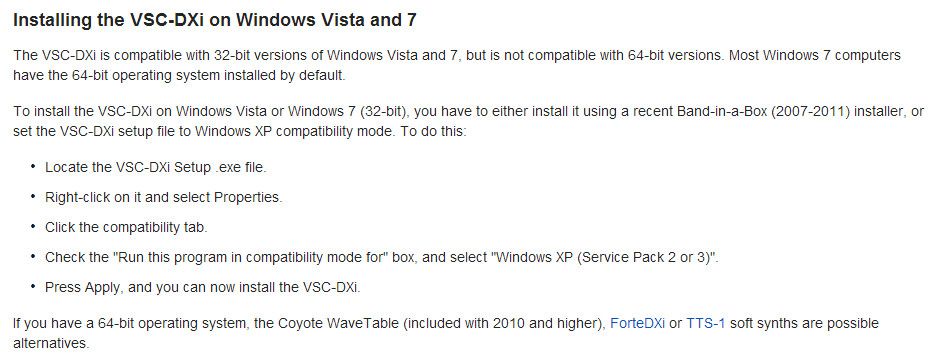 I have 2013 and 2014, if I under stand that right it should work on my Win 7 64bit. I have the USB HD for 2013 and 2-DVD's for the 2014 upgrade. I do not see how I could install Coyote, on it's own, from either.
|
|
|
|
|
|
|
|
|
|
|
|
|
Recording, Mixing, Performance and Production
|
Joined: Oct 2008
Posts: 20,676
Veteran
|
|
Veteran
Joined: Oct 2008
Posts: 20,676 |
Hi Danna,
VSC/DXi, mentioned in the above article, is the name of an older Roland soft synth. It doesn't work on 64 bit systems. It was because of this that PG Music introduced CoyoteWT into the BIAB/RB installation process.
The fact that your installation of Reaper has not picked up the PG Music plugins (Reverb, EQ, etc.) is strange.
Do you used BIAB on a USB hard drive?
My installation of Reaper automatically picked up everything that you're missing. I didn't have to do anything. There were some plugins that it didn't get, so I entered the path to those VST plugins. When I installed Reaper, I right-clicked on the installation file and installed it as Administrator. (I'm not sure whether you need to do this in Win 7.)
Have a look on your system and see if you can find a folder called "vstplugins" and then put the path to that into Reaper (just above the 'rescan' button).
For example, on my system (32 bit, Vista), I have the following folders...
c:\program files\vstplugins
c:\program files\steinberg\vstplugins
d:\program files\vstplugins
d:\orogram Files\Cakewalk\vstplugins
All those are listed in the "Vst-plugin" path. If I recall correctly, Reaper picked up all of them except the Cakewalk one.
It might also be worthwhile locating Reaper.exe, right clicking on it, selecting properties and giving it administration privileges and then running 'clear cache/rescan'.
Lastly, what antivirus software do you use?
To be honest, this problem is now in the realm of things about which I know nothing. Hopefully someone with Win 7, 64 bit will see this post and offer a bit more insight.
Kind regards,
Noel
P.S. When we went through the initial process of checking BIAB to see if CoyoteWT was installed, the test confirmed that it was indeed installed. It's just that Reaper isn't seeing it.
MY SONGS...Audiophile BIAB 2026
|
|
|
|
|
|
|
|
|
|
|
|
|
Recording, Mixing, Performance and Production
|
Joined: May 2008
Posts: 310
Journeyman
|
|
OP
Journeyman
Joined: May 2008
Posts: 310 |
BIAB is fully installed in C:bb
AVG virus software.
C:\Program Files (x86)\Steinberg\VstPlugIns\Focusrite (compessor,reverb,etc)
C:\Program Files (x86)\Sibelius Software\VSTPlugins (GM_Module.dll)
I've tried pointing Reaper to them but it does not recognize them.
Noel, thanks so much for your efforts, you've given me everything you could think of.
I'll just have to let it rest.
I've posted on the Reaper forum earlier today, but have no replys.
If I get it sorted, I'll surely post back.
Again ... Thanks
|
|
|
|
|
|
|
|
|
|
|
|
|
Recording, Mixing, Performance and Production
|
Joined: Oct 2008
Posts: 20,676
Veteran
|
|
Veteran
Joined: Oct 2008
Posts: 20,676 |
Hi Danna,
I run AVG free without any tweaking so I doubt that it's that that's the spanner in the works.
The fact that the vstplugins directories are not be recognised is pointing towards an administrative privileges possibility. Windows protects the "program files" directories and it seems that it's not letting Reaper in.
You could try turning off User Account Control (UAC) and see if that makes a difference. UAC is a brick wall. Windows will tell you that it is not advisable to turn this off, etc., but it would be an interesting experiment. You can always reactivate it after giving it a run. For what it's worth, I haven't had UAC on my system for at least 5 years (if not longer).
I'd love to know the results of any success if you find it. Posting it here would be very helpful for anyone else who has a similar problem.
Good luck,
Noel
MY SONGS...Audiophile BIAB 2026
|
|
|
|
|
|
|
|
|
|
|
|
Ask sales and support questions about Band-in-a-Box using natural language.
ChatPG's knowledge base includes the full Band-in-a-Box User Manual and sales information from the website.
|
|
|
|
|
|
|
|
|
|
|
Peter Gannon Talks Band-in-a-Box with zplane
zplane recently interviewed Peter Gannon, the founder and creator of Band-in-a-Box, about the software's early days, what sets it apart from AI, how zplane's audio algorithms are used in Band-in-a-Box, and more!
Special thanks to the team at zplane for their continued support.
Check out the full interview here: https://products.zplane.de/blog/peter-gannon-interview-pg-music
Last Chance! The Band-in-a-Box® 2026 for Mac® Special Ends Today (May 31, 2026) at 11:59pm PDT!
Time really is running out! Save up to 50% on Band-in-a-Box® 2026 for Mac® upgrades and receive a FREE Bonus PAK—only when you order by 11:59 PM PDT today!
We've added many major new features and new content in a redesigned Band-in-a-Box® 2026 for Mac®!
Version 2026 introduces a modernized GUI redesign across the program, with updated toolbars, refreshed windows, smoother workflows, and a new Dark Mode option. There’s also a new side toolbar for quicker access to commonly used windows, and the new Multi-View feature lets you arrange multiple windows as layered panels without overlap, making it easier to customize your workspace.
Another exciting new addition is the amazing new AI-Notes feature, which can transcribe polyphonic audio into MIDI. View the results in notation or play them back as MIDI, and choose whether to transcribe an entire track or transcribe specific parts like drums, bass, guitars/piano, or vocals. There's over 100 new features in Band-in-a-Box® 2026 for Mac®.
There's an amazing collection of new content too, including 202 RealTracks, new RealStyles, MIDI SuperTracks, Instrumental Studies, “Songs with Vocals” Artist Performance Sets, Playable RealTracks Set 5, two RealDrums Stems sets, and much more!
Upgrade your Band-in-a-Box for Mac® to save up to 50% on most Band-in-a-Box® 2026 upgrade packages!
Plus, when you order your Band-in-a-Box® 2026 Mac upgrade during our special, you'll receive a Free Bonus PAK of exciting new add-ons.
If you need any help deciding which package is the best option for you, just let us know. We are here to help!
Band-in-a-Box® 2026 Mac Special Offers Extended Until May 31st!
Good news- we've extended our Band-in-a-Box® 2026 for Mac® special offers until May 31, 2026!
Band-in-a-Box® 2026 is packed with major new features, enhancements, and an incredible lineup of new content! The program now sports a sleek, modern GUI redesign across the entire interface, including updated toolbars, refreshed windows, smoother workflows, a new dark mode option, and more. The brand-new side toolbar provides quicker access to key windows, while the new Multi-View feature lets you arrange multiple windows as layered panels without overlap, creating a flexible, clutter-free workspace. We have an amazing new “AI-Notes” feature. This transcribes polyphonic audio into MIDI so you can view it in notation or play it back as MIDI. You can transcribe an entire track (all pitched instruments and drums) or focus on individual parts like drums, bass, guitars/piano, or vocals. There's an amazing collection of new content too, including 202 RealTracks, new RealStyles, MIDI SuperTracks, Instrumental Studies, “Songs with Vocals” Artist Performance Sets, Playable RealTracks Set 5, two RealDrums Stems sets, and much more!
There are over 100 new features in Band-in-a-Box® 2026 for Mac®.
When you order purchase Band-in-a-Box® 2026 before 11:59 PM PDT on May 31st, you'll also receive a Free Bonus PAK packed with exciting new add-ons.
Check out the Band-in-a-Box® for Mac packages page to find the best package for you.
Holiday Weekend Hours
It's Victoria Day Long Weekend in Canada. Our Customer Service hours are:
Saturday, May 16: Closed
Sunday, May 17: Closed
Monday, May 18: 8:00am - 4:00pm
Regular hours resume Tuesday, May 19th!
Today's the Last Day of the Band-in-a-Box 2026® for Mac Special!
Order before 11:59pm PDT today (May 15, 2026) to save up to 50% off your Band-in-a-Box® 2026 for Mac® upgrade and receive a FREE Bonus PAK loaded with great new Add-ons to use with this new version!
Don't wait - order today!
Check out all the new features in the redesigned Band-in-a-Box® 2026 for Mac®!
Band-in-a-Box® 2026 for Mac - Special Offers End at 11:59pm PDT on Friday, May 15th, 2026!
Order before 11:59pm PDT on Friday, May 15th and SAVE up to 50% on most Band-in-a-Box® version 2026 for Mac Upgrade packages... and that's not all! With your version 2026 for Mac purchase, we'll include a Bonus PAK full of great new Add-ons FREE! Upgrade to the 2026 49-PAK to receive even more NEW Add-ons including 20 additional RealTracks... that's 222 NEW RealTracks available with version Band-in-a-Box® 2026 for Mac!
Upgrade to Band-in-a-Box® 2026 for Mac® today for as little as $49! Check out the Band-in-a-Box® packages page for all available purchase options.
Learn more about the Free Bonus PAK and 49-PAK here.
If you have any questions about which package is the best option for you, just let us know. We're here to help!
202 New RealTracks Released with Band-in-a-Box 2026!
With Band-in-a-Box® 2026, we've released 202 incredible new RealTracks (in sets 468-488) in a variety of genres—featuring your most requested styles!
Jazz, Funk & World (Sets 468-475):
Our new jazz, funk & blues RealTracks include a groovin’ collection of RealTracks and RealDrums! These include more requested “soul jazz” RealTracks featuring artists Neil Swainson (bass), Charles Treadway (organ), Brent Mason (guitar), and Wes Little (drums). There are new “smooth jazz” styles (4), which include a RealTracks first: muted trumpet, as well as slick new smooth jazz brushes options for drums. Blues lovers will be thrilled—there are more “classic acoustic blues” styles, including guitar (5), bass (4), and drums (10) with blues master Colin Linden, featuring understated and tasty background acoustic soloing, plus brushes drums and acoustic bass. There are also new electric blues RealTracks, including electric blues with PG favorite Johnny Hiland (3) and soulful electric slide guitar from Colin Linden (4). If you love funk & gospel, there are great new options this year, including gospel organ (3) from Charles Treadway, as well as new funk, tango, and rock ’n’ roll drums (3) and bass (1). And for big, bold arrangements, we have uptempo soul horns (4) featuring a three-part hip horn section with options for a full mix or stems of each individual horn — plus an accompanying rhythm section (4) of drums, bass, guitar, and electric piano!
Rock & Pop (Sets 476–482):
Our new rock & pop RealTracks bring a powerful mix of requested favorites, fresh genres, and modern chart-inspired styles! We have more of our popular “Producer Layered Acoustic Guitars (15)” featuring Band-in-a-Box favorite Brent Mason. We’ve continued our much-requested disco styles (10), and added new Celtic guitar (5) with a more basic, accessible approach than our previous Drop-D or DADGAD offerings. There are also highly requested yacht rock styles (17), inspired by the smooth, polished soft-rock sound of the late ’70s and early ’80s — laid-back grooves, silky electric pianos, warm textures, elegant harmonic movement, and pristine production aesthetics. Fans of heavier styles will love our new glam metal (13), capturing the flashy, high-energy sound of ’80s arena-ready guitar rock. We also have a set of rootsy modern-folk rock (18), with a warm, organic sound combining contemporary folk textures and driving acoustic strumming. And we’ve added lots of new modern pop styles (16) — the kinds of sounds you’re hearing on the radio today, featuring exciting new drums, synths, and cutting-edge RealTracks arrangements.
Country, & Americana (Sets 483–488):
Our new country & Americana RealTracks deliver a rich collection of acoustic, electric, and roots-inspired styles! We have new country pop (9) with legendary guitarist Brent Mason. There is also a potpourri (14) of bouzouki, guitars, banjo, and more, perfect for adding texture and character to contemporary acoustic arrangements. We’ve added funky country guitar (5) with PG favorite Brent Mason, along with classic pedal steel styles (5) featuring steel great Doug Jernigan. There are more country songwriter styles (8) that provide intimate, rootsy foundations for storytelling and modern Americana writing. Finally, we have “background soloing” acoustic guitar (12) with Brent Mason — simpler, but still very tasty acoustic lines designed to sit beautifully behind vocals or act as a subtle standalone solo part.
Check out all the 202 new RealTracks (in sets 468-488)!
And, if you are looking for more, the 2026 49-PAK (for $49) includes an impressive collection of 20 bonus RealTracks, featuring exciting and inspiring additions to add to your RealTracks library. You'll get new country-rhythm guitar styles from PG Music favorites Johnny Hiland and Brent Mason, along with modern-pop grooves that capture today’s radio-ready sound! There are also new indie-folk styles with guitar, bass, 6-string bass used as a high-chording instrument, acoustic guitar, and banjo. Plus, dedicated "cymbal fills" RealDrums provide an added layer that work very well with low-key folky styles with other percussion.
The 2026 49-PAK is loaded with other great new add-ons as well. Learn more about the 2026 49-PAK!
|
|
|
|
|
|
|
|
|
|
|
|
Forums57
Topics86,619
Posts807,540
Members40,174
| |
Most Online64,515
Apr 8th, 2026
|
|
|
|
|
|
|
|
|





 Dansk
Dansk Deutsch - Windows
 Español
 Français - Windows
 Italiano - Windows
 Nederlands
 Polski
 Português
 Svenskt
 русский
 Japanese
 Simplified Chinese
 Traditional Chinese
 Korean