An update. The biggest changes are moving out of the corner and centering on that wall, and placing the monitors so as to create a nearly equilateral triangle with my listening position. I can't move any farther away from the wall, but I am fairly balanced within the room now.
I did add a couple of hardware units, a Golden Age Pre-73 MKII pre-amp and an FMR Audio RNC 1773. Oh, and I trimmed those noise-cancelling hot-pads so they would actually fit into the ports on those monitors:)
I now have a small switch box so I can kill the output to the monitors easily, without having to reach in back for their power buttons. And, I picked up a splitter so I can use either set of headphones without having to plug in or unplug any cables, and there's extra jacks so that I can plug in an in-ear monitor for a Street Jelly show if broadcast from this room.
Those monitor stands are from ISO Acoustics, and they're on top of some Auralex foam pads with a 3/16 piece of plywood in between for stability. The foam helped a lot. That external hdd is setting on the leftover Auralex pads that were in the box. This untreated room is boomy already and so I've tried to limit the noise coming from that hdd and from those monitors setting on the surface of the desk.
I do check my mixes with those monitors as compared to a professional reference mix, but I primarily use headphones.
Looks great Scott! Nice on the equilateral triangle set up. A definite must. I see the speaker stands to get you speakers up to ear height. I made some home made wood stands on mine.
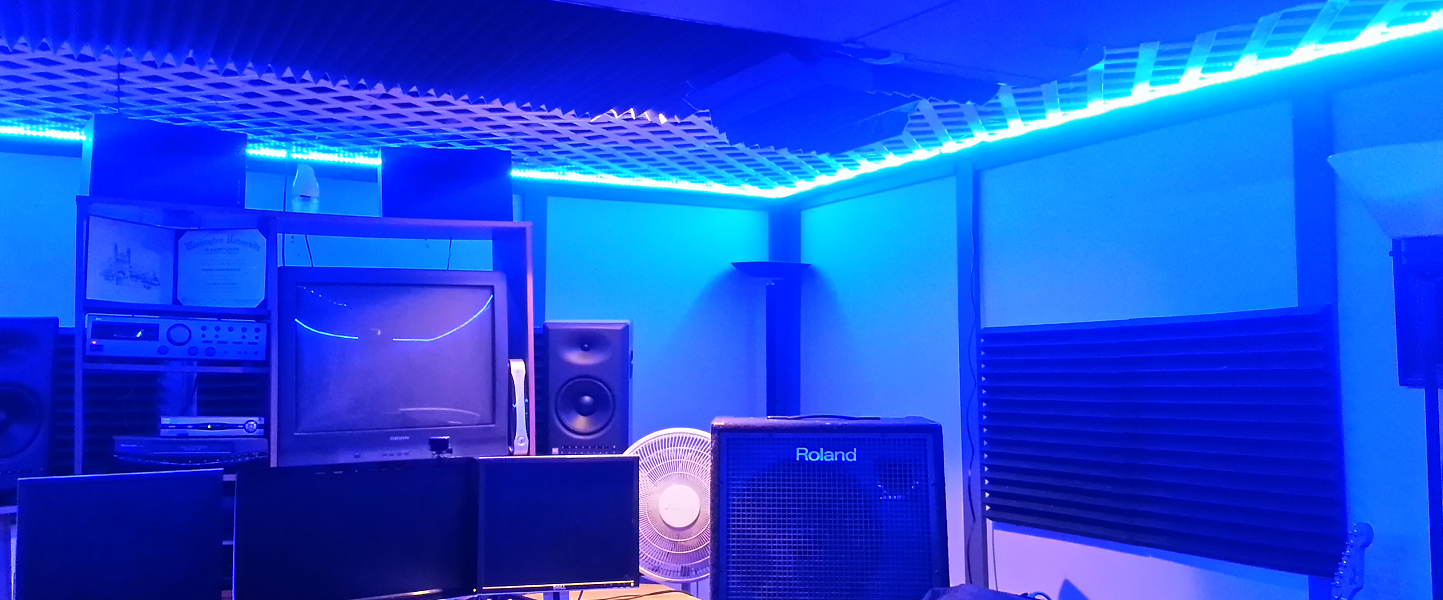
Main difference on my set up from the picture above is that I got some Dell 19" flat screen monitors to match up to the 24" center monitor that was already there. The old CRT screens are gone.
P.S. - The wife got me some blue LEDs for my ceiling as an Xmas gift. They're a lot like the black lights of the past. This is almost as good as lava lamps!
I'd post a picture of my studio now, but nothing much has changed except perhaps a bit more dust on the shelves.
And... BTW Steve....
Quote:
- The wife got me some blue LEDs for my ceiling as an Xmas gift. They're a lot like the black lights of the past. This is almost as good as lava lamps!
The LED's are cool but they ain't lava lamp cool.
You can find my music at: www.herbhartley.com Add nothing that adds nothing to the music. You can make excuses or you can make progress but not both.
The magic you are looking for is in the work you are avoiding.
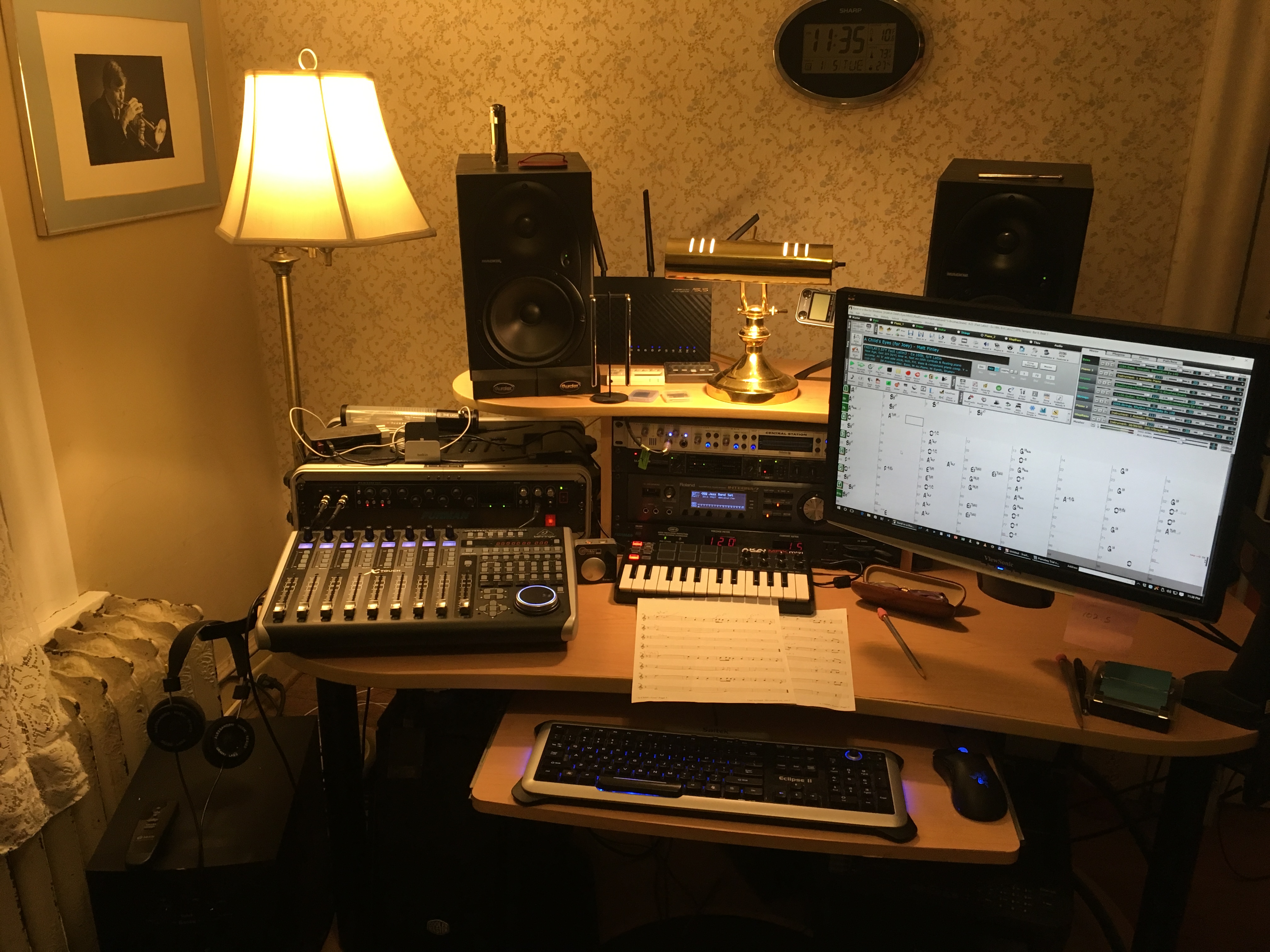
This is where I compose and arrange. The instruments and recording equipment are in another room, connected by wiring and by V-Control Pro to this PC. The display swivels out of the way of the Mackie monitor.
BIAB 2025 Win Audiophile. Software: Studio One 7 Pro, Swam horns, Acoustica-7, Notion 6, Song Master Pro, Win 11 Home. Hardware: Intel i9, 32 Gb; Presonus 192 & Faderport 8, Royer 121, Slate VSX, Adam Sub8 & Neumann 120 monitors.
Thanks Jim. Yes, it is peaceful but not as much as a lesser setup in the Adirondacks. I use headphones to check each mix, particularly the stereo separation and to prevent cancellation in mono. You can see my headphones in the lower left. These are Alessandro brand, a customization of the Grado open air line. Best $100 I ever spent in audio.
I also use headphones when my wife is asleep in the next room! That's when I use the Sony closed cans.
BIAB 2025 Win Audiophile. Software: Studio One 7 Pro, Swam horns, Acoustica-7, Notion 6, Song Master Pro, Win 11 Home. Hardware: Intel i9, 32 Gb; Presonus 192 & Faderport 8, Royer 121, Slate VSX, Adam Sub8 & Neumann 120 monitors.
"BIAB 2016 for Windows Audiophile, SONAR Platinum, Adobe Audition, Ozone, & Encore all running on Windows 10 64-bit. Hardware includes a Roland Integra-7, Focusrite 18i20, TCE Finalizer, Behringer X-Touch"
Very nice and comfortable setup.
What is your routing for the Integra-7? I had a Focusrite 18i20 for a while but did not keep it. I currently have Presonus 22vsl and 44vsl for audio interfaces. I also have a Behringer 24 channel mixer w/ stereo USB in/out available. I usually transfer BIAB tracks to a Tascam DP-24 for vocal recording and most mixing.
I'm thinking I can take the Integra-7's 8 analog outputs into my Tascam DP-24's 8 analog inputs and then import realtracks through the Tascam USB interface. Just wondering if you were using the analog outputs of the 18i20 in a similar fashion?
Charlie, it always comes back to signal flow, doesn't it.
My Integra-7 connection to the Focusrite Scarlett 18i20 couldn't be easier: one digital coax cable from the coax out to the SP/DIF In on the Scarlett.
Years ago I tested my Roland Fantom XR, very similar to the better Integra, comparing digital versus analog connections. I preferred the digital sound and the "no fuss" approach so it's been that way ever since.
Another way to say this is that I only use the Integra for MIDI sounds, not for audio or as a mixer or speaker control; I do those functions elsewhere.
BIAB 2025 Win Audiophile. Software: Studio One 7 Pro, Swam horns, Acoustica-7, Notion 6, Song Master Pro, Win 11 Home. Hardware: Intel i9, 32 Gb; Presonus 192 & Faderport 8, Royer 121, Slate VSX, Adam Sub8 & Neumann 120 monitors.
PowerTracks 2026 is here—bringing powerful new enhancements designed to make your production workflow faster, smoother, and more intuitive than ever.
The enhanced Mixer now shows Track Type and Instrument icons for instant track recognition, while a new grid option simplifies editing views. Non-floating windows adopt a modern title bar style, replacing the legacy blue bar.
The Master Volume is now applied at the end of the audio chain for consistent levels and full-signal master effects.
Tablature now includes a “Save bends when saving XML” option for improved compatibility with PG Music tools. Plus, you can instantly match all track heights with a simple Ctrl-release after resizing, and Add2 chords from MGU/SGU files are now fully supported... and more!
Get started today—first-time packages start at just $49.
Already using PowerTracks Pro Audio? Upgrade for as little as $29 and enjoy the latest improvements!
Band-in-a-Box 2026 for Windows Special Offers End Tomorrow (January 15th, 2026) at 11:59 PM PST!
Time really is running out! Save up to 50% on Band-in-a-Box® 2026 for Windows® upgrades and receive a FREE Bonus PAK—only when you order by 11:59 PM PST on Thursday, January 15, 2026!
We've added many major new features and new content in a redesigned Band-in-a-Box® 2026 for Windows®!
Version 2026 introduces a modernized GUI redesign across the program, with updated toolbars, refreshed windows, smoother workflows, and a new Dark Mode option. There’s also a new side toolbar for quicker access to commonly used windows, and the new Multi-View feature lets you arrange multiple windows as layered panels without overlap, making it easier to customize your workspace.
Another exciting new addition is the new AI-Notes feature, which can transcribe polyphonic audio into MIDI. You can view the results in notation or play them back as MIDI, and choose whether to process an entire track or focus on specific parts like drums, bass, guitars/piano, or vocals. There's over 100 new features in Band-in-a-Box® 2026 for Windows®.
There's an amazing collection of new content too, including 202 RealTracks, new RealStyles, MIDI SuperTracks, Instrumental Studies, “Songs with Vocals” Artist Performance Sets, Playable RealTracks Set 5, two RealDrums Stems sets, XPro Styles PAK 10, Xtra Styles PAK 21, and much more!
Upgrade your Band-in-a-Box for Windows to save up to 50% on most Band-in-a-Box® 2026 upgrade packages!
Plus, when you order your Band-in-a-Box® 2026 upgrade during our special, you'll receive a Free Bonus PAK of exciting new add-ons.
If you need any help deciding which package is the best option for you, just let us know. We are here to help!
Band-in-a-Box® 2026 for Windows® Special Offers Extended Until January 15, 2026!
Good news! You still have time to upgrade to the latest version of Band-in-a-Box® for Windows® and save. Our Band-in-a-Box® 2026 for Windows® special now runs through January 15, 2025!
We've packed Band-in-a-Box® 2026 with major new features, enhancements, and an incredible lineup of new content! The program now sports a sleek, modern GUI redesign across the entire interface, including updated toolbars, refreshed windows, smoother workflows, a new dark mode option, and more. The brand-new side toolbar provides quicker access to key windows, while the new Multi-View feature lets you arrange multiple windows as layered panels without overlap, creating a flexible, clutter-free workspace. We have an amazing new “AI-Notes” feature. This transcribes polyphonic audio into MIDI so you can view it in notation or play it back as MIDI. You can process an entire track (all pitched instruments and drums) or focus on individual parts like drums, bass, guitars/piano, or vocals. There's an amazing collection of new content too, including 202 RealTracks, new RealStyles, MIDI SuperTracks, Instrumental Studies, “Songs with Vocals” Artist Performance Sets, Playable RealTracks Set 5, two RealDrums Stems sets, XPro Styles PAK 10, Xtra Styles PAK 21, and much more!
There are over 100 new features in Band-in-a-Box® 2026 for Windows®.
When you order purchase Band-in-a-Box® 2026 before 11:59 PM PST on January 15th, you'll also receive a Free Bonus PAK packed with exciting new add-ons.
Upgrade to Band-in-a-Box® 2026 for Windows® today! Check out the Band-in-a-Box® packages page for all the purchase options available.
Band-in-a-Box 2026 Video: The Newly Designed Piano Roll Window
In this video, we explore the updated Piano Roll, complete with a modernized look and exciting new features. You’ll see new filtering options that make it easy to focus on specific note groups, smoother and more intuitive note entry and editing, and enhanced options for zooming, looping, and more.
Band-in-a-Box 2026 Video: AI Stems & Notes - split polyphonic audio into instruments and transcribe
This video demonstrates how to use the new AI-Notes feature together with the AI-Stems splitter, allowing you to select an audio file and have it separated into individual stems while transcribing each one to its own MIDI track. AI-Notes converts polyphonic audio—either full mixes or individual instruments—into MIDI that you can view in notation or play back instantly.
One of our representatives will be happy to help you over the phone. Our hours of operation are from
6:00AM to 6:00PM PST (GMT -8) Monday thru Friday, and 8:00AM to 4:00PM PST Saturday. We are closed Sunday. You can also send us your questions via email.
One of our representatives will be happy to help you on our Live Chat or by email. Our hours of operation are from
6:00AM to 6:00PM PST (GMT -8) Monday thru Friday; 8:00AM to 4:00PM PST (GMT -8) Saturday; Closed Sunday.












 Dansk
Dansk Deutsch - Windows
 Español
 Français - Windows
 Italiano - Windows
 Nederlands
 Polski
 Português
 Svenskt
 русский
 Japanese
 Simplified Chinese
 Traditional Chinese
 Korean