|
Log in to post
|
Print Thread |
|
|
|
|
|
Band-in-a-Box for Windows
|
Joined: Dec 2013
Posts: 1,138
Expert
|
OP

Expert
Joined: Dec 2013
Posts: 1,138 |
I opened a BiaB file created with version 2014 and received the error message in the subject.
The Piano, Strings and Soloist tracks (2nd, 5th, & 7th) do not play. When I open this project in Real Band, there is no audio for those tracks, except at the very end of the song where there is a hold.
In the Piano and Soloist tracks there are no VST/DX/Plugins.
In the Strings track on the Plugins Tab [SampleTank 2.x] is listed when I open the project. In the pop-up VST/DX/Plugins window, the first slot is empty though and displays <DX> None.
This is not happening with other 2014 BiaB projects. I tried creating a new instance of RT 1787 in Real Band on a new empty track, there is no audio generated except at that held note at the end of the song.
From Real Band:
****** Song Summary *************
Title: Untitled Song
File:Little Cabin 2015.SGU
Key=D , Tempo 88, Length (m:s)=3:34
No intro. 83 bar chorus, from bar 1 to bar 83. Repeat x1 chorus
No Melody
No Soloist track.
Song is saved with bar changes for Time signature,RealDrums Changes,
Style is _FPBTSSW.STY (2 Sw FgerpickGuitars Slow [85RS])
StringsCustom Synth is Hi-Q 001 01 Piano, Acoustic, Grand SampleTank.tgs
RealTracks in song: 1190:Bass, Electric, ModernRnBRock Ev 065
RealTracks in song: 1787:Fiddle, Background Pop16ths Ev 085 (Outside)
RealTracks in song: 378:Guitar, Acoustic, Strumming DoubleTime Ev 088
RealTracks in song: 1787:Fiddle, Background Pop16ths Ev 085 (Outside)
RealTracks in song: 1760:Fiddle, Background Pop16ths Ev 085
RealTracks in song: 1604:Fiddle, Background Pop16ths Ev 110
RealDrums in Song: NashBrushBalDbKEv16^3-a: QuarterHat, TripletSnare , b: QuarterRide, Snare
*******************
Does that 'StringsCustom Synth' mean anything to you experts? Thanks for reading this and for any suggestions.
|
|
|
|
|
|
|
|
|
|
|
|
|
Band-in-a-Box for Windows
|
Joined: Dec 2013
Posts: 1,138
Expert
|
|
OP
Expert
Joined: Dec 2013
Posts: 1,138 |
Update: All three of the troublesome tracks displayed [SampleTank 2.x] as the first VST on the Plugins tab. On the Soloist track I was able to remove it by selecting <DX>None and that worked, but that doesn't work for the Piano and Strings tracks. SampleTank is no longer displayed on those two tracks, but there's still no audio. I get two error messages when I open the file. Also just found this thread so I'll try re-installing since I appear to have the same glitches that Floyd Jane described. http://www.pgmusic.com/forums/ubbthreads.php?ubb=showflat&Number=278062&page=1
Last edited by olemon; 01/30/15 02:23 PM.
|
|
|
|
|
|
|
|
|
|
|
|
|
Band-in-a-Box for Windows
|
Joined: Jun 2000
Posts: 2,499
Veteran
|
|
Veteran
Joined: Jun 2000
Posts: 2,499 |
That error is caused by BIAB's instantiation of ST2 not finding the HI-Q instruments.
I assuming you are using 2015 and latest build 415?
There are a few threads here re ST2 DXI and HI-Q instruments somewhere I think Peter has a thread here somewhere as well but (while you search)
Make sure that in your ST 2 instrument library wherever that is that you have a sub-directory called \Band-in-a-Box
If you do standard installs (and win 7 or 8) that will be C:\Program Files (x86)\IK Multimedia\Instruments\Band-in-a-Box
Also try running ST2 (as DXi or VSTi doesn't matter for this) and make sure that you refresh the instruments paths (in the "prefs" then do a "relist").
If that doesn't work try reinstalling HQ-sets 1 and 2 then the BIAB update again
good luck
Larry
EDIT didn't read your SECOND post so missed that you already went to other thread so everything above is redundant
so by now you should have already done all the re-installs, updated to BIAB and and refresh path in ST
Last edited by Larry Kehl; 01/30/15 04:20 PM.
Win10Pro,i9,64GB,2TBSSD+20TBHDDs,1080TI,BIAB'24,Scarlett18i8,Montage7,Fusion 8HD,QS8,Integra7,XV5080,QSR,SC-8850,SPLAT,FL21&others,Komp.14,IK suite&others, just a guitar player-AXE FX III &FM9T, FishmanTP, MIDIGuitar2, GK2/3'sw/GI20
|
|
|
|
|
|
|
|
|
|
|
|
|
Band-in-a-Box for Windows
|
Joined: Dec 2013
Posts: 1,138
Expert
|
|
OP
Expert
Joined: Dec 2013
Posts: 1,138 |
Love the application PG Music, I really, really do, but installing a new version is not fun. The bb folder is on the C:\ drive, I accepted all of the default paths on previous versions and for the 2015 version.
Reinstalled 2015 and installed build 415. By the way, I used the BiaB utility to check for new updates. It did not find 415 and listed 414 as the most current?
Getting Part 3: and Part 7: error message, in those projects with the HQ sets I assume. I never paid much attention in the past. I've used BiaB for just over a year. Auditioned a RT, sounded good, exported the audio to Sonar, done.
I had no problems with version 2014. Had SampleTank and it was authorized in order for me to use BiaB 2014 as I did all of last year, but now I'm getting the message that its 10-day trial has expired. Fine. I run the Authorization Manager (have to download a new version even though it was just installed from the 2015 USB drive?). Done. Launch the Authorization Manager then log into my IK Multimedia account to get the authorization number...why wasn't that automatic? But then the Authorization Manager returns a Connection Error: 903. I'm accessing the web at the same time so I know I have internet connectivity.
I contacted both PG Music and IK Multimedia support. I'll keep trying to resolve this over the weekend. I guess I'm not alone in experiencing these problems. Thanks for listening and for your help.
|
|
|
|
|
|
|
|
|
|
|
|
|
Band-in-a-Box for Windows
|
Joined: Dec 2013
Posts: 1,138
Expert
|
|
OP
Expert
Joined: Dec 2013
Posts: 1,138 |
Made some progress. Right now, only the Piano track is misbehaving.
RT 1760 will play.
RT 1787 will not play.
But, both of those RT's will play on the Strings/Melody/Soloist tracks.
The default synth is SampleTank and the trial expired message is not occurring every time.
|
|
|
|
|
|
|
|
|
|
|
|
|
Band-in-a-Box for Windows
|
Joined: Jun 2000
Posts: 2,499
Veteran
|
|
Veteran
Joined: Jun 2000
Posts: 2,499 |
Glad you seem to have ST now working
A little late and more for others than you but when you install(ed)/re-install(ed) BIAB 2105 and if SampleTank and/or AmpliTube were already previously installed and WORKING - then UNCHECK the three boxes doing install:
IK Multimedia SampleTank DXi Synth
IK Multimedia AmpliTube VST Plugin
IK Multimedia Authorization Manager
Those IK re-installs might really mess up an already working IK install.
I like SampleTank, and AmpliTube, and use a lot of the T-Racks processors over the "high priced spread" stuff but IK's authorization and installs can be a PITA sometimes for some installations - that's an IK MM issue NOT PG.
Larry
Win10Pro,i9,64GB,2TBSSD+20TBHDDs,1080TI,BIAB'24,Scarlett18i8,Montage7,Fusion 8HD,QS8,Integra7,XV5080,QSR,SC-8850,SPLAT,FL21&others,Komp.14,IK suite&others, just a guitar player-AXE FX III &FM9T, FishmanTP, MIDIGuitar2, GK2/3'sw/GI20
|
|
|
|
|
|
|
|
|
|
|
|
|
Band-in-a-Box for Windows
|
Joined: Dec 2013
Posts: 1,138
Expert
|
|
OP
Expert
Joined: Dec 2013
Posts: 1,138 |
I appreciate your help, Larry. I still get the SampleTank error on some projects. And when I open the Midi/Audio drivers dialogue or wizard, BiaB consistently locks up/crashes before I can exit out. Very buggy.
On some projects the Coyote synth is the default, and I'm fairly sure that Cakewalk's TTS used to show up in the list, but it doesn't now. Wonder if I need jBridge?
I also have some T-RackS plugins and checked to see if I could authorize SampleTank via the CustomShop, but no go there.
|
|
|
|
|
|
|
|
|
|
|
|
|
Band-in-a-Box for Windows
|
Joined: Jun 2000
Posts: 2,499
Veteran
|
|
Veteran
Joined: Jun 2000
Posts: 2,499 |
1. As far as IK stuff I would get ALL that installed, authorized, and WORKING outside of BIAB, before trying to run to ground the HI-Q issue (then be careful not to "overwrite" those IK installs with a fresh/re-freshed BIAB install). Also Custom Shop is not place to do SampleTank authorizations - that's only for T-Racks and AmpliTube related stuff 2. As for your problem RT's (I'm not much of a RT user) but RT's 1760 and 1787 both work here and on the piano track - so?? 3. MIDI/Audio Driver setting hang-ups. a. First try doing a Opt. -> Return to Factory settings b. Do you possibly have a "MIDI loop" going on with some external MIDI HW - causing the hangup? This can be due to MIDI thru going out to HW then from that HW right back to your selected "MIDI in" device and then right back out the MIDI thru to external HW (rinse and repeat, ad infinitum) (unplug/turnoff all external MIDI HW BEFORE trying to open those menus). Also could be your select AUDIO (ASIO4 ALL or HW ASIO drivers?) 4. Back to HI-Q, most issues with HI-Q, for most people SEEM to be fixed with double checking where the IK Instruments\Band-in-a-Box sub-directory is, maybe doing a HI-Q reinstall, and "relist" from within ST and/or when really pushed checking for all files in the "x:\BB\DX Settings" directory - see: http://www.pgmusic.com/forums/ubbthreads.php?ubb=showflat&Number=278062&page=3Good luck Larry
Win10Pro,i9,64GB,2TBSSD+20TBHDDs,1080TI,BIAB'24,Scarlett18i8,Montage7,Fusion 8HD,QS8,Integra7,XV5080,QSR,SC-8850,SPLAT,FL21&others,Komp.14,IK suite&others, just a guitar player-AXE FX III &FM9T, FishmanTP, MIDIGuitar2, GK2/3'sw/GI20
|
|
|
|
|
|
|
|
|
|
|
|
|
Band-in-a-Box for Windows
|
Joined: Dec 2013
Posts: 1,138
Expert
|
|
OP
Expert
Joined: Dec 2013
Posts: 1,138 |
Here's a screen capture from RB. Notice that the for RT 1787, on one track it is fine, there's an audio wave and sound, on two other tracks of RT 1787 there is no audio wave form except for the Shot at the end of the song. I've checked/double checked bar settings. 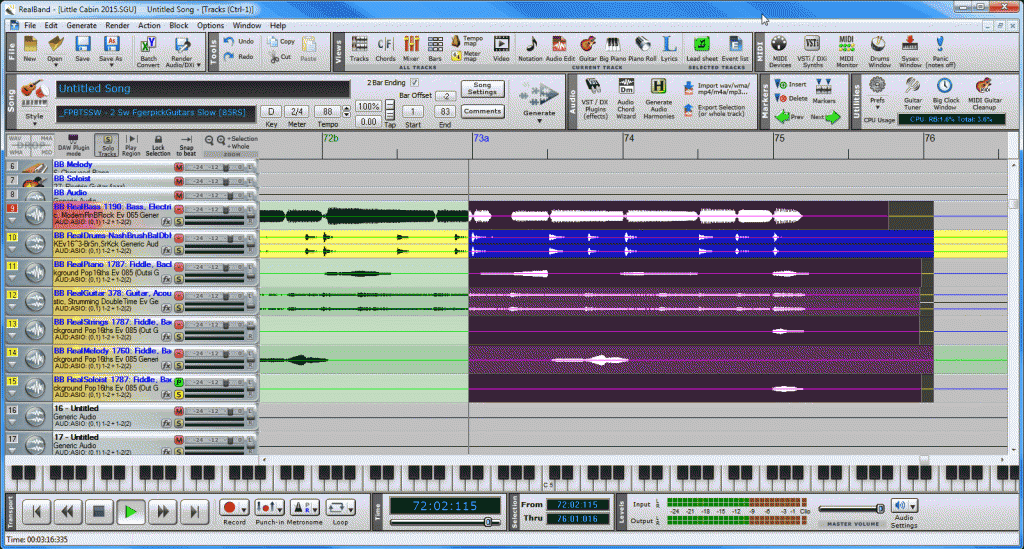 Here's the Plugins Tab and the Piano FX from the same file in BB: 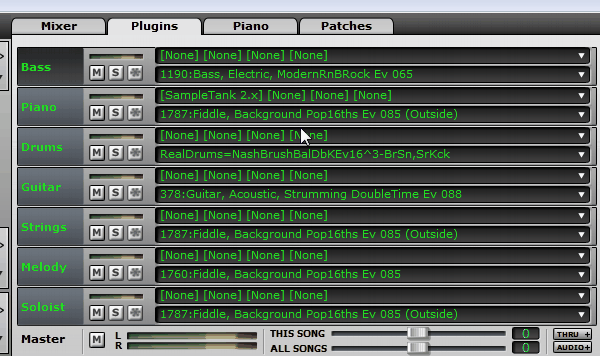 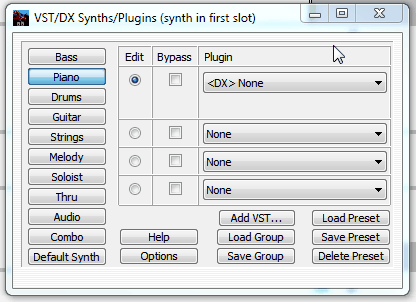 And when I select Default Synth, here's an image of SampleTank. I do not get the 10-day Trial Expired message everytime. In this case I did: 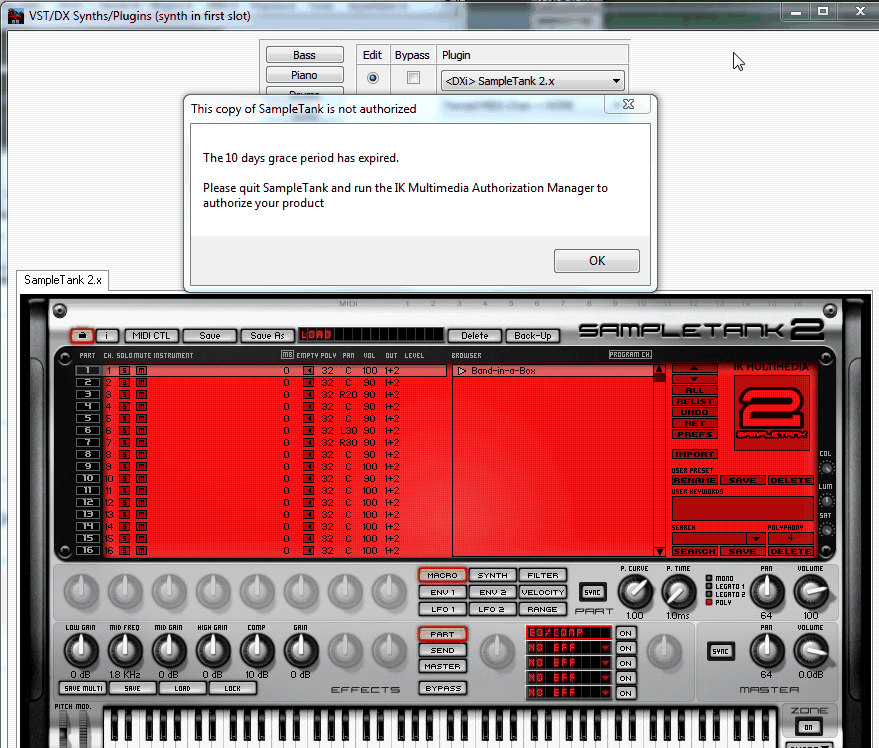
|
|
|
|
|
|
|
|
|
|
|
|
|
Band-in-a-Box for Windows
|
Joined: Jun 2006
Posts: 2,250
Veteran
|
|
Veteran
Joined: Jun 2006
Posts: 2,250 |
IK's authorization and installs can be a PITA sometimes for some installations - that's an IK MM issue NOT PG.
Larry
Sorry, Larry - it IS a PG issue. PG shouldnt be putting something into their BIAB that doesnt work without an awful lot of messing about by the Buyer. We buy BIAB, full stop - EVRYTHING bundled in it should work as advertised!! End of Rant!  cheers ian
Last edited by sixchannel; 02/01/15 07:16 AM.
|
|
|
|
|
|
|
|
|
|
|
|
|
Band-in-a-Box for Windows
|
Joined: Jun 2000
Posts: 2,499
Veteran
|
|
Veteran
Joined: Jun 2000
Posts: 2,499 |
Olemon
On your RB screen - not sure what to tell you - need one of the RB guru's (like you, I mainly use Sonar)
However, unless I COMPLETELY misunderstood what I inferred from above (between your words and your BB screens) - you CANNOT assign a VSTi/DXI (instrument) synth to a audio track (aka RT). Unless second pic was ONLY meant to ONLY go with fist pic?
Actually I now think about it - the latter is what you meant? If so, my apologies.
Does this song, which looks like a RT only song, play in BIAB? Or is issue only in RB?
And I have to ask: have you yet confirmed that ST 2 is installed, authorized, and works FINE in standalone mode or in other applications like Sonar (completely outside BIAB/RB)?
Try BOTH versions ST 2 DXi and ST 2 VSTi (they are NOT same thing) in Sonar multi times. You may get some weirdness with the DXi.
Sixchannel
I guess we'll agree to disagree here.
Where we agree, I do think that PG's HI-Q SOUND add-ins installs are a little "squirrelly."
But I've had Cakewalk (SONAR) 3rd party add-ons that made me jump through hoops, I didn't hold CW responsible - I did ask for CW help initially since I figured they knew more about issue.
The absolute WORST were some YAMAHA "freebies" add-ons (love the key board hate the add-ons from the then non-corp. affiliate Steinberg)- I STILL can't get it working correctly (talk about squirrelly)
I have to ask
If someone goes to IK MM and gets the free ST 2, ST3, or AmpliTube, T-Racks completely independent of PG (as they could have in 2012 and still can) and has issues with installs and authorizations, and if you read IK forums you will see that STILL happens, is PG responsible, even if that person didn't buy any PG SW?
Anyone can/could have gone to IK Multimedia and downloaded the FREE ST 2 and Amplitude BEFORE PG supplied it as separate free ADD ON in BIAB 2012.
Larry
Last edited by Larry Kehl; 02/01/15 07:59 AM.
Win10Pro,i9,64GB,2TBSSD+20TBHDDs,1080TI,BIAB'24,Scarlett18i8,Montage7,Fusion 8HD,QS8,Integra7,XV5080,QSR,SC-8850,SPLAT,FL21&others,Komp.14,IK suite&others, just a guitar player-AXE FX III &FM9T, FishmanTP, MIDIGuitar2, GK2/3'sw/GI20
|
|
|
|
|
|
|
|
|
|
|
|
|
Band-in-a-Box for Windows
|
Joined: Dec 2013
Posts: 1,138
Expert
|
|
OP
Expert
Joined: Dec 2013
Posts: 1,138 |
Does this song, which looks like a RT only song, play in BIAB? Or is issue only in RB?
And I have to ask: have you yet confirmed that ST 2 is installed, authorized, and works FINE in standalone mode or in other applications like Sonar (completely outside BIAB/RB)?
Try BOTH versions ST 2 DXi and ST 2 VSTi (they are NOT same thing) in Sonar multi times. You may get some weirdness with the DXi.
I thought I was using RT's too, WMA files, not Super MIDI tracks requiring a synth. Below is a screen capture of a song with a Super MIDI 2062 track. It has SampleTank listed in the plugins tab and it plays fine, but all the bars are outlined in red and every bar setting has a 3 entered in beats per bar? But, I just tried loading RT 1787 into a recent project and it will not play there. Yeah, same behavior in BB and RB for that same .sgu file. All the tracks play, except for those that I'm assuming are somehow associated with SampleTank, in which case both BB and RB play audio for that Shot only. I just posted the RB picture to show the audio wave form for those tracks at that Shot. I haven't experimented with SampleTank in Sonar, ever, but I'll see what happens. The standalone SampleTank gives me the authorization error message. Clicking the piano keyboard doesn't produce any sound. By the way, after opening SampleTank in standalone, I closed it and opened BB. Immediately got the can't connect channels and the can't get buffer size errors. Time for tech support. 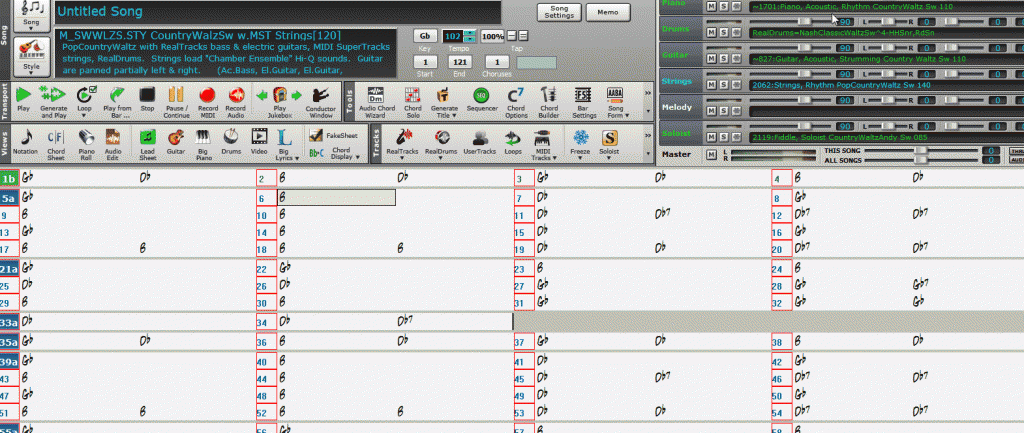
|
|
|
|
|
|
|
|
|
|
|
|
|
Band-in-a-Box for Windows
|
Joined: Jun 2000
Posts: 2,499
Veteran
|
|
Veteran
Joined: Jun 2000
Posts: 2,499 |
One problem at a time, stick with all AUDIO and RT's issues THEN tackle MIDI and ST.
1. The song in this last (above) post is not SAME song as in previous post (RB showed song as "little cabin") where you showed it in RB with all RTs only listed tracks in BIAB pic
I want to know if THAT song and EACH RT plays in BIAB, since that song had NO MIDI tracks, no MIDI Supertracks, no HI-Q, this separates out your ST2 issues from muddying up your "RT won't play issue."
If the problem child RT 1787 doesn't' play IN BIAB (and stay in BIAB - one app at a time), and most of your other RT's DO play (correct?), maybe it is as simple as your copy of RT 1787 is kaput, got corrupted?
Re-download and/or re-install that RT set, RT Pop SET 159 (RT set 159 came out in Summer of 2012 - aka 2012.5). Or maybe you have that ONE RT folder somewhere backed up should be folder (X is drive BB installed on):
"x:\BB\RealTracks\Fiddle, Background Pop16ths Ev 085"?
2. Since you say you have authorization issues OUTSIDE of BIAB with your copy of standalone ST 2, that confirms your ST 2 issue are 100% an IK, ST 2, and/or your installation of it. Don't even waste time calling up ST 2 in Sonar, it won't work there either.
MY SUGGESTION - follow it or not:
UNINSTALL ST2 (use Windows uninstaller)- that's just so you have clean slate.
Get a fresh copy of ST 2 installer (FROM IK web site), also get current copy of Auth. Mgr. (1.0.11) from IK web site.
Then REINSTALL ST 2 (both DXi and VSTi) and then run the downloaded Auth. Mgr.
ST 2 serial numbers remain the same, but just in case they should be listed in your IK Multimedia Account, if you forget them or don't have them written down somewhere.
Larry
Win10Pro,i9,64GB,2TBSSD+20TBHDDs,1080TI,BIAB'24,Scarlett18i8,Montage7,Fusion 8HD,QS8,Integra7,XV5080,QSR,SC-8850,SPLAT,FL21&others,Komp.14,IK suite&others, just a guitar player-AXE FX III &FM9T, FishmanTP, MIDIGuitar2, GK2/3'sw/GI20
|
|
|
|
|
|
|
|
|
|
|
|
|
Band-in-a-Box for Windows
|
Joined: Dec 2013
Posts: 1,138
Expert
|
|
OP
Expert
Joined: Dec 2013
Posts: 1,138 |
Didn't mean to confuse the issue. I'm just describing a couple examples of weird behavior since installing BB/RB 2015 and the add-ons.
The glitches may well in fact be connected to SampleTank or to corrupt PG Music files, or both or....
I've been able to make RT 1787 work and not work in multiple .sgu files. In some cases that RT is associated with SampleTank as per the plugins tab, and in other cases it isn't.
MIDI Supertrack 2062 works in an older BB file, even though it is using SampleTank. But, in that particular .sgu file, where you would expect a problem if SampleTank isn't authorized, playback is grand. But, every bar now contains a beat per measure change, which it never had before.
I just opened a new BB file. Everything plays without a problem, RTs, RDs and three MIDI Super Tracks; 1886, 2059 and 2062. [SampleTank 2.x] is in the first slot of each of those tracks on the Plugins tab. BB asks if it's OK to add the SuperPatch. Select 'Yes' and SampleTank is inserted. If I click on [SampleTank 2.x] it opens and I get the 'Not Authorized' message, but that doesn't seem to matter.
I've uninstalled/re-installed SampleTank and Authorization Manager a few times and tried authorizing, but it fails. I put a ticket in to IK yesterday.
I'll first try to get SampleTank authorized. After that if I still have trouble then PG may need to send a new USB drive. I put a trouble call in to PG yesterday as well.
I'm going to try a few more tricks, but at this point I'm waiting on Tech Support I guess. I'll let you know what I learn.
|
|
|
|
|
|
|
|
|
|
|
|
|
Band-in-a-Box for Windows
|
Joined: Dec 2013
Posts: 1,138
Expert
|
|
OP
Expert
Joined: Dec 2013
Posts: 1,138 |
Okay. Within c:\[user]\AppData\Roaming\IK Multimedia there was a cookie file.
IK Tech Support advised to delete it. I did that and then was able to authorize SampleTank. Who knew?
On the PG Music side. Tech support had no explanation and we did not get to the bottom of it. Even after authorizing SampleTank, I still experience glitches of the sort I describe within this thread. I experienced them today while chatting online with PG Music. In one particular project I got memory errors. So far just in that one project though. New projects appear to be immune, but I'm not declaring success as I had at least one glitch in a new project.
I uninstalled/re-installed again...I'm moving on and hoping that nothing catastrophic occurs.
One thing PG Tech Support did say is that Coyote WT should be the default synth.
All I know for sure is that after installing 2015 for the first time, I had no trouble until I opened an older existing project.
Thanks for your time.
|
|
|
|
|
|
|
|
|
|
|
|
|
Band-in-a-Box for Windows
|
Joined: Jun 2000
Posts: 2,499
Veteran
|
|
Veteran
Joined: Jun 2000
Posts: 2,499 |
Again I understand your frustration.
I really wish I could suggest anything at this point to make your pre-BIAB 2105 songs work without all the headaches you are having.
Did you ever your audio (RT's) issues fully resolved/working?
Larry
|
|
|
|
|
|
|
|
|
|
|
|
|
Band-in-a-Box for Windows
|
Joined: May 2002
Posts: 7,979
PG Music Staff
|
|
PG Music Staff
Joined: May 2002
Posts: 7,979 |
Hello Olemon
Can you send a couple of those problem SGU files to support and reference this thread?
Andrew
PG Music Inc.
|
|
|
|
|
|
|
|
|
|
|
|
|
Band-in-a-Box for Windows
|
Joined: Dec 2013
Posts: 1,138
Expert
|
|
OP
Expert
Joined: Dec 2013
Posts: 1,138 |
|
|
|
|
|
|
|
|
|
|
|
|
|
Band-in-a-Box for Windows
|
Joined: May 2000
Posts: 15,976
PG Music Staff
|
|
PG Music Staff
Joined: May 2000
Posts: 15,976 |
The usual cause of an "Instrument Not Found" would be a messed-up or partial installation, and the cure would be to re-install the Hi-Q sounds (using the Dec. 2014 Hi-Q sounds installer that was included with the update), as well as the BB 2015 latest patch.
Here's a test that you could do to see if that is the case....
For example, lets test the “Classic Bass” sound.
You should have these 2 files, with these 2 dates: (assuming BB is installed to c:\bb)
1. c:\bb\DX Settings\Hi-Q 034 01 Bass, Electric, 61 Classic SampleTank.tgs dated 6/26/2014
2. C:\Program Files (x86)\IK Multimedia\SampleTank 2.5\Instruments\Band-in-a-Box\Bass\61 Classic Bass PG.stip dated 6/26/2014
If your dates are different, and you have BB 2015, then you should update the installation as follows:
To fix this problem (assuming version 2015)
1. Install the latest BB 2015 patch.
2. Install the latest 2015 HiQ instrument installer. (should be Dec 2014 or later) (e.g. hi-q_instruments_sampletank_01-02.exe)
Have Fun!
Peter Gannon
PG Music Inc.
|
|
|
|
|
|
|
|
|
|
|
|
|
Band-in-a-Box for Windows
|
Joined: Dec 2013
Posts: 1,138
Expert
|
|
OP
Expert
Joined: Dec 2013
Posts: 1,138 |
Peter,
Both of those files with the matching dates reside on the C:\ drive.
I am no longer getting the Part x: Instrument Not Found errors, but am still not able to Generate / re-Generate RT on certain song tracks.
Andrew has contacted me via email and I've responded. Thank you all for looking into this.
|
|
|
|
|
|
|
|
|
|
|
|
Ask sales and support questions about Band-in-a-Box using natural language.
ChatPG's knowledge base includes the full Band-in-a-Box User Manual and sales information from the website.
|
|
|
|
|
|
|
|
|
|
|
Peter Gannon Talks Band-in-a-Box with zplane
zplane recently interviewed Peter Gannon, the founder and creator of Band-in-a-Box, about the software's early days, what sets it apart from AI, how zplane's audio algorithms are used in Band-in-a-Box, and more!
Special thanks to the team at zplane for their continued support.
Check out the full interview here: https://products.zplane.de/blog/peter-gannon-interview-pg-music
Last Chance! The Band-in-a-Box® 2026 for Mac® Special Ends Today (May 31, 2026) at 11:59pm PDT!
Time really is running out! Save up to 50% on Band-in-a-Box® 2026 for Mac® upgrades and receive a FREE Bonus PAK—only when you order by 11:59 PM PDT today!
We've added many major new features and new content in a redesigned Band-in-a-Box® 2026 for Mac®!
Version 2026 introduces a modernized GUI redesign across the program, with updated toolbars, refreshed windows, smoother workflows, and a new Dark Mode option. There’s also a new side toolbar for quicker access to commonly used windows, and the new Multi-View feature lets you arrange multiple windows as layered panels without overlap, making it easier to customize your workspace.
Another exciting new addition is the amazing new AI-Notes feature, which can transcribe polyphonic audio into MIDI. View the results in notation or play them back as MIDI, and choose whether to transcribe an entire track or transcribe specific parts like drums, bass, guitars/piano, or vocals. There's over 100 new features in Band-in-a-Box® 2026 for Mac®.
There's an amazing collection of new content too, including 202 RealTracks, new RealStyles, MIDI SuperTracks, Instrumental Studies, “Songs with Vocals” Artist Performance Sets, Playable RealTracks Set 5, two RealDrums Stems sets, and much more!
Upgrade your Band-in-a-Box for Mac® to save up to 50% on most Band-in-a-Box® 2026 upgrade packages!
Plus, when you order your Band-in-a-Box® 2026 Mac upgrade during our special, you'll receive a Free Bonus PAK of exciting new add-ons.
If you need any help deciding which package is the best option for you, just let us know. We are here to help!
Band-in-a-Box® 2026 Mac Special Offers Extended Until May 31st!
Good news- we've extended our Band-in-a-Box® 2026 for Mac® special offers until May 31, 2026!
Band-in-a-Box® 2026 is packed with major new features, enhancements, and an incredible lineup of new content! The program now sports a sleek, modern GUI redesign across the entire interface, including updated toolbars, refreshed windows, smoother workflows, a new dark mode option, and more. The brand-new side toolbar provides quicker access to key windows, while the new Multi-View feature lets you arrange multiple windows as layered panels without overlap, creating a flexible, clutter-free workspace. We have an amazing new “AI-Notes” feature. This transcribes polyphonic audio into MIDI so you can view it in notation or play it back as MIDI. You can transcribe an entire track (all pitched instruments and drums) or focus on individual parts like drums, bass, guitars/piano, or vocals. There's an amazing collection of new content too, including 202 RealTracks, new RealStyles, MIDI SuperTracks, Instrumental Studies, “Songs with Vocals” Artist Performance Sets, Playable RealTracks Set 5, two RealDrums Stems sets, and much more!
There are over 100 new features in Band-in-a-Box® 2026 for Mac®.
When you order purchase Band-in-a-Box® 2026 before 11:59 PM PDT on May 31st, you'll also receive a Free Bonus PAK packed with exciting new add-ons.
Check out the Band-in-a-Box® for Mac packages page to find the best package for you.
Holiday Weekend Hours
It's Victoria Day Long Weekend in Canada. Our Customer Service hours are:
Saturday, May 16: Closed
Sunday, May 17: Closed
Monday, May 18: 8:00am - 4:00pm
Regular hours resume Tuesday, May 19th!
Today's the Last Day of the Band-in-a-Box 2026® for Mac Special!
Order before 11:59pm PDT today (May 15, 2026) to save up to 50% off your Band-in-a-Box® 2026 for Mac® upgrade and receive a FREE Bonus PAK loaded with great new Add-ons to use with this new version!
Don't wait - order today!
Check out all the new features in the redesigned Band-in-a-Box® 2026 for Mac®!
Band-in-a-Box® 2026 for Mac - Special Offers End at 11:59pm PDT on Friday, May 15th, 2026!
Order before 11:59pm PDT on Friday, May 15th and SAVE up to 50% on most Band-in-a-Box® version 2026 for Mac Upgrade packages... and that's not all! With your version 2026 for Mac purchase, we'll include a Bonus PAK full of great new Add-ons FREE! Upgrade to the 2026 49-PAK to receive even more NEW Add-ons including 20 additional RealTracks... that's 222 NEW RealTracks available with version Band-in-a-Box® 2026 for Mac!
Upgrade to Band-in-a-Box® 2026 for Mac® today for as little as $49! Check out the Band-in-a-Box® packages page for all available purchase options.
Learn more about the Free Bonus PAK and 49-PAK here.
If you have any questions about which package is the best option for you, just let us know. We're here to help!
202 New RealTracks Released with Band-in-a-Box 2026!
With Band-in-a-Box® 2026, we've released 202 incredible new RealTracks (in sets 468-488) in a variety of genres—featuring your most requested styles!
Jazz, Funk & World (Sets 468-475):
Our new jazz, funk & blues RealTracks include a groovin’ collection of RealTracks and RealDrums! These include more requested “soul jazz” RealTracks featuring artists Neil Swainson (bass), Charles Treadway (organ), Brent Mason (guitar), and Wes Little (drums). There are new “smooth jazz” styles (4), which include a RealTracks first: muted trumpet, as well as slick new smooth jazz brushes options for drums. Blues lovers will be thrilled—there are more “classic acoustic blues” styles, including guitar (5), bass (4), and drums (10) with blues master Colin Linden, featuring understated and tasty background acoustic soloing, plus brushes drums and acoustic bass. There are also new electric blues RealTracks, including electric blues with PG favorite Johnny Hiland (3) and soulful electric slide guitar from Colin Linden (4). If you love funk & gospel, there are great new options this year, including gospel organ (3) from Charles Treadway, as well as new funk, tango, and rock ’n’ roll drums (3) and bass (1). And for big, bold arrangements, we have uptempo soul horns (4) featuring a three-part hip horn section with options for a full mix or stems of each individual horn — plus an accompanying rhythm section (4) of drums, bass, guitar, and electric piano!
Rock & Pop (Sets 476–482):
Our new rock & pop RealTracks bring a powerful mix of requested favorites, fresh genres, and modern chart-inspired styles! We have more of our popular “Producer Layered Acoustic Guitars (15)” featuring Band-in-a-Box favorite Brent Mason. We’ve continued our much-requested disco styles (10), and added new Celtic guitar (5) with a more basic, accessible approach than our previous Drop-D or DADGAD offerings. There are also highly requested yacht rock styles (17), inspired by the smooth, polished soft-rock sound of the late ’70s and early ’80s — laid-back grooves, silky electric pianos, warm textures, elegant harmonic movement, and pristine production aesthetics. Fans of heavier styles will love our new glam metal (13), capturing the flashy, high-energy sound of ’80s arena-ready guitar rock. We also have a set of rootsy modern-folk rock (18), with a warm, organic sound combining contemporary folk textures and driving acoustic strumming. And we’ve added lots of new modern pop styles (16) — the kinds of sounds you’re hearing on the radio today, featuring exciting new drums, synths, and cutting-edge RealTracks arrangements.
Country, & Americana (Sets 483–488):
Our new country & Americana RealTracks deliver a rich collection of acoustic, electric, and roots-inspired styles! We have new country pop (9) with legendary guitarist Brent Mason. There is also a potpourri (14) of bouzouki, guitars, banjo, and more, perfect for adding texture and character to contemporary acoustic arrangements. We’ve added funky country guitar (5) with PG favorite Brent Mason, along with classic pedal steel styles (5) featuring steel great Doug Jernigan. There are more country songwriter styles (8) that provide intimate, rootsy foundations for storytelling and modern Americana writing. Finally, we have “background soloing” acoustic guitar (12) with Brent Mason — simpler, but still very tasty acoustic lines designed to sit beautifully behind vocals or act as a subtle standalone solo part.
Check out all the 202 new RealTracks (in sets 468-488)!
And, if you are looking for more, the 2026 49-PAK (for $49) includes an impressive collection of 20 bonus RealTracks, featuring exciting and inspiring additions to add to your RealTracks library. You'll get new country-rhythm guitar styles from PG Music favorites Johnny Hiland and Brent Mason, along with modern-pop grooves that capture today’s radio-ready sound! There are also new indie-folk styles with guitar, bass, 6-string bass used as a high-chording instrument, acoustic guitar, and banjo. Plus, dedicated "cymbal fills" RealDrums provide an added layer that work very well with low-key folky styles with other percussion.
The 2026 49-PAK is loaded with other great new add-ons as well. Learn more about the 2026 49-PAK!
|
|
|
|
|
|
|
|
|
|
|
|
Forums57
Topics86,630
Posts807,688
Members40,178
| |
Most Online64,515
Apr 8th, 2026
|
|
|
|
|
|
|
|
|






 Dansk
Dansk Deutsch - Windows
 Español
 Français - Windows
 Italiano - Windows
 Nederlands
 Polski
 Português
 Svenskt
 русский
 Japanese
 Simplified Chinese
 Traditional Chinese
 Korean