++ Another thread ++ started a nice discussion about how Band-in-a-Box's graphical interface needs improvement. I'm starting this thread so users and prospective customers can provide PG Music with specific suggestions for improvement. I've copied an edited version of Peter Gannon's thoughts below:
"Here's a screenshot of Band-in-a-Box 2015 http://static.emediamusic.com/product_assets/bb/2014-bandboxwin.jpg And, no, that doesn't look like a cartoon to me. I happen to like that there is text present on most of the buttons and elements in BiaB, unlike the DAW program screen that has just icons with no text for many items.
Now don't get me wrong here- I am all for improving lots of aspects of BiaB GUI, and there's lots to be done there! But only in a way that makes it easier and more intuitive to use. So I'm not about to get rid of text on the buttons for example."
User jford posted some thoughts many users agreed with:
My personal opinion is that I like the retro "look" of BIAB. I don't know that I want BIAB to start looking like every other music app out there and become just a face in the crowd, like so many other music applications today. "It's familiar" (a great Andy Griffith line from "No Time For Sergeants").
That being said, there are a few (I would imagine) fairly simple things that could be done to modernize the user experience. Peter has often said to provide specifics for changes, so here goes.
The main screen has a lot of white, errr, grey space on it. The little chord entry box has been discussed at length recently, but just look at all the unused space surrounding the little box. The white space areas should be able to be used more efficiently, which is where some of the below suggestions come into play.
I think what would go a long way towards modernizing the interface would be to make all the window elements floatable (where you can move it around on the screen and resize it), dockable (you can lock it into place it on the screen at the top-bottom-left-right), visible/invisible (if you don’t want to see it on the screen, then poof, it’s gone, easily brought back), and scalable (which is different resizable – for example the static mixer window elements are of fixed size, which is why there isn’t room to see the Thru or Audio tracks. Resizable usually makes things disappear; scalable changes the size of the fonts and graphics to continue to display the entire element).
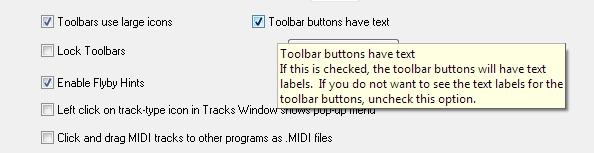
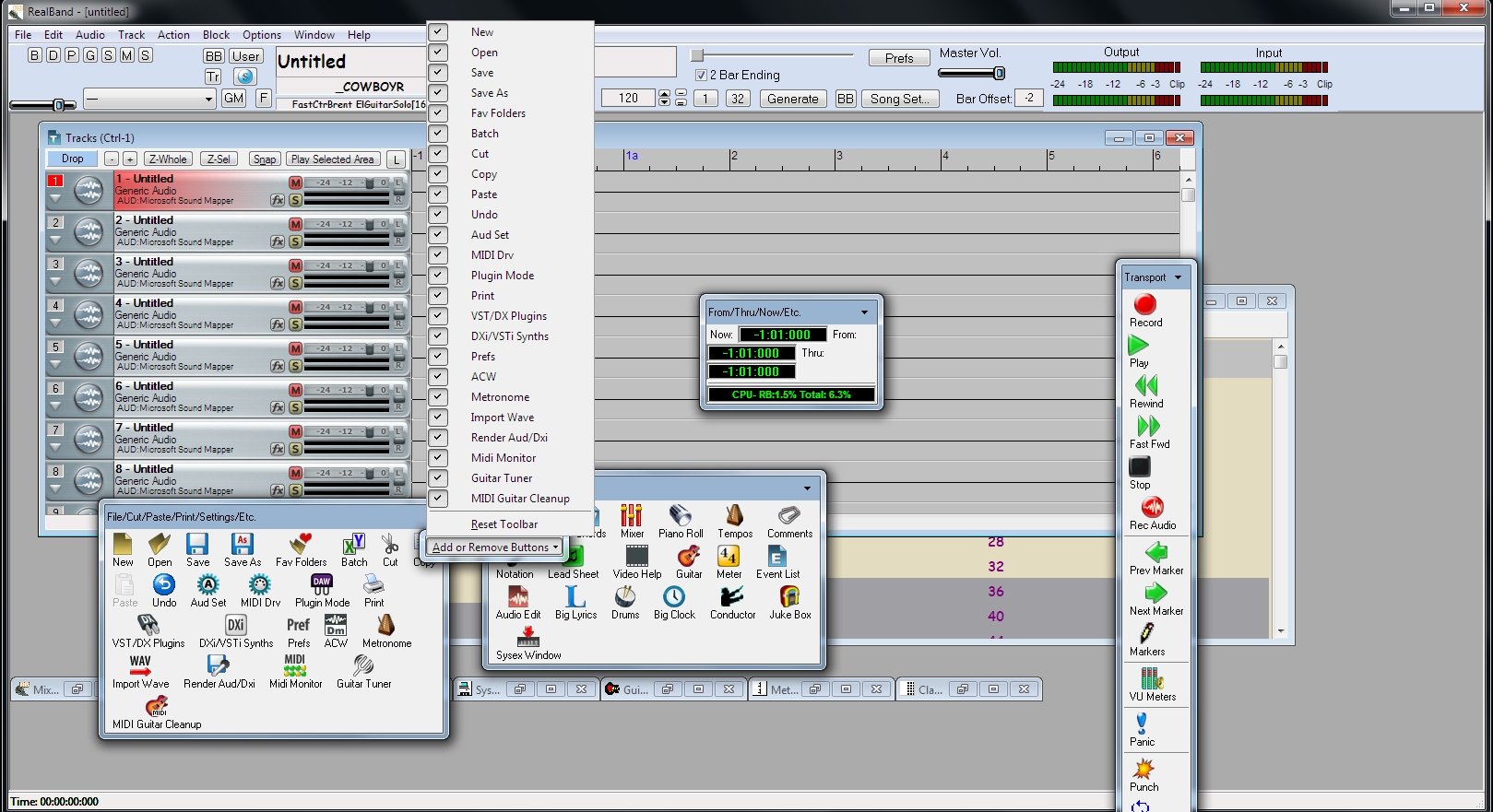
Toolbars should be fully customizable – dockable or floating. You should be able to determine whether the buttons have text on them, or are large or small buttons. You should be able to add/remove any buttons, as well as re-order the buttons to suit your own workflow.
While colors currently are user customizable, this should be made as easy as possible, with clear descriptions of what each screen element represents.
The request for improving chord entry in the chord grid has already been made and discussed at length, so I won’t go into here (other than something should be done to improve it).
Right now, for example, you can bring up the floatable mixer, but the static mixer stays on the screen. And they don’t look the same or have the same functionality. And the reason you made it floatable was to reclaim screen space, but that doesn’t happen. There should be ONE mixer window with all the functionality that could either be docked to one of the sides of the screen (PGMusic could figure out how that would work and what would go where when there are multiple elements docked), or it could float and you could move it around as you see fit (and all tracks should be displayed.
Additionally, when you change an instrument on the chord grid (maybe by using the F5 key at a certain bar), the mixer should change to reflect that new instrument, not just keep showing the instrument as originally defined in the style. It’s confusing to see a guitar listed and hear a violin, for example.
The VST/DX screen is in need of rework (this issue affects both BIAB and RealBand). The top part of the window takes up a third to half of the screen, leaving little room for the actual VST (which is what you really want to see in the first place). When I want to just check, for example, if an instrument is playing through the VSTi, I should not have to bring up the windows, move the window to the top of the screen, resize the window so I can adjust the scroll bars, then adjust the scroll bars to see the VST interface. By that time, I’ve forgotten why I clicked on it in the first place. The stuff at the top is important, but ought to be called up only when you need it, not visible on the screen the whole time. Maybe a twisty where it by default displays the current selection only (on a single line), but then you click on the twisty to see the other tracks and selections, and then click the twisty again and it just displays the [possibly new] current selection. That way, there’s plenty of room for the actual DX/VST interface, which s what you wanted in the first place.
Even though there has been some work done here, the menus need to be reworked to remove redundancy.
For example, on the File Menu, how many “Open” commands do I need. I should only need one, and then I can choose what to open once the “Open” window appears (just like other Windows applications do).
Likewise on the Export To and Send To commands. I understand that one is the “last one selected”, but just make the default entry on the “Export To” command be the “last one selected”. The redundancy is not needed.
And you really only need a “Save” and “Save As” command. If something hasn’t been saved previously, then it should invoke the “Save As” command; otherwise, it just saves with whatever options you previously set. And then any options you want to set should be on the “Save As” screen (this is where you would be able to save with patches/harmonies/etc).
The help menu also has a number of (in my opinion) unnecessary redundancies, but all menus should be looked at carefully.
Yes, there is more that can be done (did someone say StylePicker, RealTracksPicker, Songlist, etc?), but as a start these would, in my opinion go a long way towards improving user experience and workflow for creating music. Of course, these are just my opinions and suggestions. Take 'em or leave 'em. I still love BIAB/RealBand and will continue to support it, regardless. Nothing else comes even close to doing what they do. _________________________ John
And my own contribution:
The ONE idea in the FL Studio video I would like PG Music implement is for the GUI to use vector graphics. BiaB and RB users have a wide variety of displays being driven by a variety of graphic cards or on board motherboard chips. The Fl Studio video demonstrated how vector graphics provides a sharp image on any size display. That's exciting!
I would like to see Band-in-a-Box and RealBand have screen tabs similar to those used in Chrome or Firefox. Each tab would display BiaB or RB from a different perspective. For instance, the default RealBand tabs might follow the progression to create a song with Tab 1 offering a minimal track screen, commands to import a SGU or midi file, chord sheet and load instruments, tab 2 geared to editing, tab 3 mixing and exporting.
While changing to vector graphics may prove a stretch, an effective use of tabs could eliminate a great deal of clutter.
Others suggestions were posted but I was unable to copy all of them.
"We want to take things out of the box, turn them on and see them leap into action without having to read anything"
taken from a blogg about user interfaces (2007).
The Sequencer Window. If I were a new user, who knows chord E A and D on the keyboard and has a shrewd idea of what a sequencer was, if I was exploring the interface as part of my dipping my toes in the water, if I pressed a button marked "Sequencer"
I would expect to see a sequencer view.
What the user actually sees actually get is:
1] A pop up box asking him to choose between a 'melody' and a 'soloist'
Bemused by the difference (don't soloists play the melody?). The user click one at random
This presents the user with.......... a question about mutlichannels
The user begins to wonder if irt is some sort of initiation test, all he wants to do is see the sequencer.
He clicks a guess again...
He is presented with another warning message saying the track screen will be blank "Great!" he thinks and click on still hoping to find...... a sequencer.
What appears is a strange screen showing buttons for all or none of - nothing. It does not look like a sequncer at all. He tries in his mind to compare it to a sequencer, but there is just not enough resemblance to make any connection. He is baffled.
By chance he clicks the video button and a strange video appears (check it out). Whatever is being explained does not answer the question where is hte sequencer?
Yes where is the sequencer?
Well weeks later you discover, there isnt one. At least there is one but you have to go out of the program load into RB and work from there.
All you wanted to see was a sequencer. You wanted to see the Audio and the MIDI tracks along with your recorded tracks.
Months later it dawns on you what PG thinks is a sequencer is only something that applies to the "Melody" track and the "Soloist" track. You Wonder why you cant see the MIDI for the MIDI drum.
Proposed Solution
Provide a proper sequencer window.
Drop the notion of melodist and soloist (whilst cleverly retaining their function)
just have tracks and track types.
Make any track recordable by the user.
On any MIDI track make the Notation and the Piano Roll screens accessible by clicking on the tracks in the sequncer.
Make a chord track behave like a chord does already and show this at the top line of the sequencer
Show the parts underneath
on MIDI tracks have a notation button, which glows when notation is available. On clicking, provide three choices "score view" "manuscript view" and "Sequencer view". The Manuscriot view shows the part in concent with other parts. The Sequencer view shows the part in (treble or bass or twin) under the sequencer track.
Make similar functions available for the Piano roll view.
Be able to edit and move chunks of things with tools
Make Transport controls moveable and dockeable
Melody and SOLOIST tracks can still remain but simply as a track type in the sequencer. As a specified type they would have specific editable attributes.
each track type would have its own attributes - Real Tracks might have to arrive in blocks. Cut shape and fade tools would be provided.
Stop the need to work in two applications integrate them intelligently.
If this was done the new user would click on a sequencer button and see a useful sequencer, with useful tools.
Currently it must appear almost designed to confuse.
Z
provide a editable mixer that floats resizes and twins with this.
Well, seeing that I managed to 'rock the boat' yesterday (this was unintentional, although it appears that I managed to completely capsize it...), I thought it my duty to come up with practical ideas instead of talk. Talk is cheap. Ideas, and functional concepts are required. It was therefore my duty to put in some effort to restore normality - if that's possible.
So, I spent a little bit of time today with some 'ideas only' concepts of how the interface could be improved, by reducing clutter, an hopefully streamlining the look and appearance, so to speak.
This is a rough shot, only a day's work (including video), and is completely conceptual. It could be improved for sure, but it's a start.
I hope that others might think this has merit and could be taken further, or offer their own suggestions, as others already have.
(I hope PGM staff get a chance to see it too. Peter, feel free to PM me for design ideas.)
Watching on YouTube at larger size is perhaps more beneficial to see the new features.
Feel free to provide all comments, criticisms, good, bad, anything.
My intentions (as always) are only to provide ideas to improve and advance the product, nothing less.
None of the ideas in the video are difficult to implement too.
Best
Trevor
BIAB & RB2026 Win.(Audiophile), Windows 10 Professional & Windows 11, Sonar Platinum, Cakewalk by Bandlab, Izotope Prod.Bundle, Roland RD-1000, Synthogy Ivory, Kontakt, Focusrite 18i20, KetronSD2, NS40M Monitors, Pioneer Active Monitors
Clambering, slowly but surely, bloodied fingers, shirt ripped off my back. What it takes, eh?
BIAB & RB2026 Win.(Audiophile), Windows 10 Professional & Windows 11, Sonar Platinum, Cakewalk by Bandlab, Izotope Prod.Bundle, Roland RD-1000, Synthogy Ivory, Kontakt, Focusrite 18i20, KetronSD2, NS40M Monitors, Pioneer Active Monitors
That's a very impressive video. You have some good ideas. Here are some random thoughts.
The tabs or buttons might work better if they were on two rows with the top row selecting broad functions like create song, practice, perform, custom 1 and custom 2. Buttons on the second row would change based upon the top row selection. For example, when perform is selected you would see second row buttons for import songlist, play songlist, create songlist, display lyrics on/off, display chords on/off.
Trevor, I would adopt that in a heartbeat. Really great job. A lot of this is like changing the navigation scheme on a website, leaving the underlying called pages the same as they were but giving a whole new appearance = easy to implement as you said. I love it.
Your ideas for the progress bar and audio meters look great, too.
We definitely should make you feel bad more often!
By the way, great name for a song: "Uncontrollably Brazen". Even better name for a band. But the song on the screen is not what we were listening to...
Jim, yes, we can refine ideas for the button/menu system including sublevels. I think Trevor was going for the concept of showing how we could have the chordsheet take most of the screen, which I would really like. I'll bet those who use a laptop and play live gigs using the conductor would agree. This is quite exciting stuff.
Last edited by Matt Finley; 05/01/1506:00 AM.
BIAB 2025 Win Audiophile. Software: Studio One 7 Pro, Swam horns, Acoustica-7, Notion 6, Song Master Pro, Win 11 Home. Hardware: Intel i9, 32 Gb; Presonus 192 & Faderport 8, Royer 121, Slate VSX, Adam Sub8 & Neumann 120 monitors.
The thought occurred to me when the curser was over the tracks button, why stop at the limited tracks that biab has, why not let the "tracks" actually open all the tracks in a style vieweable as in a DAW and maybe the ability to add up to 24 tracks or more?
Windows 10 (64bit) M-Audio Fast Track Pro, Band in a Box 2025, Cubase 14, Cakewalk and far too many VST plugins that I probably don't need or will ever use
00 I agree with most of your ideas. What I would add or change is to have all 16 MIDI channels open for the user. That way we could add more strings, guitar etc to the mix. Make all 16 channels open for either MIDI or RTs.
I would also add going to 64 bit at the same time.
I would not merge BiaB and RB into one product. I would have two products; one with the enhancements to BiaB and another with RB added to the enhanced BiaB. YMMV.
I'm in a fitness protection program. I'm been hiding from exercise.
64 bit Win 10 Pro, the latest BiaB/RB, Roland Octa-Capture audio interface, a ton of software/hardware
Excellent job Trevor! The only thing that I would change would be to have the play/record/song track/meter toolbar be floatable and able to be pinned anywhere in the main window. I prefer mine to be on the very top. This is nitpicking for sure but something to think about.
Now I have to get you mad about the lack of new MIDI styles
I'm in a fitness protection program. I'm been hiding from exercise.
64 bit Win 10 Pro, the latest BiaB/RB, Roland Octa-Capture audio interface, a ton of software/hardware
+1 Trevor. I think the ability to see what you're typing in the chord cell should be implemented. This may have been mentioned is someone's previous post. We shouldn't have to look elsewhere to see what we're typing.
Asus Q500A i7 Win 10 64 bit 8GB ram 750 HD 15.5" touch screen, BIAB 2017, Casio PX 5s, Xw P1, Center Point Stereo SS V3 and EWI 4000s.
Excellent job Trevor! The only thing that I would change would be to have the play/record/song track/meter toolbar be floatable and able to be pinned anywhere in the main window. I prefer mine to be on the very top. This is nitpicking for sure but something to think about.
Now I have to get you mad about the lack of new MIDI styles
+1 Mario and how about the ability to pin yellow messages
+1 Trevor. I think the ability to see what you're typing in the chord cell should be implemented. This may have been mentioned is someone's previous post. We shouldn't have to look elsewhere to see what we're typing.
It's interesting to me that the GUI is perceived to look 'better' when there is a menu structure (buttons) to bring up only the part(s) I want to see at the moment.
BIAB 2025 Win Audiophile. Software: Studio One 7 Pro, Swam horns, Acoustica-7, Notion 6, Song Master Pro, Win 11 Home. Hardware: Intel i9, 32 Gb; Presonus 192 & Faderport 8, Royer 121, Slate VSX, Adam Sub8 & Neumann 120 monitors.
But I want to know about the song. Did you do that in BIAB??? The horns were terrific. Mixed with the synth - that was cool. Can you post that in the Showcase - and give specifics on how you created that?... Share!!
But I want to know about the song. Did you do that in BIAB??? The horns were terrific. Mixed with the synth - that was cool. Can you post that in the Showcase - and give specifics on how you created that?... Share!! floyd
Hi Floyd, thanks for the great feedback, appreciated. Unfortunately, I didn't produce the audio with BiaB. It was done using Sonicfire Pro's 'SmartSound' product, which is used to create backing tracks for movies and video. You just pick the genre, select any specific variations (mood, feel etc), set the required track length hh:mm:ss:ff, and it generates a track exactly to fit the desired length. I have a fairly large library of different sound styles. I guess that these are essentially very similar to 'Real Tracks'
I was going to do something in BiaB but run out of time (and maybe creativity by then!). Cheers Trevor
BIAB & RB2026 Win.(Audiophile), Windows 10 Professional & Windows 11, Sonar Platinum, Cakewalk by Bandlab, Izotope Prod.Bundle, Roland RD-1000, Synthogy Ivory, Kontakt, Focusrite 18i20, KetronSD2, NS40M Monitors, Pioneer Active Monitors
... By the way, great name for a song: "Uncontrollably Brazen". Even better name for a band. But the song on the screen is not what we were listening to...
Hi Matt, as mentioned in an above post, the song audio was produced by a different program. However, I used BiaB's Auto-Generate Song Title feature for a different song that was on screen (one I am currently writing) and it came up with "Uncontrollably Brazen", and well, I couldn't resist.
BIAB & RB2026 Win.(Audiophile), Windows 10 Professional & Windows 11, Sonar Platinum, Cakewalk by Bandlab, Izotope Prod.Bundle, Roland RD-1000, Synthogy Ivory, Kontakt, Focusrite 18i20, KetronSD2, NS40M Monitors, Pioneer Active Monitors
Wow, great production. I would agree with Mario D. About the play, record..... Personally I would rather wait another year to have a GUI like this rather than get something this year that would be a rehash of the same old look.
Great demo! Thanks for taking the time to put that together. It's always so much easier to "see" something, especially in a video, than to read through a description of it.
Instead of having a colour change to indicate the active bar have some form of symbol
I would favour some other form of indicator
The red line box in the lead sheet window is soooo thin that if you were using glasses precious nano seconds are lost glimpsing at where you are.
I want to say there is a lot to like about the chord sheet window. I run it with Alanah chocoloate theme,. If you are spending hours working on a tune its not a good thing to stare at manuscript whites. OK on a smaller device of course. COlour schemes fonts are really useful.
Agree that we should 'feel' like we are entering directly into a chord click on the chord in the song bang - chord change options apparent.
It would be good to be able to enable/disable a count in for a loop or section.
Would it be possible to use the repeat 1 and Repeat 2" Symbols when displaying the structure of a song. To have the option to show a song that way at a single click, in the main window - to set a pref.
Well done Trev I'm proud of you mate ! it's a shame you have to go through such a fight to point out the the truth but you kickedass and took BIAB into the stratosphere. He who has ears will hear.
I can't do it anymore I'm totally worn out, defeated, and given up !
“Imagination is more important than knowledge. For knowledge is limited to all we now know and understand, while imagination embraces the entire world, and all there ever will be to know and understand.”
Layout the preferences differently. The present look is crowded to the eye and reduces my mind to peering and hunt and peck. Colors and font prefs are in different places. Could do with a resort.
A Bigger window. Tree Structure pane. More air to breathe.
I am always loosings songs in the ether - Yes I am disorganised.
Suggestion?Brainstorm If we had the concept of 'most used' song, a song search filter for saved after date...
We need some kind of way of organising favorites without having favorite this and favourite that everywhere. Favorite song> Favorite Style, Favorite Real Track ALL one screen one place
Someway of indicating and setting this that Is very apparent
Eric Persing has come up with some new ways of searching for sounds in Omnisphere 2. One could search by "songs that feature this MIDI/Real Track instrument.
Could be very useful if expanded. Always with default but changeable preferences to set in new preferences look.
Add an optional piano/fretboard/notation view.
Show a standard voicing on a keyboard notation or Tab
Hsve some form of intelligent system to offer on the keyboard fret notation alternative chords/ voicings (within BIAB limits). Maybe an indication of a chords 'family'. Different views perhaps.
Well done Trev I'm proud of you mate ! it's a shame you have to go through such a fight to point out the the truth but you kickedass and took BIAB into the stratosphere. He who has ears will hear.
I can't do it anymore I'm totally worn out, defeated, and given up !
“Imagination is more important than knowledge. For knowledge is limited to all we now know and understand, while imagination embraces the entire world, and all there ever will be to know and understand.”
― Albert Einstein
SR, I'm pretty honored to get such praise from you. I know you have worked tirelessly with ideas, and taken these further to develop separate improvements that we have all benefited from. Your words speak volumes. There are lots of team players who have contributed. Every positive comment, every positive input is absolutely valuable. Teamwork is what it's all about, I reckon. Much appreciated. And "never give up". Your input has always been more than valuable. Trev
BIAB & RB2026 Win.(Audiophile), Windows 10 Professional & Windows 11, Sonar Platinum, Cakewalk by Bandlab, Izotope Prod.Bundle, Roland RD-1000, Synthogy Ivory, Kontakt, Focusrite 18i20, KetronSD2, NS40M Monitors, Pioneer Active Monitors
Well, seeing that I managed to 'rock the boat' yesterday (this was unintentional, although it appears that I managed to completely capsize it...), I thought it my duty to come up with practical ideas instead of talk. Talk is cheap. Ideas, and functional concepts are required. It was therefore my duty to put in some effort to restore normality - if that's possible.
So, I spent a little bit of time today with some 'ideas only' concepts of how the interface could be improved, by reducing clutter, an hopefully streamlining the look and appearance, so to speak.
This is a rough shot, only a day's work (including video), and is completely conceptual. It could be improved for sure, but it's a start.
I hope that others might think this has merit and could be taken further, or offer their own suggestions, as others already have.
(I hope PGM staff get a chance to see it too. Peter, feel free to PM me for design ideas.)
Watching on YouTube at larger size is perhaps more beneficial to see the new features.
Feel free to provide all comments, criticisms, good, bad, anything.
My intentions (as always) are only to provide ideas to improve and advance the product, nothing less.
None of the ideas in the video are difficult to implement too.
Best
Trevor
Nice job on the demo. But I would like to see them reorganize/refactor the toolbars (and menus and dialog boxes) rather than simply hiding them!
The truth of the matter is that in biab 2013 we had dockable toolbars, but we went backwards and this feature was removed.
Pg music totally buried its head in the sand, and though we were told often enough that the dockable feature would be reinstated and it "was a work in progress" nothing ever happened.
Just part of the reason this has reached the stage that it has now.
Windows 10 (64bit) M-Audio Fast Track Pro, Band in a Box 2025, Cubase 14, Cakewalk and far too many VST plugins that I probably don't need or will ever use
Well, seeing that I managed to 'rock the boat' yesterday (this was unintentional, although it appears that I managed to completely capsize it...), I thought it my duty to come up with practical ideas instead of talk. Talk is cheap. Ideas, and functional concepts are required. It was therefore my duty to put in some effort to restore normality - if that's possible.
So, I spent a little bit of time today with some 'ideas only' concepts of how the interface could be improved, by reducing clutter, an hopefully streamlining the look and appearance, so to speak.
This is a rough shot, only a day's work (including video), and is completely conceptual. It could be improved for sure, but it's a start.
I hope that others might think this has merit and could be taken further, or offer their own suggestions, as others already have.
(I hope PGM staff get a chance to see it too. Peter, feel free to PM me for design ideas.)
Watching on YouTube at larger size is perhaps more beneficial to see the new features.
Feel free to provide all comments, criticisms, good, bad, anything.
My intentions (as always) are only to provide ideas to improve and advance the product, nothing less.
None of the ideas in the video are difficult to implement too.
Best
Trevor
Nice job on the demo. But I would like to see them reorganize/refactor the toolbars (and menus and dialog boxes) rather than simply hiding them!
Totally agree the issues are far more than skin deep
All of the above suggestion and comments can be put into BIAB. You can have a Classic view option for those who don't want change or are stuck in the DOS Days and Themes for those who need change, these can be posted in the User Section Forum with a screen shot for anyone to download and change their layout with one click. The themes will have Custom Menus, all dockable, movable and resizable units.
Have the best of both worlds NOT one Layout for All !
They had adjustable docks and menus in BB/RB 2013 but instead of improving them they got rid of them and went backwards. You could have an option of icon big/small with or without text or text only NO icon.
Originally Posted By: solidrock
Originally Posted By: DEddy
Drag and Drop in BIAB.
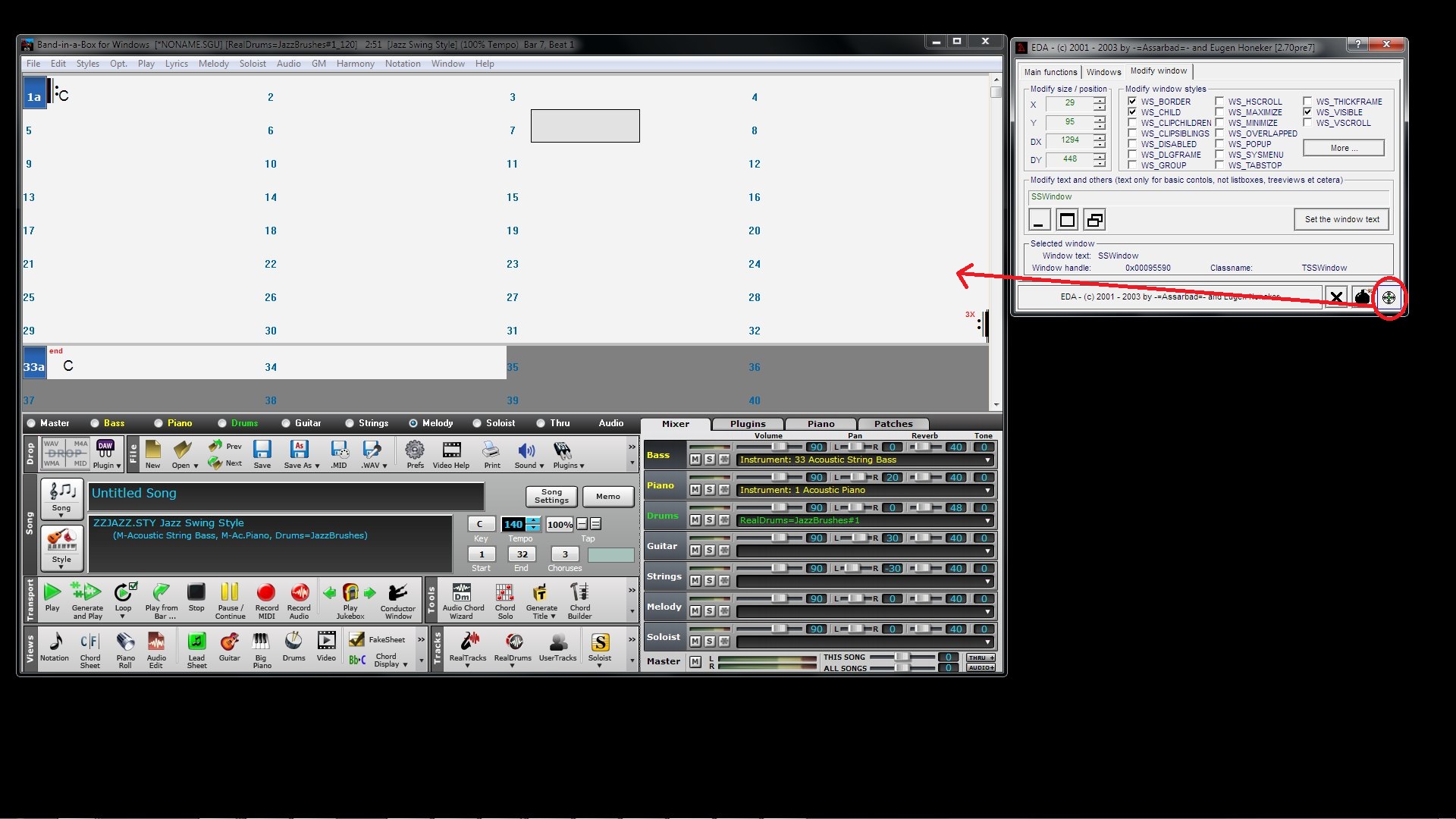
Please consider having the ability to remove the Mixer window (hide) as this interferes with grabbing some instruments (see screenshot). Tough time trying to access Strings and no deal with getting to the Guitar.
For your consideration.
It should be very easy to do, but if they don't get around to it you can use a Tool to do it. You always have the floating mixer window if you disable the main. If you need it desperately, I can upload a tool. I adjusted it manually but if you know the size you just key it in. BB Custom.mp4
Just drag the cross-hair on the bottom right to the section you want to modify, click the minimize button or maximize if you want a big mixer (or just move it to the far right so you can just see a bit then you can move it back), then drag the cross-hair to the controls section, go to the Modify Window Tab, you have XY position & XY size, just key in size or use mouse wheel or cursor keys the on numbers. You can also move the controls to the bottom and Chords to the top but it would be a lot easier if PG let you do this with a simple click n drag. It's not permanent, next time you start it will be back to it's locked restrictive layout. Will work with RB also.
It's a handy little Tool, maybe it should come with BB & RB
Hey SR, welcome back! Personally, I think you've got stacks of great ideas to offer. Trev
BIAB & RB2026 Win.(Audiophile), Windows 10 Professional & Windows 11, Sonar Platinum, Cakewalk by Bandlab, Izotope Prod.Bundle, Roland RD-1000, Synthogy Ivory, Kontakt, Focusrite 18i20, KetronSD2, NS40M Monitors, Pioneer Active Monitors
I think it would a good idea to prioritize what improvements should be made. Since BIAB moves slowly with changes, I would like to see some basic functions improved before any changes to the GUI are made. One thing among others is the abiliy to put more than 4 chords in a measure. This has been in the wishlist for many years. I'd like the ability to hide icons not used returned. Ray
Asus Q500A i7 Win 10 64 bit 8GB ram 750 HD 15.5" touch screen, BIAB 2017, Casio PX 5s, Xw P1, Center Point Stereo SS V3 and EWI 4000s.
Band-in-a-Box 2026 Video: The Newly Designed Piano Roll Window
In this video, we explore the updated Piano Roll, complete with a modernized look and exciting new features. You’ll see new filtering options that make it easy to focus on specific note groups, smoother and more intuitive note entry and editing, and enhanced options for zooming, looping, and more.
Band-in-a-Box 2026 Video: AI Stems & Notes - split polyphonic audio into instruments and transcribe
This video demonstrates how to use the new AI-Notes feature together with the AI-Stems splitter, allowing you to select an audio file and have it separated into individual stems while transcribing each one to its own MIDI track. AI-Notes converts polyphonic audio—either full mixes or individual instruments—into MIDI that you can view in notation or play back instantly.
Bonus PAK and 49-PAK for Band-in-a-Box® 2026 for Windows®
With your version 2026 for Windows Pro, MegaPAK, UltraPAK, UltraPAK+, Audiophile Edition or PlusPAK purchase, we'll include a Bonus PAK full of great new Add-ons for FREE! Or upgrade to the 2026 49-PAK for only $49 to receive even more NEW Add-ons including 20 additional RealTracks!
These PAKs are loaded with additional add-ons to supercharge your Band-in-a-Box®!
This Free Bonus PAK includes:
The 2026 RealCombos Booster PAK:
-For Pro customers, this includes 27 new RealTracks and 23 new RealStyles.
-For MegaPAK customers, this includes 25 new RealTracks and 23 new RealStyles.
-For UltraPAK customers, this includes 12 new RealStyles.
MIDI Styles Set 92: Look Ma! More MIDI 15: Latin Jazz
MIDI SuperTracks Set 46: Piano & Organ
Instrumental Studies Set 24: Groovin' Blues Soloing
Artist Performance Set 19: Songs with Vocals 9
Playable RealTracks Set 5
RealDrums Stems Set 9: Cool Brushes
SynthMaster Sounds Set 1 (with audio demos)
Android Band-in-a-Box® App (included)
Looking for more great add-ons, then upgrade to the 2026 49-PAK for just $49 and you'll get:
20 Bonus Unreleased RealTracks and RealDrums with 20 RealStyle.
FLAC Files (lossless audio files) for the 20 Bonus Unreleased RealTracks and RealDrums
MIDI Styles Set 93: Look Ma! More MIDI 16: SynthMaster
MIDI SuperTracks Set 47: More SynthMaster
Instrumental Studies 25 - Soul Jazz Guitar Soloing
Artist Performance Set 20: Songs with Vocals 10
RealDrums Stems Set 10: Groovin' Sticks
SynthMaster Sounds & Styles Set 2 (sounds & styles with audio demos)
Join Tobin as he takes you on a tour of the new user interface in Band-in-a-Box® 2026 for Windows®! This modern GUI redesign offers a sleek new look with updated toolbars, refreshed windows, and a smoother workflow. The brand-new side toolbar puts track selection, the MultiPicker Library, and other essential tools right at your fingertips. Plus, our upgraded Multi-View lets you layer multiple windows without overlap, giving you a highly flexible workspace. Many windows—including Tracks, Piano Roll, and more—have been redesigned for improved usability and a cleaner, more intuitive interface, and more!
Introducing XPro Styles PAK 10 – Now Available for Windows Band-in-a-Box 2025 and Higher!
We've just released XPro Styles PAK 10 for Windows & Mac Band-in-a-Box version 2025 (and higher) with 100 brand new RealStyles, plus 28 RealTracks and RealDrums!
Few things are certain in life: death, taxes, and a brand spankin’ new XPro Styles PAK! In this, the 10th edition of our XPro Styles PAK series, we’ve got 100 styles coming your way! We have the classic 25 styles each from the rock & pop, jazz, and country genres, and rounding out this volume's wildcard slot is 25 styles in the Praise & Worship genre! A wide spanning genre, you can find everything from rock, folk, country, and more underneath its umbrella. The included 28 RealTracks and RealDrums can be used with any Band-in-a-Box® 2026 (and higher) package.
Here’s just a small sampling of what you can look forward to in XPro Styles PAK 10: Soft indie folk worship songs, bumpin’ country boogies, gospel praise breaks, hard rockin’ pop, funky disco grooves, smooth Latin jazz pop, bossa nova fusion, western swing, alternative hip-hop, cool country funk, and much more!
Special offers until December 31st, 2025!
All the XPro Styles PAKs 1 - 10 are on sale for only $29 ea (Reg. $49 ea), or get them all in the XPro Styles PAK Bundle for only $149 (reg. $299)! Order now!
XPro Styles PAKs require Band-in-a-Box® 2025 or higher and are compatible with ANY package, including the Pro, MegaPAK, UltraPAK, UltraPAK+, and Audiophile Edition.
Introducing Xtra Styles PAK 21 – Now Available for Windows Band-in-a-Box 2025 and Higher!
Xtra Styles PAK 21 for Windows & Mac Band-in-a-Box version 2025 (and higher) is here with 200 brand new RealStyles!
We're excited to bring you our latest Xtra Styles PAK installment—the all new Xtra Styles PAK 21 for Band-in-a-Box version 2025 (and higher)!
Rejoice, one and all, for Xtra Styles PAK 21 for Band-in-a-Box® is here! We’re serving up 200 brand spankin’ new styles to delight your musical taste buds! The first three courses are the classics you’ve come to know and love, including offerings from the rock & pop, jazz, and country genres, but, not to be outdone, this year’s fourth course is bro country! A wide ranging genre, you can find everything from hip-hop, uptempo outlaw country, hard hitting rock, funk, and even electronica, all with that familiar bro country flair. The dinner bell has been rung, pickup up Xtra Styles PAK 21 today!
In this PAK you’ll discover: Energetic folk rock, raucous train beats, fast country boogies, acid jazz grooves, laid-back funky jams, a bevy of breezy jazz waltzes, calm electro funk, indie synth pop, industrial synth metal, and more bro country than could possibly fit in the back of a pickup truck!
Special offers until December 31st, 2025!
All the Xtra Styles PAKs 1 - 21 are on special for only $29 each (reg $49), or get all 21 PAKs for $199 (reg $399)! Order now!
Note: The Xtra Styles require the UltraPAK, UltraPAK+, or Audiophile Edition of Band-in-a-Box®. (Xtra Styles PAK 21 requires the 2025 or higher UltraPAK, UltraPAK+, or Audiophile Edition. They will not work with the Pro or MegaPAK version because they need the RealTracks from the UltraPAK, UltraPAK+, or Audiophile Edition.
Introducing XPro Styles PAK 10 – Now Available for Mac Band-in-a-Box 2025 and Higher!
We've just released XPro Styles PAK 10 for Mac & Windows Band-in-a-Box version 2025 (and higher) with 100 brand new RealStyles, plus 28 RealTracks and RealDrums!
Few things are certain in life: death, taxes, and a brand spankin’ new XPro Styles PAK! In this, the 10th edition of our XPro Styles PAK series, we’ve got 100 styles coming your way! We have the classic 25 styles each from the rock & pop, jazz, and country genres, and rounding out this volume's wildcard slot is 25 styles in the Praise & Worship genre! A wide spanning genre, you can find everything from rock, folk, country, and more underneath its umbrella. The included 28 RealTracks and RealDrums can be used with any Band-in-a-Box® 2026 (and higher) package.
Here’s just a small sampling of what you can look forward to in XPro Styles PAK 10: Soft indie folk worship songs, bumpin’ country boogies, gospel praise breaks, hard rockin’ pop, funky disco grooves, smooth Latin jazz pop, bossa nova fusion, western swing, alternative hip-hop, cool country funk, and much more!
Special offers until December 31st, 2025!
All the XPro Styles PAKs 1 - 10 are on sale for only $29 ea (Reg. $49 ea), or get them all in the XPro Styles PAK Bundle for only $149 (reg. $299)! Order now!
XPro Styles PAKs require Band-in-a-Box® 2025 or higher and are compatible with ANY package, including the Pro, MegaPAK, UltraPAK, UltraPAK+, and Audiophile Edition.
One of our representatives will be happy to help you over the phone. Our hours of operation are from
6:00AM to 6:00PM PST (GMT -8) Monday thru Friday, and 8:00AM to 4:00PM PST Saturday. We are closed Sunday. You can also send us your questions via email.
One of our representatives will be happy to help you on our Live Chat or by email. Our hours of operation are from
6:00AM to 6:00PM PST (GMT -8) Monday thru Friday; 8:00AM to 4:00PM PST (GMT -8) Saturday; Closed Sunday.

















 Dansk
Dansk Deutsch - Windows
 Español
 Français - Windows
 Italiano - Windows
 Nederlands
 Polski
 Português
 Svenskt
 русский
 Japanese
 Simplified Chinese
 Traditional Chinese
 Korean