|
Log in to post
|
Print Thread |
|
|
|
|
|
Recording, Mixing, Performance and Production
|
Joined: Aug 2011
Posts: 11,010
Veteran
|
OP

Veteran
Joined: Aug 2011
Posts: 11,010 |
The statement below was found in the notes for a beginning mixing class. Agree or disagree and why?
Recording/mixing at well below max level (-10 dBFS to -20 dBFS) allows for louder and cleaner masters. After all, the end product is what matters most. The old axiom of “use up all the bits” no longer applies in the age of 24-bit recordings and gear with lower noise floors.
|
|
|
|
|
|
|
|
|
|
|
|
|
Recording, Mixing, Performance and Production
|
Joined: Apr 2013
Posts: 8,847
Veteran
|

Veteran
Joined: Apr 2013
Posts: 8,847 |
The statement below was found in the notes for a beginning mixing class. Agree or disagree and why?
Recording/mixing at well below max level (-10 dBFS to -20 dBFS) allows for louder and cleaner masters. After all, the end product is what matters most. The old axiom of “use up all the bits” no longer applies in the age of 24-bit recordings and gear with lower noise floors. It's a true statement but is more applicable to a beginner mixer. A good, clean recording at a higher level will require less, if any effects such as compression, eq and limiting to bring the dynamics up to level. It's always better to get the recording right than to fix it during post. With beginning mixer, it's also better to be safe than sorry so there is something to work with if the artist is gone and the recording is crud.
BIAB 2025:RB 2025, Latest builds: Dell Optiplex 7040 Desktop; Windows-10-64 bit, Intel Core i7-6700 3.4GHz CPU and 16 GB Ram Memory.
|
|
|
|
|
|
|
|
|
|
|
|
|
Recording, Mixing, Performance and Production
|
Joined: Apr 2009
Posts: 10,794
Veteran
|
|
Veteran
Joined: Apr 2009
Posts: 10,794 |
Disagree:
You want to have the levels set just far enough down so that you don't exceed 0dB and venture into clipping. -6dB for peaks is fine. But you could push it up further if you needed to. I tend to work around -3dB on peaks.
If you record too low, yes, you can turn it up, but, when you do, you also turn up the noise and hiss that is in the track. As you turn it up, you raise the noise floor as well. -20dB is way down. That level is lower than where I run my vocal doubling secondary tracks and you can't hear them unless you solo the vocal buss. They are not recorded at that level..... they are recorded up just under 0dB, but I pull the faders back for the final mix.
You want to have the strongest signal level going in that you can possibly get without clipping. That keeps the source material well above the noise floor.
I prefer to have nice strong levels in the tracks and then pull them down for the final mix if that's needed, rather than going the other way.
Just my 2 cents
You can find my music at: www.herbhartley.comAdd nothing that adds nothing to the music. You can make excuses or you can make progress but not both. The magic you are looking for is in the work you are avoiding.
|
|
|
|
|
|
|
|
|
|
|
|
|
Recording, Mixing, Performance and Production
|
Joined: Apr 2013
Posts: 8,847
Veteran
|
|
Veteran
Joined: Apr 2013
Posts: 8,847 |
I agree Herb. I try for around -6 db too.
BIAB 2025:RB 2025, Latest builds: Dell Optiplex 7040 Desktop; Windows-10-64 bit, Intel Core i7-6700 3.4GHz CPU and 16 GB Ram Memory.
|
|
|
|
|
|
|
|
|
|
|
|
|
Recording, Mixing, Performance and Production
|
Joined: Jan 2013
Posts: 1,333
Expert
|
|
Expert
Joined: Jan 2013
Posts: 1,333 |
Well....
We all have our particular recording protocols that work for us.
For me...I've always recorded individual tracks to about -12db...give or take a couple....and I've never had any level issues at any stage.
Therefore, I see no benefit in recording at a higher input level.
Back in 2010 I'd sent (3) of my tunes to be mastered at Buffalo Sound (now called the The Ranch I think).
He said to send all raw tracks at -12db.
(He also added lead axe and B3 tracks which was very cool)
Most of us are in the digital realm so noise should not be a big issue as far as recording levels.
So...that recommended level (-12db) has more to do with the head room comfort necessary with summing of all tracks along with FX/signal processing at the stereo mix.
If you're using tape, different story, then as close to 0db is best but you can even push that level in the tape realm without issues.
If the end result has been achieved regardless of the path chosen all is well.
That's my take on it.
Carry on....
Last edited by chulaivet1966; 09/20/15 04:40 PM.
|
|
|
|
|
|
|
|
|
|
|
|
|
Recording, Mixing, Performance and Production
|
Joined: May 2008
Posts: 5,086
Veteran
|
|
Veteran
Joined: May 2008
Posts: 5,086 |
IF you are using plugins that emulate vintage hardware and you are recording/mixing in 24bit, then the "sweet spot" is said to be -18dbfs and it's suggested to use the trim on your DAW (or a trim plugin first in your fx chain) since the signal is prefader going into the plugins. This is from Graham at the Recording Revolution: http://therecordingrevolution.com/2013/11/25/do-you-know-how-to-read-your-meters/And I've read long discussions about that from some other places too. But personally, I just keep the peaks somewhere between -12 and -6. I use Realtracks and rarely record anything other than vocals. And i found the above advice (-18dbfs)to not work well for me mixing with the FX I use. YMMV
|
|
|
|
|
|
|
|
|
|
|
|
|
Recording, Mixing, Performance and Production
|
Joined: Oct 2008
Posts: 20,484
Veteran
|
|
Veteran
Joined: Oct 2008
Posts: 20,484 |
Jim,
Thanks for starting this thread. I'm finding it very interesting reading.
Noel
MY SONGS...Audiophile BIAB 2026
|
|
|
|
|
|
|
|
|
|
|
|
|
Recording, Mixing, Performance and Production
|
Joined: Oct 2008
Posts: 20,484
Veteran
|
|
Veteran
Joined: Oct 2008
Posts: 20,484 |
IF you are using plugins that emulate vintage hardware and you are recording/mixing in 24bit, then the "sweet spot" is said to be -18dbfs and it's suggested to use the trim on your DAW (or a trim plugin first in your fx chain) since the signal is prefader going into the plugins. This is from Graham at the Recording Revolution: http://therecordingrevolution.com/2013/11/25/do-you-know-how-to-read-your-meters/And I've read long discussions about that from some other places too. But personally, I just keep the peaks somewhere between -12 and -6. I use Realtracks and rarely record anything other than vocals. And i found the above advice (-18dbfs)to not work well for me mixing with the FX I use. YMMV Hi Josie, That's interesting that you mention -18 dBFS. I find that for my individual instrument tracks (wav), I usually have them set so that the meters, on average, oscillate around the -18 dB mark in Reaper. For my vocals, they're usually a little higher... I estimate somewhere around -12 dB. For the Master Volume, though, I set it so that it peaks a little under 0 dB. I arrived at these values purely by trial and error and I've stayed with them because they seem to work for me. (This is the main reason that I run Reaper with a version 3 skin... I like the extra height of the meters that v3 has.) Since I have Ozone as an FX in the Master fader, I find that I need to adjust the Master fader when I play around with Ozone's presets. Regards, Noel
MY SONGS...Audiophile BIAB 2026
|
|
|
|
|
|
|
|
|
|
|
|
|
Recording, Mixing, Performance and Production
|
Joined: Apr 2009
Posts: 10,794
Veteran
|
|
Veteran
Joined: Apr 2009
Posts: 10,794 |
Just for the record. I never... well let's just say, rarely.... I rarely use numbers to determine my levels. I record the track and look at the wave forms. This is my normal looking track view. The waveforms are 75% or more of the track. If they are more like straight lines, they were too weak and get recorded again after I adjust the input level up. It's rare that I overload anything I record because I have the max input levels set in my interface's software control panel front end. 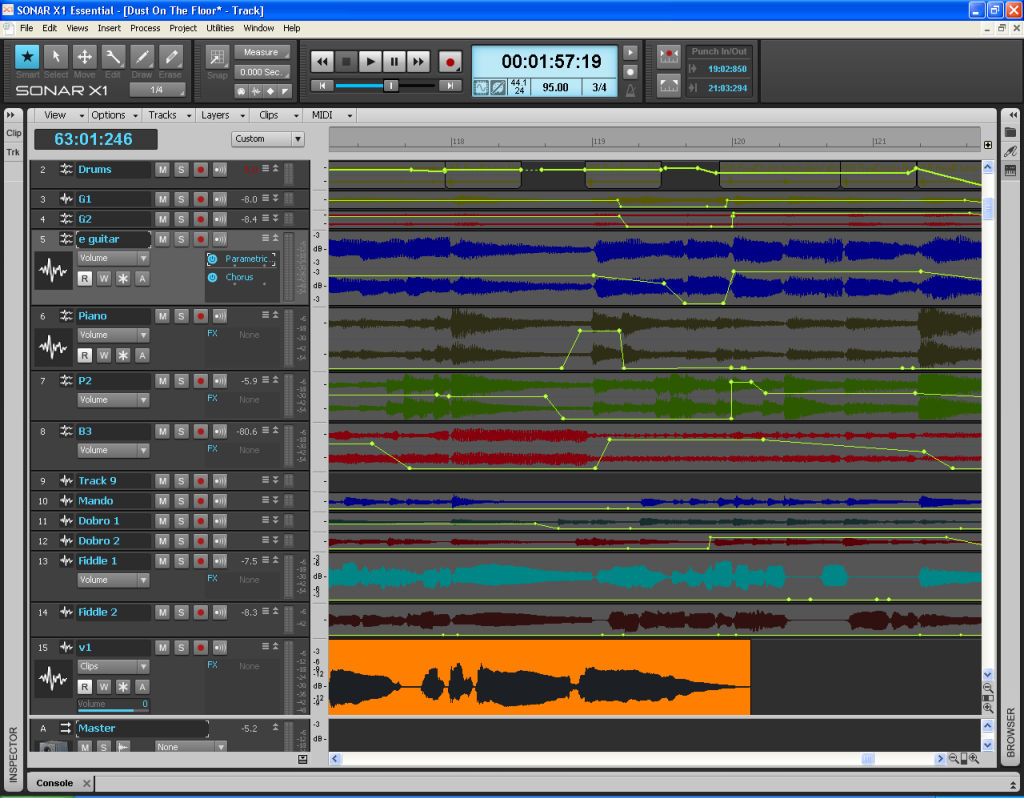 DUST ON THE FLOOR DUST ON THE FLOOR This is a screen shot closeup of the vocal from another studio. Notice the "overs" starting around the center and going to the right (forward) from that point. The interesting thing is that listening to this, the over's don't seem to wreak to much havoc in the tune. I try to avoid this kind of thing in my studio, but there's very little control over stuff that comes in the door. 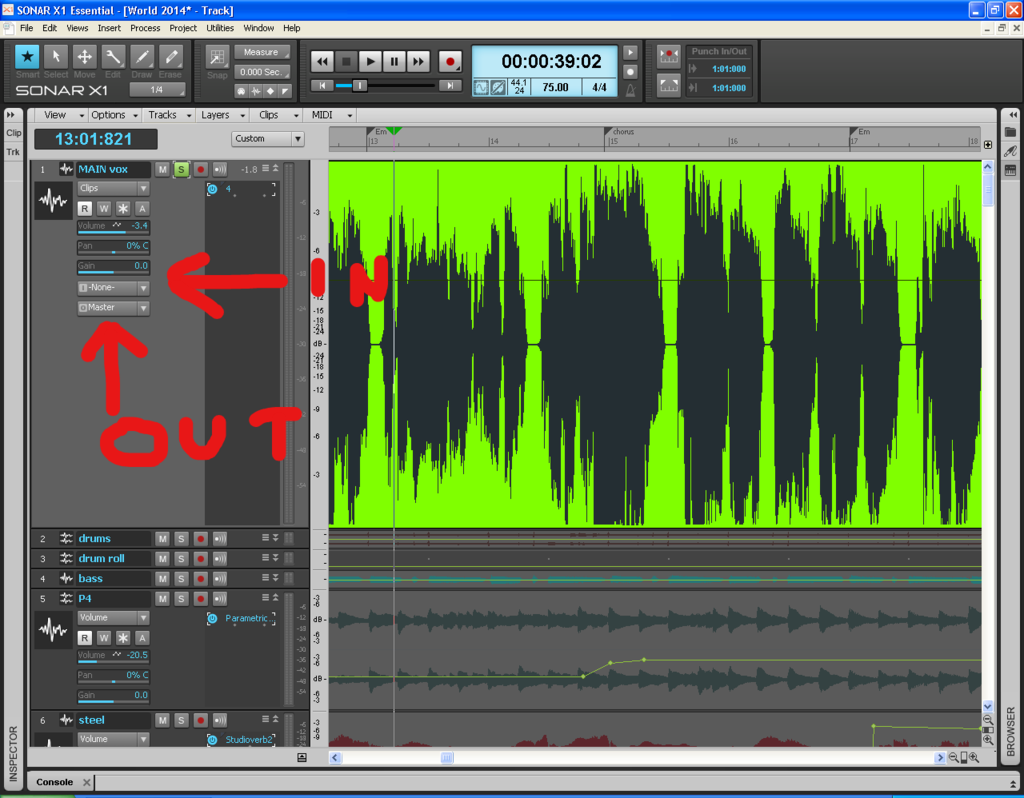 IN A WORLD WITHOUT YOU IN A WORLD WITHOUT YOU I included the links to the songs I referenced so you can hear the results. The way I determine my levels is by looking at the wave forms and also by observing the meters as I'm in playback mode and record mode. I adjust levels to stay out of the red. An occasional red blink is OK but I do not want to have constant red showing up in either mode. I look at the outputs and then after a render or export, I look carefully at the final wave to see how many peaks are touching 0dB both in the original wave and in the converted MP3 file. Just for grins, I set my levels up a bit and exported this. This is what I don't want to see. 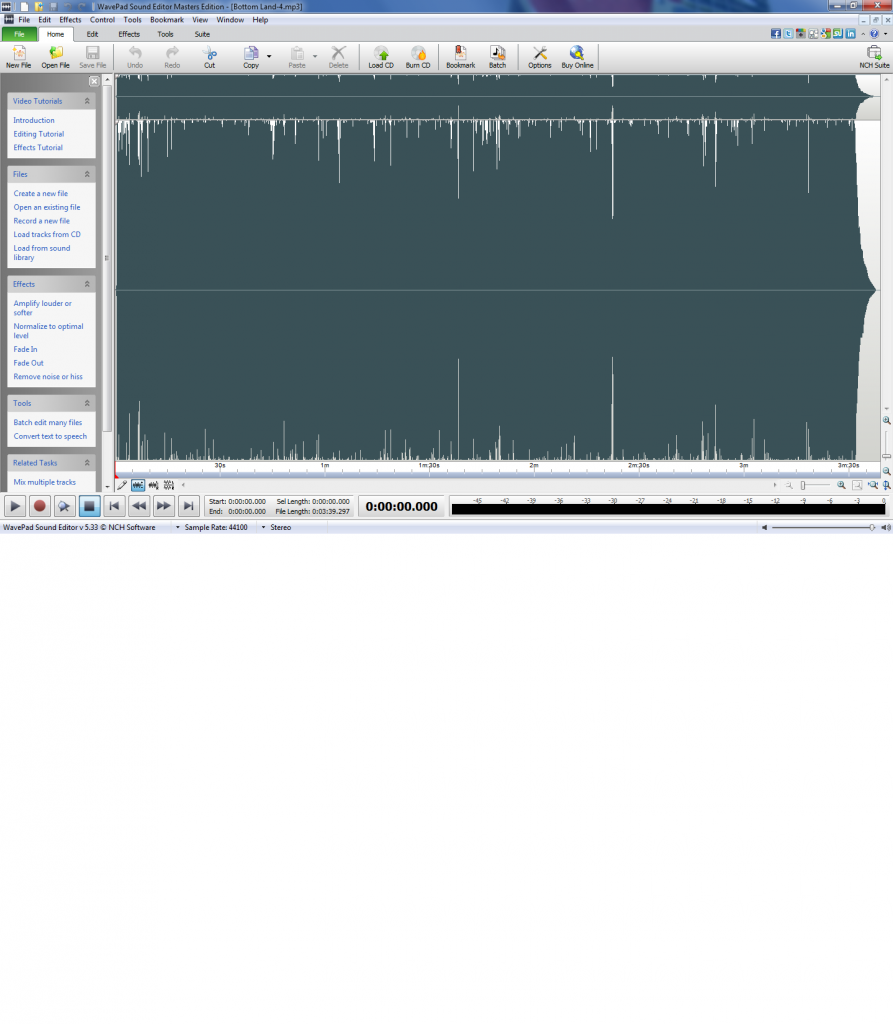
You can find my music at: www.herbhartley.comAdd nothing that adds nothing to the music. You can make excuses or you can make progress but not both. The magic you are looking for is in the work you are avoiding.
|
|
|
|
|
|
|
|
|
|
|
|
|
Recording, Mixing, Performance and Production
|
Joined: Jan 2002
Posts: 7,913
Veteran
|
|
Veteran
Joined: Jan 2002
Posts: 7,913 |
Does anyone want to learn some of the terminology involved and how that matters for setting input levels? If so, this is what I picked up in EE-638 from Purdue University many moons ago.
The quantization signal to noise ratio is 48 dB better in a 24 bit recording compared to a 16 bit recording. The rule of thumb is that the QNSR improves 6 dB for every bit of the A/D conversion at hand. To hear how this works in the reverse, take a nice clean 24 bit signal and then do bit reduction to 16 bit (most won't notice), then bit reduce to 12 bit (you will probably hear this) and then 8 bit, and you'll definitely harken back to the old Castle Wolfenstein game days with it's crudely rendered words and sounds.
Quantization noise is what happens with the signal that is effectively zero and the A/D has to decide if the signal is actually all zeros, or all zeros except for a 1 in the LSB.
2^16, or 65,536 'shelves' to stick the signal on with 16 bit recording, and 2^24 or 16,777,216 potential shelves to stick the signal on with 24 bit recording.
The quantization of the signal for a 24 bit at such a finer resolution is what accounts for the 48 dB better QSNR.
Translation: There is no harm in recording near full-scale use at 24 bit resolution, but there's also WAY WAY WAY more wiggle room (maybe another WAY in there) with 24 bit vs. 16 bit. I state that there's no harm because you can scale down the full scale tracks after you've made the recording, but the chance to be introducing quantization noise at let's say -18 dBfs, is for all intents and purposes non-existent.
Last edited by rockstar_not; 09/21/15 04:27 PM.
|
|
|
|
|
|
|
|
|
|
|
|
|
Recording, Mixing, Performance and Production
|
Joined: Apr 2009
Posts: 10,794
Veteran
|
|
Veteran
Joined: Apr 2009
Posts: 10,794 |
I'll pass on the big fancy words. As long as I can get the results I'm looking for..... "a couple dB lower or higher" works for me". 
You can find my music at: www.herbhartley.comAdd nothing that adds nothing to the music. You can make excuses or you can make progress but not both. The magic you are looking for is in the work you are avoiding.
|
|
|
|
|
|
|
|
|
|
|
|
Ask sales and support questions about Band-in-a-Box using natural language.
ChatPG's knowledge base includes the full Band-in-a-Box User Manual and sales information from the website.
|
|
|
|
|
|
|
|
|
|
|
Band-in-a-Box® 2025 for Mac® users: Build 904 now available!
If you're already using Band-in-a-Box® 2025 for Mac®, make sure to grab the latest update! Build 904 is now available for download and includes the newest additions and enhancements from our team.
Band-in-a-Box® 2026 for Windows® users: Build 1237 is now available!
Already a Band-in-a-Box 2026 for Windows user? Stay up to date and download the build 1237 to get all the latest additions and enhancements.
PowerTracks Pro 2026 for Windows is Here!
PowerTracks 2026 is here—bringing powerful new enhancements designed to make your production workflow faster, smoother, and more intuitive than ever.
The enhanced Mixer now shows Track Type and Instrument icons for instant track recognition, while a new grid option simplifies editing views. Non-floating windows adopt a modern title bar style, replacing the legacy blue bar.
The Master Volume is now applied at the end of the audio chain for consistent levels and full-signal master effects.
Tablature now includes a “Save bends when saving XML” option for improved compatibility with PG Music tools. Plus, you can instantly match all track heights with a simple Ctrl-release after resizing, and Add2 chords from MGU/SGU files are now fully supported... and more!
Get started today—first-time packages start at just $49.
Already using PowerTracks Pro Audio? Upgrade for as little as $29 and enjoy the latest improvements!
Order now!
Band-in-a-Box 2026 for Windows Special Offers End Tomorrow (January 15th, 2026) at 11:59 PM PST!
Time really is running out! Save up to 50% on Band-in-a-Box® 2026 for Windows® upgrades and receive a FREE Bonus PAK—only when you order by 11:59 PM PST on Thursday, January 15, 2026!
We've added many major new features and new content in a redesigned Band-in-a-Box® 2026 for Windows®!
Version 2026 introduces a modernized GUI redesign across the program, with updated toolbars, refreshed windows, smoother workflows, and a new Dark Mode option. There’s also a new side toolbar for quicker access to commonly used windows, and the new Multi-View feature lets you arrange multiple windows as layered panels without overlap, making it easier to customize your workspace.
Another exciting new addition is the new AI-Notes feature, which can transcribe polyphonic audio into MIDI. You can view the results in notation or play them back as MIDI, and choose whether to process an entire track or focus on specific parts like drums, bass, guitars/piano, or vocals. There's over 100 new features in Band-in-a-Box® 2026 for Windows®.
There's an amazing collection of new content too, including 202 RealTracks, new RealStyles, MIDI SuperTracks, Instrumental Studies, “Songs with Vocals” Artist Performance Sets, Playable RealTracks Set 5, two RealDrums Stems sets, XPro Styles PAK 10, Xtra Styles PAK 21, and much more!
Upgrade your Band-in-a-Box for Windows to save up to 50% on most Band-in-a-Box® 2026 upgrade packages!
Plus, when you order your Band-in-a-Box® 2026 upgrade during our special, you'll receive a Free Bonus PAK of exciting new add-ons.
If you need any help deciding which package is the best option for you, just let us know. We are here to help!
Band-in-a-Box® 2026 for Windows® Special Offers Extended Until January 15, 2026!
Good news! You still have time to upgrade to the latest version of Band-in-a-Box® for Windows® and save. Our Band-in-a-Box® 2026 for Windows® special now runs through January 15, 2025!
We've packed Band-in-a-Box® 2026 with major new features, enhancements, and an incredible lineup of new content! The program now sports a sleek, modern GUI redesign across the entire interface, including updated toolbars, refreshed windows, smoother workflows, a new dark mode option, and more. The brand-new side toolbar provides quicker access to key windows, while the new Multi-View feature lets you arrange multiple windows as layered panels without overlap, creating a flexible, clutter-free workspace. We have an amazing new “AI-Notes” feature. This transcribes polyphonic audio into MIDI so you can view it in notation or play it back as MIDI. You can process an entire track (all pitched instruments and drums) or focus on individual parts like drums, bass, guitars/piano, or vocals. There's an amazing collection of new content too, including 202 RealTracks, new RealStyles, MIDI SuperTracks, Instrumental Studies, “Songs with Vocals” Artist Performance Sets, Playable RealTracks Set 5, two RealDrums Stems sets, XPro Styles PAK 10, Xtra Styles PAK 21, and much more!
There are over 100 new features in Band-in-a-Box® 2026 for Windows®.
When you order purchase Band-in-a-Box® 2026 before 11:59 PM PST on January 15th, you'll also receive a Free Bonus PAK packed with exciting new add-ons.
Upgrade to Band-in-a-Box® 2026 for Windows® today! Check out the Band-in-a-Box® packages page for all the purchase options available.
Happy New Year!
Thank you for being part of the Band-in-a-Box® community.
Wishing you and yours a very happy 2026—Happy New Year from all of us at PG Music!
Season's Greetings!
Wishing everyone a happy, healthy holiday season—thanks for being part of our community!
The office will be closed for Christmas Day, but we will be back on Boxing Day (Dec 26th) at 6:00am PST.
Team PG
|
|
|
|
|
|
|
|
|
|
|
|
Forums57
Topics86,034
Posts799,155
Members40,013
| |
Most Online44,367
Mar 4th, 2026
|
|
|
|
|
|
|
|
|






 Dansk
Dansk Deutsch - Windows
 Español
 Français - Windows
 Italiano - Windows
 Nederlands
 Polski
 Português
 Svenskt
 русский
 Japanese
 Simplified Chinese
 Traditional Chinese
 Korean