Previous Thread
Index
Next Thread
Print Thread
Go To
#462206 03/14/18 03:19 PM
Post your own Tips and Tricks here
Joined: Feb 2015
Posts: 7,954
P
Veteran
OP Offline
Veteran
P
Joined: Feb 2015
Posts: 7,954
Copied from this post http://www.pgmusic.com/forums/ubbthreads.php?ubb=showflat&Number=376053#Post376053

Originally Posted By: Matt Finley
Pipeline, this info is too good to lose. Perhaps make a post in Tips and Tricks?


This will give the same consecutive shot/hold/push and not random ones, you can use this method on any RealDrum without having to edit the drum audio file:

This will give you just a few of the possible options.
Put these folders in your X:\bb\Drums\SurfRockDoubleTwo^

https://www.dropbox.com/s/yb7ficwz8nj1wj9/SurfRockDoubleTwo%5E01-Extra.zip?dl=1

Create a backup 1st then paste this over all the C:\bb\Drums\SurfRockDoubleTwo^ text
in X:\bb\Data\PGALLDrumFolderNames.txt (2018)
X:\bb\PGALLDrumFolderNames.txt (2017)
Code:
C:\bb\Drums\SurfRockDoubleTwo^\SurfRockDoubleTwo^01-Ride,Splsh
C:\bb\Drums\SurfRockDoubleTwo^\SurfRockDoubleTwo^01-Ride-SK,Splsh-SK
C:\bb\Drums\SurfRockDoubleTwo^\SurfRockDoubleTwo^01-Ride-SS,Splsh-SS
C:\bb\Drums\SurfRockDoubleTwo^\SurfRockDoubleTwo^01-Ride-ST1,Splsh-ST1
C:\bb\Drums\SurfRockDoubleTwo^\SurfRockDoubleTwo^02-Ride,HiHat
C:\bb\Drums\SurfRockDoubleTwo^\SurfRockDoubleTwo^03-Splsh,HHat


In the RealDrum Picker > Rebuild > then choose Shot=Kick or Shot=Snare or Shot=Tom1
you can create many different ones with one type for a shot/hold and another for a push. The above demos just uses the same for push/shot/hold.
More can be added to 01 02 03
But to have combined hits the wav file will need to be edited.

Memos can be added to RDPGMemos.txt and info to DrumGrooveNames.txt


Just open up the text file inside the different shot folders then scroll to the bottom and you will see all shots are removed but the one being used.
The first one still has all the shots at the end of the text file so using that drum you will get random shots.
The one with 0 in front is used for shots n holds C.. C...
the one with 1 in front is used for the pushes ^C ^^C

So you can just make a copy of the first folder and rename it to the name of the shot and also rename the text file inside to the same name prefix.
Then just go down to the bottom of the text file and delete the shots you don't want, if the shot has a ; in front remove it to use it.
You can have the same shot for shots/holds and pushes or different just choose the 2 you want to use, one with 0 in front(shot/hold) and one with 1 in front(push).

The end of text file in the RealDrums folder will show where and what shots you have:

Shot{ Kick (applicable for Brushes & Sticks) },1,289,0,543,1,90
;Shot{ Kick (applicable for Brushes & Sticks) },0,289,0,543,1,90
Shot{ Snare with Sticks },1,290,64,543,1,90
;Shot{ Snare with Sticks },0,290,64,543,1,90
Shot{Flam},1,291,128,434,1,90
;Shot{Flam},0,291,128,434,1,90
;Shot{ HiHat },1,292,84,380,1,90
Shot{ HiHat },0,292,84,380,1,90
;Shot{ HiHat Open },1,292,465,543,1,90
Shot{ HiHat Open },0,292,465,543,1,90
Shot{ HiHat Open 2 },1,294,49,815,1,90
;Shot{ HiHat Open 2 },0,294,49,815,1,90
;Shot{ Tom 1 },1,295,385,1087,1,90
Shot{ Tom 1 },0,295,385,1087,1,90
;Shot{ Tom 2 },1,298,34,1087,1,90
Shot{ Tom 2 },0,298,34,1087,1,90
Shot{ Floor Tom },1,300,162,1087,1,90
;Shot{ Floor Tom },0,300,162,1087,1,90
Shot{ Crash },1,302,291,1904,1,90
;Shot{ Crash },0,302,291,1904,1,90
Shot{ Crash 2 },1,306,275,1904,1,90
Shot{ Crash 2 },0,306,275,1904,1,90
Shot{Ride },1,310,260,2176,1,90
Shot{Ride },0,310,260,2176,1,90
Shot{ Side Stick },1,315,37,543,1,90
;Shot{ Side Stick },0,315,37,543,1,90


Other Methods:

You could create your own RealDrum set to play just the shots/holds you need but you would need to use F5 to change drums then F5 again to return to normal drums.

Or you could edit the real drum text file (use ; in front to comment lines out) so it only has one shot to choose from, and even add that shot as a custom made one to the end of the wav/wma file, just backup the original text & wav file and experiment with it.
292 is the bar that the shot is on (with the track starting on -1 then 0 as the 2 bar countin) just drag the real drum track into RealBand set to the same tempo as the drums.

,1,292,84,380,1,90

more info:
http://www.pgmusic.com/tutorial_realdrums_stylemaking.htm


Here are some examples of defined shots:

Shot,1,82,-2,455,1,100
Shot,0,83,5,360,1,90
Shot,1,171,240,200,1,80

The six elements that come after the text "shot" are explained here in further detail:


Type of shot
The type of shot needs to be either 0 or 1. If 0 is entered, the shot will be used when chords are entered with two periods (shot) or three periods (hold). If 1 is entered, the shot will be used when chords are entered with two or three carets before them (8th & 16th note pushes).

Bar number in style wave file
Like with patterns, you need to remember that RealDrums styles use -1 based numbering, so you need to subtract 2 from the bar number as you see it in your audio editor. More than one shot can be played in a single bar, and you would use the tick adjust amount to distinguish between the two.

Tick Adjust
The shots do not necessarily have to occur at the bar lines, and the tick adjust can be used to tell Band-in-a-Box® exactly where the shot starts. Simply measure the number of ticks from the downbeat of the bar number entered to the start of the shot, and that is the number that should be entered here. If the shot starts before the bar number that was entered, a negative number should be entered here.

For example, if a shot is recorded at bar 82, but on closer examination it appears that

Shot,1,82,-2,455,1,100

In another example (see example 10 below), a shot is played at the third beat of bar 171. In this case you need to use the tick adjust to indicate that it a full two beats after bar 171. Since one beat is 120 ticks, two beats would be 240 ticks, and it would therefore be entered as such:

Shot,1,171,240,200,1,80

RealDrums Style Example 10
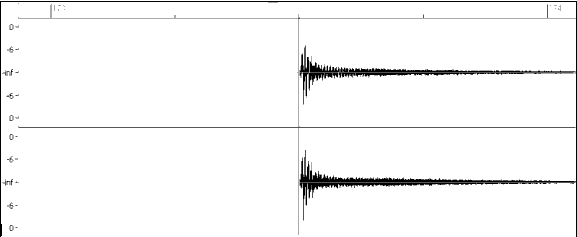
Example 10: Here the shot begins at bar 171 (173-2), at the third beat, or 240 ticks into the bar.

Duration
Unlike patterns, which use numbers of bars for durations, the shots use ticks for durations. So, for example, if a shot lasts for three beats, you would enter 360 (3 beats * 120 ticks per beat).

Here is an example of a shot that lasts for three beats:

Shot,0,83,5,360,1,90

For the best effect, the sound of the shots should decay naturally, and the entire length of the shot including the decay should be entered in the text file. This is especially important when all other instruments are silent, and all you hear is the decaying sound of the drum hit.

Weight
The weight for shots works exactly the same as the weight for patterns, except that there is no need for the use of 0 or 9 weights. This number should be between 1 and 8, with higher numbers representing a greater chance that the shot will be selected each time.

Volume
The volume of the shots is represented by a number between 1 and 127. If 90 is entered, the volume will not be adjusted at all. If a number between 1 and 89 is entered, the volume will be lowered accordingly, and if a number between 91 and 127 is entered, the volume will be raised accordingly. It is generally easiest to test the volume amounts once the style has been completed.


Create a backup copy of SurfRockDoubleTwo^_165_Style.wav(wma)
and SurfRockDoubleTwo^01-Ride,Splsh_165_Style.txt
So set RB to 165bpm then drag SurfRockDoubleTwo^_165_Style.wav in onto the track name,
go to the end of the track and highlight the first hit you want, zoom in to get it accurate making sure you get all the sustain in the selection,
Ctrl+C check Events only,
Select "Snap to Beat"
Set cursor @ bar 251
Ctrl+V check Merge & Events
DeSelect "Snap to Beat"

Copy the next hit you want and repeat the above, if you don't want the hit on a beat don't use Snap

Delete SurfRockDoubleTwo^_165_Style.bt1

Save to wav with original name (drag the new wav back into RB to check it saved correctly)

Remove all the shots in the text file and just add this and save :

Code:
Shot{ My Custom Hits                 },1,251,0,2244,8,90
Shot{ My Custom Hits                 },0,251,0,2244,8,90


Here's another option Custom RealDrum Solos\Hits Mac\Win you can also create an SFZ instrument from the same realdrums and use it in Sforzando VSTi on the midi track you can mute the realdrums on the bar/s with the shots/holds then add the midi notes you need in the piano roll on the bar/s that you need the custom shots/holds, then un-mute the realdrums after the shots/holds.

You can try it first with the PG Library in Sforzando > Drums > Rock Kit.

1. Use F5 to mute the drum track where the shots are.

2. Load Sforzando vst into a midi track.

3. In the Piano Roll view in the same midi track, hold the shift+ctrl and draw in a note, move the note up/down until you get the hit you want (make sure you have ASIO or MME Always On in the Driver Settings), draw in more notes if need be.

4. Use F5 to un-mute the drum track after the shots.

You never know the Rock Kit may be the same kit the surf drums were recorded on in the PG studio. You have some FX in the Sforzando GUI to adjust the sound to match the RealDrums or you can add some FX after Sforzando. You can copy and paste the midi shots if you need them again.


n RealBand you can regenerate each shot to get what you want or copy and paste.
With Biab 2018 you can use the audio editor to edit the drum track how you like but you would need a bit of enthusiasm.
You can save the drum track to a Performance track then move it to the audio editor, copy a good shot from one section to another, OR open the original realdrum track in another instance of Biab and copy the shots you need from the end of the track to the other Biab with your drum track.

and..
http://www.pgmusic.com/forums/ubbthreads.php?ubb=showflat&Number=459905#Post459905

http://www.pgmusic.com/forums/ubbthreads.php?ubb=showflat&Number=460040#Post460040

http://www.pgmusic.com/forums/ubbthreads.php?ubb=showflat&Number=447121


Post your own Tips and Tricks here
Joined: Dec 2007
Posts: 1,796
Expert
Offline
Expert
Joined: Dec 2007
Posts: 1,796
Thnx, guess it ain't a simple thing then LoL.

Post your own Tips and Tricks here
Joined: Nov 2009
Posts: 1,380
Expert
Offline
Expert
Joined: Nov 2009
Posts: 1,380
Fascinating...

very cool Pipeline...


Bandcamp
Win-11; BiaB-2026 Audiophile
Cakewalk Sonar; Melodyne-5; Scaler 3; NI Komplete:
Focusrite Scarlett 18i20


Post your own Tips and Tricks here
Joined: Jan 2021
Posts: 4
L
Newbie
Offline
Newbie
L
Joined: Jan 2021
Posts: 4
Many thanks for the helpful info. I will get right on it now I can see more clearly. I'd hope that in future recordings of Real Drums, any pushes would be recorded as part of a bar with a post push bar following, rather than a separate hit, if that's possible.

Previous Thread
Next Thread
Go To

Link Copied to Clipboard
ChatPG

Ask sales and support questions about Band-in-a-Box using natural language.

ChatPG's knowledge base includes the full Band-in-a-Box User Manual and sales information from the website.

PG Music News
Band-in-a-Box 2026 Video: AI Stems & Notes - split polyphonic audio into instruments and transcribe

This video demonstrates how to use the new AI-Notes feature together with the AI-Stems splitter, allowing you to select an audio file and have it separated into individual stems while transcribing each one to its own MIDI track. AI-Notes converts polyphonic audio—either full mixes or individual instruments—into MIDI that you can view in notation or play back instantly.

Watch the video.

You can see all the 2026 videos on our forum!

Bonus PAK and 49-PAK for Band-in-a-Box® 2026 for Windows®

With your version 2026 for Windows Pro, MegaPAK, UltraPAK, UltraPAK+, Audiophile Edition or PlusPAK purchase, we'll include a Bonus PAK full of great new Add-ons for FREE! Or upgrade to the 2026 49-PAK for only $49 to receive even more NEW Add-ons including 20 additional RealTracks!

These PAKs are loaded with additional add-ons to supercharge your Band-in-a-Box®!

This Free Bonus PAK includes:

  • The 2026 RealCombos Booster PAK: -For Pro customers, this includes 27 new RealTracks and 23 new RealStyles. -For MegaPAK customers, this includes 25 new RealTracks and 23 new RealStyles. -For UltraPAK customers, this includes 12 new RealStyles.
  • MIDI Styles Set 92: Look Ma! More MIDI 15: Latin Jazz
  • MIDI SuperTracks Set 46: Piano & Organ
  • Instrumental Studies Set 24: Groovin' Blues Soloing
  • Artist Performance Set 19: Songs with Vocals 9
  • Playable RealTracks Set 5
  • RealDrums Stems Set 9: Cool Brushes
  • SynthMaster Sounds Set 1 (with audio demos)
  • Android Band-in-a-Box® App (included)

Looking for more great add-ons, then upgrade to the 2026 49-PAK for just $49 and you'll get:


  • 20 Bonus Unreleased RealTracks and RealDrums with 20 RealStyle.
  • FLAC Files (lossless audio files) for the 20 Bonus Unreleased RealTracks and RealDrums
  • MIDI Styles Set 93: Look Ma! More MIDI 16: SynthMaster
  • MIDI SuperTracks Set 47: More SynthMaster
  • Instrumental Studies 25 - Soul Jazz Guitar Soloing
  • Artist Performance Set 20: Songs with Vocals 10
  • RealDrums Stems Set 10: Groovin' Sticks
  • SynthMaster Sounds & Styles Set 2 (sounds & styles with audio demos)

Learn more about the Bonus PAKs for Band-in-a-Box® 2026 for Windows®!

Video: New User Interface (GUI)

Join Tobin as he takes you on a tour of the new user interface in Band-in-a-Box® 2026 for Windows®! This modern GUI redesign offers a sleek new look with updated toolbars, refreshed windows, and a smoother workflow. The brand-new side toolbar puts track selection, the MultiPicker Library, and other essential tools right at your fingertips. Plus, our upgraded Multi-View lets you layer multiple windows without overlap, giving you a highly flexible workspace. Many windows—including Tracks, Piano Roll, and more—have been redesigned for improved usability and a cleaner, more intuitive interface, and more!

Watch the video.

You can see all the 2026 videos on our forum!

Introducing XPro Styles PAK 10 – Now Available for Windows Band-in-a-Box 2025 and Higher!

We've just released XPro Styles PAK 10 for Windows & Mac Band-in-a-Box version 2025 (and higher) with 100 brand new RealStyles, plus 28 RealTracks and RealDrums!

Few things are certain in life: death, taxes, and a brand spankin’ new XPro Styles PAK! In this, the 10th edition of our XPro Styles PAK series, we’ve got 100 styles coming your way! We have the classic 25 styles each from the rock & pop, jazz, and country genres, and rounding out this volume's wildcard slot is 25 styles in the Praise & Worship genre! A wide spanning genre, you can find everything from rock, folk, country, and more underneath its umbrella. The included 28 RealTracks and RealDrums can be used with any Band-in-a-Box® 2026 (and higher) package.

Here’s just a small sampling of what you can look forward to in XPro Styles PAK 10: Soft indie folk worship songs, bumpin’ country boogies, gospel praise breaks, hard rockin’ pop, funky disco grooves, smooth Latin jazz pop, bossa nova fusion, western swing, alternative hip-hop, cool country funk, and much more!

Special offers until December 31st, 2025!

All the XPro Styles PAKs 1 - 10 are on sale for only $29 ea (Reg. $49 ea), or get them all in the XPro Styles PAK Bundle for only $149 (reg. $299)! Order now!

Learn more and listen to demos of XPro Styles PAKs.

Video: XPro Styles PAK 10 Overview & Styles Demos: Watch now!

XPro Styles PAKs require Band-in-a-Box® 2025 or higher and are compatible with ANY package, including the Pro, MegaPAK, UltraPAK, UltraPAK+, and Audiophile Edition.

Introducing Xtra Styles PAK 21 – Now Available for Windows Band-in-a-Box 2025 and Higher!

Xtra Styles PAK 21 for Windows & Mac Band-in-a-Box version 2025 (and higher) is here with 200 brand new RealStyles!

We're excited to bring you our latest Xtra Styles PAK installment—the all new Xtra Styles PAK 21 for Band-in-a-Box version 2025 (and higher)!

Rejoice, one and all, for Xtra Styles PAK 21 for Band-in-a-Box® is here! We’re serving up 200 brand spankin’ new styles to delight your musical taste buds! The first three courses are the classics you’ve come to know and love, including offerings from the rock & pop, jazz, and country genres, but, not to be outdone, this year’s fourth course is bro country! A wide ranging genre, you can find everything from hip-hop, uptempo outlaw country, hard hitting rock, funk, and even electronica, all with that familiar bro country flair. The dinner bell has been rung, pickup up Xtra Styles PAK 21 today!

In this PAK you’ll discover: Energetic folk rock, raucous train beats, fast country boogies, acid jazz grooves, laid-back funky jams, a bevy of breezy jazz waltzes, calm electro funk, indie synth pop, industrial synth metal, and more bro country than could possibly fit in the back of a pickup truck!

Special offers until December 31st, 2025!

All the Xtra Styles PAKs 1 - 21 are on special for only $29 each (reg $49), or get all 21 PAKs for $199 (reg $399)! Order now!

Learn more and listen to demos of the Xtra Styles PAK 21.

Video: Xtra Styles PAK 21 Overview & Styles Demos: Watch now!

Note: The Xtra Styles require the UltraPAK, UltraPAK+, or Audiophile Edition of Band-in-a-Box®. (Xtra Styles PAK 21 requires the 2025 or higher UltraPAK, UltraPAK+, or Audiophile Edition. They will not work with the Pro or MegaPAK version because they need the RealTracks from the UltraPAK, UltraPAK+, or Audiophile Edition.

Introducing XPro Styles PAK 10 – Now Available for Mac Band-in-a-Box 2025 and Higher!

We've just released XPro Styles PAK 10 for Mac & Windows Band-in-a-Box version 2025 (and higher) with 100 brand new RealStyles, plus 28 RealTracks and RealDrums!

Few things are certain in life: death, taxes, and a brand spankin’ new XPro Styles PAK! In this, the 10th edition of our XPro Styles PAK series, we’ve got 100 styles coming your way! We have the classic 25 styles each from the rock & pop, jazz, and country genres, and rounding out this volume's wildcard slot is 25 styles in the Praise & Worship genre! A wide spanning genre, you can find everything from rock, folk, country, and more underneath its umbrella. The included 28 RealTracks and RealDrums can be used with any Band-in-a-Box® 2026 (and higher) package.

Here’s just a small sampling of what you can look forward to in XPro Styles PAK 10: Soft indie folk worship songs, bumpin’ country boogies, gospel praise breaks, hard rockin’ pop, funky disco grooves, smooth Latin jazz pop, bossa nova fusion, western swing, alternative hip-hop, cool country funk, and much more!

Special offers until December 31st, 2025!

All the XPro Styles PAKs 1 - 10 are on sale for only $29 ea (Reg. $49 ea), or get them all in the XPro Styles PAK Bundle for only $149 (reg. $299)! Order now!

Learn more and listen to demos of XPro Styles PAKs.

Video: XPro Styles PAK 10 Overview & Styles Demos: Watch now!

XPro Styles PAKs require Band-in-a-Box® 2025 or higher and are compatible with ANY package, including the Pro, MegaPAK, UltraPAK, UltraPAK+, and Audiophile Edition.

Introducing Xtra Styles PAK 21 – Now Available for Mac Band-in-a-Box 2025 and Higher!

Xtra Styles PAK 21 for Mac & Windows Band-in-a-Box version 2025 (and higher) is here with 200 brand new RealStyles!

We're excited to bring you our latest Xtra Styles PAK installment—the all new Xtra Styles PAK 21 for Band-in-a-Box version 2025 (and higher)!

Rejoice, one and all, for Xtra Styles PAK 21 for Band-in-a-Box® is here! We’re serving up 200 brand spankin’ new styles to delight your musical taste buds! The first three courses are the classics you’ve come to know and love, including offerings from the rock & pop, jazz, and country genres, but, not to be outdone, this year’s fourth course is bro country! A wide ranging genre, you can find everything from hip-hop, uptempo outlaw country, hard hitting rock, funk, and even electronica, all with that familiar bro country flair. The dinner bell has been rung, pickup up Xtra Styles PAK 21 today!

In this PAK you’ll discover: Energetic folk rock, raucous train beats, fast country boogies, acid jazz grooves, laid-back funky jams, a bevy of breezy jazz waltzes, calm electro funk, indie synth pop, industrial synth metal, and more bro country than could possibly fit in the back of a pickup truck!

Special offers until December 31st, 2025!

All the Xtra Styles PAKs 1 - 21 are on special for only $29 each (reg $49), or get all 21 PAKs for $199 (reg $399)! Order now!

Learn more and listen to demos of the Xtra Styles PAK 21.

Video: Xtra Styles PAK 21 Overview & Styles Demos: Watch now!

Note: The Xtra Styles require the UltraPAK, UltraPAK+, or Audiophile Edition of Band-in-a-Box®. (Xtra Styles PAK 21 requires the 2025 or higher UltraPAK, UltraPAK+, or Audiophile Edition. They will not work with the Pro or MegaPAK version because they need the RealTracks from the UltraPAK, UltraPAK+, or Audiophile Edition.

Forum Statistics
Forums57
Topics85,307
Posts790,765
Members39,855
Most Online25,754
Jan 24th, 2025
Newest Members
gim77, StratMan1965, CPIA2002, janhardo, Minstrel
39,855 Registered Users
Top Posters(30 Days)
jpettit 323
MarioD 222
DrDan 211
Noel96 161
DC Ron 145
Rob Helms 127
Today's Birthdays
Country Fever, EddieP.Morrison, Mariothegreat
Powered by UBB.threads™ PHP Forum Software 7.7.5