Well, it’s delivered on a hard drive. And whatever means you hourly/daily back up your PC or Mac should handle backing up the program and associated files you create. However I live in Apple World
Our albums and singles are on Spotify, Apple Music, Amazon Music, YouTube Music, Pandora and more. If interested search on Janice Merritt. Thanks! Our Videos
As far as I know, activation (and you have three) writes a file to your hard drive but does not need to ‘phone home’ after that. As long as you keep your PG Music-supplied hard drive, DVDs or downloaded files, you should be fine.
BIAB 2025 Win Audiophile. Software: Studio One 7 Pro, Swam horns, Acoustica-7, Notion 6, Song Master Pro, Win 11 Home. Hardware: Intel i9, 32 Gb; Presonus 192 & Faderport 8, Royer 121, Slate VSX, Adam Sub8 & Neumann 120 monitors.
Guess I'm just too cloistered in my Apple world. I do full backups up daily and if my mac hard drive completely crashed I could create a clone of it on a new mac or new hard drive with only a few clicks here and there. I have a terabyte HD and back up to a terabyte HD. I keep another clone in the safety deposit box and swap it out monthly. A lot of folks find the Apple world too restrictive but I like being taken care of
Bud
Our albums and singles are on Spotify, Apple Music, Amazon Music, YouTube Music, Pandora and more. If interested search on Janice Merritt. Thanks! Our Videos
I have the installation files for every application on all my computers on a 2TB USB hard drive - all the apps, all the sound libraries, all the utilities, all the O/S discs, etc. Then that USB drive is backed up to another USB drive.
I have on occasion had to completely re-install everything (and it takes about a week because there is so much content to install, authorize, unzip, etc). But with that USB drive, I don't have to shuffle CD's or DVD's or downloads. I keep it current with any application updates, and I've got it all tracked in a spreadsheet that shows every the application organized by purpose on each tab, the current version, status of updates between my three computers, installation notes, authorization/registration codes, vendor site and forum login information, etc.
I also take a monthly image of my three computers (I just run it when I go to bed at night and it's done when I wake up in the morning), so recovering from a hard drive failure only takes as long as getting a new hard drive and then however long it takes to get the data off the USB image backup onto the computer. The O/S partition usually takes about 2 hours, but restoring my audio libraries (1.5TB worth) takes much longer just because of the time it takes to copy that much data.
But hey, that's just me.
John
Laptop-HP Omen I7 Win11Pro 32GB 12TB SSD Desktop-ASUS-I7 Win10Pro 32GB 12TB SATA
BTW, I also use a virtual CD/DVD disc mounter. For the apps that came on DVD, I converted them to ISO image files, which I save on my USB hard drive. I can then right click on the ISO file, assign a drive letter, and it's just like having the CD/DVD mounted, but operates a whole lot faster.
John
Laptop-HP Omen I7 Win11Pro 32GB 12TB SSD Desktop-ASUS-I7 Win10Pro 32GB 12TB SATA
Because some of my older software doesn't repond to UNC reference.
I also save my audio CD's to Nero's NRG format, which I can then mount as a virtual CD and play in my audio player as if it were a physical CD. And while the file could potentially get corrupt, it doesn't get scratched.
I use the free one from DVDFab, as I found some of the others balked when I went to Windows 10 (although they may have caught up). I used to use MagicISO for a long time, but it didn't like Windows 10 when it came out. The one from DVDFab seems to be based on MagicISO (similar interface), however, but works great on both my Win7 and Win10 machines.
John
Laptop-HP Omen I7 Win11Pro 32GB 12TB SSD Desktop-ASUS-I7 Win10Pro 32GB 12TB SATA
Reinstalling windows is a real pain. I do make regular backups with acronis 2010, I also have bought acronis 2018 but I hate the GUI, so usually if something goes wrong I just do a recovery with acronis 2010.
(Macrium Reflect free version is a fine program as well, might switch to it in near future)
That was until a few weeks ago, as I had windows 10 32 bit and stuff like Second Life was constantly crashing in busy sims, so decided to put on windows 10 64 bit, which solved the crashing problems.
But as John said a pain to put everything back on and aurhorize.
Probably talking about 40-50 hours in all. About 95gb and still counting as I add stuff.
Think I am almost there though.
I was just thinking though about activation. Wouldn't it be great if PG music gave all registered users, a backup offline activation file for the last years version that they bought, not current until they upgrade again for next year.
That way should anything happen (and I'm sure Pg music aren't going anywhere) the faithful followers of the program would be sucure in knowledge that the offline activation file would always activate biab.
Windows 10 (64bit) M-Audio Fast Track Pro, Band in a Box 2025, Cubase 14, Cakewalk and far too many VST plugins that I probably don't need or will ever use
It is my understanding that if you back up with disk imaging software and do a complete restore, everything including the OS is restored. Computer IT folks, please correct this if I'm wrong.
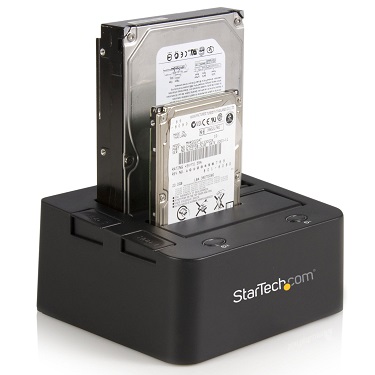
I use Acronis, and I have a "toaster" hard drive docking station.
It hooks to the computer via a USB port, and you can insert and remove either desktop or laptop SATA hard drives in there.
This is what the toaster drive looks like loaded with a desktop and a laptop HD.
You can have scores of hard drives with different projects on them, store them in a safe place, and pop them in the toaster when you need them.
I do a daily backup with Acronis. It's a disk image with a few incremental additions. It rotates between a few of these so I always have the last half dozen or more backups available.
Then once a month I put another drive in and do a disk image. I have almost a years worth of images on that disk. This is cheap insurance. If I get a nasty virus, or ransomware, I can go back to an uninfected state.
I also backup data from my documents and other important folders using Microsoft/Windows' SyncToy software. I have it set up so that it looks at the designated folders on my computers HD, compares them with the identical folders on the toaster HD, and any changes made on the computer, get changed on the toaster. I do this every day too. I like it better than a backup because the files are uncompressed, and if I screw up something on the computer, say a song file I made changes to, I can just drag and drop from the toaster HD to the computer HD and it's fixed in a couple of seconds.
There is no need to go to Apple to make good backups. In fact, I'd say there are probably more good backup options for Windows than for Mac, simply because there are 20 times more Windows users in the world.
The only good reason to go Mac is if you like the Mac OS better or you depend on software that runs better on the Mac.
Your data is more important than your computer. Back up every day.
There are only two kinds of computer users, those who have had a hard disk crash, and those who haven't had a hard disk crash - YET.
Musiclover I was just thinking though about activation. Wouldn't it be great if PG music gave all registered users, a backup offline activation file for the last years version that they bought, not current until they upgrade again for next year.
That way should anything happen (and I'm sure Pg music aren't going anywhere) the faithful followers of the program would be sucure in knowledge that the offline activation file would always activate biab.
That makes me feel safer.
Notes that is excellent googling the toaster right away.
win 10 64 bit 16gb,i7 chip, ssd 500gb, m-audio air, ,Roland BK-7M, 1000,shure sm7b,sonar,acid,mixcraft, variety of plugins.Sample tank 3,Kontakt. TC Helicon Voicelive 3 2 . https://beatmaster1.bandcamp.com/releases
I *think* if your ticket file (key) from PGMusic is good it validates, and that's stored locally.
The possible issue I see is if you wanted to move the program to another computer after PGMusic was gone. Then the available number of installs may cause an issue when the program checks for an available license. In other words, I *think* a current 'good' install would continue to run, but a new install or new machine may cause an issue.
/By then, Pipeline may have a patch. <grin>/
.. of course everything I said could be wrong, but that's how I think it works currently ..
RB keeps a history of the tickets but BiaB seems to keep only the latest ticket (or maybe the re-organization of files in the recent version affects my perception of this)
I do not work here, but the benefits are still awesome Make your sound your own!
Band-in-a-Box® 2025 for Mac® users: Build 904 now available!
If you're already using Band-in-a-Box® 2025 for Mac®, make sure to grab the latest update! Build 904 is now available for download and includes the newest additions and enhancements from our team.
PowerTracks 2026 is here—bringing powerful new enhancements designed to make your production workflow faster, smoother, and more intuitive than ever.
The enhanced Mixer now shows Track Type and Instrument icons for instant track recognition, while a new grid option simplifies editing views. Non-floating windows adopt a modern title bar style, replacing the legacy blue bar.
The Master Volume is now applied at the end of the audio chain for consistent levels and full-signal master effects.
Tablature now includes a “Save bends when saving XML” option for improved compatibility with PG Music tools. Plus, you can instantly match all track heights with a simple Ctrl-release after resizing, and Add2 chords from MGU/SGU files are now fully supported... and more!
Get started today—first-time packages start at just $49.
Already using PowerTracks Pro Audio? Upgrade for as little as $29 and enjoy the latest improvements!
Band-in-a-Box 2026 for Windows Special Offers End Tomorrow (January 15th, 2026) at 11:59 PM PST!
Time really is running out! Save up to 50% on Band-in-a-Box® 2026 for Windows® upgrades and receive a FREE Bonus PAK—only when you order by 11:59 PM PST on Thursday, January 15, 2026!
We've added many major new features and new content in a redesigned Band-in-a-Box® 2026 for Windows®!
Version 2026 introduces a modernized GUI redesign across the program, with updated toolbars, refreshed windows, smoother workflows, and a new Dark Mode option. There’s also a new side toolbar for quicker access to commonly used windows, and the new Multi-View feature lets you arrange multiple windows as layered panels without overlap, making it easier to customize your workspace.
Another exciting new addition is the new AI-Notes feature, which can transcribe polyphonic audio into MIDI. You can view the results in notation or play them back as MIDI, and choose whether to process an entire track or focus on specific parts like drums, bass, guitars/piano, or vocals. There's over 100 new features in Band-in-a-Box® 2026 for Windows®.
There's an amazing collection of new content too, including 202 RealTracks, new RealStyles, MIDI SuperTracks, Instrumental Studies, “Songs with Vocals” Artist Performance Sets, Playable RealTracks Set 5, two RealDrums Stems sets, XPro Styles PAK 10, Xtra Styles PAK 21, and much more!
Upgrade your Band-in-a-Box for Windows to save up to 50% on most Band-in-a-Box® 2026 upgrade packages!
Plus, when you order your Band-in-a-Box® 2026 upgrade during our special, you'll receive a Free Bonus PAK of exciting new add-ons.
If you need any help deciding which package is the best option for you, just let us know. We are here to help!
Band-in-a-Box® 2026 for Windows® Special Offers Extended Until January 15, 2026!
Good news! You still have time to upgrade to the latest version of Band-in-a-Box® for Windows® and save. Our Band-in-a-Box® 2026 for Windows® special now runs through January 15, 2025!
We've packed Band-in-a-Box® 2026 with major new features, enhancements, and an incredible lineup of new content! The program now sports a sleek, modern GUI redesign across the entire interface, including updated toolbars, refreshed windows, smoother workflows, a new dark mode option, and more. The brand-new side toolbar provides quicker access to key windows, while the new Multi-View feature lets you arrange multiple windows as layered panels without overlap, creating a flexible, clutter-free workspace. We have an amazing new “AI-Notes” feature. This transcribes polyphonic audio into MIDI so you can view it in notation or play it back as MIDI. You can process an entire track (all pitched instruments and drums) or focus on individual parts like drums, bass, guitars/piano, or vocals. There's an amazing collection of new content too, including 202 RealTracks, new RealStyles, MIDI SuperTracks, Instrumental Studies, “Songs with Vocals” Artist Performance Sets, Playable RealTracks Set 5, two RealDrums Stems sets, XPro Styles PAK 10, Xtra Styles PAK 21, and much more!
There are over 100 new features in Band-in-a-Box® 2026 for Windows®.
When you order purchase Band-in-a-Box® 2026 before 11:59 PM PST on January 15th, you'll also receive a Free Bonus PAK packed with exciting new add-ons.
Upgrade to Band-in-a-Box® 2026 for Windows® today! Check out the Band-in-a-Box® packages page for all the purchase options available.
One of our representatives will be happy to help you over the phone. Our hours of operation are from
6:00AM to 6:00PM PST (GMT -8) Monday thru Friday, and 8:00AM to 4:00PM PST Saturday. We are closed Sunday. You can also send us your questions via email.
One of our representatives will be happy to help you on our Live Chat or by email. Our hours of operation are from
6:00AM to 6:00PM PST (GMT -8) Monday thru Friday; 8:00AM to 4:00PM PST (GMT -8) Saturday; Closed Sunday.











 Dansk
Dansk Deutsch - Windows
 Español
 Français - Windows
 Italiano - Windows
 Nederlands
 Polski
 Português
 Svenskt
 русский
 Japanese
 Simplified Chinese
 Traditional Chinese
 Korean