I have been struggling with a BIAB MIDI recording problem for several years. I am close to going bonkers over this – or maybe I'm there already! I posted about it a few years ago, and got a lot of helpful suggestions (thanks, guys!); one of them seemed to fix the problem, and I reported the success here, but within minutes of my posting the problem returned! I gave up on it at the time, but I have taken up the cause every now and then, to no avail. I have spent a lot of time working on it, without result.
The problem occurs when I use BIAB to record from a Yamaha Clavier digital piano. You can see the issue here - note the bottom red/green line, which indicates overlapping notes.
So my questions are: What is causing those? And how can I prevent it?
A few basic facts before I get to the nitty-gritty:
• The problem does not occur with RealBand, Aria or Pianoteq. • The problem does occur with two different Yamaha piano models (Yamaha P120 and Yamaha Clavinova). • The problem occurs whether I connect with a USB cable, or with a Yamaha MIDI cable with MIDI/USB adapter. • The problem occurs whether I use the built-in drivers or the Yamaha MIDI USB driver. • The problem occurs with BIAB2006 (yes, 2006, I just recently re-installed it and checked), and BIAB2020, and all BIAB'S in between that I have had. • The problem has occurred on three computers (2 laptops, 1 desktop), with different versions of Windows. • The problem does not occur with my old CASIO LK-220 keyboard. • The problem is repeatable, in that if I play and record for a few minutes, it almost always happens; but it is random, in that it does not always happen at the same time or on the same notes. The randomness makes it hard to troubleshoot. • If I record a longer piece, more of those lines accumulate.
There was a suggestion that perhaps the Yamaha sends a flood of MIDI messages that overwhelm BIAB. To check, I installed software called Midi-Ox, which monitors incoming MIDI messages. I don't know how to devise a good diagnostic test, but I have run a few simple tests, with results that seem normal. If I press ten keys at once, ten note-on messages show up; if I release them, ten note-off messages are displayed. If I do that test many times, rapidly, I still get ten note-on and ten note-off messages. If I monitor the input while simultaneously recording in BIAB, the only MIDI messages I see are the notes that I press on the Yamaha. Nothing I did seemed to stimulate a flood of messages.
If I set Midi-Ox to see all messages, not just the notes, I do get a continuous stream of Active Sensing messages, a few per second. I assume these are benign; however, it is interesting to note that the Casio keyboard does not send Active Sensing messages, and does not cause overlapping notes. There does not seem to be any way to tell the Yamaha to stop the Active Sensing.
I have varied just about everything I can think of, with no change in results. Things I have played around with, to no avail: • ASIO vs MME • MIDI Through ON/OFF • One-way MIDI comm (disconnected other cable) • MIDI input and output drivers • VST settings • Playing with/without pedal • Yamaha transmitting on different channels • Latency settings • Record on the soloist track vs melody track • Jbridge settings • 32 bit vs 64 bit • Quantizing settings • Timer resolution settings • Ethernet function disabled • Antivirus off • Record filter – various settings • MIDI file resolution • Windows audio sample rate settings • Piano Local Control ON/OFF • Set piano to not send Pitchbend, Systemrealtime, Sysex, Program, or Control messages • Uninstall BIAB, reinstall (twice!) • Send Extra Note Off Messages set to YES • Piano Local On set to OFF, at both piano and in BIAB software • Monitored CPU load while recording, no spikes noted • Reset priority of BIAB process in Windows • Isolate the computer from the internet • Turn off WI-FI • Stop programs running in the background • Computer cleanup measures – defrag, disk error check, PC Cleanup, etc
Recently, I began to wonder if some other software on my computer was causing an interaction of some sort. (I had a strange problem once with MS Word, and MS told me to upgrade Adobe Acrobat to fix it. They were right. I guess the two programs used the same DLL file or something like that, so there was an interaction that I would not have expected.) With that in mind, I deleted the Vanbasco MIDI Player to see if that would fix the MIDI problem. Nope.
I had previously assumed two things that I am now not sure of. I assumed that the problem was due to losing a note off message, but now I think that is not right, because sometimes the problem occurs when I am sure I was still holding down the key (i.e., I am sure no note off message has been sent). Also, I assumed that the problem was most likely when there are a lot of notes coming from the piano, but sometimes there are lots of notes, and no overlap problem, and sometimes there is a problem when there are not so many notes.
How accurate is my data? I have no expertise in these things, so I may be misinterpreting some results. Also, I have always assumed I was on the brink of solving the problem, so I was never motivated to keep detailed data for the future analysis; the result being that the quality of my note-taking was not what you would call meticulous.
I have lots of files that can be examined to see the effect. Also, it is but a few minutes effort to create new files showing the effect, with any desired set of parameters.
One thing that mystifies me is that no one else is complaining about this. I tend to take that to mean there is something very specific about my pianos or computers or setup that is causing the problem. But maybe it means that no one else is using the MIDI recording function (???).
Questions that seem to point to a culprit: • Why does the problem occur with BIAB but not RealBand or Pianoteq? What's different? • Why does it occur with Yamaha pianos but not with the Casio keyboard? What's different?
That may be clearest problem statement I have ever read on this site.
My first reaction was, is the Yamaha sending MIDI Note Off, but you answered that. My second reaction was to filter the MIDI input (as some do with wind controllers that spew a huge number of messages) but you answered that.
Have you tried writing directly to Support@pgmusic.com ? We are only fellow users here. Further, the number of us who use MIDI actively appears to be a small subset that shrinks more each year.
BIAB 2026 Win Audiophile. Software: Fender Studio One 8, Swam horns, Acoustica-7, Notion 6, Song Master Pro, Win 11 Home. Hardware: Intel i9, 32 Gb; Fender Quantom HD8 & Faderport 8, Royer 121, Adam Sub8 & Neumann 120 monitors.
Hi Nice to see a fellow Yamaha user. Yes indeed. I had this type of problem once with cubase the only program to give me this. However if you wind the timeline back to the start of the long red note (this is the offending note) and seems stuck on so look at that point for excessive midi activity at that time particularly on that channel but on the others also . This should allow you to see the problem in the events view.
If you don’t need that note delete it, if you do need it insert an end time, before the next occurrence. You may need a full Daw like Cakewalk for this. Mike
Can you please attach a file with this problem? You can use the file manager to attach an .MGU file, or use dropbox etc., or send to support email. Mention specifically which bars the problem occurs at.
AS I said in my last post if you look at (open) the file in RealBand You can see in the event list for track 6 that the first stuck note occurs at bar 9.04 .104 Where you send E5 for 21.820 ms And next at bar 11.04.11 B4 for 22,003 ms. and similar occurrences just after hat time. If you shorten these times to a reasonable note length you can rescue your file. Mike
Mike, yes, thanks. I have rescued files this way using RealBand, and I agree: When there are only a few overlaps, and the fixes are obvious, that works.
But I should explain that when I am setting out to produce a recording, I usually do it in RealBand. On the other hand, when I am practicing, I usually use BIAB. I create or find a file, set it for maybe 40 choruses, set it to record MIDI, and improvise over it. Then I can play it back, assess what I played, and decide where to go next in my practicing. BIAB is much better for these purposes, because it has the repeat capabilities, and the files are so easy to create and modify. I love using BIAB this way as a practice tool. But after 40 choruses, you can imagine what the recording looks like!
FYI, Realband, like most all DAWs, allow loop recording. In Realband you can have each looped recording on separate tracks. You might want to try this.
Last edited by MarioD; 01/04/2007:35 AM.
Life is short so make sure you spend as much time as possible on the Internet arguing with strangers.
64 bit Win 10 Pro, the latest BiaB/RB, Roland Octa-Capture audio interface, a ton of software/hardware
Hi Glad this worked. It seems likely to me that in all your cutting and pasting different choruses together you are some times leaving behind the note off, or overwriting the note off with the next paste.
I also notice that you send an almost continuous stream of pedal events for expression. This may cause some midi congestion ??
I don't have any idea what the limits are for MIDI traffic, but my experience with Pianoteq and RealBand lead me to believe that the messages from my piano are not pushing the limits.
Just to explore this a bit, I conducted some high tech scientific experiments (kidding there!) that I would call: "Pounding on the Keys with All Ten Fingers". The concept should be clear from the name. I compared Aria, which is free midi recording software; Anvil Studio, which is also free; and BIAB, which ... you know all about.
This image shows piano roll views, comparing the results. As you can see, the Aria and Anvil Studio recordings are clean; but the BIAB recording is a total mess!
Hi ... I also notice that you send an almost continuous stream of pedal events for expression. This may cause some midi congestion ??
Just a thought. Mike
\
Mike, yes, I was suspicious about that too, so I made some recordings without pedal. I found that it did not make a difference. Also, I record very often with Pianoteq, using the same (ok, sloppy) pedal technique, and have never had the problem with Pianoteq.
... It seems likely to me that in all your cutting and pasting different choruses together you are some times leaving behind the note off, or overwriting the note off with the next paste.
Mike, I was not certain what you meant by this, specifically, by the reference to cutting and pasting. Thinking about this, I made the interpretation that you might be referring to the way I input chords on the chord sheet by, for instance, typing chords into the A section, then copying it and pasting it into A2, typing the B section, then again pasting A into A3. So, yes, I'm wondering if something gets dropped in the copy/paste process. So I opened a new BIAB file, with the default 32 bar song consisting of the C chord only, and executed my "Pounding on the Keys with All Ten Fingers" test. So there was no copying or pasting involved. Result: Lots of overlap stuff.
In options / preferences / record filter. You can chose what sort of midi events to record. The default is note, sustain, pitch bend. According to the help button , it might just pay to include other controllers.
The other thing that may be causing you problem with the Yamaha Clavier digital piano, is polyphony. If it is low. I don’t know what yours is, my Clavinover is 128. I had a DGX 620 that was only 32 note polyphony and it caused me all sorts of midi problems. 32 notes may seem like a lot but if you are playing full left and right hand chords and the piano is using multiple layers as in chorused or octave it can run out. Then note stealing will occur according to the instruments note stealing rules. Usually starting on a first in first out basis.
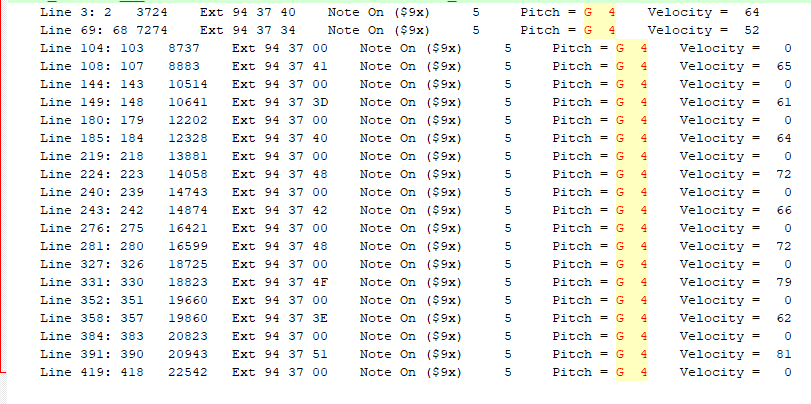
I would like to see the data that the keyboard is sending. We can see this by using the MIDI monitor. Here is what to do. 1. Open the MIDI Monitor (under the Window menu) and filter it to show only external MIDI input. 2. Press Clear, then Record something in Band-in-a-Box and keep the take. 3. In the MIDI Monitor, click Save Text, and save as a txt file. 4. In BB, save the BB song. 5. Attach the text file and BB song.
Thanks. However that text file is messed up. I'm not sure how you got a text file like that... It should look something like this. After you press the Save Text button (in the MIDI Monitor), you could also simply just highlight and press Ctrl+C to copy, and then paste it into a text file.
Evt #	Time (mS)	Source	Raw	Status	Chan	Data 1	Data 2
1	0	6376	00 00 00 	Note Off ($8x)	  1 	Pitch = C  0 	Velocity =   0
2	0	Ext	94 48 63 	Note On ($9x)	  5 	Pitch = C  6 	Velocity =  99
3	17	Ext	94 4A 63 	Note On ($9x)	  5 	Pitch = D  6 	Velocity =  99
4	19	Ext	94 47 63 	Note On ($9x)	  5 	Pitch = B  5 	Velocity =  99
5	81	Ext	94 4C 63 	Note On ($9x)	  5 	Pitch = E  6 	Velocity =  99
6	144	Ext	94 47 00 	Note On ($9x)	  5 	Pitch = B  5 	Velocity =   0
7	176	Ext	94 4A 00 	Note On ($9x)	  5 	Pitch = D  6 	Velocity =   0
8	178	Ext	94 48 00 	Note On ($9x)	  5 	Pitch = C  6 	Velocity =   0
9	270	Ext	94 48 63 	Note On ($9x)	  5 	Pitch = C  6 	Velocity =  99
10	272	Ext	94 4C 00 	Note On ($9x)	  5 	Pitch = E  6 	Velocity =   0
11	303	Ext	94 4A 63 	Note On ($9x)	  5 	Pitch = D  6 	Velocity =  99
12	397	Ext	94 4D 63 	Note On ($9x)	  5 	Pitch = F  6 	Velocity =  99
13	399	Ext	94 4C 63 	Note On ($9x)	  5 	Pitch = E  6 	Velocity =  99
14	461	Ext	94 4A 00 	Note On ($9x)	  5 	Pitch = D  6 	Velocity =   0
Last edited by Andrew - PG Music; 01/07/2012:52 PM.
Perfect, thanks for sending the files. It's clear what happened in this particular case. I am seeing one stuck note G4 in this file. As you can see in the screenshot, the computer did not receive a MIDI note off (actually a note on with velocity 0) for the first G4.
I suppose Band-in-a-Box should automatically be setting the maximum duration of the note if it doesn't receive a note off before the same note is played again?
I would be interested in seeing a .SEQ (RealBand) with a MIDI recording to see how RealBand is handling this. It would also be good to look at another sample recording to see if there are any patterns.
Hmm well from the examples you have sent including the one I mentioned earlier. That is stuck notes E5 B4 and G4 as Andrew has found. It might just pay to make a test recording playing these notes one at a time instead of a handful.
You could have a key contact problem in the octave 4 and 5 part of the key bed Or may be as I said some sort of congestion, due to lack of polyphony. What is your spec polyphony wise? A very interesting project, this one!! Mike
Hi No problem with polyphony then! I am clutching at straws now, not much left.
But I do recall when I first bought my Novation impulse 61 key mid controller keyboard, have all sorts of problems of a similar random nature with midi data. In the end this turned out to be an inferior quality mid cable (too thin) once changed for a thicker gauge all has work well ever since. I just wonder if because, of the size and position of a large piano your lead may be a bit longer than the norm, mine is from the Clavinover and I made sure to use a thick one. Below is a copy of an article I wrote explaining this on my web site . It might just be the golden bullet.
Not all USB cables are the same.
Having spent many hours and sleepless nights in the past with USB connectivity problems. Like my Novation impulse 61 controller keyboard and my Yamaha Cvp 405 dropping their connection to my music software. At a critical point and loosing hours of work. Or the dreaded drive not available when using USB hard drives on my Cvp. I thought I would pass this on. USB leads from the pound shop just wont do . Since upgrading my USB leads to the spec below I have had no problems for the last 12 mths or so
Not all USB cables are the same. The thickness of the wires that supply power to the device can be critical to both audio performance, and its resilience to static electricity. The best way to choose a cable is to look at the markings on the side. These will usually say '2725' and then another set of numbers containing 'AWG': '28AWG/1PR AND 24AWG/2C' or similar. The first number will always be 28AWG, and the second will be a number between 20 and 28. The lower this second number, the thicker the wire. If the printing just says '28AWG', this means 28AWG for both numbers. Focusrite recommends using cables where the second number is 24AWG or lower.
This is especially important if the device takes its power from the USB skt as my Impulse 61 does As it will play havoc with any running auto keyboard mapping programs like Automap If it drops its connection..
Also Yamaha keyboards don’t have much power to spare for running usb hard drives that are powered by usb.
then another E4 NOTE ON, with no NOTE OFF in between.
Right exactly, so the problem is conceptually very simple... just a missing note off. There aren't extra messages.
I'm just wondering how RealBand handles it - can you record MIDI into RealBand and attach the .SEQ file? Presumably we should get Band-in-a-Box to handle it like RealBand does, which I'm guessing is to add a missing note off.
zplane recently interviewed Peter Gannon, the founder and creator of Band-in-a-Box, about the software's early days, what sets it apart from AI, how zplane's audio algorithms are used in Band-in-a-Box, and more!
Special thanks to the team at zplane for their continued support.
Last Chance! The Band-in-a-Box® 2026 for Mac® Special Ends Today (May 31, 2026) at 11:59pm PDT!
Time really is running out! Save up to 50% on Band-in-a-Box® 2026 for Mac® upgrades and receive a FREE Bonus PAK—only when you order by 11:59 PM PDT today!
We've added many major new features and new content in a redesigned Band-in-a-Box® 2026 for Mac®!
Version 2026 introduces a modernized GUI redesign across the program, with updated toolbars, refreshed windows, smoother workflows, and a new Dark Mode option. There’s also a new side toolbar for quicker access to commonly used windows, and the new Multi-View feature lets you arrange multiple windows as layered panels without overlap, making it easier to customize your workspace.
Another exciting new addition is the amazing new AI-Notes feature, which can transcribe polyphonic audio into MIDI. View the results in notation or play them back as MIDI, and choose whether to transcribe an entire track or transcribe specific parts like drums, bass, guitars/piano, or vocals. There's over 100 new features in Band-in-a-Box® 2026 for Mac®.
There's an amazing collection of new content too, including 202 RealTracks, new RealStyles, MIDI SuperTracks, Instrumental Studies, “Songs with Vocals” Artist Performance Sets, Playable RealTracks Set 5, two RealDrums Stems sets, and much more!
Upgrade your Band-in-a-Box for Mac® to save up to 50% on most Band-in-a-Box® 2026 upgrade packages!
Plus, when you order your Band-in-a-Box® 2026 Mac upgrade during our special, you'll receive a Free Bonus PAK of exciting new add-ons.
If you need any help deciding which package is the best option for you, just let us know. We are here to help!
Band-in-a-Box® 2026 Mac Special Offers Extended Until May 31st!
Good news- we've extended our Band-in-a-Box® 2026 for Mac® special offers until May 31, 2026!
Band-in-a-Box® 2026 is packed with major new features, enhancements, and an incredible lineup of new content! The program now sports a sleek, modern GUI redesign across the entire interface, including updated toolbars, refreshed windows, smoother workflows, a new dark mode option, and more. The brand-new side toolbar provides quicker access to key windows, while the new Multi-View feature lets you arrange multiple windows as layered panels without overlap, creating a flexible, clutter-free workspace. We have an amazing new “AI-Notes” feature. This transcribes polyphonic audio into MIDI so you can view it in notation or play it back as MIDI. You can transcribe an entire track (all pitched instruments and drums) or focus on individual parts like drums, bass, guitars/piano, or vocals. There's an amazing collection of new content too, including 202 RealTracks, new RealStyles, MIDI SuperTracks, Instrumental Studies, “Songs with Vocals” Artist Performance Sets, Playable RealTracks Set 5, two RealDrums Stems sets, and much more!
There are over 100 new features in Band-in-a-Box® 2026 for Mac®.
When you order purchase Band-in-a-Box® 2026 before 11:59 PM PDT on May 31st, you'll also receive a Free Bonus PAK packed with exciting new add-ons.
Check out the Band-in-a-Box® for Mac packages page to find the best package for you.
Today's the Last Day of the Band-in-a-Box 2026® for Mac Special!
Order before 11:59pm PDT today (May 15, 2026) to save up to 50% off your Band-in-a-Box® 2026 for Mac® upgrade and receive a FREE Bonus PAK loaded with great new Add-ons to use with this new version!
Band-in-a-Box® 2026 for Mac - Special Offers End at 11:59pm PDT on Friday, May 15th, 2026!
Order before 11:59pm PDT on Friday, May 15th and SAVE up to 50% on most Band-in-a-Box® version 2026 for Mac Upgrade packages... and that's not all! With your version 2026 for Mac purchase, we'll include a Bonus PAK full of great new Add-ons FREE! Upgrade to the 2026 49-PAK to receive even more NEW Add-ons including 20 additional RealTracks... that's 222 NEW RealTracks available with version Band-in-a-Box® 2026 for Mac!
Upgrade to Band-in-a-Box® 2026 for Mac® today for as little as $49! Check out the Band-in-a-Box® packages page for all available purchase options.
Learn more about the Free Bonus PAK and 49-PAK here.
If you have any questions about which package is the best option for you, just let us know. We're here to help!
202 New RealTracks Released with Band-in-a-Box 2026!
With Band-in-a-Box® 2026, we've released 202 incredible new RealTracks (in sets 468-488) in a variety of genres—featuring your most requested styles!
Jazz, Funk & World (Sets 468-475):
Our new jazz, funk & blues RealTracks include a groovin’ collection of RealTracks and RealDrums! These include more requested “soul jazz” RealTracks featuring artists Neil Swainson (bass), Charles Treadway (organ), Brent Mason (guitar), and Wes Little (drums). There are new “smooth jazz” styles (4), which include a RealTracks first: muted trumpet, as well as slick new smooth jazz brushes options for drums. Blues lovers will be thrilled—there are more “classic acoustic blues” styles, including guitar (5), bass (4), and drums (10) with blues master Colin Linden, featuring understated and tasty background acoustic soloing, plus brushes drums and acoustic bass. There are also new electric blues RealTracks, including electric blues with PG favorite Johnny Hiland (3) and soulful electric slide guitar from Colin Linden (4). If you love funk & gospel, there are great new options this year, including gospel organ (3) from Charles Treadway, as well as new funk, tango, and rock ’n’ roll drums (3) and bass (1). And for big, bold arrangements, we have uptempo soul horns (4) featuring a three-part hip horn section with options for a full mix or stems of each individual horn — plus an accompanying rhythm section (4) of drums, bass, guitar, and electric piano!
Rock & Pop (Sets 476–482):
Our new rock & pop RealTracks bring a powerful mix of requested favorites, fresh genres, and modern chart-inspired styles! We have more of our popular “Producer Layered Acoustic Guitars (15)” featuring Band-in-a-Box favorite Brent Mason. We’ve continued our much-requested disco styles (10), and added new Celtic guitar (5) with a more basic, accessible approach than our previous Drop-D or DADGAD offerings. There are also highly requested yacht rock styles (17), inspired by the smooth, polished soft-rock sound of the late ’70s and early ’80s — laid-back grooves, silky electric pianos, warm textures, elegant harmonic movement, and pristine production aesthetics. Fans of heavier styles will love our new glam metal (13), capturing the flashy, high-energy sound of ’80s arena-ready guitar rock. We also have a set of rootsy modern-folk rock (18), with a warm, organic sound combining contemporary folk textures and driving acoustic strumming. And we’ve added lots of new modern pop styles (16) — the kinds of sounds you’re hearing on the radio today, featuring exciting new drums, synths, and cutting-edge RealTracks arrangements.
Country, & Americana (Sets 483–488):
Our new country & Americana RealTracks deliver a rich collection of acoustic, electric, and roots-inspired styles! We have new country pop (9) with legendary guitarist Brent Mason. There is also a potpourri (14) of bouzouki, guitars, banjo, and more, perfect for adding texture and character to contemporary acoustic arrangements. We’ve added funky country guitar (5) with PG favorite Brent Mason, along with classic pedal steel styles (5) featuring steel great Doug Jernigan. There are more country songwriter styles (8) that provide intimate, rootsy foundations for storytelling and modern Americana writing. Finally, we have “background soloing” acoustic guitar (12) with Brent Mason — simpler, but still very tasty acoustic lines designed to sit beautifully behind vocals or act as a subtle standalone solo part.
And, if you are looking for more, the 2026 49-PAK (for $49) includes an impressive collection of 20 bonus RealTracks, featuring exciting and inspiring additions to add to your RealTracks library. You'll get new country-rhythm guitar styles from PG Music favorites Johnny Hiland and Brent Mason, along with modern-pop grooves that capture today’s radio-ready sound! There are also new indie-folk styles with guitar, bass, 6-string bass used as a high-chording instrument, acoustic guitar, and banjo. Plus, dedicated "cymbal fills" RealDrums provide an added layer that work very well with low-key folky styles with other percussion.
The 2026 49-PAK is loaded with other great new add-ons as well. Learn more about the 2026 49-PAK!
One of our representatives will be happy to help you over the phone. Our hours of operation are from
6:00AM to 6:00PM PST (GMT -8) Monday thru Friday, and 8:00AM to 4:00PM PST Saturday. We are closed Sunday. You can also send us your questions via email.
One of our representatives will be happy to help you on our Live Chat or by email. Our hours of operation are from
6:00AM to 6:00PM PST (GMT -8) Monday thru Friday; 8:00AM to 4:00PM PST (GMT -8) Saturday; Closed Sunday.








 Dansk
Dansk Deutsch - Windows
 Español
 Français - Windows
 Italiano - Windows
 Nederlands
 Polski
 Português
 Svenskt
 русский
 Japanese
 Simplified Chinese
 Traditional Chinese
 Korean