|
Log in to post
|
Print Thread |
|
|
|
|
|
Beginners Forum
|
Joined: Aug 2009
Posts: 25
Enthusiast
|
OP

Enthusiast
Joined: Aug 2009
Posts: 25 |
Despite running Windows 10, an intel(R)Core(TM)i7-4510U CPU @ 2.00GHz, 8Gig of Ram, A Samsung 860 QVO 4TB SATA 2.5" Internal SSD, and a Steinberg UR22C - USB 3 Audio Interface, the play back of my chord structures can sometimes be terribly jerky, glitchy and unreliable.
Also the Notation window struggles to keep pace with the chords changes, refreshing to the next bars of notation long after the section has finished. I do not have this problem with other software, in fact I'm seriously considering dumping Band in a Box because the performance is so poor and unreliable and cannot really be used in any serious capacity.
Is there a way of checking and optimizing the system resources and how they are being used to function more effectively and efficiently?
Last edited by Jyde D; 02/01/21 09:30 AM.
|
|
|
|
|
|
|
|
|
|
|
|
|
Beginners Forum
|
Joined: Dec 2018
Posts: 483
Journeyman
|
|
Journeyman
Joined: Dec 2018
Posts: 483 |
What sample rate and buffer size is your Steinberg audio interface configured for? If your buffer size is down around 64/128/256, try changing it to 1024 or 2048 and see if that helps. Sample rate should probably be 44.1 KHz. I don't think you need to set it to 48 KHz for BiaB.
ThinkPad i9 32GB RAM 7TB SSD; Win11 Pro; RME Fireface UCX II; BiaB 2026 Ultra
Studio Pro 8; Tonalic Studio 1; Reaper v7; Bitwig Studio 6; Melodyne Studio 5
Gig Performer 5; NI S61 MK3; Focal Shape 65; Beyerdynamic DT 880 & 770
|
|
|
|
|
|
|
|
|
|
|
|
|
Beginners Forum
|
Joined: Dec 2013
Posts: 2,732
Veteran
|
|
Veteran
Joined: Dec 2013
Posts: 2,732 |
Hi Jyde, if buffer settings do not help you..... From the specs you listed, 8 Gig of RAM seems a little low for a music machine. First thing I would check while you have issues is to look in Task Manager, pull up the "Performance" Tab, and click on Memory and see if it gets maxed out when you have the issue. You could also spot check CPU and Disk while you're in there but those should be good.
 Steve BIAB/RB 2022, Pro Tools 2020, Korg N5, JBL LSR 4328 Powered Monitors, AKG/Shure Mics.
PC: Win11 PRO, 4 TB M2 SSD, 2 TB HD, 128 GB Memory
|
|
|
|
|
|
|
|
|
|
|
|
|
Beginners Forum
|
Joined: Jan 2020
Posts: 3,694
Veteran
|
|
Veteran
Joined: Jan 2020
Posts: 3,694 |
D.
most times these probs are settings related.
please post large pics/and/or type back the following info.
(i'm vision impaired)
1. post a pic of the UR's CONTROL PANEL SETTINGS.
BUFFER size included. THIS IS VERY IMPORTANT.
OFTEN INCORRECT BUFFERS CAN CAUSE "glitches".
also post your project sampling rate and bit depth.
eg 44.1/16 bit should be set.
2.post a pic of your biab audio settings. from the audio prefs.
3.WIN SOUND DEVICES SHOULD SHOW THE STEINY AND 44.1/16.
AS DEFAULT. DOES IT ??
the above will help people help you.
WHAT OTHER SOFTWARE IS WORKING WELL WITH YOUR SET UP ?
FYI your processor would not be my first choice.
on cpubenchmark.net it has a rateing of 2500.
normally for studio work i recommend a rateing of at least 5000. but you DO have ssd. thats good.
it might also be a video setting.
but please post back the info requested.
best.
muso.
lol. we all posted replies same time.
Last edited by justanoldmuso; 02/01/21 10:03 AM.
my songs....mixed for good earbuds...(fyi..my vocs on all songs..) https://soundcloud.com/alfsongs(90 songs created useing bb/rb) (lots of tips of mine in pg tips forum.)
|
|
|
|
|
|
|
|
|
|
|
|
|
Beginners Forum
|
Joined: Jun 2012
Posts: 21,137
Veteran
|
|
Veteran
Joined: Jun 2012
Posts: 21,137 |
Also, could you advise exactly what version and build you are running of Band In A Box?
The Task Manager in your version of Windows 10 may have a Resource Monitor feature (easily accessed from the Task Manager > Performance Tab). That application can show you a great detail of resource usage, including from the Overview Tab.
BIAB & RB2026 Win.(Audiophile), Windows 10 Pro & Windows 11, Cakewalk Bandlab, Izotope Prod.Bundle, Roland RD-1000, Synthogy Ivory, Session Keys Grand S & Electric R, Kontakt, Focusrite 18i20, KetronSD2, NS40M, Pioneer Active Monitors.
|
|
|
|
|
|
|
|
|
|
|
|
|
Beginners Forum
|
Joined: Dec 2003
Posts: 25,023
Veteran
|

Veteran
Joined: Dec 2003
Posts: 25,023 |
Also what else is running in the background? I have gotten into the habit of disabling my either net card, turning off my anti-virus, cCleaner, and anti-malwarebytes. Even with my system sometimes they can cause problems like you are experiencing.
Life is short so make sure you spend as much time as possible on the Internet arguing with strangers.
64 bit Win 10 Pro, the latest BiaB/RB, Roland Octa-Capture audio interface, a ton of software/hardware
|
|
|
|
|
|
|
|
|
|
|
|
|
Beginners Forum
|
Joined: Jul 2000
Posts: 27,657
Veteran
|
|
Veteran
Joined: Jul 2000
Posts: 27,657 |
You mention "jerky, glitchy" and some of the above ideas address this. You also request a way of "checking and optimizing the system resources". That's a good idea. You can use the Windows utility Performance Monitor. I prefer a free visual utility called DPC Latency Checker. You just let it run and observe any red bars that indicate something else is running in the background that causes glitches in digital audio. Note that the utility has not been updated for Windows 10 but it works fine, and has directions. Just consider a reading of 1000 to be normal, not zero, and it works. Do you have a laptop? Make sure the system power settings are turned to maximum power - no power saving. Also keep in mind your CPU is seven years old and with a relatively low speed does not score all that well. See this: https://cpu.userbenchmark.com/SpeedTest/10660/IntelR-CoreTM-i7-4510U-CPU---200GHz BIAB can run on much slower CPUs but we have learned through experience that the CPU is the most important component by far in regeneration times. What surprises me is that you say you see these problems on playback, which does not take much computer power. So perhaps you are seeing the program begin playback before all tracks are regenerated, and if so, you should go into Song Settings Ctrl+N and check the checkbox that says This Song Has Playback Problems.
BIAB 2026 Win Audiophile. Software: Fender Studio One 8, Swam horns, Acoustica-7, Notion 6, Song Master Pro, Win 11 Home. Hardware: Intel i9, 32 Gb; Fender Quantom HD8 & Faderport 8, Royer 121, Adam Sub8 & Neumann 120 monitors.
|
|
|
|
|
|
|
|
|
|
|
|
|
Beginners Forum
|
Joined: Dec 2018
Posts: 483
Journeyman
|
|
Journeyman
Joined: Dec 2018
Posts: 483 |
LatencyMon (Home Edition) from Replendence Software is free and coded for Win10 64-bit. Not the prettiest of interfaces, but it works great. Been using it for years. 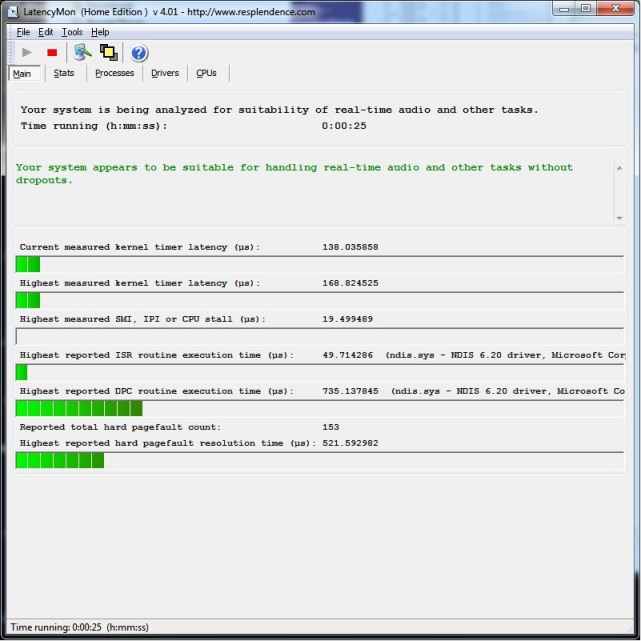 LatencyMon Download LatencyMon Download
ThinkPad i9 32GB RAM 7TB SSD; Win11 Pro; RME Fireface UCX II; BiaB 2026 Ultra
Studio Pro 8; Tonalic Studio 1; Reaper v7; Bitwig Studio 6; Melodyne Studio 5
Gig Performer 5; NI S61 MK3; Focal Shape 65; Beyerdynamic DT 880 & 770
|
|
|
|
|
|
|
|
|
|
|
|
|
Beginners Forum
|
Joined: Jul 2000
Posts: 27,657
Veteran
|
|
Veteran
Joined: Jul 2000
Posts: 27,657 |
Yes, that’s another good one.
BIAB 2026 Win Audiophile. Software: Fender Studio One 8, Swam horns, Acoustica-7, Notion 6, Song Master Pro, Win 11 Home. Hardware: Intel i9, 32 Gb; Fender Quantom HD8 & Faderport 8, Royer 121, Adam Sub8 & Neumann 120 monitors.
|
|
|
|
|
|
|
|
|
|
|
|
|
Beginners Forum
|
Joined: May 2020
Posts: 2,766
Veteran
|
|
Veteran
Joined: May 2020
Posts: 2,766 |
I second the suggestions of checking with DPC Latency Checker and LatencyMon, but most likely increasing the ASIO buffer will do the trick. If it doesn't, try switching driver type to WAS instead. on cpubenchmark.net it has a rateing of 2500.
normally for studio work i recommend a rateing of at least 5000. I think the CPU should be fine for this. Technically our system requirements for BIAB are a single core 1ghz CPU which would have a rating in the 3 digits; while I wouldn't actually want to own a computer that slow, BIAB should work fine.
I work here
|
|
|
|
|
|
|
|
|
|
|
|
|
Beginners Forum
|
Joined: Apr 2009
Posts: 11,005
Veteran
|
|
Veteran
Joined: Apr 2009
Posts: 11,005 |
So, what driver is being used by the interface?
In most cases, the ASIO driver is the preferred driver. It will, however, grab the MME or other driver unless you specify ASIO as it's default.
Steinburg says this: Our UR-Cs are compatible with all major audio software supporting the ASIO, Core Audio or WDM standard, providing a fully integrated, DSP-based monitoring setup wherever you are and with whichever DAW you use. Integrating seamlessly with Cubase and almost any other DAW, UR-Cs deliver latency-free monitoring with DSP-powered FX, via the onboard SSP3 DSP chip and latest dspMixFx technology.
Be sure you download the latest ASIO driver ( not wrappers and other codec based things) and use it and see if it makes a difference.
What you are describing is often caused my using a less optimal driver in windows. It can also be sampling rate... be sure everything is set to 44.1khz and adjust the latency and buffers if you need too. Often, with sampling and drivers being set properly, everything else works well at default values.
Edit: If you open a DAW for example... it will grab the ASIO driver and when you open BB, it will have to use MME or whatever else is available. This happens to me when I'm working and not thinking about what was already open. MME will give you that kind of crappy performance every time on a good machine.
Last edited by Guitarhacker; 02/03/21 10:20 AM.
You can find my music at: www.herbhartley.comAdd nothing that adds nothing to the music. You can make excuses or you can make progress but not both. The magic you are looking for is in the work you are avoiding.
|
|
|
|
|
|
|
|
|
|
|
|
|
Beginners Forum
|
Joined: Jan 2020
Posts: 3,694
Veteran
|
|
Veteran
Joined: Jan 2020
Posts: 3,694 |
Simon. re cpu rateings. my 5000 minimum recommend. normally i agree with you on lots of studio topics, but on this topic i respectfully disagree. for the following reasons. for someone brand new to recording and daw work it gives them a false sense of security. "oh boy i can just use my aunties old hand me down pc , and all will be good". "ooh , what are plug ins ? " "think i'll add a few" or "think i'll add my friends orchestral sample lib". and suddenly things start going "pear shaped". see what i mean ? when i was buying computers for industry, the same thing would happen. we would be assured by vendors a certain low end piece of hardware would work , but reality was problems ensued in day to day operation after a while. then end users would get on the backs of the IT staff. the problem being end users wanted a low end hardware price, but also wanted high end performance. wasnt going to happen. you can see in recording forum after recording forum the problem useing low end pc hardware. in summary, little leeway for "growth" as the new user wants to use more and more features. frankly simon, when a great nice refurb with a powerfull processor , lots of ram, and ssd's can be had for paltry sums now, its a doddle compared to years past. loads of refurbs for a few hundred buks. best. muso. ps. heres a PROPER RECORDING PC I LUST AFTER>> WOW ! rack mountable too. these would eat biab alive lol. page down for lots of info. the type of system used by big recording studios. https://pcaudiolabs.com/rok-box-mc-x-series/Jyde. could you please post the pics requested up thread. it helps people help you. every happiness.
Last edited by justanoldmuso; 02/03/21 11:42 AM.
my songs....mixed for good earbuds...(fyi..my vocs on all songs..) https://soundcloud.com/alfsongs(90 songs created useing bb/rb) (lots of tips of mine in pg tips forum.)
|
|
|
|
|
|
|
|
|
|
|
|
|
Beginners Forum
|
Joined: Jul 2000
Posts: 27,657
Veteran
|
|
Veteran
Joined: Jul 2000
Posts: 27,657 |
If you are going to run BIAB with a reasonably slow CPU, Simon says it will work, but there are several settings that can really help. I cited one essential one above. If you want others, write back.
BIAB 2026 Win Audiophile. Software: Fender Studio One 8, Swam horns, Acoustica-7, Notion 6, Song Master Pro, Win 11 Home. Hardware: Intel i9, 32 Gb; Fender Quantom HD8 & Faderport 8, Royer 121, Adam Sub8 & Neumann 120 monitors.
|
|
|
|
|
|
|
|
|
|
|
|
|
Beginners Forum
|
Joined: May 2020
Posts: 2,766
Veteran
|
|
Veteran
Joined: May 2020
Posts: 2,766 |
Simon. re cpu rateings. my 5000 minimum recommend.
normally i agree with you on lots of studio topics, but on this topic i respectfully disagree.
for the following reasons.
for someone brand new to recording and daw work it gives them a false sense of security.
"oh boy i can just use my aunties old hand me down pc , and all will be good".
"ooh , what are plug ins ? " "think i'll add a few" or "think i'll add my friends orchestral sample lib".
and suddenly things start going "pear shaped". see what i mean ? I certainly do see what you mean, though take a step back for a sec. When running BIAB alone, our system requirements are perfectly adequate. BB on it's own uses a couple hundred megs of ram and is perfectly happy even on a single core CPU. When you're running plugins in BIAB, you have to follow the system requirements of those plugins - Komplete for example needs a minimum of 4gb ram and an i5 CPU. If you're using the BIAB plugin in Pro Tools, then you'll be subject to their minimum requirements of 16gb of ram (recommended 32gb) - you see what I mean. There's no reason that BIAB on it's own can't run on a computer with the OP's cpu rating, and as Matt mentioned there are some settings that can help. ASIO buffer is probably the main one, but you can set the time stretching quality to Low as well which can help - that's in Realtracks Preferences.
I work here
|
|
|
|
|
|
|
|
|
|
|
|
|
Beginners Forum
|
Joined: Jan 2020
Posts: 3,694
Veteran
|
|
Veteran
Joined: Jan 2020
Posts: 3,694 |
Simon. my wife just bought a lottery ticket.lol. if we win , i'm gonna get the biggest baddest wildest craziest custom built computer system like the big studios use plus one of these lol. https://audient.com/products/consoles/asp4816/overview/best muso.
my songs....mixed for good earbuds...(fyi..my vocs on all songs..) https://soundcloud.com/alfsongs(90 songs created useing bb/rb) (lots of tips of mine in pg tips forum.)
|
|
|
|
|
|
|
|
|
|
|
|
|
Beginners Forum
|
Joined: May 2020
Posts: 2,766
Veteran
|
|
Veteran
Joined: May 2020
Posts: 2,766 |
If you win, buy me one too! I'll put it up against my DDA console, hopefully it wouldn't completely blow it out of the water 
I work here
|
|
|
|
|
|
|
|
|
|
|
|
Ask sales and support questions about Band-in-a-Box using natural language.
ChatPG's knowledge base includes the full Band-in-a-Box User Manual and sales information from the website.
|
|
|
|
|
|
|
|
|
|
|
Peter Gannon Talks Band-in-a-Box with zplane
zplane recently interviewed Peter Gannon, the founder and creator of Band-in-a-Box, about the software's early days, what sets it apart from AI, how zplane's audio algorithms are used in Band-in-a-Box, and more!
Special thanks to the team at zplane for their continued support.
Check out the full interview here: https://products.zplane.de/blog/peter-gannon-interview-pg-music
Last Chance! The Band-in-a-Box® 2026 for Mac® Special Ends Today (May 31, 2026) at 11:59pm PDT!
Time really is running out! Save up to 50% on Band-in-a-Box® 2026 for Mac® upgrades and receive a FREE Bonus PAK—only when you order by 11:59 PM PDT today!
We've added many major new features and new content in a redesigned Band-in-a-Box® 2026 for Mac®!
Version 2026 introduces a modernized GUI redesign across the program, with updated toolbars, refreshed windows, smoother workflows, and a new Dark Mode option. There’s also a new side toolbar for quicker access to commonly used windows, and the new Multi-View feature lets you arrange multiple windows as layered panels without overlap, making it easier to customize your workspace.
Another exciting new addition is the amazing new AI-Notes feature, which can transcribe polyphonic audio into MIDI. View the results in notation or play them back as MIDI, and choose whether to transcribe an entire track or transcribe specific parts like drums, bass, guitars/piano, or vocals. There's over 100 new features in Band-in-a-Box® 2026 for Mac®.
There's an amazing collection of new content too, including 202 RealTracks, new RealStyles, MIDI SuperTracks, Instrumental Studies, “Songs with Vocals” Artist Performance Sets, Playable RealTracks Set 5, two RealDrums Stems sets, and much more!
Upgrade your Band-in-a-Box for Mac® to save up to 50% on most Band-in-a-Box® 2026 upgrade packages!
Plus, when you order your Band-in-a-Box® 2026 Mac upgrade during our special, you'll receive a Free Bonus PAK of exciting new add-ons.
If you need any help deciding which package is the best option for you, just let us know. We are here to help!
Band-in-a-Box® 2026 Mac Special Offers Extended Until May 31st!
Good news- we've extended our Band-in-a-Box® 2026 for Mac® special offers until May 31, 2026!
Band-in-a-Box® 2026 is packed with major new features, enhancements, and an incredible lineup of new content! The program now sports a sleek, modern GUI redesign across the entire interface, including updated toolbars, refreshed windows, smoother workflows, a new dark mode option, and more. The brand-new side toolbar provides quicker access to key windows, while the new Multi-View feature lets you arrange multiple windows as layered panels without overlap, creating a flexible, clutter-free workspace. We have an amazing new “AI-Notes” feature. This transcribes polyphonic audio into MIDI so you can view it in notation or play it back as MIDI. You can transcribe an entire track (all pitched instruments and drums) or focus on individual parts like drums, bass, guitars/piano, or vocals. There's an amazing collection of new content too, including 202 RealTracks, new RealStyles, MIDI SuperTracks, Instrumental Studies, “Songs with Vocals” Artist Performance Sets, Playable RealTracks Set 5, two RealDrums Stems sets, and much more!
There are over 100 new features in Band-in-a-Box® 2026 for Mac®.
When you order purchase Band-in-a-Box® 2026 before 11:59 PM PDT on May 31st, you'll also receive a Free Bonus PAK packed with exciting new add-ons.
Check out the Band-in-a-Box® for Mac packages page to find the best package for you.
Holiday Weekend Hours
It's Victoria Day Long Weekend in Canada. Our Customer Service hours are:
Saturday, May 16: Closed
Sunday, May 17: Closed
Monday, May 18: 8:00am - 4:00pm
Regular hours resume Tuesday, May 19th!
Today's the Last Day of the Band-in-a-Box 2026® for Mac Special!
Order before 11:59pm PDT today (May 15, 2026) to save up to 50% off your Band-in-a-Box® 2026 for Mac® upgrade and receive a FREE Bonus PAK loaded with great new Add-ons to use with this new version!
Don't wait - order today!
Check out all the new features in the redesigned Band-in-a-Box® 2026 for Mac®!
Band-in-a-Box® 2026 for Mac - Special Offers End at 11:59pm PDT on Friday, May 15th, 2026!
Order before 11:59pm PDT on Friday, May 15th and SAVE up to 50% on most Band-in-a-Box® version 2026 for Mac Upgrade packages... and that's not all! With your version 2026 for Mac purchase, we'll include a Bonus PAK full of great new Add-ons FREE! Upgrade to the 2026 49-PAK to receive even more NEW Add-ons including 20 additional RealTracks... that's 222 NEW RealTracks available with version Band-in-a-Box® 2026 for Mac!
Upgrade to Band-in-a-Box® 2026 for Mac® today for as little as $49! Check out the Band-in-a-Box® packages page for all available purchase options.
Learn more about the Free Bonus PAK and 49-PAK here.
If you have any questions about which package is the best option for you, just let us know. We're here to help!
202 New RealTracks Released with Band-in-a-Box 2026!
With Band-in-a-Box® 2026, we've released 202 incredible new RealTracks (in sets 468-488) in a variety of genres—featuring your most requested styles!
Jazz, Funk & World (Sets 468-475):
Our new jazz, funk & blues RealTracks include a groovin’ collection of RealTracks and RealDrums! These include more requested “soul jazz” RealTracks featuring artists Neil Swainson (bass), Charles Treadway (organ), Brent Mason (guitar), and Wes Little (drums). There are new “smooth jazz” styles (4), which include a RealTracks first: muted trumpet, as well as slick new smooth jazz brushes options for drums. Blues lovers will be thrilled—there are more “classic acoustic blues” styles, including guitar (5), bass (4), and drums (10) with blues master Colin Linden, featuring understated and tasty background acoustic soloing, plus brushes drums and acoustic bass. There are also new electric blues RealTracks, including electric blues with PG favorite Johnny Hiland (3) and soulful electric slide guitar from Colin Linden (4). If you love funk & gospel, there are great new options this year, including gospel organ (3) from Charles Treadway, as well as new funk, tango, and rock ’n’ roll drums (3) and bass (1). And for big, bold arrangements, we have uptempo soul horns (4) featuring a three-part hip horn section with options for a full mix or stems of each individual horn — plus an accompanying rhythm section (4) of drums, bass, guitar, and electric piano!
Rock & Pop (Sets 476–482):
Our new rock & pop RealTracks bring a powerful mix of requested favorites, fresh genres, and modern chart-inspired styles! We have more of our popular “Producer Layered Acoustic Guitars (15)” featuring Band-in-a-Box favorite Brent Mason. We’ve continued our much-requested disco styles (10), and added new Celtic guitar (5) with a more basic, accessible approach than our previous Drop-D or DADGAD offerings. There are also highly requested yacht rock styles (17), inspired by the smooth, polished soft-rock sound of the late ’70s and early ’80s — laid-back grooves, silky electric pianos, warm textures, elegant harmonic movement, and pristine production aesthetics. Fans of heavier styles will love our new glam metal (13), capturing the flashy, high-energy sound of ’80s arena-ready guitar rock. We also have a set of rootsy modern-folk rock (18), with a warm, organic sound combining contemporary folk textures and driving acoustic strumming. And we’ve added lots of new modern pop styles (16) — the kinds of sounds you’re hearing on the radio today, featuring exciting new drums, synths, and cutting-edge RealTracks arrangements.
Country, & Americana (Sets 483–488):
Our new country & Americana RealTracks deliver a rich collection of acoustic, electric, and roots-inspired styles! We have new country pop (9) with legendary guitarist Brent Mason. There is also a potpourri (14) of bouzouki, guitars, banjo, and more, perfect for adding texture and character to contemporary acoustic arrangements. We’ve added funky country guitar (5) with PG favorite Brent Mason, along with classic pedal steel styles (5) featuring steel great Doug Jernigan. There are more country songwriter styles (8) that provide intimate, rootsy foundations for storytelling and modern Americana writing. Finally, we have “background soloing” acoustic guitar (12) with Brent Mason — simpler, but still very tasty acoustic lines designed to sit beautifully behind vocals or act as a subtle standalone solo part.
Check out all the 202 new RealTracks (in sets 468-488)!
And, if you are looking for more, the 2026 49-PAK (for $49) includes an impressive collection of 20 bonus RealTracks, featuring exciting and inspiring additions to add to your RealTracks library. You'll get new country-rhythm guitar styles from PG Music favorites Johnny Hiland and Brent Mason, along with modern-pop grooves that capture today’s radio-ready sound! There are also new indie-folk styles with guitar, bass, 6-string bass used as a high-chording instrument, acoustic guitar, and banjo. Plus, dedicated "cymbal fills" RealDrums provide an added layer that work very well with low-key folky styles with other percussion.
The 2026 49-PAK is loaded with other great new add-ons as well. Learn more about the 2026 49-PAK!
|
|
|
|
|
|
|
|
|
|
|
|
Forums57
Topics86,581
Posts807,063
Members40,163
| |
Most Online64,515
Apr 8th, 2026
|
|
|
|
|
|
|
|
|












 Dansk
Dansk Deutsch - Windows
 Español
 Français - Windows
 Italiano - Windows
 Nederlands
 Polski
 Português
 Svenskt
 русский
 Japanese
 Simplified Chinese
 Traditional Chinese
 Korean