>> about allowing users to relabel Bar Based Section Letters.
We could use the section text layer for this.
Here's what you can do already in BIAB 2021.
1. add section letters (right click on the bar and choose a letter) 2. add section text (using the section text layer, press display button)
What could be added in a future version, is to integrate the "Song Form" feature with the section text, so that you could label each section, and the labels would show up, for example, if you label A: Verse B: Chorus C: Intro D: Interlude
then type CAABDABBA it would create a song form that has intro-verse-verse-chorus--interlude-verse-chorus-chorus-verse and label them as such.
And changing the form from 'CAABADBBA' to 'CAABDABBADA' is as easy as changing that string in the quotes, and they'd all be labelled.
This will also work from Midi Input like Conductor but with smooth transitions with RealTracks audio:
That's why I mentioned a couple of times A VST to send Tempo/Play/Stop/Loop/Continue to main Biab app from DAW this way you could have any sort of Tab GUI setup in Reaper and Biab will follow it. This way you are using the features already available in your DAW rather than asking for them to be implemented in Biab. The smooth seek from section to section works with the BB Plugin in Reaper and would work with a Sync VST and Biab.
I think users are just wanting a DAW in Biab so they can do all they do in their DAW but remain in Biab. For what I do I would like to see the BBPlugin advance, get all the code in the VST it's self, get it generating and playing direct from the RT/RD source files, as said this will be quicker to generate up than Biab. Maybe some years down the track I'll come back here and find all that.
Peter. before i reply to your latest posts back to me , and thanks for partaking in this thread, i would like to go on the record with a couple of things. 1. i have the utmost respect for how far you have brought your company and its products. its not easy building a company. kudos to you. also let me say you have a great team of people. 2. ive opened the eyes of more than a few musicians over the years , as to what can be done useing your products who were just not aware of what could be achieved. many times i would just sit the person down with me and open up powertraks and/or biab or rb , and watch their eyes light up as i went through building the bed tracks of a song and then adding the "cherries" on top etc. 3. i'm not trying to paint myself as a better musician or songwriter than anyone else on these forums. frankly i struggle to do the best i can in doing songs. there are many musicians on here way more capable than myself. of that i'm sure. i'm not trying to be a "smartie". now back to the thread. ------------------------------------------------------------------------------------------------------------------
the main issue for me is how to correlate the sections of a song in biab (or rb) with the markers in the daw i use. in my case the popular reaper. <<and i dont say that to knock rb which i like.
(thank you pipeline for partaking in this thread).
Peter, you will notice in PL's tabbed graphic < > arrows on the tab line. i happen to like this as i can work on various sections of a song as i need to. also an important point is , because the song is broken up into tab sections there wont be a slew of chords in each section. i also like in that tab view the capability of just clicking the mouse on the tab to get whatever i want > intro or verse or break or whatever i have named.
lets examine another possibility peter. ie another possible view akin to piano roll view whereby chords linearly along the top horizontally and instrument choices down left hand side vertically. includeing the new 16 trak biab approach. and instead of those cel areas in piano roll, cels users can clik on to either do a partial regen or mute part of a bar and sorta the features of F5 currently. (no i'm not saying replace piano roll which is a different purpose, i'm just saying useing its layout as a view model.) maybe Pipeline could do a graphic example ? as due to my vision impairement i'm useless at graphics.
Peter in your example those section texts certainly help the correlation i need to daw markers. i'm useing layers currently for notes etc.
regards. oldmuso.
my songs....mixed for good earbuds...(fyi..my vocs on all songs..) https://soundcloud.com/alfsongs (90 songs created useing bb/rb) (lots of tips of mine in pg tips forum.)
Peter, Thanx so much for getting involve with this thread. Because of your input I have learned a couple of new things that will help my workflow and enjoy BiaB a little bit more.
Life is short so make sure you spend as much time as possible on the Internet arguing with strangers.
64 bit Win 10 Pro, the latest BiaB/RB, Roland Octa-Capture audio interface, a ton of software/hardware
>>ie no big monitor. maybe its my vision impairement but i see no zoom buttons in chord view. even with big monitor. same.i do have the zooms in other views. not chord view.
Have a look at Jim Fogle’s screenshot above in this thread. It shows the chordsheet zoom buttons at the bottom right of the screen (to the right of the 3X test).
Note that those buttons are a 2021 feature. You can get the same behavior in 2020 or earlier by right click - display options - and set the number of columns to a bigger number than 4, for example 16. Then you’ll see 16 bars per row, and if your song is (for example) 144 bars long it’ll fit nicely on the single screen with 8 rows of 16 bars. Which means that you don’t need to use the vertical scroll bar as you’ve pointed out above. Each section starts on a new line, and you can visualize the whole song at once, not repeated tabbing to different sections to reveal the whole song.
> That's why I mentioned a couple of times A VST to send Tempo/Play/Stop/Loop/Continue to main Biab app from DAW
Pipeline, Thanks for the suggestions. If you’re asking for BIAB to be a slave to play/stop commands, this isn’t advisable as we don’t (yet) support floating point tempos. So if the master tells us to play at tempo=124.54 , we can’t do it and tracks would be out of sync. It also wouldn’t work well as BiaB isn’t always ready to play instantly. It would also generally be a complicated feature to implement for us, many code changes and there is “lower hanging fruit” in that regard.
i am somewhat happier now, haveing set chorus to 1 of course , and lots of testing out various display options in the chord sheet, as well as experimenting useing layers for entering text denoting whether a chord section/grouping is intro , break, verse, interlude, solo, bridge or outtro or whatever i name the chord grouping. ive been experimenting lots. now i can correlate more easily with my daw song section markers text.
re fractional tempos. i dont think ive ever written a song with a fractional tempo. maybe i'm dumb , but, now i'm curious. please allow me to ask under what circumstances would a songwriter use fractional tempo on a new original song ? i'm kinda befuddled on this. thanks.
best regards. oldmuso.
my songs....mixed for good earbuds...(fyi..my vocs on all songs..) https://soundcloud.com/alfsongs (90 songs created useing bb/rb) (lots of tips of mine in pg tips forum.)
>> re fractional tempos. i dont think ive ever written a song with a fractional tempo. maybe i'm dumb , but, now i'm curious. please allow me to ask under what circumstances would a songwriter use fractional tempo on a new original song ? i'm kinda befuddled on this.
There are several scenarios that people use fractional tempos like 123.54
1. When making a tempo change from 120 to 125 gradually, the DAW might insert a bunch of tempo changes like 120, 120.5 121 etc. 2. To sync to a rubato recording that might have varying tempos. 3. Dance tempos (eg. aerobic exercise) are very strict, and for them 130.5 might be different than 130. 4. Ultra-slow tempos like 35 vs 35.5 might sound different.
Adding fractional tempos to BIAB is on the list of features to add.
... Adding fractional tempos to BIAB is on the list of features to add.
This is great news. Thanks!
BIAB & RB2026 Win.(Audiophile), Windows 10 Pro & Windows 11, Cakewalk Bandlab, Izotope Prod.Bundle, Roland RD-1000, Synthogy Ivory, Session Keys Grand S & Electric R, Kontakt, Focusrite 18i20, KetronSD2, NS40M, Pioneer Active Monitors.
..If you’re asking for BIAB to be a slave to play/stop commands, this isn’t advisable as we don’t (yet) support floating point tempos. So if the master tells us to play at tempo=124.54 , we can’t do it and tracks would be out of sync. It also wouldn’t work well as BiaB isn’t always ready to play instantly. It would also generally be a complicated feature to implement for us, many code changes and there is “lower hanging fruit” in that regard.
I realize that but thought you could change the playback % rate ?? And once you drag it into the DAW ACID will fit it. I could understand if it's not generated the tracks already there would be a wait but it should start instantly to follow the DAW once the users generates beforehand. I remember mine never started instantly until I removed the Bandstand.ini from bb\ root that was still there from years gone by. If it's just Biab users using it with their DAW they are likely to be whole tempos as you can drag a midi from Biab to DAW to set tempo map. Are the complicated code changes to do with the decimal tempos or just receiving the VstTimeInfo play/stop/continue ?
Peter. re fractional tempos. yes i'm aware of the points you mentioned. includeing daw inserting changes. thanks. sorry if i was unclear. to clarify i was more interested in the motivation by a songwriter today creating a brand new song from scratch in a popular pop/rock/country etc genre , what would be his/her motivation for saying "today i'm gonna create a song with a (for example) 123.45 tempo or a 99.98 tempo" as an example ? i'm trying to understand the motivation behind such a move by a songwriter. cos when i start a new song i always think in terms of whole , rather than fractional numbers.
fyi i took an old song of mine which i originally did on a 2 inch multitrack years ago, imported the final stereo into biab as a test. and then used biab to even out the fractional tempo (as a result of tape). i was rather surprised the algo in biab did the evening out job to give me a constant tempo. mind you the song was originally recorded to a clik. maybe i was just lucky. i used the even out feature in audio edit.
a question. would it be a less disruptive codeing job for your team if only whole tempos were offered, and thus you could throw up a message saying "only whole tempos supported" if a fractional tempo was detected. i think users would be happy if starting off whole tempos were supported in biab.
best sometimes my wife lays a tempo mop on me if i dont do the dishes lol. oldmuso. ps pipeline. nice !
Last edited by justanoldmuso; 03/18/2101:42 PM.
my songs....mixed for good earbuds...(fyi..my vocs on all songs..) https://soundcloud.com/alfsongs (90 songs created useing bb/rb) (lots of tips of mine in pg tips forum.)
> what would be his/her motivation for saying "today i'm gonna create a song with a (for example) 123.45 tempo or a 99.98 tempo" as an example ?
Probably something innocent like using a tap tempo feature, and tapping at the tempo he wants, and the DAW tells him it’s 123.45, so that’s what he goes with.
Is the ReWireVST suppose to be working now or is that just a bug that needs fixing to stop it working again ? I just thought I'd try it as you have done a lot of fixing with VST support. Can you try that with the BBMac21 in Beta.
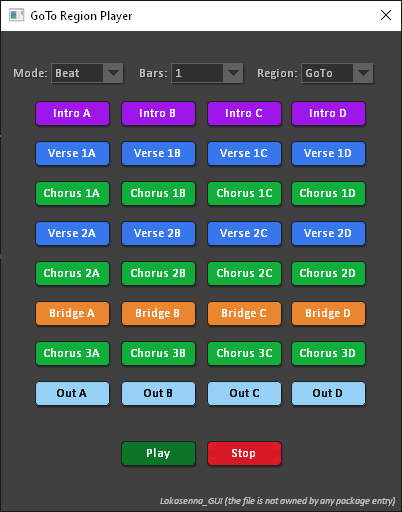
Now you can color the sections how you like, it will load the SGU to get the chords. You could maybe send commands/keystrokes from the Lua scripting in Reaper to Biab.
>> about allowing users to relabel Bar Based Section Letters.
We could use the section text layer for this.
Here's what you can do already in BIAB 2021.
1. add section letters (right click on the bar and choose a letter) 2. add section text (using the section text layer, press display button)
What could be added in a future version, is to integrate the "Song Form" feature with the section text, so that you could label each section, and the labels would show up, for example, if you label A: Verse B: Chorus C: Intro D: Interlude
then type CAABDABBA it would create a song form that has intro-verse-verse-chorus--interlude-verse-chorus-chorus-verse and label them as such.
And changing the form from 'CAABADBBA' to 'CAABDABBADA' is as easy as changing that string in the quotes, and they'd all be labelled.
Look at this post available in BIAB today for an alternate method that's a more extensive and versatile way to label and re-order song sections. Render High Quality trax in BIAB DAW Plug-in
There is an existing song form feature in BiaB. It’s under the edit menu, form, song form, That isn’t a tabbed chord sheet. But you define sections as A,B,C... etc, and can then just type AABACBAA and the song gets rearranged like that. And change it to ABACCBA. You get to see the whole composition on screen at once, unlike the tabbed chord sheet that only shows part of the song,
I'm bumping this so I can share what I am now doing with song form markers. All of my songs are unfolded. I assign song form makers a little differently than ABC etc. I use the following letters: I=into V=verse C=chorus B=bridge P=prechorus E=ending
You will lose the ability to better label things this way as the layers are not open but for me just the letters are all that I need. YMMV
Life is short so make sure you spend as much time as possible on the Internet arguing with strangers.
64 bit Win 10 Pro, the latest BiaB/RB, Roland Octa-Capture audio interface, a ton of software/hardware
zplane recently interviewed Peter Gannon, the founder and creator of Band-in-a-Box, about the software's early days, what sets it apart from AI, how zplane's audio algorithms are used in Band-in-a-Box, and more!
Special thanks to the team at zplane for their continued support.
Last Chance! The Band-in-a-Box® 2026 for Mac® Special Ends Today (May 31, 2026) at 11:59pm PDT!
Time really is running out! Save up to 50% on Band-in-a-Box® 2026 for Mac® upgrades and receive a FREE Bonus PAK—only when you order by 11:59 PM PDT today!
We've added many major new features and new content in a redesigned Band-in-a-Box® 2026 for Mac®!
Version 2026 introduces a modernized GUI redesign across the program, with updated toolbars, refreshed windows, smoother workflows, and a new Dark Mode option. There’s also a new side toolbar for quicker access to commonly used windows, and the new Multi-View feature lets you arrange multiple windows as layered panels without overlap, making it easier to customize your workspace.
Another exciting new addition is the amazing new AI-Notes feature, which can transcribe polyphonic audio into MIDI. View the results in notation or play them back as MIDI, and choose whether to transcribe an entire track or transcribe specific parts like drums, bass, guitars/piano, or vocals. There's over 100 new features in Band-in-a-Box® 2026 for Mac®.
There's an amazing collection of new content too, including 202 RealTracks, new RealStyles, MIDI SuperTracks, Instrumental Studies, “Songs with Vocals” Artist Performance Sets, Playable RealTracks Set 5, two RealDrums Stems sets, and much more!
Upgrade your Band-in-a-Box for Mac® to save up to 50% on most Band-in-a-Box® 2026 upgrade packages!
Plus, when you order your Band-in-a-Box® 2026 Mac upgrade during our special, you'll receive a Free Bonus PAK of exciting new add-ons.
If you need any help deciding which package is the best option for you, just let us know. We are here to help!
Band-in-a-Box® 2026 Mac Special Offers Extended Until May 31st!
Good news- we've extended our Band-in-a-Box® 2026 for Mac® special offers until May 31, 2026!
Band-in-a-Box® 2026 is packed with major new features, enhancements, and an incredible lineup of new content! The program now sports a sleek, modern GUI redesign across the entire interface, including updated toolbars, refreshed windows, smoother workflows, a new dark mode option, and more. The brand-new side toolbar provides quicker access to key windows, while the new Multi-View feature lets you arrange multiple windows as layered panels without overlap, creating a flexible, clutter-free workspace. We have an amazing new “AI-Notes” feature. This transcribes polyphonic audio into MIDI so you can view it in notation or play it back as MIDI. You can transcribe an entire track (all pitched instruments and drums) or focus on individual parts like drums, bass, guitars/piano, or vocals. There's an amazing collection of new content too, including 202 RealTracks, new RealStyles, MIDI SuperTracks, Instrumental Studies, “Songs with Vocals” Artist Performance Sets, Playable RealTracks Set 5, two RealDrums Stems sets, and much more!
There are over 100 new features in Band-in-a-Box® 2026 for Mac®.
When you order purchase Band-in-a-Box® 2026 before 11:59 PM PDT on May 31st, you'll also receive a Free Bonus PAK packed with exciting new add-ons.
Check out the Band-in-a-Box® for Mac packages page to find the best package for you.
Today's the Last Day of the Band-in-a-Box 2026® for Mac Special!
Order before 11:59pm PDT today (May 15, 2026) to save up to 50% off your Band-in-a-Box® 2026 for Mac® upgrade and receive a FREE Bonus PAK loaded with great new Add-ons to use with this new version!
Band-in-a-Box® 2026 for Mac - Special Offers End at 11:59pm PDT on Friday, May 15th, 2026!
Order before 11:59pm PDT on Friday, May 15th and SAVE up to 50% on most Band-in-a-Box® version 2026 for Mac Upgrade packages... and that's not all! With your version 2026 for Mac purchase, we'll include a Bonus PAK full of great new Add-ons FREE! Upgrade to the 2026 49-PAK to receive even more NEW Add-ons including 20 additional RealTracks... that's 222 NEW RealTracks available with version Band-in-a-Box® 2026 for Mac!
Upgrade to Band-in-a-Box® 2026 for Mac® today for as little as $49! Check out the Band-in-a-Box® packages page for all available purchase options.
Learn more about the Free Bonus PAK and 49-PAK here.
If you have any questions about which package is the best option for you, just let us know. We're here to help!
202 New RealTracks Released with Band-in-a-Box 2026!
With Band-in-a-Box® 2026, we've released 202 incredible new RealTracks (in sets 468-488) in a variety of genres—featuring your most requested styles!
Jazz, Funk & World (Sets 468-475):
Our new jazz, funk & blues RealTracks include a groovin’ collection of RealTracks and RealDrums! These include more requested “soul jazz” RealTracks featuring artists Neil Swainson (bass), Charles Treadway (organ), Brent Mason (guitar), and Wes Little (drums). There are new “smooth jazz” styles (4), which include a RealTracks first: muted trumpet, as well as slick new smooth jazz brushes options for drums. Blues lovers will be thrilled—there are more “classic acoustic blues” styles, including guitar (5), bass (4), and drums (10) with blues master Colin Linden, featuring understated and tasty background acoustic soloing, plus brushes drums and acoustic bass. There are also new electric blues RealTracks, including electric blues with PG favorite Johnny Hiland (3) and soulful electric slide guitar from Colin Linden (4). If you love funk & gospel, there are great new options this year, including gospel organ (3) from Charles Treadway, as well as new funk, tango, and rock ’n’ roll drums (3) and bass (1). And for big, bold arrangements, we have uptempo soul horns (4) featuring a three-part hip horn section with options for a full mix or stems of each individual horn — plus an accompanying rhythm section (4) of drums, bass, guitar, and electric piano!
Rock & Pop (Sets 476–482):
Our new rock & pop RealTracks bring a powerful mix of requested favorites, fresh genres, and modern chart-inspired styles! We have more of our popular “Producer Layered Acoustic Guitars (15)” featuring Band-in-a-Box favorite Brent Mason. We’ve continued our much-requested disco styles (10), and added new Celtic guitar (5) with a more basic, accessible approach than our previous Drop-D or DADGAD offerings. There are also highly requested yacht rock styles (17), inspired by the smooth, polished soft-rock sound of the late ’70s and early ’80s — laid-back grooves, silky electric pianos, warm textures, elegant harmonic movement, and pristine production aesthetics. Fans of heavier styles will love our new glam metal (13), capturing the flashy, high-energy sound of ’80s arena-ready guitar rock. We also have a set of rootsy modern-folk rock (18), with a warm, organic sound combining contemporary folk textures and driving acoustic strumming. And we’ve added lots of new modern pop styles (16) — the kinds of sounds you’re hearing on the radio today, featuring exciting new drums, synths, and cutting-edge RealTracks arrangements.
Country, & Americana (Sets 483–488):
Our new country & Americana RealTracks deliver a rich collection of acoustic, electric, and roots-inspired styles! We have new country pop (9) with legendary guitarist Brent Mason. There is also a potpourri (14) of bouzouki, guitars, banjo, and more, perfect for adding texture and character to contemporary acoustic arrangements. We’ve added funky country guitar (5) with PG favorite Brent Mason, along with classic pedal steel styles (5) featuring steel great Doug Jernigan. There are more country songwriter styles (8) that provide intimate, rootsy foundations for storytelling and modern Americana writing. Finally, we have “background soloing” acoustic guitar (12) with Brent Mason — simpler, but still very tasty acoustic lines designed to sit beautifully behind vocals or act as a subtle standalone solo part.
And, if you are looking for more, the 2026 49-PAK (for $49) includes an impressive collection of 20 bonus RealTracks, featuring exciting and inspiring additions to add to your RealTracks library. You'll get new country-rhythm guitar styles from PG Music favorites Johnny Hiland and Brent Mason, along with modern-pop grooves that capture today’s radio-ready sound! There are also new indie-folk styles with guitar, bass, 6-string bass used as a high-chording instrument, acoustic guitar, and banjo. Plus, dedicated "cymbal fills" RealDrums provide an added layer that work very well with low-key folky styles with other percussion.
The 2026 49-PAK is loaded with other great new add-ons as well. Learn more about the 2026 49-PAK!
One of our representatives will be happy to help you over the phone. Our hours of operation are from
6:00AM to 6:00PM PST (GMT -8) Monday thru Friday, and 8:00AM to 4:00PM PST Saturday. We are closed Sunday. You can also send us your questions via email.
One of our representatives will be happy to help you on our Live Chat or by email. Our hours of operation are from
6:00AM to 6:00PM PST (GMT -8) Monday thru Friday; 8:00AM to 4:00PM PST (GMT -8) Saturday; Closed Sunday.










 Dansk
Dansk Deutsch - Windows
 Español
 Français - Windows
 Italiano - Windows
 Nederlands
 Polski
 Português
 Svenskt
 русский
 Japanese
 Simplified Chinese
 Traditional Chinese
 Korean