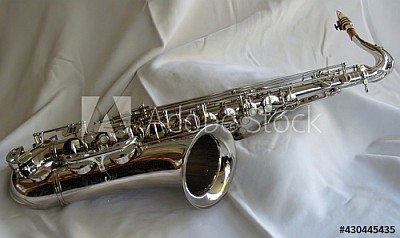
Since these two are music related, I'll share them here:
They are pictures of my MacSax tenor sax. It was a custom job - the "Notes Norton" signature model. As far as I know there are two of them out there. Somebody wanted one just like mine. MacSax is no longer in the sax business, but is where the real profits reside for sax players, mouthpieces.
BIAB & RB2026 Win.(Audiophile), Windows 10 Pro & Windows 11, Cakewalk Bandlab, Izotope Prod.Bundle, Roland RD-1000, Synthogy Ivory, Session Keys Grand S & Electric R, Kontakt, Focusrite 18i20, KetronSD2, NS40M, Pioneer Active Monitors.
When photographing instruments (or any inanimate object) think very carefully about the background. The viewer will see that, as much as they see the instrument (although you may not). How well the background fits with the instrument will determine if your image sells. See my 2 examples below...
When photographing instruments (or any inanimate object) think very carefully about the background. The viewer will see that, as much as they see the instrument (although you may not). How well the background fits with the instrument will determine if your image sells. See my 2 examples below...
snip ... My Alamy images (I license maybe 3 or a 4 a week) often fetch upwards of €50. The one below was licensed last week for $425. Several pots of Skinny latte Mocha!
And we get to see it for free!
This is an interesting conversation, beautiful photographs and very informative tips. Loving every minute I read.
I used to do manual focus with my Pentax K1000. The K1000 was all manual, and it forced me to think about f-stop and aperture, which was great but with a target like wildlife that can move unexpectedly, the extra seconds it took could be the reason I didn't get the shot I wanted.
I upgraded to a Canon EOS and started to use auto-focus in the manner than StephenP explains in his video.
It's a much quicker way of getting the shot.
But the way I see it, there is an advantage to both methods.
Notes, I think you hit on a critical point here. And that is the importance of understanding aperture size, shutter speed and how it affects depth of field, foregrounds, and backgrounds.
No issues with using auto-focus at all, but understanding the theory and technology behind the technique basics always works in your favor. I'm sure that both you and Stephen would agree.
BIAB & RB2026 Win.(Audiophile), Windows 10 Pro & Windows 11, Cakewalk Bandlab, Izotope Prod.Bundle, Roland RD-1000, Synthogy Ivory, Session Keys Grand S & Electric R, Kontakt, Focusrite 18i20, KetronSD2, NS40M, Pioneer Active Monitors.
My humble advice comes from a lifetime spent in photography, as both an amateur and a professional. My father was a professional, and he taught me to shoot. He also taught me darkroom skills, developing and printing, dodging and burning, etc. That was over 60 years ago now. Back then it was all manual, and one had to learn the essentials of photography to apply them successfully.
That experience equipped me to actually work in the field, running a photography department for 16 years at the third largest teaching hospital in the U.S. - Jackson Memorial.
I would also advise against 'digitizing' negatives with a camera mounted on a copy stand. For $229, you can get a decent scanner that will digitize photos, negatives or slides, and give a better result.
That's great. I've used photos from that catalog before.
WTG!!!
Bud
PS And a shoutout to another forum member, BabuMusic, who has many photo books on Amazon. He uses a lot of his shots in his music vids.
Our albums and singles are on Spotify, Apple Music, Amazon Music, YouTube Music, Pandora and more. If interested search on Janice Merritt. Thanks! Our Videos
One (Everglades Sunset) is a Kodachrome slide I scanned with a dedicated film/slide scanner.
The slide had been stored too long and had some small spots that wouldn't blow off with the rocket, so I used editing software to get rid of them. It was time-consuming but pleasant to see it get better.
This was a very old slide, I think from back in my K1000 days. That's when I was living in Ft.Lauderdale and this shot was from the levee behind Ft.L before they expanded the city even more and ate up more of my beloved Everglades.
I'm not spending much time at this, only when I have a few spare moments, but I'm enjoying it.
I'm not spending much time at this, only when I have a few spare moments, but I'm enjoying it.Notes
And that's the main thing to bear in mind, make it something you do for pleasure. Unfortunately, since the advent of digital cameras, half the population of the world seems to be into stock photography.
This makes it more about 'numbers' than quality images. With 15 images, you've got more chance of making money from the lottery than photography.
I've got nearly 9000 images with the stock library I use, and probably only sell 5 images a month, even though my photos get looked at a lot - because there is so much competition these days.
That said, a friend just sent me an image she sold with Stockimo (the library for camera-phone images) to ask if I would re-size for a print, as someone else want to buy it. She's probably only got 10 images with Stockimo, so you never know!
I'm definitely enjoying myself, and don't expect to make enough to buy a second home in the south of France, but I'd like to sell at least one so I can go on record as a professional
I just edit and upload when I have a few spare moments.
I need to convert my slides because I've got thousands of them. I'm not sure my slide projector works anymore, it's been in storage way too long. Plus I live in a tiny 900 square foot house and storage space is always at a premium.
The main problem with the slides is that I don't live with air conditioning, and there are some dust specks that the rocket will not blow off or the microfiber cloth will not gently remove.
I've scoured the 'net and there doesn't seem to be a very good way of removing the stubborn ones without unmounting the slide, cleaning, and remounting the slide, and I don't have that much free time.
Depending on where the spots are, I can edit them out. If not I'll keep scans that are good memories.
I now have 17 images on AdobeStock. I am the proverbial needle in the haystack. I don't think I'll hit 9,000 any time soon so you don't have to worry about competition from me
Last Chance! The Band-in-a-Box® 2026 for Mac® Special Ends Today (May 31, 2026) at 11:59pm PDT!
Time really is running out! Save up to 50% on Band-in-a-Box® 2026 for Mac® upgrades and receive a FREE Bonus PAK—only when you order by 11:59 PM PDT today!
We've added many major new features and new content in a redesigned Band-in-a-Box® 2026 for Mac®!
Version 2026 introduces a modernized GUI redesign across the program, with updated toolbars, refreshed windows, smoother workflows, and a new Dark Mode option. There’s also a new side toolbar for quicker access to commonly used windows, and the new Multi-View feature lets you arrange multiple windows as layered panels without overlap, making it easier to customize your workspace.
Another exciting new addition is the amazing new AI-Notes feature, which can transcribe polyphonic audio into MIDI. View the results in notation or play them back as MIDI, and choose whether to transcribe an entire track or transcribe specific parts like drums, bass, guitars/piano, or vocals. There's over 100 new features in Band-in-a-Box® 2026 for Mac®.
There's an amazing collection of new content too, including 202 RealTracks, new RealStyles, MIDI SuperTracks, Instrumental Studies, “Songs with Vocals” Artist Performance Sets, Playable RealTracks Set 5, two RealDrums Stems sets, and much more!
Upgrade your Band-in-a-Box for Mac® to save up to 50% on most Band-in-a-Box® 2026 upgrade packages!
Plus, when you order your Band-in-a-Box® 2026 Mac upgrade during our special, you'll receive a Free Bonus PAK of exciting new add-ons.
If you need any help deciding which package is the best option for you, just let us know. We are here to help!
Band-in-a-Box® 2026 Mac Special Offers Extended Until May 31st!
Good news- we've extended our Band-in-a-Box® 2026 for Mac® special offers until May 31, 2026!
Band-in-a-Box® 2026 is packed with major new features, enhancements, and an incredible lineup of new content! The program now sports a sleek, modern GUI redesign across the entire interface, including updated toolbars, refreshed windows, smoother workflows, a new dark mode option, and more. The brand-new side toolbar provides quicker access to key windows, while the new Multi-View feature lets you arrange multiple windows as layered panels without overlap, creating a flexible, clutter-free workspace. We have an amazing new “AI-Notes” feature. This transcribes polyphonic audio into MIDI so you can view it in notation or play it back as MIDI. You can transcribe an entire track (all pitched instruments and drums) or focus on individual parts like drums, bass, guitars/piano, or vocals. There's an amazing collection of new content too, including 202 RealTracks, new RealStyles, MIDI SuperTracks, Instrumental Studies, “Songs with Vocals” Artist Performance Sets, Playable RealTracks Set 5, two RealDrums Stems sets, and much more!
There are over 100 new features in Band-in-a-Box® 2026 for Mac®.
When you order purchase Band-in-a-Box® 2026 before 11:59 PM PDT on May 31st, you'll also receive a Free Bonus PAK packed with exciting new add-ons.
Check out the Band-in-a-Box® for Mac packages page to find the best package for you.
Today's the Last Day of the Band-in-a-Box 2026® for Mac Special!
Order before 11:59pm PDT today (May 15, 2026) to save up to 50% off your Band-in-a-Box® 2026 for Mac® upgrade and receive a FREE Bonus PAK loaded with great new Add-ons to use with this new version!
Band-in-a-Box® 2026 for Mac - Special Offers End at 11:59pm PDT on Friday, May 15th, 2026!
Order before 11:59pm PDT on Friday, May 15th and SAVE up to 50% on most Band-in-a-Box® version 2026 for Mac Upgrade packages... and that's not all! With your version 2026 for Mac purchase, we'll include a Bonus PAK full of great new Add-ons FREE! Upgrade to the 2026 49-PAK to receive even more NEW Add-ons including 20 additional RealTracks... that's 222 NEW RealTracks available with version Band-in-a-Box® 2026 for Mac!
Upgrade to Band-in-a-Box® 2026 for Mac® today for as little as $49! Check out the Band-in-a-Box® packages page for all available purchase options.
Learn more about the Free Bonus PAK and 49-PAK here.
If you have any questions about which package is the best option for you, just let us know. We're here to help!
202 New RealTracks Released with Band-in-a-Box 2026!
With Band-in-a-Box® 2026, we've released 202 incredible new RealTracks (in sets 468-488) in a variety of genres—featuring your most requested styles!
Jazz, Funk & World (Sets 468-475):
Our new jazz, funk & blues RealTracks include a groovin’ collection of RealTracks and RealDrums! These include more requested “soul jazz” RealTracks featuring artists Neil Swainson (bass), Charles Treadway (organ), Brent Mason (guitar), and Wes Little (drums). There are new “smooth jazz” styles (4), which include a RealTracks first: muted trumpet, as well as slick new smooth jazz brushes options for drums. Blues lovers will be thrilled—there are more “classic acoustic blues” styles, including guitar (5), bass (4), and drums (10) with blues master Colin Linden, featuring understated and tasty background acoustic soloing, plus brushes drums and acoustic bass. There are also new electric blues RealTracks, including electric blues with PG favorite Johnny Hiland (3) and soulful electric slide guitar from Colin Linden (4). If you love funk & gospel, there are great new options this year, including gospel organ (3) from Charles Treadway, as well as new funk, tango, and rock ’n’ roll drums (3) and bass (1). And for big, bold arrangements, we have uptempo soul horns (4) featuring a three-part hip horn section with options for a full mix or stems of each individual horn — plus an accompanying rhythm section (4) of drums, bass, guitar, and electric piano!
Rock & Pop (Sets 476–482):
Our new rock & pop RealTracks bring a powerful mix of requested favorites, fresh genres, and modern chart-inspired styles! We have more of our popular “Producer Layered Acoustic Guitars (15)” featuring Band-in-a-Box favorite Brent Mason. We’ve continued our much-requested disco styles (10), and added new Celtic guitar (5) with a more basic, accessible approach than our previous Drop-D or DADGAD offerings. There are also highly requested yacht rock styles (17), inspired by the smooth, polished soft-rock sound of the late ’70s and early ’80s — laid-back grooves, silky electric pianos, warm textures, elegant harmonic movement, and pristine production aesthetics. Fans of heavier styles will love our new glam metal (13), capturing the flashy, high-energy sound of ’80s arena-ready guitar rock. We also have a set of rootsy modern-folk rock (18), with a warm, organic sound combining contemporary folk textures and driving acoustic strumming. And we’ve added lots of new modern pop styles (16) — the kinds of sounds you’re hearing on the radio today, featuring exciting new drums, synths, and cutting-edge RealTracks arrangements.
Country, & Americana (Sets 483–488):
Our new country & Americana RealTracks deliver a rich collection of acoustic, electric, and roots-inspired styles! We have new country pop (9) with legendary guitarist Brent Mason. There is also a potpourri (14) of bouzouki, guitars, banjo, and more, perfect for adding texture and character to contemporary acoustic arrangements. We’ve added funky country guitar (5) with PG favorite Brent Mason, along with classic pedal steel styles (5) featuring steel great Doug Jernigan. There are more country songwriter styles (8) that provide intimate, rootsy foundations for storytelling and modern Americana writing. Finally, we have “background soloing” acoustic guitar (12) with Brent Mason — simpler, but still very tasty acoustic lines designed to sit beautifully behind vocals or act as a subtle standalone solo part.
And, if you are looking for more, the 2026 49-PAK (for $49) includes an impressive collection of 20 bonus RealTracks, featuring exciting and inspiring additions to add to your RealTracks library. You'll get new country-rhythm guitar styles from PG Music favorites Johnny Hiland and Brent Mason, along with modern-pop grooves that capture today’s radio-ready sound! There are also new indie-folk styles with guitar, bass, 6-string bass used as a high-chording instrument, acoustic guitar, and banjo. Plus, dedicated "cymbal fills" RealDrums provide an added layer that work very well with low-key folky styles with other percussion.
The 2026 49-PAK is loaded with other great new add-ons as well. Learn more about the 2026 49-PAK!
2026 Free Bonus PAK & 49-PAK for Band-in-a-Box® 2026 for Mac®!
With your version 2026 for Mac Pro, MegaPAK, UltraPAK, UltraPAK+, Audiophile Edition or PlusPAK purchase, we'll include a Bonus PAK full of great new Add-ons for FREE! Or upgrade to the 2026 49-PAK for only $49 to receive even more NEW Add-ons including 20 additional RealTracks!
These PAKs are loaded with additional add-ons to supercharge your Band-in-a-Box®!
This Free Bonus PAK includes:
The 2026 RealCombos Booster PAK:
-For Pro customers, this includes 27 new RealTracks and 23 new RealStyles.
-For MegaPAK customers, this includes 25 new RealTracks and 23 new RealStyles.
-For UltraPAK customers, this includes 12 new RealStyles.
MIDI Styles Set 92: Look Ma! More MIDI 15: Latin Jazz
MIDI SuperTracks Set 46: Piano & Organ
Instrumental Studies Set 24: Groovin' Blues Soloing
Artist Performance Set 19: Songs with Vocals 9
Playable RealTracks Set 5
RealDrums Stems Set 9: Cool Brushes
SynthMaster Sounds Set 1 (with audio demos)
iOS Android Band-in-a-Box® App
Looking for more great add-ons, then upgrade to the 2026 49-PAK for just $49 and you'll get:
20 Bonus Unreleased RealTracks and RealDrums with 20 RealStyle.
FLAC Files (lossless audio files) for the 20 Bonus Unreleased RealTracks and RealDrums
MIDI Styles Set 93: Look Ma! More MIDI 16: SynthMaster
MIDI SuperTracks Set 47: More SynthMaster
Instrumental Studies 25 - Soul Jazz Guitar Soloing
Artist Performance Set 20: Songs with Vocals 10
RealDrums Stems Set 10: Groovin' Sticks
SynthMaster Sounds & Styles Set 2 (sounds & styles with audio demos)
One of our representatives will be happy to help you over the phone. Our hours of operation are from
6:00AM to 6:00PM PST (GMT -8) Monday thru Friday, and 8:00AM to 4:00PM PST Saturday. We are closed Sunday. You can also send us your questions via email.
One of our representatives will be happy to help you on our Live Chat or by email. Our hours of operation are from
6:00AM to 6:00PM PST (GMT -8) Monday thru Friday; 8:00AM to 4:00PM PST (GMT -8) Saturday; Closed Sunday.





 Norton Music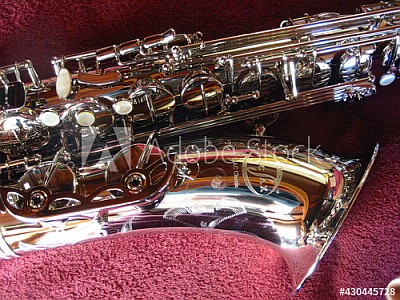






 Dansk
Dansk Deutsch - Windows
 Español
 Français - Windows
 Italiano - Windows
 Nederlands
 Polski
 Português
 Svenskt
 русский
 Japanese
 Simplified Chinese
 Traditional Chinese
 Korean