This question is for those who use / used "Pushes" in RT/RD arrangement whe in BIAB. I was working on composition and progression called for the "push". When I typed it in, results were far less from desired. I couldn't understand what was the issue, until I pulled ACW view. The "timing" looks correct, but the waveform seems to be squashed. And no matter how many times I tried re-generating, it looks (and listens) squashed. What supposed to be a "natural" anticipation, became a distraction.
So, I've tested few other styles (with different sets of RTs/RDs). Some "pushes" where acceptable, but I have noticed that on about half of the time, there was still this squishiness / flattening of waveform.
To understand better what I am talking about, attaching 2 images. I don't use pushes very often, but it is in theory, great feature. Can anyone suggest what I could have missed to make them work right? Thank you.
I wonder if the Pushes in RealTracks are 'computer generated' rather than having been performed by the original recording artist? If so, this might be why they don't sound natural.
BIAB & RB2026 Win.(Audiophile), Windows 10 Pro & Windows 11, Cakewalk Bandlab, Izotope Prod.Bundle, Roland RD-1000, Synthogy Ivory, Session Keys Grand S & Electric R, Kontakt, Focusrite 18i20, KetronSD2, NS40M, Pioneer Active Monitors.
"Automatically fill gaps" didn't do a thing for this issue.
but Adjusting push velocity to 4db solved it!
I deliberately didn't want to raise volume in audio editor manually, as this was a persistent issue. I wanted to find a solution, not a workaround. I guess the drop in velocity played a trick on my ears.
While I accept this as partial solution and THANK YOU for sharing your knowledge, my question before I mark this as "resolved" is this:
Shouldn't a Push calculate proper volume level automatically?
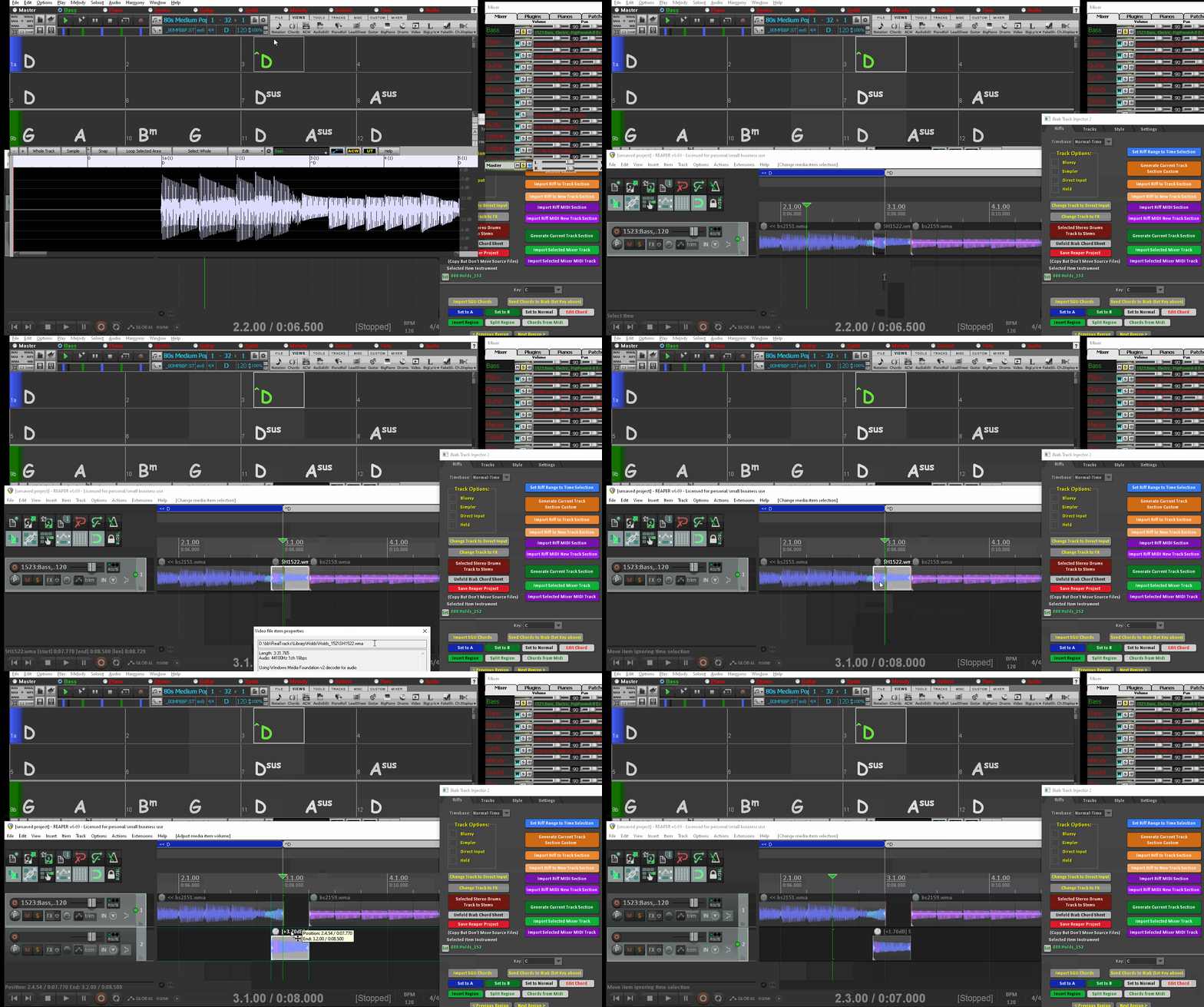
You need non destructive editing to allow adjustment in position, level and playback speed. They just use the Holds as you can see in the gif below the track is the same sections as in Biab BUT you can adjust it how you like. With Drums you can select the push you want and not take what you are given.
Shouldn't a Push calculate proper volume level automatically?
I would not think so as that is what the manual setting is for. Each Shot and Hold folder is used by multiple RealTracks recorded over a span of years. Content of the audio clip can drastically change the apparent volume level during playback. Everybody hears differently so the best option in this instance is to let the user have control over the apparent volume level of Shots and Holds. My guess it would be extremely difficult, if not impossible to have a calculation for proper volume level that would please everyone.
Being able to adjust the playback rate you can create a fast or slow strum like if you are using the Held option that just plays the Holds. You just get so much more control than with a consolidated wav.
Jim, "I would not think so as that is what the manual setting is for."
Well, I do not adjust volumes for shots, rests and holds (at least in BIAB) and I use them often. Because more or less they are within "comfort" range for rough audition. "Pushes", it seems drop significantly in volume in 1/2 of the cases and sound very confusing.
I will leave this unresolved for couple of days to see if it attracts are couple of more viewpoints.
---
Musocity, I do remember the concept of non-destructive editing very well. Do I support it? Yes. I believe you presented your case well. But it is up to the owner to consider it or not. I have no clue how difficult it is to implement this within existing BIAB code (probably is).
I want to try this on a computer, but for the moment I thought I would mention that I reduce the levels for pushes, shots, and holds considerably, and always have. I find the default values jarring, but I can only speak to the jazz and Latin genres I use most frequently. I am surprised by this waveform because I would have expected louder, not softer. I’ll test my system tomorrow.
BIAB 2026 Win Audiophile. Software: Fender Studio One 8, Swam horns, Acoustica-7, Notion 6, Song Master Pro, Win 11 Home. Hardware: Intel i9, 32 Gb; Presonus Quantom HD8 & Faderport 8, Royer 121, Adam Sub8 & Neumann 120 monitors.
It is already in the Biab code, as Reaper just plays the Biab data section direct. Implementing NDE code, maybe way down the track or not at all ? the BB Plugin/Standalone is way easier.
You have the RT Hold db adjust deep down in the soloist dialog (it should adjust the Pushes as well ?). You could Freeze the tracks and save the SGU then close it, then adjust the Hold level, then open the SGU and generate to see where it is. But that is no easy task like is being done in Reaper non destructively.
This would be like the current track data that is stored in a frozen SGU, you have "RiffdbOffset" so Biab should be able to apply an offset to the current track RT data then re-write it back to RAM giving you the level adjust, without having to implement NDE.
It's like when I watch youtube videos on the smart tv, you are watching a video with low sound so you turn the sound up and then the ad is through the roof. It should go by the db of the track to the db level adjust of the Hold/Push. Maybe PG could do this before youtube get around to it
Musocity, Yes, I was thinking same. It should go by average db of the track... And then if you want, you adjust it to your taste. I can tolerate shots, rests without imidiate adjustments just fine, but pushes are strange the way they are.
The requirement for manual adjustment should be sign posted...as in a prompt screen asking if one wants to adjust volume. To leave it unsaid means the vast majority of people will either leave it as BIAB does it or not use the push feature as it doesn't meet requirements. Good spotting one & all...yet again WORKAROUND is the BIAB way for now.
Cheers rayc "What's so funny about peace, love & understanding?" - N.Lowe
Well, I do not adjust volumes for shots, rests and holds (at least in BIAB) and I use them often. Because more or less they are within "comfort" range for rough audition. "Pushes", it seems drop significantly in volume in 1/2 of the cases and sound very confusing.
I agree with you 100 percent. I've seldom had to adjust the volume level of a Shot or Hold.
When I do find a Shot or Hold where the volume level does not match the volume level of the rest of my song I'll generally freeze the tracks and email PG Music Support (support@pgmusic.com) with the frozen SGU file and a description of the issue. For example, bar 19 strings track Hold volume level is too high.
More often than not the volume level is adjusted in a future update.
Band-in-a-Box® 2025 for Mac® users: Build 904 now available!
If you're already using Band-in-a-Box® 2025 for Mac®, make sure to grab the latest update! Build 904 is now available for download and includes the newest additions and enhancements from our team.
PowerTracks 2026 is here—bringing powerful new enhancements designed to make your production workflow faster, smoother, and more intuitive than ever.
The enhanced Mixer now shows Track Type and Instrument icons for instant track recognition, while a new grid option simplifies editing views. Non-floating windows adopt a modern title bar style, replacing the legacy blue bar.
The Master Volume is now applied at the end of the audio chain for consistent levels and full-signal master effects.
Tablature now includes a “Save bends when saving XML” option for improved compatibility with PG Music tools. Plus, you can instantly match all track heights with a simple Ctrl-release after resizing, and Add2 chords from MGU/SGU files are now fully supported... and more!
Get started today—first-time packages start at just $49.
Already using PowerTracks Pro Audio? Upgrade for as little as $29 and enjoy the latest improvements!
Band-in-a-Box 2026 for Windows Special Offers End Tomorrow (January 15th, 2026) at 11:59 PM PST!
Time really is running out! Save up to 50% on Band-in-a-Box® 2026 for Windows® upgrades and receive a FREE Bonus PAK—only when you order by 11:59 PM PST on Thursday, January 15, 2026!
We've added many major new features and new content in a redesigned Band-in-a-Box® 2026 for Windows®!
Version 2026 introduces a modernized GUI redesign across the program, with updated toolbars, refreshed windows, smoother workflows, and a new Dark Mode option. There’s also a new side toolbar for quicker access to commonly used windows, and the new Multi-View feature lets you arrange multiple windows as layered panels without overlap, making it easier to customize your workspace.
Another exciting new addition is the new AI-Notes feature, which can transcribe polyphonic audio into MIDI. You can view the results in notation or play them back as MIDI, and choose whether to process an entire track or focus on specific parts like drums, bass, guitars/piano, or vocals. There's over 100 new features in Band-in-a-Box® 2026 for Windows®.
There's an amazing collection of new content too, including 202 RealTracks, new RealStyles, MIDI SuperTracks, Instrumental Studies, “Songs with Vocals” Artist Performance Sets, Playable RealTracks Set 5, two RealDrums Stems sets, XPro Styles PAK 10, Xtra Styles PAK 21, and much more!
Upgrade your Band-in-a-Box for Windows to save up to 50% on most Band-in-a-Box® 2026 upgrade packages!
Plus, when you order your Band-in-a-Box® 2026 upgrade during our special, you'll receive a Free Bonus PAK of exciting new add-ons.
If you need any help deciding which package is the best option for you, just let us know. We are here to help!
Band-in-a-Box® 2026 for Windows® Special Offers Extended Until January 15, 2026!
Good news! You still have time to upgrade to the latest version of Band-in-a-Box® for Windows® and save. Our Band-in-a-Box® 2026 for Windows® special now runs through January 15, 2025!
We've packed Band-in-a-Box® 2026 with major new features, enhancements, and an incredible lineup of new content! The program now sports a sleek, modern GUI redesign across the entire interface, including updated toolbars, refreshed windows, smoother workflows, a new dark mode option, and more. The brand-new side toolbar provides quicker access to key windows, while the new Multi-View feature lets you arrange multiple windows as layered panels without overlap, creating a flexible, clutter-free workspace. We have an amazing new “AI-Notes” feature. This transcribes polyphonic audio into MIDI so you can view it in notation or play it back as MIDI. You can process an entire track (all pitched instruments and drums) or focus on individual parts like drums, bass, guitars/piano, or vocals. There's an amazing collection of new content too, including 202 RealTracks, new RealStyles, MIDI SuperTracks, Instrumental Studies, “Songs with Vocals” Artist Performance Sets, Playable RealTracks Set 5, two RealDrums Stems sets, XPro Styles PAK 10, Xtra Styles PAK 21, and much more!
There are over 100 new features in Band-in-a-Box® 2026 for Windows®.
When you order purchase Band-in-a-Box® 2026 before 11:59 PM PST on January 15th, you'll also receive a Free Bonus PAK packed with exciting new add-ons.
Upgrade to Band-in-a-Box® 2026 for Windows® today! Check out the Band-in-a-Box® packages page for all the purchase options available.
One of our representatives will be happy to help you over the phone. Our hours of operation are from
6:00AM to 6:00PM PST (GMT -8) Monday thru Friday, and 8:00AM to 4:00PM PST Saturday. We are closed Sunday. You can also send us your questions via email.
One of our representatives will be happy to help you on our Live Chat or by email. Our hours of operation are from
6:00AM to 6:00PM PST (GMT -8) Monday thru Friday; 8:00AM to 4:00PM PST (GMT -8) Saturday; Closed Sunday.









 Dansk
Dansk Deutsch - Windows
 Español
 Français - Windows
 Italiano - Windows
 Nederlands
 Polski
 Português
 Svenskt
 русский
 Japanese
 Simplified Chinese
 Traditional Chinese
 Korean