|
Log in to post
|
Print Thread |
|
|
|
|
|
Beginners Forum
|
Joined: Feb 2023
Posts: 2
Newbie
|
OP

Newbie
Joined: Feb 2023
Posts: 2 |
Hallo, ich bin neu bei BiB und auch neu im Forum und grüße euch alle.
Mein Problem:
Ich möchte in BiB-Styles gängige Instrumente durch ungewöhnliche Sounds ersetzen. Dazu habe ich mir die Xpro Styles zugelegt. Die haben Real Sounds in den Tracks (Audio) und können auch Midi ausgeben. Damit hoffe ich eine Kombination aus den Originalsounds und meinen Soundkreationen bekommen.
Bis jetzt ist es mir aber nicht gelungen die XPro-Tracks auf MIDI umzuschalten, damit ich sie in NI-Kontakt spielen kann. Lediglich der Drumtrack ließ sich mit "Force Drumtracks to MIDI" entsprechend umschalten. Wie gelingt mir das bei den anderen Tracks (MIDI Daten sin vorhanden das kann man in der Pianoroll sehen)?
Wie kann ich XPro-Styles in einer Mischung aus Real-Tracks und MIDI-Tracks wiedergeben?
Für Tipps und Hilfe wäre ich sehr dankbar
Beste Grüße SiSKey
PS:Bis jetzt bin ich fast nur damit beschäftigt mich durch die ganzen Menüs und Einstellungen in BiB zu kämpfen, das ist frustrierend ( ich finde zum Teil auch wenig intuitiv), dabei möchte ich meine freie Zeit lieber fürs Musikmachen verwenden.
|
|
|
|
|
|
|
|
|
|
|
|
|
Beginners Forum
|
Joined: May 2002
Posts: 7,728
PG Music Staff
|
|
PG Music Staff
Joined: May 2002
Posts: 7,728 |
Hello,
The XPro styles contain RealTracks. These are audio recordings of musicians playing real instruments, so you cannot choose a MIDI patch.
Just for your information, you will notice that many RealTracks have notation - this is called "RealCharts". While it is possible to export the MIDI notation as a MIDI file, it is not really intended to be played because it is a transcription. If you want to hear the MIDI part being played, you can drag the track to the "MIDI" section of the 'drop Station' (Top left of the main screen). Then, right click and select "audition this track".
On another note, there are MIDI Supertracks, which are somewhere in between RealTracks and MIDI tracks. These are also recordings of live musicians playing but they have been capture as MIDI. In the StylePicker, type "supertracks" in the filter to see some examples of this. In the StylePicker "Mixer" at the bottom of the dialog you can identify RealTracks (green), Supertracks (blue) and regular programmed MIDI tracks (yellow).
====================
Translation
Die XPro-Stile enthalten RealTracks. Dies sind Audioaufnahmen von Musikern, die echte Instrumente spielen, Sie können also kein MIDI-Patch auswählen.
Nur zu Ihrer Information, Sie werden feststellen, dass viele RealTracks eine Notation haben - dies wird "RealCharts" genannt. Obwohl es möglich ist, die MIDI-Notation als MIDI-Datei zu exportieren, ist sie nicht wirklich zum Spielen gedacht, da es sich um eine Transkription handelt. Wenn Sie den gespielten MIDI-Part hören möchten, können Sie die Spur in den „MIDI“-Bereich der „Drop Station“ (oben links auf dem Hauptbildschirm) ziehen. Klicken Sie dann mit der rechten Maustaste und wählen Sie "diesen Titel vorhören".
Außerdem gibt es MIDI-Supertracks, die irgendwo zwischen RealTracks und MIDI-Tracks angesiedelt sind. Dies sind auch Aufnahmen von live spielenden Musikern, aber sie wurden als MIDI erfasst. Geben Sie im StylePicker „Supertracks“ in den Filter ein, um einige Beispiele dafür zu sehen. Im StylePicker „Mixer“ unten im Dialog können Sie RealTracks (grün), Supertracks (blau) und regulär programmierte MIDI-Spuren (gelb) identifizieren.
Andrew
PG Music Inc.
|
|
|
|
|
|
|
|
|
|
|
|
|
Beginners Forum
|
Joined: Feb 2023
Posts: 2
Newbie
|
|
OP
Newbie
Joined: Feb 2023
Posts: 2 |
Hallo,
ok das habe ich jetzt verstanden. Eigentlich wollte ich mit den Rt etwas kreativ sein und die eine oder andere Spur durch ungewöhnliche Klänge ersetzen. Das geht ja so wohl nicht.
Die Real Styles sind aber dennoch klasse und ich kann sie gut einsetzen.
Nach den MidiSupertracks schaue ich dann mal.
Vielen Dank
|
|
|
|
|
|
|
|
|
|
|
|
|
Beginners Forum
|
Joined: May 2002
Posts: 7,728
PG Music Staff
|
|
PG Music Staff
Joined: May 2002
Posts: 7,728 |
Actually, I wanted to be a bit creative with the Rt and replace one or the other track with unusual sounds. That's probably not going to work. If you want to keep the same notes of the RT but play it with some MIDI patch / VSTi plugin you have, you can do that. As I mentioned, it will use the transcribed "RealChart", but this might be OK for what you are doing. In fact the transcription doesn't sound too bad for some RT's, plus you can edit the notation. Here is now you could do it: Let's say you are starting with _DREAMY.STY, and you would like to have your own custom patch play the bass line instead of the Electric Bass RT in the style. 1. Generate the song / re-generate until you are happy with the bass part. 2. Go to Edit | Copy Special | Copy/Move Tracks. Copy the MIDI part to Utility track #1. Do not copy the RT: 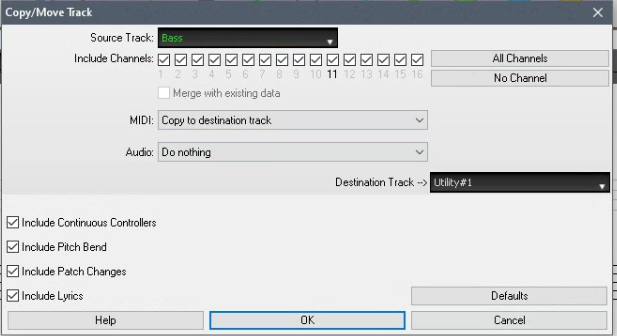 3. Now you have a MIDI bass part. You can, if you want, mute the RT bass part, choose the patch, and edit the notes in editable notation mode.[/img] 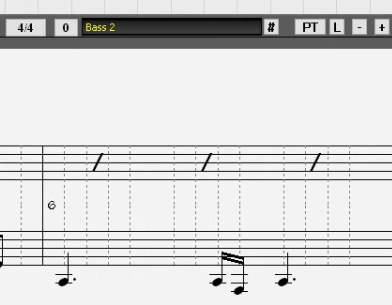 -------------------------- translation: Wenn Sie die gleichen Noten des RT behalten, aber mit einem MIDI-Patch / VSTi-Plugin spielen möchten, das Sie haben, können Sie das tun. Wie ich bereits erwähnt habe, wird das transkribierte "RealChart" verwendet, aber dies könnte für das, was Sie tun, in Ordnung sein. Tatsächlich klingt die Transkription für einige RTs nicht allzu schlecht, außerdem können Sie die Notation bearbeiten. Hier können Sie es jetzt tun: Angenommen, Sie beginnen mit _DREAMY.STY und möchten, dass Ihr eigener benutzerdefinierter Patch die Basslinie anstelle des Electric Bass RT im Stil spielt. 1. Song generieren / neu generieren, bis Sie mit dem Basspart zufrieden sind. 2. Gehen Sie zu Bearbeiten | Kopieren Spezial | Tracks kopieren/verschieben. Kopieren Sie den MIDI-Part auf die Utility-Spur Nr. 1. Kopieren Sie nicht die RT: 3. Jetzt haben Sie einen MIDI-Bass-Part. Sie können, wenn Sie möchten, den RT-Bass-Part stummschalten, das Patch auswählen und die Noten im editierbaren Notationsmodus bearbeiten.
Andrew
PG Music Inc.
|
|
|
|
|
|
|
|
|
|
|
|
Ask sales and support questions about Band-in-a-Box using natural language.
ChatPG's knowledge base includes the full Band-in-a-Box User Manual and sales information from the website.
|
|
|
|
|
|
|
|
|
|
|
Band-in-a-Box® 2025 for Mac® users: Build 904 now available!
If you're already using Band-in-a-Box® 2025 for Mac®, make sure to grab the latest update! Build 904 is now available for download and includes the newest additions and enhancements from our team.
Band-in-a-Box® 2026 for Windows® users: Build 1237 is now available!
Already a Band-in-a-Box 2026 for Windows user? Stay up to date and download the build 1237 to get all the latest additions and enhancements.
PowerTracks Pro 2026 for Windows is Here!
PowerTracks 2026 is here—bringing powerful new enhancements designed to make your production workflow faster, smoother, and more intuitive than ever.
The enhanced Mixer now shows Track Type and Instrument icons for instant track recognition, while a new grid option simplifies editing views. Non-floating windows adopt a modern title bar style, replacing the legacy blue bar.
The Master Volume is now applied at the end of the audio chain for consistent levels and full-signal master effects.
Tablature now includes a “Save bends when saving XML” option for improved compatibility with PG Music tools. Plus, you can instantly match all track heights with a simple Ctrl-release after resizing, and Add2 chords from MGU/SGU files are now fully supported... and more!
Get started today—first-time packages start at just $49.
Already using PowerTracks Pro Audio? Upgrade for as little as $29 and enjoy the latest improvements!
Order now!
Band-in-a-Box 2026 for Windows Special Offers End Tomorrow (January 15th, 2026) at 11:59 PM PST!
Time really is running out! Save up to 50% on Band-in-a-Box® 2026 for Windows® upgrades and receive a FREE Bonus PAK—only when you order by 11:59 PM PST on Thursday, January 15, 2026!
We've added many major new features and new content in a redesigned Band-in-a-Box® 2026 for Windows®!
Version 2026 introduces a modernized GUI redesign across the program, with updated toolbars, refreshed windows, smoother workflows, and a new Dark Mode option. There’s also a new side toolbar for quicker access to commonly used windows, and the new Multi-View feature lets you arrange multiple windows as layered panels without overlap, making it easier to customize your workspace.
Another exciting new addition is the new AI-Notes feature, which can transcribe polyphonic audio into MIDI. You can view the results in notation or play them back as MIDI, and choose whether to process an entire track or focus on specific parts like drums, bass, guitars/piano, or vocals. There's over 100 new features in Band-in-a-Box® 2026 for Windows®.
There's an amazing collection of new content too, including 202 RealTracks, new RealStyles, MIDI SuperTracks, Instrumental Studies, “Songs with Vocals” Artist Performance Sets, Playable RealTracks Set 5, two RealDrums Stems sets, XPro Styles PAK 10, Xtra Styles PAK 21, and much more!
Upgrade your Band-in-a-Box for Windows to save up to 50% on most Band-in-a-Box® 2026 upgrade packages!
Plus, when you order your Band-in-a-Box® 2026 upgrade during our special, you'll receive a Free Bonus PAK of exciting new add-ons.
If you need any help deciding which package is the best option for you, just let us know. We are here to help!
Band-in-a-Box® 2026 for Windows® Special Offers Extended Until January 15, 2026!
Good news! You still have time to upgrade to the latest version of Band-in-a-Box® for Windows® and save. Our Band-in-a-Box® 2026 for Windows® special now runs through January 15, 2025!
We've packed Band-in-a-Box® 2026 with major new features, enhancements, and an incredible lineup of new content! The program now sports a sleek, modern GUI redesign across the entire interface, including updated toolbars, refreshed windows, smoother workflows, a new dark mode option, and more. The brand-new side toolbar provides quicker access to key windows, while the new Multi-View feature lets you arrange multiple windows as layered panels without overlap, creating a flexible, clutter-free workspace. We have an amazing new “AI-Notes” feature. This transcribes polyphonic audio into MIDI so you can view it in notation or play it back as MIDI. You can process an entire track (all pitched instruments and drums) or focus on individual parts like drums, bass, guitars/piano, or vocals. There's an amazing collection of new content too, including 202 RealTracks, new RealStyles, MIDI SuperTracks, Instrumental Studies, “Songs with Vocals” Artist Performance Sets, Playable RealTracks Set 5, two RealDrums Stems sets, XPro Styles PAK 10, Xtra Styles PAK 21, and much more!
There are over 100 new features in Band-in-a-Box® 2026 for Windows®.
When you order purchase Band-in-a-Box® 2026 before 11:59 PM PST on January 15th, you'll also receive a Free Bonus PAK packed with exciting new add-ons.
Upgrade to Band-in-a-Box® 2026 for Windows® today! Check out the Band-in-a-Box® packages page for all the purchase options available.
Happy New Year!
Thank you for being part of the Band-in-a-Box® community.
Wishing you and yours a very happy 2026—Happy New Year from all of us at PG Music!
Season's Greetings!
Wishing everyone a happy, healthy holiday season—thanks for being part of our community!
The office will be closed for Christmas Day, but we will be back on Boxing Day (Dec 26th) at 6:00am PST.
Team PG
|
|
|
|
|
|
|
|
|
|
|
|
Forums57
Topics86,033
Posts799,152
Members40,012
| |
Most Online44,367
Mar 4th, 2026
|
|
|
|
|
|
|
|
|



 Dansk
Dansk Deutsch - Windows
 Español
 Français - Windows
 Italiano - Windows
 Nederlands
 Polski
 Português
 Svenskt
 русский
 Japanese
 Simplified Chinese
 Traditional Chinese
 Korean