Band in a Box is the meat and potato of music production, no doubt. However, even the best steak, needs pepper, vinegar, mustard and garlic, to spice things up. The spice here is the external segments of MIDI & Audio.
The question is, how to deal with MIDIs & Audios in a professional way?
First thing first, let's be clear, we are talking about using BiaB only, with no DAWs involved. The whole purpose is to use BiaB to gen/regen green tracks back and forth many times throughout the production process, without locking things into a rendered audio then import to DAW.
Second, all MIDIs in this discussion are referring to single instrument MIDI (not the multi combined one), to make things simple. For example, a monophonic MIDI file contains a single track of solo guitar notes, with no other instruments present in the file.
Here're a few advanced questions need some expert input.
Question #1 - Accurately Insert Say, I have a half bar drum fill MIDI, needs to be accurately inserted to beat 3 of bar 4. What is the best practice to accurately drag/drop/snap this MIDI to the grid in the piano roll of BiaB?
Question #2 - Switch Between Append/Overwrite Say, I have several different 4 bar drum MIDI loops. I first drag one loop to bar 1, listen to it, if I don't like it, I want to drag another loop to bar 1 to overwrite/replace it. If I like it, I want to drag a new loop to bar 5 while keep bar 1 to bar 4 unchanged. How can I switch between overwriting and appending to existing MIDI in the piano roll?
Question #3 - Import CC Events Say, I have a piano MIDI riff with CC64 sustain pedal event. Or a guitar solo MIDI with Pitch Bend event. How can I insert the MIDI event to the desired position in the piano roll in the meanwhile keep MIDI notes and event synced after importing?
Question #4 - Position Accuracy Say, I have an 8 bar bassline audio in WAV / MP3 format, needs to be inserted and accurately aligned to the beginning of bar 32 grid. In the Audio Edit / Waveform window, what is the most accurate way of achieving this?
Question #5 - Single Mixer Track Say, I have a one bar reverse cymbal sound effect in WAV / MP3 format, needs to be inserted to bar 4, bar 8, bar 12, bar 16... etc. How can I have the same audio duplicated and inserted to different locations of the song, but also being routed to a single mixer track, so I can control the volume with one slider. What if I have several different cymbal audio files, can they still be inserted to different locations but being connected to the same mixer track?
That's all the questions. I believe it is a crime to use BiaB as an amateur karaoke generation tool. That's discrimination and bigotry.
BiaB deserves its honor and respect as a Grammy nominated technology milestone in the human history of music.
A Canadian music producer, singer songwriter, composer, and professional guitarist.
Frankly, you really would be better off using a proper DAW for all this.
Byron Dickens
BIAB. CbB. Mixbus 32C 8 HP Envy. Intel core i7. 16GB RAM W10. Focusrite Scarlett 18i 20. Various instruments played with varying degrees of proficiency.
So many things I have suggested to make all these things easy, but it could take PG ages to get around to them. With audio clip import if you set the Audio Edit to snap it will import the audio clip to the drag position, 1/4 1/8 1/16 has been asked for snap options. With midi snap import hasn't been implemented yet, if you drag n drop a midi clip into Biab you need to select Merge (this needs to be default) otherwise the whole track is wiped out, and down the bottom of the import dialog there is insert so many bars before the item so you need to enter that, it should also import to the piano roll track you drag it into not some other track. You can copy and paste audio sections from another instance of Biab. It has been suggested to be able to drop acidize loops directly into the track with an option to loop for so many bars.
You would be better suggesting development ideas for the BBPlugin then you can do it all in a DAW. Some users die of old age waiting for features in Biab.
Most all things you are asking and suggesting would be much easier in just about any DAW. BIAB is good at some of this stuff and many users here in the forums have done fantastic stuff with it, but most get into their DAW when the going gets heavy with some of these things.
My wife asked if I had seen the dog bowl. I told her I didn't even know he could.
“ BiaB deserves its honor and respect as a Grammy nominated technology milestone in the human history of music.”
Thank you for that kind comment. We are adding functions to BiaB and welcome the suggestions you have above. We will post a detailed reply as to your specific requests to see if/how you could currently do that in BiaB.
<< Question #1 - Accurately Insert Say, I have a half bar drum fill MIDI, needs to be accurately inserted to beat 3 of bar 4. What is the best practice to accurately drag/drop/snap this MIDI to the grid in the piano roll of BiaB? >>
Set the curser over beat 3 of bar 4 and paste the selected midi. Utilize the Snap to Grid feature to ensure accuracy.
<< Question #2 - Switch Between Append/Overwrite Say, I have several different 4 bar drum MIDI loops. I first drag one loop to bar 1, listen to it, if I don't like it, I want to drag another loop to bar 1 to overwrite/replace it. If I like it, I want to drag a new loop to bar 5 while keep bar 1 to bar 4 unchanged. How can I switch between overwriting and appending to existing MIDI in the piano roll? >>
I would do each loop on it's own track, use F5 Bar Settings to designate the bars for each individual loop to play, render and merge the 3 loop tracks into a stereo WAV file and import that WAV file onto a Utility Track and revert the three loop tracks back to the Style original instruments.
<< Question #3 - Import CC Events Say, I have a piano MIDI riff with CC64 sustain pedal event. Or a guitar solo MIDI with Pitch Bend event. How can I insert the MIDI event to the desired position in the piano roll in the meanwhile keep MIDI notes and event synced after importing? >>
I've never attempted to do this technique.
<< Question #4 - Position Accuracy Say, I have an 8 bar bassline audio in WAV / MP3 format, needs to be inserted and accurately aligned to the beginning of bar 32 grid. In the Audio Edit / Waveform window, what is the most accurate way of achieving this? >>
Place the bassline audio WAV/MP3 on the desktop. Open the Audio Edit Window and activate the Snap Button. Reduce the BIAB window enough to select and drag the Bassline audio file onto Audio Edit Window to Bar 32 and release the mouse.
<< Question #5 - Single Mixer Track Say, I have a one bar reverse cymbal sound effect in WAV / MP3 format, needs to be inserted to bar 4, bar 8, bar 12, bar 16... etc. How can I have the same audio duplicated and inserted to different locations of the song, but also being routed to a single mixer track, so I can control the volume with one slider. What if I have several different cymbal audio files, can they still be inserted to different locations but being connected to the same mixer track? >>
The drag and drop technique described in question 4 will work for this too. Repeat the drag drop for each bar location.
I say this to you: You guys are totally Tony Starks!
However, I'm still trying to fathom your wisdom, and may need your further enlightment, or maybe a few screenshots for elaborations.
Here's my interpretation of your explanations, please correct me if I was wrong.
External Audio File (WAV/WMA/MP3) Sounds easy. Select a utility track, open Audio Edit window, turn on snap, drag the file in, align to the grid, release the mouse, everything will be merged into one mixer track.
The question is, when I save the SGU/MGU file, what's gonna happen? Are these external audio files saved into the SGU, make it a very large file? Or the SGU only saves the path linking to the external files? What if after saving, I rename these exteral audio files, or move them to a different folder, is there gonna be a problem with the SGU?
External MIDI File (.mid) This is where I got confused. First I open the piano roll window, turn on snap, then what? Should I drag the file in, or copy the file and paste it in? How should I move it to the desired bar grid like I did with the audio?
A Painful Situation Often I produced these Japanese style anime theme songs, which are quite different from western music. It may sound crazy, but there is a drum fill happening every 4 bars, and each drum fill is significantly different from each other. BiaB generated drum can't do the job, so I need to insert an EZdrummer plugin into BiaB, and drag twenty different 4 bar long drum MIDI files into BiaB, merge them to one mixer track, and play them with EZdrummer. I need to constantly regen short guitar riffs in BiaB until everything matches, that's why I can't export things to a DAW in my case.
So, how should I drag, drop, align, merge all these external .mid files into one utility track in BiaB?
A Canadian music producer, singer songwriter, composer, and professional guitarist.
Personally, I find it much easier to do the basic groundwork on BiaB, then export – then import to a DAW to do the fine editing.
Real Band from PG Music combines BiaB with a DAW, so that might be a solution for you as well.
Many of the changes you suggest are easy-peasy in a DAW, and not so straight forward or easy at all in BiaB.
Of course, there is more than one right way to use these wonderful music-making tools.
I've been using BiaB since its humble beginnings as a DOS program, with 3 or 4 instruments, no endings, no notation, and none of the other improvements that make BiaB the incredible tool it is today.
Kudos to PG Music for taking those early beginnings, that were amazing for their day, and as computing became more powerful, continues to improve the program, responding to our collective wishes.
<< The question is, when I save the SGU/MGU file, what's gonna happen? >>
The audio files are automatically saved and named in the same folder as the SGU/MGU file. See the attached screenshot.
<< What if after saving, I rename these exteral audio files, or move them to a different folder, is there gonna be a problem with the SGU? >>
No. The SGU/MGU file will open and play normally but without loading any of the audio files. It omits them.
<< External MIDI File (.mid)>>
<<This is where I got confused. First I open the piano roll window, turn on snap, then what? Should I drag the file in, or copy the file and paste it in? How should I move it to the desired bar grid like I did with the audio?>>
I've always used copy/paste but only because it's what I first used and I've stuck with it.
<< A Painful Situation >>
This is a more intricate and involved answer that's specific to your workflow and there's many variations, techniques and tools that could apply. I'll study it more and try to develop an answer how I would approach a BIAB only solution.
First thing first, let's be clear, we are talking about using BiaB only, with no DAWs involved. The whole purpose is to use BiaB to gen/regen green tracks back and forth many times throughout the production process, without locking things into a rendered audio then import to DAW.
MV, Glad to see your enthusiastic involvement and contribution to the forum. Your questions help us all learn the intricacies of BIAB. And, we always welcome fresh blood. I have only one comment for you to carefully consider:
… always choose the proper tool for the job. Don’t use a screwdriver to hit a nail. Yes, BIAB is a virtual swiss army knife for musical work, but it is not a substitute for your DAW.
The question is, when I save the SGU/MGU file, what's gonna happen? Are these external audio files saved into the SGU, make it a very large file? Or the SGU only saves the path linking to the external files? What if after saving, I rename these exteral audio files, or move them to a different folder, is there gonna be a problem with the SGU?
The system that BIAB uses is simple - for a song "MySong.SGU": - the 'Audio' track is MySong.WAV - Utility tracks are MySong #1.WAV, MySong #2.WAV etc.
If you have a lot of audio tracks you should consider creating a separate folder (MySong) for your song files. If the wave files are not found in the same directory as your song, they are ignored.
Quote:
This is where I got confused. First I open the piano roll window, turn on snap, then what? Should I drag the file in, or copy the file and paste it in? How should I move it to the desired bar grid like I did with the audio?
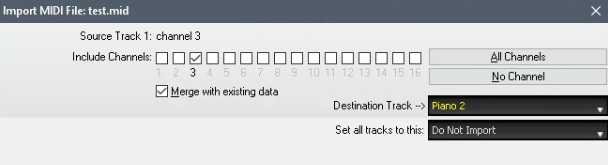
There are two basic ways that BIAB handles 'importing' a MIDI file. (1) opens it as a new file (i.e. MIDI file player) and (2) imports all or part of the MIDI file to the Melody track (or a Utility track) of the current song.
In your case, you want #2. You can import the MIDI file by dragging and dropping it onto BB. Then:
1. Answer Yes to import to current song.
2. In the Import MIDI file dialog:
- Select "merge with existing data", and make sure the correct target track is selected.
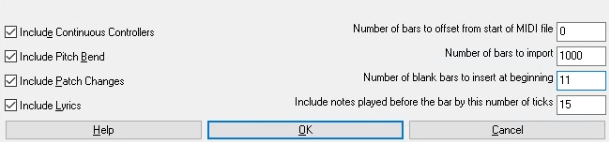
- Set "Number of bars to import" to 1000 (entire MIDI file)
- Set "Number blank bars to insert at beginning" as you need. NOTE: BIAB has a 2 bar count-in, which are considered bars -1 and 0. If there are not 2 empty bars at the start of your MIDI file, you need to set this to 2. As another example, if you want to import it to bar 10, you need to set this to 11. Then, your file would be inserted starting at bar 10 of the .SGU.
Note: The "include notes played before" setting allows notes played slightly before the barline to be included in the import. This is useful because often notes are played slightly early in performances.
------------
On the other hand, if you simply want to take a MIDI part you have already imported, and copy it to a different part of the same track, there are a few ways to do that. If you are in the Piano roll, you can
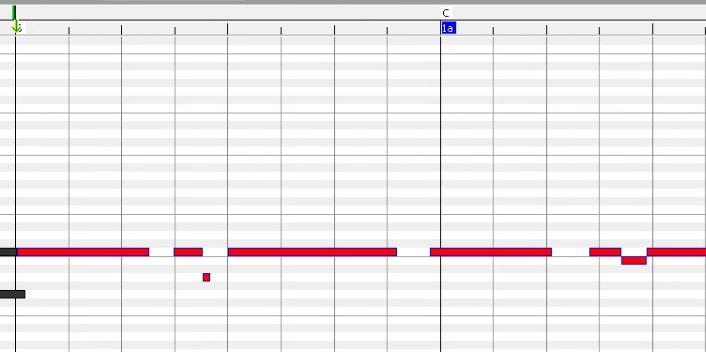
1. Highlight the notes, and press Ctrl+C. To highlight all of the notes in a region, one way is to click and drag in the narrow area where the bar numbers are displayed - see image, where the little green arrow is.
2. Move the cursor (in the area where the chords are displayed) to the position that you want to paste to and press Ctrl+V.
Last edited by Andrew - PG Music; 02/14/2309:12 AM.
Biab doesn't use non destructive editing for imported files, it don't reference the source files so you usually get a 32bit wav file attached for each track. The RealTracks just reference the source files so you don't get a massive size. With midi there is no easy clip editing/moving like in a DAW or EZdrummer so the best thing is use an empty track to import the midi then select all those notes then cut and paste it to the track and position you need it.
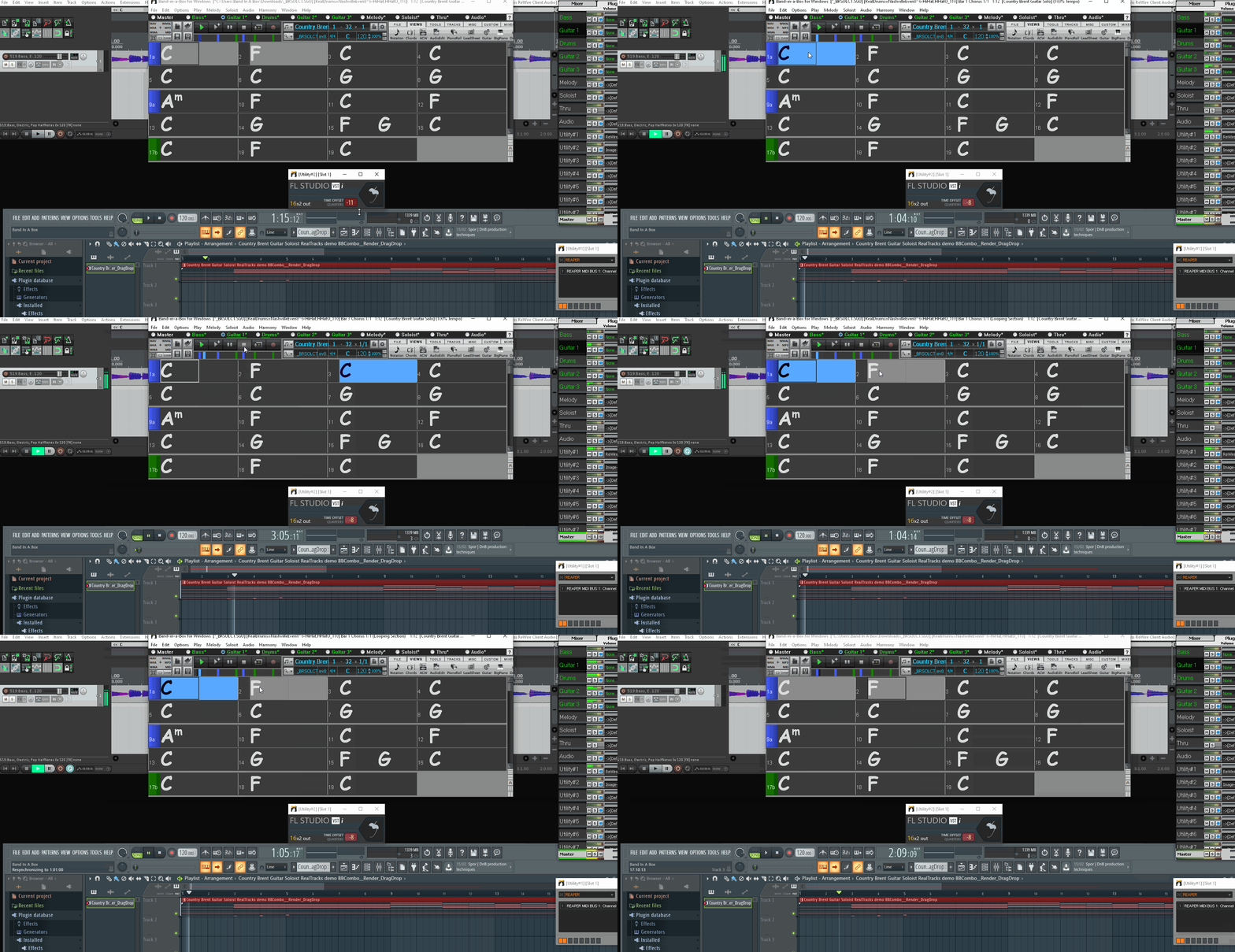
You can use Biab as a ReWire Master and use Reaper as a ReWire slave and load all the midi and audio clips into Reaper that will give super easy drag n drop audio/midi and won't have massive file size attached to it as it will just reference the source files. You can even open the SGU in Reaper to give the chord track. https://www.xtsware.com/?page_id=334
@MusicStudent Unfortunately, when you say “export to a DAW”, you are talking about a cake, if it’s baked, it’s done. You can not “unbake” a cake back to flour, eggs, sugar, and milk.
Say, you export all your audio tracks from BiaB to your DAW, and spend a day doing editing, comping, adding MIDI and VSTs, to complete a song. The next morning, you just feel like you want to make a few slight changes, such as change a few chords here and there, insert one bar here and there, regenerate a bit of guitar here and there, so on and so forth. Guess what? You have to go back to BiaB to regen everything and your previous day’s work in the DAW is pretty much ruined.
Trust me, I’ve been using this “BiaB to WAV to DAW” approach for a long time, until recently I had a spiritual awakening.
My point is, music production is not a laser guided sidewinder missile, and you won’t hit your target with one shot. It is more of a mortar attack, and you’ve got to take several tries before you can hit your target. Luckily, BiaB is here to provide unlimited ammunitions.
A Canadian music producer, singer songwriter, composer, and professional guitarist.
@Andrew - PG Music Thanks for your detailed explanations and screenshots. I think I had a pretty good grasp on the concepts you had provided.
Here’re just a few follow up questions need help.
Copy/Move MIDI Notes What does it mean by “Move the cursor (in the area where the chords are displayed) to the position that you want to paste to”? In the piano roll, after select the notes and press Ctrl+C, what should I do then? Can I turn the snap on, move the cursor to snap whatever grid (bar grid, beat grid, 1/16th grid, etc), and then press Ctrl+V?
Import MIDI to middle of the bar Say, I want the beginning of imported MIDI to be aligned to the middle (beat 3) of bar 10. Can I simply enter 240 ticks in the "Include notes played before" box at the bottom right corner? I assume one bar is divided into 480 ticks.
Completely Disable 2 Bar Count-in Is there a way I can disable the default 2 bar count-in all places in BiaB (preview, playback, audio export, MIDI import, and everywhere else)? So bar -1 and bar 0 will completely disappear, and I’ll never have to worry about offsetting when drag & drop a MIDI. No more math.
Force Not to Gen/Regen In the chord sheet, is it possible to have no chord assigned to bar/bars, so later when switch to Audio Edit window, no waveform is generated for that portion. Say, for the first half of the song, I inserted an long audio to bar 1, and I want it to play from bar 1 to bar 32, nothing else is generated or plays. Then start from bar 33, the audio ends and BiaB generated sounds start to play. I know I can use volume automation or bar settings to mute things, but would be better if waveform not generated in the first place. Can I delete the chord on bar 1, so from bar 1 to 32 the chord sheet is blank and not generating?
A Canadian music producer, singer songwriter, composer, and professional guitarist.
@musocity Just finished watching your Dropbox video, and I think you are crazy, and in the meanwhile brilliant!
Basically, you are fighting against the world. When every person in this forum wants you to always export from BiaB to a DAW, you are doing exactly the opposite: Insert a DAW to BiaB.
I don’t care about how other people would judge you on this, I personally think, what you did in that video, is a game changer. You get the best of two worlds, the flexibility of a DAW, and the generatibility of BiaB.
Unfortunately, I don’t know how to use Reaper. I use the notorious teenager puberty gang’s favorite thing called FL. Good thing is, I don’t need to worry about Rewire, because FL has a VST version of which can be easily inserted into BiaB as a plugin. Bad thing is, I need to figure out how to disable BiaB’s 2 bar count-in so the Host (BiaB) and the Slave (FL) can sync and play the same bar number.
Rewiring / Using DAW as a plugin in BiaB, is revolutionary.
A Canadian music producer, singer songwriter, composer, and professional guitarist.
Isn't there a bar offset setting in FL ? You don't need to know how to use Reaper to drop audio or midi clips into it's tracks, you may have to click the FX button on the track to add a vst that's about it, you had to ask how to do it in Biab because it's not well thought out and designed to be a no brainer. Just look at Reaper as extra tracks with super easy drag n drop audio/midi with non destructive editing, you don't need to know anything else. You can even inject the Biab source files directly into Reaper without creating any wav files. I tried to get PG to make a small vst like FL studio has to sync it to any DAW, so Biab will follow the DAW transport.
Last Chance! The Band-in-a-Box® 2026 for Mac® Special Ends Today (May 31, 2026) at 11:59pm PDT!
Time really is running out! Save up to 50% on Band-in-a-Box® 2026 for Mac® upgrades and receive a FREE Bonus PAK—only when you order by 11:59 PM PDT today!
We've added many major new features and new content in a redesigned Band-in-a-Box® 2026 for Mac®!
Version 2026 introduces a modernized GUI redesign across the program, with updated toolbars, refreshed windows, smoother workflows, and a new Dark Mode option. There’s also a new side toolbar for quicker access to commonly used windows, and the new Multi-View feature lets you arrange multiple windows as layered panels without overlap, making it easier to customize your workspace.
Another exciting new addition is the amazing new AI-Notes feature, which can transcribe polyphonic audio into MIDI. View the results in notation or play them back as MIDI, and choose whether to transcribe an entire track or transcribe specific parts like drums, bass, guitars/piano, or vocals. There's over 100 new features in Band-in-a-Box® 2026 for Mac®.
There's an amazing collection of new content too, including 202 RealTracks, new RealStyles, MIDI SuperTracks, Instrumental Studies, “Songs with Vocals” Artist Performance Sets, Playable RealTracks Set 5, two RealDrums Stems sets, and much more!
Upgrade your Band-in-a-Box for Mac® to save up to 50% on most Band-in-a-Box® 2026 upgrade packages!
Plus, when you order your Band-in-a-Box® 2026 Mac upgrade during our special, you'll receive a Free Bonus PAK of exciting new add-ons.
If you need any help deciding which package is the best option for you, just let us know. We are here to help!
Band-in-a-Box® 2026 Mac Special Offers Extended Until May 31st!
Good news- we've extended our Band-in-a-Box® 2026 for Mac® special offers until May 31, 2026!
Band-in-a-Box® 2026 is packed with major new features, enhancements, and an incredible lineup of new content! The program now sports a sleek, modern GUI redesign across the entire interface, including updated toolbars, refreshed windows, smoother workflows, a new dark mode option, and more. The brand-new side toolbar provides quicker access to key windows, while the new Multi-View feature lets you arrange multiple windows as layered panels without overlap, creating a flexible, clutter-free workspace. We have an amazing new “AI-Notes” feature. This transcribes polyphonic audio into MIDI so you can view it in notation or play it back as MIDI. You can transcribe an entire track (all pitched instruments and drums) or focus on individual parts like drums, bass, guitars/piano, or vocals. There's an amazing collection of new content too, including 202 RealTracks, new RealStyles, MIDI SuperTracks, Instrumental Studies, “Songs with Vocals” Artist Performance Sets, Playable RealTracks Set 5, two RealDrums Stems sets, and much more!
There are over 100 new features in Band-in-a-Box® 2026 for Mac®.
When you order purchase Band-in-a-Box® 2026 before 11:59 PM PDT on May 31st, you'll also receive a Free Bonus PAK packed with exciting new add-ons.
Check out the Band-in-a-Box® for Mac packages page to find the best package for you.
Today's the Last Day of the Band-in-a-Box 2026® for Mac Special!
Order before 11:59pm PDT today (May 15, 2026) to save up to 50% off your Band-in-a-Box® 2026 for Mac® upgrade and receive a FREE Bonus PAK loaded with great new Add-ons to use with this new version!
Band-in-a-Box® 2026 for Mac - Special Offers End at 11:59pm PDT on Friday, May 15th, 2026!
Order before 11:59pm PDT on Friday, May 15th and SAVE up to 50% on most Band-in-a-Box® version 2026 for Mac Upgrade packages... and that's not all! With your version 2026 for Mac purchase, we'll include a Bonus PAK full of great new Add-ons FREE! Upgrade to the 2026 49-PAK to receive even more NEW Add-ons including 20 additional RealTracks... that's 222 NEW RealTracks available with version Band-in-a-Box® 2026 for Mac!
Upgrade to Band-in-a-Box® 2026 for Mac® today for as little as $49! Check out the Band-in-a-Box® packages page for all available purchase options.
Learn more about the Free Bonus PAK and 49-PAK here.
If you have any questions about which package is the best option for you, just let us know. We're here to help!
202 New RealTracks Released with Band-in-a-Box 2026!
With Band-in-a-Box® 2026, we've released 202 incredible new RealTracks (in sets 468-488) in a variety of genres—featuring your most requested styles!
Jazz, Funk & World (Sets 468-475):
Our new jazz, funk & blues RealTracks include a groovin’ collection of RealTracks and RealDrums! These include more requested “soul jazz” RealTracks featuring artists Neil Swainson (bass), Charles Treadway (organ), Brent Mason (guitar), and Wes Little (drums). There are new “smooth jazz” styles (4), which include a RealTracks first: muted trumpet, as well as slick new smooth jazz brushes options for drums. Blues lovers will be thrilled—there are more “classic acoustic blues” styles, including guitar (5), bass (4), and drums (10) with blues master Colin Linden, featuring understated and tasty background acoustic soloing, plus brushes drums and acoustic bass. There are also new electric blues RealTracks, including electric blues with PG favorite Johnny Hiland (3) and soulful electric slide guitar from Colin Linden (4). If you love funk & gospel, there are great new options this year, including gospel organ (3) from Charles Treadway, as well as new funk, tango, and rock ’n’ roll drums (3) and bass (1). And for big, bold arrangements, we have uptempo soul horns (4) featuring a three-part hip horn section with options for a full mix or stems of each individual horn — plus an accompanying rhythm section (4) of drums, bass, guitar, and electric piano!
Rock & Pop (Sets 476–482):
Our new rock & pop RealTracks bring a powerful mix of requested favorites, fresh genres, and modern chart-inspired styles! We have more of our popular “Producer Layered Acoustic Guitars (15)” featuring Band-in-a-Box favorite Brent Mason. We’ve continued our much-requested disco styles (10), and added new Celtic guitar (5) with a more basic, accessible approach than our previous Drop-D or DADGAD offerings. There are also highly requested yacht rock styles (17), inspired by the smooth, polished soft-rock sound of the late ’70s and early ’80s — laid-back grooves, silky electric pianos, warm textures, elegant harmonic movement, and pristine production aesthetics. Fans of heavier styles will love our new glam metal (13), capturing the flashy, high-energy sound of ’80s arena-ready guitar rock. We also have a set of rootsy modern-folk rock (18), with a warm, organic sound combining contemporary folk textures and driving acoustic strumming. And we’ve added lots of new modern pop styles (16) — the kinds of sounds you’re hearing on the radio today, featuring exciting new drums, synths, and cutting-edge RealTracks arrangements.
Country, & Americana (Sets 483–488):
Our new country & Americana RealTracks deliver a rich collection of acoustic, electric, and roots-inspired styles! We have new country pop (9) with legendary guitarist Brent Mason. There is also a potpourri (14) of bouzouki, guitars, banjo, and more, perfect for adding texture and character to contemporary acoustic arrangements. We’ve added funky country guitar (5) with PG favorite Brent Mason, along with classic pedal steel styles (5) featuring steel great Doug Jernigan. There are more country songwriter styles (8) that provide intimate, rootsy foundations for storytelling and modern Americana writing. Finally, we have “background soloing” acoustic guitar (12) with Brent Mason — simpler, but still very tasty acoustic lines designed to sit beautifully behind vocals or act as a subtle standalone solo part.
And, if you are looking for more, the 2026 49-PAK (for $49) includes an impressive collection of 20 bonus RealTracks, featuring exciting and inspiring additions to add to your RealTracks library. You'll get new country-rhythm guitar styles from PG Music favorites Johnny Hiland and Brent Mason, along with modern-pop grooves that capture today’s radio-ready sound! There are also new indie-folk styles with guitar, bass, 6-string bass used as a high-chording instrument, acoustic guitar, and banjo. Plus, dedicated "cymbal fills" RealDrums provide an added layer that work very well with low-key folky styles with other percussion.
The 2026 49-PAK is loaded with other great new add-ons as well. Learn more about the 2026 49-PAK!
2026 Free Bonus PAK & 49-PAK for Band-in-a-Box® 2026 for Mac®!
With your version 2026 for Mac Pro, MegaPAK, UltraPAK, UltraPAK+, Audiophile Edition or PlusPAK purchase, we'll include a Bonus PAK full of great new Add-ons for FREE! Or upgrade to the 2026 49-PAK for only $49 to receive even more NEW Add-ons including 20 additional RealTracks!
These PAKs are loaded with additional add-ons to supercharge your Band-in-a-Box®!
This Free Bonus PAK includes:
The 2026 RealCombos Booster PAK:
-For Pro customers, this includes 27 new RealTracks and 23 new RealStyles.
-For MegaPAK customers, this includes 25 new RealTracks and 23 new RealStyles.
-For UltraPAK customers, this includes 12 new RealStyles.
MIDI Styles Set 92: Look Ma! More MIDI 15: Latin Jazz
MIDI SuperTracks Set 46: Piano & Organ
Instrumental Studies Set 24: Groovin' Blues Soloing
Artist Performance Set 19: Songs with Vocals 9
Playable RealTracks Set 5
RealDrums Stems Set 9: Cool Brushes
SynthMaster Sounds Set 1 (with audio demos)
iOS Android Band-in-a-Box® App
Looking for more great add-ons, then upgrade to the 2026 49-PAK for just $49 and you'll get:
20 Bonus Unreleased RealTracks and RealDrums with 20 RealStyle.
FLAC Files (lossless audio files) for the 20 Bonus Unreleased RealTracks and RealDrums
MIDI Styles Set 93: Look Ma! More MIDI 16: SynthMaster
MIDI SuperTracks Set 47: More SynthMaster
Instrumental Studies 25 - Soul Jazz Guitar Soloing
Artist Performance Set 20: Songs with Vocals 10
RealDrums Stems Set 10: Groovin' Sticks
SynthMaster Sounds & Styles Set 2 (sounds & styles with audio demos)
One of our representatives will be happy to help you over the phone. Our hours of operation are from
6:00AM to 6:00PM PST (GMT -8) Monday thru Friday, and 8:00AM to 4:00PM PST Saturday. We are closed Sunday. You can also send us your questions via email.
One of our representatives will be happy to help you on our Live Chat or by email. Our hours of operation are from
6:00AM to 6:00PM PST (GMT -8) Monday thru Friday; 8:00AM to 4:00PM PST (GMT -8) Saturday; Closed Sunday.








 Norton Music





 Dansk
Dansk Deutsch - Windows
 Español
 Français - Windows
 Italiano - Windows
 Nederlands
 Polski
 Português
 Svenskt
 русский
 Japanese
 Simplified Chinese
 Traditional Chinese
 Korean