Buenas tardes. No consigo colocar el archivo de audio en el compás correcto. Está en 2/4 y tiene 8 compases de introducción. ¿Me podéis ayudar? Soy nuevo en el foro así que saludos y muchas gracias.
<< Good afternoon. I can't get the audio file to the correct bar. It is in 2/4 time and has 8 bars of introduction. Can you help me? I'm new to the forum so greetings and thank you very much. >>
Hi,
From what I understand, you want to import an existing audio file (maybe a .wav file) to your Band-in-a-Box song, starting at the first bar of your chorus which is bar 9. If that's correct, here is how to do this.
1. Go to Audio menu | Import Audio, and select your .wav file.
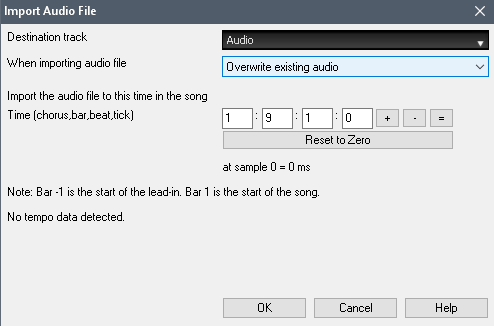
2. Enter 1 : 9 : 1 : 0 (import to chorus 1, bar 9, beat 1, tick 1), select Audio track, and press OK. You could alternatively select any of the Utility tracks if your 'Audio' track is already being used.
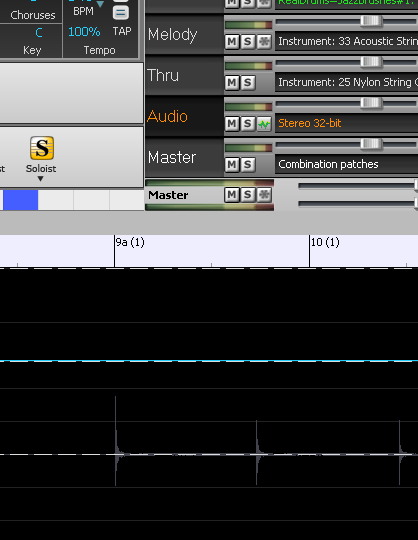
3. If you select the Audio track in the Mixer window, and view the Audio Edit window as in the screenshot below, you should see your audio starting on bar 9.
If this is was not what your question was, please describe in more detail.
-----------------
Por lo que entiendo, desea importar un archivo de audio existente (quizás un archivo .wav) a su canción Band-in-a-Box, comenzando en el primer compás de su coro, que es el compás 9. Si eso es correcto, aquí está como hacer esto.
1. Vaya al menú Audio | Importe audio y seleccione su archivo .wav.
2. Ingrese 1 : 9 : 1 : 0 (importar a coro 1, compás 9, tiempo 1, marca 1), seleccione Pista de audio y presione OK. Alternativamente, puede seleccionar cualquiera de las pistas de Utilidad si su pista de 'Audio' ya está siendo utilizada.
3. Si selecciona la pista de audio en la ventana Mezclador y ve la ventana Edición de audio como en la captura de pantalla a continuación, debería ver el audio comenzando en el compás 9.
Si esta no era su pregunta, por favor descríbala con más detalle.
Muchas gracias por su respuesta pero sigo haciendo algo mal porque no me lo pone en su lugar. El audio está en 2/4 y he probado tanto en este compás como en 4/4 y tampoco lo coloca en el compás 9. Me gustaría enviarle una captura de pantalla pero no sé cómo hacerlo en este correo. Saludos.
No estoy seguro de entender. Una captura de pantalla estaría bien. Para agregar una captura de pantalla, puede hacer clic en el enlace "File Manager" que verá cuando responda a este mensaje. O bien, puede compartir la imagen con Dropbox u otro proveedor de almacenamiento en la nube.
---
I'm not sure I understand. A screenshot would be good. To add a screenshot, you can click the "File Manager" link that you will see when you are replying to this message. Or, you can share the image with Dropbox or another cloud storage provider.
Muchas gracias, Andrew. Mi problema es que sigo tus instrucciones y tampoco me lo coloca en el compás 9. Por si acaso: tengo BB para Mac, el compás es 2/4 y tiene 8 compases de introducción. Te envío captura de pantalla por si observas algo que tenga mal configurado. Saludos.
Había asumido la versión de Windows, pero probé en la versión de Mac y funciona exactamente igual que lo describí. Voy a pasar esto al foro de Mac.
No puedo ver la imagen; debe cambiar la configuración de la imagen en Google Drive para que cualquier persona con el enlace pueda verla.
---- I had assumed the Windows version, but I tested on the Mac version and it works exactly the same as I described. I'll move this over to the Mac forum.
I can't view the image - you need to change the settings on the image in Google Drive so that anyone with the link can view.
¡Por fin, Andrew, lo he conseguido! Pero, como decimos en España,"por la cuenta de la vieja", esto es, prueba-error. Todavía me puedes ayudar. Quiero quitar un trozo de audio que se me ha quedado en los últimos compases. ¿Cómo lo hago? Por cierto: respondiendo a tu pregunta, no veo la onda de audio en Audio/ Edit audio. Saludos y muchas gracias.
Si no hay nada en la ventana de edición de audio (amplíe completamente moviendo la rueda del mouse hacia abajo) y está seguro de que está viendo la pista correcta (la pista predeterminada es "Audio"), entonces no se importó nada. Puede verificar mirando su archivo de canción .SGU en Finder y viendo si hay un archivo .WAV que tenga el mismo nombre. Si no, entonces su canción no tiene una pista de audio.
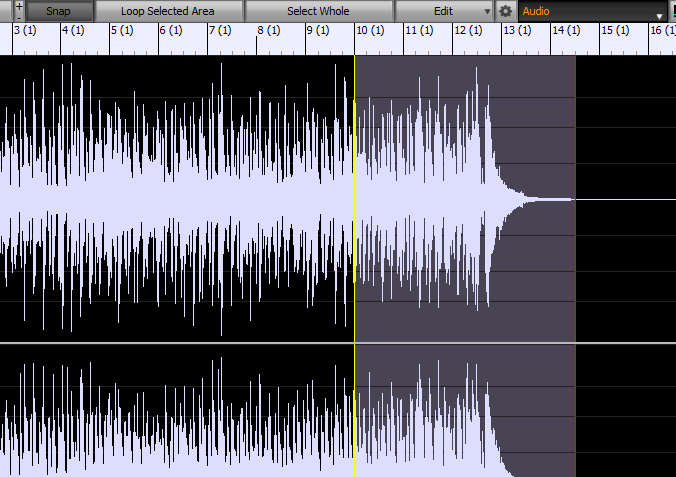
Si desea eliminar el audio de alguna parte de la pista, abra la ventana Edición de audio y asegúrese de tener seleccionada la pista de audio. Luego, puede resaltar una región y presionar Command + X (Cortar). O puede usar la tecla Supr / Fn+Supr dependiendo de su teclado.
---
If there is nothing at all in the audio edit window (zoom all the way out by scrolling the mouse wheel down), and you are sure that you are viewing the correct track (default track is "Audio"), then nothing was imported. You can verify by looking at your .SGU song file in Finder, and seeing if there is a .WAV file that has the same name. If not, then your song does not have an audio track.
If you want to delete audio from some part of the track, open the Audio Edit window, and make sure you have the Audio track selected. Then, you can just highlight a region and press Command+X (Cut). Or you can use the Delete key / Fn+Delete depending on your keyboard.
Es algo muy curioso: no veo la onda del audio en la ventana editar audio pero sonar si que suena y en el compás adecuado. He importado la melodía en audio mp3 para que pese menos y veo que, a veces, me hace automáticamente un archivo de audio en wav y me lo guarda en la carpeta de la canción. Soy nuevo en esto y veo que tengo mucho que aprender. Los trozos de audio que quería quitar los he quitado siguiendo tus instrucciones. Repito, Andrew: muchas gracias por tu paciencia y sapiencia. Un fuerte abrazo desde España.
no veo la onda del audio en la ventana editar audio pero sonar si que suena y en el compás adecuado.
I believe that you are looking at a different track, otherwise I don't have an explanation for that.
Creo que estás mirando una pista diferente, de lo contrario no tengo una explicación para eso.
Quote:
He importado la melodía en audio mp3 para que pese menos y veo que, a veces, me hace automáticamente un archivo de audio en wav y me lo guarda en la carpeta de la canción
Yes, Band-in-a-Box needs to convert the compressed audio to a regular wave file before it can be used.
Sí, Band-in-a-Box necesita convertir el audio comprimido a un archivo de onda normal antes de poder usarlo.
La canción está sonando y en la ventana de audio no hay onda. Eso sí: no veo ahora, en la carpeta de la canción donde se guardan todos los archivos, el de audio wav que hace BB cuando yo trabajo con mp3.
La canción está sonando y en la ventana de audio no hay onda. Eso sí: no veo ahora, en la carpeta de la canción donde se guardan todos los archivos, el de audio wav que hace BB cuando yo trabajo con mp3.
Eso es extraño. ¿Qué compilación exacta tienes (Ayuda | Acerca de Band-in-a-Box) y qué macOS?
zplane recently interviewed Peter Gannon, the founder and creator of Band-in-a-Box, about the software's early days, what sets it apart from AI, how zplane's audio algorithms are used in Band-in-a-Box, and more!
Special thanks to the team at zplane for their continued support.
Last Chance! The Band-in-a-Box® 2026 for Mac® Special Ends Today (May 31, 2026) at 11:59pm PDT!
Time really is running out! Save up to 50% on Band-in-a-Box® 2026 for Mac® upgrades and receive a FREE Bonus PAK—only when you order by 11:59 PM PDT today!
We've added many major new features and new content in a redesigned Band-in-a-Box® 2026 for Mac®!
Version 2026 introduces a modernized GUI redesign across the program, with updated toolbars, refreshed windows, smoother workflows, and a new Dark Mode option. There’s also a new side toolbar for quicker access to commonly used windows, and the new Multi-View feature lets you arrange multiple windows as layered panels without overlap, making it easier to customize your workspace.
Another exciting new addition is the amazing new AI-Notes feature, which can transcribe polyphonic audio into MIDI. View the results in notation or play them back as MIDI, and choose whether to transcribe an entire track or transcribe specific parts like drums, bass, guitars/piano, or vocals. There's over 100 new features in Band-in-a-Box® 2026 for Mac®.
There's an amazing collection of new content too, including 202 RealTracks, new RealStyles, MIDI SuperTracks, Instrumental Studies, “Songs with Vocals” Artist Performance Sets, Playable RealTracks Set 5, two RealDrums Stems sets, and much more!
Upgrade your Band-in-a-Box for Mac® to save up to 50% on most Band-in-a-Box® 2026 upgrade packages!
Plus, when you order your Band-in-a-Box® 2026 Mac upgrade during our special, you'll receive a Free Bonus PAK of exciting new add-ons.
If you need any help deciding which package is the best option for you, just let us know. We are here to help!
Band-in-a-Box® 2026 Mac Special Offers Extended Until May 31st!
Good news- we've extended our Band-in-a-Box® 2026 for Mac® special offers until May 31, 2026!
Band-in-a-Box® 2026 is packed with major new features, enhancements, and an incredible lineup of new content! The program now sports a sleek, modern GUI redesign across the entire interface, including updated toolbars, refreshed windows, smoother workflows, a new dark mode option, and more. The brand-new side toolbar provides quicker access to key windows, while the new Multi-View feature lets you arrange multiple windows as layered panels without overlap, creating a flexible, clutter-free workspace. We have an amazing new “AI-Notes” feature. This transcribes polyphonic audio into MIDI so you can view it in notation or play it back as MIDI. You can transcribe an entire track (all pitched instruments and drums) or focus on individual parts like drums, bass, guitars/piano, or vocals. There's an amazing collection of new content too, including 202 RealTracks, new RealStyles, MIDI SuperTracks, Instrumental Studies, “Songs with Vocals” Artist Performance Sets, Playable RealTracks Set 5, two RealDrums Stems sets, and much more!
There are over 100 new features in Band-in-a-Box® 2026 for Mac®.
When you order purchase Band-in-a-Box® 2026 before 11:59 PM PDT on May 31st, you'll also receive a Free Bonus PAK packed with exciting new add-ons.
Check out the Band-in-a-Box® for Mac packages page to find the best package for you.
Today's the Last Day of the Band-in-a-Box 2026® for Mac Special!
Order before 11:59pm PDT today (May 15, 2026) to save up to 50% off your Band-in-a-Box® 2026 for Mac® upgrade and receive a FREE Bonus PAK loaded with great new Add-ons to use with this new version!
Band-in-a-Box® 2026 for Mac - Special Offers End at 11:59pm PDT on Friday, May 15th, 2026!
Order before 11:59pm PDT on Friday, May 15th and SAVE up to 50% on most Band-in-a-Box® version 2026 for Mac Upgrade packages... and that's not all! With your version 2026 for Mac purchase, we'll include a Bonus PAK full of great new Add-ons FREE! Upgrade to the 2026 49-PAK to receive even more NEW Add-ons including 20 additional RealTracks... that's 222 NEW RealTracks available with version Band-in-a-Box® 2026 for Mac!
Upgrade to Band-in-a-Box® 2026 for Mac® today for as little as $49! Check out the Band-in-a-Box® packages page for all available purchase options.
Learn more about the Free Bonus PAK and 49-PAK here.
If you have any questions about which package is the best option for you, just let us know. We're here to help!
202 New RealTracks Released with Band-in-a-Box 2026!
With Band-in-a-Box® 2026, we've released 202 incredible new RealTracks (in sets 468-488) in a variety of genres—featuring your most requested styles!
Jazz, Funk & World (Sets 468-475):
Our new jazz, funk & blues RealTracks include a groovin’ collection of RealTracks and RealDrums! These include more requested “soul jazz” RealTracks featuring artists Neil Swainson (bass), Charles Treadway (organ), Brent Mason (guitar), and Wes Little (drums). There are new “smooth jazz” styles (4), which include a RealTracks first: muted trumpet, as well as slick new smooth jazz brushes options for drums. Blues lovers will be thrilled—there are more “classic acoustic blues” styles, including guitar (5), bass (4), and drums (10) with blues master Colin Linden, featuring understated and tasty background acoustic soloing, plus brushes drums and acoustic bass. There are also new electric blues RealTracks, including electric blues with PG favorite Johnny Hiland (3) and soulful electric slide guitar from Colin Linden (4). If you love funk & gospel, there are great new options this year, including gospel organ (3) from Charles Treadway, as well as new funk, tango, and rock ’n’ roll drums (3) and bass (1). And for big, bold arrangements, we have uptempo soul horns (4) featuring a three-part hip horn section with options for a full mix or stems of each individual horn — plus an accompanying rhythm section (4) of drums, bass, guitar, and electric piano!
Rock & Pop (Sets 476–482):
Our new rock & pop RealTracks bring a powerful mix of requested favorites, fresh genres, and modern chart-inspired styles! We have more of our popular “Producer Layered Acoustic Guitars (15)” featuring Band-in-a-Box favorite Brent Mason. We’ve continued our much-requested disco styles (10), and added new Celtic guitar (5) with a more basic, accessible approach than our previous Drop-D or DADGAD offerings. There are also highly requested yacht rock styles (17), inspired by the smooth, polished soft-rock sound of the late ’70s and early ’80s — laid-back grooves, silky electric pianos, warm textures, elegant harmonic movement, and pristine production aesthetics. Fans of heavier styles will love our new glam metal (13), capturing the flashy, high-energy sound of ’80s arena-ready guitar rock. We also have a set of rootsy modern-folk rock (18), with a warm, organic sound combining contemporary folk textures and driving acoustic strumming. And we’ve added lots of new modern pop styles (16) — the kinds of sounds you’re hearing on the radio today, featuring exciting new drums, synths, and cutting-edge RealTracks arrangements.
Country, & Americana (Sets 483–488):
Our new country & Americana RealTracks deliver a rich collection of acoustic, electric, and roots-inspired styles! We have new country pop (9) with legendary guitarist Brent Mason. There is also a potpourri (14) of bouzouki, guitars, banjo, and more, perfect for adding texture and character to contemporary acoustic arrangements. We’ve added funky country guitar (5) with PG favorite Brent Mason, along with classic pedal steel styles (5) featuring steel great Doug Jernigan. There are more country songwriter styles (8) that provide intimate, rootsy foundations for storytelling and modern Americana writing. Finally, we have “background soloing” acoustic guitar (12) with Brent Mason — simpler, but still very tasty acoustic lines designed to sit beautifully behind vocals or act as a subtle standalone solo part.
And, if you are looking for more, the 2026 49-PAK (for $49) includes an impressive collection of 20 bonus RealTracks, featuring exciting and inspiring additions to add to your RealTracks library. You'll get new country-rhythm guitar styles from PG Music favorites Johnny Hiland and Brent Mason, along with modern-pop grooves that capture today’s radio-ready sound! There are also new indie-folk styles with guitar, bass, 6-string bass used as a high-chording instrument, acoustic guitar, and banjo. Plus, dedicated "cymbal fills" RealDrums provide an added layer that work very well with low-key folky styles with other percussion.
The 2026 49-PAK is loaded with other great new add-ons as well. Learn more about the 2026 49-PAK!
One of our representatives will be happy to help you over the phone. Our hours of operation are from
6:00AM to 6:00PM PST (GMT -8) Monday thru Friday, and 8:00AM to 4:00PM PST Saturday. We are closed Sunday. You can also send us your questions via email.
One of our representatives will be happy to help you on our Live Chat or by email. Our hours of operation are from
6:00AM to 6:00PM PST (GMT -8) Monday thru Friday; 8:00AM to 4:00PM PST (GMT -8) Saturday; Closed Sunday.




 Dansk
Dansk Deutsch - Windows
 Español
 Français - Windows
 Italiano - Windows
 Nederlands
 Polski
 Português
 Svenskt
 русский
 Japanese
 Simplified Chinese
 Traditional Chinese
 Korean