
The Piano Chord Dictionary
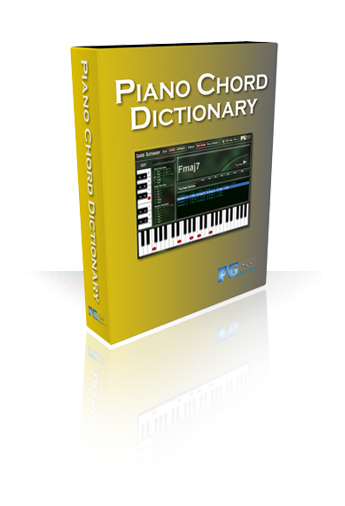
The Piano Chord Dictionary is an essential tool for any musician. Simply choose a root note, select the chord you want to learn, and the Piano Chord Dictionary will play the chord and display it on the on-screen piano keyboard.
Features:
Chord Selection Area
This is where you select the Root and chord type that you want to display. Some of the most common chord types are listed on the main screen, and other chords can be selected from pull-down menus.
Chord Display Area
This part of the screen displays the currently selected chord symbol, the notes that it contains, and possible variations of the chord that can be displayed.
Piano Keyboard Area
This is where the notes in the chord are displayed. Chords are displayed here when a new chord is selected (by default, variation 1 automatically gets displayed for a new chord), when the chord display (Play Chord) button is pressed (the last played variation gets replayed), when the [Chord Contains] button is pressed (displays the chord in root position), or when any of the variations are selected (displays the chord in that variation). The last chord played remains on screen until you select a new chord or variation.
Notes that are played with the left hand are displayed as squares, and notes that are played with the right hand are displayed as circles.
Top Control Panel
This area contains some settings for the program, and allows you to access the Help files, Volume Control mixer, and About screen.
Reverse Chord Finder
The Reverse Chord Finder allows you to enter any notes on the piano keyboard, and the program then displays a list of all chords that contain those notes.
Chord Voicings Selection
This allows you to either display all available voicings for a specific chord, or you can narrow the list to only show specific voicings, for example, left-hand trio voicings.
Unconditional 30-Day Money Back Guarantee on all PG Music products purchased from PG Music Inc.
PG Music Inc. 29 Cadillac Ave Victoria BC V8Z 1T3 Canada
Sales: 1-800-268-6272, 250-475-2874, + 800-4746-8742*
*Outside USA and Canada where International Freephone service is available.
 Online now
Need Help?
Customer Sales & Support
|
Phones (Pacific Time) 1-800-268-6272 1-250-475-2874 |
||
| Live Chat | ||
| OPEN | Online Ordering 24/7 |
|
| OPEN | Forums, email, web support |