

Tutorial: II-V-I Practice
If you're a student or a teacher, you may want some II-V-I practice patterns.
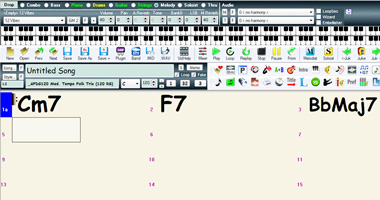
The first thing to do in Band-in-a-Box is press NEW to get a blank slate. You can enter ANY chords you want, whether it's a song, or just chord patterns that you want to practice over. For this example, in bar 1 enter C minor 7 [Cm7 is the shortcut], F7 in bar 2, and B-flat-J [bbj], which is the shortcut for major 7.
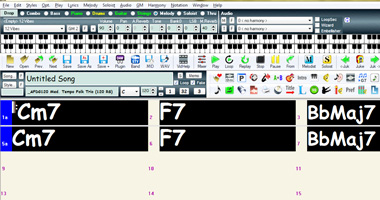
In bar 5 type k4 which is a shortcut that will repeat the first 4 bars.
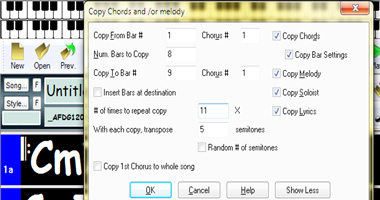
Then using your mouse, highlight all 8 of those bars and drag them to bar 9 while holding control. A Copy Chords and / or Melody dialogue box will appear. Change the "# of times to repeat copy" to 11 and change "With each copy, transpose" to 5. Click OK...
Note - Mac version does not have copy bars x times feature, however you can create the same type of file using "Edit | Copy Special | copy from .. to" and "Edit | Transpose from..to.."
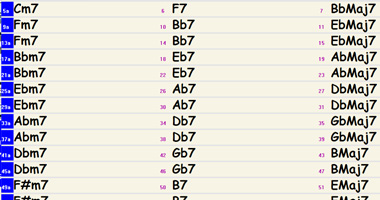
The result? A song that takes the II-V-I progression through the cycle of fifths, through all 12 keys!
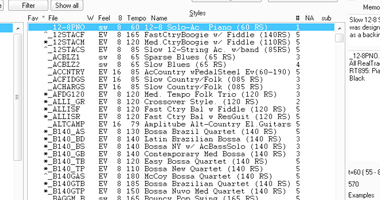
Then pick a tempo, 140, set it to 1 chorus, and choose from over 2 thousand styles, with RealTracks, MIDI, or a combination of both. Band-in-a-Box will generated a rhythm section, playing the cycle-of-fifths practice progression!
Unconditional 30-Day Money Back Guarantee on all PG Music products purchased from PG Music Inc.
PG Music Inc.
29 Cadillac Ave Victoria BC Canada V8Z 1T3
Sales: 800-268-6272, 250-475-2874,+ 800-4746-8742*
* Outside USA & Canada where International Freephone service is available.
Access Codes
Tech Support: Live Chat, support@pgmusic.com
 Online now
Need Help?
Customer Sales & Support
|
Phones (Pacific Time) 1-800-268-6272 1-250-475-2874 |
||
| Live Chat | ||
| OPEN | Online Ordering 24/7 |
|
| OPEN | Forums, email, web support |