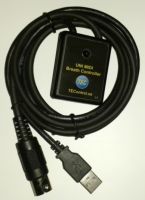
Has anyone had a chance to try out the USB MIDI Breath Controller? I've been looking for an affordable breath controller for some time, and this looks like it would fit the bill nicely. It's half the price of the the MRT Controller, which seems to be the only other product on the market.
Specifically, I'm curious how well it works with JABB. I know that you really should be using it with something like physical modeling, but I've only got so much money to spend.
I've read that JABB is designed to work with wind controllers, but have also read that it's not exactly stellar in that department.
Bob Norton and Matt Finley may have some thoughts for you. They helped me out mightily when I was buying a MIDI wind system for my wife. Bob's site includes general information on wind controllers, too.
In addition to what answers you get here, you might talk to Matt at Patchman Music, a wind controller specialist. He will probably want to sell you something better--it's what he does--but there's no harm in asking. His FAQs page has a wealth of information, too.
HTH,
Richard
"My primary musical instrument is the personal computer."
I have one and I am very happy with it. It can be programmed to send any MIDI CC on any channel, so it will work with pretty much any software that accepts MIDI CC messages.
I learned about it on the Sound On Sound forum (below), there are a couple of detailed reviews there. Hope it helps.
I use an Akai EWI-USB wind controller but I did look up the specs on this unit. It will work very well with JABB. This will send one CC# at a time however with multi-takes you can send a different CC# on each pass. Thus you can get more realistic sounds on JABB. That plus the facts that you can either write and/or correct things in your DAW will take you a long way in obtaining more realistic sounds.
Good luck.
Life is short so make sure you spend as much time as possible on the Internet arguing with strangers.
64 bit Win 10 Pro, the latest BiaB/RB, Roland Octa-Capture audio interface, a ton of software/hardware
Thanks for the info! I think a wind controller is beyond my skill set for a while, but this controller is going to the top of my "fun stuff to get" list.
I have/use the older Yamaha BC3 (like you I'm not a wind/horn player - hard enough to just play guitar and hack around on keys). Since none of my current synths/rack modules have a dedicated breath input jack any longer, I use a MIDI Solutions Breath Controller and feed it (MIDI merge it) into the MIDI stream via the my first MIDI mixer (I run two JL Cooper MSB Rev 2's) that then feeds all synths (including the PC) that are "down stream." I can apply breath control to ANY synth sound source I own.
If I didn't already have the BC3 I'd probably buy this one (expect not sure I'd relish idea of having to HAVE a PC (laptop, net book, whatever) running just to apply breath to an external synth, but that's just me!
Good Luck Larry
Last edited by Larry Kehl; 11/24/1310:23 AM.
Win10Pro,i9,64GB,2TBSSD+20TBHDDs,1080TI,BIAB'24,Scarlett18i8,Montage7,Fusion 8HD,QS8,Integra7,XV5080,QSR,SC-8850,SPLAT,FL21&others,Komp.14,IK suite&others, just a guitar player-AXE FX III &FM9T, FishmanTP, MIDIGuitar2, GK2/3'sw/GI20
I can't imagine ever using the breath controller outside the context of my desktop environment, so performance isn't an issue for me.
I found a free VST called midiAudioToCC which translates volume into MIDI CC commands. Basically, something that could be used as a poor man's breath controller.
But... I tried it out with JABB and GPO, but the results weren't very encouraging - there was too much variation in volume - the flute ended up sounding more like a harmonica because of rapid oscillations in volume. I should play around with the smoothing and see if I can get better results.
Also, humming would probably work better than blowing into the mike. On the other hand, it seems to work fine for the iOS apps...
If I didn't already have the BC3 I'd probably buy this one (expect not sure I'd relish idea of having to HAVE a PC (laptop, net book, whatever) running just to apply breath to an external synth, but that's just me!
A new BC with MIDI OUT is now available according to KVR. This one should plug straight into any synthesizer I think, eliminating the need for conversion boxes, PCs, etc.
TIP: Many of the Yamaha Keyboards came at one time with a Breath Controller input on them.
Usually located on the front, below the keyboard, easy to spot in the used instrument stores, thrift shops, garage sales, etc. - and often can be purchased for pennies on the dollar.
An upside is that those keyboards were built like tanks and generally speaking, all functions still work.
Most were purchased by folks who never really used 'em much, never took them out on gigs, virtually near brand new except for that layer of dust from sitting when the interest soon waned.
Since the Street Price of devices such as the MIDI Solutions Breath Controller box is around the $200 mark, sans mouthpiece device, which will add even more to the purchase price, but these older 61-key Yamaha keyboards can be found and purchased for as little as $20 used (!) it can represent a very viable option and does not require a PC. Overdubbing BC data works pretty much the same, too, if that is the goal.
The actual Yamaha Breath Control mouthpiece and associated hookup is typically not included as many of these keyboards were offered w/o it, the BC being sold as an accessory.
"BC2" can be used with any of the Yamaha stuff that has a BC input.
GOOD suggestion (for someone with a BC but no unit to use it on/with) or for someone who can still get a BC unit.
My situation/solution was just by way of explaining how I applied my BC to one, many, or no synths at all (overkill and actually wasteful for 99% of folks, but I have the equipment anyway for other reasons).
I would NEVER advise anyone to go out build my $$$ solution.
I bought the BC when I had a Motif ES (now have XS which does NOT have BC in) but still bought the MIDI Solutions even though I had the ES (but I did not pay anywhere close to retail for it - more like used for around $60) because I like being able to control all MIDI devies (including PC) via a MIDI mixer/patch bay (I am a control freak). Besides plugging the BC into the ES only allowed me to apply breath to units down stream not up stream, I have many other units upstream of ES (now XS) in my config. so I opted for the approach I now use.
Larry
PS Happy Thanksgiving to all my fellow Yanks out here (and good wishs to all those who aren't Yanks)!
Win10Pro,i9,64GB,2TBSSD+20TBHDDs,1080TI,BIAB'24,Scarlett18i8,Montage7,Fusion 8HD,QS8,Integra7,XV5080,QSR,SC-8850,SPLAT,FL21&others,Komp.14,IK suite&others, just a guitar player-AXE FX III &FM9T, FishmanTP, MIDIGuitar2, GK2/3'sw/GI20
First of all from the video demo that I remember of the TEC controller, it seems far better than anything in its class to use with a keyboard. The fact that it has a USB interface makes it far superior to any similar BC device which works only with specific keyboard models or hardware devices. The USB interface means it will hook to any computer, therefore any synth that works with the computer should be able to talk with the TEC BC controller -although that does not guarantee full compatibility, but is an absolute requirement. Thus the TEC is far more resistant to obsolescence.
Anyone who has not seen the TEC video demo should look and listen here:
Second, as far as JABB and Breath (BC) and Windcontrollers are concerned, I don't think they really designed it to make good use of these devices. If they did, they mostly failed. There is no explicit setting in the Aria Engine for BC or Windcontrollers. Whoever told you so is wrong, but you don't have to take my word for it, just look at the Aria screen menus.
Only Samplemodeling has the following settings:
Keyboard Breath Controller (BC) Windcontroller
Not only do they go out of their way to work with these devices, but the quality of their sounds is incredibly good. I also feel that the overall responsiveness (including latencyh) is the best I have ever tried. Now I'm speaking of Windcontrollers, specifically EWI's but the Breath controller, which I have not tried, surely is very similar.
Samplemodeling uses Kontakt Player for Brass and the their own SWAM (engine) player for Sax, Clarinet, Oboe, and English Horn. Both engines have specific menus for keyboard, BC or Windcontroller.
Not only do they go out of their way to work with these devices, but the quality of their sounds is incredibly good. I also feel that the overall responsiveness (including latencyh) is the best I have ever tried.
Yes, I agree completely with your experience. I don't think there is anything better on the market for woodwind/brass instruments.
I've heard great things about samplemodeling. Thanks!
Yes, it is really great as you can hear in this video.
Quite impressive. In the hands (and mouth) of the skilled player, this would fool most. I looked away while he was playing the tenor sax, and to my ear, I would be fooled - particularly if this would have been less 'naked' with a piano player, drummer and bass player along for the ride.
I still have my BC-2, which I use with my Yamaha CS6X keyboard...a very nice and rugged 'dance-oriented' keyboard with sampling. Wish the TEC wasn't so expensive...oh, well!
I noticed that Hello music has the EWI 4000S for under $500. Not being a woodwind player, I don't know if this is a good deal or not. Hello Music's pricing sometimes seems fantastic, at other times not so great. Here's a link - says "sign in for member pricing" - so maybe there's a bit of a price break there.
They don't exactly give it away, but it is way cheaper than any other alternatives. Consider that just the Midi solutions converter box costs $200 and then you still need to find a used BC3, which goes on ebay for more than $300...
Has anyone had a chance to try out the USB MIDI Breath Controller? I've been looking for an affordable breath controller for some time, and this looks like it would fit the bill nicely. It's half the price of the the MRT Controller, which seems to be the only other product on the market.
A new breath controller from Germany is now available
zplane recently interviewed Peter Gannon, the founder and creator of Band-in-a-Box, about the software's early days, what sets it apart from AI, how zplane's audio algorithms are used in Band-in-a-Box, and more!
Special thanks to the team at zplane for their continued support.
Last Chance! The Band-in-a-Box® 2026 for Mac® Special Ends Today (May 31, 2026) at 11:59pm PDT!
Time really is running out! Save up to 50% on Band-in-a-Box® 2026 for Mac® upgrades and receive a FREE Bonus PAK—only when you order by 11:59 PM PDT today!
We've added many major new features and new content in a redesigned Band-in-a-Box® 2026 for Mac®!
Version 2026 introduces a modernized GUI redesign across the program, with updated toolbars, refreshed windows, smoother workflows, and a new Dark Mode option. There’s also a new side toolbar for quicker access to commonly used windows, and the new Multi-View feature lets you arrange multiple windows as layered panels without overlap, making it easier to customize your workspace.
Another exciting new addition is the amazing new AI-Notes feature, which can transcribe polyphonic audio into MIDI. View the results in notation or play them back as MIDI, and choose whether to transcribe an entire track or transcribe specific parts like drums, bass, guitars/piano, or vocals. There's over 100 new features in Band-in-a-Box® 2026 for Mac®.
There's an amazing collection of new content too, including 202 RealTracks, new RealStyles, MIDI SuperTracks, Instrumental Studies, “Songs with Vocals” Artist Performance Sets, Playable RealTracks Set 5, two RealDrums Stems sets, and much more!
Upgrade your Band-in-a-Box for Mac® to save up to 50% on most Band-in-a-Box® 2026 upgrade packages!
Plus, when you order your Band-in-a-Box® 2026 Mac upgrade during our special, you'll receive a Free Bonus PAK of exciting new add-ons.
If you need any help deciding which package is the best option for you, just let us know. We are here to help!
Band-in-a-Box® 2026 Mac Special Offers Extended Until May 31st!
Good news- we've extended our Band-in-a-Box® 2026 for Mac® special offers until May 31, 2026!
Band-in-a-Box® 2026 is packed with major new features, enhancements, and an incredible lineup of new content! The program now sports a sleek, modern GUI redesign across the entire interface, including updated toolbars, refreshed windows, smoother workflows, a new dark mode option, and more. The brand-new side toolbar provides quicker access to key windows, while the new Multi-View feature lets you arrange multiple windows as layered panels without overlap, creating a flexible, clutter-free workspace. We have an amazing new “AI-Notes” feature. This transcribes polyphonic audio into MIDI so you can view it in notation or play it back as MIDI. You can transcribe an entire track (all pitched instruments and drums) or focus on individual parts like drums, bass, guitars/piano, or vocals. There's an amazing collection of new content too, including 202 RealTracks, new RealStyles, MIDI SuperTracks, Instrumental Studies, “Songs with Vocals” Artist Performance Sets, Playable RealTracks Set 5, two RealDrums Stems sets, and much more!
There are over 100 new features in Band-in-a-Box® 2026 for Mac®.
When you order purchase Band-in-a-Box® 2026 before 11:59 PM PDT on May 31st, you'll also receive a Free Bonus PAK packed with exciting new add-ons.
Check out the Band-in-a-Box® for Mac packages page to find the best package for you.
Today's the Last Day of the Band-in-a-Box 2026® for Mac Special!
Order before 11:59pm PDT today (May 15, 2026) to save up to 50% off your Band-in-a-Box® 2026 for Mac® upgrade and receive a FREE Bonus PAK loaded with great new Add-ons to use with this new version!
Band-in-a-Box® 2026 for Mac - Special Offers End at 11:59pm PDT on Friday, May 15th, 2026!
Order before 11:59pm PDT on Friday, May 15th and SAVE up to 50% on most Band-in-a-Box® version 2026 for Mac Upgrade packages... and that's not all! With your version 2026 for Mac purchase, we'll include a Bonus PAK full of great new Add-ons FREE! Upgrade to the 2026 49-PAK to receive even more NEW Add-ons including 20 additional RealTracks... that's 222 NEW RealTracks available with version Band-in-a-Box® 2026 for Mac!
Upgrade to Band-in-a-Box® 2026 for Mac® today for as little as $49! Check out the Band-in-a-Box® packages page for all available purchase options.
Learn more about the Free Bonus PAK and 49-PAK here.
If you have any questions about which package is the best option for you, just let us know. We're here to help!
202 New RealTracks Released with Band-in-a-Box 2026!
With Band-in-a-Box® 2026, we've released 202 incredible new RealTracks (in sets 468-488) in a variety of genres—featuring your most requested styles!
Jazz, Funk & World (Sets 468-475):
Our new jazz, funk & blues RealTracks include a groovin’ collection of RealTracks and RealDrums! These include more requested “soul jazz” RealTracks featuring artists Neil Swainson (bass), Charles Treadway (organ), Brent Mason (guitar), and Wes Little (drums). There are new “smooth jazz” styles (4), which include a RealTracks first: muted trumpet, as well as slick new smooth jazz brushes options for drums. Blues lovers will be thrilled—there are more “classic acoustic blues” styles, including guitar (5), bass (4), and drums (10) with blues master Colin Linden, featuring understated and tasty background acoustic soloing, plus brushes drums and acoustic bass. There are also new electric blues RealTracks, including electric blues with PG favorite Johnny Hiland (3) and soulful electric slide guitar from Colin Linden (4). If you love funk & gospel, there are great new options this year, including gospel organ (3) from Charles Treadway, as well as new funk, tango, and rock ’n’ roll drums (3) and bass (1). And for big, bold arrangements, we have uptempo soul horns (4) featuring a three-part hip horn section with options for a full mix or stems of each individual horn — plus an accompanying rhythm section (4) of drums, bass, guitar, and electric piano!
Rock & Pop (Sets 476–482):
Our new rock & pop RealTracks bring a powerful mix of requested favorites, fresh genres, and modern chart-inspired styles! We have more of our popular “Producer Layered Acoustic Guitars (15)” featuring Band-in-a-Box favorite Brent Mason. We’ve continued our much-requested disco styles (10), and added new Celtic guitar (5) with a more basic, accessible approach than our previous Drop-D or DADGAD offerings. There are also highly requested yacht rock styles (17), inspired by the smooth, polished soft-rock sound of the late ’70s and early ’80s — laid-back grooves, silky electric pianos, warm textures, elegant harmonic movement, and pristine production aesthetics. Fans of heavier styles will love our new glam metal (13), capturing the flashy, high-energy sound of ’80s arena-ready guitar rock. We also have a set of rootsy modern-folk rock (18), with a warm, organic sound combining contemporary folk textures and driving acoustic strumming. And we’ve added lots of new modern pop styles (16) — the kinds of sounds you’re hearing on the radio today, featuring exciting new drums, synths, and cutting-edge RealTracks arrangements.
Country, & Americana (Sets 483–488):
Our new country & Americana RealTracks deliver a rich collection of acoustic, electric, and roots-inspired styles! We have new country pop (9) with legendary guitarist Brent Mason. There is also a potpourri (14) of bouzouki, guitars, banjo, and more, perfect for adding texture and character to contemporary acoustic arrangements. We’ve added funky country guitar (5) with PG favorite Brent Mason, along with classic pedal steel styles (5) featuring steel great Doug Jernigan. There are more country songwriter styles (8) that provide intimate, rootsy foundations for storytelling and modern Americana writing. Finally, we have “background soloing” acoustic guitar (12) with Brent Mason — simpler, but still very tasty acoustic lines designed to sit beautifully behind vocals or act as a subtle standalone solo part.
And, if you are looking for more, the 2026 49-PAK (for $49) includes an impressive collection of 20 bonus RealTracks, featuring exciting and inspiring additions to add to your RealTracks library. You'll get new country-rhythm guitar styles from PG Music favorites Johnny Hiland and Brent Mason, along with modern-pop grooves that capture today’s radio-ready sound! There are also new indie-folk styles with guitar, bass, 6-string bass used as a high-chording instrument, acoustic guitar, and banjo. Plus, dedicated "cymbal fills" RealDrums provide an added layer that work very well with low-key folky styles with other percussion.
The 2026 49-PAK is loaded with other great new add-ons as well. Learn more about the 2026 49-PAK!
One of our representatives will be happy to help you over the phone. Our hours of operation are from
6:00AM to 6:00PM PST (GMT -8) Monday thru Friday, and 8:00AM to 4:00PM PST Saturday. We are closed Sunday. You can also send us your questions via email.
One of our representatives will be happy to help you on our Live Chat or by email. Our hours of operation are from
6:00AM to 6:00PM PST (GMT -8) Monday thru Friday; 8:00AM to 4:00PM PST (GMT -8) Saturday; Closed Sunday.










 Dansk
Dansk Deutsch - Windows
 Español
 Français - Windows
 Italiano - Windows
 Nederlands
 Polski
 Português
 Svenskt
 русский
 Japanese
 Simplified Chinese
 Traditional Chinese
 Korean