Since I'm a newbie to RB I have a lot of questions - I hope I'm not getting on your nerves with my almost daily postings. At least I promise that before bringing up issues here I will search back postings, read the manual and ask Google!
Here are my 2 questions about volume automation:
1. Am I right: You can copy the volume tracks of MIDI files, but can't copy the volume track of one audio track to another audio track?
2. I always have horn sections in my songs, which I convert to audio files after the MIDI tracks are OK. To make the section sound exactly like I want it to, I have to find a very exact place for each instrument volumewise and of course panwise (can I use that word?). Mostly changing the volume by a very small value makes the difference. After that I'd like to throw in some (de-)crescendi. If I edit the volume track of each instrument accordingly I cannot change the volume later on with the mixdown.
If I automate volume changes by recording the respective fader moves one by one I will lose 'my' sound, because in order to get a crescendo I'll have to pull the fader almost completely down to zero and then up again - that way it's almost impossible to bring it back to the exact value it had before.
Of course I could leave the horn tracks untouched after editing their volume tracks and change only the other instruments to make them fit in, but that is pretty limiting, too.
The solution would be recording the fader moves of the subgroup I combine all horns in. But I do understand that this is not possible, because subgroups have no tracks on their own.
I am sure that lots of folks work with horn (or string) sections - how do you get along with that problem - are there any workarounds...?
It appears few people are using RealBand as you describe. My thought is you might want to try multiple passes for each track.
During pass one the concentration might be on acquiring the best, most realistic midi to audio conversion possible. What does "best" mean in this example? Maybe it means an audio output with dynamics similar to what a human can produce. Maybe it means limited dynamic range like recording an instrument with a compressor insert on the track. It most likely will mean taking care of broad volume levels in midi. You'll have to define "best" but the goal is the best midi to audio conversion you can obtain so you don't have to do all the mixing in the audio domain. I'm thinking each midi instrument audio track should be a mono track since it is common to have mono instrument tracks. Even major tracks such as main vocal, lead guitar or sax solo typically begins life as a recorded audio track.
Once everything is rendered to audio then you can treat the song project as all audio. With most or all mono audio tracks, center all panning so you can work on volume levels and frequency separation. Get the best sounding mono mix you can. Once you have a good mono mix, then pan and start adding effects.
Yep.... Real Band is a very basic DAW and as such, does not have the full functionality one expects in a DAW.
I would suggest that you look into buying something like Cakewalk's Music Creator 7 for $20 from their website or what ever other DAW you might prefer. I use Sonar, also by Cakewalk and a few steps up from the MC series. I started with the MC series so I have no doubts it will do what you need.
I write my songs in Band in a Box and then use Real Band to render the audio tracks. I export those tracks one at a time into Sonar. So essentially, I am using 3 different programs to do what I do. You will find that many others also use a separate DAW to do their final mixing. It's also where I add vocals and my live played instruments and other synths.
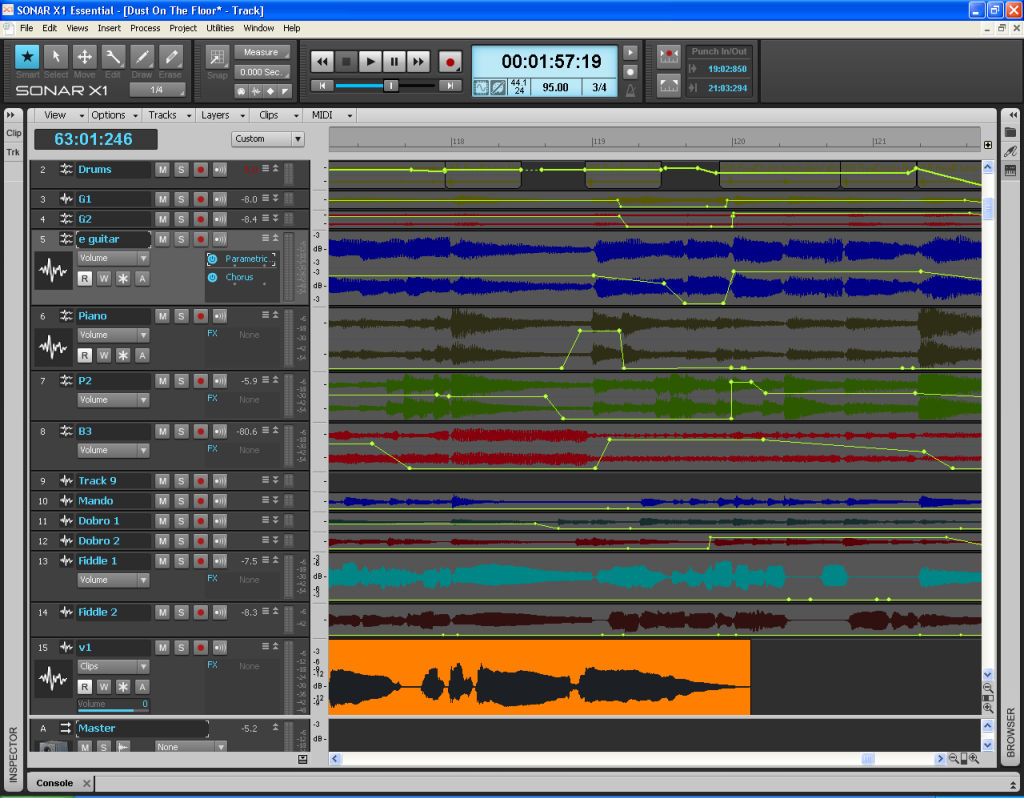
In Sonar, I can easily add the volume and panning envelopes I need to control the sound of the instrument in the track. Sonar's envelopes are easily controlled by inserting nodes manually or it will follow "writing automation" in real time. Essentially, turn write automation on and during the playback it will record the fader and knob movements you make. I don't like doing it that way because it's messy ( one fader movement can easy deposit 20 to 30 nodes into the envelope) and not very accurate. I find I get the best control by surgically inserting the nodes exactly where I want them. Fades in and out are very easy to accomplish and by dragging the track vertically larger, you can get precise dB settings on those nodes.
The photo above is a typical look at a project I do in Sonar. Notice the bright yellow lines with dots.... those are the volume envelopes and the nodes. Panning envelopes are red where they are used. Whichever mode you are in is highlighted. This is volume mode.
By zooming in on the track, I can place my envelopes surgically to get one note in one track and the very next node in the track above it to make one piano fill.(<< That was done in a different song.) I can also easily fade instruments in or out as you can see in the photo.
NOTE: Always take your tracks into the DAW for mixing as full uneffected, dry tracks. Don't do any fades or edits in BB/RB. The edits that you "burn" to the tracks upon export from BB/RB become permanent and that's not the best option. Leave the tracks 100% complete and dry, and you can always do your edits in the DAW and those things are easily changed by adjusting the envelopes.
With a good, fully functional DAW, you will be able to do everything you are asking for, and do it easily.
You can find my music at: www.herbhartley.com Add nothing that adds nothing to the music. You can make excuses or you can make progress but not both.
The magic you are looking for is in the work you are avoiding.
In Sonar, I can easily add the volume and panning envelopes I need to control the sound of the instrument in the track. Sonar's envelopes are easily controlled by inserting nodes manually or it will follow "writing automation" in real time.
Volume envelopes are also offered in RealBand, and have been since 2014 (I believe). Here's the PG Music tutorial:
I have worked in lots of other DAWs in the past (including MC7, as Guitarhacker suggested). However, I am currently working entirely in Realband to really wrap my brain around all that it has to offer. So far, I have found that it does most everything as other DAWs if I just do a little digging to find it.
So far, I have found that it does most everything as other DAWs if I just do a little digging to find it.
Yep, people just don't take time to learn it. Regarding original post; I believe you can indeed cut/copy just volume nodes for audio or MIDI. Don't have it open right now to verify. And yes it has automation, though some (who are used to other DAWs) feel it could be improved.
OK, opened it for image below. Highlight section of audio, then click Copy. Check what you want, uncheck what you don't.
Last edited by rharv; 02/11/1602:58 PM.
I do not work here, but the benefits are still awesome Make your sound your own!
This is the major point about RB that gets missed ALL THE TIME. RB does much more than people realize.
Sometimes when someone becomes part of the PG family they are already familiar with and invested a lot of time and money in another DAW so they don't want to switch and I can't blame them. Just don't make assumptions that RB can't do something without testing it out first. I just made that mistake about a hardware synth with a GM soundbank and Notes corrected me. This stuff is tricky.
The thing to keep in mind for people reading this is if you already have a $4-600 big name DAW great. For that price it better do stuff that RB can't or if it can it does it better, easier with prettier looks, whatever.
BUT, if you don't already have another DAW and you're thinking you might need one, FULLY check out what RB can do FIRST. Depending on what your needs are it could easily be all you need.
although I don't have too much experience with other DAWs that's exactly my impression so far: RB is much more powerful than it seems to be at first glance, you just have to find out. And I really do prefer it's clear GUI to that of other DAWs, OK, that's a matter of personal taste.
Of course there seem to be a few things lacking, but I am convinced that you can get stunning results with it. And then there's this great forum with so much helpfulness and, of course, the wishlist.
Yes, you are perfectly right: With the X-mas special I paid less than 200 bucks for the UltraPlusPak with thousands of MIDI and RealTrack styles, which summed up to about 90 GB I believe - if that's not value for money...
I just got the forum title 'Enthusiast' and that's exactly what I've become during tbe last six weeks!
thanks a lot for taking the time for your elaborate replies.
I read your suggestions and descriptions very carefully - it's' really interesting to get to know the different approaches you have. But I am sure that I will benefit from either one; in fact I already tried some of the things you mentioned in order to find out what suits me best.
Inspired by JimFogle's opinion I meanwhile figured out how I can solve my "crescendo problem': Since these crescendi will not be changed once I threw them in, I can prepare the volume track of one horn MIDI track first, then copy its nodes to the other horn MIDI tracks and render the four horn section tracks (be it EQed like JimFogles wrote or' dry' like Guitarhacker prefers it) afterwards. Either way I can change their final volumes during the mixdown to any value without having to take care of the crescendi.
I just tried it once again - the volume track of an audio track can only be copied when you copy the whole track including the audio part (thus by checking "Events" and "Nodes"). Copying solely the volume track (by checking just "Nodes") doesn't work with me...
Introducing XPro Styles PAK 11 – Now Available for Windows Band-in-a-Box 2026 and Higher!
XPro Styles PAK 11 for Windows & Mac Band-in-a-Box® version 2026 (and higher) is here with 100 brand new RealStyles, plus 31 RealTracks/RealDrums!
Guess who’s back again? That’s right! It’s our XPro Styles PAK’s triumphant return with the 11th edition in this series! 100 new styles are coming your way spread across the rock & pop, jazz, and country genres. And this edition's wildcard genre explores the immense and far-reaching catalogue of electronic music! The included 31 RealTracks and RealDrums can be used with any Band-in-a-Box® 2026 (and higher) package.
Special offers available until August 31st, 2026!
All the XPro Styles PAKs 1-11 are on sale for only $29 ea (Reg. $49 ea), or get them all in the XPro Styles PAK Bundle for only $149 (reg. $299)! Order now!
XPro Styles PAKs require Band-in-a-Box® 2026 or higher and are compatible with ANY package, including the Pro, MegaPAK, UltraPAK, UltraPAK+, and Audiophile Edition.
Introducing Xtra Styles PAK 22 – Now Available for Windows Band-in-a-Box 2026 and Higher!
Xtra Styles PAK 22 for Windows & Mac Band-in-a-Box version 2026 (and higher) is here with 200 brand new RealStyles!
It’s time to celebrate! Xtra Styles PAK 22 for Band-in-a-Box® is here, and we've got 200 brand-new styles coming your way!
No Xtra Styles PAK is complete without the classic rock & pop, jazz, and country volumes you know and love, and we’ve got plenty to share, with 150 styles spread across too many genres to list! Of course, it also wouldn’t be complete with our special wildcard volume to add a little spice and pizzazz to the mix. This year, because we loved it so much the first time, we’ve decided to make the second iteration of our SynthMaster volume, full of new sounds, interesting genres, and 50 engaging styles, all making use of the diverse SynthMaster plugin! Here you can find genres such as airy yacht rock, sultry electrotango, and even some synth soca funk. Don’t wait, pickup up Xtra Styles PAK 22 today!
In this PAK you can find: dulcet folk ballads, funky gospel country, Brazilian jazz fusion, upbeat 1980s pop, classic Americana, a plethora of breezy bossa novas, indie singer-songwriter, scintillating synthwave, exuberant electronica, and many, many more!
Special offers available until August 31st, 2026!
All the Xtra Styles PAKs 1-22 are on special for only $29 each (reg $49), or get all 22 PAKs for $199 (reg $399)! Order now!
Note: The Xtra Styles require the UltraPAK, UltraPAK+, or Audiophile Edition of Band-in-a-Box®. (Xtra Styles PAK 22 requires the 2026 or higher UltraPAK, UltraPAK+, or Audiophile Edition. They will not work with the Pro or MegaPAK version because they need the RealTracks from the UltraPAK, UltraPAK+, or Audiophile Edition.
Introducing XPro Styles PAK 11 – Now Available for Mac Band-in-a-Box 2026 and Higher!
XPro Styles PAK 11 for Mac & Windows Band-in-a-Box® version 2026 (and higher) is here with 100 brand new RealStyles, plus 31 RealTracks/RealDrums!
Guess who’s back again? That’s right! It’s our XPro Styles PAK’s triumphant return with the 11th edition in this series! 100 new styles are coming your way spread across the rock & pop, jazz, and country genres. And this edition's wildcard genre explores the immense and far-reaching catalogue of electronic music! The included 31 RealTracks and RealDrums can be used with any Band-in-a-Box® 2026 (and higher) package.
Special offers available until August 31st, 2026!
All the XPro Styles PAKs 1-11 are on sale for only $29 ea (Reg. $49 ea), or get them all in the XPro Styles PAK Bundle for only $149 (reg. $299)! Order now!
XPro Styles PAKs require Band-in-a-Box® 2026 or higher and are compatible with ANY package, including the Pro, MegaPAK, UltraPAK, UltraPAK+, and Audiophile Edition.
Introducing Xtra Styles PAK 22 – Now Available for Mac Band-in-a-Box 2026 and Higher!
Xtra Styles PAK 22 for Mac & Windows Band-in-a-Box version 2026 (and higher) is here with 200 brand new RealStyles!
It’s time to celebrate! Xtra Styles PAK 22 for Band-in-a-Box® is here, and we've got 200 brand-new styles coming your way!
No Xtra Styles PAK is complete without the classic rock & pop, jazz, and country volumes you know and love, and we’ve got plenty to share, with 150 styles spread across too many genres to list! Of course, it also wouldn’t be complete with our special wildcard volume to add a little spice and pizzazz to the mix. This year, because we loved it so much the first time, we’ve decided to make the second iteration of our SynthMaster volume, full of new sounds, interesting genres, and 50 engaging styles, all making use of the diverse SynthMaster plugin! Here you can find genres such as airy yacht rock, sultry electrotango, and even some synth soca funk. Don’t wait, pickup up Xtra Styles PAK 22 today!
In this PAK you can find: dulcet folk ballads, funky gospel country, Brazilian jazz fusion, upbeat 1980s pop, classic Americana, a plethora of breezy bossa novas, indie singer-songwriter, scintillating synthwave, exuberant electronica, and many, many more!
Special offers available until August 31st, 2026!
All the Xtra Styles PAKs 1-22 are on special for only $29 each (reg $49), or get all 22 PAKs for $199 (reg $399)! Order now!
Note: The Xtra Styles require the UltraPAK, UltraPAK+, or Audiophile Edition of Band-in-a-Box®. (Xtra Styles PAK 22 requires the 2026 or higher UltraPAK, UltraPAK+, or Audiophile Edition. They will not work with the Pro or MegaPAK version because they need the RealTracks from the UltraPAK, UltraPAK+, or Audiophile Edition.
zplane recently interviewed Peter Gannon, the founder and creator of Band-in-a-Box, about the software's early days, what sets it apart from AI, how zplane's audio algorithms are used in Band-in-a-Box, and more!
Special thanks to the team at zplane for their continued support.
Last Chance! The Band-in-a-Box® 2026 for Mac® Special Ends Today (May 31, 2026) at 11:59pm PDT!
Time really is running out! Save up to 50% on Band-in-a-Box® 2026 for Mac® upgrades and receive a FREE Bonus PAK—only when you order by 11:59 PM PDT today!
We've added many major new features and new content in a redesigned Band-in-a-Box® 2026 for Mac®!
Version 2026 introduces a modernized GUI redesign across the program, with updated toolbars, refreshed windows, smoother workflows, and a new Dark Mode option. There’s also a new side toolbar for quicker access to commonly used windows, and the new Multi-View feature lets you arrange multiple windows as layered panels without overlap, making it easier to customize your workspace.
Another exciting new addition is the amazing new AI-Notes feature, which can transcribe polyphonic audio into MIDI. View the results in notation or play them back as MIDI, and choose whether to transcribe an entire track or transcribe specific parts like drums, bass, guitars/piano, or vocals. There's over 100 new features in Band-in-a-Box® 2026 for Mac®.
There's an amazing collection of new content too, including 202 RealTracks, new RealStyles, MIDI SuperTracks, Instrumental Studies, “Songs with Vocals” Artist Performance Sets, Playable RealTracks Set 5, two RealDrums Stems sets, and much more!
Upgrade your Band-in-a-Box for Mac® to save up to 50% on most Band-in-a-Box® 2026 upgrade packages!
Plus, when you order your Band-in-a-Box® 2026 Mac upgrade during our special, you'll receive a Free Bonus PAK of exciting new add-ons.
If you need any help deciding which package is the best option for you, just let us know. We are here to help!
Band-in-a-Box® 2026 Mac Special Offers Extended Until May 31st!
Good news- we've extended our Band-in-a-Box® 2026 for Mac® special offers until May 31, 2026!
Band-in-a-Box® 2026 is packed with major new features, enhancements, and an incredible lineup of new content! The program now sports a sleek, modern GUI redesign across the entire interface, including updated toolbars, refreshed windows, smoother workflows, a new dark mode option, and more. The brand-new side toolbar provides quicker access to key windows, while the new Multi-View feature lets you arrange multiple windows as layered panels without overlap, creating a flexible, clutter-free workspace. We have an amazing new “AI-Notes” feature. This transcribes polyphonic audio into MIDI so you can view it in notation or play it back as MIDI. You can transcribe an entire track (all pitched instruments and drums) or focus on individual parts like drums, bass, guitars/piano, or vocals. There's an amazing collection of new content too, including 202 RealTracks, new RealStyles, MIDI SuperTracks, Instrumental Studies, “Songs with Vocals” Artist Performance Sets, Playable RealTracks Set 5, two RealDrums Stems sets, and much more!
There are over 100 new features in Band-in-a-Box® 2026 for Mac®.
When you order purchase Band-in-a-Box® 2026 before 11:59 PM PDT on May 31st, you'll also receive a Free Bonus PAK packed with exciting new add-ons.
Check out the Band-in-a-Box® for Mac packages page to find the best package for you.
One of our representatives will be happy to help you over the phone. Our hours of operation are from
6:00AM to 6:00PM PST (GMT -8) Monday thru Friday, and 8:00AM to 4:00PM PST Saturday. We are closed Sunday. You can also send us your questions via email.
One of our representatives will be happy to help you on our Live Chat or by email. Our hours of operation are from
6:00AM to 6:00PM PST (GMT -8) Monday thru Friday; 8:00AM to 4:00PM PST (GMT -8) Saturday; Closed Sunday.








 Dansk
Dansk Deutsch - Windows
 Español
 Français - Windows
 Italiano - Windows
 Nederlands
 Polski
 Português
 Svenskt
 русский
 Japanese
 Simplified Chinese
 Traditional Chinese
 Korean