So I'm a fan of the Nashville series and as such it's got me interested again in making music.
One thing I have trouble with in my DAW (Studio One) is trying to get BIAB bass Realtracks to sound smooth, fatter, thicker and deeper without sounding boomy. I know not all BIAB RealTracks were recorded with same musicians so there will be a variance but is it a matter of adding effects to make bass sound the way I want it? Studio One has "ProEq" but I've never been able to get the bass to sound like I want although I have gotten close. I also have iZotope Nectar2, Allow2 & Ozone6 plugins but never happy with the bass tracks from BIAB. Currently mixing with this RealTrack "_ACCFOLK.STY BBStrings_Real 2444 Guitar, Baritone Electric, Background PopCountryBrent Ev 085"
I'm seldom ever satisfied with any bass track that I hear initially. But adding a compressor to the bass track and adjusting it to suit your taste can get rid of the boomy sound and muddyness so that it punches through the mix. Give it a try. And of course make sure there's NO reverb on your bass track. Also pan your bass just a bit off center to give it it's own sonic space and to keep it from muddying up the vocal. Finally, it's all subjective. If YOU like it, it's good.
Also, filter the RealTracks picker to make sure you have select the "Direct Input (DI)" version of the RealTrack. That ensures that there is no effects processing on that track. That lets you do all the processing as you see fit.
John
Laptop-HP Omen I7 Win11Pro 32GB 12TB SSD Desktop-ASUS-I7 Win10Pro 32GB 12TB SATA
Here is something to try - using just what Studio One Professional gives you. (You should NOT need anything more - S1 Pro has it all...)
1. Drop the Funk Bass preset on your bass track. (EQ and Compressor)
2. (You may need to turn the whole track down after that -2 0r -3 dB)
3. Bring up the EQ that is now on the track - click the maroon circle to turn it on - it's around 80 Hz. It will drop out the really low stuff. Slide it a little right to drop out a little more - a bit right of 100 Hz.
4. Raise the Yellow dot up - a "bump" just above 100 - it will give your bass some punch and clarity. You can slide it a little left or right to hear the affect it has on the sound of the bass...
Try a good saturation plugin. They'll change the tone of your bass in ways EQ and compression can't. I have Klanghelm SDRR (https://klanghelm.com/contents/products/SDRR/SDRR.php). It's a steal at 34 euros but there are other options eg soundtoys decapitator. The bass sound you describe is exactly what you get.
I've never tried Helian 3, just the regular Helian Bass further down the page. But since it is free on this site I'll likely grab Helian 3 also.
Free Amp is pretty cool also, but I have noticed version 2 may play nice on one machine where version 3 works on another so I don't often recommend it publicly.
I do not work here, but the benefits are still awesome Make your sound your own!
Bass is often the hardest thing to get right due to the speakers and room you're working in. Having a good playback system with speakers that can reproduce that low end accurately is critical to getting it to sound good. A treated room really helps too.
Floyd also hit on something that not many people are aware of. It is a great idea to high pass the bass. Just like you should do with most everything else, the bass can often benefit from a high pass filter set to around 100hz. You might have to experiment a bit on the slope and the exact freq, could be lower or higher, but it's something you should try. Most people do the exact opposite and boost the low end of the bass thinking it will get them a fatter sound when the opposite is in fact true.
Keep in mind too that you're comparing your mix to that of a professional who knows what to do and has the million dollar studio and knows how to use it. Not saying you can't get a great bass, because you can, but you might not get it from a real track. As great as the RT's are, sometimes you just have to do something else to get what you want. I've been known to use a sampled bass with midi and play my own bass lines from time to time. You can often get a much cleaner bass which has nice definition in the sound and cool characteristics and overtones that might not be in a RT.
You can find my music at: www.herbhartley.com Add nothing that adds nothing to the music. You can make excuses or you can make progress but not both.
The magic you are looking for is in the work you are avoiding.
You may be trying to emulate a composite sound of acoustic and electric bass blended together.
Choose your bass RealTrack (I'm assuming acoustic), freeze the performance you like best, extract the RealChart midi, import midi and play using an electric (if RealTrack was electric then go with acoustic) bass instrument patch. Mix the sound of both tracks together to create one sound. One track likely will be -12db to -18db quieter than the most prominent track.
You'll still need to eq the composite sound but you may find the composite sound to be closer to the way you want to begin with.
Thanks everyone for your comments. There's a lot to think about and some of it is beyond my skill set but there are some useful things here to consider.
Also, filter the RealTracks picker to make sure you have select the "Direct Input (DI)" version of the RealTrack. That ensures that there is no effects processing on that track. That lets you do all the processing as you see fit.
Here is something to try - using just what Studio One Professional gives you. (You should NOT need anything more - S1 Pro has it all...)
1. Drop the Funk Bass preset on your bass track. (EQ and Compressor)
2. (You may need to turn the whole track down after that -2 0r -3 dB)
3. Bring up the EQ that is now on the track - click the maroon circle to turn it on - it's around 80 Hz. It will drop out the really low stuff. Slide it a little right to drop out a little more - a bit right of 100 Hz.
4. Raise the Yellow dot up - a "bump" just above 100 - it will give your bass some punch and clarity. You can slide it a little left or right to hear the affect it has on the sound of the bass...
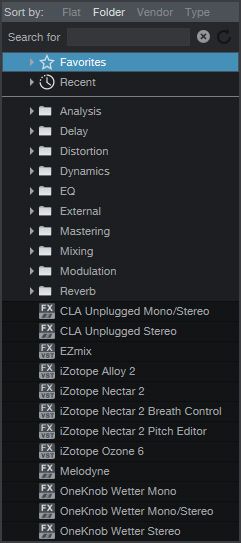
I don't have the same options as you. I don't have your instruments and certainly not guitar as an option in my folder list. I would love to know how you got those? I'm using Studio One 3 Pro.
Here is something to try - using just what Studio One Professional gives you. (You should NOT need anything more - S1 Pro has it all...)
1. Drop the Funk Bass preset on your bass track. (EQ and Compressor)
2. (You may need to turn the whole track down after that -2 0r -3 dB)
3. Bring up the EQ that is now on the track - click the maroon circle to turn it on - it's around 80 Hz. It will drop out the really low stuff. Slide it a little right to drop out a little more - a bit right of 100 Hz.
4. Raise the Yellow dot up - a "bump" just above 100 - it will give your bass some punch and clarity. You can slide it a little left or right to hear the affect it has on the sound of the bass...
I don't have the same options as you. I don't have your instruments and certainly not guitar as an option in my folder list. I would love to know how you got those? I'm using Studio One 3 Pro.
Whatever your picture was suppose to be, I can't see it...
Are you looking at the Effects? Make sure that is clicked at the bottom of the Browse window (not Instruments or Sounds or Files or Pool).
In the RealTracks picker, you should see a column labeled "Direct Input Available". So first check if the instrument you want has a DI available. Then, you can reselect (or select) the instrument, but make sure the "Direct Input" checkbox is checked.
John
Laptop-HP Omen I7 Win11Pro 32GB 12TB SSD Desktop-ASUS-I7 Win10Pro 32GB 12TB SATA
1. I assume that in referring to Nashville, do you mean the TV series?
2. Are you mixing over speakers in your new room? If so, no amount of Izotope or other processing is going to help overcome the very strong room modes that you very likely have present in that room due to the quite narrow shape and concrete walls.
I realize that most people will say to never mix over headphones. That is generally true; particularly for stereo imaging. However, for very narrow and/or small rooms, there is almost no way to actually compensate for the undamped room modes you have right in the middle of bass guitar frequencies.
You can test for the actual modes with a little bit of a complicated setup if you have a microphone and a way to record output of your monitor speakers while keeping it from feeding back into the system.
The reason you might need this is to record how strong your room modes actually are and what kind of compensation you will need to do in an output bus EQ so that when you do mix, you aren't compensating with individual track EQ.
These are automated systems. However, you can accomplish similar results for strongly undamped modes like what is probably in your room, by using a sine sweep waveform played through your system, and a microphone at your listening position, recording the output of the speakers.
You record the signal and then look to see at what frequencies you have strong modes - this is where the recorded signal will go significantly higher than the rest of the signal. Several ways to go about measuring this.
However, before going on - do you have interest in the topic?
Izotope's Neutron has some great electric bass presets that address the issues you mention and they are easy to tweak. And Neutron's "Masking Meter" makes it easy to detect frequency collisions with the kick drum and bass guitar.
Bud
Our albums and singles are on Spotify, Apple Music, Amazon Music, YouTube Music, Pandora and more. If interested search on Janice Merritt. Thanks! A few of our videos are here on our website: https://www.janiceandbud.com/our-music.html
Although the Bass RealTracks are good I personally never use a BIAB bass line. I always like to create my own as the RealTracks never quite play what I want them to play. They will have strange and inappropriate leaps or maybe a walking bass will be OK for a while and then suddenly jump to a wrong note. Sometimes the bass notes can sound out of tune to my ears too. I think the bass is such a crucial element of a song that it is best to create your own lines. This applies no matter what the style jazz, funky, country or pop the bass line is the glue with the drums to creating the correct groove. I use Spectrasonics Trilian or MODO bass but there are many excellent bass vst instruments to choose from.
Paul, in listening closely to the YouTube link, the bass is not even being played for half of the video and the part where it is present is the absolutely simplest bass part one can imagine. At most two notes per measure and only the root being played if my ear is not lying to me. Often the notes are held long enough that they simply die out. I would be surprised if there are any BIAB tracks that are that simple.
Introducing XPro Styles PAK 11 – Now Available for Windows Band-in-a-Box 2026 and Higher!
XPro Styles PAK 11 for Windows & Mac Band-in-a-Box® version 2026 (and higher) is here with 100 brand new RealStyles, plus 31 RealTracks/RealDrums!
Guess who’s back again? That’s right! It’s our XPro Styles PAK’s triumphant return with the 11th edition in this series! 100 new styles are coming your way spread across the rock & pop, jazz, and country genres. And this edition's wildcard genre explores the immense and far-reaching catalogue of electronic music! The included 31 RealTracks and RealDrums can be used with any Band-in-a-Box® 2026 (and higher) package.
Special offers available until August 31st, 2026!
All the XPro Styles PAKs 1-11 are on sale for only $29 ea (Reg. $49 ea), or get them all in the XPro Styles PAK Bundle for only $149 (reg. $299)! Order now!
XPro Styles PAKs require Band-in-a-Box® 2026 or higher and are compatible with ANY package, including the Pro, MegaPAK, UltraPAK, UltraPAK+, and Audiophile Edition.
Introducing Xtra Styles PAK 22 – Now Available for Windows Band-in-a-Box 2026 and Higher!
Xtra Styles PAK 22 for Windows & Mac Band-in-a-Box version 2026 (and higher) is here with 200 brand new RealStyles!
It’s time to celebrate! Xtra Styles PAK 22 for Band-in-a-Box® is here, and we've got 200 brand-new styles coming your way!
No Xtra Styles PAK is complete without the classic rock & pop, jazz, and country volumes you know and love, and we’ve got plenty to share, with 150 styles spread across too many genres to list! Of course, it also wouldn’t be complete with our special wildcard volume to add a little spice and pizzazz to the mix. This year, because we loved it so much the first time, we’ve decided to make the second iteration of our SynthMaster volume, full of new sounds, interesting genres, and 50 engaging styles, all making use of the diverse SynthMaster plugin! Here you can find genres such as airy yacht rock, sultry electrotango, and even some synth soca funk. Don’t wait, pickup up Xtra Styles PAK 22 today!
In this PAK you can find: dulcet folk ballads, funky gospel country, Brazilian jazz fusion, upbeat 1980s pop, classic Americana, a plethora of breezy bossa novas, indie singer-songwriter, scintillating synthwave, exuberant electronica, and many, many more!
Special offers available until August 31st, 2026!
All the Xtra Styles PAKs 1-22 are on special for only $29 each (reg $49), or get all 22 PAKs for $199 (reg $399)! Order now!
Note: The Xtra Styles require the UltraPAK, UltraPAK+, or Audiophile Edition of Band-in-a-Box®. (Xtra Styles PAK 22 requires the 2026 or higher UltraPAK, UltraPAK+, or Audiophile Edition. They will not work with the Pro or MegaPAK version because they need the RealTracks from the UltraPAK, UltraPAK+, or Audiophile Edition.
Introducing XPro Styles PAK 11 – Now Available for Mac Band-in-a-Box 2026 and Higher!
XPro Styles PAK 11 for Mac & Windows Band-in-a-Box® version 2026 (and higher) is here with 100 brand new RealStyles, plus 31 RealTracks/RealDrums!
Guess who’s back again? That’s right! It’s our XPro Styles PAK’s triumphant return with the 11th edition in this series! 100 new styles are coming your way spread across the rock & pop, jazz, and country genres. And this edition's wildcard genre explores the immense and far-reaching catalogue of electronic music! The included 31 RealTracks and RealDrums can be used with any Band-in-a-Box® 2026 (and higher) package.
Special offers available until August 31st, 2026!
All the XPro Styles PAKs 1-11 are on sale for only $29 ea (Reg. $49 ea), or get them all in the XPro Styles PAK Bundle for only $149 (reg. $299)! Order now!
XPro Styles PAKs require Band-in-a-Box® 2026 or higher and are compatible with ANY package, including the Pro, MegaPAK, UltraPAK, UltraPAK+, and Audiophile Edition.
Introducing Xtra Styles PAK 22 – Now Available for Mac Band-in-a-Box 2026 and Higher!
Xtra Styles PAK 22 for Mac & Windows Band-in-a-Box version 2026 (and higher) is here with 200 brand new RealStyles!
It’s time to celebrate! Xtra Styles PAK 22 for Band-in-a-Box® is here, and we've got 200 brand-new styles coming your way!
No Xtra Styles PAK is complete without the classic rock & pop, jazz, and country volumes you know and love, and we’ve got plenty to share, with 150 styles spread across too many genres to list! Of course, it also wouldn’t be complete with our special wildcard volume to add a little spice and pizzazz to the mix. This year, because we loved it so much the first time, we’ve decided to make the second iteration of our SynthMaster volume, full of new sounds, interesting genres, and 50 engaging styles, all making use of the diverse SynthMaster plugin! Here you can find genres such as airy yacht rock, sultry electrotango, and even some synth soca funk. Don’t wait, pickup up Xtra Styles PAK 22 today!
In this PAK you can find: dulcet folk ballads, funky gospel country, Brazilian jazz fusion, upbeat 1980s pop, classic Americana, a plethora of breezy bossa novas, indie singer-songwriter, scintillating synthwave, exuberant electronica, and many, many more!
Special offers available until August 31st, 2026!
All the Xtra Styles PAKs 1-22 are on special for only $29 each (reg $49), or get all 22 PAKs for $199 (reg $399)! Order now!
Note: The Xtra Styles require the UltraPAK, UltraPAK+, or Audiophile Edition of Band-in-a-Box®. (Xtra Styles PAK 22 requires the 2026 or higher UltraPAK, UltraPAK+, or Audiophile Edition. They will not work with the Pro or MegaPAK version because they need the RealTracks from the UltraPAK, UltraPAK+, or Audiophile Edition.
zplane recently interviewed Peter Gannon, the founder and creator of Band-in-a-Box, about the software's early days, what sets it apart from AI, how zplane's audio algorithms are used in Band-in-a-Box, and more!
Special thanks to the team at zplane for their continued support.
Last Chance! The Band-in-a-Box® 2026 for Mac® Special Ends Today (May 31, 2026) at 11:59pm PDT!
Time really is running out! Save up to 50% on Band-in-a-Box® 2026 for Mac® upgrades and receive a FREE Bonus PAK—only when you order by 11:59 PM PDT today!
We've added many major new features and new content in a redesigned Band-in-a-Box® 2026 for Mac®!
Version 2026 introduces a modernized GUI redesign across the program, with updated toolbars, refreshed windows, smoother workflows, and a new Dark Mode option. There’s also a new side toolbar for quicker access to commonly used windows, and the new Multi-View feature lets you arrange multiple windows as layered panels without overlap, making it easier to customize your workspace.
Another exciting new addition is the amazing new AI-Notes feature, which can transcribe polyphonic audio into MIDI. View the results in notation or play them back as MIDI, and choose whether to transcribe an entire track or transcribe specific parts like drums, bass, guitars/piano, or vocals. There's over 100 new features in Band-in-a-Box® 2026 for Mac®.
There's an amazing collection of new content too, including 202 RealTracks, new RealStyles, MIDI SuperTracks, Instrumental Studies, “Songs with Vocals” Artist Performance Sets, Playable RealTracks Set 5, two RealDrums Stems sets, and much more!
Upgrade your Band-in-a-Box for Mac® to save up to 50% on most Band-in-a-Box® 2026 upgrade packages!
Plus, when you order your Band-in-a-Box® 2026 Mac upgrade during our special, you'll receive a Free Bonus PAK of exciting new add-ons.
If you need any help deciding which package is the best option for you, just let us know. We are here to help!
Band-in-a-Box® 2026 Mac Special Offers Extended Until May 31st!
Good news- we've extended our Band-in-a-Box® 2026 for Mac® special offers until May 31, 2026!
Band-in-a-Box® 2026 is packed with major new features, enhancements, and an incredible lineup of new content! The program now sports a sleek, modern GUI redesign across the entire interface, including updated toolbars, refreshed windows, smoother workflows, a new dark mode option, and more. The brand-new side toolbar provides quicker access to key windows, while the new Multi-View feature lets you arrange multiple windows as layered panels without overlap, creating a flexible, clutter-free workspace. We have an amazing new “AI-Notes” feature. This transcribes polyphonic audio into MIDI so you can view it in notation or play it back as MIDI. You can transcribe an entire track (all pitched instruments and drums) or focus on individual parts like drums, bass, guitars/piano, or vocals. There's an amazing collection of new content too, including 202 RealTracks, new RealStyles, MIDI SuperTracks, Instrumental Studies, “Songs with Vocals” Artist Performance Sets, Playable RealTracks Set 5, two RealDrums Stems sets, and much more!
There are over 100 new features in Band-in-a-Box® 2026 for Mac®.
When you order purchase Band-in-a-Box® 2026 before 11:59 PM PDT on May 31st, you'll also receive a Free Bonus PAK packed with exciting new add-ons.
Check out the Band-in-a-Box® for Mac packages page to find the best package for you.
One of our representatives will be happy to help you over the phone. Our hours of operation are from
6:00AM to 6:00PM PST (GMT -8) Monday thru Friday, and 8:00AM to 4:00PM PST Saturday. We are closed Sunday. You can also send us your questions via email.
One of our representatives will be happy to help you on our Live Chat or by email. Our hours of operation are from
6:00AM to 6:00PM PST (GMT -8) Monday thru Friday; 8:00AM to 4:00PM PST (GMT -8) Saturday; Closed Sunday.












 Dansk
Dansk Deutsch - Windows
 Español
 Français - Windows
 Italiano - Windows
 Nederlands
 Polski
 Português
 Svenskt
 русский
 Japanese
 Simplified Chinese
 Traditional Chinese
 Korean