|
Log in to post
|
Print Thread |
|
|
|
|
|
Band-in-a-Box for Windows
|
Joined: Feb 2011
Posts: 11
Newbie
|
OP

Newbie
Joined: Feb 2011
Posts: 11 |
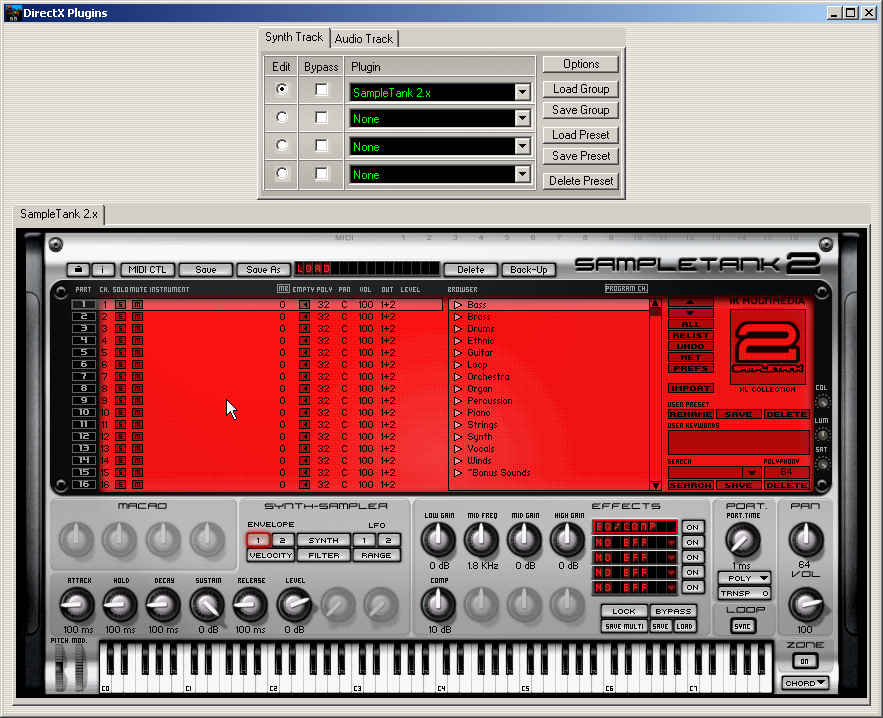
Thank you, Andrew, but so far I have not been able to get SampleTank to work by putting different samples in the different channels either. They load, and I can press the virtual keyboard but there's no audio output at all. As for the PlugSound plugin, I will continue to play with it as time allows. For right now, the Coyote plugin is working properly but I see that as an interim solution as I don't want to buy still more plugins.
|
|
|
|
|
|
|
|
|
|
|
|
|
Band-in-a-Box for Windows
|
Joined: Jul 2003
Posts: 260
Apprentice
|
|
Apprentice
Joined: Jul 2003
Posts: 260 |
Hi, I think the problem may be with some of the softsynths , not BIAB. They may be multi timbral, but they don't respond to realtime bank & program changes or they take too long to load. I tried for a couple of years to find a softsynth that would work with my One Man Band realtime arranger software ( basically a software arranger keyboard that loads Yamaha PSR style files) I ended up using soundfonts, the sounds changed in realtime. Since discovered Coyote WT ( included in BIAB 2011) & I bought Forte DXI & TTS1, they technically would also work. Quote:
Well, the Coyote demo seems to work; assigned parts play correctly in BIAB. I was hoping that my existing plugins would work; it's a financial death of a thousand cuts, this stuff. I guess I have 30 days of grace so I should be glad, though.
Thanks for all the replies. It appears that BIAB will only coexist with certain soft synths.
best wishes
rikki
BIAB 2025
Korg PA5X
Yamaha sx900
|
|
|
|
|
|
|
|
|
|
|
|
|
Band-in-a-Box for Windows
|
Joined: Dec 2003
Posts: 24,512
Veteran
|
|
Veteran
Joined: Dec 2003
Posts: 24,512 |
If you will notice on the Ultrasound web site that the PC system requirements states that it will run on XP. It does not say that it will run on Win. 7. You may want to contact them and inquire if it will run in Windows 7. That may be your problem. I hope this helps.
The bumper sticker said "I'm a veterinarian, therefore I can drive like an animal".
Suddenly I realized how many proctologists are on the road.
64 bit Win 10 Pro, the latest BiaB/RB, Roland Octa-Capture audio interface, a ton of software/hardware
|
|
|
|
|
|
|
|
|
|
|
|
|
Band-in-a-Box for Windows
|
Joined: Feb 2011
Posts: 11
Newbie
|
|
OP
Newbie
Joined: Feb 2011
Posts: 11 |
Well, it works fine under Windows 7 using Reaper.
|
|
|
|
|
|
|
|
|
|
|
|
|
Band-in-a-Box for Windows
|
Joined: Feb 2011
Posts: 11
Newbie
|
|
OP
Newbie
Joined: Feb 2011
Posts: 11 |
Trying Soundfonts now...and once again, while Soundfonts work fine in Reaper, once I try to load a voice in the sfz+ player plugin I get this error message: "There's no [sic] enough memory to load the selected Soundfont." (BTW, I have 6 gigs of RAM, although if BIAB is 32 bit it can't access it all. Still, I have enough.)
Edit: Turns out you have to set the sfz player to sr32 mode to get rid of that message. However, once I do that and load a bank of voices I get told by BIAB that I can't use the MIDI driver because it is in use by another program although nothing else is running. And the Coyote plugin works fine.
How do the rest of you get these to work?
Last edited by Benboom; 02/09/11 04:55 AM.
|
|
|
|
|
|
|
|
|
|
|
|
|
Band-in-a-Box for Windows
|
Joined: May 2000
Posts: 38,502
Veteran
|
|
Veteran
Joined: May 2000
Posts: 38,502 |
That error message is known and there are some things in the BB FAQ that should help you: Quote:
76. I get a message that a MIDI driver is "...installed properly but currently in use by another program", even though there are no other programs open.
This error will often refer to "Roland VSC", "GS Wavetable", or "No MIDI/Sound Output". First, you will want to find out if you are using ASIO or MME drivers (Opt. | MIDI/Audio Driver Setup | [Audio Settings] - Audio Driver Type)
If you are using MME drivers and the error is referring to a driver other than the 'Roland VSC', see this FAQ topic instead. (FAQ #111)
If you are using ASIO drivers, you may get this error if there is a conflict between the ASIO driver and a (non-DXi/VSTi) software synth selected in your driver setup. This happens on some computers when using the ASIO4ALL driver. To resolve the problem, make sure that the GS Wavetable and other software synths aren't selected anywhere in your setup. In other words, select a driver other than a software synth in the Band-in-a-Box MIDI Driver Setup dialog (output driver), and in the Windows control panel | Sounds and Audio Devices | Audio (MIDI Playback). Usually if you are using an ASIO driver in Band-in-a-Box, you will also be using a DXi/VSTi synth. Leave the "Use DXi Synth" box checked. You just need to select a different output driver, it won't affect the sound through your DXi synth. Ideally, select a driver for a hardware synth on your sound card or the MIDI OUT port on a MIDI interface.
If you are using MME drivers and the error is referring to the Roland VSC (the older stand-alone MIDI synth), see this FAQ topic instead.
Quote:
111. Why are there multiple instances of a single driver showing in my MIDI Driver Setup window?
Other symptoms: You might also get a message saying that a driver is "...installed properly but currently in use by another program".
Band-in-a-Box is having trouble making the proper connection to one or more MIDI devices that are installed on your computer.
If you have a MIDI interface installed and connected to an external synth, make sure the interface is connected to your computer and the synth turned on before you start Band-in-a-Box.
One of the Band-in-a-Box settings files may have become corrupt. Close Band-in-a-Box and delete the file "intrface.bbw" from your bb folder. Note that this will return many program settings to their factory defaults and Band-in-a-Box will create a new intrface.bbw file the next time you run it. You may wish to make a backup of this file before deleting it so you can restore your previous settings if this suggestion fails to resolve the problem.
If the previous suggestions didn't help, there is most likely a problem with the way one of your MIDI devices is installed. Try reinstalling the drivers for your sound card and MIDI interface, and uninstall any old MIDI devices that you aren't using.
One of the most frequent causes of this problem that we encounter is an improperly uninstalled Yamaha USB interface. Sometimes the uninstaller fails to remove a registry entry, which confuses Band-in-a-Box. To correct this problem you need to use the registry editor. The procedure isn't difficult, but since incorrect registry modifications can cause serious problems with your computer, you have to do this at your own risk.
Go to Start | Run, type "regedit" (without the quotes), and press OK. In the Registry Editor, navigate to the following location:
HKEY_LOCAL_MACHINE\ SOFTWARE\ Microsoft\ WindowsNT\ CurrentVersion\ Drivers32.
When you click on the Drivers32 folder you should see midi, midi1, midi2... entries on the right side of the registry editor window. Look for and delete entries that may refer to an interface that is no longer installed on your computer. If you had a Yamaha interface, you might see an entry similar to "xgusb.cpl". Deleting this should resolve the problem after a reboot.
112. Error message when trying to record audio: "Format unsupported. Your sound card is not allowing or set for 44K audio".
|
|
|
|
|
|
|
|
|
|
|
|
|
Band-in-a-Box for Windows
|
Joined: May 2002
Posts: 7,728
PG Music Staff
|
|
PG Music Staff
Joined: May 2002
Posts: 7,728 |
Hello Ben, Quote:
Thank you, Andrew, but so far I have not been able to get SampleTank to work by putting different samples in the different channels either. They load, and I can press the virtual keyboard but there's no audio output at all.
Don't assume it's not working just because you don't hear anything when you press keys on the virtual keyboard... that feature might not work unless you're using ASIO drivers, with "ASIO Always On" turned on.
To choose an instrument, you would ignore the patches selected on the main Band-in-a-Box screen, and open the SampleTank control panel.
First click a Part/Channel in the left side of the window, then find and double-click on the instrument that you want to load into that part in the browser window (right-hand side).
(You may want to first write down all the channels that Band-in-a-Box uses for the different tracks, found in Opt. | Preferences | Channels).
You would have to do this for each song you load that has different patches. I believe that you can save your loaded instruments as various presets so you don't have to do as much work each time.
You might consider using the Coyote WaveTable synth while auditioning songs/styles to begin with, then select your instruments in SampleTank when you're finalizing the song.
At least, that's the say SampleTank worked when I tested it in the past...
Andrew
PG Music Inc.
|
|
|
|
|
|
|
|
|
|
|
|
Ask sales and support questions about Band-in-a-Box using natural language.
ChatPG's knowledge base includes the full Band-in-a-Box User Manual and sales information from the website.
|
|
|
|
|
|
|
|
|
|
|
Band-in-a-Box® 2025 for Mac® users: Build 904 now available!
If you're already using Band-in-a-Box® 2025 for Mac®, make sure to grab the latest update! Build 904 is now available for download and includes the newest additions and enhancements from our team.
Band-in-a-Box® 2026 for Windows® users: Build 1237 is now available!
Already a Band-in-a-Box 2026 for Windows user? Stay up to date and download the build 1237 to get all the latest additions and enhancements.
PowerTracks Pro 2026 for Windows is Here!
PowerTracks 2026 is here—bringing powerful new enhancements designed to make your production workflow faster, smoother, and more intuitive than ever.
The enhanced Mixer now shows Track Type and Instrument icons for instant track recognition, while a new grid option simplifies editing views. Non-floating windows adopt a modern title bar style, replacing the legacy blue bar.
The Master Volume is now applied at the end of the audio chain for consistent levels and full-signal master effects.
Tablature now includes a “Save bends when saving XML” option for improved compatibility with PG Music tools. Plus, you can instantly match all track heights with a simple Ctrl-release after resizing, and Add2 chords from MGU/SGU files are now fully supported... and more!
Get started today—first-time packages start at just $49.
Already using PowerTracks Pro Audio? Upgrade for as little as $29 and enjoy the latest improvements!
Order now!
Band-in-a-Box 2026 for Windows Special Offers End Tomorrow (January 15th, 2026) at 11:59 PM PST!
Time really is running out! Save up to 50% on Band-in-a-Box® 2026 for Windows® upgrades and receive a FREE Bonus PAK—only when you order by 11:59 PM PST on Thursday, January 15, 2026!
We've added many major new features and new content in a redesigned Band-in-a-Box® 2026 for Windows®!
Version 2026 introduces a modernized GUI redesign across the program, with updated toolbars, refreshed windows, smoother workflows, and a new Dark Mode option. There’s also a new side toolbar for quicker access to commonly used windows, and the new Multi-View feature lets you arrange multiple windows as layered panels without overlap, making it easier to customize your workspace.
Another exciting new addition is the new AI-Notes feature, which can transcribe polyphonic audio into MIDI. You can view the results in notation or play them back as MIDI, and choose whether to process an entire track or focus on specific parts like drums, bass, guitars/piano, or vocals. There's over 100 new features in Band-in-a-Box® 2026 for Windows®.
There's an amazing collection of new content too, including 202 RealTracks, new RealStyles, MIDI SuperTracks, Instrumental Studies, “Songs with Vocals” Artist Performance Sets, Playable RealTracks Set 5, two RealDrums Stems sets, XPro Styles PAK 10, Xtra Styles PAK 21, and much more!
Upgrade your Band-in-a-Box for Windows to save up to 50% on most Band-in-a-Box® 2026 upgrade packages!
Plus, when you order your Band-in-a-Box® 2026 upgrade during our special, you'll receive a Free Bonus PAK of exciting new add-ons.
If you need any help deciding which package is the best option for you, just let us know. We are here to help!
Band-in-a-Box® 2026 for Windows® Special Offers Extended Until January 15, 2026!
Good news! You still have time to upgrade to the latest version of Band-in-a-Box® for Windows® and save. Our Band-in-a-Box® 2026 for Windows® special now runs through January 15, 2025!
We've packed Band-in-a-Box® 2026 with major new features, enhancements, and an incredible lineup of new content! The program now sports a sleek, modern GUI redesign across the entire interface, including updated toolbars, refreshed windows, smoother workflows, a new dark mode option, and more. The brand-new side toolbar provides quicker access to key windows, while the new Multi-View feature lets you arrange multiple windows as layered panels without overlap, creating a flexible, clutter-free workspace. We have an amazing new “AI-Notes” feature. This transcribes polyphonic audio into MIDI so you can view it in notation or play it back as MIDI. You can process an entire track (all pitched instruments and drums) or focus on individual parts like drums, bass, guitars/piano, or vocals. There's an amazing collection of new content too, including 202 RealTracks, new RealStyles, MIDI SuperTracks, Instrumental Studies, “Songs with Vocals” Artist Performance Sets, Playable RealTracks Set 5, two RealDrums Stems sets, XPro Styles PAK 10, Xtra Styles PAK 21, and much more!
There are over 100 new features in Band-in-a-Box® 2026 for Windows®.
When you order purchase Band-in-a-Box® 2026 before 11:59 PM PST on January 15th, you'll also receive a Free Bonus PAK packed with exciting new add-ons.
Upgrade to Band-in-a-Box® 2026 for Windows® today! Check out the Band-in-a-Box® packages page for all the purchase options available.
Happy New Year!
Thank you for being part of the Band-in-a-Box® community.
Wishing you and yours a very happy 2026—Happy New Year from all of us at PG Music!
Season's Greetings!
Wishing everyone a happy, healthy holiday season—thanks for being part of our community!
The office will be closed for Christmas Day, but we will be back on Boxing Day (Dec 26th) at 6:00am PST.
Team PG
|
|
|
|
|
|
|
|
|
|
|
|
Forums57
Topics86,031
Posts799,143
Members40,011
| |
Most Online44,367
Mar 4th, 2026
|
|
|
|
|
|
|
|
|




 Dansk
Dansk Deutsch - Windows
 Español
 Français - Windows
 Italiano - Windows
 Nederlands
 Polski
 Português
 Svenskt
 русский
 Japanese
 Simplified Chinese
 Traditional Chinese
 Korean