|
Log in to post
|
Print Thread |
|
|
|
|
|
Band-in-a-Box for Windows
|
Joined: May 2000
Posts: 38,502
Veteran
|

Veteran
Joined: May 2000
Posts: 38,502 |
From my testing, I'm not sure that is correct. The very first thing that happens when you click on the Vocal Synth button in BIAB is that a file, Sound.XML is created in the folder /bb/Data/SRequest
I get two results when using the "automatic" Sinsy button, one of which is a standard audio .wav file, the other is suffixed .XML, but upon examining the contents of that file I find only the Lyric Data in it, the Note entries are all empty at that time. I see no Pitch entries either. I do see Note Duration entries, though. 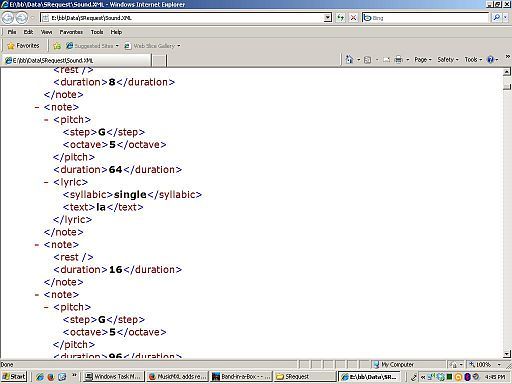 No note data = not a complete .XML file at all to me. No notes means "no chords" which is kind of defeating of the xml point. Once the thing comes back from Sinsy is a different story, though. Now the missing Note and Duration data appears. Apparently Sinsy analyzes the .wav soundfile created and sent as well as entering data into that .xml file and returning it to us. --Mac
|
|
|
|
|
|
|
|
|
|
|
|
|
Band-in-a-Box for Windows
|
Joined: Sep 2010
Posts: 8,338
Veteran
|
OP

Veteran
Joined: Sep 2010
Posts: 8,338 |
David, your good work should be brought to the attention of Peter Gannon. When the work is good enough, he'll hear it.  Actually, when the work is good enough, I'll start posting on the forum for feedback. I've already written to Peter about this. I'd like to see something better than Sinsy, but there aren't a lot of people promoting singing voice synthesis programs. There are a lot of free projects (including Sinsy, which recently released their code), but most of them are abandoned, and the websites are filled with dead links. Vocaloid would be too expensive to add to BiaB. On the Mac, there's a program called VocalWriter that uses articulatory synthesis, but it's never been ported to the PC, and (unfortunately) the author died several years ago. His wife is looking to sell off the product, but I doubt PG wants to go that route. The Mac actually has a quite nice vocal synthesis program built in, but there's no PC equivalent. (Finally, somewhere the Mac users are finally ahead! ) I believe the best commercial bet is SoftVoice, which has has a rather nice library. The owner is pretty busy right now, but he said he'd try to get me a demo. You've probably heard their product in some incarnation - Software Automatic Mouth, MacInTalk and Talk-It! are some examples. The speech sounds a bit synthetic, but it's understandable and (to my ears) superior to Sinsy. If I get a demo from SoftVoice, I'll post the results on the forum. But I haven't seen the API yet, and creating singing output isn't entirely trivial. In the mean time, I've dusted off my own speech synthesis program (mainly because Sinsy seems so deficient). It uses formant synthesis for vowels (like SoftVoice, but it uses sampled consonants. It can now read the MusicXML file from BiaB, covert the words to phonemes, and output a .wav file. Unfortunately, the new consonants broke the timing code, so I'm trying to fix things back up again. Once it works, I'll start posting some examples to get feedback. It's written in Java, but once it's done if it's any good I'll give some thought to re-writing it into C (or with a language which can compile to C).
-- David Cuny My virtual singer development blogVocal control, you say. Never heard of it. Is that some kind of ProTools thing?BiaB 2025 | Windows 11 | Reaper | Way too many VSTis.
|
|
|
|
|
|
|
|
|
|
|
|
|
Band-in-a-Box for Windows
|
Joined: Sep 2010
Posts: 8,338
Veteran
|
|
OP
Veteran
Joined: Sep 2010
Posts: 8,338 |
Mac, you're wrong: BiaB generates the MusicXML file, not Sinsy. I'm not entirely clueless here. After all, I'm the one who pointed out Sinsy in the first place. I've even made a song with it before it was added to BiaB. Even PG Music says so in their own instruction on how to manually create output.  So trust me: The only thing sent to is the Sinsy website Sound.XML file, and the only thing received from the Sinsy website is the .wav file. BiaB --> Sound.XML --> Sinsy website --> result.wav You're fundamentally mis-understanding XML. It's a hierarchical, structured tag-based markup language. Before arguing that this is a malformed MusicXML file, you might first want to look at the MusicXML tutorial.Everything between a <tag> and </tag> is part of that tag. If the tag contains nothing between the start and end, it can be abbreviated with the form <tag/>. So in your screenshot, everything between the start <note> tag and the closing </note> tag is part of the same note. The top <note> tag contains a <pitch>, <duration> and <lyric> tag. The <pitch> contains a <step> and <octave> tag. If there were an accidental, you'd also see a <alter> tag. So the pitch of the note is G5, with a duration of 64 ticks (relative to the song's division, set in the first measure). The same note also has a <lyric> tag, which indicates it has a syllabic type of single, with the lyric of la. All this information pertains to the same <note>. The next <note> contains a <rest/> tag, indicating that it's a rest. Notice the form of the tag is <tag/>, indicating it is both an opening and a closing tag, so there is no enclosed element. The duration of this rest is 16. This is followed by a G5 note of duration 96 ticks. Your screenshot demonstrates exactly what I said: the MusicXML file (generated by BiaB) contains rests following notes.
-- David Cuny My virtual singer development blogVocal control, you say. Never heard of it. Is that some kind of ProTools thing?BiaB 2025 | Windows 11 | Reaper | Way too many VSTis.
|
|
|
|
|
|
|
|
|
|
|
|
|
Band-in-a-Box for Windows
|
Joined: Jul 2000
Posts: 27,674
Veteran
|
|
Veteran
Joined: Jul 2000
Posts: 27,674 |
It is important to realize that BIAB is indeed generating some Music XML, which is what makes me so hopeful that this function can be expanded in the future to represent an entire BIAB song. You're doing great work, David.
BIAB 2026 Win Audiophile. Software: Fender Studio One 8, Swam horns, Acoustica-7, Notion 6, Song Master Pro, Win 11 Home. Hardware: Intel i9, 32 Gb; Fender Quantom HD8 & Faderport 8, Royer 121, Adam Sub8 & Neumann 120 monitors.
|
|
|
|
|
|
|
|
|
|
|
|
|
Band-in-a-Box for Windows
|
Joined: May 2000
Posts: 38,502
Veteran
|
|
Veteran
Joined: May 2000
Posts: 38,502 |
I stand corrected.
And Thank You for explaining it so well.
--Mac
|
|
|
|
|
|
|
|
|
|
|
|
|
Band-in-a-Box for Windows
|
Joined: Sep 2010
Posts: 8,338
Veteran
|
|
OP
Veteran
Joined: Sep 2010
Posts: 8,338 |
Just to beat a dead horse: To the best of my knowledge, Band in a Box does not create nor send Note Off data, either. Hence the commonly found stuck synth on strings and other pads when someone hits Stop before the Duration value has ended. BiaB most certainly creates and sends NoteOff data. How else would notes be able to turn off? Sidebar: Sending a NoteOff or sending a NoteOn with a velocity of 0 amount to the same thing. Other than being pendantic, there's not really any point in making the distinction. And I'm certainly being pendantic here.  The idea the the MIDI instructions themselves have any timing or durational information is incorrect. MIDI commands don't contain timing information. They are directives that are meant to be executed when they are received by your synth. These include instructions like: - Play a note at velocity
- Turn the modulation wheel to position
- Change the instrument on channel to instrument
When the instructions arrive at your synth, they are executed immediately. There's no such thing as "Play an eighth note" in MIDI. To make that happen, you would: - Send a NoteOn instruction.
- Wait for an 8th note duration of time.
- Send a NoteOff instruction.
If you want to store timing information, you can put the MIDI commands into a MIDI file. This is a binary (not humanly readable) file containing not only MIDI commands, but timing information as well. The program that executes the MIDI file (BiaB, your favorite DAW, whatever) reads the file, runs a timer, and send the MIDI instructions out at the appropriate time. But the commands themselves have no timing information, and they are acted on as soon as they arrive at your synth. The MIDI NoteOn command instructs the synthesizer to play a particular note until a NoteOff instruction is received. There is no durational information. From the official MIDI Message Table specs: Note On event.
This message is sent when a note is depressed (start). (kkkkkkk) is the key (note) number. (vvvvvvv) is the velocity. As a result, not sending the NoteOff command will cause any synth to behave like it had a stuck key. I hope this clarifies things a bit.
-- David Cuny My virtual singer development blogVocal control, you say. Never heard of it. Is that some kind of ProTools thing?BiaB 2025 | Windows 11 | Reaper | Way too many VSTis.
|
|
|
|
|
|
|
|
|
|
|
|
|
Band-in-a-Box for Windows
|
Joined: Sep 2010
Posts: 8,338
Veteran
|
|
OP
Veteran
Joined: Sep 2010
Posts: 8,338 |
I stand corrected.
And Thank You for explaining it so well. Mac, you're a really knowledgeable guy, with far more useful musical knowledge and experience than I'll ever have. Sorry for my tone, but it's hard to write a polite response and still get to the point.  By the way, don't miss the post above about MIDI and durational information... 
-- David Cuny My virtual singer development blogVocal control, you say. Never heard of it. Is that some kind of ProTools thing?BiaB 2025 | Windows 11 | Reaper | Way too many VSTis.
|
|
|
|
|
|
|
|
|
|
|
|
|
Band-in-a-Box for Windows
|
Joined: May 2000
Posts: 38,502
Veteran
|
|
Veteran
Joined: May 2000
Posts: 38,502 |
Miss it?
I already oopied and pasted it into a certain little file I keep handy.
And thanks again for the correction.
That is part and parcel of good engineering in my book, once someone proofs their argument, I'm happier to have learned the better for it.
--Mac
|
|
|
|
|
|
|
|
|
|
|
|
|
Band-in-a-Box for Windows
|
Joined: May 2000
Posts: 38,502
Veteran
|
|
Veteran
Joined: May 2000
Posts: 38,502 |
I think I found the reason, FWIW, and that is that I've got so many MIDI editors and viewers, etc. that use the term, "Duration" when what must really be happening under the hood is that after a certain number of ticks, the Note Off gets sent. So they don't really show me the Note Off command, using that Duration label instead.
Is that it?
--Mac
|
|
|
|
|
|
|
|
|
|
|
|
|
Band-in-a-Box for Windows
|
Joined: Aug 2011
Posts: 11,096
Veteran
|
|
Veteran
Joined: Aug 2011
Posts: 11,096 |
David and Mac, Nice discussion. Will either of you gentlemen enlighten me about the differences, if any, between midi (.MID)and SMF (.SMF) files?
|
|
|
|
|
|
|
|
|
|
|
|
|
Band-in-a-Box for Windows
|
Joined: Sep 2010
Posts: 8,338
Veteran
|
|
OP
Veteran
Joined: Sep 2010
Posts: 8,338 |
...what must really be happening under the hood is that after a certain number of ticks, the Note Off gets sent. So they don't really show me the Note Off command, using that Duration label instead. That's correct - the duration that's being displayed is a calculated value based on the difference between the NoteOn and the NoteOff events.
-- David Cuny My virtual singer development blogVocal control, you say. Never heard of it. Is that some kind of ProTools thing?BiaB 2025 | Windows 11 | Reaper | Way too many VSTis.
|
|
|
|
|
|
|
|
|
|
|
|
|
Band-in-a-Box for Windows
|
Joined: Sep 2010
Posts: 8,338
Veteran
|
|
OP
Veteran
Joined: Sep 2010
Posts: 8,338 |
Will either of you gentlemen enlighten me about the differences, if any, between midi (.MID)and SMF (.SMF) files? The file extensions don't indicate anything in particular. There are three different types of MIDI files: - Type 0: All events from the different channels are combined into one track.
- Type 1: Each channel gets an independent track.
- Type 2: A collection of patterns or song (fairly rare).
BiaB gives you the option of creating either Type 0 or Type 1. But all the types share the same extension ( .mid or .smf).
-- David Cuny My virtual singer development blogVocal control, you say. Never heard of it. Is that some kind of ProTools thing?BiaB 2025 | Windows 11 | Reaper | Way too many VSTis.
|
|
|
|
|
|
|
|
|
|
|
|
|
Band-in-a-Box for Windows
|
Joined: Aug 2011
Posts: 11,096
Veteran
|
|
Veteran
Joined: Aug 2011
Posts: 11,096 |
Thanks David for the quick answer to my question smf versus mid. I've never been able to find a concise answer from my web searches or printed sources.
|
|
|
|
|
|
|
|
|
|
|
|
Ask sales and support questions about Band-in-a-Box using natural language.
ChatPG's knowledge base includes the full Band-in-a-Box User Manual and sales information from the website.
|
|
|
|
|
|
|
|
|
|
|
Peter Gannon Talks Band-in-a-Box with zplane
zplane recently interviewed Peter Gannon, the founder and creator of Band-in-a-Box, about the software's early days, what sets it apart from AI, how zplane's audio algorithms are used in Band-in-a-Box, and more!
Special thanks to the team at zplane for their continued support.
Check out the full interview here: https://products.zplane.de/blog/peter-gannon-interview-pg-music
Last Chance! The Band-in-a-Box® 2026 for Mac® Special Ends Today (May 31, 2026) at 11:59pm PDT!
Time really is running out! Save up to 50% on Band-in-a-Box® 2026 for Mac® upgrades and receive a FREE Bonus PAK—only when you order by 11:59 PM PDT today!
We've added many major new features and new content in a redesigned Band-in-a-Box® 2026 for Mac®!
Version 2026 introduces a modernized GUI redesign across the program, with updated toolbars, refreshed windows, smoother workflows, and a new Dark Mode option. There’s also a new side toolbar for quicker access to commonly used windows, and the new Multi-View feature lets you arrange multiple windows as layered panels without overlap, making it easier to customize your workspace.
Another exciting new addition is the amazing new AI-Notes feature, which can transcribe polyphonic audio into MIDI. View the results in notation or play them back as MIDI, and choose whether to transcribe an entire track or transcribe specific parts like drums, bass, guitars/piano, or vocals. There's over 100 new features in Band-in-a-Box® 2026 for Mac®.
There's an amazing collection of new content too, including 202 RealTracks, new RealStyles, MIDI SuperTracks, Instrumental Studies, “Songs with Vocals” Artist Performance Sets, Playable RealTracks Set 5, two RealDrums Stems sets, and much more!
Upgrade your Band-in-a-Box for Mac® to save up to 50% on most Band-in-a-Box® 2026 upgrade packages!
Plus, when you order your Band-in-a-Box® 2026 Mac upgrade during our special, you'll receive a Free Bonus PAK of exciting new add-ons.
If you need any help deciding which package is the best option for you, just let us know. We are here to help!
Band-in-a-Box® 2026 Mac Special Offers Extended Until May 31st!
Good news- we've extended our Band-in-a-Box® 2026 for Mac® special offers until May 31, 2026!
Band-in-a-Box® 2026 is packed with major new features, enhancements, and an incredible lineup of new content! The program now sports a sleek, modern GUI redesign across the entire interface, including updated toolbars, refreshed windows, smoother workflows, a new dark mode option, and more. The brand-new side toolbar provides quicker access to key windows, while the new Multi-View feature lets you arrange multiple windows as layered panels without overlap, creating a flexible, clutter-free workspace. We have an amazing new “AI-Notes” feature. This transcribes polyphonic audio into MIDI so you can view it in notation or play it back as MIDI. You can transcribe an entire track (all pitched instruments and drums) or focus on individual parts like drums, bass, guitars/piano, or vocals. There's an amazing collection of new content too, including 202 RealTracks, new RealStyles, MIDI SuperTracks, Instrumental Studies, “Songs with Vocals” Artist Performance Sets, Playable RealTracks Set 5, two RealDrums Stems sets, and much more!
There are over 100 new features in Band-in-a-Box® 2026 for Mac®.
When you order purchase Band-in-a-Box® 2026 before 11:59 PM PDT on May 31st, you'll also receive a Free Bonus PAK packed with exciting new add-ons.
Check out the Band-in-a-Box® for Mac packages page to find the best package for you.
Holiday Weekend Hours
It's Victoria Day Long Weekend in Canada. Our Customer Service hours are:
Saturday, May 16: Closed
Sunday, May 17: Closed
Monday, May 18: 8:00am - 4:00pm
Regular hours resume Tuesday, May 19th!
Today's the Last Day of the Band-in-a-Box 2026® for Mac Special!
Order before 11:59pm PDT today (May 15, 2026) to save up to 50% off your Band-in-a-Box® 2026 for Mac® upgrade and receive a FREE Bonus PAK loaded with great new Add-ons to use with this new version!
Don't wait - order today!
Check out all the new features in the redesigned Band-in-a-Box® 2026 for Mac®!
Band-in-a-Box® 2026 for Mac - Special Offers End at 11:59pm PDT on Friday, May 15th, 2026!
Order before 11:59pm PDT on Friday, May 15th and SAVE up to 50% on most Band-in-a-Box® version 2026 for Mac Upgrade packages... and that's not all! With your version 2026 for Mac purchase, we'll include a Bonus PAK full of great new Add-ons FREE! Upgrade to the 2026 49-PAK to receive even more NEW Add-ons including 20 additional RealTracks... that's 222 NEW RealTracks available with version Band-in-a-Box® 2026 for Mac!
Upgrade to Band-in-a-Box® 2026 for Mac® today for as little as $49! Check out the Band-in-a-Box® packages page for all available purchase options.
Learn more about the Free Bonus PAK and 49-PAK here.
If you have any questions about which package is the best option for you, just let us know. We're here to help!
202 New RealTracks Released with Band-in-a-Box 2026!
With Band-in-a-Box® 2026, we've released 202 incredible new RealTracks (in sets 468-488) in a variety of genres—featuring your most requested styles!
Jazz, Funk & World (Sets 468-475):
Our new jazz, funk & blues RealTracks include a groovin’ collection of RealTracks and RealDrums! These include more requested “soul jazz” RealTracks featuring artists Neil Swainson (bass), Charles Treadway (organ), Brent Mason (guitar), and Wes Little (drums). There are new “smooth jazz” styles (4), which include a RealTracks first: muted trumpet, as well as slick new smooth jazz brushes options for drums. Blues lovers will be thrilled—there are more “classic acoustic blues” styles, including guitar (5), bass (4), and drums (10) with blues master Colin Linden, featuring understated and tasty background acoustic soloing, plus brushes drums and acoustic bass. There are also new electric blues RealTracks, including electric blues with PG favorite Johnny Hiland (3) and soulful electric slide guitar from Colin Linden (4). If you love funk & gospel, there are great new options this year, including gospel organ (3) from Charles Treadway, as well as new funk, tango, and rock ’n’ roll drums (3) and bass (1). And for big, bold arrangements, we have uptempo soul horns (4) featuring a three-part hip horn section with options for a full mix or stems of each individual horn — plus an accompanying rhythm section (4) of drums, bass, guitar, and electric piano!
Rock & Pop (Sets 476–482):
Our new rock & pop RealTracks bring a powerful mix of requested favorites, fresh genres, and modern chart-inspired styles! We have more of our popular “Producer Layered Acoustic Guitars (15)” featuring Band-in-a-Box favorite Brent Mason. We’ve continued our much-requested disco styles (10), and added new Celtic guitar (5) with a more basic, accessible approach than our previous Drop-D or DADGAD offerings. There are also highly requested yacht rock styles (17), inspired by the smooth, polished soft-rock sound of the late ’70s and early ’80s — laid-back grooves, silky electric pianos, warm textures, elegant harmonic movement, and pristine production aesthetics. Fans of heavier styles will love our new glam metal (13), capturing the flashy, high-energy sound of ’80s arena-ready guitar rock. We also have a set of rootsy modern-folk rock (18), with a warm, organic sound combining contemporary folk textures and driving acoustic strumming. And we’ve added lots of new modern pop styles (16) — the kinds of sounds you’re hearing on the radio today, featuring exciting new drums, synths, and cutting-edge RealTracks arrangements.
Country, & Americana (Sets 483–488):
Our new country & Americana RealTracks deliver a rich collection of acoustic, electric, and roots-inspired styles! We have new country pop (9) with legendary guitarist Brent Mason. There is also a potpourri (14) of bouzouki, guitars, banjo, and more, perfect for adding texture and character to contemporary acoustic arrangements. We’ve added funky country guitar (5) with PG favorite Brent Mason, along with classic pedal steel styles (5) featuring steel great Doug Jernigan. There are more country songwriter styles (8) that provide intimate, rootsy foundations for storytelling and modern Americana writing. Finally, we have “background soloing” acoustic guitar (12) with Brent Mason — simpler, but still very tasty acoustic lines designed to sit beautifully behind vocals or act as a subtle standalone solo part.
Check out all the 202 new RealTracks (in sets 468-488)!
And, if you are looking for more, the 2026 49-PAK (for $49) includes an impressive collection of 20 bonus RealTracks, featuring exciting and inspiring additions to add to your RealTracks library. You'll get new country-rhythm guitar styles from PG Music favorites Johnny Hiland and Brent Mason, along with modern-pop grooves that capture today’s radio-ready sound! There are also new indie-folk styles with guitar, bass, 6-string bass used as a high-chording instrument, acoustic guitar, and banjo. Plus, dedicated "cymbal fills" RealDrums provide an added layer that work very well with low-key folky styles with other percussion.
The 2026 49-PAK is loaded with other great new add-ons as well. Learn more about the 2026 49-PAK!
|
|
|
|
|
|
|
|
|
|
|
|
Forums57
Topics86,619
Posts807,543
Members40,174
| |
Most Online64,515
Apr 8th, 2026
|
|
|
|
|
|
|
|
|





 Dansk
Dansk Deutsch - Windows
 Español
 Français - Windows
 Italiano - Windows
 Nederlands
 Polski
 Português
 Svenskt
 русский
 Japanese
 Simplified Chinese
 Traditional Chinese
 Korean