I scanned through the beginner topics but didn't see this. I'm a beginner BIAB and retired music educator/pro musician.
When I download MIDI files from the web and load them into BIAB, everything goes to one track. I'd like to have the individual tracks in different channels to edit and tweak. And yes, they are midi files, not audio.
That's how Midi works within BIAB. Midi will either load into the Melodist Track or the Soloist Track. Depending on the version of BIAB you have, PC or Mac determines your options to handle Midi. PC versions have a Midi sequencer/DAW and Mac does not.
Depending on which track the Midi file imported to in PC BIAB, you have some functionality using the BIAB Sequencer - A Green circle button located in the tools bar. You can mute, delete, rechannel, merge, move to the Melodist or Soloist Channel depending on the track the file imported to. Select patches or set velocity for individual channels. Finally, you can isolate the track and move all the other channels to the other associated Midi track (Melodist or Soloist).
The other six tracks are available for you to add additional tracks of RealTracks, Midi, SuperMidi and even live audio you record or import.
This allows you to have a combination of an existing Midi track play along in sync, time and key with generated BIAB tracks.
JoanneCouper, I have the same problem too; in Realband works fine ... the tracks are separate ..... also the piano leadsheet is very readable. Now I would like to save from RealBand to BIAB format. It's possible? How can I do?
JoanneCouper, I have the same problem too; in Realband works fine ... the tracks are separate ..... also the piano leadsheet is very readable. Now I would like to save from RealBand to BIAB format. It's possible? How can I do?
The drop down menu of the "Save As" command gives the option to save a RB project as a BIAB song. You should save your project as a RB (seq) file first to be sure your project is properly and completely saved in case it doesn't open up in BIAB as expected.
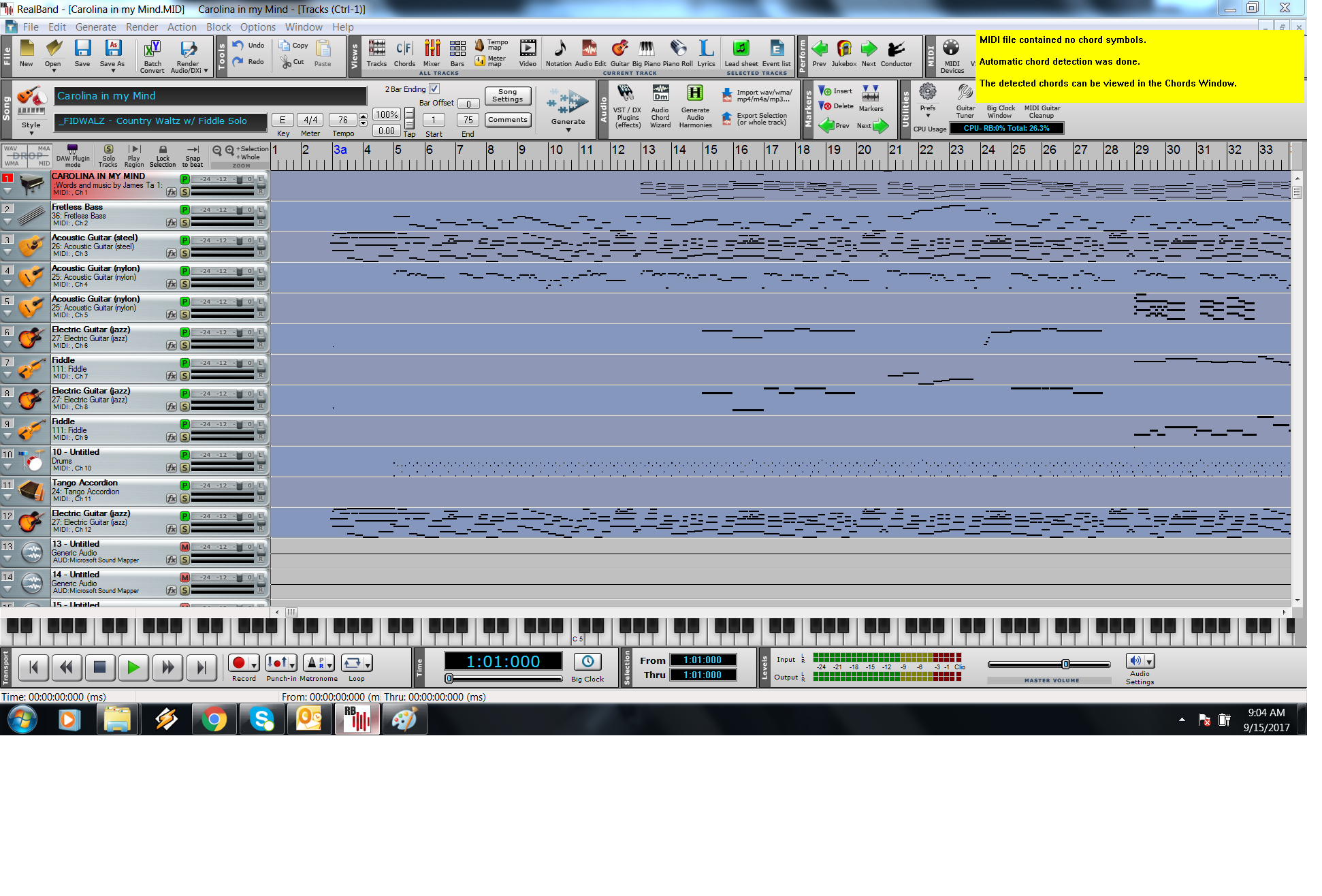
I must be missing something. I also am a rookie at BIAB and have the same problem, however following previous posts advice when I open a midi file in Real Band I also have only one track and have no idea how to explode the midi file into individual tracks. Thx in advance for your help.
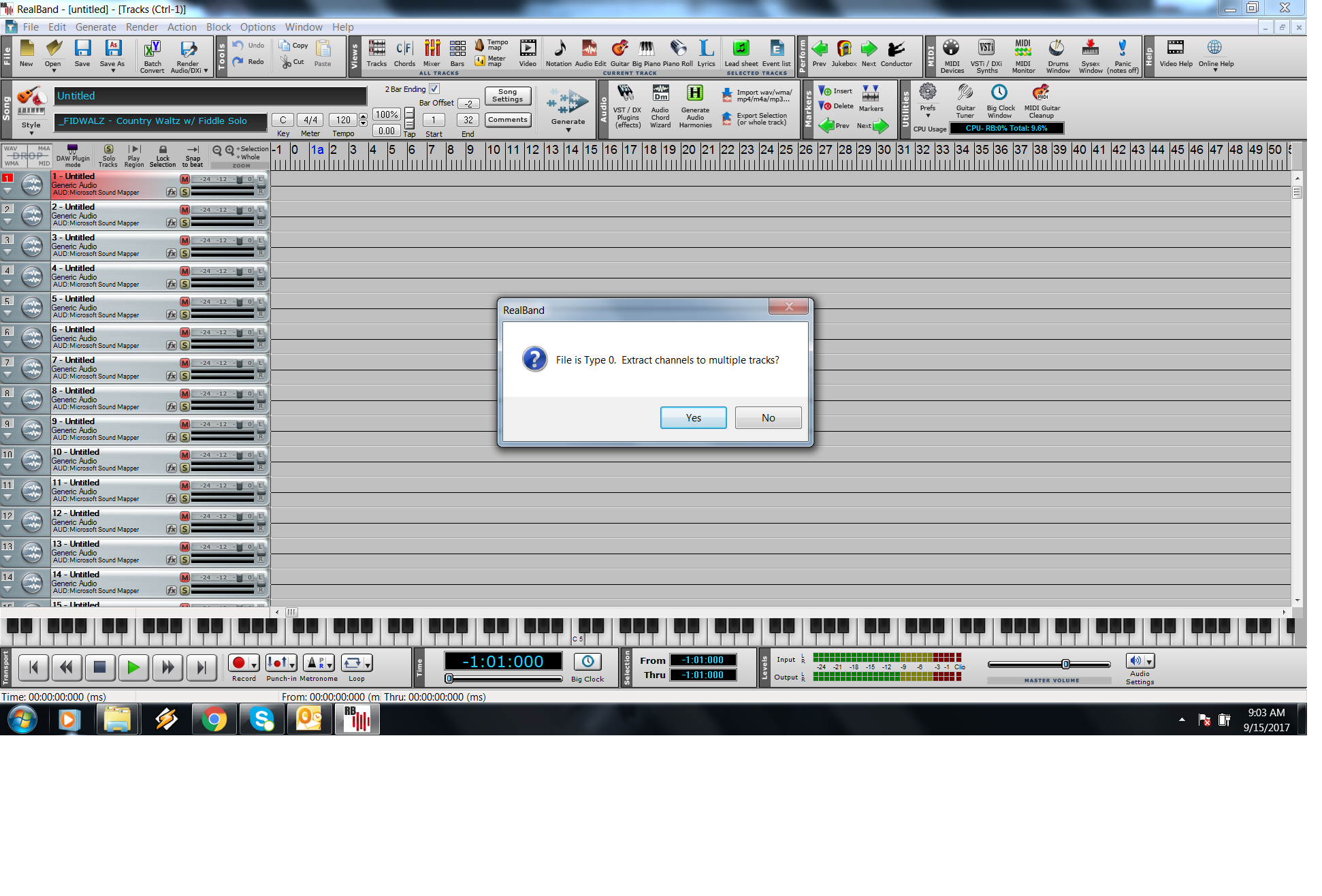
Thanks Joanne. Real Band did not ask if I wanted to separate the tracks for that particular file (strangely it works ok with other midi files) however I finally managed to do it by saving it as a 'type 0 midi file' and reopening it. Hopefully one day BIAB will be able to add this useful feature as you don't always want to have your tune rearranged.
I scanned through the beginner topics but didn't see this. I'm a beginner BIAB and retired music educator/pro musician.
When I download MIDI files from the web and load them into BIAB, everything goes to one track. I'd like to have the individual tracks in different channels to edit and tweak. And yes, they are midi files, not audio.
Thanks to all for your help! This really is a massive program with lots of gems in it! I'm sure I'll be back with more questions quite often! Hopefully I'll get a good grasp of BIAB and RB and be of help to others in the future.
I was reminded yesterday by Jford that MIDI channels can be selected and moved from the Melody Track to other BB tracks from the Edit Menu - Copy Special\Copy/Move Tracks...
This one of those areas where it seems like Biab and RB are almost the same but they're really not.
Yes, you can do that in Biab but RB is a 48 track DAW and is specifically designed for this kind of thing while Biab is not. Many new users completely ignore RB and shouldn't. It is NOT simply another version of Biab, it is a 48 track audio/midi recording program that will do very comprehensive audio or midi editing, mixing and mastering that PG decided to add Biab functions to.
I'm not going to go into a bunch of details because that's what the RB forum is for. I'll just give one example. You have a 13 track midi file and would like to see all the tracks. In Biab you have to do some menu diving and then once it's done that file has 13 tracks while Biab has 7 instrument tracks. RB just opens it right up, the tracks are visible right in front of you and you still have 35 tracks to play with.
RB is very cool and very useful so to new users I always suggest they take the same song and spend an hour with Biab then an hour with Real Band and keep doing that until they're familiar with both. After you've opened your test Biab song in RB just to see how that works, close it and start it from scratch then you'll really see how it works. Both programs will get you there using completely different workflows. Biab is initially faster and easier while RB has more depth.
I always suggest they take the same song and spend an hour with Biab then an hour with Real Band and keep doing that until they're familiar with both. After you've opened your test Biab song in RB just to see how that works, close it and start it from scratch then you'll really see how it works. Both programs will get you there using completely different workflows.
comment. That's a really great suggestion. I hope you'll post the idea in the Tips & Tricks forum section. It's really too good an idea to get lost among the multitude of posts that are created each day.
Introducing XPro Styles PAK 11 – Now Available for Windows Band-in-a-Box 2026 and Higher!
XPro Styles PAK 11 for Windows & Mac Band-in-a-Box® version 2026 (and higher) is here with 100 brand new RealStyles, plus 31 RealTracks/RealDrums!
Guess who’s back again? That’s right! It’s our XPro Styles PAK’s triumphant return with the 11th edition in this series! 100 new styles are coming your way spread across the rock & pop, jazz, and country genres. And this edition's wildcard genre explores the immense and far-reaching catalogue of electronic music! The included 31 RealTracks and RealDrums can be used with any Band-in-a-Box® 2026 (and higher) package.
Special offers available until August 31st, 2026!
All the XPro Styles PAKs 1-11 are on sale for only $29 ea (Reg. $49 ea), or get them all in the XPro Styles PAK Bundle for only $149 (reg. $299)! Order now!
XPro Styles PAKs require Band-in-a-Box® 2026 or higher and are compatible with ANY package, including the Pro, MegaPAK, UltraPAK, UltraPAK+, and Audiophile Edition.
Introducing Xtra Styles PAK 22 – Now Available for Windows Band-in-a-Box 2026 and Higher!
Xtra Styles PAK 22 for Windows & Mac Band-in-a-Box version 2026 (and higher) is here with 200 brand new RealStyles!
It’s time to celebrate! Xtra Styles PAK 22 for Band-in-a-Box® is here, and we've got 200 brand-new styles coming your way!
No Xtra Styles PAK is complete without the classic rock & pop, jazz, and country volumes you know and love, and we’ve got plenty to share, with 150 styles spread across too many genres to list! Of course, it also wouldn’t be complete with our special wildcard volume to add a little spice and pizzazz to the mix. This year, because we loved it so much the first time, we’ve decided to make the second iteration of our SynthMaster volume, full of new sounds, interesting genres, and 50 engaging styles, all making use of the diverse SynthMaster plugin! Here you can find genres such as airy yacht rock, sultry electrotango, and even some synth soca funk. Don’t wait, pickup up Xtra Styles PAK 22 today!
In this PAK you can find: dulcet folk ballads, funky gospel country, Brazilian jazz fusion, upbeat 1980s pop, classic Americana, a plethora of breezy bossa novas, indie singer-songwriter, scintillating synthwave, exuberant electronica, and many, many more!
Special offers available until August 31st, 2026!
All the Xtra Styles PAKs 1-22 are on special for only $29 each (reg $49), or get all 22 PAKs for $199 (reg $399)! Order now!
Note: The Xtra Styles require the UltraPAK, UltraPAK+, or Audiophile Edition of Band-in-a-Box®. (Xtra Styles PAK 22 requires the 2026 or higher UltraPAK, UltraPAK+, or Audiophile Edition. They will not work with the Pro or MegaPAK version because they need the RealTracks from the UltraPAK, UltraPAK+, or Audiophile Edition.
Introducing XPro Styles PAK 11 – Now Available for Mac Band-in-a-Box 2026 and Higher!
XPro Styles PAK 11 for Mac & Windows Band-in-a-Box® version 2026 (and higher) is here with 100 brand new RealStyles, plus 31 RealTracks/RealDrums!
Guess who’s back again? That’s right! It’s our XPro Styles PAK’s triumphant return with the 11th edition in this series! 100 new styles are coming your way spread across the rock & pop, jazz, and country genres. And this edition's wildcard genre explores the immense and far-reaching catalogue of electronic music! The included 31 RealTracks and RealDrums can be used with any Band-in-a-Box® 2026 (and higher) package.
Special offers available until August 31st, 2026!
All the XPro Styles PAKs 1-11 are on sale for only $29 ea (Reg. $49 ea), or get them all in the XPro Styles PAK Bundle for only $149 (reg. $299)! Order now!
XPro Styles PAKs require Band-in-a-Box® 2026 or higher and are compatible with ANY package, including the Pro, MegaPAK, UltraPAK, UltraPAK+, and Audiophile Edition.
Introducing Xtra Styles PAK 22 – Now Available for Mac Band-in-a-Box 2026 and Higher!
Xtra Styles PAK 22 for Mac & Windows Band-in-a-Box version 2026 (and higher) is here with 200 brand new RealStyles!
It’s time to celebrate! Xtra Styles PAK 22 for Band-in-a-Box® is here, and we've got 200 brand-new styles coming your way!
No Xtra Styles PAK is complete without the classic rock & pop, jazz, and country volumes you know and love, and we’ve got plenty to share, with 150 styles spread across too many genres to list! Of course, it also wouldn’t be complete with our special wildcard volume to add a little spice and pizzazz to the mix. This year, because we loved it so much the first time, we’ve decided to make the second iteration of our SynthMaster volume, full of new sounds, interesting genres, and 50 engaging styles, all making use of the diverse SynthMaster plugin! Here you can find genres such as airy yacht rock, sultry electrotango, and even some synth soca funk. Don’t wait, pickup up Xtra Styles PAK 22 today!
In this PAK you can find: dulcet folk ballads, funky gospel country, Brazilian jazz fusion, upbeat 1980s pop, classic Americana, a plethora of breezy bossa novas, indie singer-songwriter, scintillating synthwave, exuberant electronica, and many, many more!
Special offers available until August 31st, 2026!
All the Xtra Styles PAKs 1-22 are on special for only $29 each (reg $49), or get all 22 PAKs for $199 (reg $399)! Order now!
Note: The Xtra Styles require the UltraPAK, UltraPAK+, or Audiophile Edition of Band-in-a-Box®. (Xtra Styles PAK 22 requires the 2026 or higher UltraPAK, UltraPAK+, or Audiophile Edition. They will not work with the Pro or MegaPAK version because they need the RealTracks from the UltraPAK, UltraPAK+, or Audiophile Edition.
zplane recently interviewed Peter Gannon, the founder and creator of Band-in-a-Box, about the software's early days, what sets it apart from AI, how zplane's audio algorithms are used in Band-in-a-Box, and more!
Special thanks to the team at zplane for their continued support.
Last Chance! The Band-in-a-Box® 2026 for Mac® Special Ends Today (May 31, 2026) at 11:59pm PDT!
Time really is running out! Save up to 50% on Band-in-a-Box® 2026 for Mac® upgrades and receive a FREE Bonus PAK—only when you order by 11:59 PM PDT today!
We've added many major new features and new content in a redesigned Band-in-a-Box® 2026 for Mac®!
Version 2026 introduces a modernized GUI redesign across the program, with updated toolbars, refreshed windows, smoother workflows, and a new Dark Mode option. There’s also a new side toolbar for quicker access to commonly used windows, and the new Multi-View feature lets you arrange multiple windows as layered panels without overlap, making it easier to customize your workspace.
Another exciting new addition is the amazing new AI-Notes feature, which can transcribe polyphonic audio into MIDI. View the results in notation or play them back as MIDI, and choose whether to transcribe an entire track or transcribe specific parts like drums, bass, guitars/piano, or vocals. There's over 100 new features in Band-in-a-Box® 2026 for Mac®.
There's an amazing collection of new content too, including 202 RealTracks, new RealStyles, MIDI SuperTracks, Instrumental Studies, “Songs with Vocals” Artist Performance Sets, Playable RealTracks Set 5, two RealDrums Stems sets, and much more!
Upgrade your Band-in-a-Box for Mac® to save up to 50% on most Band-in-a-Box® 2026 upgrade packages!
Plus, when you order your Band-in-a-Box® 2026 Mac upgrade during our special, you'll receive a Free Bonus PAK of exciting new add-ons.
If you need any help deciding which package is the best option for you, just let us know. We are here to help!
Band-in-a-Box® 2026 Mac Special Offers Extended Until May 31st!
Good news- we've extended our Band-in-a-Box® 2026 for Mac® special offers until May 31, 2026!
Band-in-a-Box® 2026 is packed with major new features, enhancements, and an incredible lineup of new content! The program now sports a sleek, modern GUI redesign across the entire interface, including updated toolbars, refreshed windows, smoother workflows, a new dark mode option, and more. The brand-new side toolbar provides quicker access to key windows, while the new Multi-View feature lets you arrange multiple windows as layered panels without overlap, creating a flexible, clutter-free workspace. We have an amazing new “AI-Notes” feature. This transcribes polyphonic audio into MIDI so you can view it in notation or play it back as MIDI. You can transcribe an entire track (all pitched instruments and drums) or focus on individual parts like drums, bass, guitars/piano, or vocals. There's an amazing collection of new content too, including 202 RealTracks, new RealStyles, MIDI SuperTracks, Instrumental Studies, “Songs with Vocals” Artist Performance Sets, Playable RealTracks Set 5, two RealDrums Stems sets, and much more!
There are over 100 new features in Band-in-a-Box® 2026 for Mac®.
When you order purchase Band-in-a-Box® 2026 before 11:59 PM PDT on May 31st, you'll also receive a Free Bonus PAK packed with exciting new add-ons.
Check out the Band-in-a-Box® for Mac packages page to find the best package for you.
One of our representatives will be happy to help you over the phone. Our hours of operation are from
6:00AM to 6:00PM PST (GMT -8) Monday thru Friday, and 8:00AM to 4:00PM PST Saturday. We are closed Sunday. You can also send us your questions via email.
One of our representatives will be happy to help you on our Live Chat or by email. Our hours of operation are from
6:00AM to 6:00PM PST (GMT -8) Monday thru Friday; 8:00AM to 4:00PM PST (GMT -8) Saturday; Closed Sunday.














 Dansk
Dansk Deutsch - Windows
 Español
 Français - Windows
 Italiano - Windows
 Nederlands
 Polski
 Português
 Svenskt
 русский
 Japanese
 Simplified Chinese
 Traditional Chinese
 Korean