The High-Q patches replace existing normal MIDI patches that by default are GM patches and the Hi-Q patch will sound better than the GM patch.
Instead of clicking a empty track, select a Style that has MIDI tracks. It can be a hybrid style that has midi and RealTracks. Select a track that has a midi patch and replace that patch with a Hi-Q Midi Patch.
When I right-click on the instrument radio button there is no option to "Select Hi-Q MIDI Synth Patch" as shown in that video.
I see that video is from 2013 so should that option still be there in version 2020?
Thanks
I think the menu options have been rearranged since the video was made.
You probably need to be using a MIDI Style. Please see if this menu works for you:
BIAB & RB2026 Win.(Audiophile), Windows 10 Pro & Windows 11, Cakewalk Bandlab, Izotope Prod.Bundle, Roland RD-1000, Synthogy Ivory, Session Keys Grand S & Electric R, Kontakt, Focusrite 18i20, KetronSD2, NS40M, Pioneer Active Monitors.
Thanks VideoTrack for your reply and the screenshots.
I have that menu on some of the instruments and when I click on "Select High-Q MIDI Patch" I have the "Access violation" error.
I'm using all 'RealTracks' for this project so would that explain the error?
As mentioned earlier, I have installed everything so if this should work with 'RealTracks' then there must be some kind of problem with my install here.
Thanks again for replying and the explanation Jim.
I tried a further experiment and opened a new document and set all MIDI tracks. When I clicked on a radio button to select High-Q I still had the same error message.
Try starting with an all midi style with no RealTracks or RealDrums.
It might be helpful to have a screen shot of your program midi settings. Press both the control and letter e (Ctrl + E) computer keys at the same time to open the Preferences dialog window. Then select the "MIDI Drivers" button.
Noel96 prepared a Tips & Tricks post about how to post a screen shot +++ HERE +++
Thanks VideoTrack for your reply and the screenshots.
I have that menu on some of the instruments and when I click on "Select High-Q MIDI Patch" I have the "Access violation" error.
I'm using all 'RealTracks' for this project so would that explain the error?
As mentioned earlier, I have installed everything so if this should work with 'RealTracks' then there must be some kind of problem with my install here.
You should not have received an Access Violation error. That indicates that the program performed in an unexpected way and was not able to handle the error condition. Is the track that you clicked on Green(RealTracks) or Yellow(MIDI)? If RealTracks, the Hi-Q menu option should not be available? See my results:
BIAB & RB2026 Win.(Audiophile), Windows 10 Pro & Windows 11, Cakewalk Bandlab, Izotope Prod.Bundle, Roland RD-1000, Synthogy Ivory, Session Keys Grand S & Electric R, Kontakt, Focusrite 18i20, KetronSD2, NS40M, Pioneer Active Monitors.
Thanks for all your input and after much trialling I think I have the answer.
It seems that High-Q instruments need Windows Media Player which I have uninstalled. Microsoft have now included the option to uninstall the WMP amongst a few other things.
BiaB also needs the WMP to audition samples of RealTracks when selecting so I don't have that option either.
That Band-in-a-Box automatically direct some audio to Windows Media Player (WMP) trips up a user every so often. But, not often enough that it's automatically something that comes to mind when another user is responding to an issue. There are several tasks where the program uses WMP but I can't remember all of them. One that comes to mind is playback of the chord when you're using the Chord Builder feature.
(Gets on soapbox) It would be nice if PG Music documented what audio tasks call up WMP but they haven't. (Gets off soapbox)
Just a curious question on my part but, why delete Windows Media Player? It doesn't occupy much storage space and, when a program like Band-in-a-Box uses the player, you don't even see the interface.
Should you change your mind and decide you want to reload WMP +++ HERE +++ is a link for downloading the Windows 10 media player.
In fact i dont think you do remove WMP completely you can only add or remove as a windows feature. you do this in the control panel from the left hand menu when in control panel programs and features.
If this is how you removed it you wont need to download it is still there to reactivate.
It's possible to find and delete the core WMP executable but difficult enough most users would not expend the effort.
Besides the player program with an interface that wants to manage your library there is a small executable file.
To eliminate the core executable one would not use the uninstall utility but instead use administrative rights to display hidden files and file explorer to hunt down and delete the specific file. That's a pretty deep dive for most users.
The latest version of Windows does now include a full uninstall of Windows Media Player including a few other now replaced items such as Internet Explorer.
The Media Player is no longer the default now hence Microsoft's decision for it to be uninstalled in later versions. Microsoft has replace it with: Groove Music (default music player), Movies & TV app (default video player) and Photos app (default photo viewer). Personally I use the VLC Media Player.
Uninstalling really does remove it so it can't be 'reinstalled' using the features restore method.
Hi, I have a similar problem, I want take advantage of this thread to expose it.
Every time I tried to load a High-Q instrument from High-Q MIDI Patch Plugin I get an error like this:
Quote:
Instrument: Piano/Classic Electric Piano from bank:2050 was not found!
This happens with any H-Q selected instrument.
I have biab 2020 Ultrapak, the Plogue Sforzando player is installed. I don't know if I made a mistake installing, so I have some doubts:
1. Where should the sforzando sound bank be located? since apparently biab cannot find it in my system. 2. Is this Sforzando sound bank included in the usb hard disk that I received or should I download it from some web site? 3. Is this Sforzando / Sample Tank bank free or is it a limited time demo? 4. How do I set a library of my choice as default in Sforzando player?
In addition to your hard drive you have an online account with PG Music. The online account has download files for everything you've purchased from PG Music since 2014. One or two of the files are the Hi-Q instruments.
PG Music used to include the free versions of SampleTank 2 and 2.5 until 1K Multimedia changed to only 64 bit software starting with either SampleTank 3 or 4. Then PG Music switched to Sforzando because Sforzando offered a 32 bit player. That's why there are duplicate Hi-Q instruments.
The Hi-Q tgs files are located at C:\bb\DX Settings & C:\bbDX Settings\Amplitude on my machine.
Sforzando is free. SampleTank 2 & 2.5 were free. I don't know for sure but I believe 1/kMultimedia still offers some kind of free player.
You can run the PG Music installer executable you download from your online account or from your Ultra PAK hard drive and it will give you the opportunity to select to install just Sforzando.
Thanks, yes, everything is in my account, but it was not necessary to download anything since Sforzando is installed and I found the HI-Q sounds installed in C: \ Program Files \ PG Music Inc \ Band-in-a-Box Sounds.
There in the 'Programs' folder are all the sounds that I think Sforzando should find, but it keeps giving the same error "Instrument [name] from bank:2050 was not found!" when I open Sforzando
It is important to note that I can load the instruments manually since in Sforzando plugin GUI them appear listed en el menu Instrument / User / Program. But aren't that patches supposed to be loaded by selecting them on the instrument track? where btw they are ALL listed. That error message is becoming annoying!
From what you are saying it sounds like you have installed the required components. Two things need to be installed: 1. The Sforzando plugin. You can find the installer in the bb\Data\Installers folder. It doesn't hurt to run it again. 2. The HiQ instrument bank - this is a separate download .exe from Band-in-a-Box ("hiq_instruments...exe") or if you have the UltraPAK HD you will find it in the PGMusic\Installers folder.
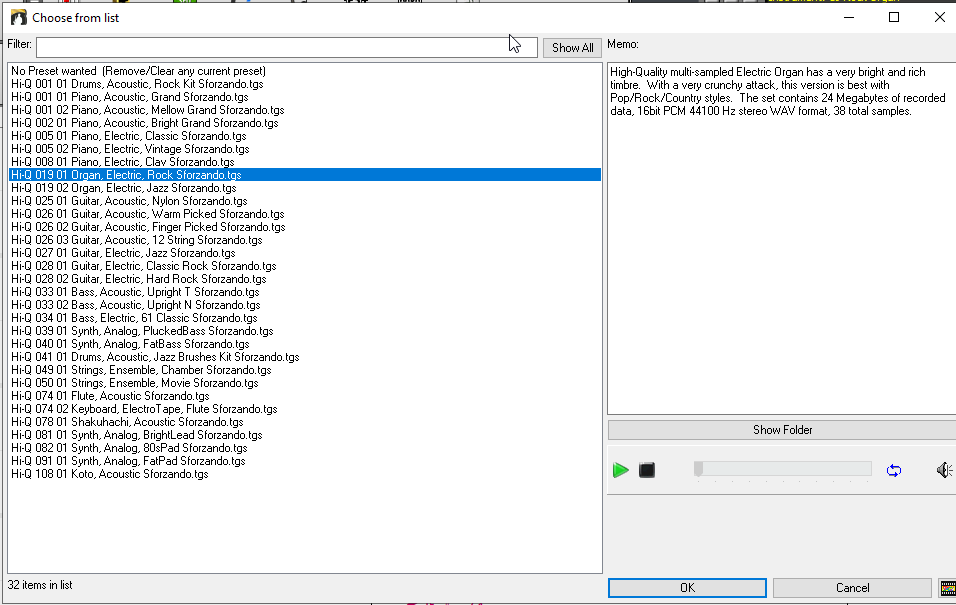
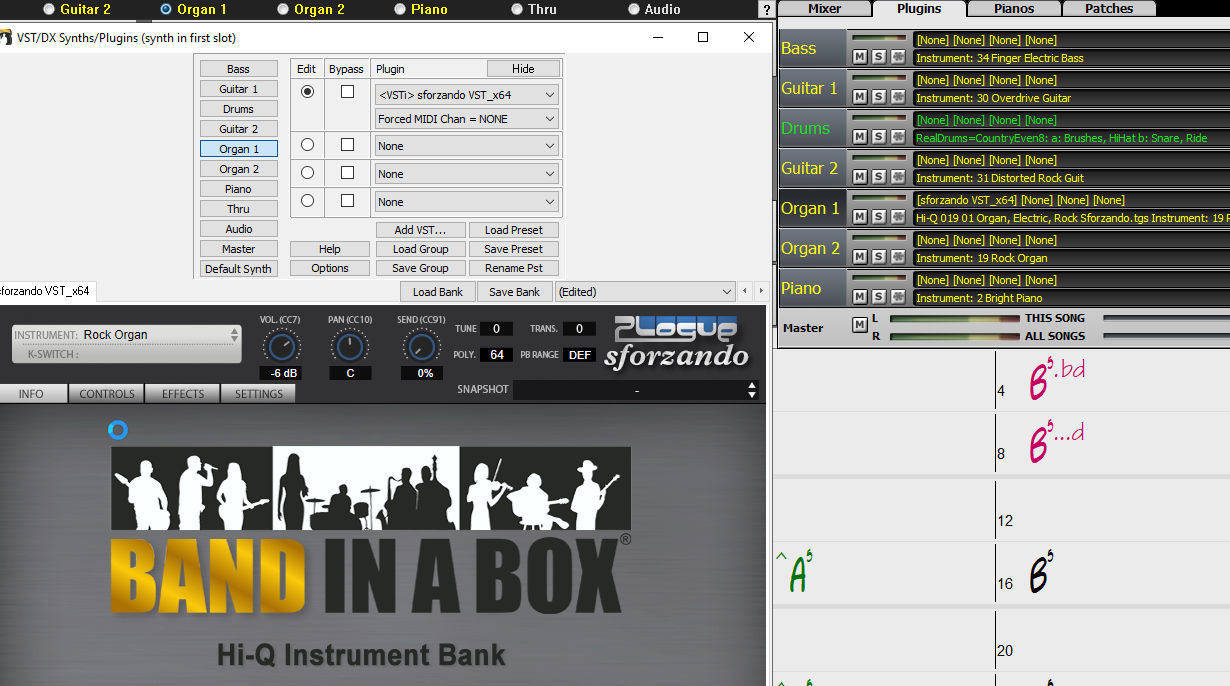
After installing you should close and re-open Band-in-a-Box. You could compare yours to my screenshots below and you might be able to notice something different... I right-clicked on a track | Select MIDI patch | Select HiQ, and selected the Rock Organ patch.
Last edited by Andrew - PG Music; 06/10/2010:30 AM.
Wow thanks, Andrew, now all worked fine, I reinstalled Sforzando plugin and the hqi sound library was recognized, anyway I reinstalled both as you suggested.
Sorry I am not an expert in this beyond simple things, my parents are musicians and bought me Band ina box as a birthday gift some years ago and since then I have been in love making music for my songs. I would like a lot a version for cellphone, especially iphone, that I could use outdoors away of home, no need for pc. Thanks!
Introducing XPro Styles PAK 11 – Now Available for Windows Band-in-a-Box 2026 and Higher!
XPro Styles PAK 11 for Windows & Mac Band-in-a-Box® version 2026 (and higher) is here with 100 brand new RealStyles, plus 31 RealTracks/RealDrums!
Guess who’s back again? That’s right! It’s our XPro Styles PAK’s triumphant return with the 11th edition in this series! 100 new styles are coming your way spread across the rock & pop, jazz, and country genres. And this edition's wildcard genre explores the immense and far-reaching catalogue of electronic music! The included 31 RealTracks and RealDrums can be used with any Band-in-a-Box® 2026 (and higher) package.
Special offers available until August 31st, 2026!
All the XPro Styles PAKs 1-11 are on sale for only $29 ea (Reg. $49 ea), or get them all in the XPro Styles PAK Bundle for only $149 (reg. $299)! Order now!
XPro Styles PAKs require Band-in-a-Box® 2026 or higher and are compatible with ANY package, including the Pro, MegaPAK, UltraPAK, UltraPAK+, and Audiophile Edition.
Introducing Xtra Styles PAK 22 – Now Available for Windows Band-in-a-Box 2026 and Higher!
Xtra Styles PAK 22 for Windows & Mac Band-in-a-Box version 2026 (and higher) is here with 200 brand new RealStyles!
It’s time to celebrate! Xtra Styles PAK 22 for Band-in-a-Box® is here, and we've got 200 brand-new styles coming your way!
No Xtra Styles PAK is complete without the classic rock & pop, jazz, and country volumes you know and love, and we’ve got plenty to share, with 150 styles spread across too many genres to list! Of course, it also wouldn’t be complete with our special wildcard volume to add a little spice and pizzazz to the mix. This year, because we loved it so much the first time, we’ve decided to make the second iteration of our SynthMaster volume, full of new sounds, interesting genres, and 50 engaging styles, all making use of the diverse SynthMaster plugin! Here you can find genres such as airy yacht rock, sultry electrotango, and even some synth soca funk. Don’t wait, pickup up Xtra Styles PAK 22 today!
In this PAK you can find: dulcet folk ballads, funky gospel country, Brazilian jazz fusion, upbeat 1980s pop, classic Americana, a plethora of breezy bossa novas, indie singer-songwriter, scintillating synthwave, exuberant electronica, and many, many more!
Special offers available until August 31st, 2026!
All the Xtra Styles PAKs 1-22 are on special for only $29 each (reg $49), or get all 22 PAKs for $199 (reg $399)! Order now!
Note: The Xtra Styles require the UltraPAK, UltraPAK+, or Audiophile Edition of Band-in-a-Box®. (Xtra Styles PAK 22 requires the 2026 or higher UltraPAK, UltraPAK+, or Audiophile Edition. They will not work with the Pro or MegaPAK version because they need the RealTracks from the UltraPAK, UltraPAK+, or Audiophile Edition.
Introducing XPro Styles PAK 11 – Now Available for Mac Band-in-a-Box 2026 and Higher!
XPro Styles PAK 11 for Mac & Windows Band-in-a-Box® version 2026 (and higher) is here with 100 brand new RealStyles, plus 31 RealTracks/RealDrums!
Guess who’s back again? That’s right! It’s our XPro Styles PAK’s triumphant return with the 11th edition in this series! 100 new styles are coming your way spread across the rock & pop, jazz, and country genres. And this edition's wildcard genre explores the immense and far-reaching catalogue of electronic music! The included 31 RealTracks and RealDrums can be used with any Band-in-a-Box® 2026 (and higher) package.
Special offers available until August 31st, 2026!
All the XPro Styles PAKs 1-11 are on sale for only $29 ea (Reg. $49 ea), or get them all in the XPro Styles PAK Bundle for only $149 (reg. $299)! Order now!
XPro Styles PAKs require Band-in-a-Box® 2026 or higher and are compatible with ANY package, including the Pro, MegaPAK, UltraPAK, UltraPAK+, and Audiophile Edition.
Introducing Xtra Styles PAK 22 – Now Available for Mac Band-in-a-Box 2026 and Higher!
Xtra Styles PAK 22 for Mac & Windows Band-in-a-Box version 2026 (and higher) is here with 200 brand new RealStyles!
It’s time to celebrate! Xtra Styles PAK 22 for Band-in-a-Box® is here, and we've got 200 brand-new styles coming your way!
No Xtra Styles PAK is complete without the classic rock & pop, jazz, and country volumes you know and love, and we’ve got plenty to share, with 150 styles spread across too many genres to list! Of course, it also wouldn’t be complete with our special wildcard volume to add a little spice and pizzazz to the mix. This year, because we loved it so much the first time, we’ve decided to make the second iteration of our SynthMaster volume, full of new sounds, interesting genres, and 50 engaging styles, all making use of the diverse SynthMaster plugin! Here you can find genres such as airy yacht rock, sultry electrotango, and even some synth soca funk. Don’t wait, pickup up Xtra Styles PAK 22 today!
In this PAK you can find: dulcet folk ballads, funky gospel country, Brazilian jazz fusion, upbeat 1980s pop, classic Americana, a plethora of breezy bossa novas, indie singer-songwriter, scintillating synthwave, exuberant electronica, and many, many more!
Special offers available until August 31st, 2026!
All the Xtra Styles PAKs 1-22 are on special for only $29 each (reg $49), or get all 22 PAKs for $199 (reg $399)! Order now!
Note: The Xtra Styles require the UltraPAK, UltraPAK+, or Audiophile Edition of Band-in-a-Box®. (Xtra Styles PAK 22 requires the 2026 or higher UltraPAK, UltraPAK+, or Audiophile Edition. They will not work with the Pro or MegaPAK version because they need the RealTracks from the UltraPAK, UltraPAK+, or Audiophile Edition.
zplane recently interviewed Peter Gannon, the founder and creator of Band-in-a-Box, about the software's early days, what sets it apart from AI, how zplane's audio algorithms are used in Band-in-a-Box, and more!
Special thanks to the team at zplane for their continued support.
Last Chance! The Band-in-a-Box® 2026 for Mac® Special Ends Today (May 31, 2026) at 11:59pm PDT!
Time really is running out! Save up to 50% on Band-in-a-Box® 2026 for Mac® upgrades and receive a FREE Bonus PAK—only when you order by 11:59 PM PDT today!
We've added many major new features and new content in a redesigned Band-in-a-Box® 2026 for Mac®!
Version 2026 introduces a modernized GUI redesign across the program, with updated toolbars, refreshed windows, smoother workflows, and a new Dark Mode option. There’s also a new side toolbar for quicker access to commonly used windows, and the new Multi-View feature lets you arrange multiple windows as layered panels without overlap, making it easier to customize your workspace.
Another exciting new addition is the amazing new AI-Notes feature, which can transcribe polyphonic audio into MIDI. View the results in notation or play them back as MIDI, and choose whether to transcribe an entire track or transcribe specific parts like drums, bass, guitars/piano, or vocals. There's over 100 new features in Band-in-a-Box® 2026 for Mac®.
There's an amazing collection of new content too, including 202 RealTracks, new RealStyles, MIDI SuperTracks, Instrumental Studies, “Songs with Vocals” Artist Performance Sets, Playable RealTracks Set 5, two RealDrums Stems sets, and much more!
Upgrade your Band-in-a-Box for Mac® to save up to 50% on most Band-in-a-Box® 2026 upgrade packages!
Plus, when you order your Band-in-a-Box® 2026 Mac upgrade during our special, you'll receive a Free Bonus PAK of exciting new add-ons.
If you need any help deciding which package is the best option for you, just let us know. We are here to help!
Band-in-a-Box® 2026 Mac Special Offers Extended Until May 31st!
Good news- we've extended our Band-in-a-Box® 2026 for Mac® special offers until May 31, 2026!
Band-in-a-Box® 2026 is packed with major new features, enhancements, and an incredible lineup of new content! The program now sports a sleek, modern GUI redesign across the entire interface, including updated toolbars, refreshed windows, smoother workflows, a new dark mode option, and more. The brand-new side toolbar provides quicker access to key windows, while the new Multi-View feature lets you arrange multiple windows as layered panels without overlap, creating a flexible, clutter-free workspace. We have an amazing new “AI-Notes” feature. This transcribes polyphonic audio into MIDI so you can view it in notation or play it back as MIDI. You can transcribe an entire track (all pitched instruments and drums) or focus on individual parts like drums, bass, guitars/piano, or vocals. There's an amazing collection of new content too, including 202 RealTracks, new RealStyles, MIDI SuperTracks, Instrumental Studies, “Songs with Vocals” Artist Performance Sets, Playable RealTracks Set 5, two RealDrums Stems sets, and much more!
There are over 100 new features in Band-in-a-Box® 2026 for Mac®.
When you order purchase Band-in-a-Box® 2026 before 11:59 PM PDT on May 31st, you'll also receive a Free Bonus PAK packed with exciting new add-ons.
Check out the Band-in-a-Box® for Mac packages page to find the best package for you.
One of our representatives will be happy to help you over the phone. Our hours of operation are from
6:00AM to 6:00PM PST (GMT -8) Monday thru Friday, and 8:00AM to 4:00PM PST Saturday. We are closed Sunday. You can also send us your questions via email.
One of our representatives will be happy to help you on our Live Chat or by email. Our hours of operation are from
6:00AM to 6:00PM PST (GMT -8) Monday thru Friday; 8:00AM to 4:00PM PST (GMT -8) Saturday; Closed Sunday.








 Dansk
Dansk Deutsch - Windows
 Español
 Français - Windows
 Italiano - Windows
 Nederlands
 Polski
 Português
 Svenskt
 русский
 Japanese
 Simplified Chinese
 Traditional Chinese
 Korean