This can be used to find the RealDrum you need with Tap 2 Find or a midi reference clip, or you can create up the drum track direct in Toontrack by splitting up the RealDrum MIDI and moving sections around.
This is for AutoHotkey v1 you can convert it to AHK v2 If you are running Biab As Administrator: To run script only .ahk install https://www.autohotkey.com/ and set AutoHotKey.exe to Run As Administrator
From 58-78Pop^ To 2416Fusion had the Audio track Soloed, so you can us solo and save all the MGU's in those folder first, these are some others I found, JazzBrushesWaltz Jazz54Even8^ UrbanPop128Shopping^ UrbanPopEv16BrokenWires UrbanPopEv16SlowHard^ UrbanPopEv16Climbing^ UrbanPopEv16Drama^ TechnoSlimcut^ Jazz54Swing^ TechnoWildnout^
(I've got more to go through, but I got tired of it all)
when they are all done you search for .MID in the Drums folder then change the View to Details and list by size, you will see drums around 1k or 2k you can drop in you DAW and check if they are empty clips if so open those MGU's and check if they have the Audio track soloed if so open all the MGU's in that folder and un solo the Audio tracks then save. Then File > Save Special > Save Song As MIDI File > Batch Mode > OK this will overwrite the empty ones. You can do them ALL manually this way but it would take sooo long !
When all done search for .MID then select all and copy to a new folder.
In the new folder use https://www.bulkrenameutility.co.uk/ to remove ^ from the filename, in the "Replace" put ^ and leave the "With" empty. In the "Numbering" set it to "Prefix" "Pad" 4 this will keep them in alphabetical order in EZDrummer and won't show line number. Then you can add them to the User Library or as a Toontrack 3rd party C:\Program Files (x86)\Common Files\Toontrack\EZDrummer\Midi or C:\Program Files\Common Files\Toontrack\EZDrummer\Midi they could also be in C:\ProgramData\Toontrack\ ? if you just have Superior Drummer 3 look for Superior3 in path. You can make folders Toontrack\EZDrummer\Midi\000001@REALDRUMS\010@REAL_DRUMS_MIDI and put all the PG midi in 010@REAL_DRUMS_MIDI then start EZDrummer or Superior Drummer 3
If you want to just use the RealDrums MIDI in EZD or SD3 you can as it's so EZ to edit the drum track however you like by cutting the main drum files up and drag around sections, changing all levels easily, adding solo riffs, 4 bar endings, 6 bar endings...
Copy the text below to notepad and save as Midi Batch RealDrums.ahk Set to your Drums folder dir:= "X:\bb\Drums" Run the script it will take some time to go through all the RealDrum folders. Don't do anything else and leave it run. It worked for me without issue, so just see how you go. If you want to exit the script look in the System Tray for "H" and exit it or Task Manager AutoHotkey.exe
Thanks for the script. I have tried it out. I have got the script to work but I am not sure weather the midi files will be useful for EZDrummer.
I think I need midi files that only contain the drum track in order for it to be useful in EZDrummer. When I export an MGU as midi from Biab I got a midi for the whole song, all instruments, not only the drum track. And I have not found a way to import only the drum track from the midi to EZDrummer. It seems to import all midi instruments in the file and it makes it a very messy drum track (maybe there is a way I have not found it).
Also when I was inspecting some of the MGU files in BIAB, they have no drum sound on the drum track or other instruments even though they are populated with RD and RTs. All instruments seem to be held in the melody track and the rest of the instrument tracks marked as frozen, so it will not produce any individual instrument midi tracks on export.
(Anyway I got the script to work after some trouble shooting. It did not work as is on my PC, Windows 11, Biab 2023 Build 1013 64B, AutoHot Key 1.1. Not really sure what I am doing I have never used AutoHotKey before. But the scrip seems to work now (it will break the loop if a style is missing for the MGU but otherwise it seems to work). I had to make the following changes Add SetControlDelay -1 before the ControlClick and ControlFocus statements ;SendRaw, %subdir% did not work replaced it with Send {Text}%subdir% ;Send, !o ; did not work replaced it with Send, {Enter} )
I leave this for now , thanks for the script. I have learned a lot and have a skeleton script I might be able to develop further for other things.
So it will open each sub folder in the "Drums" Path and in the Batch Converter any MGU in those folders will be rendered to midi and it will just render the Melody track that contains the RealDrumCharts without generating the song up.
Same as doing it manually: Open a RealDrums MGU > File > Save Special > Save Song As MIDI File > Batch Mode > OK so you should just get a .MID with just the drum midi and same name as the RealDrum .wav or .wma just make sure the Audio track is not soloed. If you choose the Piano roll view then select the Melody track you should see the Drum midi. You can Drag to MID and export but this will take too long as you need to rename them to the drum .wma name.
So basically the script makes a list of the sub directories in Drums folder then as it loops through the folders it pastes each path in the the Batch dialog then clicks Ok then Ok for notice dialog.
I did the whole Audiophile Drums folder and I got about 1226 drum midi.
Yes , AutoHotkey is easy to learn and can do so many things that users want Biab to do without waiting years for it to come to Biab. There is so much help and examples to do just about anything in the AutoHotkey forum, way more help than you would get ii the Biab forum.
The script is working fine. It generates all the midi. The problem is that the midi files hold all instruments not only the drums for the song.
Same if I do it manually.
As an example if I manually open the MGU Nashville68^_110_Style.MGU in the drums folder and manually save it, save special midi batch, I will get a midi file Nashville68^_110_Style.MID with 5 instruments; Bass, Piano, Guitar, Strings, and Melody (I can see now that the melody holds the drums).
Same as when I run the script. And similar with the other midis. It will load and show 5 instrument tracks in reaper as well as GuitarPro. And it seems that I got all those instrument tracks loaded into EZDrummer when I only want the Drum track to be imported
Maybe there is a configuration in Biab that I am missing.
BIAB 2026, Studio Pro 8, Song Master Pro, Win11 Home. i7-9700K CPU, 32GB, ESI MAYA44eX, ZOOM UAC-2, Guitar Pro 8, Transcribe, (EZKeys2, EZD3, SD3, EZBass, EZMix3) Amateur: fiddle, guitar, vocal, beginner on bass.
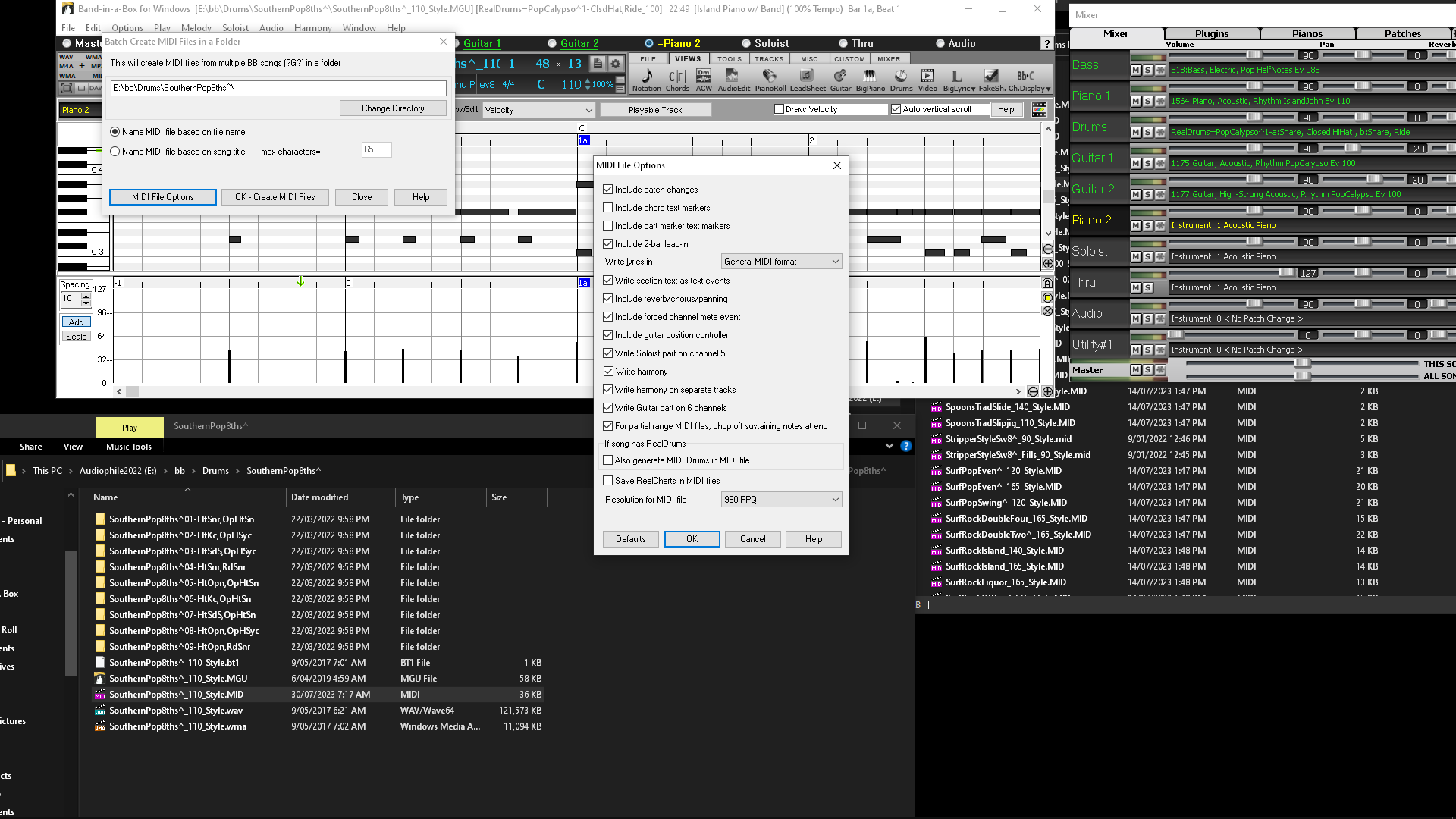
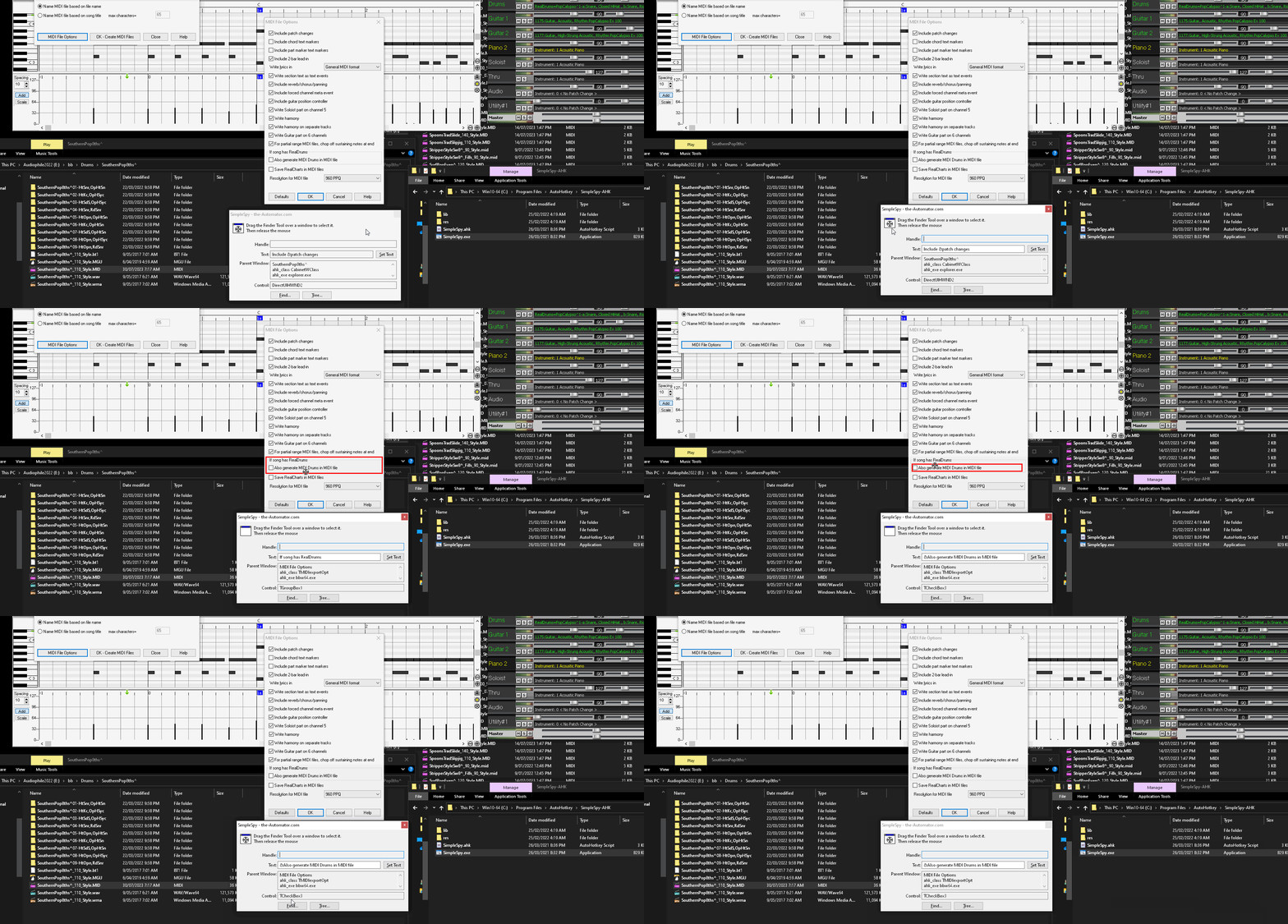
Have a look in the midi Options settings and un-check the Midi Drums and RealCharts check boxes. You could add that to the script to un-check them, I think it's already un-checks the midi chord markers = TCheckBox1 TCheckBox2 = Midi Drums TCheckBox3 = RealCharts
or just go into midi options and set it, but you need to save a midi first so it will save the settings.
I just tried the Nashville68^_110_Style.MGU and it's using a midi style so yes it's saving all them. If I solo the track Alt+2 then Alt+8 Solo the Melody track then File > Save Special > Save Midi file > Ok Save as file it will save just that track with the same name as MGU
So will have to script it to go through the folders, list the MGUs then paste the path in the Open dialog E:\bb\Drums\Nashville68^\Nashville68^_140_Style.MGU Enter solo the melody track save to midi then open next MGU in list
Hopefully that should get them all as a single midi drum track.
It seems to work ok when I test i manually with the same file as above.
However I have 9 tracks in the mixer 1 Bass, 2, Piano, 3 Drums - Alt+5, 4 Guitar 1, 5 strings, 6 Guitar - Alt+8, 7 Soloist, 8 Thru, 9 Audio - Alt???)
I need to mute all and then enable the Drums and the Audio track. Then I get the single drum track in the midi.
However I can't find any Alt key for the Audio track, the manual for hot keys stops at Alt+9 but that will enable the soloist track, I haven't found any for the Audio track.
I also guess that all MGUs must have the same order of the drum and audio track in order for the script to work if I can find an Alt key for the audio track.
BIAB 2026, Studio Pro 8, Song Master Pro, Win11 Home. i7-9700K CPU, 32GB, ESI MAYA44eX, ZOOM UAC-2, Guitar Pro 8, Transcribe, (EZKeys2, EZD3, SD3, EZBass, EZMix3) Amateur: fiddle, guitar, vocal, beginner on bass.
If you look at the Melody track in the Piano Roll you will see the RealChart Drum Midi. If you solo that track then save to midi you should get the midi notes that are the same as the wma file: Nashville68^_140_Style.mid = Nashville68^_140_Style.wma
There is no shortcut for the Audio track that I can see.
I was a bit confused since I did not see any melody track only a guitar2 track. I will try to put it into the script later on, may take a while but I am sure it will work.
BIAB 2026, Studio Pro 8, Song Master Pro, Win11 Home. i7-9700K CPU, 32GB, ESI MAYA44eX, ZOOM UAC-2, Guitar Pro 8, Transcribe, (EZKeys2, EZD3, SD3, EZBass, EZMix3) Amateur: fiddle, guitar, vocal, beginner on bass.
Introducing XPro Styles PAK 11 – Now Available for Windows Band-in-a-Box 2026 and Higher!
XPro Styles PAK 11 for Windows & Mac Band-in-a-Box® version 2026 (and higher) is here with 100 brand new RealStyles, plus 31 RealTracks/RealDrums!
Guess who’s back again? That’s right! It’s our XPro Styles PAK’s triumphant return with the 11th edition in this series! 100 new styles are coming your way spread across the rock & pop, jazz, and country genres. And this edition's wildcard genre explores the immense and far-reaching catalogue of electronic music! The included 31 RealTracks and RealDrums can be used with any Band-in-a-Box® 2026 (and higher) package.
Special offers available until August 31st, 2026!
All the XPro Styles PAKs 1-11 are on sale for only $29 ea (Reg. $49 ea), or get them all in the XPro Styles PAK Bundle for only $149 (reg. $299)! Order now!
XPro Styles PAKs require Band-in-a-Box® 2026 or higher and are compatible with ANY package, including the Pro, MegaPAK, UltraPAK, UltraPAK+, and Audiophile Edition.
Introducing Xtra Styles PAK 22 – Now Available for Windows Band-in-a-Box 2026 and Higher!
Xtra Styles PAK 22 for Windows & Mac Band-in-a-Box version 2026 (and higher) is here with 200 brand new RealStyles!
It’s time to celebrate! Xtra Styles PAK 22 for Band-in-a-Box® is here, and we've got 200 brand-new styles coming your way!
No Xtra Styles PAK is complete without the classic rock & pop, jazz, and country volumes you know and love, and we’ve got plenty to share, with 150 styles spread across too many genres to list! Of course, it also wouldn’t be complete with our special wildcard volume to add a little spice and pizzazz to the mix. This year, because we loved it so much the first time, we’ve decided to make the second iteration of our SynthMaster volume, full of new sounds, interesting genres, and 50 engaging styles, all making use of the diverse SynthMaster plugin! Here you can find genres such as airy yacht rock, sultry electrotango, and even some synth soca funk. Don’t wait, pickup up Xtra Styles PAK 22 today!
In this PAK you can find: dulcet folk ballads, funky gospel country, Brazilian jazz fusion, upbeat 1980s pop, classic Americana, a plethora of breezy bossa novas, indie singer-songwriter, scintillating synthwave, exuberant electronica, and many, many more!
Special offers available until August 31st, 2026!
All the Xtra Styles PAKs 1-22 are on special for only $29 each (reg $49), or get all 22 PAKs for $199 (reg $399)! Order now!
Note: The Xtra Styles require the UltraPAK, UltraPAK+, or Audiophile Edition of Band-in-a-Box®. (Xtra Styles PAK 22 requires the 2026 or higher UltraPAK, UltraPAK+, or Audiophile Edition. They will not work with the Pro or MegaPAK version because they need the RealTracks from the UltraPAK, UltraPAK+, or Audiophile Edition.
Introducing XPro Styles PAK 11 – Now Available for Mac Band-in-a-Box 2026 and Higher!
XPro Styles PAK 11 for Mac & Windows Band-in-a-Box® version 2026 (and higher) is here with 100 brand new RealStyles, plus 31 RealTracks/RealDrums!
Guess who’s back again? That’s right! It’s our XPro Styles PAK’s triumphant return with the 11th edition in this series! 100 new styles are coming your way spread across the rock & pop, jazz, and country genres. And this edition's wildcard genre explores the immense and far-reaching catalogue of electronic music! The included 31 RealTracks and RealDrums can be used with any Band-in-a-Box® 2026 (and higher) package.
Special offers available until August 31st, 2026!
All the XPro Styles PAKs 1-11 are on sale for only $29 ea (Reg. $49 ea), or get them all in the XPro Styles PAK Bundle for only $149 (reg. $299)! Order now!
XPro Styles PAKs require Band-in-a-Box® 2026 or higher and are compatible with ANY package, including the Pro, MegaPAK, UltraPAK, UltraPAK+, and Audiophile Edition.
Introducing Xtra Styles PAK 22 – Now Available for Mac Band-in-a-Box 2026 and Higher!
Xtra Styles PAK 22 for Mac & Windows Band-in-a-Box version 2026 (and higher) is here with 200 brand new RealStyles!
It’s time to celebrate! Xtra Styles PAK 22 for Band-in-a-Box® is here, and we've got 200 brand-new styles coming your way!
No Xtra Styles PAK is complete without the classic rock & pop, jazz, and country volumes you know and love, and we’ve got plenty to share, with 150 styles spread across too many genres to list! Of course, it also wouldn’t be complete with our special wildcard volume to add a little spice and pizzazz to the mix. This year, because we loved it so much the first time, we’ve decided to make the second iteration of our SynthMaster volume, full of new sounds, interesting genres, and 50 engaging styles, all making use of the diverse SynthMaster plugin! Here you can find genres such as airy yacht rock, sultry electrotango, and even some synth soca funk. Don’t wait, pickup up Xtra Styles PAK 22 today!
In this PAK you can find: dulcet folk ballads, funky gospel country, Brazilian jazz fusion, upbeat 1980s pop, classic Americana, a plethora of breezy bossa novas, indie singer-songwriter, scintillating synthwave, exuberant electronica, and many, many more!
Special offers available until August 31st, 2026!
All the Xtra Styles PAKs 1-22 are on special for only $29 each (reg $49), or get all 22 PAKs for $199 (reg $399)! Order now!
Note: The Xtra Styles require the UltraPAK, UltraPAK+, or Audiophile Edition of Band-in-a-Box®. (Xtra Styles PAK 22 requires the 2026 or higher UltraPAK, UltraPAK+, or Audiophile Edition. They will not work with the Pro or MegaPAK version because they need the RealTracks from the UltraPAK, UltraPAK+, or Audiophile Edition.
zplane recently interviewed Peter Gannon, the founder and creator of Band-in-a-Box, about the software's early days, what sets it apart from AI, how zplane's audio algorithms are used in Band-in-a-Box, and more!
Special thanks to the team at zplane for their continued support.
Last Chance! The Band-in-a-Box® 2026 for Mac® Special Ends Today (May 31, 2026) at 11:59pm PDT!
Time really is running out! Save up to 50% on Band-in-a-Box® 2026 for Mac® upgrades and receive a FREE Bonus PAK—only when you order by 11:59 PM PDT today!
We've added many major new features and new content in a redesigned Band-in-a-Box® 2026 for Mac®!
Version 2026 introduces a modernized GUI redesign across the program, with updated toolbars, refreshed windows, smoother workflows, and a new Dark Mode option. There’s also a new side toolbar for quicker access to commonly used windows, and the new Multi-View feature lets you arrange multiple windows as layered panels without overlap, making it easier to customize your workspace.
Another exciting new addition is the amazing new AI-Notes feature, which can transcribe polyphonic audio into MIDI. View the results in notation or play them back as MIDI, and choose whether to transcribe an entire track or transcribe specific parts like drums, bass, guitars/piano, or vocals. There's over 100 new features in Band-in-a-Box® 2026 for Mac®.
There's an amazing collection of new content too, including 202 RealTracks, new RealStyles, MIDI SuperTracks, Instrumental Studies, “Songs with Vocals” Artist Performance Sets, Playable RealTracks Set 5, two RealDrums Stems sets, and much more!
Upgrade your Band-in-a-Box for Mac® to save up to 50% on most Band-in-a-Box® 2026 upgrade packages!
Plus, when you order your Band-in-a-Box® 2026 Mac upgrade during our special, you'll receive a Free Bonus PAK of exciting new add-ons.
If you need any help deciding which package is the best option for you, just let us know. We are here to help!
Band-in-a-Box® 2026 Mac Special Offers Extended Until May 31st!
Good news- we've extended our Band-in-a-Box® 2026 for Mac® special offers until May 31, 2026!
Band-in-a-Box® 2026 is packed with major new features, enhancements, and an incredible lineup of new content! The program now sports a sleek, modern GUI redesign across the entire interface, including updated toolbars, refreshed windows, smoother workflows, a new dark mode option, and more. The brand-new side toolbar provides quicker access to key windows, while the new Multi-View feature lets you arrange multiple windows as layered panels without overlap, creating a flexible, clutter-free workspace. We have an amazing new “AI-Notes” feature. This transcribes polyphonic audio into MIDI so you can view it in notation or play it back as MIDI. You can transcribe an entire track (all pitched instruments and drums) or focus on individual parts like drums, bass, guitars/piano, or vocals. There's an amazing collection of new content too, including 202 RealTracks, new RealStyles, MIDI SuperTracks, Instrumental Studies, “Songs with Vocals” Artist Performance Sets, Playable RealTracks Set 5, two RealDrums Stems sets, and much more!
There are over 100 new features in Band-in-a-Box® 2026 for Mac®.
When you order purchase Band-in-a-Box® 2026 before 11:59 PM PDT on May 31st, you'll also receive a Free Bonus PAK packed with exciting new add-ons.
Check out the Band-in-a-Box® for Mac packages page to find the best package for you.
One of our representatives will be happy to help you over the phone. Our hours of operation are from
6:00AM to 6:00PM PST (GMT -8) Monday thru Friday, and 8:00AM to 4:00PM PST Saturday. We are closed Sunday. You can also send us your questions via email.
One of our representatives will be happy to help you on our Live Chat or by email. Our hours of operation are from
6:00AM to 6:00PM PST (GMT -8) Monday thru Friday; 8:00AM to 4:00PM PST (GMT -8) Saturday; Closed Sunday.



 Dansk
Dansk Deutsch - Windows
 Español
 Français - Windows
 Italiano - Windows
 Nederlands
 Polski
 Português
 Svenskt
 русский
 Japanese
 Simplified Chinese
 Traditional Chinese
 Korean