|
Log in to post
|
Print Thread |
|
|
|
|
|
RealBand
|
Joined: Jun 2013
Posts: 51
Enthusiast
|
OP

Enthusiast
Joined: Jun 2013
Posts: 51 |
When working in RB (2013) I spend quite a bit of effort into maximizing the volume of the all midi and audio tracks using compression etc. When satisfied that I have a good mix I do the merge audio and vsti/dxi tracks to stereo wav file. I am always disappointed with the result. The volume of the wav file produced is VERY low in comparison to my .seq file. It doesn't matter which media player I use to play the wav file that was produced. Volume is low.
I have gotten around this by using another program to boost the signal up, but I would like to avoid having to do this. I would like the output to be similar to what I hear within RB. Loud and clear.
I have looked at the mixer window in RB but can't see anything that could be causing this. Is there a 'merge tracks tutorial for dummies'? I must be missing something.
Thanks
Terry
|
|
|
|
|
|
|
|
|
|
|
|
|
RealBand
|
Joined: Jun 2012
Posts: 21,142
Veteran
|
|
Veteran
Joined: Jun 2012
Posts: 21,142 |
I don't know that I've got the answer, but you can also Merge to Compressed, or Merge to WMA.
Perhaps try that and see if the volume is also lower. It might just narrow down where the volume change occurs.
On my test, when I played back the WAV and MP3, it sounded quite similar in level to the RealBand Test tracks I was using
BIAB & RB2026 Win.(Audiophile), Windows 10 Pro & Windows 11, Cakewalk Bandlab, Izotope Prod.Bundle, Roland RD-1000, Synthogy Ivory, Session Keys Grand S & Electric R, Kontakt, Focusrite 18i20, KetronSD2, NS40M, Pioneer Active Monitors.
|
|
|
|
|
|
|
|
|
|
|
|
|
RealBand
|
Joined: Jun 2013
Posts: 51
Enthusiast
|
|
OP
Enthusiast
Joined: Jun 2013
Posts: 51 |
I haven't done the compressed output since I haven't set up to produce an mp3, but I have done the WMA with the same low output.
In addition to hearing it, I can clearly see the difference in output between the .seq and .wav in the windows mixer ( Win 8.1) which has a little bar that slides in the background as the file plays.
|
|
|
|
|
|
|
|
|
|
|
|
|
RealBand
|
Joined: Jul 2000
Posts: 3,161
Veteran
|
|
Veteran
Joined: Jul 2000
Posts: 3,161 |
Basically, it is unnecessary to Normalise ALL tracks before or during the mix operations. Try to get the gain per track around the -6 to -9 decibles to start with by using the Gain plugin. You do need to have headroom on the gain sliders. When you have mixed the tracks, you can used the Merge to Stereo Wave ensuring that the output is not being clipped (flat heads to parts of the track). THEN apply Normalisation to the final wave to maximise the sound level with a headroom of 2 decibles allowed for further adjustment.
|
|
|
|
|
|
|
|
|
|
|
|
|
RealBand
|
Joined: May 2000
Posts: 38,502
Veteran
|
|
Veteran
Joined: May 2000
Posts: 38,502 |
Depending on your sound device and its drivers, it may be necessary to visit the Record Properties or that section in the sound device's Control Panel and set Record Input fader for the .wav channel higher.
--Mac
|
|
|
|
|
|
|
|
|
|
|
|
|
RealBand
|
Joined: Apr 2009
Posts: 11,034
Veteran
|
|
Veteran
Joined: Apr 2009
Posts: 11,034 |
When working in RB (2013) I spend quite a bit of effort into maximizing the volume of the all midi and audio tracks using compression etc. When satisfied that I have a good mix I do the merge audio and vsti/dxi tracks to stereo wav file. I am always disappointed with the result. The volume of the wav file produced is VERY low in comparison to my .seq file.
There should be no need to compress those tracks which RB renders. That is part of the problem. Let me tell you how I work. this is not the "right way" or the "only way" just simply how I work. I render the tracks out of RB by exporting them into a new folder. At this point I am not concerned with their levels. I import them into Sonar (any good DAW including Real Band is fine) and look at them there. Some are nice and fat, full looking and some are obviously much lower and thinner. I only normalize the track IF, and only IF I have problems hearing it cleanly against the mix of the other tracks. Some times that weak looking wave sounds just fine. If it does, I leave it alone. First thing I do is start my mixing by setting the drums and bass. It is at this point where I will often use NORMALIZE to 96% on the waves in the tracks that appear less then robust and I have problems hearing at 0db. Normalizing doesn't change the characteristics, it simply bumps the volume up so the track holds it's own with the other tracks. I work on the project as needed and then export it. I generally use very little compression on anything. Especially NOT to raise the volume. Sure, a compressor will raise the volume, but that's not how I use it. There is almost NEVER a compressor in my tracks. The only compression is in the master output bin, and that is very light. I set my master output levels up for the final export. I tend to work on mixes with the faders half way down....lower volume. As if comes out of the DAW, it's still a bit low in volume. I open that file in WavePad my wave file editor, and after trimming the count in and silence .... I normalize it again to 96%. I use this process on ALL my tunes. It's rare for me to try to use compression to bump levels and when I do try it I generally back up and go a different route because it doesn't sound good. Example song: In A World Without You Here is a screen shot of this exact song as it was uploaded. Notice there is plenty of space in the wave.... it never hits the 0db at any point yet it is plenty loud. Compression would flatten the tops and make them the same, this has spikes at all different levels none of them "overs".... 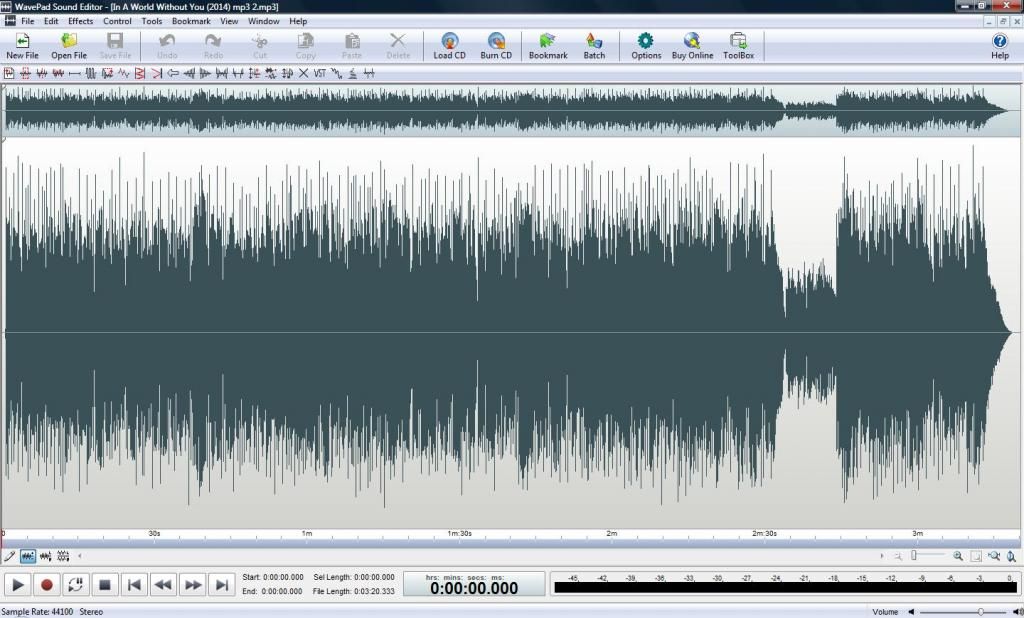 It is a process that has taken some time to become consistent with. Lots of trial and error went into it through the years.... The journey began when I listened to my stuff compared to others and noticed my tunes were so much lower in volume and quality.
Last edited by Guitarhacker; 01/13/14 08:46 AM.
You can find my music at: www.herbhartley.comAdd nothing that adds nothing to the music. You can make excuses or you can make progress but not both. The magic you are looking for is in the work you are avoiding.
|
|
|
|
|
|
|
|
|
|
|
|
|
RealBand
|
Joined: Jun 2013
Posts: 51
Enthusiast
|
|
OP
Enthusiast
Joined: Jun 2013
Posts: 51 |
Thanks for all of the input folks. I don't have any options for playing with the record wav levels on the soundcard. No options at all on this laptop. The computer mixer has something to be desired.
I do very little compression in my .seq tracks but do add some to some of the tracks to bring up the sound level a bit if I think it needs it. I also do normalize and reduce the track by 3db after. I try and keep compression as minimal as possible. I try to leave some headroom on my tracks.
I think that I will try as you suggest and do some further tweaking with wavelab. I have been using audacity to do that up to this point, but not proficient at the use of that program.
I understand where I need to go. I was hoping to accomplish it all within realband, but it appears that a wav editor is a good idea.
|
|
|
|
|
|
|
|
|
|
|
|
|
RealBand
|
Joined: Jun 2013
Posts: 51
Enthusiast
|
|
OP
Enthusiast
Joined: Jun 2013
Posts: 51 |
BTW guitarhacker...great sounding song! I should have mentioned that in my previous post.
|
|
|
|
|
|
|
|
|
|
|
|
|
RealBand
|
Joined: Apr 2009
Posts: 11,034
Veteran
|
|
Veteran
Joined: Apr 2009
Posts: 11,034 |
..... I also do normalize and reduce the track by 3db after. I try and keep compression as minimal as possible. I try to leave some headroom on my tracks.
.......
I understand where I need to go. I was hoping to accomplish it all within realband, but it appears that a wav editor is a good idea.
I would not do it that way... normalize then back it off after by 3 db. I would simply set the normalization to 100% or perhaps 96%... or somewhere between those numbers and after the process, simply click save. If you reduce at that point, you are turning the gains you got from the normalization down. I normalize from between 96% to 100% depending more on how I feel that day than anything else... (just kidding) .... but going 100% is fine unless you are converting to MP3 OR sending it to a mastering house . Both of those will want something around -6db for proper head room after the mastering or conversion process. Personally, I've not had any issues with normalizing a wave to 100% and then running into mp3 clipping issues after the conversion. So I let it rock. I have been setting to 96% a lot recently because that little 4% extra will not add that much more loudness to my tracks.... and I certainly don't need it. You should be able to get it all inside the DAW, but most folks I know use that 3rd party editor as I do... for it's convenience and not much more.... you could just as easily bounce it to a new track and normalize in the DAW.... I find it faster and easier to open Wavepad vs a new project in the DAW. One thing to be aware of if you do bounce it to track in the DAW..... be sure it's not running through the master buss and it's FX again for a second go round..... you'll pull your hair out trying to figure out why it doesn't sound the same.
You can find my music at: www.herbhartley.comAdd nothing that adds nothing to the music. You can make excuses or you can make progress but not both. The magic you are looking for is in the work you are avoiding.
|
|
|
|
|
|
|
|
|
|
|
|
|
RealBand
|
Joined: Jun 2013
Posts: 51
Enthusiast
|
|
OP
Enthusiast
Joined: Jun 2013
Posts: 51 |
Thank you for the very sound advice. It certainly seems that this is the solution to my problem. Ive tried your techniques and already have much improved some of my recordings. Every day is a school day and I'm so glad that there are people on this forum who take the time to be the instructor. All of the advice here has saved me a lot of time and frustration.
|
|
|
|
|
|
|
|
|
|
|
|
|
RealBand
|
Joined: May 2000
Posts: 38,502
Veteran
|
|
Veteran
Joined: May 2000
Posts: 38,502 |
Thanks for all of the input folks. I don't have any options for playing with the record wav levels on the soundcard. No options at all on this laptop. The computer mixer has something to be desired.
That doesn't sound right. What is the laptop brand, model, operating system, and what does the Hardware Manager Devices report for the type of built in sound? There are Record Properties involved in all Microsoft Operating Systems, but in some of the newer OS's they've hidden them in different ways. --Mac
|
|
|
|
|
|
|
|
|
|
|
|
|
RealBand
|
Joined: Jun 2013
Posts: 51
Enthusiast
|
|
OP
Enthusiast
Joined: Jun 2013
Posts: 51 |
Mac
This is a Samsung NP550P7C Laptop with an Intel I7 processor and it's running Windows 8.1( which itself has something to be desired). The sound system onboard is Realtec High Definition Audio.
There is a speaker icon on the status bar which allows you to set volume levels. Within that there is a "Mixer" you can click on but all that allows you to control are "Application volume controls for output". Just a volume for playback as far as I can tell.
In the Windows Control Panel there is an application called Realtek HD Audio Manager which allows you to configure your speakers and microphone. I can set the recording volume for the microphone here but nothing else. Even the " Device Advanced Settings" in that application doesn't offer anything.
There is a "Sound" utility within control panel with options for playback and recording. In the Recording tab I see three devices, my m-track, the microphone and stereo mix. I can't see anything in the mic or stereo mix tabs that allow me to set record levels for anything, just balance.
I am familiar with the type of mixer you are talking about but I am yet to find it on this machine. Someone did a good job of tucking it away somewhere.
|
|
|
|
|
|
|
|
|
|
|
|
|
RealBand
|
Joined: Apr 2009
Posts: 11,034
Veteran
|
|
Veteran
Joined: Apr 2009
Posts: 11,034 |
if using the on-board sound card.... (not the best way to do things) .... I do believe there are settings there that should at least be tweeked.
In my studio, I use an external sound card and it does have a control panel which allows changing the input/output levels as needed.
Set it and forget it.
Last edited by Guitarhacker; 01/14/14 05:53 AM.
You can find my music at: www.herbhartley.comAdd nothing that adds nothing to the music. You can make excuses or you can make progress but not both. The magic you are looking for is in the work you are avoiding.
|
|
|
|
|
|
|
|
|
|
|
|
|
RealBand
|
Joined: May 2000
Posts: 38,502
Veteran
|
|
Veteran
Joined: May 2000
Posts: 38,502 |
I think it may be time to start shopping for a good USB sound device solution, designed for music recording...
--Mac
|
|
|
|
|
|
|
|
|
|
|
|
|
RealBand
|
Joined: Jun 2013
Posts: 51
Enthusiast
|
|
OP
Enthusiast
Joined: Jun 2013
Posts: 51 |
AhHA.
I noticed the "Stereo Mix" setting had been disabled. Don't know why. I enabled it and now there is a tab within the Realtek HD Audio Manager for setting the recording volume level of the stereo mix. I think that this may be what you are referring to. Will have to do a test to see. Will report back.
Thanks!
|
|
|
|
|
|
|
|
|
|
|
|
|
RealBand
|
Joined: May 2000
Posts: 38,502
Veteran
|
|
Veteran
Joined: May 2000
Posts: 38,502 |
AhHA.
I noticed the "Stereo Mix" setting had been disabled. Don't know why. I enabled it and now there is a tab within the Realtek HD Audio Manager for setting the recording volume level of the stereo mix. I think that this may be what you are referring to. Will have to do a test to see. Will report back.
Thanks! And that would be the Record Input that the .wav would be happening through, I think you can now start experimenting with the Fader settings, first one I would try is ALL THE WAY UP, this for headroom, can then change things at the main software mixer inside the programs knowing that you have all that can be gotten always available. Do the same for the Playback as well, including a Master Fader if one is present. That way you should be hearing the same levels as you are merging. This is called, "Normalizing the Gain Staging". Or, as I sometimes like to say, "What goes in is what comes out!" If your monitoring situation changes when doing the above, set the monitor speaker level using hardware control, keep your software settings the same at. all. times. --Mac
|
|
|
|
|
|
|
|
|
|
|
|
|
RealBand
|
Joined: Jun 2013
Posts: 51
Enthusiast
|
|
OP
Enthusiast
Joined: Jun 2013
Posts: 51 |
Yup, that does seem to make a difference. No wonder I couldn't set it if the tab wasn't showing up in the utility. Thanks for making me dig into my operating system as well.
I will have to look at investing in better gear no doubt.
|
|
|
|
|
|
|
|
|
|
|
|
Ask sales and support questions about Band-in-a-Box using natural language.
ChatPG's knowledge base includes the full Band-in-a-Box User Manual and sales information from the website.
|
|
|
|
|
|
|
|
|
|
|
Introducing XPro Styles PAK 11 – Now Available for Windows Band-in-a-Box 2026 and Higher!
XPro Styles PAK 11 for Windows & Mac Band-in-a-Box® version 2026 (and higher) is here with 100 brand new RealStyles, plus 31 RealTracks/RealDrums!
Guess who’s back again? That’s right! It’s our XPro Styles PAK’s triumphant return with the 11th edition in this series! 100 new styles are coming your way spread across the rock & pop, jazz, and country genres. And this edition's wildcard genre explores the immense and far-reaching catalogue of electronic music! The included 31 RealTracks and RealDrums can be used with any Band-in-a-Box® 2026 (and higher) package.
Special offers available until August 31st, 2026!
All the XPro Styles PAKs 1-11 are on sale for only $29 ea (Reg. $49 ea), or get them all in the XPro Styles PAK Bundle for only $149 (reg. $299)! Order now!
Learn more and listen to demos of XPro Styles PAKs.
Video: XPro Styles PAK 11 Overview & Styles Demos: Watch now!
XPro Styles PAKs require Band-in-a-Box® 2026 or higher and are compatible with ANY package, including the Pro, MegaPAK, UltraPAK, UltraPAK+, and Audiophile Edition.
Introducing Xtra Styles PAK 22 – Now Available for Windows Band-in-a-Box 2026 and Higher!
Xtra Styles PAK 22 for Windows & Mac Band-in-a-Box version 2026 (and higher) is here with 200 brand new RealStyles!
It’s time to celebrate! Xtra Styles PAK 22 for Band-in-a-Box® is here, and we've got 200 brand-new styles coming your way!
No Xtra Styles PAK is complete without the classic rock & pop, jazz, and country volumes you know and love, and we’ve got plenty to share, with 150 styles spread across too many genres to list! Of course, it also wouldn’t be complete with our special wildcard volume to add a little spice and pizzazz to the mix. This year, because we loved it so much the first time, we’ve decided to make the second iteration of our SynthMaster volume, full of new sounds, interesting genres, and 50 engaging styles, all making use of the diverse SynthMaster plugin! Here you can find genres such as airy yacht rock, sultry electrotango, and even some synth soca funk. Don’t wait, pickup up Xtra Styles PAK 22 today!
In this PAK you can find: dulcet folk ballads, funky gospel country, Brazilian jazz fusion, upbeat 1980s pop, classic Americana, a plethora of breezy bossa novas, indie singer-songwriter, scintillating synthwave, exuberant electronica, and many, many more!
Special offers available until August 31st, 2026!
All the Xtra Styles PAKs 1-22 are on special for only $29 each (reg $49), or get all 22 PAKs for $199 (reg $399)! Order now!
Learn more and listen to demos of the Xtra Styles PAK 22.
Video: Xtra Styles PAK 22 Overview & Styles Demos: Watch now!
Note: The Xtra Styles require the UltraPAK, UltraPAK+, or Audiophile Edition of Band-in-a-Box®. (Xtra Styles PAK 22 requires the 2026 or higher UltraPAK, UltraPAK+, or Audiophile Edition. They will not work with the Pro or MegaPAK version because they need the RealTracks from the UltraPAK, UltraPAK+, or Audiophile Edition.
Introducing XPro Styles PAK 11 – Now Available for Mac Band-in-a-Box 2026 and Higher!
XPro Styles PAK 11 for Mac & Windows Band-in-a-Box® version 2026 (and higher) is here with 100 brand new RealStyles, plus 31 RealTracks/RealDrums!
Guess who’s back again? That’s right! It’s our XPro Styles PAK’s triumphant return with the 11th edition in this series! 100 new styles are coming your way spread across the rock & pop, jazz, and country genres. And this edition's wildcard genre explores the immense and far-reaching catalogue of electronic music! The included 31 RealTracks and RealDrums can be used with any Band-in-a-Box® 2026 (and higher) package.
Special offers available until August 31st, 2026!
All the XPro Styles PAKs 1-11 are on sale for only $29 ea (Reg. $49 ea), or get them all in the XPro Styles PAK Bundle for only $149 (reg. $299)! Order now!
Learn more and listen to demos of XPro Styles PAKs.
Video: XPro Styles PAK 11 Overview & Styles Demos: Watch now!
XPro Styles PAKs require Band-in-a-Box® 2026 or higher and are compatible with ANY package, including the Pro, MegaPAK, UltraPAK, UltraPAK+, and Audiophile Edition.
Introducing Xtra Styles PAK 22 – Now Available for Mac Band-in-a-Box 2026 and Higher!
Xtra Styles PAK 22 for Mac & Windows Band-in-a-Box version 2026 (and higher) is here with 200 brand new RealStyles!
It’s time to celebrate! Xtra Styles PAK 22 for Band-in-a-Box® is here, and we've got 200 brand-new styles coming your way!
No Xtra Styles PAK is complete without the classic rock & pop, jazz, and country volumes you know and love, and we’ve got plenty to share, with 150 styles spread across too many genres to list! Of course, it also wouldn’t be complete with our special wildcard volume to add a little spice and pizzazz to the mix. This year, because we loved it so much the first time, we’ve decided to make the second iteration of our SynthMaster volume, full of new sounds, interesting genres, and 50 engaging styles, all making use of the diverse SynthMaster plugin! Here you can find genres such as airy yacht rock, sultry electrotango, and even some synth soca funk. Don’t wait, pickup up Xtra Styles PAK 22 today!
In this PAK you can find: dulcet folk ballads, funky gospel country, Brazilian jazz fusion, upbeat 1980s pop, classic Americana, a plethora of breezy bossa novas, indie singer-songwriter, scintillating synthwave, exuberant electronica, and many, many more!
Special offers available until August 31st, 2026!
All the Xtra Styles PAKs 1-22 are on special for only $29 each (reg $49), or get all 22 PAKs for $199 (reg $399)! Order now!
Learn more and listen to demos of the Xtra Styles PAK 22.
Video: Xtra Styles PAK 22 Overview & Styles Demos: Watch now!
Note: The Xtra Styles require the UltraPAK, UltraPAK+, or Audiophile Edition of Band-in-a-Box®. (Xtra Styles PAK 22 requires the 2026 or higher UltraPAK, UltraPAK+, or Audiophile Edition. They will not work with the Pro or MegaPAK version because they need the RealTracks from the UltraPAK, UltraPAK+, or Audiophile Edition.
Peter Gannon Talks Band-in-a-Box with zplane
zplane recently interviewed Peter Gannon, the founder and creator of Band-in-a-Box, about the software's early days, what sets it apart from AI, how zplane's audio algorithms are used in Band-in-a-Box, and more!
Special thanks to the team at zplane for their continued support.
Check out the full interview here: https://products.zplane.de/blog/peter-gannon-interview-pg-music
Last Chance! The Band-in-a-Box® 2026 for Mac® Special Ends Today (May 31, 2026) at 11:59pm PDT!
Time really is running out! Save up to 50% on Band-in-a-Box® 2026 for Mac® upgrades and receive a FREE Bonus PAK—only when you order by 11:59 PM PDT today!
We've added many major new features and new content in a redesigned Band-in-a-Box® 2026 for Mac®!
Version 2026 introduces a modernized GUI redesign across the program, with updated toolbars, refreshed windows, smoother workflows, and a new Dark Mode option. There’s also a new side toolbar for quicker access to commonly used windows, and the new Multi-View feature lets you arrange multiple windows as layered panels without overlap, making it easier to customize your workspace.
Another exciting new addition is the amazing new AI-Notes feature, which can transcribe polyphonic audio into MIDI. View the results in notation or play them back as MIDI, and choose whether to transcribe an entire track or transcribe specific parts like drums, bass, guitars/piano, or vocals. There's over 100 new features in Band-in-a-Box® 2026 for Mac®.
There's an amazing collection of new content too, including 202 RealTracks, new RealStyles, MIDI SuperTracks, Instrumental Studies, “Songs with Vocals” Artist Performance Sets, Playable RealTracks Set 5, two RealDrums Stems sets, and much more!
Upgrade your Band-in-a-Box for Mac® to save up to 50% on most Band-in-a-Box® 2026 upgrade packages!
Plus, when you order your Band-in-a-Box® 2026 Mac upgrade during our special, you'll receive a Free Bonus PAK of exciting new add-ons.
If you need any help deciding which package is the best option for you, just let us know. We are here to help!
Band-in-a-Box® 2026 Mac Special Offers Extended Until May 31st!
Good news- we've extended our Band-in-a-Box® 2026 for Mac® special offers until May 31, 2026!
Band-in-a-Box® 2026 is packed with major new features, enhancements, and an incredible lineup of new content! The program now sports a sleek, modern GUI redesign across the entire interface, including updated toolbars, refreshed windows, smoother workflows, a new dark mode option, and more. The brand-new side toolbar provides quicker access to key windows, while the new Multi-View feature lets you arrange multiple windows as layered panels without overlap, creating a flexible, clutter-free workspace. We have an amazing new “AI-Notes” feature. This transcribes polyphonic audio into MIDI so you can view it in notation or play it back as MIDI. You can transcribe an entire track (all pitched instruments and drums) or focus on individual parts like drums, bass, guitars/piano, or vocals. There's an amazing collection of new content too, including 202 RealTracks, new RealStyles, MIDI SuperTracks, Instrumental Studies, “Songs with Vocals” Artist Performance Sets, Playable RealTracks Set 5, two RealDrums Stems sets, and much more!
There are over 100 new features in Band-in-a-Box® 2026 for Mac®.
When you order purchase Band-in-a-Box® 2026 before 11:59 PM PDT on May 31st, you'll also receive a Free Bonus PAK packed with exciting new add-ons.
Check out the Band-in-a-Box® for Mac packages page to find the best package for you.
|
|
|
|
|
|
|
|
|
|
|
|
Forums57
Topics86,636
Posts807,797
Members40,179
| |
Most Online64,515
Apr 8th, 2026
|
|
|
|
|
|
|
|
|






 Dansk
Dansk Deutsch - Windows
 Español
 Français - Windows
 Italiano - Windows
 Nederlands
 Polski
 Português
 Svenskt
 русский
 Japanese
 Simplified Chinese
 Traditional Chinese
 Korean